
![Crexi [$1.9💰] Scraper: Properties, Brokers & Instant Database avatar](https://images.apifyusercontent.com/Gf9X5j-OXnfwlC8hOie2ClaNSY_emDpR7lp-y5blmY4/rs:fill:250:250/cb:1/aHR0cHM6Ly9hcGlmeS1pbWFnZS11cGxvYWRzLXByb2QuczMudXMtZWFzdC0xLmFtYXpvbmF3cy5jb20vbmduOHZSRVNUa3NleVdFNnAtYWN0b3ItUkZIS0libjFOclpiRVlCTEMtSk5xTUtUYmlaQy1jcmV4aS53ZWJw.webp)
Crexi [$1.9💰] Scraper: Properties, Brokers & Instant Database
Pricing
from $1.90 / 1,000 records
Crexi [$1.9💰] Scraper: Properties, Brokers & Instant Database
Crexi scraper for commercial real estate — sale & lease listings, property records with tax/ownership history, demographics and agent profiles nationwide. Plus an instant database of 234,000+ US brokers with brokerage, license & deal stats — phone on request. Pure API-first. JSON/CSV.
Pricing
from $1.90 / 1,000 records
Rating
5.0
(5)
Developer

Muhamed Didovic
Maintained by CommunityActor stats
2
Bookmarked
136
Total users
56
Monthly active users
6.3 hours
Issues response
a day ago
Last modified
Categories
Share
Crexi Scraper — Properties + Instant Broker Database
How It Works
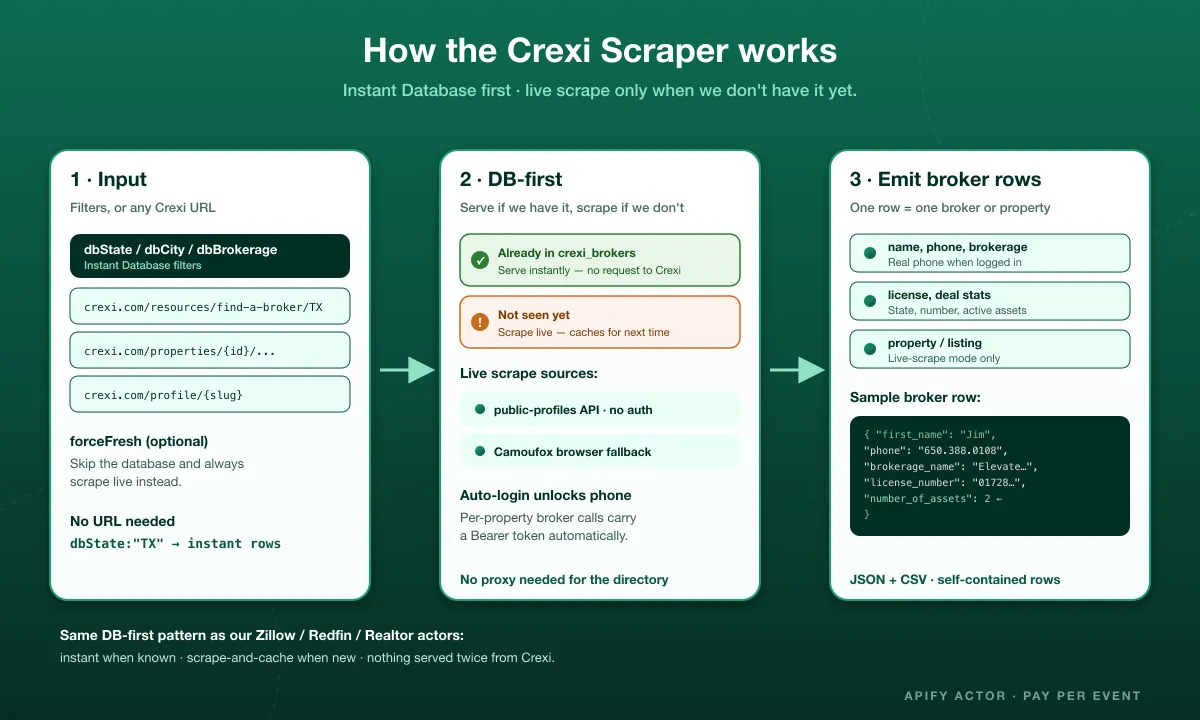
Scrape Crexi commercial real estate the way you need it: sale & lease listings, property records with tax/ownership history, demographics and agent profiles nationwide — or skip scraping entirely with an instant database of 234,000+ US brokers (brokerage, license, deal stats, and phone on request).
Nobody else on Apify sells Crexi broker contacts — every other Crexi scraper on the Store returns properties only. This one gives you the people behind the listings, plus the full property side too.
Why Use This Scraper?
- ✅ 234,000+ commercial real estate brokers, instant delivery — filter by State, City, or Brokerage, no scraping needed
- ✅ Full property scraping too — sale & lease listings, property records, tax/ownership history, demographics, agent profiles
- ✅ Phone numbers on request — a logged-in broker lookup is wired in (no cookies required); opt in and only pay for the numbers you actually get
- ✅ Rich per-broker data — brokerage name, license number & state, active/closed deal counts, profile URL
- ✅ DB-first live scraping — a find-a-broker URL is served instantly if we already have that state; otherwise it scrapes live and caches for next time
- ✅ Pure API-first — no browser for the vast majority of requests, Camoufox fallback only when needed
Overview
This actor serves two audiences: CRE lead-gen teams, recruiters, and market researchers who want broker contacts without scraping, and investors, analysts, and proptech teams who want Crexi property data.
Instant Database mode returns a flat broker row per broker, straight from the store — no requests to Crexi at all. Live-scrape mode (property / broker / agent-profile / find-a-broker URLs) returns property listings, broker contact blocks, and agent profile data, reading Crexi's own APIs directly.
On contacts, honestly: every broker record has brokerage, license, and deal-count data. Phone numbers are present for a growing subset — currently in the tens of thousands and climbing as more properties get scraped (each scraped listing unlocks the phone for its broker via an authenticated lookup). Phone is a metered field: set dbIncludePhone (Instant Database) or includePhoneNumbers (live-scrape) to receive real numbers — off by default, so you're never billed for a field you didn't ask for, and only billed for records that actually have one. Email stays masked (user@crexi.com) for essentially all records — Crexi only reveals real email addresses to paid Crexi accounts, which is a separate, bigger lift than the phone unlock.
Supported Inputs
Instant Database filters (no URL needed)
| Field | Example | Notes |
|---|---|---|
dbState | TX | 2-letter state code |
dbCity | Austin | optional, narrows within the state |
dbBrokerage | CBRE | brokerage name contains, optional |
dbHasPhone / dbHasEmail | true | filter to records that already have that field |
dbIncludePhone | true | opt in to receive real phone numbers — additional charge per record with a phone, off by default |
instantDatabase | true | force database mode (auto-on if any filter above is set) |
Live-scrape URL types
| URL type | Example |
|---|---|
| Sale/lease search | https://www.crexi.com/properties?placeIds%5B%5D=...&types%5B%5D=Land |
| Single property | https://www.crexi.com/properties/{id}/{slug} |
| Group / group property | https://www.crexi.com/groups/{groupId}[/properties/{id}] |
| Broker directory | https://www.crexi.com/resources/find-a-broker/{State} |
| Agent profile | https://www.crexi.com/profile/{slug} |
| Property records (parcel, tax/sale/ownership history) | https://www.crexi.com/property-records/{parcelKey}/{40-hex-recordId} |
Copy-pasteable startUrls
Unsupported inputs
- ❌ Content behind a Crexi login (beyond the actor's own broker-phone unlock, which uses our own account, not yours)
- ❌ Non-crexi.com domains
- ❌ Real email addresses — Crexi requires a paid account for that; this actor's account is not paid
Use Cases
| Audience | Use case |
|---|---|
| CRE lead-gen teams | Pull thousands of broker contacts instantly by state, city, or brokerage |
| Recruiters | Build brokerage rosters filtered by state, city, or firm |
| Investors / analysts | Track sale & lease listings, pricing, and property records nationwide |
| Proptech / CRM | Enrich a pipeline with verified broker + brokerage + license data |
| Market researchers | Bulk-export Crexi property and broker data for analysis |
- Choose a mode — Instant Database (State/City/Brokerage filters) for broker contacts, or live scrape (property / broker / find-a-broker URL) for listings and fresh broker data
- Instant Database path — the actor queries our pre-collected store and returns matching brokers in seconds
- DB-first on find-a-broker URLs — if we already have that state, it's served instantly; otherwise the actor scrapes live and caches the result for next time
- Live-scrape path — the actor calls Crexi's own APIs directly (search, property detail, broker lookup); a logged-in account is used automatically so broker phone numbers unlock without you supplying cookies
- Output — one row per broker (database) or per property / broker / agent profile (live scrape), JSON or CSV
Input Configuration
Input fields
| Field | Type | Required | Notes |
|---|---|---|---|
dbState / dbCity / dbBrokerage | string | no | Instant Database filters |
dbHasPhone / dbHasEmail | boolean | no | Filter to records that already have that field, default false |
dbIncludePhone | boolean | no | Opt in to real phone numbers in Instant Database mode — additional charge per record with a phone, default false |
instantDatabase | boolean | no | Force DB mode, default false |
maxItems | integer | no | Cap on Instant Database rows, default 200 |
forceFresh | boolean | no | Skip DB-first, always live-scrape find-a-broker URLs, default false |
startUrls | array<string> | no (or DB filters) | Crexi URLs to scrape |
moreResults | boolean | no | Fan out by price range to exhaust >1,500-result searches, default false |
includeListingDetails | boolean | no | Fetch full detail per search result, default false |
includeBrokerDetails | boolean | no | Fetch broker contact block per result, default false |
includePhoneNumbers | boolean | no | Opt in to real phone numbers on live-scraped brokers (requires includeBrokerDetails) — additional charge per record with a phone, default false |
includePropertyRecord | boolean | no | Fetch parcel/property-record data, default false |
includePropertyHistory | boolean | no | Fetch property update history, default false |
includeTaxHistory | boolean | no | Fetch tax history, default false |
includeDemographics | boolean | no | Fetch population/income/household data, default false |
includeMoreMedia | boolean | no | Fetch additional media, default false |
includeDocuments | boolean | no | Download the Offering Memorandum and flyer PDFs per listing and add a documents array with a direct download URL for each — charged per document, files are often 10–25 MB, default false |
maxConcurrency / minConcurrency | integer | no | Default 50 / 1 |
maxRequestRetries | integer | no | Default 50 |
cookies | array | no | Your own Crexi login cookies (EditThisCookie export) — optional, the actor logs in with its own account by default |
proxy | object | no | Apify Residential recommended |
Common scenarios
1. Instant Database — every Texas broker with a real phone number
2. Instant Database — brokers at a specific brokerage in Austin, no phone (cheaper)
3. Live scrape — sale listings with broker phone unlocks
Output Overview
- Database broker (Instant Database mode) — a flat broker row served from our store: name, contact (phone/email), brokerage, license, deal stats, profile URL.
- Live-scraped property / broker / agent profile — full Crexi detail from the site's own API response.
Output Samples
Instant Database broker — default (no dbIncludePhone, phone masked):
Instant Database broker — with dbIncludePhone: true (phone unlocked, additional charge):
Key Output Fields
| Group | Fields |
|---|---|
| Identity & contact | id, first_name, last_name, slug, phone, email, photo_url, profile_url |
| Performance | number_of_assets |
| Brokerage | brokerage_name, brokerage_website, brokerage_city, brokerage_state |
| License | license_number, license_state, broker_title |
| Metadata | source_location, last_scraped_at |
FAQ
What's the difference between Instant Database mode and live scraping?
Instant Database mode (dbState + optional filters) serves brokers straight from our pre-collected store — no requests to Crexi, results in seconds. Live scraping (startUrls) hits Crexi directly for current listings, broker contacts, or profiles.
Do all brokers have a phone number?
Not yet — phone coverage is a growing subset of the 234,000+ database, populated by an authenticated per-property lookup. Set dbHasPhone: true to only receive records that already have one, or run a live scrape with includeBrokerDetails: true to unlock phone on fresh properties as you scrape them. Either way, you also need to opt in (see below) to actually receive the number.
Why don't I see real phone numbers by default?
Phone is a metered field, billed separately from the base record — set dbIncludePhone: true (Instant Database) or includePhoneNumbers: true (live-scrape, alongside includeBrokerDetails) to receive real numbers. It's off by default so nobody's billed for a field they didn't ask for, and you're only ever charged for records that actually have a phone to unlock — never for a miss.
Can I get real broker email addresses?
Not currently. Crexi only reveals a broker's real email to Crexi accounts on a paid plan; without one, Crexi itself returns a placeholder (user@crexi.com). This actor doesn't have a paid Crexi account today.
Do I need my own Crexi cookies?
No. The actor logs in with its own Crexi account automatically to unlock broker phone numbers on live scrapes. You can still supply your own cookies if you want requests made under your own account instead.
Do I need a URL for Instant Database mode?
No — just set dbState (and optionally city/brokerage) and leave startUrls empty.
What happens if I request a find-a-broker URL for a state we already have?
It's served instantly from the database instead of hitting Crexi — set forceFresh: true to always scrape live instead.
Can it scrape properties too, not just brokers?
Yes. Live-scrape mode handles sale/lease search results, property detail pages, property records (parcel/tax/ownership history), and agent profiles.
Can I get the Offering Memorandum and flyer PDFs?
Yes. Set includeDocuments to true (with includeListingDetails) and each listing gets a documents array with a type (offering_memo or flyer), the file size, and a direct download URL. The PDFs are re-hosted on your run's key-value store, so the links keep working without any Crexi session. Two limits come from Crexi itself: listings behind a confidentiality agreement or vault return no documents (the hasOM and omAccessStatus fields tell you why), and many "flyers" are print views the Crexi page renders in the browser rather than uploaded files, so those have nothing to download. Documents are charged per file, and they are large, so turn this on for targeted searches rather than nationwide pulls.
Can I scrape content behind a login?
No. The actor only accesses publicly available Crexi pages, plus the broker-contact unlock available to its own logged-in account — never paid features or content behind a customer's own login.
JSON or CSV?
Both — export from your Apify dataset in whichever format you need.
Support
Found a bug or want a field added? Open an issue on the actor's Issues tab and we'll take a look.
Additional Services
Need a custom CRE data feed (bulk state exports, scheduled monitoring, a webhook/Sheets/DB push, or a tailored schema)? Reach out — custom scraping and data-pipeline work is available.
Explore More Scrapers
- Crexi.com Scraper — Search, Detail & Agent — the same scraper under a second listing, also pay-per-event, with opt-in broker email enrichment
- Redfin Scraper — Listings + Agent Database — US residential agents, email + phone
- Realtor.com Scraper — 500K+ Agent Database
- Zillow Agents & Leads Scraper
- PropertyFinder Scraper — Instant Broker Database — UAE & Qatar
See the full memo23 actor catalog →
🤖 For AI Agents & LLM Apps
Compact reference for AI agents calling this actor via the Apify MCP server or the Apify API (actor: memo23/crexi-ppe).
Purpose: Two modes for Crexi commercial real estate — an Instant Database of 234,000+ US brokers filtered by state/city/brokerage (no scraping), or live-scrape of property listings, records, broker contacts and agent profiles.
Minimal input:
Live-scrape mode instead: { "startUrls": ["https://www.crexi.com/properties", "https://www.crexi.com/resources/find-a-broker/TX"], "includeBrokerDetails": true } — accepts search, single-property, group, find-a-broker, agent-profile and property-records URLs.
Output: one broker row (database) or property / broker / agent-profile row (live scrape) — id, first_name, last_name, slug, phone, email, photo_url, profile_url, number_of_assets, brokerage_name, brokerage_website, brokerage_city, brokerage_state, license_number, license_state, broker_title, source_location, last_scraped_at.
Behaviors an agent should know:
instantDatabaseauto-enables whendbState/dbCity/dbBrokerageis set; leavestartUrlsempty for DB mode.maxItemscaps Instant Database rows (default 200); set it.- Phone is metered and off by default — set
dbIncludePhone(DB) orincludePhoneNumbers(live, requiresincludeBrokerDetails) to receive real numbers. - Email is always masked (
user@crexi.com) — Crexi only reveals real emails to paid accounts. forceFresh: trueskips DB-first caching on find-a-broker URLs and always scrapes live.- Billing: pay-per-result; phone is an additional charge per record that actually has one, never for a miss.
⚠️ Disclaimer
This Actor is an independent tool and is not affiliated with, endorsed by, or sponsored by Crexi, Inc. or any of its subsidiaries. All trademarks mentioned are the property of their respective owners.
The scraper accesses only publicly available Crexi pages and broker-directory data, plus broker-contact lookups made available to a standard (non-paid) Crexi account — no paid-tier features or content behind a customer's own login wall. Users are responsible for ensuring their use complies with Crexi's Terms of Service, applicable data-protection law (GDPR, CCPA, etc.), and any contractual obligations of their own organization.
SEO Keywords
crexi scraper, crexi.com scraper, crexi api, crexi broker scraper, crexi agent scraper, commercial real estate broker data, commercial real estate leads, cre lead generation, cre broker contacts, crexi property scraper, crexi find a broker, brokerage roster scraper, commercial real estate api, cre market research data, crexi json csv export, real estate agent emails, real estate broker phone numbers, commercial property listings scraper, cre data extraction, us commercial real estate data


![LoopNet US + UK + Realla [$1.5💰] Commercial Property Scraper avatar](https://images.apifyusercontent.com/OWa9kJL7gqsCWnKo6lZR80k_riG91PzwIe70jgZCt_s/rs:fill:76:76/cb:1/aHR0cHM6Ly9hcGlmeS1pbWFnZS11cGxvYWRzLXByb2QuczMudXMtZWFzdC0xLmFtYXpvbmF3cy5jb20vbmduOHZSRVNUa3NleVdFNnAtYWN0b3ItMFpDUU9OeEIzQmR5T3pyYkQtSmVPT0FKRE5idS1sb29wbmV0LmpwZw.webp)


![Car & Classic [$1💰] | Full 46k catalogue | Beats 10k cap avatar](https://images.apifyusercontent.com/yR5ZcWq7huml1KRn39casUADIIm6kQumb9tA8E00od4/rs:fill:76:76/cb:1/aHR0cHM6Ly9hcGlmeS1pbWFnZS11cGxvYWRzLXByb2QuczMudXMtZWFzdC0xLmFtYXpvbmF3cy5jb20vbmduOHZSRVNUa3NleVdFNnAtYWN0b3ItbmRLcGNQOFNyWFNueW5Na3IteGE3RlJRTHRTVy1jYXJfYW5kX2NsYXNzaWMuanBlZw.webp)


