

PeoplePerHour Job Scraper
Pricing
from $1.00 / 1,000 job founds
PeoplePerHour Job Scraper
PeoplePerHour Job Scraper extracts open freelance jobs by keyword, category slug, or listing URL. Each row is one project: title, full brief, budget, client name and city, proposal count, and urgency badges. No login. Hourlies, profiles, and job-detail URLs stay out of scope.
Pricing
from $1.00 / 1,000 job founds
Rating
0.0
(0)
Developer

Muhamed Didovic
Maintained by CommunityActor stats
0
Bookmarked
20
Total users
18
Monthly active users
a day ago
Last modified
Categories
Share
Turn any PeoplePerHour keyword, category, or /freelance-jobs listing into structured freelance-job rows.
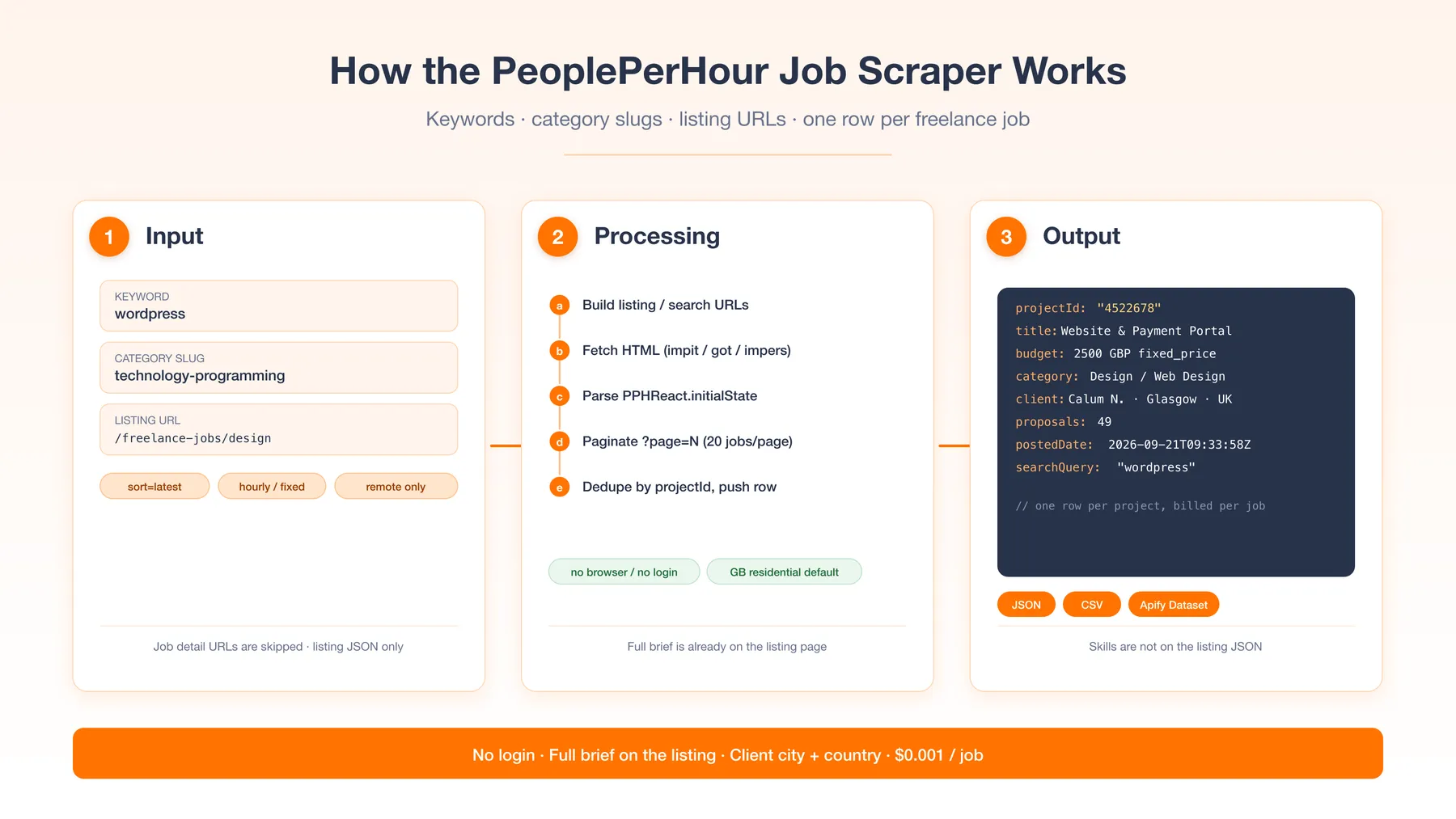
Start from a search term, a category slug, or a listing URL. Each row is one open project: title, full brief, budget, client, proposals, and badges. No PeoplePerHour login.
Why Use This Scraper?
- Multiple entry points — keywords, category slugs, or listing URLs in one run
- Full project brief on every row (it already lives in the listing JSON)
- Client name, city, country, and public profile URL
- Budget in native currency plus converted amount, fixed or hourly
- Proposal counts and urgency / featured / opportunity / pre-funded badges
- Accepts the common
queries+item_limitinput aliases - One row per
projectId, billed per job written
Overview
Built for freelancers, agencies, and researchers who need a feed of open PeoplePerHour projects — not hourlies (fixed-price services) and not freelancer profiles.
Every start type resolves to the same row shape: one job. A category URL and a keyword search both emit project rows. Job detail URLs are skipped because PeoplePerHour only embeds the job JSON on listing pages.
Supported Inputs
URL types
| URL type | Pattern | Example |
|---|---|---|
| Jobs board | /freelance-jobs | https://www.peopleperhour.com/freelance-jobs |
| Category listing | /freelance-jobs/{slug} | https://www.peopleperhour.com/freelance-jobs/technology-programming |
| Keyword search | /freelance-jobs?keyword= | https://www.peopleperhour.com/freelance-jobs?keyword=wordpress |
Copy-pasteable startUrls
Keyword / search mode
Unsupported inputs
- Job detail URLs (
/freelance-jobs/{cat}/{sub}/{slug}-{id}) — no job JSON on that page - Hourlie / service listing URLs (
/services,/hourlies) - Freelancer profile URLs (
/freelancer/...) - Hosts outside peopleperhour.com
?q=search — that query param does not filter on this site; usekeyword
Use Cases
| Audience | Use case |
|---|---|
| Freelancers | Watch fresh projects that match a skill keyword and bid while proposal counts are still low |
| Agencies | Feed outbound / proposal workflows with client name, country, and budget |
| Market researchers | Track demand, budgets, and category mix on a UK-facing freelance board |
| Recruiters | See which skills clients ask for, and how they price the work |
| Aggregators | Normalize PeoplePerHour jobs into a shared jobs feed |
How It Works
- Build listing URLs from
searchQueries,categorySlugs, and pastedstartUrls. - Fetch each page over HTTP (impit, got-scraping, and impers race; first 200 wins).
- Parse
window.PPHReact.initialState— the Redux blob withentities.projects. - Walk
?page=N(20 jobs per page) untilmaxItemsor the last page. - Dedupe by
projectId, write the row, chargejob-found.
Default proxy is Apify RESIDENTIAL pinned to GB. Datacenter exits have returned HTTP 202 on this site in the cloud.
Input Configuration
| Field | Type | Required | Notes |
|---|---|---|---|
searchQueries | string[] | no | Each value becomes ?keyword=. Example: wordpress. Default: none. |
categorySlugs | string[] | no | Path slugs: artificial-intelligence, technology-programming, writing-translation, design, digital-marketing, video-photography, business, music-audio, marketing-branding-sales, social-media. |
startUrls | url[] | no | Listing / category / search URLs. Job detail URLs are skipped. |
sortBy | enum | no | latest (default), popularity, ending, budget, relevance. Applied to keyword and category searches. |
priceType | enum | no | fixed_price or hourly. Omit for both. |
experienceLevel | enum | no | entry, intermediate, or expert. Omit for all. Applied to every listing, including pasted URLs. |
postedWithin | enum | no | 24h, 7d, or 30d. Omit for any age. On sort=latest, paging stops once a page is older than the window. |
remoteOnly | boolean | no | Default false. Restricts keyword/category searches to remote projects. |
onlyUniqueProjects | boolean | no | Default true. Dedupes by projectId across the run. |
includeDescription | boolean | no | Default true. Set false for title/budget/client/URL-only rows. |
maxItems | integer | no | Hard cap on jobs written and billed. Default 50. |
maxConcurrency | integer | no | Default 6. Pagination stays sequential so the cap is exact. |
proxy | object | no | Default Apify RESIDENTIAL + country GB. |
Aliases accepted in the JSON input (not shown as separate Console fields): queries → searchQueries, item_limit → maxItems.
Example — keyword
Example — category listing
Example — hourly + remote
Example — expert jobs from the last day
Output Overview
One flat row per project. The listing blob already includes the full brief and nested client, so there is no second hop and no separate client dataset.
experienceLevel is derived from PeoplePerHour's budget bracket (1 entry, 2 intermediate, 3 expert). Skill tags are not on the listing JSON and stay absent.
Output Samples
Keyword run (searchQueries: ["wordpress"]), trimmed from a live row:
Key Output Fields
Job
projectId— stable PeoplePerHour project idtitle,url,descriptionpostedDate,expiryDate— ISO-8601searchQuery,sourceUrl— which input produced the row
Money
budget,budgetConverted,currencyprojectType—fixed_priceorhourlybudgetBracket/experienceLevel— entry / intermediate / expert
Client
clientName,clientCity,clientCountry,clientCountryCodeclientUrl,clientId
Activity
proposalCount,unreadProposalCountisUrgent,isFeatured,isOpportunity,isPreFundedlocationType,whereCanBid,duration
FAQ
Do I need a PeoplePerHour account? No. The actor reads public listing pages only.
Why were my job URLs skipped?
Detail pages hydrate empty. Paste /freelance-jobs, a category page, or use searchQueries.
Does q=wordpress work?
No. Use keyword (the searchQueries field). q returns the unfiltered board.
Are skill tags included? No. They are not in the listing JSON. The full brief, budget, client, and badges are.
Does it scrape hourlies or freelancer profiles? No. Jobs only.
What does a run cost?
$0.005 per GB of memory at start (default after publish is 512 MB → one start event) plus $0.001 per job written. Empty rows are not charged.
What proxy should I use? Keep the default: Apify residential, country GB. Datacenter proxies have returned HTTP 202 on listing URLs in the cloud.
Support
Open an issue on this actor's Issues tab in the Apify Console. Bugs and field requests are welcome.
Additional Services
Need a scheduled lead feed, extra fields, or a push into a CRM / warehouse? Custom work is available via the Issues tab.
Explore More Scrapers
- Fiverr Scraper — gigs on the other large freelance marketplace
- LinkedIn Jobs Scraper — hired-role postings, from $0.25/1k
- LinkedIn People Search — people, not projects
The rest of the portfolio is on the memo23 Store page.
🤖 For AI Agents & LLM Apps
Compact reference for AI agents calling this actor via the Apify MCP server or the Apify API (actor: memo23/peopleperhour-job-scraper).
Purpose: Scrapes public PeoplePerHour freelance jobs (not hourlies, not profiles) into one dataset row per project.
Minimal input:
Output: one row per job — projectId, title, url, description, budget, budgetConverted, currency, projectType, experienceLevel, locationType, category, subCategory, postedDate, expiryDate, proposalCount, isUrgent, isFeatured, isOpportunity, isPreFunded, clientName, clientCity, clientCountry, clientUrl, searchQuery.
Behaviors an agent should know:
- Always set
maxItems(default 50). It is the hard cap on rows and onjob-foundcharges. Filtered-out jobs are not charged. experienceLevelisentry,intermediate, orexpert.postedWithinis24h,7d, or30d. Omit either to skip that filter.searchQueries,categorySlugs, andstartUrlscan be mixed; each keyword and each category is its own listing crawl.- Job detail URLs in
startUrlsare skipped. Use listing/search/category URLs only. queriesanditem_limitare accepted aliases forsearchQueriesandmaxItems.- Skills are not returned. No login, no cookies.
- Billed
job-foundper written row plusapify-actor-startper GB of memory. Empty runs do not charge per-job events.
⚠️ Disclaimer
This Actor is an independent tool and is not affiliated with, endorsed by, or sponsored by PeoplePerHour Ltd or any of its subsidiaries or affiliates. All trademarks mentioned are the property of their respective owners.
The scraper accesses only publicly available freelance-job listing pages — no authenticated endpoints, bidder inboxes, or content behind a PeoplePerHour login. Users are responsible for ensuring their use complies with PeoplePerHour's Terms of Service, applicable data-protection law (GDPR, CCPA, etc.), and any contractual obligations of their own organisation. Do not use results to spam clients.
SEO Keywords
PeoplePerHour scraper, PeoplePerHour job scraper, PeoplePerHour jobs API, scrape PeoplePerHour, Apify PeoplePerHour, PPH job scraper, freelance jobs scraper, PeoplePerHour projects, PeoplePerHour budget data, gig economy scraper, freelance marketplace data, PeoplePerHour proposals, PeoplePerHour category scrape, Fiverr alternative jobs scraper, Upwork alternative jobs data, PeoplePerHour lead generation, scrape freelance jobs UK, PeoplePerHour JSON export


![ForRentUniversity.com [$1.25💰] Scraper · Emails avatar](https://images.apifyusercontent.com/knob38rf08RjbTFOtyPTLKbUpJqNv69gLvD9GZvNHdY/rs:fill:76:76/cb:1/aHR0cHM6Ly9hcGlmeS1pbWFnZS11cGxvYWRzLXByb2QuczMudXMtZWFzdC0xLmFtYXpvbmF3cy5jb20vbmduOHZSRVNUa3NleVdFNnAtYWN0b3Itb2ZkQkJZZ0QzMndpZHZSemotT25mdk55NHJTQS1mcnUuanBlZw.webp)


![Collecting Cars [$3💰] | 33k SOLD prices + live bids avatar](https://images.apifyusercontent.com/Hbn_LDWbVTHAyPL8k_edq8GAZOEin7g5i4_bFf2WimM/rs:fill:76:76/cb:1/aHR0cHM6Ly9hcGlmeS1pbWFnZS11cGxvYWRzLXByb2QuczMudXMtZWFzdC0xLmFtYXpvbmF3cy5jb20vbmduOHZSRVNUa3NleVdFNnAtYWN0b3ItRm1EYVRESkEyWGNYU0s4N24tVkJhU3V5RENuYi1Db2xsZWN0aW5nX0NhcnMud2VicA.webp)


