

LinkedIn People Search — Company, Title, Industry, No Login
Pricing
from $6.00 / 1,000 profile founds
LinkedIn People Search — Company, Title, Industry, No Login
Search LinkedIn people by keyword, job title, company, school, location, industry, seniority and function — no login, no ban risk. Get name, headline, company, location, schools, languages and profile URL as clean JSON/CSV. Pay per profile found, not per block of 25 — exactly what you get.
Pricing
from $6.00 / 1,000 profile founds
Rating
5.0
(2)
Developer

Muhamed Didovic
Maintained by CommunityActor stats
3
Bookmarked
3.2K
Total users
476
Monthly active users
17 hours ago
Last modified
Categories
Share
LinkedIn People Search Scraper
Search LinkedIn for people by keyword, job title, company, school or location, or turn a list of work emails into the LinkedIn profiles behind them, and get clean, structured rows as JSON or CSV.
Find the exact people you need — growth leaders in London, engineers who studied at Stanford, marketers at a target company — and export their public professional details in one run. Works cookie-free by default (no LinkedIn login, no ban risk), with an optional power mode that uses your own session cookie for exact filters.
No login. No pooled accounts. No browser automation. Just a search in, a spreadsheet out.
Why Use This Scraper?
- No login required. Public mode finds public LinkedIn profiles without any cookie or account — so there's zero risk to your LinkedIn login.
- Search the way recruiters do. Combine keyword, job title, company, school and location to narrow in on the right people.
- Clean, structured rows. Name, headline, current company, location, schools, languages and profile URL — ready for your CRM, sheet or outreach tool.
- Two modes, one actor. Start cookie-free; switch to your own cookie later for exact facet filters and unmasked job titles.
- Pay only for what you get. Priced per profile returned — no monthly rental, no wasted spend on empty runs.
- Pure HTTP. No headless browser, no heavy proxies to configure — fast and reliable.
Coming from another LinkedIn people scraper?
Read the issue boards on the alternatives and two complaints dominate: runs that fail (503s, crashed actors, "doesn't work") and runs that time out before returning anything. Those aren't edge cases on those actors — they are the bulk of what their users have filed.
Three things here are built specifically around that:
| The failure | Here |
|---|---|
| A run dies partway and you paid for it anyway | When LinkedIn blocks a profile page, the actor reads that profile through a second public source and delivers it in full, work history included. Only a profile neither source can read comes back partial (name, headline and URL), flagged with partial: true and billed at the much lower partial price. |
| A run burns your budget before returning a usable row | The actor works out how many profiles your charge limit can actually pay for before it fetches anything, and stops with a plain message if the answer is zero, rather than spending the budget to find out. |
| No login means no risk to your account | Public mode uses no cookie and no account at all, so a blocked run can never cost you your LinkedIn access. |
Branch on partial if you only want fully-enriched rows — the flag tells you which is which, so a thin row never quietly passes as a complete one.
Reverse Email Lookup: work email → LinkedIn profile
You have jane.doe@acme.com from a verification pass or a CRM export. You need to know who Jane is before you write "Hi Jane": her full name, headline, current company and LinkedIn URL. Put the addresses in Work emails and each one comes back as one row.
A profile is returned only when two independent checks agree:
- Name: the part before the
@spells the profile's name (first.last,flast,firstl,firstlast,last.first,first.m.last, accents and hyphenated surnames handled). - Company: the email's domain belongs to the profile's employer. The strongest evidence is the employer's LinkedIn company page (
microsoft.com↔linkedin.com/company/microsoft), then the company name, an abbreviation of it (ms↔ Mint Selection), the brand in the member's own profile URL (/in/lisasu-amd), or the brand in the headline and search line.
If only one check agrees, or two people are equally plausible, the row comes back blank with a reason code instead of a guess. The row lists the candidates that were considered and why each was turned down, so you can audit the decision.
You pay only for matches. A matched, fully read profile bills one profile-found event. Blank rows are free, and so are free-mail and role addresses, which are answered before any request is made.
reasonCode | Meaning |
|---|---|
MATCHED | Name and company both point to this profile |
MATCHED_FORMER_EMPLOYER | The right person, but the domain is a past employer; the address is probably stale |
AMBIGUOUS | Two or more people fit equally well (think john.smith@apple.com) |
BELOW_MIN_CONFIDENCE | A candidate fits, but not firmly enough for your minConfidence; see bestCandidateUrl |
DOMAIN_MISMATCH | People with that name exist, but none works at that domain |
NO_COMPANY_EVIDENCE | The name matches, but LinkedIn hides the employer and nothing else ties the person to the domain |
NAME_MISMATCH | Profiles were found, none with the name in the email |
NOT_FOUND | No public profile surfaced |
SEARCH_FAILED | The search engines could not be reached; retry the row |
FREE_EMAIL_PROVIDER | gmail, outlook, yahoo and similar: no company signal (add companyDomain if you know the employer) |
ROLE_EMAIL | info@, sales@, support@: not a person |
INVALID_EMAIL | Not an email address |
Measured on 25 addresses (tech-company executives plus deliberate traps, 2026-09-29): 19 matched, including one correctly flagged MATCHED_FORMER_EMPLOYER. None of the matches was the wrong person. The 6 blanks were john.smith@apple.com (AMBIGUOUS), jensen@nvidia.com (first name only, BELOW_MIN_CONFIDENCE), a Tim Cook who works elsewhere (DOMAIN_MISMATCH), and three people whose public profile gives no employer evidence. The 25 took 72 seconds.
Per-email company hints work over the API: { "emails": [{ "email": "dylan@ms.com", "companyName": "Mint Selection" }] }.
Overview
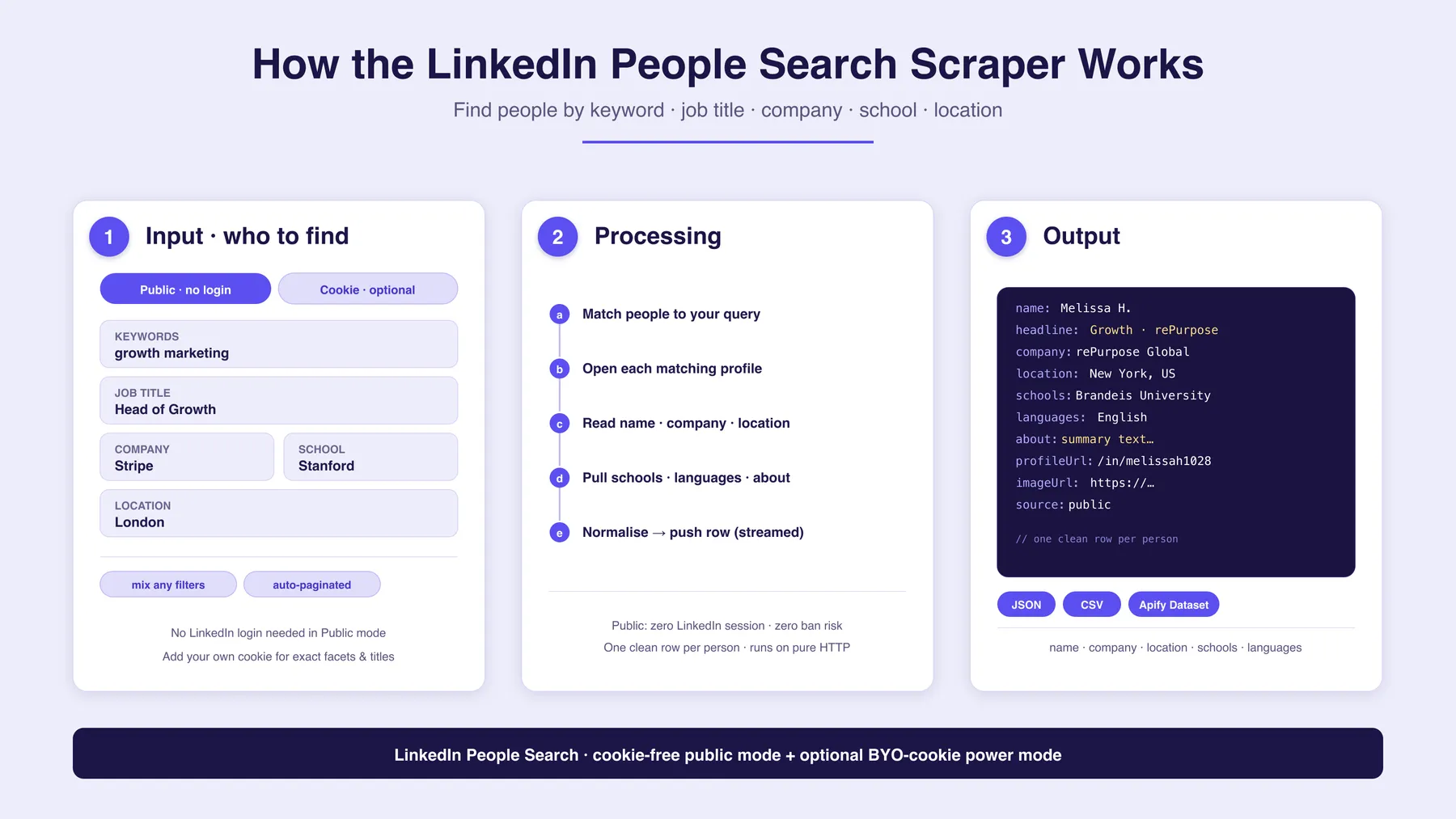
The LinkedIn People Search Scraper turns a people search query into a structured dataset of profiles. You describe who you're looking for using any mix of keyword, job title, company, school and location, and the actor returns one clean row per matching person.
It runs in two modes:
- Public mode (default): finds public LinkedIn profiles and reads their publicly visible professional details. No LinkedIn login is used anywhere, so there is no ban risk to any account.
- Cookie mode (optional): runs LinkedIn's own people search under your session cookie, unlocking exact facet filters (location / company / school URNs, connection degree) and reliably-populated job titles.
The output is a flat table — perfect for lead lists, recruiting shortlists, market maps and research panels. Export to JSON, CSV, Excel or Google Sheets, or pull it via the Apify API.
Supported Inputs
You search by criteria, not by URL. Provide any combination of the fields below — they are ANDed together to narrow the result set.
| You want… | Fill in… |
|---|---|
| People matching a free-text search | keywords (e.g. growth marketing) |
| A specific role | title (e.g. Head of Growth) |
| People at a company | company (e.g. Stripe) |
| Alumni of a school | school (e.g. Stanford) |
| People in a place | location (e.g. London) |
| A specific person by name | firstName + lastName |
| Only certain seniority levels | seniorityLevels (e.g. Director, VP, CXO) |
| Only certain job functions | jobFunctions (e.g. Sales, Engineering, Human Resources) |
| The person behind a work email | emails (e.g. jane.doe@acme.com); see Reverse Email Lookup above |
Seniority and function filters need no cookie. They work in both modes: the actor derives each profile's seniority and function from its title/headline and delivers only matching rows — you are never billed for a profile that doesn't match. Every row also carries the derived seniorityLevel and jobFunction fields, filter or not.
Cookie mode adds precise URN filters: geoUrns, currentCompanyUrns, schoolUrns and networkDepths (1st / 2nd / 3rd-degree connections) for pinpoint targeting.
Not supported: private profiles you have no access to, connection-request or messaging actions, and any data behind a paywall LinkedIn does not expose to your session. This is a read-only data tool.
Use Cases
| Audience | What they get |
|---|---|
| Sales & lead gen | Build targeted prospect lists by role, company and location |
| Recruiters | Source candidate shortlists by title, skill keyword and school |
| Marketers | Map decision-makers at target accounts for ABM campaigns |
| Researchers & analysts | Assemble people panels for market and talent studies |
| Founders | Find advisors, hires or partners matching a precise profile |
| Agencies | Deliver bulk, structured people data to clients on demand |
How It Works
- Describe who to find — enter any mix of keyword, job title, company, school and location, and pick a mode (public or cookie).
- Match people to your query — the actor finds LinkedIn profiles matching your criteria and paginates through the results automatically.
- Open each matching profile and read the publicly available professional details. When LinkedIn blocks a profile page, the profile is read through a second public source instead, so the row still comes back complete.
- Extract & normalise — name, headline, current company, location, schools, languages and profile URL become one clean row.
- Stream to the dataset — every profile is pushed as it's found, exportable to JSON, CSV, Excel or Google Sheets.
Input Configuration
| Field | Type | Description |
|---|---|---|
mode | select | public (cookie-free, default) or cookie (uses your own LinkedIn session) |
emails | array | Work emails to look up. When given, the run is an email lookup: one row per email, search fields ignored |
companyName | string | Email lookup: employer name hint, for domains that don't spell the name |
companyDomain | string | Email lookup: employer domain to match instead of the email's own |
minConfidence | integer | Email lookup: how sure a match must be, 0–100 (default 70) |
maxCandidatesPerEmail | integer | Email lookup: profiles weighed per email, 1–10 (default 5) |
keywords | string | Main free-text search (role, skill, name — anything) |
title | string | Filter by job-title keyword, e.g. Head of Growth |
company | string | Filter by company-name keyword |
school | string | Filter by school-name keyword |
location | string | Filter by location keyword, e.g. London |
firstName | string | Filter by first name |
lastName | string | Filter by last name |
seniorityLevels | array | Only deliver these seniority levels: Intern, Entry, Senior, Manager, Director, VP, CXO, Partner, Owner. Works in both modes, no cookie needed. |
jobFunctions | array | Only deliver these functions: Sales, Marketing, Engineering, Data, Product, Design, Finance, Human Resources, Operations, Legal, IT, Customer Success, Consulting, Education, Healthcare. Works in both modes. |
cookie | string (secret) | Cookie mode only — your LinkedIn session cookie (contains li_at + JSESSIONID). Runs the search under your session. Public mode ignores this. |
geoUrns | array | Cookie mode — LinkedIn location URN IDs (e.g. 103644278 = United States) |
currentCompanyUrns | array | Cookie mode — LinkedIn company URN IDs |
schoolUrns | array | Cookie mode — LinkedIn school URN IDs |
networkDepths | array | Cookie mode — connection degree: F (1st), S (2nd), O (3rd+) |
maxResults | integer | Hard cap on profiles returned by a search (default 100); email lookup ignores it |
proxy | object | Optional proxy override. Leave empty — the actor routes through its own residential proxy. |
Example 1 — Public mode (cookie-free)
Example 2 — People at a company who studied somewhere
Example 3 — Cookie mode with exact URN filters
Output Overview
Each row is one person. Public mode returns the richest set of publicly visible fields (company, schools, languages, about); cookie mode returns LinkedIn's search-result fields including reliably-populated job titles and network distance.
Every row carries a source (public or cookie) and a scrapedAt timestamp so you always know how and when it was captured.
Output Samples
Public mode (source: "public"):
Cookie mode (source: "cookie"):
Key Output Fields
Identity
name— full nameprofileUrl— canonical LinkedIn profile URLimageUrl— profile photo URL (public mode)urnId— LinkedIn member URN (cookie mode)
Professional
jobTitle— role/title (see FAQ — oftennullin public mode; reliable in cookie mode)summary— the profile headlinecurrentCompany— current employer (public mode)location— city / region / countryseniorityLevel— derived seniority bucket (Senior,Manager,Director,VP,CXO, …) on every rowjobFunction— derived function (Sales,Engineering,Human Resources, …) on every row
Background
schools— array of listed schools (public mode)languages— array of listed languages (public mode)about— the profile "about" text (public mode)experience— work history, each withtitle,company,companyUrl,dateandisCurrent(public-mode rows whose profile page LinkedIn blocked, read through the second source)education— schools withdegreeanddate(same rows)topSkills,followerCount,connectionCount— the profile's top skills and counts (same rows)
Email lookup (rows with source: "email")
email— the address you sentmatched—trueonly when both the name and the company check agreereasonCode— the decision (table above)confidence/confidenceLabel— 0–1 score andhigh/medium/low; on a blank row, the score of the closest candidatematchedSignals— the evidence that fired, e.g.name-in-email,domain-company-page,domain-past-companyfirstName,lastName— split from the matched namecompanies,pastCompanies— current and former employers with their LinkedIn company pagesbestCandidateUrl— blank rows: the closest profile that was not acceptedrejectedCandidates— every candidate turned down, with its name/company scores and the reason
Meta
networkDistance— connection degree (cookie mode)source—public,cookieoremailpartial—truewhen neither the profile page nor the second source could be read, so the row holds only name, headline and URLscrapedAt— ISO timestamp of capture
FAQ
Do I need a LinkedIn account or cookie? No. Public mode (the default) needs no login and no cookie at all. Cookie mode is optional — use it only when you want exact URN filters and unmasked job titles.
How do the seniority/function filters work without a cookie?
The actor reads each found profile's title and headline, derives a seniority bucket and a job function from them, and delivers only rows matching your filter — non-matches are skipped and never billed. A profile whose headline states no role can't be classified, so it's skipped too while a filter is active; that means filtered runs can return fewer than maxResults, and every delivered row is a guaranteed match rather than a guess.
Why is jobTitle empty on some public-mode rows?
LinkedIn hides the precise job title on many profiles when you're not logged in. Public mode reports the title when it's visible and null when LinkedIn masks it — the summary headline and currentCompany are still returned. For a reliable title on every row, use cookie mode.
Is there any risk to my LinkedIn account?
In public mode, none — no account is used anywhere. In cookie mode you supply your own session, so it behaves like your normal LinkedIn usage; keep maxResults reasonable.
What's the difference between the two modes? Public mode is safe, login-free and returns rich public fields (company, schools, languages, about). Cookie mode runs LinkedIn's own people search under your session for exact facet filters (geo/company/school URNs, connection degree) and reliable titles.
How many results can I get?
Set maxResults. Public results depend on how many public profiles match your query; cookie mode paginates LinkedIn's search results.
What formats can I export? JSON, CSV, Excel and HTML, plus Google Sheets and the Apify API — like any Apify dataset.
Does it collect emails or phone numbers? No. This actor returns the professional profile fields listed above. It does not scrape private contact details. Email lookup goes the other way: you bring the email, it finds the person.
Why did an email come back blank?
Because the name check and the company check did not both pass. Read reasonCode, then rejectedCandidates to see every profile that was considered and why it was turned down. Blank rows are not billed. Lower minConfidence if you want borderline matches such as first-name-only addresses.
Can I look up gmail or outlook addresses?
Only with a hint. A free-mail domain says nothing about the employer, so those rows return FREE_EMAIL_PROVIDER unless you pass the employer's domain in companyDomain.
Support
- Found a bug or need a new field? Open an issue on the actor's Issues tab.
- Questions and feature requests are welcome — response is usually quick.
Additional Services
Need a tailored export, a different set of fields, enrichment, or a scheduled feed into your CRM or data warehouse? Custom work and bespoke pipelines are available — reach out via the Issues tab.
Explore More Scrapers
This actor finds the people. The rest of the LinkedIn family picks up from there — same developer, same pure-HTTP engine, same pay-per-result pricing:
- LinkedIn Company Employees Scraper & Email Finder — everyone at one company, with optional contact-email discovery
- LinkedIn Profile Scraper — deep-scrape the profile URLs this actor returns
- LinkedIn Posts Scraper — what a person or company publishes
- LinkedIn Jobs Scraper — who's hiring, from $0.25/1k
- LinkedIn Ad Library Scraper — ads, impressions and targeting by advertiser
- LinkedIn Company Audience Builder — ABM audience lists from company pages
The full professional-data collection lives on the memo23 Store page.
🤖 For AI Agents & LLM Apps
Compact reference for AI agents calling this actor via the Apify MCP server or the Apify API (actor: memo23/linkedin-people-search).
Purpose: Turns a LinkedIn people-search query (keyword / title / company / school / location) into structured public profile rows; runs cookie-free by default, with an optional cookie mode for exact URN facets and unmasked titles.
Minimal input:
Cookie mode (inline variant): { "mode": "cookie", "cookie": "li_at=...; JSESSIONID=\"ajax:...\"", "title": "Product Manager", "geoUrns": ["103644278"], "maxResults": 25 }
Email lookup (inline variant): { "emails": ["jane.doe@acme.com", { "email": "dylan@ms.com", "companyName": "Mint Selection" }] }: one row per email.
Output: one row per person — name, profileUrl, imageUrl, urnId, jobTitle, summary, currentCompany, location, schools, languages, about, networkDistance, source, partial, scrapedAt. Public-mode rows whose profile page LinkedIn blocked are read through a second public source and add experience[], education[], topSkills, followerCount and connectionCount.
Behaviors an agent should know:
- Always set
maxResults(default 100) — it is the hard cap on profiles returned and controls run size and cost. - Search fields (
keywords,title,company,school,location,firstName,lastName) are ANDed together to narrow results. mode: public(default) needs no cookie;mode: cookierequires acookiewith bothli_atandJSESSIONIDand unlocks URN filters (geoUrns,currentCompanyUrns,schoolUrns,networkDepths) plus reliablejobTitle.jobTitleis oftennullin public mode (LinkedIn masks it when logged out); it is reliable in cookie mode.schools,languages,aboutpopulate in public mode only.- Email lookup:
matched: truemeans the name AND the employer were both confirmed, so the name is safe to use in a greeting. Onmatched: false, do not fill a name in yourself: reportreasonCodeand move on. A blank row is a correct answer, not an error. - Read-only: no emails, phone numbers, or private/paywalled fields.
- Billed per profile returned — no monthly rental; empty runs produce no charge. See the Pricing tab on the actor page.
⚠️ Disclaimer
This actor is an independent tool and is not affiliated with, endorsed by, or sponsored by LinkedIn Corporation or Microsoft Corporation. "LinkedIn" is a trademark of LinkedIn Corporation; all product and company names are the property of their respective owners and are used here for identification and descriptive purposes only.
This tool is intended for lawful use only. It collects publicly available information (in public mode) or information accessible to your own authenticated session (in cookie mode). You are responsible for how you use the data and for ensuring your use complies with LinkedIn's Terms of Service, applicable laws, and data-protection regulations including the GDPR and CCPA. Do not use scraped personal data for unlawful, discriminatory, or unsolicited-contact purposes that violate those regulations. Always obtain a lawful basis before processing personal data.
SEO Keywords
LinkedIn people search scraper, LinkedIn profile scraper, LinkedIn people finder, LinkedIn search export, scrape LinkedIn profiles, LinkedIn people search API, LinkedIn lead scraper, LinkedIn prospecting tool, find people on LinkedIn, LinkedIn recruiter sourcing, LinkedIn candidate search, LinkedIn contact scraper, LinkedIn data extraction, people search by company, people search by school, LinkedIn talent sourcing, LinkedIn B2B leads, LinkedIn profile data export, no-login LinkedIn scraper, LinkedIn CSV export, LinkedIn JSON export, LinkedIn audience builder, sales prospecting LinkedIn, recruiting data scraper, LinkedIn search by seniority, LinkedIn search by job function, LinkedIn advanced filters no cookie, LinkedIn people search without login, search LinkedIn by title seniority industry, LinkedIn sales navigator alternative, reverse email lookup LinkedIn, email to LinkedIn profile, find LinkedIn profile from email, email to name lookup, work email enrichment, CRM email enrichment


