

Seek Scraper — Australia & NZ Jobs, Salary & Company [$1/1K]
Pricing
from $0.85 / 1,000 results
Seek Scraper — Australia & NZ Jobs, Salary & Company [$1/1K]
Scrape seek.com.au (AU & NZ) job listings by keyword and location search with filters, or by individual job URL. Returns title, company, location, salary, classification, work type, full description, apply link and dates as one clean row each. JSON, CSV or Excel.
Pricing
from $0.85 / 1,000 results
Rating
5.0
(1)
Developer

Muhamed Didovic
Maintained by CommunityActor stats
0
Bookmarked
109
Total users
13
Monthly active users
12 days ago
Last modified
Categories
Features
Share
Seek.com.au Jobs Scraper — Salary, Company & Full Description
Scrape seek.com.au — Australia's #1 job board (and seek.co.nz) — any keyword/location search, with filters, or individual job URLs. Every job comes back in one clean schema with title, company, location, salary as a label and as numbers, work arrangement, applicant count when the listing shows it, classification, work type, the full description, apply link, and dates.
Why use this scraper
- Any Seek search, filters and all — keyword, location, radius, classification, subclassification, work type, work arrangement (on-site, hybrid, remote), salary band and date posted. A search with more matches than Seek lists in one go is continued across each state and then each category.
- Full job detail — title, company, location, salary, classification + sub-classification, work type, work arrangement, applicant count when the listing shows one, the complete description, apply link, listing + expiry dates.
- Salary as numbers — the label as shown, plus minimum, maximum and period (annual, hourly, weekly, monthly or daily) so you can sort and chart pay without parsing the text.
Overview
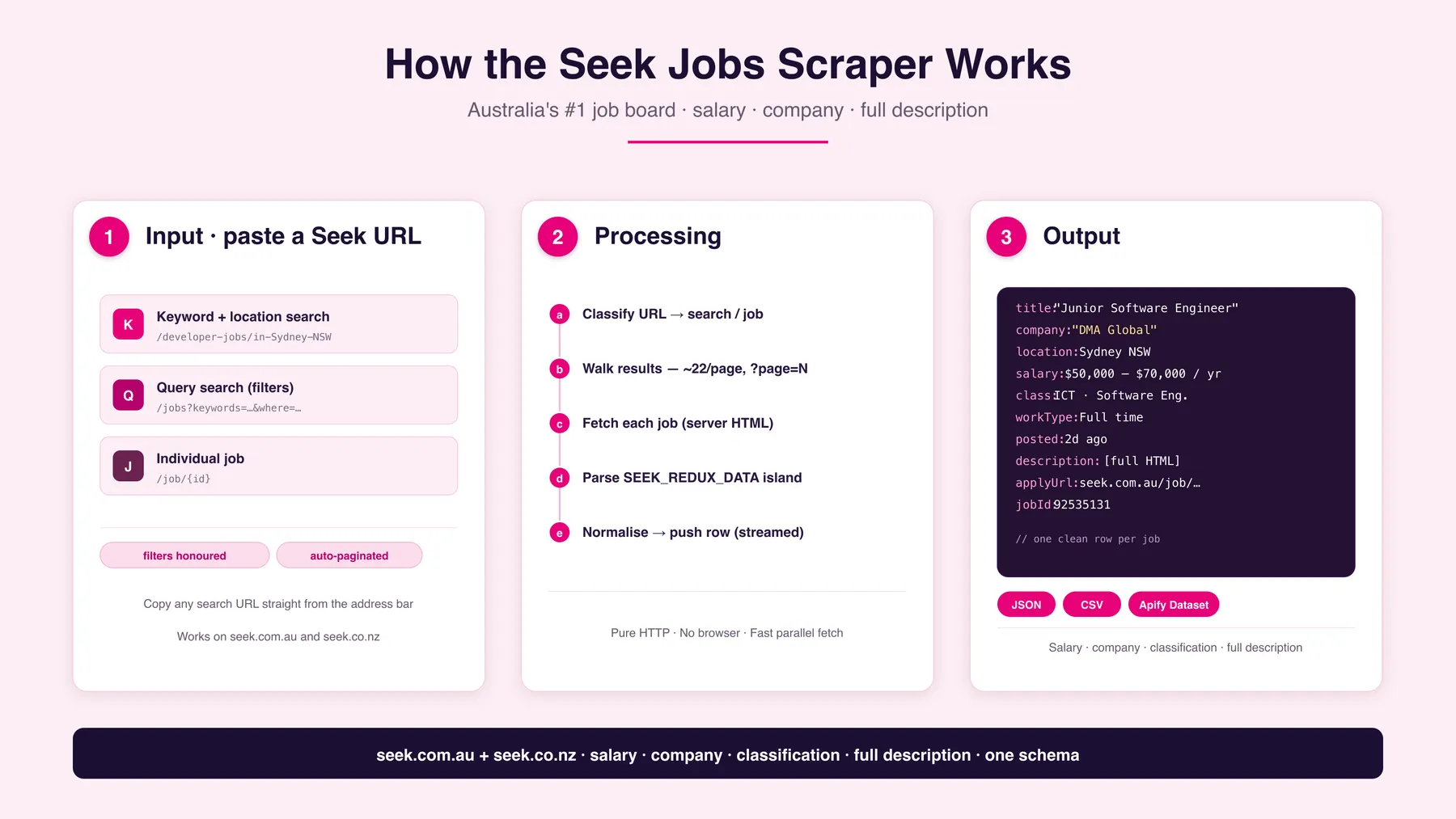
Seek embeds its full job data in each page as a JSON island. The actor classifies each URL (search / job), walks search results page by page (~22 per page, ?page=N), fans out to each job, and normalises everything into a consistent row. Ideal for recruiters, sourcers, market analysts, and job aggregators.
Supported inputs
| Input URL shape | Example |
|---|---|
| Keyword/location search | seek.com.au/developer-jobs/in-All-Sydney-NSW |
| Query search | seek.com.au/jobs?keywords=nurse&where=Melbourne |
| Filtered search | …?keywords=marketing&where=Brisbane&worktype=242 (any site filter) |
| Company jobs page | seek.com.au/Ennio-International-jobs/at-this-company |
| Individual job | seek.com.au/job/{id} |
Tip: run a search on seek.com.au, then copy the URL from your browser's address bar — the filter parameters drop straight into
startUrls. seek.co.nz works too, and so do SEEK'sau.seek.com/nz.seek.comlinks. A search that SEEK answers with 0 jobs ends as a successful run with a message saying so.
Use cases
- Recruiters & sourcers — pull live roles by keyword, location, classification; build target lists.
- Market analysts — track salary ranges, demand by classification, posting volumes over time.
- Job boards / aggregators — ingest Seek listings with full descriptions into your own index.
- Competitor monitoring — watch which companies are hiring for what, where.
How it works
- You provide one or more Seek URLs (search or job).
- The actor classifies each URL and walks search results with
?page=Npagination (filters preserved). - Each job's
SEEK_REDUX_DATAis parsed for the full structured record. - Rows are normalised to one schema and streamed to your dataset — JSON or CSV.
Input configuration
| Field | Type | Default | Description |
|---|---|---|---|
startUrls | array | — | seek.com.au / seek.co.nz URLs (search or job) |
flatten | boolean | true | Flatten arrays for CSV-friendly output |
workArrangement | array | — | On-site, hybrid, remote |
subClassification | array | — | Subclassification ids, for example 6342 |
radiusKm | integer | — | Kilometres around the location |
minApplicants / maxApplicants | integer | — | Keep listings inside this applicant band. Listings that do not show a count are skipped |
splitBroadSearch | boolean | true | Continue a search that Seek will not list in one go, across states and categories |
maxItems | integer | 10000 | Hard cap on rows collected |
maxConcurrency | integer | 8 | Parallel job fetches |
Output samples
Flattened (flatten: true, default):
Key output fields
| Field | Description |
|---|---|
jobId, canonicalUrl, shareLink | Identity |
title | Job title |
company, advertiserId, advertiserVerified | Employer |
location | e.g. "Sydney NSW" |
classification, subClassification, classificationFull | SEEK category (parent + sub) |
workType | Full time / Part time / Contract / Casual |
workArrangement | On-site, Hybrid, Remote, or a combination |
salaryDisplay | Salary as shown (e.g. "$50,000 – $70,000 per year") |
salaryMinAmount, salaryMaxAmount, salaryPeriod | The same salary as numbers, and annual / hourly / weekly / monthly / daily |
applicantCount | Applicants shown on the listing. Empty when the listing does not show a number |
teaser | Short summary |
bulletPoints[] | Highlight bullets |
description, descriptionText | Full HTML + plain-text |
phoneNumber | Recruiter phone (when present) |
applyUrl | Apply / job link |
isExpired, status, listingDate, listingDateLabel, expiresAt | Status + dates |
FAQ
Can I scrape a filtered search? Yes — paste any Seek search URL with its filters (classification, work type, salary, date posted, etc.). They're preserved and paginated automatically.
Does it work for New Zealand? Yes — seek.co.nz URLs work the same as seek.com.au.
How many jobs per search?
Seek only lists about 500 jobs for one search. With Cover the whole search on (the default), a larger search is run across each state and then each category, up to maxItems. Set that field off to keep a single search.
Why is applicant count empty?
Some listings do not publish a number. Those rows have an empty applicantCount. A minimum or maximum applicant filter skips them, because there is no number to compare.
Support
Found a bug or need a field added? Open an issue on the actor's Apify Console page.
Explore more scrapers
- Naukri Scraper — India + Gulf jobs
- Indeed Jobs Scraper — global jobs
- TotalJobs Scraper — UK jobs
- Jora Scraper — AU/NZ/SG jobs
Full portfolio: apify.com/memo23
🤖 For AI Agents & LLM Apps
Compact reference for AI agents calling this actor via the Apify MCP server or the Apify API (actor: memo23/seek-scraper).
Purpose: Scrape seek.com.au and seek.co.nz job listings — from the search fields, any Seek search URL (filters preserved), or individual job URLs — returning one clean row per job with salary as numbers, work arrangement, applicant count when shown, classification, company and the full description.
Minimal input (search mode):
Alternative URL mode: pass startUrls with any Seek search URL (seek.com.au/{keyword}-jobs/in-{Location} or /jobs?keywords=&where= with any site filters) or a seek.com.au/job/{id} URL. When startUrls is set, the Search fields above are ignored. Search fields also accept classification, subClassification, workType, workArrangement, radiusKm, minApplicants/maxApplicants, salaryMin/salaryMax/salaryType, dateRange, sortMode. splitBroadSearch (default true) continues a search Seek will not list in one go.
Output: one row per job — portal, jobId, canonicalUrl, shareLink, title, company, advertiserId, advertiserVerified, location, classification, subClassification, classificationFull, workType, workArrangement, salaryDisplay, salaryMinAmount, salaryMaxAmount, salaryPeriod, applicantCount, teaser, bulletPoints, description, descriptionText, phoneNumber, applyUrl, isExpired, status, listingDate, listingDateLabel, expiresAt.
Behaviors an agent should know:
- Always set
maxItems(default 10000) — a single search commonly has hundreds to thousands of matches; search pages return ~22 jobs each. - Provide either Search fields or
startUrls;startUrlstakes priority and overrides the Search filters. incrementalModeemits only NEW/UPDATED/REAPPEARED jobs (each row carrieschangeType+firstSeenAt); state is kept perstateKey, so scheduled runs pay only for changes.includeKeywords/excludeKeywordsandfromDate/toDate/maxAgeMinutesgate rows before billing — filtered-out rows are never charged.- Billing is per result — charged per job row returned; keyword/date-gated and filtered rows are never charged.
enrichEmailsis opt-in and billed only per contact email found. - Optional notifications (Telegram/Slack/Discord/WhatsApp/generic webhook) and output shaping (
compactfor LLM pipelines,descriptionMaxLength,excludeEmptyFields,flatten) are available.
⚠️ Disclaimer
This scraper accesses only publicly available data. Use the extracted data in compliance with seek.com.au's Terms of Use, the Australian Privacy Act 1988, the Spam Act 2003, and all applicable laws. You are responsible for how you use scraped data — particularly personal information (recruiter names, phone numbers). This actor is not affiliated with, endorsed by, or connected to SEEK Limited.
SEO Keywords
seek scraper, seek.com.au scraper, seek jobs scraper, australia jobs scraper, seek api, job listings scraper australia, recruitment data australia, seek salary scraper, job scraper australia, seek.co.nz scraper, sourcing data, job board scraper, AU job data, seek job search scraper, hiring data australia


