

Shopee Scraper [From $0.28] Search, Ratings, Sales & Shops
Pricing
from $0.28 / 1,000 product cards
Shopee Scraper [From $0.28] Search, Ratings, Sales & Shops
Shopee scraper from $0.28 per 1,000 products: keywords, shops, categories and product URLs in all 11 Shopee markets, sorted by top sales, newest or price, up to 100 per keyword. Price, discount, rating, units sold and seller details in one flat row. No login, no cookies. JSON, CSV or Excel.
Pricing
from $0.28 / 1,000 product cards
Rating
0.0
(0)
Developer

Muhamed Didovic
Maintained by CommunityActor stats
1
Bookmarked
503
Total users
235
Monthly active users
5 days ago
Last modified
Categories
Features
Share
Turn Shopee search terms or URLs into product rows — title, price, currency, seller ids, and image — across Indonesia, Singapore, Malaysia, Philippines, Thailand, Vietnam, Taiwan, Brazil, Mexico, Colombia and Chile. No login, no cookies.
Optional product details add the description, the variants and the shop's name and location. Turn on price and stock monitoring and a scheduled run tells you which products dropped or raised their price, started or ended a discount, sold out or came back since the last run.
From $0.28 per 1,000 products ($0.36 on the Bronze tier). Error rows are free.
| Input | Row(s) emitted |
|---|---|
Keyword (searchTerms) | Product cards from /list/{term} |
| Search / list / category URL | Product cards from that page |
| Shop URL | The first page of the shop's product grid (about 40 items) plus its featured items |
Product URL (-i.shop.item or /product/shop/item) | One product, completed from the product data source (up to 20 lookups per run on Apify's free plan) |
| Price & stock monitoring (optional) | The same rows with changeType: new, price_drop, price_increase, discount_change, restock, sold_out, unchanged |
Why Use This Scraper?
- From $0.28 per 1,000 products ($0.36 on Bronze); product details from $2.50 per 1,000
- Eleven Shopee marketplaces in one actor
- Keyword search, category, shop, or a mixed list of URLs
- Up to 100 products per keyword in one request, sorted by Shopee itself: top sales, newest or price
- Rating and original price on keyword results; rating, discount and seller location on category and shop cards
- Price, rating and discounted-only filters
- Competitor price and stock monitoring: with
trackChangesevery row says what changed since the previous run of the same monitor, and withonlyChangesan hourly or daily schedule delivers, and bills, only the products that moved - Product URLs come back with title, price, discount, rating, description, variants, main image and the shop's name and location
- Optional product-detail pass for description, variants and seller
- One flat row per product for JSON, CSV or Excel
- No cookies, no Shopee account
Overview
Built for price monitors, marketplace researchers, and sourcing teams who need public Shopee listings as a table.
Every successful row is a product. A shop URL does not emit a shop-profile row — it emits that shop's products, up to about 50 per shop, because Shopee's public shop page shows only the first page of the shop's products. If Shopee refuses the shop page, a paid run reads the shop through the product data source instead (about 30 products).
A keyword returns up to about 100 products. Shopee's own pages stop adding new products after a few pages, and the data source answers one page per keyword, so maxItems above that does not bring more for one keyword: split the search into several keywords instead. Shopee Colombia and Chile show no keyword results to visitors; keyword-only runs there return an unavailable error row. Paste a product or shop URL instead.
Keyword searches are read with Shopee's own sorting and come back with rating; category and shop URLs are read from Shopee's public pages, whose cards show rating and discount. A product URL is completed from the product's data: title, price, discount, rating, description, variants, main image and the shop's name and location.
Supported Inputs
| Kind | Example |
|---|---|
| Keyword | iphone in searchTerms, country: "ID" |
| List / search URL | https://shopee.sg/list/iphone or https://shopee.sg/search?keyword=iphone |
| Category | https://shopee.co.id/Komputer-Aksesoris-cat.11044261 |
| Shop | https://shopee.co.id/shop/196846900 or https://shopee.co.id/rasyidjaya_computer |
| Product | https://shopee.sg/Name-i.855002939.28095542543 or https://shopee.co.id/product/196846900/11083699432 |
Unsupported
- Cart, checkout, buyer messages, or anything behind login
- Lazada
- Colombia / Chile keyword search (product and shop URLs still work)
- Server-side
sales/latestsort (those values stay in page order)
Use Cases
| Audience | What they use it for |
|---|---|
| Price monitors | Track a SKU or keyword across SEA and LATAM Shopee hosts |
| Sellers and brands | Schedule competitors' product links or shops with onlyChanges and get only their price cuts, new discounts and sell-outs |
| Sourcing | Shortlist sellers by price, title and shop id |
| Catalog teams | Enrich a list of Shopee URLs with title and image |
| Researchers | Compare listing density for a term across countries |
How It Works
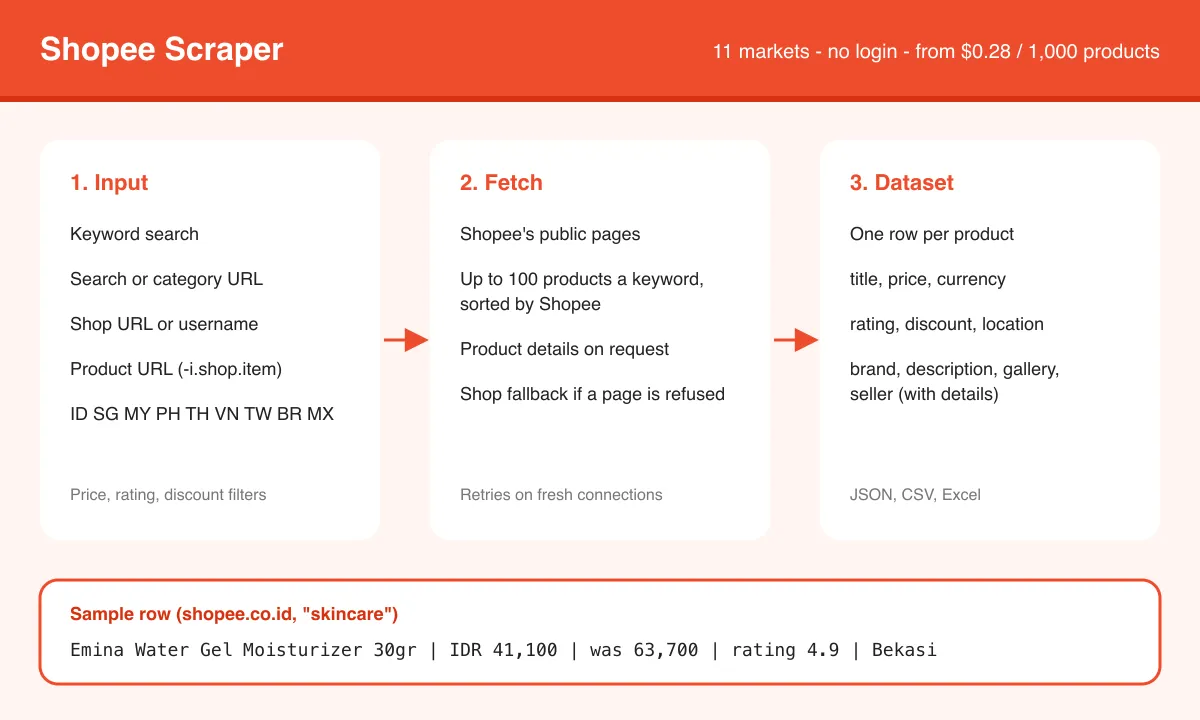
- Each input is classified as a keyword, search, category, shop or product URL, in the marketplace of its own host.
- Keywords are searched with Shopee's own sorting, up to about 100 products each. Category and shop URLs are read from Shopee's public pages; a shop returns its product grid plus its featured items, and a shop page Shopee refuses is read through the product data source instead (paid plan).
- Each product card gives title, image, price, crossed-out price, rating, discount and, in Thailand, the seller's province. The price shown on the card is the one you get.
- Filters (
minPrice,maxPrice,minRating,discountedOnly) drop cards before billing.price_asc/price_descreorder in memory. - If
enrichProductsis on, each kept product is looked up in the product data source, which adds the description, the variants and the shop's name and location. A product without a price is filled from the same lookup. - With monitoring on, each product is compared with the previous run of the same monitor before billing. With
onlyChanges, unchanged products are left out; a product whose result card already shows the same price and discount is left out before its detail lookup.
Input Configuration
In the order of the input form:
| Field | Type | Default | Description |
|---|---|---|---|
startUrls | array | — | Product, search, category or shop links; each keeps its own marketplace. url, urls, productUrls, shopUrls, categoryUrls, shopId (with or without itemId) and shop are read too. |
searchTerms | array | — | Keywords, one per line. keyword, keywords and query are read too. |
country | string | ID | Marketplace the keywords are searched on. |
mode | string | auto | auto, product, shop or search. Links are always read as the page they are; product or shop skips keywords when links are given, and product adds full details to product links. |
discountedOnly | boolean | false | Only products shown with a discount. |
minRating | number | — | Lowest rating; products without one are kept. |
minPrice / maxPrice | integer | — | In the marketplace's own money; products without a price are dropped. |
sortBy | string | relevancy | relevancy, latest, sales, price_asc or price_desc, for keyword results. |
enrichProducts | boolean | false | Full product and seller details, billed as product-detail. Product links get them anyway. Free plan: 20 lookups per run. |
maxItems | integer | 40 | Products in the whole run. |
maxConcurrency | integer | 3 | Products read at once, 1–8. |
trackChanges | boolean | false | Compare with the previous run of the same monitor and add changeType, previousPrice, priceChange, previousDiscountPct, inStock, previousInStock, firstSeenAt, previousSeenAt. |
onlyChanges | boolean | false | Leave out unchanged products (not billed). Turns on trackChanges. |
monitorName | string | default | One name per watch list, so different schedules never compare against each other. |
proxyConfiguration | object | residential | Optional; runs also work with it off. |
Example — keyword search
Example — product URLs plus detail
Example — one shop
Price & stock monitoring (scheduled alerts)
Turn on trackChanges (or onlyChanges) and give the watch list a monitorName. Each run compares every product with the previous run of that monitor. A product is identified by its marketplace, shop id and item id, so the same listing found through a keyword one day and a shop link the next is still one product, and a product on shopee.sg is never compared with one on shopee.co.id.
changeType | When |
|---|---|
new | The monitor has not seen this product before |
sold_out | Stock was above 0 last time and is 0 now |
restock | Stock was 0 last time and is above 0 now |
price_drop | The selling price is lower than last time |
price_increase | The selling price is higher than last time |
discount_change | Same price, but the discount percent changed: a sale started or ended, or the crossed-out price moved |
unchanged | None of the above |
The first match in this order wins, so a product that came back in stock at a new price is a restock. Each row also gets previousPrice, priceChange (price minus previousPrice, negative for a drop), previousDiscountPct, inStock, previousInStock, firstSeenAt and previousSeenAt.
What is compared and what is not:
- Price is the selling price Shopee shows, compared to the cent.
- Discount is the percent Shopee shows, or the one worked out from the crossed-out price.
- Stock is known for product links and with
enrichProductson. Keyword, category and shop results without details carry no stock count, so for them only price and discount are compared. To watch stock, track product links. - A value that either run does not know never counts as a change.
- Title, images, rating, review count, units sold, search position and description are not compared. They move every day without saying anything about price or availability.
- A product missing from this run keeps its last record and is not reported. Search results reshuffle, and a product that drops out of the top results has not left Shopee.
With onlyChanges, unchanged products are not written to the dataset and are not billed, and a product whose result card already shows the same price and discount is left out before its detail lookup, so it is not billed as product-detail either. maxItems counts the products checked, not the ones that changed. A run in which nothing changed ends with an empty dataset and the status message says how many products were unchanged.
Put this on an Apify schedule (hourly or daily) and connect the run to an email, Slack or webhook integration: you get a message only with the products that moved. The comparison state is kept in a key-value store in your own account whose name starts with SHOPEE-MONITOR, one store per monitor name. Delete that store to start a monitor over. Keep the input of a monitor the same from run to run; a new list of products is best tracked under a new monitorName.
Pricing
Pay per event: you pay for the products you get, plus Apify's actor start.
| Event | Free | Bronze | Silver | Gold and above |
|---|---|---|---|---|
| Product card, per 1,000 | $0.40 | $0.36 | $0.32 | $0.28 |
| Product detail, per 1,000 | $3.50 | $3.00 | $2.80 | $2.50 |
| Actor start, per GB of run memory | $0.005 | $0.005 | $0.005 | $0.005 |
A product detail is charged for each product URL and, with enrichProducts on, for each result, and only when the details came back. Error rows, and rows that came back with no product data, are free. With onlyChanges, unchanged products are free too.
What typical runs cost on Bronze, with the default 512 MB of memory:
| Run | Cost |
|---|---|
| 1,000 products from 10 keywords | $0.37 |
| One shop, 40 products | $0.02 |
| 100 product URLs, with details | $0.34 |
1,000 keyword results with enrichProducts | $3.37 |
Output Overview
One dataset row per product. Search cards include title, price, currency, url, itemId, shopId, imageUrl, and rating, discountPct and location when the card shows them. Error rows carry error, errorKind (unavailable for a dead marketplace, a bad URL, or filters that matched nothing; failed for a page that could not be read) and message — those are not charged.
With enrichProducts, the same row also gets description, variants (each option's name, modelId and imageUrl) and shopName, plus rating, discountPct and location when the card had none. soldCount, stock, ratingCount and originalPrice come when Shopee publishes them for that product. Brand, an image gallery, category path and attributes are not available.
Output Samples
Real rows from 2026-10-22, shortened (empty fields and long URLs trimmed).
Keyword search, country: "ID", searchTerms: ["skincare"]:
Shop URL, startUrls: ["https://shopee.co.th/bissiq"]:
Price & stock monitoring, onlyChanges: true, country: "SG", searchTerms: ["usb c cable"], the second run of the monitor (2026-11-22): 12 of 13 products were unchanged and left out; this one came back. The earlier price was set by hand in the monitor's store to show the change.
Key Output Fields
| Group | Fields |
|---|---|
| Identity | country, itemId, shopId, url |
| Offer | title, price, currency, originalPrice, discountPct, imageUrl, rating, location |
| Provenance | searchTerm, sourceUrl, position, page, scrapedAt |
| Detail (opt-in) | description, variants, shopName, soldCount, stock, ratingCount |
Changes (with trackChanges or onlyChanges) | changeType, previousPrice, priceChange, previousDiscountPct, inStock, previousInStock, firstSeenAt, previousSeenAt |
On the run page, the Output tab has an Overview table and a Price & stock changes table.
FAQ
Does it need Shopee cookies? No. The actor needs no cookies, login or Shopee account.
Why is price null on a product URL?
A product URL's price comes from the product data source. When it has nothing for a product, or does not answer before the run's timeout, the row keeps the title and image from Shopee's product page, price stays empty, and only the product is billed. On the free plan a run can complete up to 20 products from the data source; after that product URLs get the page's title and image only.
How long should a run with product URLs or product details get? At least 2 minutes. Each product lookup takes 10-20 seconds, sometimes up to a minute, and the run stops starting lookups shortly before its timeout so it can deliver what it has. Products it did not reach come back with the title and image from Shopee's product page, without details, and are not billed for details.
What changes on Apify's free plan?
Each run may make up to 20 product data lookups: one per keyword search, product URL or product detail. After that, keywords are searched on Shopee's public pages, where sorting by sales or latest is not available, product URLs return only their title and image, and enrichProducts adds nothing (and charges nothing). A paid Apify plan has no limit.
Which countries work for search? ID, SG, MY, PH, TH, VN, BR, TW, MX. CO and CL need a product or shop URL.
How do I get alerts when a competitor changes a price on Shopee?
Put the competitor's product links (or shop links, or keywords) in the input, turn on onlyChanges, set a monitorName and schedule the run. Each run returns only the products whose price, discount or stock changed since the previous run, with changeType saying how. Connect the schedule to an email, Slack or webhook integration on Apify to be notified.
Am I billed for products that did not change?
No. With onlyChanges an unchanged product is not written to the dataset and is not charged, neither as a product nor as a product detail. With trackChanges alone every product is delivered and billed as usual, with the change columns added.
Does monitoring work with keywords, categories and shops?
Yes, for price and discount. Their result cards carry no stock count, so stock changes (sold_out, restock) are reported for product links, and for any product when enrichProducts is on and the product is looked up. Search results reshuffle between runs, so a keyword monitor also reports products that newly entered the top results as new.
How do I start a monitor over?
Use a new monitorName, or delete the SHOPEE-MONITOR-... key-value store for that name in your Apify account's Storage page. The next run then marks every product new.
What does it cost?
Apify's per-GB actor start ($0.005), then $0.36 per 1,000 product cards (Bronze; $0.28 on Gold and above). Product details cost $3.00 per 1,000 (Bronze; $2.50 on Gold and above), charged for each product URL and for each result when enrichProducts is on, and only when the details came back. Error rows are free. The Pricing section has every tier and example runs.
Support
Found a bug or need a field that is not there? Open an issue on the actor's Issues tab.
Email: muhamed.didovic@gmail.com
Additional Services
Need a custom scraper, a tailored export, or an integration into your own pipeline? Custom builds are available — muhamed.didovic@gmail.com.
Explore More Scrapers
- Shopee Reviews Scraper — the reviews of any Shopee product
- Lazada Scraper — products, prices, ratings and sellers in six SEA markets
- Tokopedia Scraper — products, shops and reviews in Indonesia
- TikTok Shop Scraper — products, best sellers and reviews
- AliExpress Scraper — products, prices and reviews
Browse the full collection at apify.com/memo23.
🤖 For AI Agents & LLM Apps
Compact reference for AI agents calling this actor via the Apify MCP server or the Apify API (actor: memo23/shopee-scraper).
Purpose: Public Shopee product cards from keywords or URLs across 11 country hosts. No login.
Minimal input:
Output: one dataset row per product — type, country, currency, title, price, url, itemId, shopId, imageUrl, searchTerm, sourceUrl. Failed targets return {error, errorKind, message}.
Behaviors an agent should know:
- Always set
maxItems. - A URL's host wins over
country. - A URL runs as what it is, whatever
modesays.mode: "product"/"shop"skipssearchTermswhen URLs are given too. - About 100 products per keyword at most; use several keywords for more.
- CO/CL keyword search returns
errorKind: "unavailable"— pass a product or shop URL. - Billing (Bronze):
product$0.00036 per delivered card;product-detail$0.003 per product URL and per result withenrichProducts, only when details came back; $0.005 actor start. Error rows are free. - On Apify's free plan a run has 20 product data lookups (keyword search, product URL, product detail); past them product URLs return only title and image. Prefer keyword search when price is required.
- No cookies needed. Do not send session tokens.
onlyChanges: truewith amonitorNamereturns onlynew,price_drop,price_increase,discount_change,restockandsold_outrows for that monitor, keyed by country + shopId + itemId; unchanged products are not billed, and an empty dataset means nothing changed.
⚠️ Disclaimer
This Actor is an independent tool and is not affiliated with, endorsed by, or sponsored by Shopee Pte. Ltd., Sea Limited, or any of their subsidiaries. All trademarks mentioned are the property of their respective owners.
The scraper accesses only publicly available Shopee listing and product pages — no authenticated endpoints, paid features, or content behind the Shopee login wall. Users are responsible for ensuring their use complies with Shopee's Terms of Service, applicable data-protection law (GDPR, CCPA, etc.), and any contractual obligations of their own organization.
SEO Keywords
Shopee scraper, scrape Shopee, Shopee price tracker, Shopee price drop alert, Shopee competitor price monitoring, Shopee stock monitor, Shopee sold out alert, Shopee API, Shopee product scraper, Shopee search scraper, Shopee shop scraper, Apify Shopee, Indonesia Shopee scraper, Shopee price monitoring, Shopee marketplace data, SEA ecommerce scraper, Shopee catalog export, Shopee seller intelligence, shopee.co.id scraper, Shopee no login


