

Telegram Group Members Scraper: Usernames, Premium & Last Seen
Pricing
from $0.80 / 1,000 group members
Telegram Group Members Scraper: Usernames, Premium & Last Seen
Export members of public Telegram groups: user ID, username, name, profile link, Premium, verified, bot, scam and fake flags, and last seen, with the group's title and size. Filter by last seen, Premium or username. No login. $0.80 per 1,000 members.
Pricing
from $0.80 / 1,000 group members
Rating
0.0
(0)
Developer

Muhamed Didovic
Maintained by CommunityActor stats
0
Bookmarked
4
Total users
3
Monthly active users
4 days ago
Last modified
Categories
Features
Share
Export the members of public Telegram groups without a login, a phone number or a Telegram account. Every row gives the member's user ID, @username, name, t.me profile link, Premium, verified, bot, scam and fake flags, and when they were last seen (an exact time, or Telegram's "online", "recently", "within a week" or "within a month"), along with the group's title and size. Filter by Premium, username or last seen, and pay only for the members you keep. $0.80 per 1,000 members, no start fee.
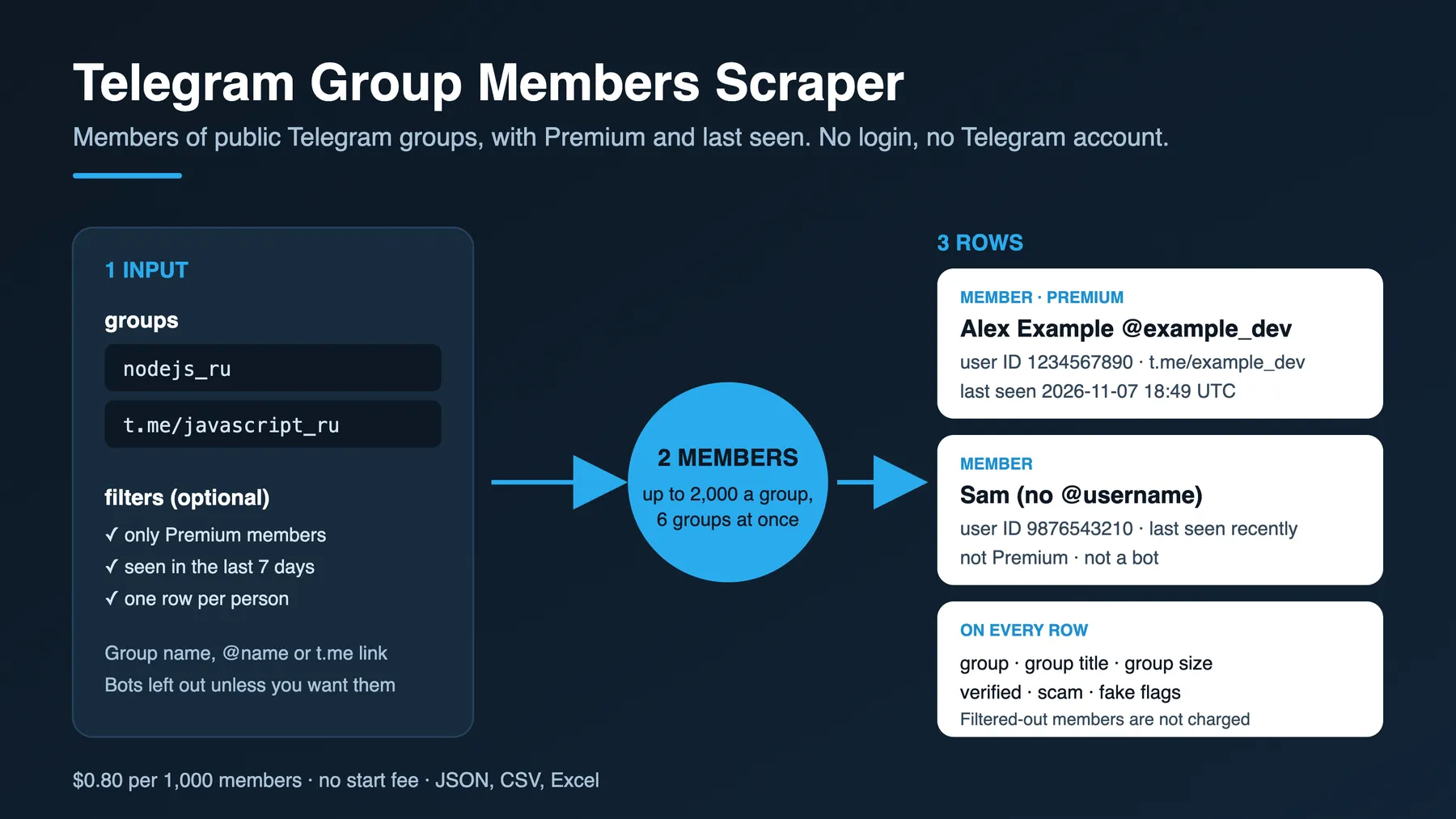
| Input | Rows |
|---|---|
| Public group name, @name or t.me link | One row per visible member, up to 2,000 a group |
| Broadcast channel | No rows: channels do not show their subscribers (not charged) |
| Invite link or private group | Skipped with a note in the log (not charged) |
Why Use This Scraper?
- No Telegram account. Nothing to log in to, no session file, no phone number, no risk to your own account.
- Filters that cost nothing. Leave out bots, keep only Premium members, only members with a @username, or only people seen in the last 3, 7 or 30 days. Members a filter leaves out are not charged.
- Last seen, kept honest. You get the exact time when the member shows it, and Telegram's own rounded status when they do not, in two separate fields.
- Group context on every row. Each member carries the group's name, title and member count, so a run across many groups stays easy to sort.
- One row per person if you want it. Turn on de-duplication and a person who sits in several of your groups is saved once.
- No start fee. $0.80 per 1,000 members and nothing per run beyond Apify's own $0.00005, so a 100-member check costs $0.08.
Use Cases
- Community research: see who is active in the groups around a topic, product or region.
- Audience building: collect the @usernames of active members in groups your audience already joins.
- Moderation and safety: check a group for bots and accounts Telegram marks as scam or fake.
- Competitor communities: compare the size and activity of rival groups over time.
- Overlap analysis: run several groups with de-duplication off and find the people they share.
How It Works
- Put one or more public group names or links in groups.
- The actor reads each group's visible member list, up to your max members per group (2,000 at most), several groups at a time.
- Your filters are applied, the group's title and size are added, and each kept member is saved as one row.
- Download the dataset as JSON, CSV, Excel or HTML, or read it from the API.
A list of 1,000 members takes about 3 minutes; six groups are worked on at the same time.
Input Configuration
| Field | Type | Default | What it does |
|---|---|---|---|
groups | array | — | Public group names, @names or t.me links (a message link from the group works too). |
maxMembersPerGroup | integer | 1000 | Members saved from each group, 1 to 2,000. |
includeGroupInfo | boolean | true | Adds the group's title and member count to every row. Free. |
includeBots | boolean | false | Keep bots in the output. Off by default. |
onlyWithUsername | boolean | false | Keep only members with a public @username. |
onlyPremium | boolean | false | Keep only Telegram Premium members. |
lastSeenWithin | string | any | any, recently (about 3 days), week or month. |
dedupeAcrossGroups | boolean | false | Save a person once even when they are in several groups. |
maxItems | integer | 10000 | Cap on member rows across all groups. Free-plan runs return up to 100. |
Example input
Active Premium members with a username, from two groups, each person once:
Output Samples
The values below are made up; the fields are what you get.
A member who hides the exact time and has no @username:
Key Output Fields
| Field | Meaning |
|---|---|
memberId | The member's permanent numeric Telegram user ID. Stays the same if they change their @username. |
username, profileUrl | Public @username and its t.me link; null when the member has none (about a third of members in our tests). |
name | Display name as the member set it. |
isPremium, isVerified, isBot, isScam, isFake | Telegram's own flags for the account. |
lastSeenStatus | exact, online, recently, within_week, within_month or unknown (hidden, or seen a long time ago). |
lastSeenAt | The exact last-seen time, only when lastSeenStatus is exact. |
phone | Only when the member made their number public, which is rare (none in our tests). |
group, groupTitle, groupMemberCount | Which group the member was found in, its title and its total member count. |
FAQ
Do I need a Telegram account or API keys? No. Give group names and run it.
Why did I get fewer members than the group has? Telegram shows outsiders only part of a large group's member list, and the actor saves up to 2,000 a group. Some groups hide their member list completely; for those only the recently active members are visible, and the run log says so (for example "the group shows 16 of its 93,480 members").
Can I scrape a channel's subscribers? No. Broadcast channels do not show their subscribers to anyone but their admins. A channel in your input returns no rows and costs nothing.
What about private groups and invite links? They cannot be read without joining, so they are skipped and noted in the log.
Are filtered-out members charged? No. You pay only for the rows saved to your dataset.
How fresh is the data? Every run reads the group at that moment.
Pricing
- $0.80 per 1,000 members saved ($0.0008 a member).
- No start fee beyond Apify's own $0.00005 a run.
- Members left out by your filters, empty groups, channels and skipped links are free.
- Free-plan accounts get up to 100 members a run to try it.
Support
Found a group that should work and does not, or need a field we do not return? Open an issue on the Issues tab and include the group name. We read every issue.
Explore More Scrapers
- Telegram Channel Scraper: posts, views and media from public channels.
- Telegram Channel Info Scraper: member counts, bios and links of channels and groups.
- Telegram Keyword Search Scraper: posts that mention a keyword across public channels.
🤖 For AI Agents & LLM Apps
Call it with {"groups": ["<group name or t.me link>"], "maxMembersPerGroup": 200} and read the default dataset. Each row is one member with stable keys; memberId is the join key across groups and runs. Use lastSeenWithin and onlyWithUsername to keep results small, and dedupeAcrossGroups when asking about people rather than memberships.
⚠️ Disclaimer
This actor collects only information that Telegram shows publicly to anyone who opens the group. It does not join groups, log in or read private chats. Member data is personal data: you are responsible for having a lawful basis to process it under the laws that apply to you (for example the GDPR) and for following Telegram's Terms of Service. Do not use the output for spam or unsolicited bulk messaging. This actor is not affiliated with or endorsed by Telegram.
SEO Keywords
telegram group members scraper, telegram member scraper, telegram members export, scrape telegram group members, telegram group member list, telegram user scraper, telegram username scraper, telegram premium users, telegram last seen, telegram audience, telegram community members, telegram supergroup members, export telegram members csv


