
Apple App Store Scraper
Pricing
from $0.60 / 1,000 apps
Apple App Store Scraper
Extract Apple App Store apps, customer reviews, ratings, developer details, pricing, and top charts. Export data, schedule via API, and integrate with other tools or AI workflows.
Pricing
from $0.60 / 1,000 apps
Rating
5.0
(1)
Developer

Michael G
Maintained by CommunityActor stats
3
Bookmarked
19
Total users
7
Monthly active users
14 days ago
Last modified
Categories
Share
What does Apple App Store Scraper do?
Apple App Store Scraper allows you to extract data about apps and customer reviews from the Apple App Store: app name, developer, price, ratings, categories, descriptions, screenshots, supported devices, release information, customer reviews, and more.
You can search apps by keyword, retrieve specific apps by App Store ID or URL, or collect ranked apps from Apple App Store charts. Select an App Store storefront, optionally include available customer reviews, and export the results or access them through the Apify API.
About the Apple App Store
The Apple App Store is Apple's marketplace for iPhone and iPad applications. App listings contain useful public information about developers, categories, pricing, ratings, compatibility, releases, screenshots, and customer feedback.
Because of this, the App Store is a practical source for app discovery, competitor research, App Store optimization (ASO), product research, review analysis, and mobile market research.
App data fields
| Field Name | Type | Description |
|---|---|---|
Record Type (type) | String | Dataset record type |
App ID (appId) | Integer | Apple's numeric App Store identifier |
App Name (appName) | String | App name |
Bundle ID (bundleId) | String | App bundle identifier |
Developer (developer) | String | App developer or publisher name |
Seller Name (sellerName) | String | Legal seller name |
Seller URL (sellerUrl) | String (URL) | Developer or product website URL |
Primary Genre (primaryGenre) | String | Primary App Store genre |
Genres (genres) | List | App Store genres assigned to the app |
Price (price) | Number | Numeric price in the selected storefront |
Formatted Price (formattedPrice) | String | Storefront-formatted price |
Currency (currency) | String | Storefront currency code |
Average User Rating (averageUserRating) | Number | Overall app rating in the selected storefront |
User Rating Count (userRatingCount) | Integer | Total number of app ratings |
Rating for Current Version (ratingForCurrentVersion) | Number | Average rating for the current app version |
Rating Count for Current Version (ratingCountForCurrentVersion) | Integer | Number of ratings for the current app version |
Content Rating (contentRating) | String | App age or content rating |
Version (version) | String | Current app version |
Release Date (releaseDate) | String (Date) | Original App Store release date |
Current Version Release Date (currentVersionReleaseDate) | String (Date) | Release date of the current version |
Release Notes (releaseNotes) | String | Release notes for the current version |
Minimum iOS Version (minimumOsVersion) | String | Minimum supported iOS version |
File Size in Bytes (fileSizeBytes) | Integer | App file size in bytes |
File Size in MB (fileSizeMB) | Number | App file size in megabytes |
Languages (languages) | List | Supported language codes |
Features (features) | List | Apple feature flags, such as iosUniversal |
Supported Devices (supportedDevices) | List | Supported Apple device identifiers |
Supported Devices Count (supportedDevicesCount) | Integer | Number of supported device identifiers |
Description (description) | String | Full App Store description |
App Icon (icon) | String (URL) | App icon URL |
Screenshot URLs (screenshotUrls) | List | iPhone screenshot URLs |
iPad Screenshot URLs (ipadScreenshotUrls) | List | iPad screenshot URLs |
App Store URL (appStoreUrl) | String (URL) | Public App Store listing URL |
Developer URL (developerUrl) | String (URL) | App Store developer page URL |
Country (country) | String | Two-letter storefront code used for the request |
Search Term (searchTerm) | String | Search keyword that returned the app; null outside Search apps mode |
Chart Rank (chartRank) | Integer | App position in the selected chart; null outside Top charts mode |
Chart Type (chartType) | String | Selected chart type; null outside Top charts mode |
Chart Category (chartCategory) | String | Selected chart category; null outside Top charts mode |
Scraped At (scrapedAt) | String (Date) | UTC timestamp when the app record was created |
Reviews (reviews) | List | Nested customer reviews collected for the app |
Apple may not provide every optional value for every listing. Missing scalar values are returned as null, while some list fields use an empty list.
Review data fields
| Field Name | Type | Description |
|---|---|---|
App Name (appName) | String | Name of the app the review belongs to |
App Rating (averageUserRating) | Number | Overall storefront rating of the app |
Review ID (reviews[].reviewId) | String | Apple review identifier |
Rating (reviews[].rating) | Integer | Customer rating from 1 to 5 |
Title (reviews[].title) | String | Review title |
Review Text (reviews[].text) | String | Full review text |
Author (reviews[].author) | String | Public review author name |
Author URL (reviews[].authorUrl) | String (URL) | Public URL associated with the review author |
Date (reviews[].date) | String (Date) | Review publication date in UTC |
App Version (reviews[].appVersion) | String | App version reviewed by the customer |
Vote Count (reviews[].voteCount) | Integer | Number of votes recorded for the review |
Vote Sum (reviews[].voteSum) | Integer | Total vote score reported by Apple |
Country (reviews[].country) | String | App Store storefront used to collect the review |
Customer reviews are stored inside the parent app's reviews array. The Reviews Dataset view expands this array and presents app-level context alongside each review.
Why scrape the Apple App Store?
- App discovery: find iPhone and iPad apps by keyword, category, or chart.
- Competitor research: compare competing apps, developers, positioning, prices, ratings, and releases.
- App Store optimization: analyze titles, categories, ratings, descriptions, screenshots, and other ASO data.
- Product research: identify user complaints, recurring issues, and requested features in available reviews.
- Review analysis: collect customer feedback for sentiment analysis or internal research in your own workflow.
- Market research: study app categories, pricing, publishers, compatibility, and release activity.
- Chart monitoring: track top free, paid, and grossing apps for a selected storefront.
- Lead generation: identify relevant app developers and publishers for targeted research or outreach.
Example Input
The Actor provides a straightforward input form where you can choose how to collect apps, select an App Store country, and optionally include customer reviews.
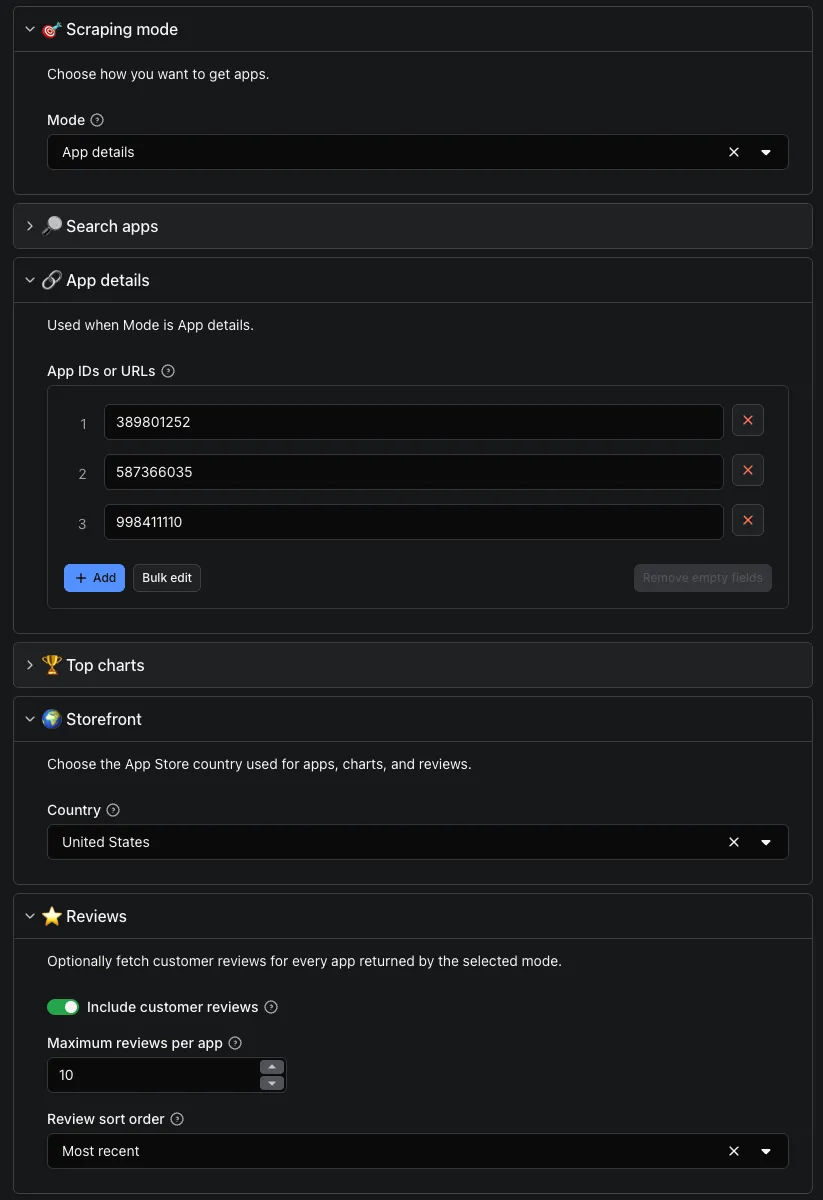
Example A: Search apps by keyword
Example B: Get specific apps and include reviews
Example C: Scrape top charts
The Input form is divided into mode-specific and shared sections:
- Search apps uses Search keywords, Max apps per keyword, and Price filter.
- App details uses App IDs or URLs.
- Top charts uses Chart, Category, and Chart results.
- Storefront and Reviews are shared settings.
Only the fields that belong to the selected mode affect how apps are collected.
Output sample
The results will be wrapped into a dataset which you can find in the Storage tab. Note that the output is organized in a table for viewing convenience.
The Overview Dataset view provides a compact summary of collected apps, including app icons, names, developers, ratings, prices, and other essential information.

The Apps Dataset view contains additional app-level metadata for more detailed research and analysis.

The Reviews Dataset view displays each available customer review as its own row, alongside app-level information such as the app name and overall rating.
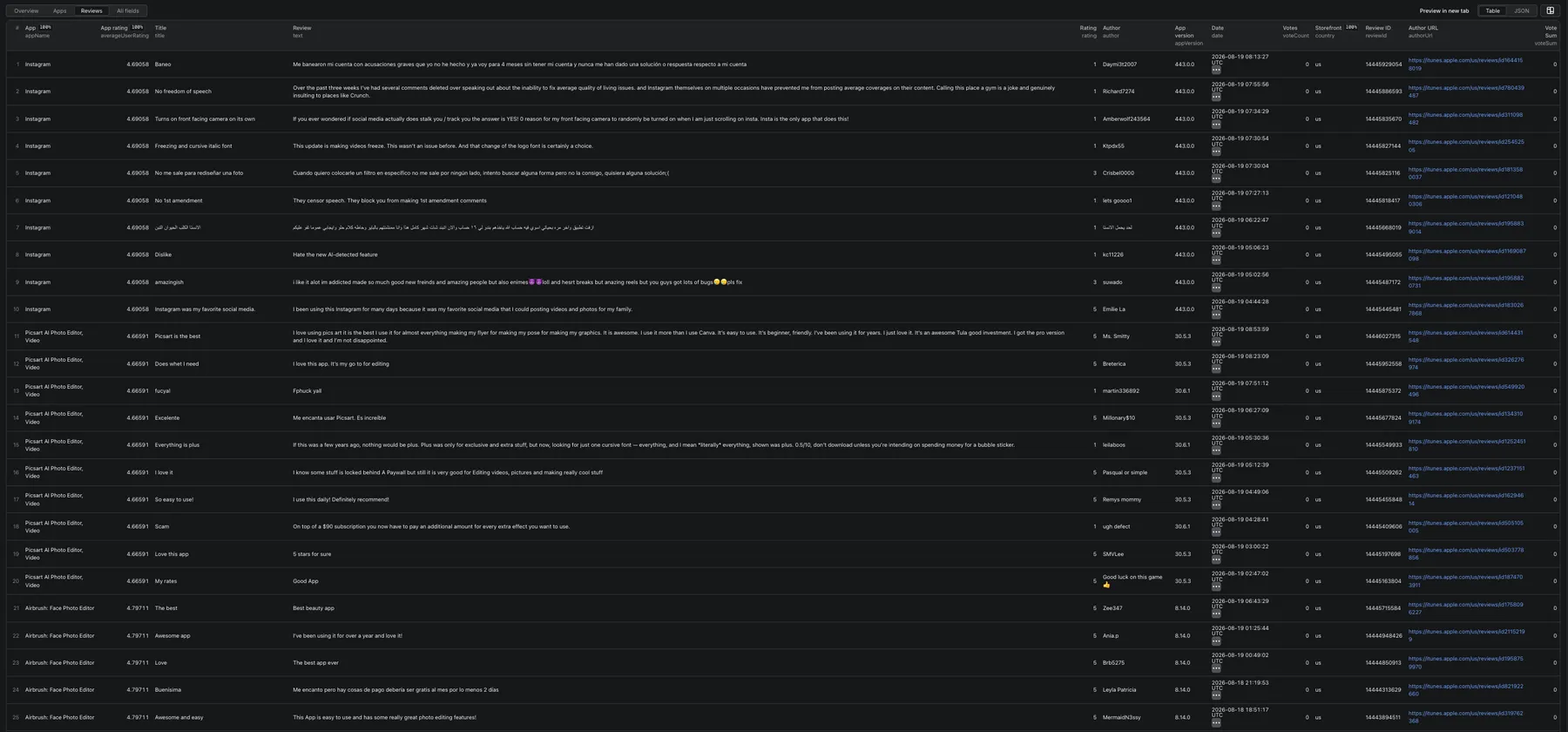
The Dataset provides the following views:
- Overview: one row per app with compact listing information.
- Apps: one row per app with additional app-level metadata.
- Reviews: one row per available customer review, created by expanding the nested
reviewsarray. - All fields: complete app objects, including the optional nested
reviews[]data.
Each physical Dataset item represents one app. Reviews are not stored as separate physical Dataset items; they remain inside that app's reviews array.
By clicking the Export button, you can download the Dataset in formats supported by Apify, including JSON, CSV, Excel, XML, and HTML. You can also access the results through the Apify API.
How do I use Apple App Store Scraper?
Apple App Store Scraper is designed to help you collect app metadata and available App Store reviews even if you have no prior scraping experience. Follow these steps:
- Choose Search apps, App details, or Top charts.
- Enter search keywords, App Store IDs or URLs, or chart settings for the selected mode.
- Select the App Store country used for app data, charts, and reviews.
- Optionally enable customer reviews and choose the review limit and sort order.
- Click Start and wait for the run to finish.
- Open the Dataset and export the results in your preferred format.
Only settings corresponding to the selected mode affect how apps are collected. Storefront and review settings are shared by all three modes.
Features
- Keyword Search: search one or more keywords and collect up to 200 apps per keyword.
- App Details by ID or URL: retrieve exact listings using numeric IDs or full App Store URLs.
- Top Charts: collect Top Free, Top Paid, or Top Grossing apps.
- Chart Categories: choose All apps or one of the supported App Store categories in the Input form.
- Country Selection: use a two-letter storefront code for app data, charts, and reviews.
- Customer Reviews: optionally attach reviews returned by Apple's public feed to each app.
- Review Sorting: request Most recent or Most helpful reviews.
- Price Filtering: return all, free, or paid apps in Search apps mode.
- Multiple Apps per Run: search multiple keywords or look up multiple IDs and URLs.
- Rich App Metadata: collect ratings, pricing, releases, compatibility, media, developer data, and more.
- Structured Dataset Views: inspect Overview, Apps, Reviews, or the complete All fields output.
- Export and API Access: use Apify export formats, API endpoints, schedules, and platform integrations.
Apple's public review feed can expose up to 500 available reviews per app and storefront. This is an upper limit, not a guarantee that every app or storefront will return that many reviews.
Reviews and Apple feed limitations
Reviews are collected from Apple's publicly available review feed. Availability depends on the selected storefront and Apple's current response. Some apps may temporarily return no reviews even when their App Store page displays ratings or review activity, and the same behavior can affect other tools that use this public feed.
The Actor retries temporarily empty responses up to three total attempts per page, then continues. Apps are still returned when reviews are unavailable, and the selected storefront is never changed automatically.
The public feed exposes up to 50 reviews per page and up to ten pages for the selected app, storefront, and sort order. Pagination can stop earlier when Apple returns an empty page, omits a valid next-page link, repeats review IDs, or reports fewer available reviews.
How much does Apple App Store Scraper cost?
Apple App Store Scraper uses pay-per-event pricing with three event types: Actor start, collected app, and collected customer review. You pay once when the Actor starts and for each app collected. Review charges apply only when customer reviews are included and successfully collected. Apps without available reviews do not generate review charges.
| Event | Free | Starter | Scale | Business |
|---|---|---|---|---|
| 1,000 apps | $1.20 | $1.00 | $0.80 | $0.60 |
| 1,000 reviews | $0.12 | $0.10 | $0.08 | $0.06 |
| Actor start | $0.0012 | $0.0010 | $0.0008 | $0.0006 |
App and review prices are listed per 1,000 collected results, while the Actor start price applies once per run.
Apify provides you with $5 in free usage credits every month on the Apify Free plan, allowing you to collect up to approximately 4,100 apps or 40,000 customer reviews for free using those credits.
For regular data collection, consider upgrading to the $29/month Starter plan, which can get you up to approximately 28,000 apps or 280,000 customer reviews every month.
The exact number of results depends on whether you collect app data only or include customer reviews.
Starter plan examples
- 1 app with 100 reviews: $0.0010 Actor start + $0.0010 app + $0.0100 reviews = $0.0120
- 100 apps without reviews: $0.0010 Actor start + $0.1000 apps = $0.1010
- 180 apps with 12,667 reviews: $0.0010 Actor start + $0.1800 apps + $1.2667 reviews = $1.4477
You can set a maximum cost per run in Apify Console to control spending.
Integrations and Apple App Store Scraper
Apple App Store Scraper can be connected with almost any cloud service or web app thanks to integrations on the Apify platform. You can use results with Make, n8n, Zapier, Google Sheets, Google Drive, Slack, Airbyte, GitHub, Clay, API-based workflows, AI workflows, and more Apify integrations.
These integrations are provided by the Apify platform and are not separate features built directly into this Actor.
Your feedback
We're always working on improving the performance of our Actors. If you've got any technical feedback for Apple App Store Scraper or simply found a bug, please create an issue on the Actor's Issues tab in Apify Console.


