

Sitemap Change Monitor: Added & Removed URLs
Pricing
from $2.90 / 1,000 sitemap compareds
Sitemap Change Monitor: Added & Removed URLs
Sitemap change monitor for public sitemap.xml files. Compares each run with the last one and returns URLs that were added, removed or whose lastmod changed, including nested sitemap indexes. Obeys robots.txt and does not fetch the pages. Not a one-time sitemap extractor.
Pricing
from $2.90 / 1,000 sitemap compareds
Rating
0.0
(0)
Developer

Muhammet Mustafa Dincer
Maintained by CommunityActor stats
0
Bookmarked
2
Total users
1
Monthly active users
a day ago
Last modified
Categories
Security
Limited permissionsShare
What is Sitemap Change Monitor?
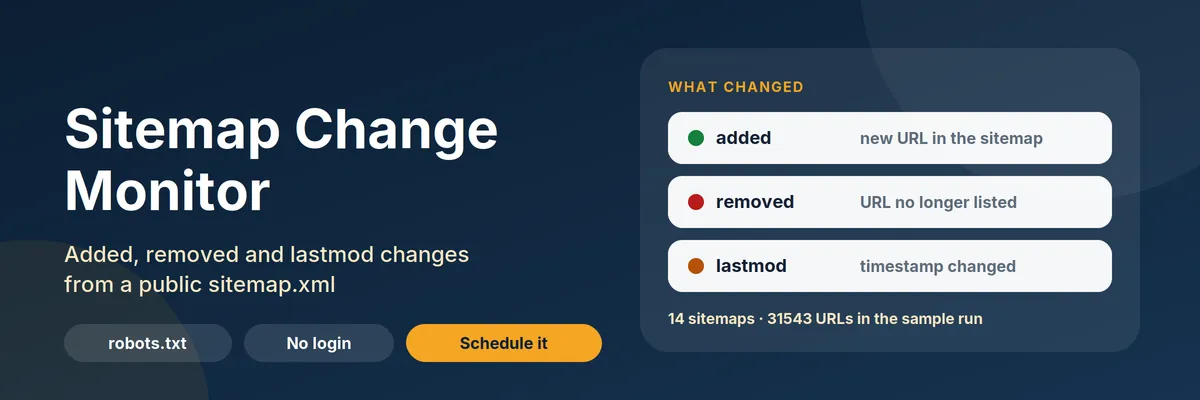
Sitemap Change Monitor watches a public sitemap.xml and, on every run after the first, returns only the URLs that were added, removed or whose lastmod changed. An added URL includes its page title. Paste a sitemap address or a domain, click Start, and schedule it. A sitemap extractor lists every URL once. This sitemap monitor tells you what moved, including URLs inside a nested sitemap index.
The first run saves a baseline and writes one summary row per sitemap. It does not charge per URL. Later runs with the same watchlist name write one row per change. The Actor reads sitemap files, and, when page titles are on, the HTML title of each new URL. It does not log in, and it obeys robots.txt.
Because it runs on Apify you also get an API, schedules, webhooks and the dataset as JSON, CSV or Excel. Point a webhook at the run and the change rows are the alert.
Quick answer: when should you pick this Actor?
Pick Sitemap Change Monitor when you want a sitemap monitor: new pages on a blog, pricing or product section, removed URLs after a migration, or lastmod updates on a public sitemap you already check by hand. Path filters such as /blog, /pricing and /products keep the alert on that section. New URLs come back with the page title, so a Slack or email alert is readable without opening the site.
Use a sitemap extractor instead when you need every URL in one dump, with HTTP status codes. This Actor does not check status codes, so it cannot tell you which URLs return 404.
Defaults that work: leave the prefilled sitemaps (https://www.sitemaps.org/sitemap.xml and https://www.ietf.org/sitemap.xml) and click Start. The first run returns two summary rows with status baseline_saved. Run the same input again later for the changes. Keep monitorName the same between runs.
At a glance
| Does | Compares a public sitemap with the previous run and returns added, removed and lastmod-changed URLs. Added URLs include the page title |
| Input | Sitemap URLs or domains, up to 50. A domain is resolved from the Sitemap: lines in robots.txt. Optional path filters |
| Output | One sitemap summary row, plus one change row per reported URL |
| Change types | added, removed, lastmod_changed |
| Needs | No login, no API key, no browser, no proxy |
| Pricing | Pay per event. Free plan: $0.0002 to start, $0.004 per sitemap compared, $0.0002 per URL change. A page title is not a separate charge |
| Does not | Check status codes, log in, bypass a bot wall, or open removed URLs. Page titles are optional and capped |
Key terms
- Baseline: the saved set of URLs and
lastmodvalues. The first successful run only saves a baseline. - Sitemap compared: one sitemap that was read and saved or compared. This is the primary paid event. A blocked or unreadable sitemap is free.
- URL change: one added, removed or
lastmod-changed URL that was written to the dataset. A baseline run has none. A page title rides on the added-URL row and is not its own event. - Watchlist: the
monitorName. Same name, same baseline. Usebloganddocsto keep two baselines apart. - Path filter: a segment such as
/blog,/pricingor/products./blogmatches/blog/postand/en/blog. It does not match/blogger. - Capped: the read stopped at Max URLs or Max sitemap files. Removals are not reported, because URLs past the cap would look deleted.
What can you use it for?
New and removed URLs
Schedule a daily run. added rows are new <loc> values. removed rows are URLs that disappeared. A migration that drops a path shows up here without downloading the whole sitemap into your sheet every day.
lastmod as a freshness alert
Keep all three change types. A URL whose <lastmod> changed from one real date to another becomes lastmod_changed, with previousLastmod and lastmod. Date-only values stay YYYY-MM-DD. Two timestamps that are the same instant in different UTC spellings count as equal.
When the sitemap has no lastmod
Some files omit <lastmod>, or drop it on a later run. Those URLs are still watched. The Actor reports them when they are added or removed. It does not treat a missing date as an edit:
- No date on both runs: unchanged.
- A date appears for the first time: stored, not reported. The next real date change is reported.
- A date disappears: not reported. The last known date is kept, so a later different date is still a change.
The summary field urlsWithoutLastmod counts URLs that had no <lastmod> in the file just read. A new URL with no date still gets a row, and, when titles are on, a page title.
Page titles for new URLs
fetchPageTitles is on by default. For each added URL, up to maxPageTitles (default 50), the Actor requests that page on the same site, reads the HTML <title> (or og:title when the title element is empty), and stores it on pageTitle. Removed URLs and lastmod_changed rows are not opened. The page body is not stored.
The request obeys robots.txt, waits at least one second (and a crawl-delay up to 10 seconds), and stops title fetches if the site returns 403, 429 or a bot-protection page. The URL row is still written. Set fetchPageTitles to false, or maxPageTitles to 0, to read sitemap files only.
One section of a large sitemap
includePaths keeps URLs whose path contains a segment such as /blog, /pricing or /products. Use this when you care about a competitor's blog, pricing page or catalog and not about tag or author archives. /blog matches /blog, /blog/post and /en/blog. It does not match /blogger. excludePaths uses the same rule, so /tag does not drop /tags.
Changing either list saves a new baseline on the next run, so the first run after the edit does not report the whole file as added. The same one-time baseline happens after this version, because path matching changed from a raw substring to a segment.
A domain, when you do not know the file name
Pass example.com. The Actor reads robots.txt, follows the Sitemap: lines on that site, and falls back to /sitemap.xml. Nested indexes are followed up to Max sitemap files, and only on the same site.
How to watch a sitemap
- Open the Actor and click Try for free (once it is public) or Start in Console.
- Keep the prefilled sitemaps, or replace them with your own sitemap URL or domain.
- Leave Max URLs at 20,000 for the first run.
- Click Start. The first run finishes with status
baseline_saved. - Run it again later, or create a schedule. Download the URL changes view, or call the dataset API.
A sitemap that answers with a bot wall, a robots.txt disallow or a crawl-delay over 10 seconds is skipped. The Actor does not retry a 403 or a 429, and it does not rotate proxies.
How much does Sitemap Change Monitor cost?
Pricing is pay per event. You pay for sitemaps that were actually compared, and for URL changes that were actually written. A baseline does not charge per URL. A sitemap that is blocked, missing or unreadable is not charged.
| Event | Free | Bronze | Silver | Gold and above |
|---|---|---|---|---|
| Actor start | $0.0002 | $0.0002 | $0.0002 | $0.0002 |
| Sitemap compared (primary) | $0.004 | $0.0036 | $0.0032 | $0.0029 |
| URL change | $0.0002 | $0.00018 | $0.00016 | $0.00014 |
A quiet daily watch of one sitemap is about $0.0042 on the Free plan (start plus one sitemap, no changes). Watching that sitemap for 30 days with no edits is about $0.13. One hundred URL changes on top of a check add $0.02. Reading the page title of a new URL does not add an event: it is part of that URL-change row. It does add one HTTP request per titled URL, at least one second apart, up to Max page titles.
One thousand sitemap checks, with no URL changes, cost $4.00 plus the start fees. The Apify free plan includes monthly credit, which covers hundreds of daily checks of a small sitemap.
A sitemap extractor that charges per URL, such as apify/sitemap-extractor at $0.0005 per result, costs about $0.50 to list 1,000 URLs once, and the same again every day if you schedule it. This Actor charges the comparison, then only the URLs that changed. boxbox10/sitemap-extractor lists every URL and is free. tri_angle/sitemap-change-detector describes a similar diff and does not publish a pay-per-event price.
Set the run's maximum cost if you want a hard stop. When the remaining limit cannot cover every change, the Actor writes the summary, writes no change rows, and leaves the baseline where it was. Raise the limit and run again. Those changes are not charged twice. Changes you drop with Max changes are different: they are omitted on purpose and are not repeated.
Input example
Output example
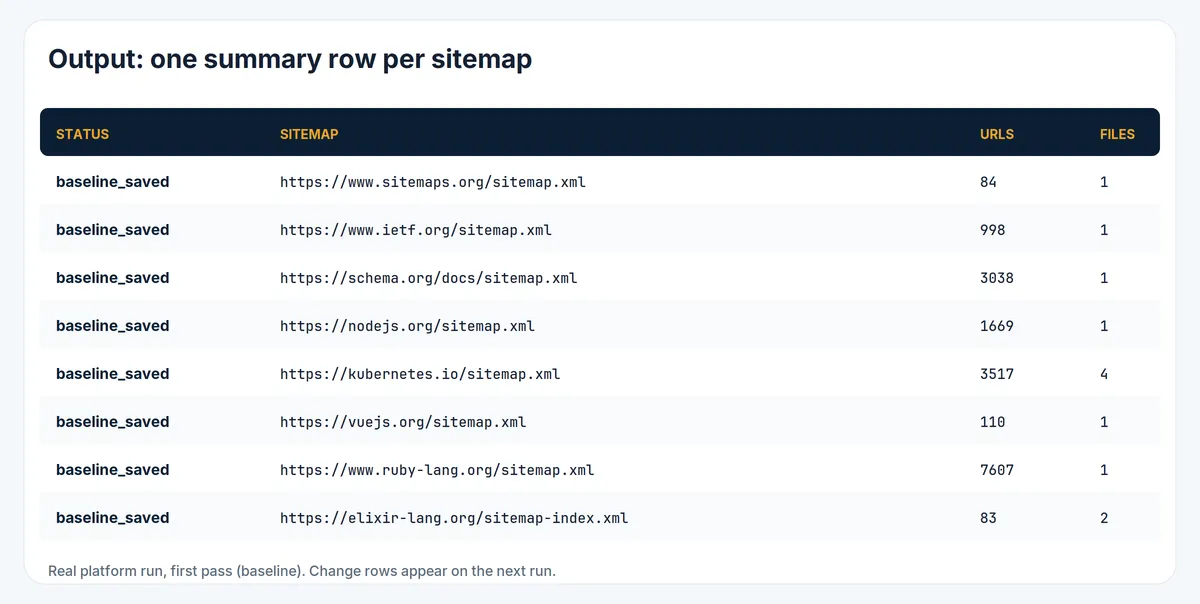
A baseline run writes a summary and no change rows:
A later run writes the summary plus one row per change:
status on a sitemap row is one of: baseline_saved, compared, incomplete, robots_disallowed, bot_challenge, refused, unreachable, http_error, unreadable, crawl_delay_too_long, cross_site_redirect, too_many_redirects, invalid_input, not_fetched.
The key-value record RUN_SUMMARY counts how many sitemaps were checked and how many URL changes were charged. The baseline itself is stored in your account in the named store sitemap-change-monitor-state. Deleting that store starts new baselines. The same monitorName must be used on later runs, including scheduled runs.
Tips
- Keep the same
monitorName. A new name is a new baseline, so the next run will not show the history of the old one. - A capped sitemap (
capped: true) does not report removals. Raise Max URLs (up to 50,000) or Max sitemap files (up to 30) if the summary says the file was cut. requestDelayMscannot go below 1000. Ifrobots.txtasks for a crawl-delay above 10 seconds, that sitemap is skipped.- Path filters and the caps are part of the baseline. Changing them saves a new baseline instead of marking every URL as added.
/blog,/pricingand/productsare segment filters:/blogdoes not match/blogger. - A sitemap with no
lastmodstill reports added and removed URLs. CheckurlsWithoutLastmodon the summary. A date that only appears or disappears is not a URL change. - Page titles apply to added URLs only, on the same site, up to Max page titles. A blocked page still leaves the URL row, with an empty
pageTitle. - The Actor sends
SitemapMonitor/1.0and follows theUser-agent: *group, or a group namedSitemapMonitorwhen a site has one.
Integrations and API
Schedule the Actor daily or hourly. Add an Apify webhook on the run to send the dataset to Slack, Google Sheets, Make, Zapier, n8n or your own endpoint. Filter on recordType = change so a quiet run does not look like an alert. Call the Actor from the Apify API or from an AI agent through the Apify MCP server. The Actor uses limited permissions: it writes its own dataset and its own named store of baselines, and it does not read the rest of your account.
Is it legal to monitor a sitemap?
A sitemap file is published so that crawlers can read it. The protocol and the Sitemap: line in robots.txt exist for that. This Actor fetches robots.txt and the sitemap files you name (or that robots.txt points to on that site). When Page title for new URLs is on, it also requests newly added URLs on that same site and reads the HTML title only. It does not log in, does not store the page body, and does not collect a page's text beyond that title.
It obeys robots.txt for every sitemap file and every page it would request, waits at least one second between requests to a host, honors a crawl-delay up to 10 seconds, and stops on HTTP 403, 429 or a bot-protection page. It does not try to get around a block. A page that is disallowed is listed without a title.
You choose the sites. You are responsible for their terms and for any personal data that appears inside a URL itself. The Actor is not affiliated with sitemaps.org, the IETF, or any site you watch. If a rights holder asks us to stop, we remove the Actor, including from the Store.
This is not legal advice. See Apify's guidance on web scraping legality.
FAQ
Does it need a login or cookies? No.
Is the first run empty? No. You get one summary row per sitemap with status: baseline_saved and the URL count. Change rows start on the next run.
Why are there no removed URLs? The read was capped, or you turned off the removed change type. The summary field removed is null when removals were not detected.
Why is pageTitle empty? Titles are read only for added URLs, and only while Page title for new URLs is on. The page may be disallowed by robots.txt, on another site, over Max page titles, or without a <title>. The URL row is still written. Turn the option off to skip those requests.
The sitemap has no lastmod. Did the watch fail? No. urlsWithoutLastmod counts those URLs. They show up when they are added or removed. A lastmod that appears for the first time, or disappears, is not reported as a change. The last known date is kept.
How do I watch only /blog, /pricing and /products? Put those three segments in Only watch paths containing. /blog matches /blog/post and does not match /blogger. The next run saves a new baseline.
Why did a URL show up as added twice? The spending limit stopped the run before the changes were saved, so the baseline was not moved. The next successful run reports them once and charges them once. A Max changes cut is different: those extra rows are dropped on purpose.
A site shows a challenge. The row is bot_challenge and it is free. The Actor will not switch IPs or headers to get past it.
How do I report a problem? Open an issue in the Issues tab and include the run URL.
Other Actors
| Actor | What it does |
|---|---|
| Shopify Store Monitor | Price, stock and new-product changes on public Shopify catalogs |
| Website Contact Page Finder | Finds contact, about, pricing and careers URLs. It reads a sitemap to locate pages; this Actor watches the sitemap itself |


