

EUIPO Trademark Search — EU Trade Mark Lookup & Clearance
Pricing
from $50.00 / 1,000 trademarks
EUIPO Trademark Search — EU Trade Mark Lookup & Clearance
EU trademark due diligence and clearance: search the EUIPO register by brand name, applicant or Nice class. JSON — mark, type, application/registration number, status, applicant, filing/registration dates, Nice classes, plus a similarity score and clearance risk. Official source. Pay per record.
Pricing
from $50.00 / 1,000 trademarks
Rating
0.0
(0)
Developer
NexGenData
Maintained by CommunityActor stats
1
Bookmarked
43
Total users
5
Monthly active users
2 days ago
Last modified
Share
EUIPO Trademark Search
Use it for EU trademark due diligence and brand clearance: profile applicants and research competitors’ marks — output is company data (mark, applicant, status, Nice classes, dates).
Search EUIPO trademarks for EU brand clearance. Built for IP counsel, brand teams, researchers and AI agents.
📊 Sample Output
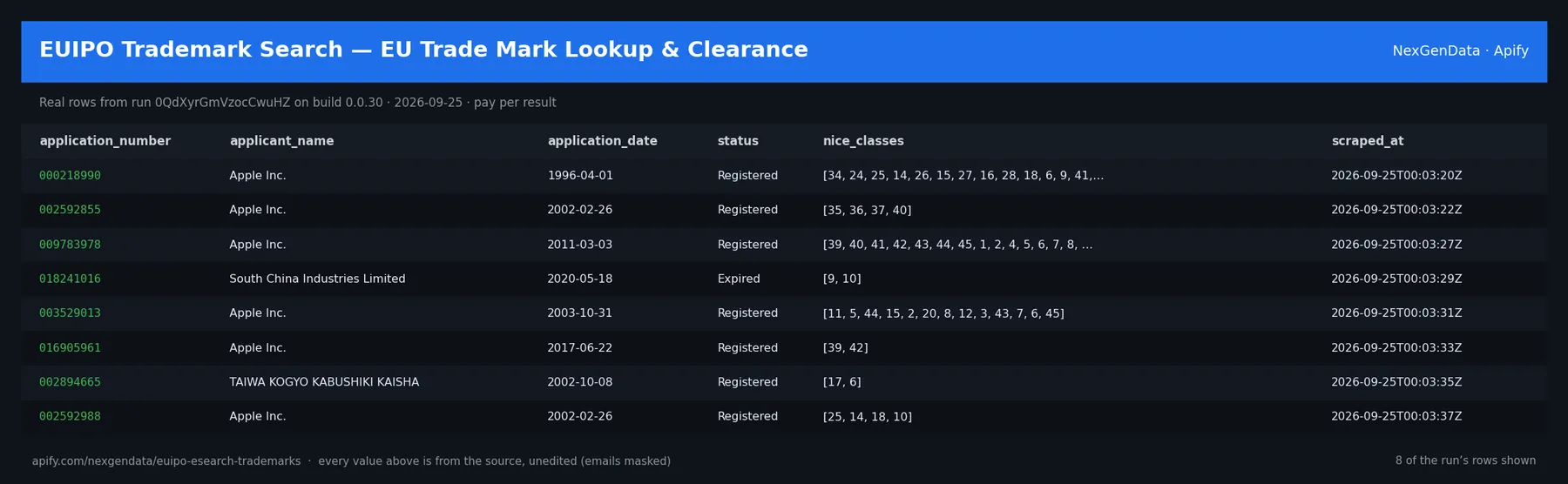
application_number | applicant_name | application_date | status | nice_classes | scraped_at |
|---|---|---|---|---|---|
| 000218990 | Apple Inc. | 1996-04-01 | Registered | [34, 24, 25, 14, 26, 15, 27, 16, '…'] | 2026-09-25T00:03:20Z |
| 002592855 | Apple Inc. | 2002-02-26 | Registered | [35, 36, 37, 40] | 2026-09-25T00:03:22Z |
| 009783978 | Apple Inc. | 2011-03-03 | Registered | [39, 40, 41, 42, 43, 44, 45, 1, '…'] | 2026-09-25T00:03:27Z |
| 018241016 | South China Industries Limited | 2020-05-18 | Expired | [9, 10] | 2026-09-25T00:03:29Z |
| 003529013 | Apple Inc. | 2003-10-31 | Registered | [11, 5, 44, 15, 2, 20, 8, 12, '…'] | 2026-09-25T00:03:31Z |
| 016905961 | Apple Inc. | 2017-06-22 | Registered | [39, 42] | 2026-09-25T00:03:33Z |
Real rows from run 0QdXyrGmVzocCwuHZ on build 0.0.30 (2026-09-25), unedited apart from masked emails/phones and shortened long text; fields the source does not publish are empty.
🔧 Input reference
| Field | Type | Default | What it does |
|---|---|---|---|
query (required) | string | "Apple" | Search by mark name (free text). |
offices | array | ["EM"] | ISO codes of TM offices to search. EM=EUIPO, DE=Germany, FR=France, etc. |
niceClasses | array | [] | Filter by Nice classification (1-45). Empty = all classes. |
status | string (, Registered, Filed, Opposed, Refused, Expired) | "" | Filter by status. Leave blank for all. |
maxResults | integer | 25 | Hard cap on trademarks returned. |
mode | string (search, watch) | "search" | 'Search' runs a one-off clearance search. 'Watch' monitors this exact query on a schedule and returns ONLY new or changed filings since the last run (first run just establishes th… |
watchLabel | string | "" | Optional. Names this watch so multiple watches stay independent — each label keeps its own memory of previously-seen marks. |
similarityThresholdPct | integer | 0 | Optional noise filter for watch alerts: only alert on marks at least this similar to your query (0 = alert on every new/changed match). Similarity blends text, token and phonetic… |
alertOnNewFilings | boolean | true | Alert when a mark appears that was not seen on the previous run. |
alertOnStatusChange | boolean | true | Alert when a previously-seen mark changes status (e.g. Filed -> Opposed, Filed -> Registered). |
watchMode | boolean | false | Fleet-standard alias for mode='watch'. Save this query and, on every later run, return ONLY items new since the last run. Billed $0.05 per check. |
🧾 JSON sample record
One real record from run 0QdXyrGmVzocCwuHZ (emails/phones masked, long text shortened):
💰 Pricing
| Event | Price (USD) | When it is charged |
|---|---|---|
Actor Start (apify-actor-start) | $0.005 | Charged when the Actor starts running. Number of events charged depends on Actor memory (one event per GB, minimum one event). |
Trademark (apify-default-dataset-item) | $0.05 | Single EUIPO / TMview trademark record (application #, mark, applicant, Nice classes, status). |
Watch check (watch-check) | $0.05 | One monitoring check per watch-mode run — diffs current EUIPO filings against the saved baseline to surface new or changed marks. Watch mod… |
Pay-per-event: you pay only for what the run delivers. A run that delivers nothing bills no result events (only the actor-start event, when the actor defines one). Example: a run that delivers 100 results costs 100 × $0.05 = $5.00 plus the start fee.
⏰ Run this as a brand watch (recommended)
Every IP registry actor is a monitoring subscription, not a one-shot lookup. Schedule a weekly sweep and catch new filings as they land:
Weekly cron (0 8 * * 1) turns this into an always-on brand watch.
📊 What you get
Clean JSON, one record per trademark (full output has 8 fields):
application_number— Application numbermark_name— Mark nameapplicant_name— Applicant namenice_classes— Nice classesstatus— Statusfiling_date— Filing dateoffice— Officemark_image_url— Mark image url
Pricing: $0.05 per trademark (Pay-Per-Event) — about 20 trademarks per $1.
🤖 Use with AI agents
Point Claude, the OpenAI Agents SDK, an n8n flow or any MCP-aware client at it and run EU trademark clearance searches on demand.
Sample agent prompt:
Agentic payments (x402): Supports agentic payment via x402 — agents can call this actor with USDC, no API key required.
Watch mode — monitor filings on a schedule
Set Mode = Watch (monitor changes) and run this Actor on a schedule (daily or weekly) to turn a one-off clearance search into ongoing monitoring. Watch mode:
- Remembers the marks it has already seen for each query (per optional Watch label), persisted across runs.
- On the first run, it establishes a baseline silently — no alerts, it just records what currently exists.
- On every later run, it returns only the deltas: newly-filed marks and marks whose status changed (e.g. Filed → Opposed, Filed → Registered). Quiet runs return an empty dataset.
- Every record carries a composite similarity_score (text + token + phonetic) and a clearance_risk band (Low / Medium / High), plus
change_type,previous_status,first_seenanddetected_at.
Wire it to alerts with Apify integrations: trigger an email, Slack message or webhook whenever a watch run produces items. Optional Similarity threshold % narrows alerts to the most confusingly-similar marks.
Watch inputs
mode:search(default) orwatchwatchLabel: optional name to keep multiple watches independentsimilarityThresholdPct: 0–100, optional noise filter (0 = all new/changed matches)alertOnNewFilings: alert on marks not seen last run (default on)alertOnStatusChange: alert on status changes for known marks (default on)
Set up a recurring watch — Saved Task + Schedule + integration
- Save a Task. Configure the Actor with
Mode = Watch, your brand in Search Query, the offices you care about (e.g.EMfor EUIPO), an optional Watch label, then click Save as a new task. Name it e.g.Watch: <brand> across EUIPO. - Schedule it. Open Schedules → Create schedule, add your saved task as the action, and pick a cadence (daily is typical for clearance monitoring). The first scheduled run establishes the baseline; every run after that returns only new or changed filings.
- Wire an alert. On the task's Integrations tab, add an email, Slack, or webhook integration and set it to trigger on run success with a non-empty dataset — so you're notified only when there's actually a new or changed mark. Zero-delta runs stay silent.
A ready-to-clone example task, "Watch: Spotify across EUIPO", is published on this Actor's Saved tasks tab — open it to see the exact watch configuration and run it in one click.
Watch-mode pricing
Watch mode adds one non-primary event, Watch check ($0.05 per watch-mode run), on top of the existing per-result and Actor-start pricing. Search mode is unaffected. Quiet monitoring runs cost only the Actor-start + one Watch check; you pay the per-result price only when a new or changed mark is actually returned.
Watch your mark in the EU and the US
This Actor is the EU half of a pair. For US / USPTO coverage use its sibling, USPTO Trademark Search — US Brand Clearance API — the same watch-mode monitoring for US trademark filings. Run both on a schedule to watch your brand across the two largest trademark systems in one workflow.
Run it on a schedule
For EU brand protection, a weekly run on each mark you watch catches new filings as they land, and daily suits active clearance monitoring. Between runs, new marks are filed and known marks change status, for example from Filed to Opposed or Filed to Registered. Set mode to watch (or watchMode to true): the first run quietly records a baseline, and every later run returns only newly filed marks and status changes, so quiet weeks return an empty dataset. Use similarityThresholdPct to keep only the most confusingly similar marks, and watchLabel to keep several watches separate. Send each run's results onward with a webhook, Google Sheets, Zapier, Make or the Apify API.
Video guides from Apify: Schedule your Actor · Integrations
FAQ
Why use this instead of the official EUIPO eSearch or TMview website?
EUIPO's eSearch and TMview are free to search in a browser. This actor turns a mark-name search into clean JSON with application number, office, mark name and type, applicant and country, filing and registration dates, status, Nice classes and a link to the TMview record. It adds a similarity score and a Low, Medium or High clearance-risk band to each mark, and a watch mode that returns only new or changed filings on a schedule. It needs no OAuth, no login and no API key, and you pay per trademark.
What does a typical run cost?
You pay per result, not for run time: $0.05 for each row in the results, plus $0.005 per run start (charged per GB of run memory, minimum one). A run that returns 25 trademarks costs about $1.25. Optional extras are charged only when you turn them on: a watch-mode change check $0.05. Live prices are always shown in the Pricing tab.
How do I check if a brand name is already registered as an EU trademark?
Put the name in query, keep offices as ["EM"] for EUIPO, and optionally narrow with niceClasses and status. Each result shows the mark's status and classes, and its similarity_score and clearance_risk tell you how close it is to your query. Treat it as a screening search before formal clearance.
Can I search national trademark offices in Europe too?
Yes. offices takes ISO office codes, for example DE for Germany or FR for France, alongside EM for EUIPO. EU trademark coverage does not include the UK since Brexit, so use the UK Trademark Search actor for the GB register.
Can I filter EU trademarks by Nice class or status?
Yes. niceClasses takes class numbers from 1 to 45 (empty means all classes), and status takes Registered, Filed, Opposed, Refused or Expired (blank means all). maxResults caps the number of marks returned, with a default of 25.
Related actors
- Trademark Search — USPTO Serial + IP Australia Name Search — the US half of the same brand watch.
- UK Trademark Search — UKIPO Brand Clearance API — the GB register, which EU coverage no longer includes.
- Trademark Conflict Watch — Brand Monitoring API — monitor conflicting filings across registers.
- Japan JPO Patents & Trademarks — 特許検索 API — extend clearance to Japanese marks.
- Korea KIPO Patents & Trademarks — 특허 검색 API — extend clearance to Korean marks.


