
PDF Text Extractor — Extract Text from PDF Links
Pricing
from $33.50 / 1,000 pdf documents
PDF Text Extractor — Extract Text from PDF Links
Extract text from PDF links, or from every PDF a page links to. One row per PDF: full text, page and word counts, optional per-page text, title, subject, dates and producer. Scanned or locked PDFs are skipped, not billed. Part of NexGen Signal — data tools and official-source data products
Pricing
from $33.50 / 1,000 pdf documents
Rating
0.0
(0)
Developer
NexGen Signal
Maintained by CommunityActor stats
0
Bookmarked
2
Total users
1
Monthly active users
2 days ago
Last modified
Categories
Share
📄 PDF Text Extractor — Extract Text from PDF Links
Give PDF links, or web pages that link to PDFs, and get the text of each PDF as one row: full text, page and word counts, optional per-page text with page labels, and the document's title, subject, keywords, creating application, producer and dates.
Text is read with PDFium, the engine inside Chrome, so columns, ligatures and non-Latin scripts come out cleanly and fast. Long documents are fine: a record holds up to 1.5 million characters, and anything longer is also saved in full as a text file with a link. Scanned PDFs with no text layer and password-protected PDFs are skipped and not billed.
The unit of output is one PDF delivered. Skipped files are not billed.
Who buys this and for what job
- AI and RAG builders turning PDF libraries into text for embedding and search.
- Analysts and researchers pulling text from reports, filings and papers in bulk.
- Compliance teams indexing published documents for keyword monitoring.
- Developers who need a PDF-to-text step in a pipeline without running their own parser.
Buyers usually search for this as "PDF to text API", "extract text from PDF URL" or "PDF scraper".
📊 Sample Output
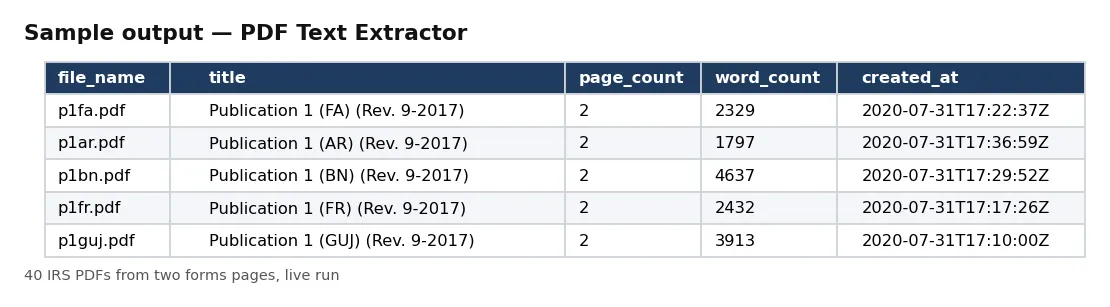
| file_name | title | page_count | word_count | created_at |
|---|---|---|---|---|
| p1fa.pdf | Publication 1 (FA) (Rev. 9-2017) | 2 | 2329 | 2020-07-31T17:22:37Z |
| p1ar.pdf | Publication 1 (AR) (Rev. 9-2017) | 2 | 1797 | 2020-07-31T17:36:59Z |
| p1bn.pdf | Publication 1 (BN) (Rev. 9-2017) | 2 | 4637 | 2020-07-31T17:29:52Z |
| p1fr.pdf | Publication 1 (FR) (Rev. 9-2017) | 2 | 2432 | 2020-07-31T17:17:26Z |
| p1guj.pdf | Publication 1 (GUJ) (Rev. 9-2017) | 2 | 3913 | 2020-07-31T17:10:00Z |
Rows from live run c2eJyMXNXuF1mPNr2 on Apify (40 PDFs collected from two IRS forms pages). Notice the page counts run from a 1-page form to publications of over 100 pages; each is one record.
✅ What you get
Every field of each record:
record_id,sha256,bytes— file hash (record_id is its first 24 characters) and size.url,final_url,found_on_page,file_name— the PDF link, where it was served from, the page it was found on, and the file name.text,text_chars,word_count— the text (pages separated by a blank line) and its size.text_truncated,full_text_url— true when the text was over 1.5 million characters; the full text is then saved as a file at full_text_url.pages— per-page text with page number and label (when includePages is on).page_count,pages_read,pdf_version,page_labels_used,is_tagged— document structure.title,subject,keywords,creator_app,producer,created_at,modified_at— document metadata (the Author field is not delivered).read_at— when it was read (UTC).
⚙️ Sample inputs
One PDF (the Store example)
Full text and metadata of the W-4 form.
Every PDF a page links to
Reads the page's PDF links, in page order.
Per-page text, first 10 pages only
For page-level search or chunking.
Input fields:
| Field | Meaning |
|---|---|
pdfUrls | PDF links, or pages with PDF links (up to 2,000). |
followPdfLinks | read PDFs linked from pages (default true). |
maxPdfsPerPage | PDF links taken per page (default 50). |
includePages | add per-page text (default false). |
maxPagesPerDocument | pages read per PDF (default 2,000). |
maxFileMb | skip PDFs bigger than this (default 100). |
maxDocuments | stop after this many delivered PDFs (default 1,000). Each delivered PDF is billed. |
🧾 JSON sample record
🔧 How it works
PDFs are downloaded 6 at a time, checked for the %PDF signature, and read page by page with pypdfium2 (PDFium). A PDF whose pages give no text at all is reported as scanned (it needs OCR) and not billed. The PDF's Author metadata is never delivered.
Every run reads each host's robots.txt first: a path it disallows is skipped, listed in the run receipt and never charged. Only public internet addresses are fetched (no private, loopback or cloud-metadata addresses, checked again on every redirect). No logins, no CAPTCHA solving, no proxies.
Delivery is pushed first and charged after. The run receipt (RUN_RECEIPT) lists every link with its outcome (for pages: PDF links found and what happened to each), the robots.txt result per host, and the delivered and charged counts.
💰 Pricing example
Per PDF delivered, no start fee, no monthly charge:
| Apify plan | Price per PDF |
|---|---|
| Free | $0.05 |
| Bronze | $0.045 |
| Silver | $0.04 |
| Gold, Platinum, Diamond | $0.0335 |
- 10 PDFs: $0.50 on the Free plan, $0.335 on Gold.
- 1,000 PDFs: $50.00 on Free, $33.50 on Gold.
- 10,000 PDFs: $500.00 on Free, $335.00 on Gold.
Coverage and size. Proof runs on 17 Oct 2026: 40 IRS PDFs from two pages in about 8 seconds, from 1-page forms to the 126-page Form 1040 instructions, each read in full. Text-layer PDFs only; for scans use the Image OCR Text Extractor.
⚖️ Legal & ToS
Documents belong to their owners. You choose the links. Make sure you have the right to download and use the content you point it at; the actor fetches only what you give it (and, where you turn it on, what those pages link to).
Every run reads each host's robots.txt first: a path it disallows is skipped, listed in the run receipt and never charged. Only public internet addresses are fetched (no private, loopback or cloud-metadata addresses, checked again on every redirect). No logins, no CAPTCHA solving, no proxies.
❓ FAQ
Does it OCR scanned PDFs? No. A PDF with no text layer is skipped and not billed; the Image OCR Text Extractor reads scans.
Are tables kept? Text comes out in reading order with line breaks; table cells are not split into columns.
Can it open password-protected PDFs? No. They are skipped and not billed.
🆘 Troubleshooting
- skipped: no text layer — The PDF is a scan; use OCR.
- text_truncated is true — The document has over 1.5 million characters; download full_text_url (add your token if storages are private).
- SOURCE UNAVAILABLE — None of your links could be reached after retries. Nothing was charged.
🔗 Related Actors
- PR Newswire Scraper — press releases by company or topic
- Website Tech Stack Detector — what a site is built with
- Website Contact Scraper — contact details from website lists
🏢 About NexGen Signal — data tools and official-source data products on Apify. Browse the catalog: apify.com/nexgensignal
⭐ Found this useful?
If this actor saved you time, a rating on its Apify Store page helps other buyers find it.
Part of NexGen Signal — data tools and official-source data products.


