

US Building Permits Data — Census BPS by State, County & Metro
Pricing
from $33.50 / 1,000 building permits records
US Building Permits Data — Census BPS by State, County & Metro
US Census Building Permits Survey as data: new housing units, buildings and valuation by structure type (1-unit to 5+) for states, counties and metro areas, monthly, year-to-date and annual. Filter by state, area and date. No API key. Part of NexGen Signal — official-source data products
Pricing
from $33.50 / 1,000 building permits records
Rating
0.0
(0)
Developer

NexGen Signal
Maintained by CommunityActor stats
0
Bookmarked
2
Total users
1
Monthly active users
2 days ago
Last modified
Categories
Share
🏗️ US Building Permits Data — Census BPS by State, County & Metro
Get the US Census Bureau's Building Permits Survey as clean JSON — new privately-owned housing units, buildings and construction value authorized by permit, split into 1-unit, 2-unit, 3-4 unit and 5+ unit structures, for every state, county and metro area — straight from Census's own permit files.
Choose states (with division, region and US totals), counties or metro and micro areas (CBSA, from 2024), and monthly, year-to-date or annual files. With no dates, the actor reads the latest month Census has published. Valuation is always delivered in dollars.
The unit of output is one permits record: one state, county or metro area for one month or year. You pay per record delivered; a run that finds nothing costs nothing.
Who buys this and for what job
- Homebuilders, building-products makers and suppliers sizing demand by county and metro, single-family versus multifamily.
- Real estate investors and lenders tracking new supply pipelines in their markets.
- Economists and analysts following housing permits month by month.
- Local government and planning teams benchmarking against peer counties.
Buyers usually search for this as "building permits data" or "census building permits by county".
📊 Sample Output
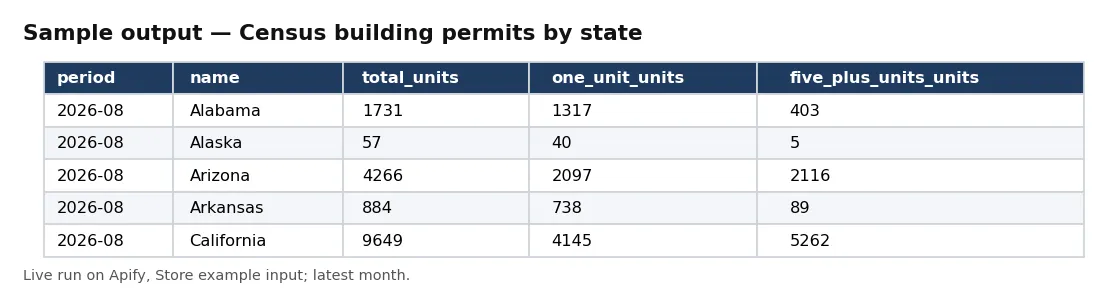
| period | name | total_units | one_unit_units | five_plus_units_units | total_valuation_usd |
|---|---|---|---|---|---|
| 2026-08 | Alabama | 1731 | 1317 | 403 | 451645000 |
| 2026-08 | Alaska | 57 | 40 | 5 | 19039000 |
| 2026-08 | Arizona | 4266 | 2097 | 2116 | 1190862000 |
| 2026-08 | Arkansas | 884 | 738 | 89 | 225057000 |
| 2026-08 | California | 9649 | 4145 | 5262 | 2599020000 |
| 2026-08 | Colorado | 1900 | 1298 | 578 | 779079000 |
Rows from live run I8tz4glQAGFnK8cJv on Apify (the Store example: level state, latest month, 10 records). Notice the latest month Census has published (August 2026 here), with single-family (1-unit) and multifamily (5+ units) counts and valuation in dollars.
✅ What you get
Every field of each record:
record_id— bPS:level— state, county or metro.period_type— monthly, year_to_date or annual.period— 2026-08 (monthly and year-to-date) or 2025 (annual).survey_date— survey date as published (YYYYMM or YYYY).name— state, county or CBSA name as published.state_fips— two-digit FIPS state code (state and county levels; division/region/US rows carry Census's own codes).county_fips— three-digit FIPS county code (county level).csa_code— combined Statistical Area code, or 999 when the CBSA is in none (metro level).cbsa_code— five-digit CBSA code (metro level).cbsa_type— metropolitan (part of a CSA or not) or Micropolitan.region— census region.division— census division.is_aggregate— true for division, region and US total rows in state files.total_buildings— sum of the four building-type columns (estimates with imputation).total_units— sum of the four unit columns.total_valuation_usd— sum of the four valuation columns, in dollars.valuation_published_unit— unit Census uses in this file (thousands of dollars for state and CBSA files, dollars for county files); valuation_usd fields are always in dollars.source— publisher survey.source_file— census file read.source_url— file URL.source_file_last_modified— last-Modified of that file.licence— licence notice.attribution— source line.observed_at— when this run read it (UTC).one_unit_buildings— 1-unit buildings (estimates with imputation).one_unit_units— 1-unit housing units (estimates with imputation).one_unit_valuation_usd— 1-unit valuation in dollars (estimates with imputation).two_units_buildings— 2-units buildings (estimates with imputation).two_units_units— 2-units housing units (estimates with imputation).two_units_valuation_usd— 2-units valuation in dollars (estimates with imputation).three_four_units_buildings— 3-4 units buildings (estimates with imputation).three_four_units_units— 3-4 units housing units (estimates with imputation).three_four_units_valuation_usd— 3-4 units valuation in dollars (estimates with imputation).five_plus_units_buildings— 5+ units buildings (estimates with imputation).five_plus_units_units— 5+ units housing units (estimates with imputation).five_plus_units_valuation_usd— 5+ units valuation in dollars (estimates with imputation).reported_one_unit_buildings— 1-unit buildings (reported only).reported_one_unit_units— 1-unit housing units (reported only).reported_one_unit_valuation_usd— 1-unit valuation in dollars (reported only).reported_two_units_buildings— 2-units buildings (reported only).reported_two_units_units— 2-units housing units (reported only).reported_two_units_valuation_usd— 2-units valuation in dollars (reported only).reported_three_four_units_buildings— 3-4 units buildings (reported only).reported_three_four_units_units— 3-4 units housing units (reported only).reported_three_four_units_valuation_usd— 3-4 units valuation in dollars (reported only).reported_five_plus_units_buildings— 5+ units buildings (reported only).reported_five_plus_units_units— 5+ units housing units (reported only).reported_five_plus_units_valuation_usd— 5+ units valuation in dollars (reported only).
⚙️ Sample inputs
1. The Store example — states, latest month
Returned the 10 records above from st2608c.txt in run I8tz4glQAGFnK8cJv; $0.50 on the Free plan.
2. Every Texas county, latest month
Read 3,018 counties from co2608c.txt and returned 40 of the 221 Texas counties in run OqHDi8aCAhwVJE1aw; raise maxRecords for all of them.
3. Annual permits for Texas metro and micro areas
Returned 20 of the 66 Texas CBSAs from cbsa2025a.txt in run Pjdni8tlQiGfyeveR.
Input fields:
| Field | Meaning |
|---|---|
level | Which Census permits file family to read. |
periodType | Monthly current-month files, year-to-date files (include late reports for earlier months), or annual files. |
monthFrom | First month wanted, e.g. 2025-01 (monthly and year-to-date). Leave both months empty for the latest month. |
monthTo | Last month wanted, e.g. 2026-08. |
yearFrom | First year wanted (annual files). |
yearTo | Last year wanted (annual files). |
states | Two-letter codes (TX) or FIPS codes (48); at state level also full names. Not for metro. |
nameContains | Keep rows whose name contains any of these, e.g. Harris (county), Austin (metro), TX (metro names end with the state). |
cbsaCodes | Five-digit CBSA codes, e.g. 12420 (metro level). |
includeAggregates | State files end with division, region and US totals. |
order | By period. |
maxRecords | Stop after this many records (each is charged once). |
🧾 JSON sample record
🔧 How it works
-
Robots check.
www2.census.gov/robots.txtis read on every run; it sets no rules for general crawlers, so the permit folders are allowed. A robots file that disallowed them would stop the run with nothing charged. -
Find the files. The actor reads Census's folder listing for your level (State, County or CBSA) to see which monthly (
c), year-to-date (y) and annual (a) files exist, then picks the latest one or the ones in your date range. -
Parse the official layout. Each comma-delimited file is read using Census's documented record layout: identification fields, then buildings, units and valuation for 1-unit, 2-unit, 3-4 unit and 5+ unit structures, first with imputation and then reported only.
-
Deliver, then charge. Records are pushed file by file, newest period first, each batch charged after delivery. Reading stops at
maxRecordsor your maximum charge. -
Receipt.
RUN_RECEIPTrecords the robots result, the files read and their row counts, and delivered and charged counts.
No login, API key, proxy or bot workaround.
💰 Pricing example
Per record delivered, no start fee, no monthly charge:
| Apify plan | Price per record |
|---|---|
| Free | $0.05 |
| Bronze | $0.045 |
| Silver | $0.04 |
| Gold, Platinum, Diamond | $0.0335 |
- 10 records (the Store example): $0.50 on the Free plan, $0.335 on Gold.
- 1,000 records (the default cap): $50 on Free, $45 on Bronze, $40 on Silver, $33.50 on Gold.
Coverage and size. States (with 4 regions, 9 divisions and the US total) and counties back to the 1990s, metro and micro areas (CBSA) from January 2024; the latest month on 12 Oct 2026 was August 2026. State and CBSA valuation is published by Census in thousands of dollars (its documentation says so) and delivered here multiplied to dollars; county valuation is published in whole dollars (the county documentation does not state the unit; the figures are whole dollars) and delivered as published. total_* fields are the sum of the four structure-type columns. Metro files before 2024 (old MSA definitions) are not read.
⚖️ Legal & ToS
Data: U.S. Census Bureau, Building Permits Survey (www2.census.gov/econ/bps). A work of the U.S. Government, not subject to copyright in the United States (17 U.S.C. §105). Every record carries that notice in licence and the source line in attribution. Not affiliated with or endorsed by the Census Bureau.
Counts for states, counties and metro areas only — no personal data. robots.txt is honoured. Public files only, declared User-Agent, no login, key, proxy or form.
❓ FAQ
What is the difference between 'estimates with imputation' and 'reported only'?
Census fills in permit offices that did not report (imputation); the reported_* fields show only what offices reported. Most users use the imputed figures.
Monthly or year-to-date? Monthly files cover that month only. Year-to-date files sum January to that month and include late reports for earlier months.
Why is the latest month not this month? Census publishes permits with a lag; the actor reads the newest file it finds.
Do I need a Census API key? No. The actor reads Census's public files.
🆘 Troubleshooting
- 0 records at county level — give states as two-letter codes (TX) or FIPS codes (48); names are not accepted at county level.
- Metro run before 2024 — CBSA files start in January 2024.
- A name filter matched too much —
nameContainsmatches anywhere in the name; usecbsaCodesfor an exact metro. - SOURCE UNAVAILABLE message — the source did not answer after four tries; nothing was charged — run again later.
- CAPPED message — your maximum total charge was reached; raise it in the run options.
- Run failed with "Invalid input" — a filter value is malformed; the message names the field. Nothing was charged.
🔗 Related Actors
- Australia Building Approvals by SA2 - ABS — Australian building approvals.
- UK Construction Output Monthly - ONS — UK construction output.
- Eurostat Construction Production — Monthly — construction production across Europe.
- Europe House Prices — Eurostat House Price Index (Quarterly) — house prices across Europe.
- Ireland House Prices — Property Price Register Sales Search — Irish house sales.
🏢 About NexGen Signal — official-source data products from government and regulator publications. Browse the catalog: apify.com/nexgensignal
⭐ Found this useful?
If this actor saved you time, a rating on its Apify Store page helps other buyers find it.
Part of NexGen Signal — official-source data products.


