

YouTube Scraper API — Videos, Shorts, Comments, Emails, Leads
Pricing
from $2.00 / 1,000 video results
YouTube Scraper API — Videos, Shorts, Comments, Emails, Leads
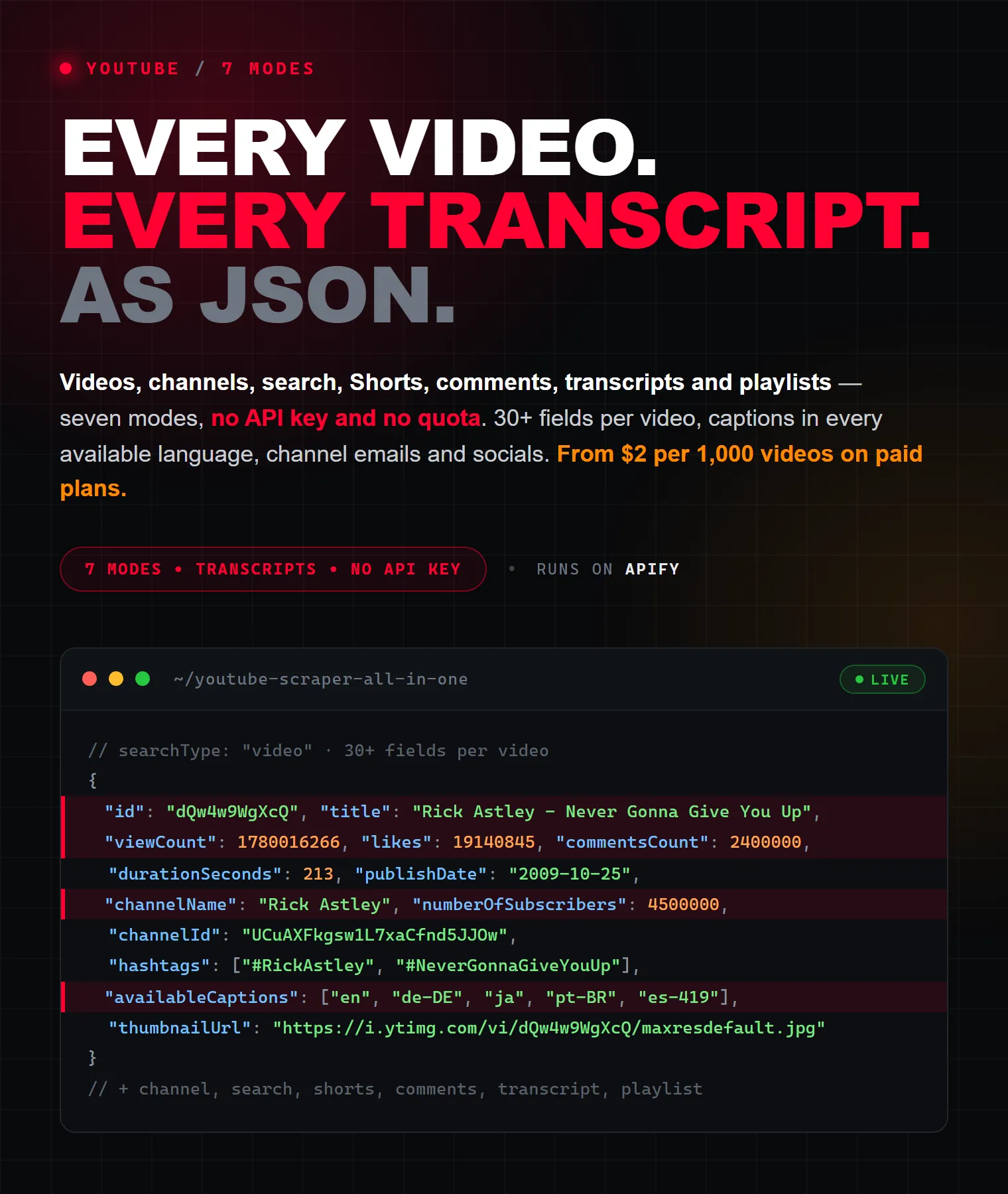
YouTube scraper and unofficial YouTube Data API — no key, no quotas: video details with exact views/likes, chapters, caption tracks, media formats, channel profiles, search filters, Shorts, Emails, live streams, comments with replies, transcripts and playlists. JSON/CSV/Excel. From $2/1k videos.
Pricing
from $2.00 / 1,000 video results
Rating
5.0
(1)
Developer

Raven
Maintained by CommunityActor stats
1
Bookmarked
35
Total users
7
Monthly active users
a month ago
Last modified
Categories
Share
YouTube Scraper — Videos, Channels, Comments, Transcripts, Shorts & Playlists (no API key)
The all-in-one YouTube scraper and unofficial YouTube Data API — with no quotas, no OAuth and no daily limits. Extract video details, channel profiles, keyword search results, Shorts, comments & replies, transcripts/subtitles and playlists from a single actor. No login, no API key, no code and no proxies to configure — just pick a Search Type, paste your URLs or keywords, and download clean structured data as JSON, CSV, Excel, XML or HTML.
Pay only for the results you get: videos, channels, Shorts and playlists start at $5 per 1,000 on the free plan and drop to $2 per 1,000 on paid plans, comments from $0.90 per 1,000, and transcripts from $9 per 1,000. Empty and failed results are never charged.
This one actor replaces an entire toolbox of separate tools — a YouTube video scraper, channel scraper, comments scraper, transcript/subtitle scraper, Shorts scraper, search scraper and playlist scraper — combined into a single, reliable extractor.
| Raven · Social-media suite • Instagram, TikTok, YouTube, Reddit, Threads, Pinterest | |||
 YouTube Scraper YouTube Scraper➤ You are here |
 Instagram Scraper Instagram ScraperPosts, followers, comments |
 TikTok Profile TikTok ProfileProfiles, videos, contacts |
 Reddit Scraper Reddit ScraperPosts, comments, users |
What does this YouTube Scraper do?
Pick a Search Type, fill the matching section, and the actor returns clean records for that mode. It talks to YouTube's internal (InnerTube) endpoints directly, so there are no API quotas to hit — a practical alternative to the official YouTube Data API, whose free tier is capped at 10,000 units/day and requires a Google Cloud project and OAuth.
| Search Type | What you provide | What you get |
|---|---|---|
| 🎥 Video details | Video URLs | Full metadata per video: title, exact views & likes, comment count, duration, description + its links, hashtags, tags/keywords, chapters, channel block, publish timestamp, category, caption tracks, thumbnails, storyboard previews, optional media formats |
| 📺 Channel | Channel URLs or @handles | Full channel profile + its videos, Shorts, live streams and (optionally) playlists, with date filtering and sort options |
| 🔎 Search | Keywords | YouTube keyword search with sort, upload-date, duration, type and feature filters (HD, 4K, CC, Live, 360°, HDR…) |
| ⚡ Shorts | Channel URLs or @handles | Shorts from a channel — title, view count, thumbnail, video ID, plus the full channel block |
| 💬 Comments | Video URLs | Every comment and reply with likes, reply count, author, verified badge, pinned & creator-heart flags |
| 📝 Transcript | Video URLs | Full timestamped transcript exported as SRT / WebVTT / XML / plain text, in any available language |
| 🎶 Playlist | Playlist URLs | Every video in a playlist, in order, with position, duration and channel |
➕ Automatic contact extraction — when you scrape channels, the actor pulls emails (including obfuscated name (at) domain (dot) com forms) and social links across 15 platforms (Instagram, TikTok, X/Twitter, Facebook, Discord, Telegram, Twitch, LinkedIn, Patreon, GitHub, Reddit, Spotify, Snapchat, WhatsApp, Pinterest) plus the channel's external links (with their real URLs), country, join date and total view count — straight from the channel description and About panel.
Why use this YouTube scraper?
- ✅ 7 scrapers in one — videos, channels, search, Shorts, comments, transcripts and playlists from a single actor and a single input.
- ✅ No API key, no quotas — skip the official YouTube Data API's 10,000-unit/day limit, Google Cloud setup and OAuth entirely.
- ✅ 30+ fields per video and up to 18 fields per channel — far more than a title-and-URL scraper.
- ✅ Comments and replies — with like counts, reply counts, verified badges, channel-owner and creator-heart flags.
- ✅ Full transcripts & subtitles — SRT, WebVTT, XML or plain text, manual or auto-generated, in any available language.
- ✅ Email & social extraction — public emails and 15 social platforms auto-pulled from channel descriptions for lead generation and influencer outreach.
- ✅ Advanced search filters — sort, upload date, duration, result type and feature flags (HD, 4K, CC, Live, 360°, HDR, VR180, Creative Commons…).
- ✅ Pay only per result — empty and failed results are never charged; a global Max items cap keeps every run within budget.
- ✅ Export anywhere — JSON, CSV, Excel, XML, HTML, or via API and no-code integrations (Make, Zapier, n8n, Google Sheets, Slack).
This actor vs. the official API vs. single-purpose scrapers
| Official YouTube Data API | Typical single-purpose scraper | This YouTube Scraper | |
|---|---|---|---|
| API key / OAuth / Google Cloud | Required | Not required | Not required |
| Daily quota | 10,000 units/day | Usually none | None |
| Scope | One endpoint at a time | Usually one thing (e.g. only transcripts) | Videos, channels, search, Shorts, comments, transcripts & playlists in one |
| Comments + replies | Limited & quota-heavy | Sometimes | Yes — with replies, hearts, pinned & owner flags |
| Transcripts / subtitles | Not available | Separate actor | Built in — SRT / VTT / XML / text |
| Email & social extraction | No | Rarely | Yes — emails + 15 social platforms |
| Pricing | Free but quota-limited | Varies | Pay per result; empty results free |
| Chapters, storyboards, media formats | No | Rarely | Yes — chapters, preview sheets, per-variant codec/resolution/bitrate |
| Export formats | JSON only | Varies | JSON, CSV, Excel, XML, HTML |
Competitor columns are generalized — individual scrapers vary.
What data can you extract?
🎥 Video (50+ fields)
Core: type · id · url · title · description · descriptionLinks (anchor text + real URL, YouTube redirects unwrapped) · viewCount · likes (exact) · likesText · commentsCount · commentsTurnedOff · duration · durationSeconds · keywords (tags) · hashtags · superTitle (topic/hashtag line above the title) · chapters (title, startSeconds, thumbnailUrl).
Dates & category: publishDate · uploadDate · date · dateText ("Aug 31, 2025") · publishedTimeText ("11 months ago") · category.
Channel block: channelId · channelName · channelUrl · channelHandle · channelAvatarUrl · isChannelVerified · numberOfSubscribers · subscriberCountText.
Flags & availability: isLive · isLiveNow · isPrivate · isFamilySafe · isUnlisted · isShortsEligible · isPaidPromotion · hasPurchaseOffer · allowRatings · availableCountries · playabilityStatus.
Media: thumbnailUrl · thumbnails (all sizes) · embedUrl · videoPreviews (storyboard sheets: tile size, grid, frame interval, URL) · availableCaptions · captions (per track: language code, name, auto-generated, translatable) · hasCaptions · translationLanguages · descriptionContacts (emails/socials found in the description).
With Include video/audio formats on, videos also carry streamingData — every progressive and adaptive variant with itag, mimeType (container + codec), width/height, fps, qualityLabel, bitrate, contentLength and URL. With Download subtitles on, videos also get subtitles, transcriptText and subtitlesLanguage.
📺 Channel (up to 22 fields)
type · channelId · channelName · channelHandle · channelUsername · channelUrl · channelRssUrl · channelDescription · numberOfSubscribers · subscriberCountText · channelTotalVideos · channelTotalViews · channelLocation · channelJoinedDate · isChannelVerified · isFamilySafe · channelKeywords · channelAvatarUrl · channelBannerUrl · channelLinks (external links with real URLs) · channelContacts (emails + socials + other links).
Every video / Short / stream scraped from a channel also carries that channel block (name, handle, avatar, banner, subscribers, total views/videos, location, join date, verified flag), so a per-video export needs no second lookup.
💬 Comment / reply (20 fields)
type (comment or reply) · cid · comment · publishedTimeText · isEdited · voteCount · voteCountText · replyCount · author · authorChannelId · authorChannelUrl · authorThumbnail · authorIsVerified · authorIsChannelOwner · authorIsArtist · hasCreatorHeart · isPinned · replyToCid · videoId · videoUrl · commentsCount (total on the video).
📝 Transcript (20 fields)
type · videoId · videoUrl · title · durationSeconds · viewCount · channelName · channelId · channelUrl · language · languageName · isAutoGenerated · availableCaptions · captions · translationLanguages · segmentCount · transcript (array of {start, dur, text}) · transcriptText (full plain text) · subtitlesFormat · subtitles (rendered SRT/VTT/XML/text).
🔎 Search / ⚡ Short / 🎶 Playlist
Search and channel-tab rows return type · id · url · title · description · duration · durationSeconds · viewCount · viewCountText · publishedTimeText · date · badges (LIVE, 4K, CC, New…) · isLive · thumbnailUrl · channelName · channelId · channelUrl · channelHandle · channelAvatarUrl · isChannelVerified · input (the URL, handle or query that produced the row).
Playlist videos add index (position), playlistId, playlistUrl, playlistTitle, playlistOwner, playlistVideoCount and playlistViewCount; an empty playlist returns the playlist record itself with playlistDescription, playlistOwnerId, playlistOwnerUrl and playlistThumbnailUrl.
Turn on Full details for every result to upgrade every search / channel / Shorts / playlist row to the complete Video field set above (exact views, likes, comment count, publish timestamp, category, chapters, tags, description links) — one extra request per video.
How to scrape YouTube step by step
- Choose a Search Type from the dropdown (Video, Channel, Search, Shorts, Comments, Transcript or Playlist).
- Fill the matching section:
- Video / Comments / Transcript → paste video URLs into YouTube URLs.
- Channel / Shorts → paste channel URLs or
@handles. - Search → type keywords into Search queries.
- Playlist → paste playlist URLs.
- Set your limits (Max items, Max videos per channel, Max comments, etc.) and click Start.
- Download your data from the Output tab as JSON, CSV, Excel, XML or HTML, or fetch it via the Apify API.
💡 Every new Apify account includes $5 in free monthly credits — enough for roughly 1,000 videos, 2,500 comments or 330 transcripts per month at free-plan prices, with no card required.
💡 Tip: enable "Download subtitles with videos" in any video-producing mode (Video / Search / Channel) to attach a transcript to every scraped video automatically.
How do limits work? (Max items vs. per-channel caps)
There are two kinds of limits and they do different things:
| Setting | Scope | What it controls |
|---|---|---|
| Max items (total output) | 🌍 Global | Hard cap on the total number of records the run outputs, across every type. The run stops as soon as it's reached. 0 = no global limit. |
| Max videos / Shorts / streams per channel | 📺 Per type | How many of each content type are fetched per channel in Channel/Shorts mode. Set Max videos to 0 for channel info only. |
Key behaviors (worth knowing before your first run):
- Channel mode always emits the channel-info record first, then the videos/Shorts/streams. The channel record doesn't count against the per-type caps, but it does count toward Max items.
- Example:
Max videos per channel = 5,Max items = 0→ 6 records (1 channel + 5 videos). - Example:
Max items = 3,Max videos per channel = 100→ 3 records (1 channel + 2 videos), because the global cap stops the run early. - In Search mode, Max items caps total results (defaults to
100when left at0). - In Playlist mode, Max videos per channel also caps the playlist (default
30) — set it to0to pull the entire playlist. - In Comments mode, Max comments per video defaults to
100— set it to0for all comments.
How to get a channel's contact emails & socials
Run Channel mode on any channel URL or @handle. The actor reads the channel's description and About panel and returns a channelContacts object with:
emails— including obfuscated forms likename (at) gmail (dot) com.socials— grouped by platform across Instagram, TikTok, X/Twitter, Facebook, Discord, Telegram, Twitch, LinkedIn, Patreon, GitHub, Reddit, Spotify, Snapchat, WhatsApp and Pinterest.links— any other external links, with the real destination URL unwrapped from YouTube's redirect.
To collect contacts for many creators at once, paste all their handles into Channel handles and set Max videos / Shorts / streams per channel = 0 so you only pay for the channel profiles.
How to download YouTube transcripts & subtitles
Use Transcript mode (paste video URLs) to get a dedicated transcript record, or toggle Download subtitles with videos in Video/Search/Channel modes to attach a transcript to every video.
- Formats: SRT, WebVTT, XML or plain text (
Subtitle format). - Language: set
Subtitle language(e.g.en,es,ru) — the closest available caption track is picked. - Auto vs. manual: turn on Prefer auto-generated to favor ASR captions; otherwise human/manual captions win.
- Save files: enable Save subtitle files to key-value store to persist each
.srt/.vttas a downloadable file.
Transcripts are only available for videos that have captions; videos without them return an NO_TRANSCRIPT_AVAILABLE note and are not charged.
Input parameters
| Field | Key | Type | Default | Notes |
|---|---|---|---|---|
| Search Type | searchType | select | video | video · channel · search · shorts · comments · transcript · playlist |
| YouTube URLs | startUrls | array | [] | Video / channel / playlist / Shorts URLs (per Search Type) |
| Search queries | searchQueries | array | [] | Keywords (Search mode) |
| Channel handles | youtubeHandles | array | [] | @handles or names (Channel / Shorts) |
| Max items (total output) | maxItems | integer | 0 | Global cap across all types; 0 = no limit |
| Sort by | sort | select | relevance | relevance · date · views · rating (Search) |
| Upload date | uploadDate | select | all | all · hour · today · week · month · year (Search) |
| Duration | videoDuration | select | all | all · short (<4m) · medium (4–20m) · long (>20m) |
| Result type | videoType | select | all | all · video · channel · playlist · movie (Search) |
| Feature filters | features | array | [] | hd · 4k · subtitles · cc · live · 3d · 360 · hdr · vr180 · location · purchased · creativeCommons |
| Max videos per channel | maxResults | integer | 30 | 0 = channel info only (also caps playlists) |
| Max Shorts per channel | maxResultsShorts | integer | 0 | Channel & Shorts modes |
| Max live streams per channel | maxResultStreams | integer | 0 | Past/active streams per channel |
| Include channel playlists | includePlaylists | boolean | false | Also scrape the channel's playlists tab |
| Full details for every result | includeVideoDetails | boolean | false | Upgrade every list row to full video detail (one extra request per video) |
| Include video/audio formats | includeVideoFormats | boolean | false | Add streamingData: itag, codec, resolution, fps, bitrate, byte size |
| Oldest post date | oldestPostDate | string | "" | Absolute (2024-01-01) or relative (100 days, 3 weeks) |
| Max comments per video | maxComments | integer | 100 | 0 = all comments (incl. replies) |
| Comments sort | commentsSort | select | top | top · newest |
| Include replies | includeReplies | boolean | true | Fetch replies to top-level comments |
| Download subtitles with videos | downloadSubtitles | boolean | false | Attach a transcript to each video |
| Subtitle language | subtitlesLanguage | string | en | Caption language code |
| Subtitle format | subtitlesFormat | select | srt | srt · vtt · xml · plaintext |
| Prefer auto-generated | preferAutoGeneratedSubtitles | boolean | false | Prefer ASR captions |
| Save subtitle files to KVS | saveSubsToKVS | boolean | false | Persist each subtitle file |
| Country (gl) | gl | string | US | Geo/country code |
| Language (hl) | hl | string | en | UI/result language code |
| Proxy configuration | proxyConfiguration | proxy | Residential US | Residential recommended |
| Custom proxy URL | customProxyUrl | string | "" | Optional; falls back to Apify proxy on failure |
| Max retries | maxRetries | integer | 5 | Retries per request on connection errors (1–15) |
Ready-to-paste input recipes
1. Every video from a channel
2. Channel profiles + emails only (lead generation)
3. This week's newest videos for a keyword
4. All comments + replies from a video (sentiment analysis)
5. Transcript in Spanish as plain text
6. HD + 4K long videos with subtitles
7. Build a video dataset with transcripts attached
Output examples
Video
Channel (with extracted contacts)
Comment
Transcript
How much does it cost to scrape YouTube?
This actor uses pay-per-event pricing — you're billed per result, and each result type is priced separately. Empty and failed results are never charged, and a global Max items cap lets you control spend per run.
| Result type | Event | Free plan | Paid plans (from) |
|---|---|---|---|
| 🎥 Video · ⚡ Short · 📡 Live stream | video / short / stream | $5.00 / 1,000 | $2.00 / 1,000 |
| 📺 Channel profile | channel | $5.00 / 1,000 | $2.00 / 1,000 |
| 🎶 Playlist | playlist | $5.00 / 1,000 | $2.00 / 1,000 |
| 💬 Comment / reply | comment | $2.00 / 1,000 | $0.90 / 1,000 |
| 📝 Transcript | transcript | $15.00 / 1,000 | $9.00 / 1,000 |
| Actor start | apify-actor-start | $0.00005 / GB | $0.00005 / GB |
Paid-plan prices are the lowest tier and scale down automatically as your Apify subscription tier increases.
Worked examples (free-plan prices):
| Job | Results | Cost |
|---|---|---|
| Scrape 1,000 videos | 1,000 videos | $5.00 |
| One channel + its 200 latest videos | 1 channel + 200 videos | ~$1.01 |
| All comments on a busy video | 10,000 comments | $20.00 |
| Transcribe a course playlist | 500 transcripts | $7.50 |
Free plan translation: the $5 in monthly Apify credits ≈ 1,000 videos, 2,500 comments or 330 transcripts per month — free, no card required. Pricing is all-inclusive: there are no separate platform-usage or proxy add-ons.
Integrations
Connect this scraper to the rest of your stack — no glue code required:
- Make, Zapier and n8n — trigger runs and route results into thousands of apps.
- Google Sheets, Slack and email — push new videos, comments or contacts wherever your team works.
- Webhooks — fire an event when a run finishes.
- Apify API & client libraries (JavaScript/TypeScript & Python) — start runs and fetch the dataset programmatically.
- Schedules — run daily/weekly to keep a dataset fresh.
Datasets export to JSON, CSV, Excel, XML or HTML, with dedicated table views for videos & channels, comments and transcripts.
Use it with AI agents (MCP)
This actor is available through the Apify MCP server, so AI assistants like Claude and ChatGPT (and any MCP-compatible framework such as LangChain or CrewAI) can run it as a tool and read the results directly. A natural-language prompt like:
"Scrape the 50 latest videos from @veritasium, then pull all comments on the most-viewed one and summarize the sentiment."
…becomes a chain of runs your agent can execute and reason over — great for research assistants, monitoring bots and content-analysis pipelines.
Popular use cases
- Creators & marketers — track video performance, analyze competitors, mine tags and hashtags for SEO.
- Influencer marketing & lead gen — pull creator emails and social links at scale for outreach.
- Sentiment & audience research — export comments + replies for NLP, moderation and brand monitoring.
- AI / LLM datasets — build transcript corpora for training, summarization and RAG.
- Trend discovery — keyword search with upload-date and feature filters to spot what's rising.
- Media monitoring & academic research — collect structured, reproducible YouTube datasets.
Is it legal to scrape YouTube?
Yes — scraping publicly available YouTube data (video metadata, public channel info, public comments, transcripts) is generally legal. This actor only collects data that is already public and does not log into any account. You are responsible for using the data in line with YouTube's Terms of Service and applicable laws such as GDPR and CCPA — in particular, don't collect or process personal data without a lawful basis.
For a deeper overview, see Apify's guide: Is web scraping legal?
FAQ
Does YouTube have a public API, and why use this scraper instead?
YouTube offers the official YouTube Data API, but it requires a Google Cloud project and OAuth, and its free tier is capped at 10,000 units/day — a single search costs 100 units. This actor has no quotas, no key and no OAuth, and returns transcripts, emails and full comment threads the official API doesn't easily provide.
Do I need an API key or a Google account?
No. There's nothing to set up — pick a Search Type and run.
Do I need proxies to scrape YouTube?
No. Proxy rotation and anti-bot handling are built in (Apify Residential is used by default). You can optionally supply your own proxy via Custom proxy URL; it falls back to the Apify proxy automatically on failure.
Can I scrape YouTube comments and replies?
Yes. Choose Comments mode to get every comment and reply with like counts, reply counts, author handle, verified badge, channel-owner flag and creator-heart flag. Sort by top or newest, and set Max comments per video = 0 for all of them.
Can I download YouTube transcripts and subtitles?
Yes. Transcript mode returns timestamped transcripts as SRT, WebVTT, XML or plain text, in any available language (manual or auto-generated). You can also toggle Download subtitles with videos to attach one to each video record.
Can I get a channel's email and social media links?
Yes. In Channel mode the actor auto-extracts public emails (including obfuscated ones) and links across 15 social platforms into channelContacts, plus the channel's external links into channelLinks — when the creator has shared them publicly.
Can I export to CSV, Excel or Google Sheets?
Yes. Every dataset exports to JSON, CSV, Excel, XML or HTML from the Output tab, via the API, or straight into Google Sheets through the Make/Zapier integrations.
Will I be charged for URLs that return nothing?
No. Empty results, unavailable videos and failed items are not charged — you only pay for records actually returned.
Why did I get fewer results than expected?
Check your caps: Max comments per video defaults to 100, Max videos per channel defaults to 30 (which also caps playlists), and a non-zero Max items stops the whole run early. Set the relevant limit to 0 to remove the cap.
Can I get video chapters, caption languages or media formats?
Yes. Every video record carries chapters (title + start offset), captions (one entry per caption track with its language code, name and auto-generated flag) and translationLanguages. Turn on Include video/audio formats to also get streamingData — itag, container and codec, resolution, fps, bitrate and byte size for every progressive and adaptive variant.
Search and channel results have fewer fields than Video mode — why?
YouTube's list pages only ship rounded counters ("1.4M views") and no likes, comment count or exact publish date. Turn on Full details for every result and the actor re-fetches each row as a full video record. It costs one extra request per video, which is why it is off by default.
Why are some fields empty (null)?
YouTube doesn't expose every field for every item — e.g. hidden like counts, channels with no About links, or videos without captions. Fields that aren't available are simply omitted from the record.
A run returned zero results — what happened?
Usually the input didn't match the Search Type (e.g. a channel URL pasted while in Video mode), the video/channel is private or region-blocked, or the video has no comments/transcript. Confirm the Search Type matches your URLs and try a different Country (gl).
How many videos, channels or comments can I scrape?
There's no hard cap — pagination is automatic. Use Max items and the per-type caps to control volume and spend.
Can I scrape by @handle instead of a URL?
Yes — for Channel and Shorts modes you can paste @handles (or channel names) into Channel handles.
Can I filter search results by date, duration or quality?
Yes — Search mode supports Sort by, Upload date, Duration, Result type and Feature filters (HD, 4K, CC, Live, 360°, HDR, VR180, Creative Commons and more).
Can I localize results to a country or language?
Yes — set Country (gl) and Language (hl) (e.g. gb/en, de/de) to localize search results and titles.
Feedback & support
Found a bug or want a new feature? Open an issue on the actor's Issues tab — include your input configuration and, if possible, the run ID or a shared run link so we can reproduce it quickly. Feature requests are welcome.
More scrapers by this developer
- Instagram Scraper — Posts, Profiles, Followers & Hashtags — the all-in-one Instagram extractor with bio contacts.
- TikTok Profile API Scraper + Contacts & Analytics — profiles, full video catalog and bio contacts.
- Reddit Scraper All-in-One — Posts, Comments & Email Finder — posts, comments, users and profile-site emails.
- Threads Scraper — Posts, Profiles & Replies — search posts, profiles and reply threads with contact extraction.
- Pinterest Full Scraper — Pins, Profiles & Boards — pins, profiles and boards with media URLs.
- Website Contact Scraper — Bulk Emails, Phones & Socials — bulk email, phone and social extraction from any domain.
Tags: youtube scraper, youtube data api, youtube api without key, youtube video scraper, youtube channel scraper, youtube comments scraper, youtube transcript scraper, youtube subtitles scraper, youtube shorts scraper, youtube playlist scraper, youtube search scraper, youtube keyword scraper, scrape youtube videos, scrape youtube comments, download youtube transcript, youtube captions, srt vtt subtitles, youtube channel data, youtube subscriber count, youtube views scraper, youtube metadata, youtube hashtags, youtube tags extractor, youtube email extractor, youtube contact scraper, youtube social media links, influencer marketing, lead generation, content research, competitor analysis, seo tools, keyword research, sentiment analysis, video data, bulk youtube scraper, no quota youtube, youtube crawler, json csv excel export, make zapier n8n integration, ai training dataset, media monitoring, youtube analytics


