

Meta Instagram Scraper API — Profiles, Posts, Reels, Comments
Pricing
from $1.00 / 1,000 profiles
Meta Instagram Scraper API — Profiles, Posts, Reels, Comments
Instagram scraper and unofficial Instagram API: profiles, posts, reels, comments, likes, followers, tagged, stories, highlights, hashtags, locations, search and bio emails — 15 modes. Posts add carousel slides, media sizes, reel audio and alt text. No login for 8 modes. JSON/CSV/Excel from $0.90/1k.
Pricing
from $1.00 / 1,000 profiles
Rating
5.0
(1)
Developer

Raven
Maintained by CommunityActor stats
0
Bookmarked
25
Total users
5
Monthly active users
a month ago
Last modified
Categories
Share
Instagram Scraper — Posts, Profiles, Followers, Comments & Hashtags 🥇
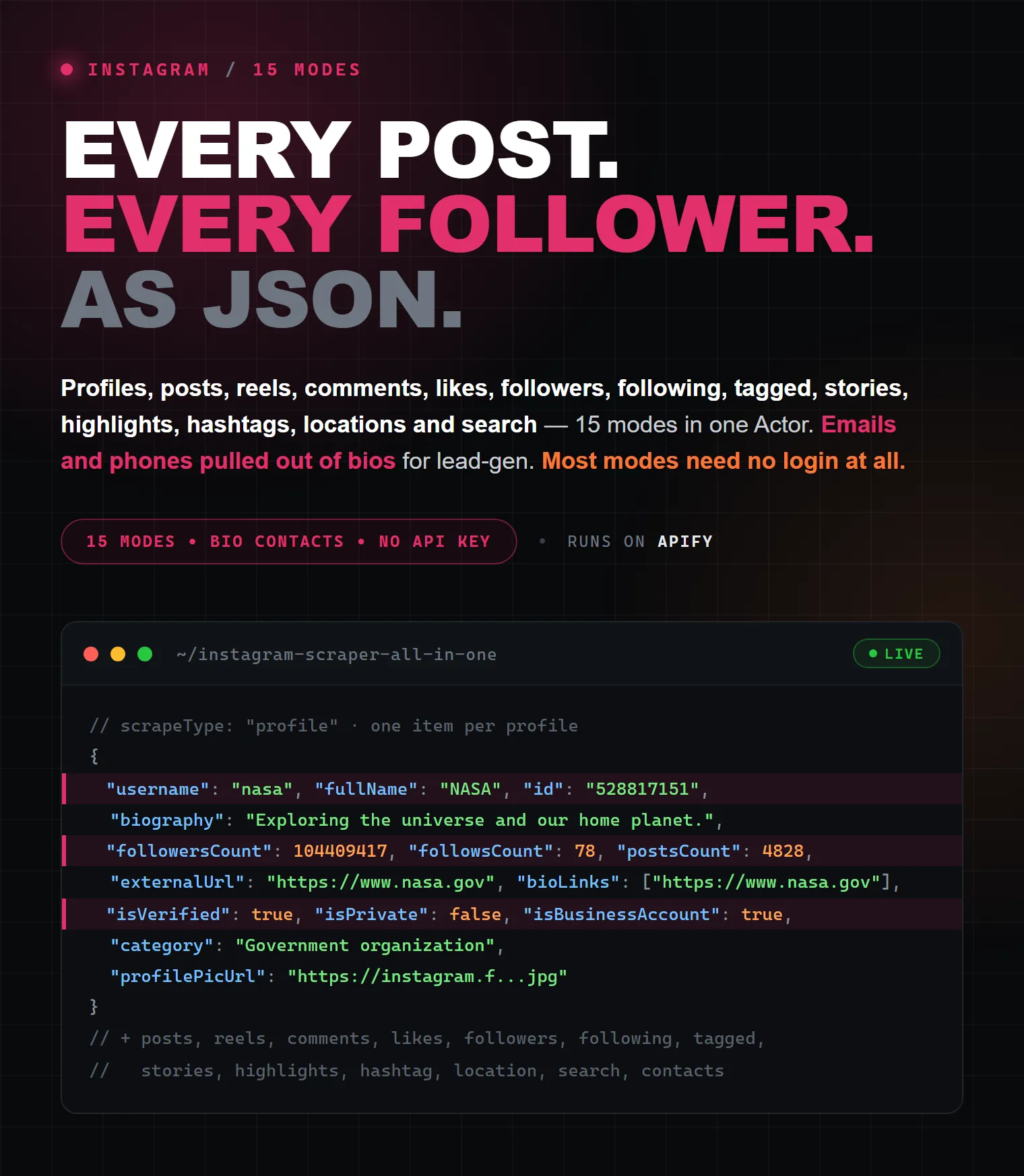
The all-in-one Instagram scraper. Extract Instagram profiles, posts, reels, comments, likes, followers, following, tagged posts, stories, highlights, hashtags, locations, search results and bio emails/contacts — from a single Actor, with one dropdown and one simple input. No code, no API key, no setup, and no login at all for profiles, posts, reels, bio contacts, comments & hashtags. Pay only for the results you keep — from $3 per 1,000 posts, $4 per 1,000 profiles and $1 per 1,000 followers/comments (as low as $0.90 / $0.40 per 1,000 on paid plans). Export to JSON, CSV, Excel, HTML, RSS or the API.
Stop juggling 15 separate scrapers. This one Instagram data extractor replaces profile scrapers, post scrapers, reel scrapers, hashtag scrapers, comment scrapers, follower scrapers, story scrapers and an email/lead extractor — with clean, flat, per-type output and pay-per-result pricing.
| Raven · Social-media suite • Instagram, TikTok, YouTube, Reddit, Threads, Pinterest | |||
 Instagram Scraper Instagram Scraper➤ You are here |
 TikTok Profile TikTok ProfileProfiles, videos, contacts |
 Threads Scraper Threads ScraperPosts, profiles, replies |
 YouTube Scraper YouTube ScraperVideos, comments, transcripts |
What does this Instagram Scraper do?
Instagram's official Graph API only returns data for your own Business/Creator accounts (after Facebook app review and OAuth) — it can't read arbitrary public profiles, hashtags, or competitor content. This Actor is a practical unofficial Instagram API alternative: it reads the same public data instagram.com serves to a browser and returns it as clean structured rows.
Pick one of 15 modes from a single dropdown, paste your input, and run:
| # | Mode | Give it | Returns | Login cookie? |
|---|---|---|---|---|
| 👤 | Profile details | username / profile URL | bio, followers, following, posts & IGTV counts, bio links, category, verified, similar accounts, newest posts… | — |
| ✉️ | Contacts (lead-gen) | username / profile URL | emails, phones, links & address pulled from the bio + business fields | — |
| 🖼️ | Profile posts | username / profile URL | every post on the timeline, with carousel slides, media sizes, collab authors, pinned & paid-partnership flags (paginated) | — |
| 🎬 | Profile reels | username / profile URL | every reel / video with play count, duration and audio track (song, artist, audio URL) (paginated) | — |
| 📄 | Post / Reel detail | post or reel URL | full media, carousel slides, tagged users, collab authors, alt text and the newest comments | — |
| 💬 | Post comments | post or reel URL | comments with author, likes, replies count and a permalink per comment | — / 🔑 |
| ❤️ | Post likers | post or reel URL | users who liked the post | 🔑 |
| 👥 | Followers | username / profile URL | the account's followers | 🔑 |
| ➡️ | Following | username / profile URL | accounts the user follows | 🔑 |
| 🏷️ | Tagged posts | username / profile URL | posts the user is tagged in | 🔑 |
| 📸 | Stories | username / profile URL | active stories | 🔑 |
| 🌟 | Highlights | username / profile URL | highlight reels | 🔑 |
| #️⃣ | Hashtag posts | #tag / hashtag URL | top & recent posts for a hashtag | — / 🔑 |
| 📍 | Location posts | location id / location URL | posts tagged at a location | 🔑 |
| 🔎 | Search | search query | matching users, hashtags & places | 🔑 |
🔑 = needs a free Instagram login cookie (1-minute setup, see below). — / 🔑 = works without a cookie for the first page of results, goes deeper with one. The modes without the key — profile, contacts, posts, reels, post detail, comments and hashtag — work straight away, no account required.
Why use this Instagram Scraper?
- ✅ 15 scrapers in one — switch data type from a single dropdown instead of installing a different Actor for every job.
- ✅ Clean, flat output — every record is a tidy single-level row carrying a
typefield, ready for Excel, Google Sheets, BigQuery or your database. No nested-JSON wrangling. - ✅ Deep fields per record — up to 40 fields per post/reel, 30 profile fields, 22 contact fields, 13 comment fields — captions, hashtags, mentions, tagged users, collab co-authors, carousel slides, media sizes, reel audio, view & play counts, pinned / paid-partnership flags, alt text, the newest comments, timestamps and media URLs.
- ✅ Full pagination — scroll through thousands of posts, followers, comments, and hashtag/location results, not just the first page.
- ✅ No login for 7 modes — profiles, posts, reels, post detail, bio contacts, comments and hashtags need no Instagram account at all.
- ✅ Built-in anti-blocking — browser-like TLS fingerprinting and automatic retries are handled for you, so most runs just work out of the box.
- ✅ Pay only per result, priced per type — followers and comments cost far less than full profiles, so you never overpay.
- ✅ Export anywhere — JSON, CSV, Excel, HTML, RSS or the Apify API; connect to Make, Zapier, n8n, Google Sheets, Slack and more.
How it compares
| Instagram Graph API (official) | Typical single-purpose scrapers | This Actor | |
|---|---|---|---|
| Setup | Facebook app + OAuth + app review | one Actor per data type | one Actor, one dropdown |
| Data types covered | your own/authorized accounts only | usually one (posts or followers or comments) | 15 modes in one |
| Public profiles / hashtags | ❌ not available | sometimes | ✅ any public profile, tag or location |
| Login required | mandatory OAuth | varies | 8 modes need none; the rest use a free cookie |
| Output shape | raw nested JSON | varies | flat, typed, one row per record |
| Per-post detail | basic media fields | first slide only, no audio | carousel slides, media sizes, reel audio, collab authors, pinned & paid-partnership flags, alt text |
| Pricing | free but rate-limited & restricted | per-run or per-result | pay per result, per type |
What data can you extract from Instagram?
Every record is flat and tagged with a type field, so you can split or price results by type. Every record also carries inputUrl — the line from your input list that produced it — so results always join back to their input.
👤 Profile (type: "profile") — username, fullName, biography, externalUrl, externalUrlShimmed, bioLinks, externalUrls (title + link type per bio link), followersCount, followsCount, postsCount, igtvVideoCount, highlightReelCount, isPrivate, isVerified, isBusinessAccount, isProfessionalAccount, joinedRecently, hideLikeAndViewCounts, hasClips, businessCategoryName, category, profilePicUrl, profilePicUrlHD, relatedProfiles (Instagram's "similar accounts"), latestPosts (newest posts, fully flattened), latestIgtvVideos, fbid, id, url.
🖼️ Post / Reel (type: "post") — shortCode, url, mediaType (image/video/carousel), productType, isVideo, caption, hashtags, mentions, likesCount, commentsCount, videoViewCount, videoPlayCount, videoDuration, hasAudio, timestamp, ownerUsername, ownerId, ownerFullName, coauthorProducers (collab authors), displayUrl, videoUrl, images, videos, dimensionsWidth, dimensionsHeight, originalWidth, originalHeight, childPosts (one entry per carousel slide), musicInfo (song_name, artist_name, audio_id, uses_original_audio…), audioUrl, isPinned, paidPartnership, isCommentsDisabled, isLikeAndViewCountsDisabled, locationName, locationId, taggedUsers, firstComment, latestComments, accessibilityCaption (the post's alt text).
✉️ Contact (type: "contact") — email, emails, phone, phones, website, links, bioMentions, isBusinessAccount, businessCategory, businessContactMethod, addressStreet, addressCity, addressZip, followersCount, isVerified, biography, profilePicUrl, url.
💬 Comment (type: "comment") — text, likesCount, repliesCount, timestamp, ownerUsername, ownerId, ownerProfilePicUrl, ownerIsVerified, postShortCode, postUrl, commentUrl (permalink of the comment itself), id.
👥 User — follower / following / liker (type: "user") — username, fullName, isPrivate, isVerified, profilePicUrl, url, relationship, ofUsername, postShortCode, id.
📸 Story / Highlight (type: "story") — mediaType, url, displayUrl, videoUrl, images, videos, dimensionsWidth, dimensionsHeight, originalWidth, originalHeight, hasAudio, timestamp, expiringAt, highlightTitle, ownerUsername, id.
🔎 Search result (type: "searchResult") — resultKind (user/hashtag/place), query, username/name, id, mediaCount, address, city, lat, lng, profilePicUrl, url.
Which of the optional fields arrive depends on the endpoint the mode reads: carousel slides, sizes, pinned/collab flags, reel audio and paid-partnership come with the timeline and reels feeds; alt text and the newest comments come with post/reel detail; latestPosts, relatedProfiles and igtvVideoCount come with the profile. Empty values are dropped instead of written as null, so a row never carries columns Instagram did not send.
How to scrape Instagram step by step
- Create a free Apify account (email or Google — the Free plan includes $5 in monthly usage credits, enough to test right away).
- Open the Instagram Scraper in Apify Console.
- Pick a mode in 🎯 What do you want to scrape?
- Paste your input in 🔗 Instagram URLs or usernames — profile URLs,
@handles, bare usernames, post/reel URLs,#hashtags, hashtag/location URLs — or a query in 🔎 Search. - (For 🔑 modes, and for deep comment / hashtag pagination) paste your Instagram login cookie (1-minute setup below).
- Set 📊 Max results per input to cap how much you collect.
- Click Save & Start. Watch records stream into the dataset, then Export as JSON, CSV, Excel, HTML or RSS.
🔑 Login cookie — required for 🔑 modes
Modes marked 🔑 (likes, followers, following, tagged, stories, highlights, search, location) read data Instagram only serves to logged-in users. For these modes a session cookie is mandatory — without it the run stops immediately with a clear "login required" message and charges nothing. Comments and hashtag modes return their first page without a cookie — the newest comments of a post, the first page of hashtag posts (Instagram hides some of its biggest hashtags from logged-out visitors) — and page deeper with one. Profile, contacts, posts, reels and post-detail modes need no cookie at all.
How to get your cookie (1 minute):
- Install the EditThisCookie v3 Chrome extension.
- Log into instagram.com in your browser.
- Click the EditThisCookie icon and export the cookies (the 5th button at the top of the cookie editor — the Export icon). This copies the cookies as JSON to your clipboard.
- Paste the exported JSON into the 🔑 Instagram login cookie field of this Actor.
The field also accepts just your
sessionidvalue or a fullname=value; name=valuecookie string. It's a secret field, so the value is stored encrypted. Use a secondary/throwaway account — heavy scraping on your main account is not recommended.
What a cookie adds to cookie-free modes (since 2026-09-02): Instagram stopped serving
its private API to logged-out visitors, so posts and reels are now read from the public
profile grid. Records keep likes, comments, captions, media URLs, carousel slides, sizes
and alt text — but video view/play counts, the isPinned and paidPartnership flags and
a reel's musicInfo / audioUrl are only returned with a cookie, because Instagram no
longer shows them to guests at all.
🔄 Cookie expiry note: Instagram cookies typically stay valid for a few days to a few weeks. If a run that worked before starts reporting login required / invalid authentication, just re-export fresh cookies and paste them again.
How to control how many results (and your budget)
Max results per inputcaps records collected per URL/username/hashtag/location. With 3 profiles and a limit of 500, you get up to 1,500 records. Pagination stops automatically when the source is exhausted.- Set a run cost limit on the Apify run screen (Limit run cost) to hard-cap spend — the Actor stops as soon as the charge limit is reached.
- Because billing is per result and per type, a followers run and a full-profile run cost very different amounts. Start with a small limit to validate output, then scale up.
How to extract emails & phones from Instagram bios (lead-gen)
The ✉️ Contacts mode turns any public/business profile into a lead record: it pulls emails and phones from the bio text and from Instagram's business contact fields, plus every link, @mention, business category and address it can find — no login required. Feed it a list of @handles or profile URLs and export straight to your CRM or Google Sheets.
Input parameters
| Field | Key | Type | Notes |
|---|---|---|---|
| 🎯 What do you want to scrape? | scrapeType | string (enum) | One of the 15 modes. Required. |
| 🔗 Instagram URLs or usernames | directUrls | array | One per line — profile URLs, @handles, usernames, post/reel URLs, #hashtags, hashtag/location URLs. Leave empty in Search mode. |
| 🔎 Search query | search | string | Used only in Search mode. |
| Search for | searchType | string (enum) | all, user, hashtag or place. Search mode only. |
| 📊 Max results per input | resultsLimit | integer | Upper bound per input (default 100). |
| 🔑 Instagram login cookie | sessionCookie | string (secret) | Required for 🔑 modes; optional for comments / hashtag (unlocks deep pagination). JSON export, sessionid, or cookie string. |
| Max retries per request | maxRetries | integer | Automatic retries before giving up on a request (default 6). |
Ready-to-paste input recipes
1. Scrape a profile's posts (no login)
2. Extract emails & phones from bios — lead-gen (no login)
3. A single post / reel with tagged users & top comments (no login)
4. Comments of a post (no login for the newest ones, 🔑 for the full list)
Drop sessionCookie and you still get the post's newest comments — Instagram embeds them in the public post page. Add it to page through the whole comment list.
5. Followers of an account (🔑 login)
6. Hashtag posts (deeper with 🔑 login)
7. Search users / hashtags / places (🔑 login)
Output examples
👤 Profile (type: "profile")
🖼️ Post / Reel (type: "post")
A reel additionally carries its audio track:
✉️ Contact (type: "contact")
💬 Comment (type: "comment")
👥 User — follower / following / liker (type: "user")
📸 Story / Highlight (type: "story")
🔎 Search result (type: "searchResult")
Ready-made dataset views ship on the Output tab — Overview, Posts & Reels, Profiles, Users, Comments and Contacts — so you can eyeball each record type before exporting.
How much does it cost to scrape Instagram?
This Actor uses pay-per-result billing, and each result type is priced separately — so you only pay for the data you actually pull, and cheap data (followers, comments) never costs the same as a full profile. The price drops automatically on higher Apify subscription plans.
| Result type | Free plan (per 1,000) | Paid plans (from, per 1,000) | Covers |
|---|---|---|---|
| 👤 Profile | $4.00 | $1.00 | profile details |
| ✉️ Contact (lead) | $6.00 | $2.00 | emails / phones / links from bios |
| 🖼️ Post / Reel | $3.00 | $0.90 | posts, reels, hashtag, location, tagged, post detail |
| 💬 Comment | $1.00 | $0.40 | comments |
| 👥 User | $1.00 | $0.40 | followers, following, likers |
| 📸 Story / Highlight | $2.00 | $1.00 | stories, highlights |
| 🔎 Search result | $2.00 | $0.70 | search |
Worked examples (Free-plan prices)
| You scrape | Result type | Cost (Free) | Cost (paid, from) |
|---|---|---|---|
| 1,000 profiles | profile | $4.00 | $1.00 |
| 10,000 posts | post | $30.00 | $9.00 |
| 5,000 followers | user | $5.00 | $2.00 |
| 2,000 comments | comment | $2.00 | $0.80 |
| 500 bio leads | contact | $3.00 | $1.00 |
Free-plan translation: Apify's Free plan includes $5 of usage credits every month — roughly 1,250 profiles, 1,600 posts, 5,000 comments/followers, or 830 bio leads at no cost. The price you see is all-in — there are no add-on fees on top of the per-result price (a negligible $0.00005 actor-start event applies once per run). Use Max results per input and the run cost limit to keep spend predictable.
Integrations
Push Instagram data anywhere without writing glue code. On the Apify platform this Actor connects to:
- Make, Zapier, n8n — no-code automation flows.
- Google Sheets, Google Drive, Slack, Airbyte — sync results into your stack.
- Webhooks — trigger an action the moment a run finishes.
- REST API + official JavaScript/TypeScript and Python clients — pull the dataset programmatically.
- Schedules — run daily/weekly to keep datasets fresh.
Export formats: JSON, JSONL, CSV, Excel (XLSX), HTML and RSS.
Use with AI agents (MCP)
Every Apify Actor — this one included — is reachable through the Apify MCP server, so AI agents (Claude, ChatGPT, LangChain, CrewAI, LibreChat…) can run it as a tool and pull Instagram data on demand. Point your MCP client at the Apify MCP server and prompt naturally, e.g.:
"Scrape the last 50 posts from @nasa, then extract the emails from the bios of the 20 accounts they tag most often."
Popular use cases
- Influencer marketing — vet creators by real follower counts, engagement and audience overlap before you partner.
- Lead generation — pull emails, phones and websites from business-profile bios into your CRM.
- Competitor & brand monitoring — track rivals' posts, reels, hashtags and comment sentiment over time.
- Social listening & trends — collect posts by hashtag or location to spot what's catching fire in your niche.
- Audience research — export followers/following lists for competitor-audience and lookalike analysis.
- UGC & campaign tracking — gather tagged posts and hashtag content for reporting and rights management.
- Market & academic research — build datasets of public profiles, posts and comments for analysis.
Is it legal to scrape Instagram?
Scraping publicly available data is generally permitted in many jurisdictions, and this Actor only collects data that is publicly visible (or visible to the account whose cookie you supply) — it does not break into private content. However, results can contain personal data, which is protected by regulations like the GDPR (EU) and CCPA (California). Only collect personal data when you have a legitimate reason, respect Instagram's Terms, and don't republish private information. When in doubt, consult a lawyer.
For a deeper primer, see Apify's guide: Is web scraping legal?
FAQ
Does Instagram have a public API?
Instagram's official Graph API is restricted to your own Business/Creator accounts and requires a Facebook app plus OAuth review — it can't read arbitrary public profiles, hashtags or competitor content. This Actor is a practical unofficial Instagram API alternative for public data.
Do I need an Instagram account to use this scraper?
Not for profiles, posts, reels, post detail, bio contacts, comments or hashtags — those run without an account (comments and hashtag return their first page anonymously). The other modes (likes, followers, following, tagged, stories, highlights, search, location) need a free login cookie from any Instagram account.
Can I scrape Instagram without login or a cookie?
Yes — profiles, posts, reels, post detail, bio contacts, comments and hashtags need no cookie. Everything Instagram keeps behind its login wall (follower lists, likes, stories, highlights, tagged posts, search, location posts, and deep comment / hashtag pagination) requires the session cookie.
Where do I get the Instagram login cookie?
Log into instagram.com, export your cookies with a browser extension (EditThisCookie v3 / Cookie-Editor), and paste the JSON, the sessionid value, or the cookie string into the Instagram login cookie field. See the Login cookie section.
Do I need proxies?
No. Anti-blocking is fully built in and handled for you — there's nothing to set up or configure.
How many followers / comments can I scrape?
Set Max results per input up to 100,000 per input. Pagination pages through the source until your limit is hit or the feed is exhausted. Note that Instagram itself stops returning a cursor for the deepest reaches of very large follower lists.
Can I scrape private Instagram accounts?
Only accounts your logged-in cookie is actually allowed to view. Public accounts work in the anonymous modes; private ones require that your session already follows them.
Can I scrape multiple profiles or hashtags at once?
Yes — add one input per line in Instagram URLs or usernames. Max results per input applies to each one independently.
Can I export Instagram data to CSV, Excel or Google Sheets?
Yes — export as JSON, CSV, Excel (XLSX), HTML or RSS, pull it via the API, or pipe it straight into Google Sheets through the Apify integration.
How do I extract emails from Instagram bios?
Use the Contacts mode with a list of usernames or profile URLs. It pulls emails, phones, links and address from each bio and business-contact field — no login needed.
Will I be charged for URLs that return nothing?
Billing is per result pushed, so a username that yields zero records costs nothing beyond the negligible $0.00005 actor-start event charged once per run. If a 🔑 mode returns nothing, check that you supplied a valid cookie.
Why am I getting fewer results than expected?
Usual causes: a low Max results per input, a 🔑 mode run without a valid cookie, a private/empty account, or a hit run-cost limit. Instagram also caps deep enumeration of very large accounts. Try a smaller test run and confirm your cookie is fresh.
Why are some fields empty or null?
Empty and private fields are dropped from each record to keep output clean — e.g. a photo post has no videoUrl, a single-image post has no childPosts, and a profile with no bio email has no email. You only get the fields Instagram actually returns for that item.
I'm switching from another Instagram scraper — how do the field names map?
Almost all names are identical (shortCode, displayUrl, dimensionsWidth, childPosts, musicInfo, latestComments, isPinned, paidPartnership, coauthorProducers, latestPosts, relatedProfiles, profilePicUrlHD, inputUrl…). Two differ: alt text is accessibilityCaption (elsewhere alt), and image/video URL lists are images / videos. Inside musicInfo the sub-keys are kept exactly as Instagram sends them (song_name, artist_name, audio_id, uses_original_audio, should_mute_audio), so existing code reads them unchanged.
How much does it cost to scrape Instagram?
From $3 per 1,000 posts, $4 per 1,000 profiles and $1 per 1,000 followers/comments on the Free plan, dropping to as low as $0.90 / $0.40 per 1,000 on paid plans. See the pricing table — each result type is priced separately.
Can I automate or schedule this scraper?
Yes — use Apify Schedules to run it on a cadence, and Make / Zapier / n8n / webhooks to route results into your tools automatically.
Feedback & support
Found a bug or want a new mode/field? Open an issue on the Actor's Issues tab, or share a failing run URL so it can be reproduced quickly. Feature requests are welcome.
More scrapers by this developer
- Threads Scraper — Posts, Profiles & Replies — Meta's Threads, the Instagram sibling.
- Facebook Ads Library Scraper — Meta & Instagram Ad Spy — spy on active Instagram & Facebook ads.
- TikTok Profile API Scraper + Contacts & Analytics — TikTok profiles, contacts and stats.
- Ultimate YouTube Scraper — Videos, Transcripts & Comments — YouTube videos, transcripts and comments.
- Pinterest Full Scraper — Pins, Profiles & Boards — Pinterest pins, profiles and boards.
- Website Contact Scraper — Bulk Emails, Phones & Socials — turn any website list into a lead list.
Tags: instagram scraper, instagram data scraper, instagram api, unofficial instagram api, scrape instagram, instagram profile scraper, instagram post scraper, instagram reel scraper, instagram comment scraper, instagram followers scraper, instagram following scraper, instagram likes scraper, instagram hashtag scraper, instagram location scraper, instagram tagged scraper, instagram stories scraper, instagram highlights scraper, instagram search scraper, instagram email extractor, instagram lead generation, social media scraper, instagram crawler, instagram data export, instagram bulk scraper, instagram analytics, instagram influencer scraper, export instagram to csv, export instagram to excel, no-code instagram scraper, all-in-one instagram scraper


