

Google Maps Local SEO Grid Scraper
Pricing
from $1.49 / 1,000 grid points
Google Maps Local SEO Grid Scraper
Local SEO geo-grid for Google Maps: scan a keyword from many GPS points around your center coordinate and get ranked businesses plus Place IDs per cell. Track your GBP rank block by block, export heatmap SVG, and power agency reports via API—without a separate Maps SERP API.
Pricing
from $1.49 / 1,000 grid points
Rating
0.0
(0)
Developer

rainminer
Maintained by CommunityActor stats
0
Bookmarked
1
Total users
1
Monthly active users
25 days ago
Last modified
Categories
Share
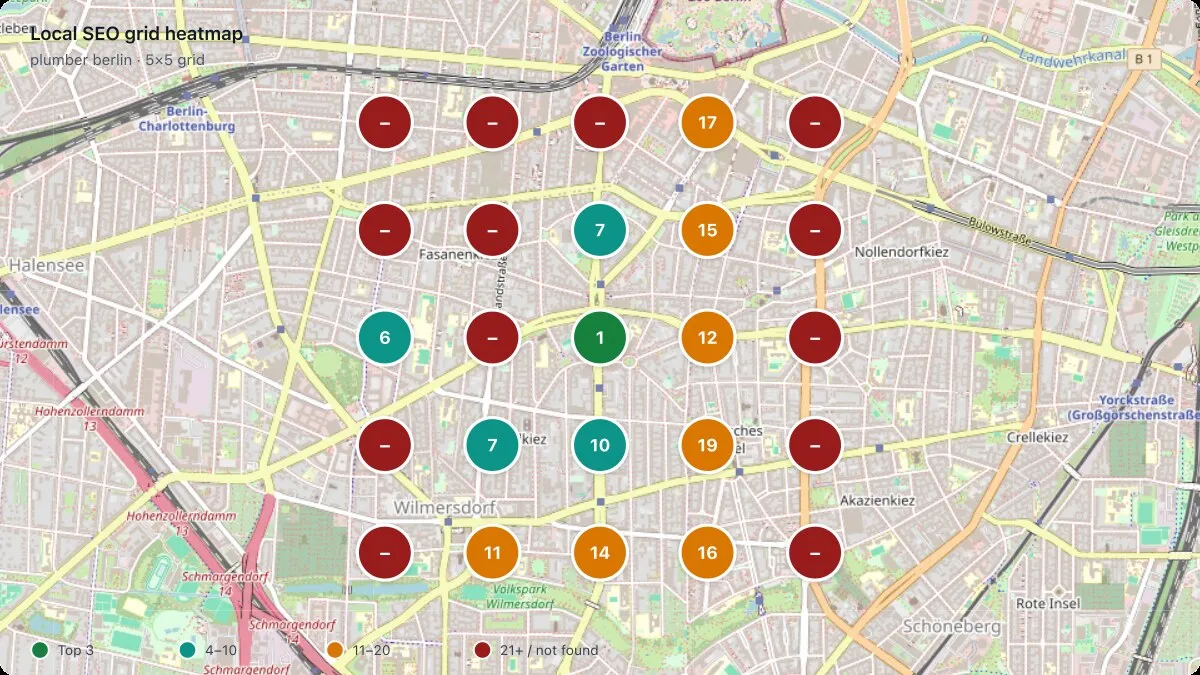
A local SEO grid (geo-grid) shows how your Google Business Profile ranks on Maps from many nearby GPS points—not one city-center search. Rankings change block by block with searcher proximity. This Actor runs the full grid for you and returns ranked businesses and Place IDs at every cell, plus an optional heatmap SVG for client reports.
What can this Actor do?
- Run 5×5, 7×7, or custom grids around any lat/lng with configurable spacing in meters
- Fetch keyword rankings at each pin (
plumber,dentist near me,personal injury lawyer, …) - Export Google Place IDs, ratings, addresses, and Maps URLs for every listing
- Track your business with
trackPlaceIdortrackBusinessName→trackedRankper cell - Output GRID_HEATMAP_SVG (color-coded pins on a map) and GRID_SUMMARY JSON for dashboards
- Scale via Apify API, schedules, and webhooks—no separate SERP API subscription required
Use cases
- Agency geo-grid reports — deliver heatmaps that prove local visibility before/after SEO work
- GBP rank tracking — see where you rank in the top 3 vs page two across a neighborhood
- Competitor mapping — list who owns each cell for a high-value keyword
- Multi-location brands — compare grids around each store or franchise
- Citation & review campaigns — target weak grid cells where you rank 11+
- Sales demos — show prospects block-by-block visibility vs a single “city rank”
- API backends — replace custom grid runners + paid Maps SERP vendors with one Actor
- White-label tools — pull dataset + SVG into your own reporting UI
- Scheduled monitoring — monthly runs to catch ranking drift after Google updates
- Hyperlocal content planning — find zones where you are invisible and need geo pages
Key features
- Grid geometry —
gridSize,spacingMeters, auto zoom from span (same idea as agency geo-grid tools) - Place IDs —
ChIJ…on listings when Google exposes them - Parallel scans —
concurrencywith automatic retry on failed cells - Dataset + KV — one row per grid cell; full run in
GRID_SUMMARYandGRID_HEATMAP_SVG
Who is it for?
- Local SEO agencies delivering geo-grid reports to clients
- Multi-location brands comparing visibility around each store
- Developers building rank trackers without maintaining Maps scrapers
Input
| Field | Description |
|---|---|
keyword | Maps search query (required) |
latitude, longitude | Grid center (required) |
gridSize | Rows/columns (default 5, 3–15) |
spacingMeters | Distance between pins (default 500) |
zoom | Optional; auto-derived from grid span if omitted |
maxItems | Listings per point (default 20, max 120) |
trackPlaceId | Your ChIJ… Place ID for per-cell rank |
trackBusinessName | Name fallback when Place ID is missing |
concurrency | Parallel grid points (default 5) |
language | UI language (default en) |
proxyConfiguration | Proxies if needed (default: no Apify Proxy) |
Example
Output
Dataset (one row per grid cell)
Each item includes businesses[] with rank, title, placeId, rating, reviewsCount, address, and url.
Key-value store
| Key | Contents |
|---|---|
GRID_SUMMARY | Full grid, aggregates (avgTrackedRank, top3PointCount) |
GRID_HEATMAP_SVG | Map heatmap (set tracking fields for meaningful colors) |
Tips
- Start with 3×3 and low
maxItemsfor testing; scale on Apify Cloud. - Enable Apify Proxy if Google blocks datacenter IPs in your region.
- Set
trackPlaceIdsoGRID_HEATMAP_SVGshows green/teal/amber ranks instead of–.
How much does it cost?
Pricing is pay-per-event: one grid point charge per cell that returns listings, plus a small Actor start fee. Run the Actor from Apify Console to see current tier prices. Platform usage (compute/proxy) is included in typical PPE runs at our listed grid-point rates—check your plan on the Store page.
Image Credit
Map tiles in run heatmaps and the banner: © OpenStreetMap contributors (ODbL).


