

Coches.net Scraper — Used Car Listings & Prices Spain
Pricing
from $1.00 / 1,000 results
Coches.net Scraper — Used Car Listings & Prices Spain
Scrape used car listings from Coches.net, Spain's largest car marketplace: price vs. market average, price drops, km, fuel, DGT badge, dealers and photos. Filter by brand, model, fuel, price, year, province or postal code. Incremental mode returns only changes. No login. $0.001 per listing.
Pricing
from $1.00 / 1,000 results
Rating
5.0
(2)
Developer

Rastriq — Structured data from the world
Maintained by CommunityActor stats
0
Bookmarked
81
Total users
22
Monthly active users
2.4 hours
Issues response
24 days ago
Last modified
Categories
Share
Coches.net Scraper — Spain Car Listings
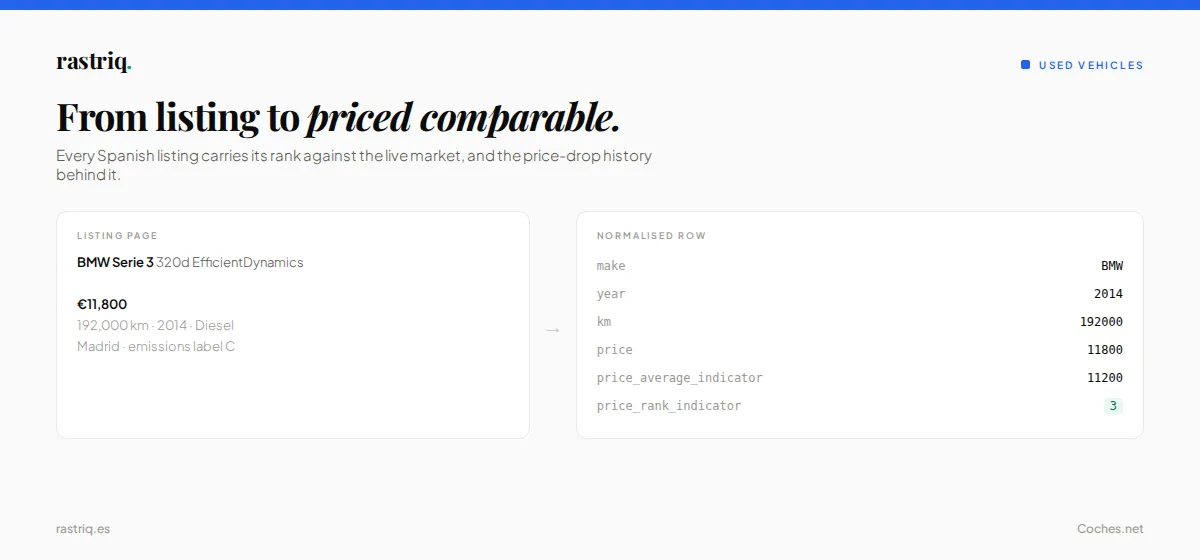
Extract vehicle listings from Coches.net, Spain's largest used car marketplace with over 150,000 active listings. Coches.net Scraper lets you scrape prices, brands, models, specifications, dealer info, and location data — no API key or login required.
🚀 Try it free — your first $5 of usage is on Apify. No credit card required.
Your first run in 10 seconds
The form comes pre-filled with Toyota hybrids, 2 pages, 30 results. Press Start: it takes about 10 seconds, returns 30 listings (price, km, year, fuel, province, price rank vs. market) and costs about $0.03. Then change the brand, fuel, price or province, or paste your own coches.net search URL.
What is Coches.net Scraper?
Coches.net Scraper is an Apify Actor that extracts structured vehicle data from Spain's leading automotive marketplace. Whether you're tracking used car prices across regions, building a dealer inventory database, or running competitive analysis on the Spanish automotive market, Coches.net Scraper delivers clean, structured JSON data ready for analysis.
The scraper works without browser emulation — it extracts data directly from coches.net's server-rendered pages, making it fast, reliable, and cost-effective.
What data does Coches.net Scraper extract?
| Field | Description |
|---|---|
| 🚗 Vehicle info | Title, make, model, year, mileage (km), horsepower |
| 💰 Pricing | Listing price (EUR), financed price, market average price, price competitiveness rank (1–5), price drop history (original price, % drop, days since drop) |
| ⛽ Specs | Fuel type (Gasolina, Diésel, Eléctrico, Híbrido, GLP) |
| 🏷️ Labels | DGT environmental badge (C, ECO, 0 Emisiones, B), offer type (Ocasión, KM 0, Seminuevo) |
| 🏢 Seller | Professional/private flag, certified vehicle, financing available, warranty included, phone number |
| 🏬 Dealer | Dealer ID, name, Coches.net plan, rating and review count (search and URL mode). Address, postal code, coordinates, website and stock page (URL mode). Professional sellers only |
| 📍 Location | Region, province, city |
| 📸 Media | Full photo gallery (all URLs), video URLs, main thumbnail |
| 📅 Dates | Publication date, creation date, scrape timestamp |
| 🔖 Flags | Top/promoted listing, urgent sale, reserved, taxes included |
| 🔗 Links | Direct listing URL |
How to use Coches.net Scraper
Option 1: Search by filters
- Set your filters — choose a make, model, fuel type, price range, or year range. All filters are optional; leave blank to scrape the full inventory.
- Set limits — configure
maxPagesandmaxItemsto control how much data you collect. - Start the run — click "Start" and wait for the scraper to finish (about 10 seconds for 30 listings; each page holds ~35 listings).
- Download your data — export results as JSON, CSV, Excel, or connect directly via Apify's API or integrations.
Option 2: Scrape by URL
Paste one or more coches.net URLs directly:
- Listing URLs (e.g.
https://www.coches.net/bmw-serie-3-320i-4p-gasolina-2009-en-madrid-70672809-covo.aspx) → extracts that single listing's full details. - Search URLs (e.g.
https://www.coches.net/segunda-mano/?MakeIds[0]=7) → paginates through those search results.
When URLs are provided, the make/model/fuel filters are ignored — the URL already defines what to scrape. maxPages and maxItems limits still apply to search URLs.
Incremental mode (cursor)
Enable enableCursor to only capture new or changed listings since your last run. The Actor keeps a ledger of delivered listing ids plus a fingerprint of price, km, title, reservation and price drop: unchanged listings are skipped and not charged. Ideal for scheduled daily or weekly monitoring (details in Incremental ingestion below).
Note: Incremental mode only works with filter-based search, not URL mode.
Input parameters
| Parameter | Type | Description | Default |
|---|---|---|---|
urls | String[] | One or more coches.net listing or search URLs. When set, search filters are ignored. | — |
make | String | Car brand (Spanish names work: "Mercedes-Benz", "Alfa Romeo") | — |
model | String | Model within the selected make ("Serie 3", "Clase A") | — |
fuel | Enum | Fuel type: gasolina, diesel, electrico, hibrido, glp. Gasolina, diésel, eléctrico and híbrido are filtered by Coches.net itself (híbrido = its "Híbrido" category, plug-in hybrids not included); GLP is filtered on the pages fetched, so use maxPages 6. | — |
minPrice / maxPrice | Integer | Price range in EUR | — |
minYear / maxYear | Integer | Registration year range (1950–2027) | — |
postalCode | String | Spanish postal code to search around. Requires radiusKm. | — |
radiusKm | Integer | Search radius around postalCode, in km | — |
province | Integer | Restrict to one province by INE code (28 = Madrid, 8 = Barcelona) | — |
maxPages | Integer | Max search pages to crawl (~35 listings/page). Recommended 1-6 — see Crawl limits below. | 6 |
maxItems | Integer | Hard cap on total listings returned | 50 |
enableCursor | Boolean | Return only new and changed listings since your last run | false |
cursorId | String | Namespaces the incremental ledger. Empty = derived from your filters. | — |
emitSeenIds | Boolean | Write every observed listing id to SEEN_IDS for delisting detection | false |
proxyConfiguration | Object | Proxy settings. Empty → Apify residential proxy, country ES | Residential ES |
Output example
Output fields reference
| Field | Type | Description |
|---|---|---|
id | String | Coches.net listing identifier |
latitude | Number | Municipality centroid latitude — see Location data below |
longitude | Number | Municipality centroid longitude |
ine_municipality_code | String | Official INE municipality code (CPRO+CMUN) |
geo_precision | String | municipality or unavailable |
title | String | Full listing title |
make | String | Car manufacturer/brand |
model | String | Car model name |
year | Integer | Registration year |
km | Integer | Mileage in kilometres |
hp | Integer | Engine power in HP |
price | Number | Listing price in EUR |
financed_price | Number | Financed price in EUR (if available) |
price_average_indicator | Number | Market average price for similar vehicles (EUR) |
price_rank_indicator | Integer | Price competitiveness: 1 = great deal → 5 = overpriced |
price_drop_original | Number | Previous price before last reduction (EUR) |
price_drop_percentage | Number | Percentage of last price drop |
price_drop_days | Integer | Days since last price change |
fuel_type | String | Gasolina, Diésel, Eléctrico, Híbrido, GLP |
environmental_label | String | DGT emissions badge (C, ECO, 0 Emisiones, B) |
is_professional | Boolean | Professional dealer (vs. private seller) |
is_certified | Boolean | Vehicle certified by dealer |
is_financed | Boolean | Financing option available |
is_top | Boolean | Promoted/top listing |
is_urgent | Boolean | Marked as urgent sale |
has_warranty | Boolean | Warranty included |
has_reservation | Boolean | Currently reserved by a buyer |
includes_taxes | Boolean | Price includes taxes (IVA/IGIC) |
offer_type | String | Ocasión, KM 0, Seminuevo, etc. |
phone | String | Seller phone number (if public) |
seller_id | String | Dealer (contract) ID — stable dealer key. Professional sellers only |
seller_name | String | Dealer trading name. Professional sellers only |
seller_pack | String | Dealer's Coches.net plan (start, reference, expert…). Professional sellers only |
seller_rating_avg | Number | Average dealer review score. Professional sellers only |
seller_rating_count | Integer | Number of dealer reviews. Professional sellers only |
seller_address | String | Dealer street address. URL mode only |
seller_postal_code | String | Dealer postal code. URL mode only |
seller_latitude / seller_longitude | Number | Dealer coordinates. URL mode only |
seller_website | String | Dealer's own website, if published. URL mode only |
seller_url | String | Dealer stock page on Coches.net. URL mode only |
region | String | Spanish autonomous community |
province | String | Province |
city | String | City |
img_url | String | Main listing thumbnail URL |
photos | String[] | All photo URLs for this listing |
videos | String[] | Video URLs (if any) |
publication_date | String | ISO 8601 — when the listing was last published/renewed |
creation_date | String | ISO 8601 — when the listing was first created |
url | String | Direct listing URL on Coches.net |
source | String | Always cochesnet |
scraped_at | String | ISO 8601 — extraction timestamp |
Location data — what you get and how precise it is
Coches.net does not publish per-listing coordinates on any of its surfaces: not in the search payload, not on the individual listing page, and not through the API gateway behind the site. The complete location object on a listing is province, region and municipality.
What it does expose is location.cityId, and that value is the official INE municipality code
(the Spanish national statistics code). So this Actor resolves coordinates offline from an
embedded table of 8 217 municipality centroids built from official IGN/INE boundaries, covering
8 122 of the 8 124 municipalities in the register.
| Field | Meaning |
|---|---|
latitude / longitude | Centroid of the listing's municipality |
ine_municipality_code | The official code — joins against census, income and registration data |
geo_precision | municipality (~98% of listings, typically 1–8 km), province (fallback), or unavailable |
A small minority of listings carry a sub-municipal entity code rather than a municipality code (for example 28800, "La Moraleja", a district of Alcobendas). Those fall back to the province centroid rather than to a postal-code lookup, because the postal-code tables place 28800 in Alcalá de Henares — roughly 30 km from the real location. A coarse coordinate that is correct beats a precise one that is wrong, and geo_precision always tells you which you have.
No extra requests, no per-listing cost, no geocoding key.
Radius search — find cars near a postal code
Set postalCode and radiusKm and the search is restricted to that radius. Coches.net performs
the filtering itself, using the exact positions it holds internally, so this is more accurate than
computing distances from the municipality centroids above.
One behaviour to know about: the radius is exact for private sellers, but dealers with
national or multi-province stock appear in any radius search regardless of distance. That is how
coches.net itself behaves — a dealer 400 km away who advertises nationally shows up for every
location. If you need a strict geographic bound, filter on is_professional at your end.
Incremental ingestion — keep a catalogue continuously up to date
Turn on enableCursor and the Actor returns only what actually changed.
The Actor keeps a ledger of every listing id already delivered for your search stream, plus a
fingerprint over price / km / title / reservation / price drop:
| Situation | Result |
|---|---|
| Listing id not in the ledger | Emitted, _delta_status: "new" |
| Fingerprint changed | Emitted, _delta_status: "updated" + _changed_fields, _previous_price, _price_delta |
| Seen before, unchanged | Skipped, not charged |
The ledger makes no assumption about result ordering, which matters here: coches.net orders search results by relevance and shuffles that order between sessions, so anything based on "highest id seen so far" silently loses listings that surface out of order.
Runs sharing a cursorId share one ledger; different ids are fully independent. Leave it empty
and the Actor derives a stable id from your filters, so parallel searches never interfere.
Detecting sold vehicles
With delta ingestion your catalogue never expires rows — a vehicle that sells simply stops
appearing. Enable emitSeenIds and the Actor writes every id observed during the sweep (including
those skipped as unchanged) to SEEN_IDS in the run's key-value store. Compare across runs and
mark anything absent for N consecutive sweeps as sold. No extra cost.
Reading the run summary
unchanged_skipped is the number to watch: listings the ledger recognised and did not charge you
for. A healthy delta run scans many and emits few.
Crawl limits and building a full catalogue
Coches.net's robots.txt disallows pg=7 through pg=69, so no query may be paginated past
page 6 — about 210 listings. This Actor caps maxPages at 6 and logs when it does.
To build a large catalogue, shard the query space rather than paginating deeper:
Use the province input (INE code) together with make, minPrice/maxPrice and
minYear/maxYear to keep each query inside its page budget. For reference, the national
catalogue is roughly 260 000 listings, so a complete sweep is on the order of several thousand
narrow queries.
How much does it cost to use Coches.net Scraper?
Coches.net Scraper uses a pay-per-event pricing model:
- Start: $0.0005 per GB of memory (256 MB default, so at most $0.0005 per run)
- Per result: $0.001 per listing (unchanged listings skipped by incremental mode are not charged)
| What you scrape | Listings | Approx. cost |
|---|---|---|
| First-run example (Toyota hybrids, 2 pages) | 30 | $0.03 |
| One province, one brand | 200 | $0.20 |
| A price/year band across Spain | 1,000 | $1.00 |
| Daily incremental feed (≈5% changes) | ~50/day | ~$0.05/day |
Platform usage (compute, proxy) is included in these prices. Set a maximum cost per run in the run options to cap spending. Your first $5 of Apify usage is free — enough for ~5,000 listings at no cost.
🔒 Privacy — GDPR compliance
Enable Strip seller personal data (stripSellerPII: true) to remove personal data of private sellers from the output:
| Field | Action |
|---|---|
phone | Set to null |
Coordinates are already municipal centroids (~1 km precision) and are not modified. Professional seller data is never affected.
The seller_* dealer fields are always null for private sellers, whether stripSellerPII is on or off: the actor never reads a private seller's name or user ID.
When stripSellerPII is off (the default), the actor behaves exactly as before — all fields are emitted as-is.
Use cases
- Market research: Analyze pricing trends by make, model, region, and age across Spain
- Price monitoring: Track price drops and market positioning with
price_drop_*andprice_rank_indicatorfields - Competitive intelligence: Compare dealer vs. private pricing, warranty offerings, and financing across regions
- Inventory analysis: Map supply distribution by province, fuel type, or price segment
- Incremental ingestion: Use cursor mode for zero-duplicate daily feeds into your data pipeline
- Data enrichment: Combine with AutoScout24 or Mobile.de data for cross-market comparison
Copy to your AI assistant
🧪 Ready-made examples
Start from a pre-configured task and adapt it to your needs:
- Track BMW 3 Series prices in Spain
- Find cheap diesel cars for sale in Spain
- Compare used Mercedes-Benz A-Class prices in Spain
- Monitor electric car listings in Spain
- Find cheap used cars under €5,000 in Spain
- Scrape used hybrid cars for sale in Spain
- Used cars for sale in Madrid
- Nearly new cars (2026+) in Spain
- Used cars near a postal code
Related Actors by Rastriq
- AutoScout24 Scraper — Europe's largest car marketplace
- Mobile.de Scraper — Germany's leading car platform
- Wallapop Cars Scraper — Spain's general classifieds marketplace
- Automobile Catalog Taxonomy — Car specs and taxonomy data
- Carandclassic Scraper — Classic car listings
- Classic Trader Scraper — Classic and vintage vehicles
- Collecting Cars Scraper — Car auction platform
- Njuskalo Scraper — Croatian classifieds
- Polovniautomobili Scraper — Serbian car marketplace
About the data
This actor is part of Rastriq's automotive coverage. See the normalised output fields, the full source list and the use cases behind it: used car market data.
FAQ
Is scraping Coches.net legal? Coches.net Scraper extracts only publicly available listing data that any visitor can see. It does not bypass any authentication, paywalls, or access controls. Always review Coches.net's terms of service and ensure your use case complies with applicable laws.
Does Coches.net Scraper require a login? No. The scraper works without any login or API key. It accesses the same public search results that any visitor sees.
How many results can I scrape?
Each search query is best kept to 6 pages (~210 listings) because coches.net asks crawlers not to go deeper. To build a large catalogue, split the search by province, make, price band and year band (see Crawl limits), and use incremental mode to keep it updated. You pay only for the listings returned.
How often is the data updated?
Listings on Coches.net change constantly. Schedule daily or weekly runs to maintain an up-to-date dataset. Enable incremental mode (enableCursor) to only capture new listings and avoid re-processing.
Can I scrape a specific search or listing URL?
Yes. Paste any coches.net listing URL (.aspx) or search URL (/segunda-mano/...) into the urls input. The scraper auto-detects the URL type and extracts accordingly.
What is incremental mode?
When enableCursor is enabled, the Actor remembers every listing it delivered (with a fingerprint of price, km, title, reservation and price drop). On later runs it returns only new listings and listings whose fingerprint changed, flagged with _delta_status. Unchanged listings are skipped and not charged. Perfect for scheduled monitoring.
My run returned 0 or very few results. Why?
- Brand or model not found: the brand name must exist on coches.net (use
makeIdfor DS, MG, Polestar, XPeng...). An unknown model falls back to the whole brand (see the run log). - LPG (GLP): the filter is applied to the pages fetched, so set
maxPagesto 6 and expect few matches. - Very narrow filters (small province + high price floor) may legitimately have no listings.
- Coches.net temporarily blocked the request: leave the proxy field as pre-filled (residential, Spain) and retry.
Coches.net Scraper — Extracción de anuncios de coches en España
Coches.net Scraper extrae anuncios de vehículos de Coches.net, el mayor portal de compraventa de coches de España con más de 150.000 anuncios activos. Obtén precios, marcas, modelos, especificaciones, información del vendedor y datos de ubicación de forma automática.
¿Qué datos extrae?
- Vehículo: título, marca, modelo, año, kilómetros, caballos de potencia
- Precio: precio de venta (EUR), precio financiado, precio medio de mercado, ranking de competitividad (1–5), historial de bajadas de precio
- Especificaciones: tipo de combustible, etiqueta medioambiental de la DGT
- Vendedor: profesional o particular, vehículo certificado, financiación, garantía, teléfono de contacto
- Ubicación: comunidad autónoma, provincia, ciudad
- Multimedia: galería completa de fotos, vídeos
- Fechas: fecha de publicación, fecha de creación
- Flags: anuncio destacado, venta urgente, reservado, impuestos incluidos
- Enlaces: URL directa del anuncio
Modos de uso
- Búsqueda por filtros: configura marca, modelo, combustible, rango de precio y año.
- Búsqueda por URL: pega una o más URLs de coches.net (anuncios individuales o páginas de búsqueda).
- Modo incremental: activa
enableCursorpara capturar solo anuncios nuevos desde la última ejecución — cero duplicados.
¿Cómo funciona?
- Configura los filtros o pega URLs directamente.
- Establece los límites de páginas y resultados.
- Ejecuta el scraper y descarga los datos en JSON, CSV o Excel.
- Programa ejecuciones periódicas para crear una base de datos histórica de precios.
¿Es legal?
Coches.net Scraper solo extrae datos de anuncios públicos accesibles para cualquier visitante. No requiere inicio de sesión ni sortea ningún tipo de protección. Revisa siempre los términos de uso de Coches.net y la legislación aplicable.
Sobre los datos
Este actor forma parte de la cobertura de automoción de Rastriq. Consulta la lista completa de fuentes, los campos normalizados de salida y los casos de uso: datos del mercado de coches de ocasión.


![Coches.net Scraper [Just 💰$3] — Used Cars in Spain avatar](https://images.apifyusercontent.com/6iAomz4uQYbjfXtT0JQ1TQiMDeSeqjY0iaRkukWAJiU/rs:fill:76:76/cb:1/aHR0cHM6Ly9hcGlmeS1pbWFnZS11cGxvYWRzLXByb2QuczMudXMtZWFzdC0xLmFtYXpvbmF3cy5jb20vclB1SjNjc1NCUjVsaTVmd1QtYWN0b3ItZEZheFpBcGI3Nm1yemRxTXEtOGdhSEVoTUU1Ry1jb2NoZXMubmV0X2xvZ28ucG5n.webp)


