

Google Maps Email Scraper: Business Leads with Emails
Pricing
from $2.25 / 1,000 leads
Google Maps Email Scraper: Business Leads with Emails
Get business leads from Google Maps with emails: name, category, address, phone, website, rating and reviews from Google Maps, plus emails, extra phones and Instagram, Facebook, LinkedIn and X profiles read from each business's website and contact page.
Pricing
from $2.25 / 1,000 leads
Rating
0.0
(0)
Developer

Red Fox Scout
Maintained by CommunityActor stats
0
Bookmarked
12
Total users
6
Monthly active users
6 days ago
Last modified
Categories
Share
Get business leads from Google Maps with emails you can actually send to. Every email is checked for a working mail server (dead domains dropped, the best address first, the page it came from attached), and Cover the whole area returns every matching business in a city, not just the first page of one search. For every place in a Google Maps search you get the Maps data (name, category, address, phone, website, rating, reviews, hours), and the Actor then visits the business's own website and contact page to add emails, extra phone numbers and Instagram, Facebook, LinkedIn and X profiles. One run, one table, ready for outreach. For sales teams and agencies building local B2B lead lists.
Price: $3 per 1,000 leads. Duplicates and failed searches are free, and with "Only leads with an email" you pay only for leads that have one. Apify's free plan ($5 monthly credit) covers about 1,600 leads a month.
Questions it answers
- What are the emails of dentists, contractors or agencies in my target city?
- Which local businesses have an Instagram page I can reach them on?
- Which leads have both a phone number and an email?
- How do these businesses rate on Google, and how many reviews do they have?
Who uses this
- 📈 Sales and lead generation: local B2B lead lists with emails, by niche and city.
- 🏢 Agencies: prospects for web design, SEO, ads and social media services.
- 🧑💼 Freelancers and consultants: build a targeted outreach list in minutes.
- 🗂️ CRM teams: enrich local accounts with emails and social profiles.
Why this Google Maps Email Scraper
- 📬 Emails you can send to: every email is checked for a working mail server; dead domains are dropped and the best address comes first.
- 🗺️ Every business in a city: Cover the whole area returns every matching place, not just the first page of one search.
- 🧩 Maps data and website contacts in one row: no second Actor, no joining files.
- 📄 Contact pages included: it follows each website's contact, about and imprint links, where emails usually are.
- 💰 Pay for what you want: turn on "Only leads with an email" and leads without one are free.
- 🧹 Clean emails: placeholders, image file names and tracking addresses are filtered out; the business's own role address (info@, office@) comes first.
- 💵 $3 per 1,000 leads with everything included.
How to use the Google Maps Email Scraper
- Click Try for free (a free Apify account is enough).
- Enter what to search, one per line, e.g.
dentists in Austin TX. Or enterdentistsand add cities under Locations. - Optional: turn on Only leads with an email, set a minimum rating.
- Click Start, then download as CSV or Excel, or send the leads to Google Sheets or your CRM.
Input
| Field | Default | What it does |
|---|---|---|
searchQueries | – | Searches as typed in Google Maps, one per line. |
locations | – | Optional cities or areas; every search runs in each. |
onlyWithEmail | false | Deliver and charge only leads with an email. |
minRating | – | Skip places rated below this. |
maxPagesPerSite | 3 | Contact, about or imprint pages checked per website. |
language | en | Language of names and categories. |
countryCode | us | Country Google uses for regional results. |
checkEmailDomains | true | Check each email's domain for mail servers and drop addresses that cannot receive mail. |
includePeople | false | Also list the people on the website's team, leadership and about pages, with title and the email, phone or LinkedIn shown beside them. |
searchWholeArea | false | Cover the whole area: every place in the city or map circle, not just one search. |
startUrls / placeIds | – | Google Maps search or place URLs, or place IDs, instead of (or with) searches. |
latitude, longitude, radiusKm | – / – / 5 | Search a circle around a map point. |
skipClosedPlaces | false | Leave out permanently or temporarily closed places. |
categoryFilterWords | – | Keep only places whose Google category contains one of these words. |
searchMatching | all | Brand searches: keep only places whose name contains (or equals) the search words. |
minReviews | – | Skip places with fewer reviews. |
skipWithoutPhone | false | Skip places without a phone number. |
maxItems | 40 | Leads per search. A normal search ends after ~120-250 places; with Cover the whole area use hundreds or thousands. |
proxyConfiguration | off | Optional proxy for very large runs. |
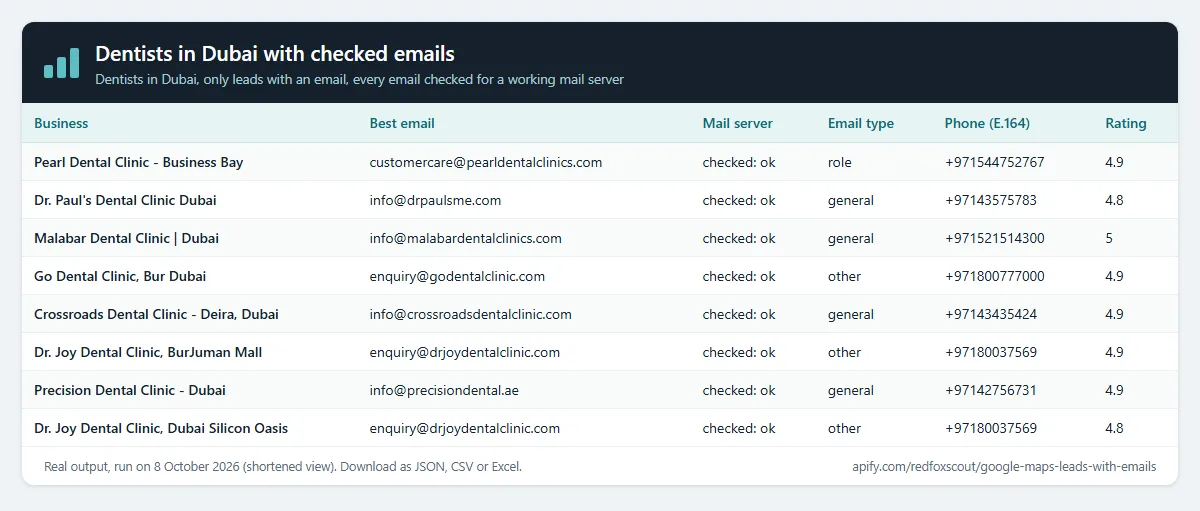
Example (the input behind the table above):
Output
One row per business. A real row from that run (hours shortened):
Each row also has categories, street, city, neighborhood, latitude, longitude, cid and googleMapsUrl. websiteStatus says why contacts are empty when they are (no website, HTTP 403, unreachable).
Example tasks
Ready-made inputs you can open, change and run:
- Dentists in Dubai with checked emails
- Get real estate agency emails in Miami
- Get restaurant emails and Instagram pages in London
- Find roofing contractors with emails in Dallas
- Get marketing agency emails in Dubai
- Get gym and fitness studio emails in Sydney
People on team pages
With People on team pages on, each lead also gets people and peopleCount: the people the business's own website lists on its team, attorneys, leadership and about pages, with name and title, and email, phone or linkedin only when the page shows them next to that person. The team pages share the contact-page budget (maxPagesPerSite), and it adds nothing to the price. It is off by default, so existing runs are unchanged.
Real lead from { "searchQueries": ["law firms in Chicago"], "maxItems": 3, "includePeople": true } (shortened to three people):
Titles are copied as the page shows them. Some sites list no team page, and then peopleCount is 0.
Emails you can send to
Lead lists fail when the addresses bounce. This Actor checks every email it finds before you see it:
- Mail-server check (on by default): each email's domain is looked up for mail servers (MX). Addresses on domains that cannot receive mail are dropped from
emailandemails; you still see them inemailsCheckedwith the reason (no-mx,domain-not-found). - Best address first: the business's own domain beats free mail, sales@, info@ and contact@ beat named roles, no-reply and privacy addresses go last.
emailTypesays which kindemailis. - Proof:
emailSourcesnames the page each email was on. - Phones in E.164 (
websitePhonesE164) when the country is known, ready for dialers and WhatsApp. - We check domains, not mailboxes: no SMTP probing of individual addresses.
A real row (dentists in Dubai Marina): email = info@skyclinicjlt.com (valid-mx), while info@skyclinicdentalcenter.com, also on the site, was dropped because that domain has no mail server.
Every business in a city
A normal Google Maps search ends after ~120-250 places. Turn on Cover the whole area and the city (from Locations or "in
How much does it cost?
$3 per 1,000 leads, Maps data and website contacts included.
- 100 leads: about $0.30
- 10,000 leads: about $30
- Duplicates, failed searches and (with the email-only option) leads without an email: free
Apify's free plan gives $5 of credit every month, enough for about 1,600 leads.
FAQ
Is this legal? It combines public Google Maps business listings with contact details that businesses publish on their own websites. You are responsible for how you contact them, including email marketing laws (CAN-SPAM, GDPR) in your market.
What does this Actor not do? It does not guess or look up personal emails of owners or staff, does not log in anywhere and does not read review texts. It returns the contact details, and the names and titles on team pages, that a business publishes on its own website.
Why do some leads have no email? Many small businesses only offer a contact form or a phone number. Turn on "Only leads with an email" to skip and not pay for those.
How many leads per search? Google shows up to about 140 places per search. Split big cities by neighborhood for more.
Related Actors
- Google Maps Scraper: the same Maps data without the website visit, at $1 per 1,000 places.
- Website Contact Extractor: emails and socials for any list of websites.
- Tech Stack Detector: which technologies each business website runs on.


