

Website Contact Extractor: Emails, Phones & Socials
Pricing
from $1.13 / 1,000 websites
Website Contact Extractor: Emails, Phones & Socials
Extract business emails, phone numbers, address and social media profiles (LinkedIn, Facebook, Instagram, X, YouTube, TikTok) from any list of company websites. Checks the home page plus contact, about and imprint pages. Works with Google Maps results.
Pricing
from $1.13 / 1,000 websites
Rating
0.0
(0)
Developer

Red Fox Scout
Maintained by CommunityActor stats
0
Bookmarked
2
Total users
1
Monthly active users
13 days ago
Last modified
Categories
Security
Limited permissionsShare
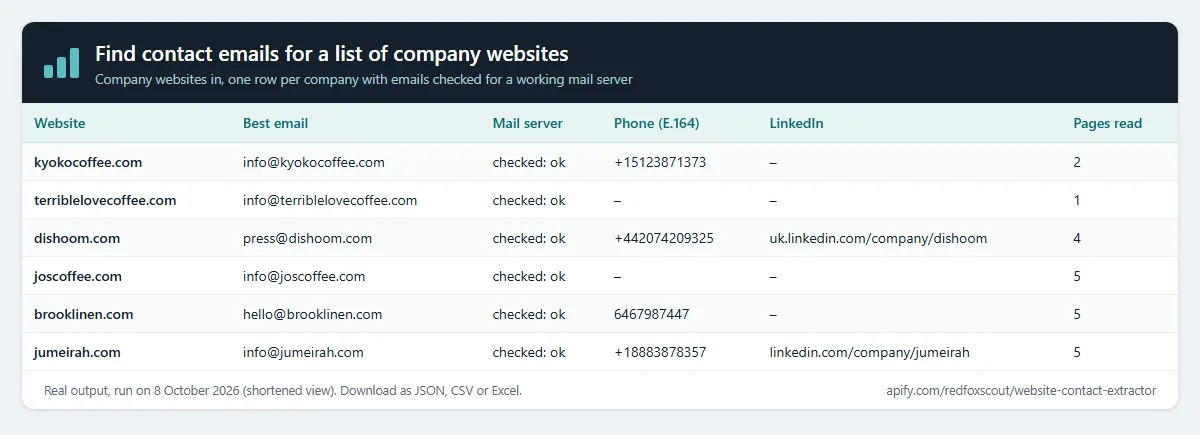
Get one clean row per company with emails you can send to. For each company website it checks the home page, contact, about and imprint pages (found through the links, then the sitemap), checks that each address's domain can receive mail (MX check), drops no-reply and junk addresses, and puts the best address first in primaryEmail. Phone numbers come as written and in international format (E.164), with the source page for each email and social profiles from 17 networks. For sales teams, agencies and anyone building B2B lead lists.
Price: $1.50 per 1,000 websites. Sites that fail to load or block the visit are free. Apify's free plan ($5 monthly credit) covers about 3,300 websites a month.
Questions it answers
- What's the best email to send to for each company on my list?
- Which addresses are on domains that can't receive mail, so I don't waste a send?
- What's each company's phone number in international format?
- Which of these businesses have a TikTok, Pinterest, WhatsApp or Telegram account?
- Where is each company's contact page?
- Who runs each company, and how do I reach them?
Who uses this
- 📈 Sales and lead generation: turn a list of company websites into a contact list you can use.
- 🏢 Agencies: enrich prospect lists before outreach or ads targeting.
- 🗂️ CRM and data teams: fill missing emails, phones and social links on account records.
- 🗺️ Local business research: pair it with Google Maps results to reach local businesses.
Why this Website Contact Extractor
- 📬 Emails you can send to: every email domain is checked for a working mail server, dead addresses are dropped and the best one comes first, with the page it was found on.
- 📄 Contact pages included: it follows the site's contact, about and imprint links, and the sitemap when the links are not enough.
- 🧹 Clean results: removes placeholder addresses, image file names, tracking addresses and no-reply senders; decodes Cloudflare-protected emails.
- 🔗 Socials in the same row as emails and phones, from links and from JSON-LD
sameAsdata. - 👥 People on team pages: names and job titles from each company's own team, leadership and about pages, with the email, phone or LinkedIn shown beside them.
- 🗂️ Reads other datasets: pick a Google Maps or lead-list dataset and it uses the website column.
- 🔔 Change alerts: give a monitor name and get only sites whose contacts changed since the last run.
How to use the Website Contact Extractor
- Click Try for free (a free Apify account is enough).
- Paste company websites or domains, one per line, or pick a dataset with a website field.
- Click Start. Each site takes a few seconds.
- Download as JSON, CSV or Excel, or send the rows to Google Sheets or your CRM.
Input
| Field | Default | What it does |
|---|---|---|
urls | – | Company websites or domains, one per line. |
startUrls | – | The same list in Apify's standard start-URL format. |
datasetId | – | Read websites from another Actor's dataset (e.g. Google Maps results). |
datasetUrlField | website | Field in that dataset that holds the website. |
maxDatasetItems | 10000 | Read at most this many rows from that dataset. |
monitorName | – | Remember results under this name to detect changes next run. |
onlyChanges | false | Output only sites whose contacts changed (needs a monitor name). |
maxPagesPerSite | 4 | Contact, about, imprint or team pages checked per site besides the home page. |
includePeople | true | List the people on the company's team, leadership and about pages. Off: no team pages are read. |
maxPeople | 50 | Most people kept per website (up to 1,000). |
maxTeamPages | 5 | Extra pages of a people directory to follow ("Next", page 2, 3...), up to 50. Same price per website. |
includeUrlPatterns | – | Check only pages whose URL matches one of these (see above). |
excludeUrlPatterns | – | Never check pages whose URL matches one of these. |
checkEmailDomains | true | Look up each email domain's mail servers (MX). Turn off to keep every address found. |
maxConcurrency | 20 | Sites checked in parallel. |
requestTimeoutSecs | 30 | Give up on a page after this long. |
proxyConfiguration | off | Use your own proxy group if some sites block or rate-limit the checks. |
Example (the input behind the output below):
Output
One row per website. The real row for kyokocoffee.com from that run, shortened:
primaryEmail and emails are the sendable addresses; emailsChecked lists every address found, with its status. people and peopleCount list the people on team pages (see People on team pages).
Example tasks
Ready-made inputs you can open, change and run:
- Find contact emails for a list of company websites
- Phone number extractor for business websites
- Emails plus Instagram, Facebook and LinkedIn from websites
People on team pages
The team, leadership, staff and about pages are read within the same page budget as the contact pages (maxPagesPerSite). For each person a page shows, the row gets name and title, plus email, phone or linkedin only when the page shows them next to that person. Person entries in the page's JSON-LD (founders, employees, board members) are included too. Navigation, footers, testimonials, blog authors and form options are skipped, and a phone or email shared by several people (a switchboard or shared inbox) is left out of each of them.
Big directories that spread people over many pages (law firms, agencies) are followed page by page with Directory pages per site (maxTeamPages). On hinshawlaw.com/en/professionals, 10 directory pages took a run from 27 to 209 people, 180 of them with their direct phone, in 45 seconds, at the price of one website.
Real output from { "urls": ["https://www.hinshawlaw.com/en/professionals"], "maxPeople": 3 }:
Titles are copied as the page shows them, so some sites add a city or a label to a title. Turn off includePeople to skip the team pages.
Emails you can send to
- MX check: each email domain is looked up once for its mail servers. Addresses on a domain that does not exist (
domain-not-found) or has no mail server (no-mx) are left out ofemailsandprimaryEmail. They stay inemailsCheckedwith that status, so nothing is lost. If the DNS lookup does not answer, the address is kept asunchecked. - Best address first: the company's own domain comes first. Then sales@, info@ and contact@, then general inboxes (hello@, enquiries@), then named roles (support@, press@, careers@), then other addresses. Privacy, abuse and webmaster addresses come last, and no-reply addresses are dropped.
- Where each address came from:
emailSourcesgives the page for every address inemails, andemailsCheckedgives it for every address found. - Phones in E.164:
phonesE164andprimaryPhoneE164(e.g.+14155550100) when the number has a+or00prefix, or when the site's country is clear from its JSON-LD address, its domain or its page language. The number as written stays inphones. - No guessed addresses: only addresses printed on the company's own pages are returned.
Choose which pages to check
- Contact pages per site (
maxPagesPerSite, default 4): the number of contact, about, imprint and (withincludePeople) team pages read besides the home page. - Only check pages matching (
includeUrlPatterns): check only pages whose URL matches, e.g.team,locationsor*/offices/*. A*matches any text; a word without*matches anywhere in the URL. - Skip pages matching (
excludeUrlPatterns): never check matching pages, e.g.blogor*/news/*. - Without patterns, the contact, about and imprint pages linked from the home page are read first, then pages from
sitemap.xml.
Work with other datasets
Pick a dataset under Websites from another Actor, e.g. Google Maps Scraper results. The Actor reads its website field (or the field you name, such as url, domain or contact.website) and checks every site. For an automatic run after each scrape, add an Actor-to-Actor integration with { "datasetId": "{{resource.defaultDatasetId}}", "datasetUrlField": "website" }.
Change alerts
Give the run a Change alert name (e.g. clients-weekly) and put it on an Apify schedule. Each row then gets changeStatus (new, changed or unchanged) and changedFields, compared with the previous run of the same name. Turn on Only new and changed sites and each run's dataset is just the change report. Unchanged sites are still checked and charged as usual.
What this Actor does not do
It does not guess emails or phones from name patterns, look people up on other sites, do people-search (home addresses, personal phones or emails), or log in to sites. It does not connect to mail servers or send anything, so it shows that a domain accepts mail, not that a mailbox exists.
How much does it cost?
$1.50 per 1,000 websites checked, contact and team pages included. People add nothing to the price.
- 100 websites: about $0.15
- 10,000 websites: about $15
- Sites that fail to load or block the visit: free
Apify's free plan gives $5 of credit every month, enough for about 3,300 websites.
FAQ
Is this legal? It reads publicly published business contact details from company websites, including the names and job titles companies publish for their own people, and returns them as shown. You are responsible for how you use them, including email marketing laws (CAN-SPAM, GDPR) in your market.
Why is a site's email empty? Some sites only offer a contact form or show the address as an image. Those can't be read as text. An address on a domain with no mail server is also left out of emails; check emailsChecked to see it.
What does "domain-not-found" or "no-mx" mean? The address's domain does not exist, or exists but has no mail server, so mail to it will bounce. It is kept in emailsChecked with that status.
Can it read JavaScript-only sites? It reads the HTML the site sends. Sites that build everything in the browser may return fewer contacts.
Related Actors
- Company Social Links Finder: official social profiles and key pages for any list of companies.
- Email Security Checker: mail provider, SPF, DMARC and more for each domain.
- Tech Stack Detector: what technologies each website uses.


