

Google Maps Scraper: Businesses, Phones, Websites & Ratings
Pricing
from $0.75 / 1,000 places
Google Maps Scraper: Businesses, Phones, Websites & Ratings
Scrape Google Maps business listings for any search and location: name, category, address, phone, website, rating, review count, opening hours, coordinates and place ID. Up to 140 places per search. No login, no browser, fast and cheap.
Pricing
from $0.75 / 1,000 places
Rating
0.0
(0)
Developer

Red Fox Scout
Maintained by CommunityActor stats
0
Bookmarked
1
Total users
0
Monthly active users
a day ago
Last modified
Categories
Share
Scrape every business on Google Maps for a search and an area. Turn on Cover the whole area and the city is split into map tiles, so you get every matching place Google shows in the area, once each, not just the places one Google Maps search returns. Each place comes with name, address, phone, website, rating, review count, opening hours, coordinates and place ID. No login and no browser.
Price: $1 per 1,000 places. Duplicates, places removed by a filter and failed searches are free. Apify's free plan ($5 monthly credit) covers about 5,000 places a month.
Questions it answers
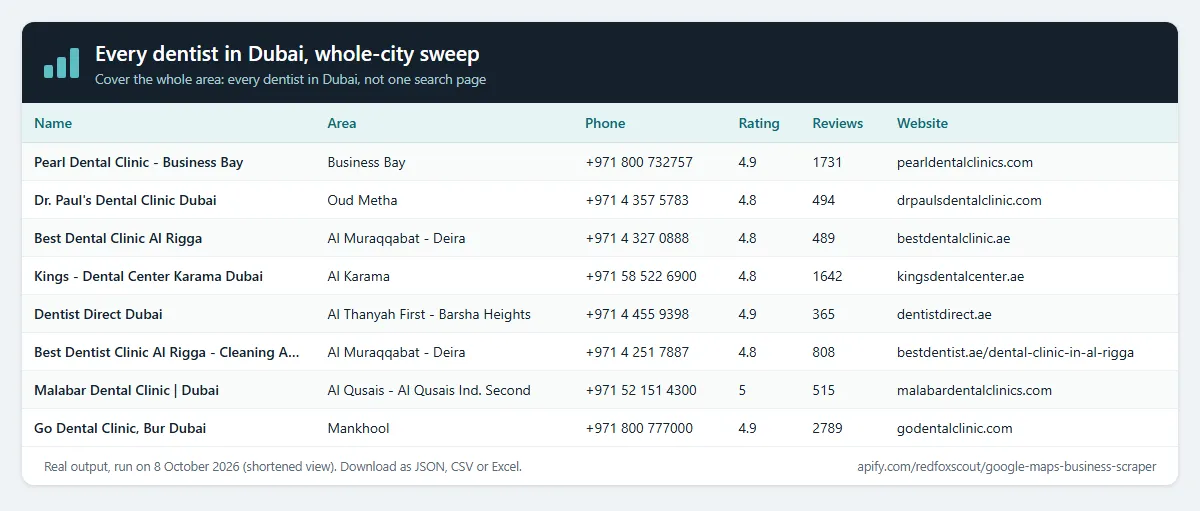
- Which dentists are in the whole of Dubai, with phone numbers?
- Which businesses in my target city have no website (prospects for web agencies)?
- Where are all the branches of a brand in a city, and what is around a point on the map?
- Which places are not closed, have a phone number and at least 100 reviews?
Who uses this
- 📈 Sales and lead generation: complete business lists with phone and website, by niche and city.
- 🏢 Marketing and web agencies: businesses with no website, or with weak ratings.
- 📍 Market research and expansion: count and map competitors, branches and gaps in any area.
- 🗂️ Data teams: feed places into a CRM, a directory or a map.
Why this Google Maps Scraper
- 🗺️ Whole-area coverage: one Google Maps search returns one list. Cover the whole area sweeps the city and returns each matching place once.
- ⚡ Fast and cheap: reads the data Google Maps loads, without a browser. Runs of 20 places take seconds.
- 💰 $1 per 1,000 places, all fields included: phone, website, rating, reviews, hours, photos, coordinates and IDs.
- 🎯 Filters: rating, review count, website, phone, closed places, categories and name matching.
- 🔁 Many searches in one run: every search runs in every location; duplicates are removed and not charged.
- 📧 Pairs with contact extraction: send the
websitecolumn to the Website Contact Extractor to get emails.
How to use the Google Maps Scraper
- Click Try for free (a free Apify account is enough).
- Enter what to search, one per line, e.g.
dentists in Dubai. Or enterdentistsand add cities under Locations. - For every place in a city, turn on Cover the whole area and raise Max results per search (a plain search stops after a few hundred places).
- Click Start, then download as JSON, CSV or Excel.
Input
| Field | Default | What it does |
|---|---|---|
searchQueries | – | Searches as typed in Google Maps, one per line, e.g. dentists in Dubai. |
locations | – | Cities or areas; every search runs in each one (<search> in <location>). |
searchWholeArea | false | Cover the whole area: sweep map tiles so every matching place Google shows in the area is returned once. |
maxItems | 60 | Places per search. With Cover the whole area use hundreds or thousands. |
startUrls | – | Google Maps search links (/maps/search/...@lat,lng,zoom) and place links. ?cid= links are not supported. |
placeIds | – | Google place IDs such as ChIJ1S_Bov20RIYRe7MiR8tYawY. One row per place. |
latitude, longitude | – | A map point to search around. Set both. |
radiusKm | 5 | Radius of the circle around the point (0.2 to 200 km). Places outside the circle are left out; with Cover the whole area, every place inside it is returned. |
skipClosedPlaces | false | Leave out places Google marks as permanently or temporarily closed. |
categoryFilterWords | – | Keep a place only if one of its Google categories contains one of these words, e.g. dentist, orthodontist. |
searchMatching | all | Name must match: any place Google returns, the name contains the search words, or the name is exactly the search words. Works with Starbucks in Dubai or with Starbucks plus Locations Dubai: the city part is not part of the name check. |
minRating | – | Skip places rated below this (whole number, 1 to 5). Places without a rating are skipped when this is set. |
minReviews | – | Skip places with fewer reviews. Places without a review count are skipped when this is set. |
website | allPlaces | All places, only places with a website, or only places without one. |
skipWithoutPhone | false | Skip places that list no phone number. |
language | en | Language of names and categories, e.g. de, ar, fr. Use the language of your search. |
countryCode | us | Country Google uses for regional results, e.g. gb, ae, de. |
maxConcurrency | 3 | Searches run at once. |
proxyConfiguration | off | Off by default and usually not needed. Turn on for very large runs if Google starts rate-limiting. |
skipWithoutWebsite still works: it is the same as website = only places with a website.
Examples from real runs:
- Map point:
{ "searchQueries": ["gyms"], "latitude": 25.2048, "longitude": 55.2708, "radiusKm": 3, "maxItems": 20 } - Brand branches:
{ "searchQueries": ["Starbucks"], "locations": ["Dubai"], "searchMatching": "only_includes", "maxItems": 20 } - Businesses without a website:
{ "searchQueries": ["roofers in Dallas TX"], "website": "withoutWebsite", "maxItems": 15 } - Google Maps search link:
{ "startUrls": [{ "url": "https://www.google.com/maps/search/pizza/@40.758,-73.9855,15z" }], "maxItems": 20 } - Place IDs:
{ "placeIds": ["ChIJG-gJw2vKRIYROWi2uwOp8QE", "ChIJ1S_Bov20RIYRe7MiR8tYawY", "ChIJlZDDXbK1RIYRXDHg0KomqhY"] }
Output
One row per place. Fields:
- Identity:
name,placeId,cid,fid,kgmid,url(Google Maps link by CID),googleMapsUrl. - Location:
address,street,city,neighborhood,postalCode,state,countryCode,latitude,longitude,timezone. - Contact:
phone,phoneInternational,website,domain. - Business:
category,categories,description,openingHours,additionalInfo(Accessibility and other About items),highlights(e.g. "Women-owned"),reservationUrl,bookingLinks. - Ratings:
rating,reviewsCount,reviewsDistribution(one to five stars). - Status:
permanentlyClosed,temporarilyClosed. - Photos:
imageUrl,imageUrls. - Search:
searchQuery,rank(position in the search; in a whole-area sweep, the order the places were found). - Errors: a failed search adds a row with
searchQueryanderror. Error rows are free.
A real row (shortened with ...):
Example tasks
Ready-made inputs you can open, change and run:
- Every dentist in Dubai, whole-city sweep
- Get restaurants in New York from Google Maps
- Find real estate agencies in London
- Find plumbers in Chicago for lead generation
- Get gyms and fitness centers in Los Angeles
- Find law firms in Toronto
- Get coffee shops in Austin, Texas
Cover the whole area (every place, not one search)
Google Maps returns one list for each search, and that list runs out. In our test runs, a plain search for "restaurants in New York" returned 171 places and stopped, and "dentists in Dubai" returned 235. With Cover the whole area on, the same kind of search returned 1,000 places in about 7 minutes; we stopped the test there.
The area is the city named in the search or under Locations, the map view of a Google Maps link, or your own map point. It is split into map tiles of about 8 km, and a tile that still holds many places is split again. Each place is returned once, by its place ID, so places that appear in two tiles are not repeated or charged twice. Max results per search is the limit: the run stops there, and you pay only for the places returned. Large areas take minutes.
Input (real run, shortened with ...):
One row from that run:
What this Actor does not do
It does not open ?cid= links, collect review text, popular times, menus or prices, and it does not collect people's names or personal emails. It does not log in.
How much does it cost?
$1 per 1,000 places, every field included.
- 100 places: about $0.10
- 1,000 places (for example, a whole-city sweep): about $1
- 10,000 places: about $10
- Duplicates, places removed by a filter and failed searches: free
Apify's free plan gives $5 of credit every month, enough for about 5,000 places.
FAQ
Is this legal? It collects public business listings: names, addresses, phone numbers, websites, ratings and hours that businesses publish on Google Maps. It does not log in and does not collect reviewer profiles or personal data. You are responsible for using the data in line with the laws and terms that apply to you.
Why do I get fewer places than the area has? A plain search returns one Google list, and it runs out. Turn on Cover the whole area, or split the work with Locations or a map point.
Why is the review count empty for some places? Google sometimes sends a listing without its review count. The row keeps its other fields. Run again later for a fuller result. Places without a review count are skipped when Minimum number of reviews is set.
Why is the phone empty for some places? Not every business lists a phone number on Google Maps. Use "Only places with a phone number" to skip them.
Why do place ID and link lookups have fewer fields? They return the place's main details. Some fields, such as the review breakdown, can be empty.
Can I get emails? Google Maps does not show emails. Run the website column through the Website Contact Extractor.
Related Actors
- Website Contact Extractor: emails, phones and social profiles from each place's website.
- Google Maps Leads with Emails: the same kind of Google Maps leads, with emails from their websites.
- Tech Stack Detector: which technologies each business website runs on.
- Company Social Links Finder: official social profiles for any list of websites.


