

LinkedIn Jobs Scraper: Job Search, No Login, With Descriptions
Pricing
from $0.60 / 1,000 jobs
LinkedIn Jobs Scraper: Job Search, No Login, With Descriptions
Scrape LinkedIn job listings by keyword and location, no login or cookies needed. Get title, company, location, salary, posted date, full description, seniority, employment type, applicants and apply link. Filter by date, remote, job type and level.
Pricing
from $0.60 / 1,000 jobs
Rating
0.0
(0)
Developer

Red Fox Scout
Maintained by CommunityActor stats
0
Bookmarked
2
Total users
2
Monthly active users
a day ago
Last modified
Categories
Share
Scrape fresh, low-competition LinkedIn jobs without logging in. Filter to jobs posted in the last 24 hours with under 10 applicants and Easy Apply, drop staffing agencies and reposted duplicates, and get the salary as numbers. Every job also comes with its full description, seniority, applicant count and apply type.
Price: $0.80 per 1,000 jobs. Failed searches and duplicates are free. Apify's free plan ($5 monthly credit) covers about 6,000 jobs a month.
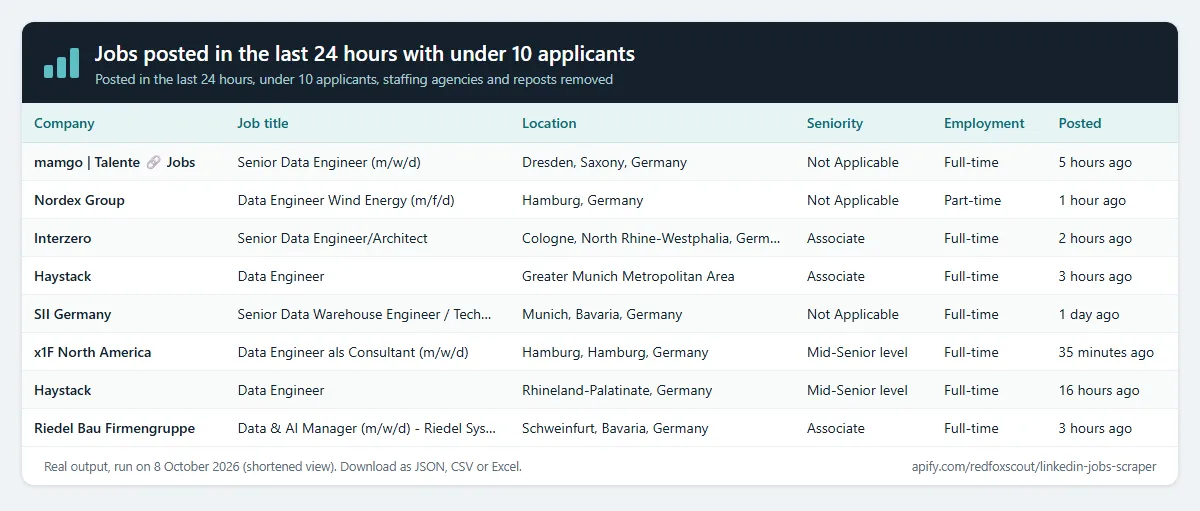
Questions it answers
- Which companies posted data engineer jobs in Germany in the last 24 hours, and how many people applied?
- Which new jobs have fewer than 10 applicants and an Easy Apply button?
- What salary range do remote data analyst jobs in the US publish?
- Which companies are hiring for roles that need my product (e.g. "Salesforce administrator")?
- Did a specific company post new jobs this week?
Who uses this
- 🧑💼 Recruiters and agencies: find companies hiring for the roles you place, every day.
- 📈 Sales teams: hiring is a buying signal; a company hiring five data engineers needs data tools.
- 📊 Job boards and analysts: feed fresh listings into a job site, newsletter or labor-market dashboard.
- 🎯 Job seekers: one sheet of fresh, uncrowded jobs with descriptions, instead of endless scrolling.
Why this LinkedIn Jobs Scraper
- 🆕 Fresh and uncrowded: posted in the last 24 hours, under 10 applicants, Easy Apply. These are LinkedIn's own filters, applied on LinkedIn's side.
- 🧹 Less noise by default: staffing agencies and the same job posted again are removed (turn either off to keep them).
- 💵 Salary as numbers: minimum, maximum, currency and period, whenever the employer shows pay.
- 🏢 Company watch: follow companies by name or LinkedIn company ID, with their website, industry, size and logo.
- 🔒 No login needed. It reads the public job listings LinkedIn shows to any visitor. No cookies, no account at risk.
- 🤝 Exact applicant counts: the number of applicants as a number when LinkedIn shows it (33, 110...), ready to sort for the least crowded jobs.
- 💰 Pay only for jobs delivered, at $0.80 per 1,000.
How to use the LinkedIn Jobs Scraper
- Click Try for free (a free Apify account is enough).
- Enter job titles or keywords and locations, one per line. Or enter company names or LinkedIn company IDs instead.
- Optional: add the fresh-job filters, a title or company filter, or paste a LinkedIn jobs search URL to reuse its filters.
- Click Start, then download the jobs as JSON, CSV or Excel, or schedule the run for a daily feed.
Input
| Field | Default | What it does |
|---|---|---|
keywords | – | Job titles or keywords, one per line. |
locations | – | Countries, regions or cities. Every keyword is searched in every location. Empty = worldwide. |
distance | LinkedIn's | Radius around each location, in miles. Only used with a location. |
postedWithin | any | day, week, month or any. |
workplace | all | Any of onsite, remote, hybrid. |
jobType | all | Any of fulltime, parttime, contract, temporary, internship, volunteer, other. |
experience | all | Any of internship, entry, associate, midsenior, director, executive. |
sortBy | relevance | relevance or date (newest first). |
includeDetails | true | Adds description, seniority, employment type, job function, industries, applicants, apply type and open/closed state. One extra request per job. |
includeHiringTeam | false | Adds the hiring team when LinkedIn's public job page shows it (hiringTeam, plus posterName, posterTitle, posterProfileUrl). Rare: most public pages show none. Needs includeDetails. |
under10Applicants | false | Only jobs with fewer than 10 applicants (LinkedIn's filter). |
easyApply | false | Only jobs with Easy Apply. |
dropReposts | true | One row per company, title and location across all searches. Set false to keep every repost. |
excludeAgencies | true | Drops staffing and recruiting firms (name heuristic; with details, also LinkedIn's industry). Set false to keep agency posts. |
companyNames | – | Keeps jobs whose company name contains one of these names, as whole words (Meta matches "Meta Platforms", not "Metalworks"). With no keywords, each name is searched. |
companyIds | – | Numeric LinkedIn company IDs, e.g. 1441 for Google. LinkedIn filters on these, so it is the faster choice. |
includeCompanyDetails | false | Adds company website, industry, size and logo. One extra request per company. |
titleInclude | – | Keeps jobs whose title contains at least one of these words (whole words, any case). |
titleExclude | – | Drops jobs whose title contains any of these words, e.g. intern, senior. |
searchUrls | – | LinkedIn jobs search URLs; their filters are kept. |
startUrls | – | Same as searchUrls, for compatibility with other job scrapers. Both lists are searched. |
maxItems | 50 | Jobs per search (max 1,000). |
Output
One row per job. A real row from a local run on the input in the Fresh jobs section below (description shortened):
descriptionHtml keeps the original formatting. postedAtTimestamp is estimated from LinkedIn's relative time ("4 hours ago"): within about an hour for minutes and hours, within about a day for days. postedAt is the exact date. applicantCount is the exact number when LinkedIn shows one; applicants keeps the text as shown. hiringTeam is an empty list when the job page shows no hiring team.
Example tasks
Ready-made inputs you can open, change and run:
- Jobs posted in the last 24 hours with under 10 applicants
- Find remote software engineer jobs posted this week
- Find data analyst jobs in the US
- Find product manager jobs in New York
- Find jobs in Dubai and the UAE
- Find entry-level jobs and internships for graduates
- See which companies are hiring sales reps
Applicant counts and hiring team
- Exact applicant count:
applicantCountis the number when LinkedIn shows one, for example 33 from "33 applicants". "Over 200 applicants" and "Be among the first 25 applicants" givenull;applicantskeeps LinkedIn's text. - Hiring team: with
includeHiringTeamon,hiringTeamlists the people a public job page shows under "Meet the hiring team" ({ name, title, profileUrl }), andposterName,posterTitle,posterProfileUrlhold the first one. LinkedIn rarely shows this block to visitors who are not signed in, so expect an empty list on most jobs. Signed-in pages were checked on 2026-10-09 and did not include it either, so this Actor does not use login cookies.
Fresh jobs with few applicants
Example input (this exact input produced the row shown under Output):
- Posted within: Past 24 hours uses LinkedIn's date filter.
- Under 10 applicants and Easy Apply are LinkedIn's own filters, so LinkedIn applies them before any job reaches you.
- Drop reposts keeps one row per company, title and location across all searches. The same job posted again under a new ID is removed. The same title posted in two cities stays, because those are two openings.
- Exclude staffing agencies removes recruiters by company name (for example "staffing", "recruitment", "executive search", Randstad, Robert Half) and, when details are on, by LinkedIn's "Staffing and Recruiting" industry. It is a heuristic: some agencies with plain names still get through.
Salary, apply type and company details
- Salary:
salaryMin,salaryMax,salaryCurrencyandsalaryPeriod(year, month, week, day or hour) are parsed from the pay text. When the card shows no pay, the pay from the job page is used (with details on). Empty when the employer shows no pay. - Apply type:
applyTypeiseasy_applywhen the job can be applied to on LinkedIn, andexternalwhen it sends you to the company's site.applyUrlstays empty for logged-out visitors, so useapplyTypeinstead. - Company details (optional):
companyWebsite,companyIndustry,companySizeandcompanyLogocome from the company's public LinkedIn page. Pages that ask for a login are skipped and left empty.
Daily job feed
Schedule the Actor (Apify Console → Schedules) with postedWithin: "day", sortBy: "date" and dropReposts: true. Each day you get the new jobs only, then send them to Google Sheets, Slack or a webhook with Apify integrations.
What this Actor does not do
It does not log in, so LinkedIn's login-only features (such as "jobs in your network") are not offered. It cannot submit applications, message anyone, follow companies or post. The hiring team is returned only as the job page shows it: it does not visit those people's profiles, search for them, or look up emails or phone numbers. It does not fill applyUrl for external jobs, because LinkedIn shows that link only to logged-in users.
How much does it cost?
$0.80 per 1,000 jobs delivered, with full descriptions included.
- 100 jobs: about $0.08
- 10,000 jobs: about $8
- Failed searches, duplicate jobs and jobs removed by your filters: free
- Hiring team and applicant count: no extra charge
Apify's free plan gives $5 of credit every month, enough for about 6,000 jobs.
FAQ
Is this legal? It collects public job listings that LinkedIn shows to anyone without logging in. The only people data it returns is the hiring team that the job page shows (name, title and public profile link), not profile details or contact information. You are responsible for using the data in line with the laws and terms that apply to you.
How many jobs can I get per search? LinkedIn shows at most about 1,000 results per search. For more, split by location or add filters.
Why did I get fewer jobs than maxItems? Filters such as "under 10 applicants" or "exclude agencies" skip jobs before they are charged, and LinkedIn may return fewer results for a narrow search. The run log says how many jobs each filter skipped.
Why is the salary empty? Pay is only filled when the employer publishes it on the listing. Pay written without an amount (for example "competitive") leaves the salary fields empty.
Why is hiringTeam empty? LinkedIn rarely shows the hiring team on public job pages, so most jobs have none. Turn includeHiringTeam off to leave those fields out.
Why is applyUrl empty? LinkedIn shows the company's own apply link only to logged-in users. Use applyType to see whether a job applies on LinkedIn or on the company site.
Some runs are slower. Why? If LinkedIn slows requests down, the run waits and retries. Lower "Searches in parallel" for very large runs. Title, company and agency filters are checked page by page, so a narrow filter can scan many pages to find enough jobs; a company ID or a more specific keyword is faster.
Related Actors
- Jobs Index: search 260,000+ startup jobs from company career pages at once.
- ATS Jobs Scraper: every open job at companies on Greenhouse, Lever, Ashby and more.
- Company Social Links Finder: each company's LinkedIn page and other profiles from its website.


