

ATS Jobs Scraper: Greenhouse, Lever & Ashby Jobs API
Pricing
from $0.75 / 1,000 jobs
ATS Jobs Scraper: Greenhouse, Lever & Ashby Jobs API
Greenhouse, Lever & Ashby jobs API, plus Workable, SmartRecruiters, Recruitee, Personio and Breezy: list every open job at any company, live from its own career site. Auto-detects the ATS from a company website. One clean schema, filters, new-jobs-only alerts. $1 per 1,000 jobs.
Pricing
from $0.75 / 1,000 jobs
Rating
0.0
(0)
Developer

Red Fox Scout
Maintained by CommunityActor stats
0
Bookmarked
2
Total users
1
Monthly active users
2 days ago
Last modified
Categories
Share
Paste company websites, get their open jobs. This Actor takes a list of company websites like stripe.com or ramp.com, finds each company's job board on Greenhouse, Lever, Ashby and five more applicant tracking systems (ATS), and returns every open job in one clean format. Schedule it with monitoring mode on and each run returns only the jobs that are new since the last one. $1.00 per 1,000 jobs.
Each job also comes with rule-based fields read from the posting: salary range, seniority, years of experience, visa sponsorship, remote or hybrid, the tools and skills it names, and any contact email or recruiter name it shows. Nothing is generated by AI, and a field is null when the posting does not say.
Greenhouse · Lever · Ashby · Workable · SmartRecruiters · Recruitee · Personio · Breezy HR
Price: $1.00 per 1,000 jobs. Companies that fail or have no matching jobs cost nothing. Apify's free plan ($5 monthly credit) covers about 5,000 jobs a month.
Questions it answers
- What jobs is this company hiring for right now?
- Which of these companies opened new sales or engineering roles since yesterday?
- Which applicant tracking system (Greenhouse, Lever, Ashby...) does this company use?
- Which open roles pay at least $100,000, or mention visa sponsorship?
- How do I get an alert when a company posts a new job?
Who uses this
- 📋 Job boards and aggregators: fill niche boards with fresh postings straight from the source, no stale reposts.
- 🤝 Recruiters and staffing agencies: watch target companies and get alerted when they open roles you can fill.
- 💼 Sales teams: hiring is a buying signal. A company hiring 5 data engineers needs data tools.
- 📈 Investors and analysts: track headcount growth, pay bands and hiring mix across a portfolio.
- 🧭 Job seekers and career coaches: monitor dream companies for new openings.
Why this Actor
- ✅ Paste websites, not board URLs. Give it
notion.soand it finds the Ashby board on Notion's careers page. Give itramp.comand it does the same. - ✅ New jobs only. Monitoring mode remembers every job it has returned for your company list, so scheduled runs feed alerts or a database without duplicates.
- ✅ Live data from the source. Jobs come from each company's own ATS at run time, so they're never stale or already filled.
- ✅ Official public APIs. Every vendor here publishes a job-board API meant for public use. No logins, no proxies, no browser, no breakage from anti-bot updates.
- ✅ One schema for 8 ATS, plus pay, seniority, years of experience, visa sponsorship, remote or hybrid, and skills on every job.
- 📧 Contacts the posting shows. Email addresses and a named recruiter, as written in the job description. Nothing is looked up.
How to use the ATS Jobs Scraper
- Click Try for free (a free Apify account is enough).
- Add companies, one per line: a company website, a careers page URL, or a shorthand like
lever:palantir. - Optional: add keywords, locations, remote-only, a posting-date limit, or pay and description filters.
- Click Start. A dozen companies take under a minute.
- Download the jobs as JSON, CSV or Excel, or schedule the run with monitoring mode on to get only new jobs each day.
Input
| Field | Default | What it does |
|---|---|---|
companies | required | Company websites, careers page URLs, or ats:slug shorthands. One per line. |
keywords | empty | Keep jobs whose title/department/team contains any of these. |
excludeKeywords | empty | Drop jobs whose title/department/team contains any of these (plain substring match, so intern also matches "international"). |
searchInDescription | false | Also match keywords against the full description. |
excludeDescriptionKeywords | empty | Drop jobs whose full description contains any of these whole words or phrases, e.g. security clearance. Unlike excludeKeywords, intern does not match international. |
locations | empty | Keep jobs whose location contains any of these (London, Germany, Remote). |
remoteOnly | false | Only remote jobs. |
postedWithinDays | 0 | Only jobs posted in the last N days. |
hasSalary | false | Keep only jobs that publish a pay figure, from the ATS pay fields or the posting text. |
minSalary | 0 | Keep jobs whose top published pay, converted to a yearly amount, reaches this number. Hourly is x 2,080, weekly x 52, monthly x 12, daily x 260. 0 = off. Jobs with no pay or no stated pay period are dropped when set. |
salaryCurrency | empty | Keep only jobs whose pay is in this currency, e.g. USD. Set it with minSalary: amounts are compared as published, with no currency conversion. |
includeDescription | true | Include full descriptions. Turn off for smaller results. The description-based fields, descriptionEmails and hiringContact, need it. |
includeQuestions | false | Greenhouse jobs only: add applicationQuestions from the application form. One extra request per returned Greenhouse job. |
onlyNewJobs | false | Monitoring mode: return only jobs not returned before. |
monitorName | auto | Name for monitoring memory, to share it between schedules. |
maxJobsPerCompany | 0 | Limit per company (0 = all). |
guessSlugs | true | If no ATS link is found on a website, try boards named after the domain. |
maxConcurrency | 5 | Companies processed in parallel. |
Accepted company formats:
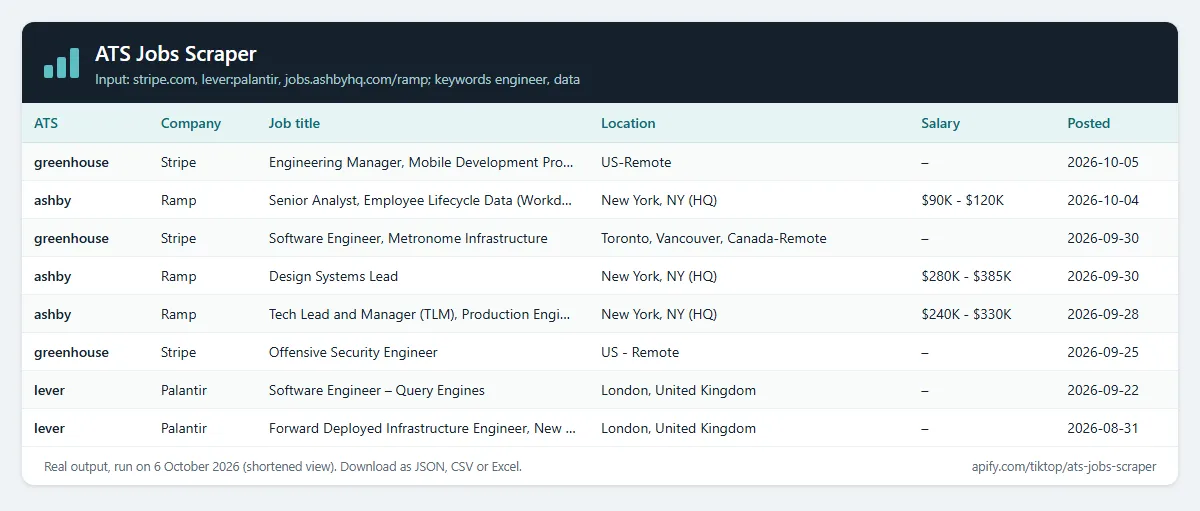
Example (the input behind the table above):
Output
One row per job. A real row from a run on ramp.com (descriptions shortened):
detectedVia tells you how the board was found: input (you gave it), a careers page URL (found on the company website), or slug-guess (matched by company name; double-check these).
A per-company report (jobs found, jobs returned, errors) is saved in the run's key-value store as RUN_SUMMARY.
Derived fields (rule-based, no AI)
Each value comes from wording in the posting, or it is null. Check the description when a figure matters to a decision.
- Pay (
salaryMin,salaryMax,salaryCurrency,salaryPeriod): the ATS pay fields first, otherwise the first pay range in the salary text, title or description. Figures are in the period the posting uses; they are not converted. A figure of 10,000 or more, or akfigure, with no period is read as yearly. A smaller figure with no period staysnull, because it could be monthly. experienceLevel: intern, entry, mid, senior, lead or executive, from the title (for example "Senior", "Staff", "Head of", "Junior", "II").yearsOfExperience: the minimum years the description asks for ("5+ years of experience", "3-5 years" gives 3).visaSponsorship:truewhen the description says visa sponsorship is offered,falsewhen it says it is not,nullwhen silent.workArrangement: remote, hybrid or onsite. The ATS value wins; otherwise the location, title and description are read.keySkills: up to 25 tools and skills from a curated list of about 300 (Python, SQL, Salesforce, AWS, Figma...), in order of mention.educationRequirement: the highest degree the description mentions: phd, masters, bachelors, associate or high school.descriptionEmailsandhiringContact: the contact details the posting shows. See Contacts written in the posting.
What each ATS provides
Every ATS gives title, location, posting date, link and description. Other fields depend on what the vendor publishes: Ashby, Recruitee, Lever and Breezy often include salary; SmartRecruiters and Recruitee include seniority; Lever and Ashby include remote/hybrid/onsite; Personio includes department and employment type. Missing fields are null.
SmartRecruiters and Breezy list jobs without descriptions, so the Actor reads each returned job's posting page (one request per job). Filters on descriptions or pay read every candidate job's page first.
Example tasks
Ready-made inputs you can open, change and run:
- New jobs at a list of companies since last run
- Scrape all open jobs from Greenhouse career pages
- Scrape all open jobs from Lever career pages
- Remote software engineering jobs at top tech startups
- Track AI, ML and data jobs at leading companies
Contacts written in the posting
Some postings name a recruiter or give an address for applications. The Actor returns what the description says, read by fixed rules in English, German and French:
descriptionEmails: every email address in the description, including mailto links, lowercased and de-duplicated (up to 20). Role mailboxes such ascareers@oraccommodations@are kept, because the posting shows them. Image file names such aslogo@2x.pngand sample addresses such asname@example.comare dropped.hiringContact:{ "name", "email" }for a person the description names after a label: "Contact Jane Doe", "Recruiter: Jane Doe", "Hiring manager: Jane Doe", "Ansprechpartnerin: Anna Schmidt", "Contactez Claire Dubois".emailis the address that belongs to that person (it carries their surname or first name, or sits right next to the name), otherwisenull. A role mailbox is never assigned to a person, and a phrase such as "Contact Center Operations" is not read as a name.
Nothing is looked up on LinkedIn, the web or company directories, and no address is guessed. A contact that appears only in an image or a PDF is not found.
Needs descriptions. Both fields come from the description, so keep includeDescription on (it is on by default). With it off, both are null, unless a description or pay filter already read the descriptions. Greenhouse, Lever, Ashby, Workable, Recruitee and Personio send descriptions in the same request, so the fields cost nothing extra. SmartRecruiters and Breezy need one posting-page request per job, which the Actor makes only for jobs it returns (or for every candidate when a description or pay filter is set).
Real rows from local runs, shortened. Databricks, with keywords: ["architect"]:
Cloudflare, with keywords: ["architect", "engineer"]:
Paste company websites, get only the new jobs
This is the main use. Put company websites in companies (one per line), turn on Only new jobs (monitoring mode) and schedule the run.
How the ATS is found for a website:
- The homepage is read for a link to a supported job board, or an embedded board.
- If there is none, up to four careers-looking links on the same site (for example
/careers,/jobs, "Join us") are read the same way. - If still nothing, boards named after the company's domain are checked on each ATS (
ramp.comtriesramp). Turn this off withguessSlugs. - Every board found is confirmed with the vendor's API before it is used, and a board named after the company is preferred.
The detectedVia field shows which step found each board: the website you gave, a careers page URL, or slug-guess. Check slug-guess rows, because a name match is a guess. A company whose careers page is built in JavaScript or hosted on a different domain may not be detected: give its board URL or ats:slug shorthand instead, such as greenhouse:airbnb.
Use with Claude
Ask Claude about any company's open jobs and it runs this Actor for you through Apify's MCP server.
- In Claude (desktop app or claude.ai), open Settings, then Connectors, then Add custom connector.
- Name it
Apifyand paste this server URL:https://mcp.apify.com?tools=redfoxscout/ats-jobs-scraper - Select Continue, then Add, and sign in to Apify when your browser opens.
Then try:
- "Which of these companies are hiring data engineers right now: stripe.com, ramp.com, notion.so, figma.com, airbnb.com?"
- "List Ramp's open engineering jobs posted in the last 14 days, with salary ranges."
The input Claude sends for the first prompt:
Runs are billed to your Apify account at the same $1 per 1,000 jobs. To search 260,000+ jobs without naming companies, use Career Site Jobs API.
Use in Clay
Add each company's open jobs (a hiring signal) to a Clay table of accounts:
- In Clay, open Settings, then Connections, then Add Connection, pick Apify and paste your Apify API token (Apify Console, Settings, API & Integrations).
- In your table, select Add enrichment, search for Apify and pick Run Apify Actor.
- Choose this Actor (
redfoxscout/ats-jobs-scraper, ID1bXqNsF0ift2zjR5B) and paste this as the input, inserting your website column where it says/Website(Clay's rule: quotes around the key, none around the column token):
- Map what you need from the results: the number of jobs,
title,department,location,postedAtandurl. Rows withdetectedVia=slug-guesswere matched by company name; double-check those.
Clay runs the Actor once per row, so each row costs one Actor start plus $0.001 per job returned. Companies with no matching jobs cost only the start.
Monitoring mode
Turn on onlyNewJobs and schedule the Actor (e.g. daily). The first run returns all matching jobs. Later runs return only jobs that weren't returned before. Connect a webhook, Slack, email, Google Sheets or Zapier integration to get alerts. The memory is tied to your company list; set monitorName to keep it when you edit the list.
Jobs that a filter removes are not remembered, so they are returned on a later run if the filter changes to let them through. Jobs cut off by maxJobsPerCompany are also not remembered, and come back in a later run.
What this Actor does not do
- It does not log in, use cookies or accounts, or solve CAPTCHAs. It reads only the public job-board data each vendor publishes.
- It does not read Workday, iCIMS, Taleo or other ATS without a public job-board API.
- It does not look people up or guess addresses. A recruiter's name or email appears only when the posting itself shows it, and it never returns LinkedIn profiles or contact details from other sources.
- It does not run a browser, so a careers page that is only built in JavaScript may not be detected.
How much does it cost?
Pay per event:
- Job result: $0.001 per job returned ($1.00 per 1,000).
- Actor start: $0.00005 per GB of memory (default 1 GB = $0.00005 per run).
- Companies that fail or have no matching jobs cost nothing.
- Filters are applied before charging. You only pay for jobs you get.
| What you run | Cost |
|---|---|
| One company with 150 open jobs | about $0.15 |
| 20 companies, about 2,000 jobs | about $2 |
| Daily monitoring that finds 30 new jobs a day | about $0.90 a month |
Apify's free plan includes $5 of credit every month, enough for about 5,000 jobs. Paid Apify plans get Store discounts of up to 25%. Set a maximum cost per run in the run options; the Actor stops cleanly when it's reached.
FAQ
Is this legal? It reads job postings through each ATS vendor's public job-board API, the same feeds companies use to syndicate their jobs. Job postings are company information. The Actor returns only the contact details the posting itself shows, and it looks nobody up.
My company uses Workday / iCIMS / Taleo. Not supported yet. The Actor tells you no supported ATS was found, and you aren't charged.
The website I pasted was not detected. Give its careers page URL or ats:slug shorthand instead (for example greenhouse:airbnb). The run summary says which companies were not found, and you aren't charged for them.
Can I search all companies at once? Not with this Actor: it fetches live jobs from the companies you list, which keeps the data fresh. To search everything at once, use Startup Jobs Search (260,000+ jobs from 8,000+ companies, refreshed daily).
Are the pay and experience fields accurate? They are read from the posting's wording with fixed rules. A pay figure in a foreign currency or period is read from the text, and a figure with no stated period stays null. Use them to filter and sort, and check the description for anything that matters to a decision.
Are the contact fields complete? No. They are read from the text of the posting with fixed rules. An address written in an unusual way, such as jane [at] acme [dot] com, or a contact that appears only in an image, is not found.
How fast is it? About 2,000 jobs from a dozen companies in under a minute.
Related Actors
- Startup Jobs Search: search 260,000+ jobs from 8,000+ companies at once, no company list needed.
- Greenhouse Jobs Scraper and Ashby Jobs Scraper: single-ATS editions.
- Company Signals MCP: the same hiring data for Claude, ChatGPT, Cursor and other AI agents.
- Website Tech Stack Detector: which ATS, CRM and analytics a company's website uses.


