

Link Building Prospects & Guest Post Finder (Google, AI)
Pricing
from $6.00 / 1,000 qualified prospect (rules only)s
Link Building Prospects & Guest Post Finder (Google, AI)
First 25 prospects free. Link building prospects from Google, pay per qualified prospect: guest-post, resource and listicle pages with contact route, fit score and AI opener. Free demo on any plan; live search runs on your Apify account, any plan that runs Store Actors.
Pricing
from $6.00 / 1,000 qualified prospect (rules only)s
Rating
0.0
(0)
Developer

Rich Minds
Maintained by CommunityActor stats
0
Bookmarked
2
Total users
1
Monthly active users
3 days ago
Last modified
Categories
Share
Guest-post and resource-page sites for your keywords, with a checked e-mail and a first line.
⚡ First 25 prospects free · 💵 $0.006 per qualified prospect · 🤖 $0.018 with AI + ≈ $0.005 tokens, on plans with model access or your key · ⏱️ demo in seconds; ≈ 4–6 min for 5 keywords with AI (estimate)
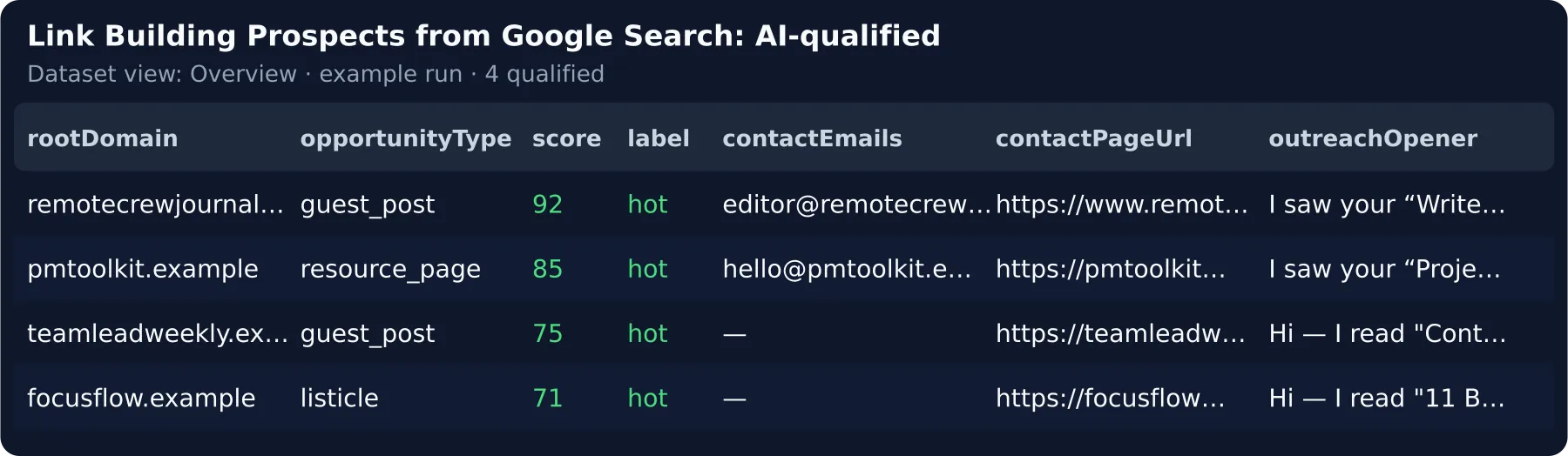
Try it in 30 seconds. Click Try it — the pre-filled free demo turns 8 Google results into 4 link building prospects, nothing charged. Then paste the page you want links to and press Start. Your first 25 qualified prospects are free. → What a run costs · What the AI adds · Run it weekly
⚡ At a glance
| What you get | one row per site: opportunity type, checked best e-mail, authority, fit score, opener, dead links to pitch |
| You provide | the page you want links to — keywords and a pitch are optional (read from the page) |
| Never delivered | directories, giants, PDFs, your own and ignored domains, sites you already received |
| Output | a ranked sheet (Excel / CSV / Google Sheets), an e-mail digest — or straight into Lemlist / Instantly |
| Typical run | 5 keywords → 30 Google searches → ≈ 300 results → ≈ 45 qualified (estimate) |
| Cost of that run | $0.41 rules only · $1.17 with the AI — Google search on your account included |
| Keys / setup | Plan with Apify model access: no key · other plans: your first 5 real prospects get live AI verdicts on us, then your own key — a free Gemini / Groq key = 1–3 AI verdicts per run, a paid key = every prospect |
| Which plan | Free demo and your own list (list mode, template): any plan · live search: a plan that runs Store Actors |
| Agencies | up to 25 websites in one run and one schedule — 10 of them weekly ≈ $35 a month with AI (estimate) |
🎯 What this Actor does for link building
It runs the searches link builders type by hand, then does the spreadsheet work; we charge only per prospect that passes your filters:
- The kind of opportunity — guest post, resource page, listicle, review, forum, news, unlinked or competitor mention.
- A way in you can trust — e-mails, contact and write-for-us pages from the site, MX-checked, the best one picked.
- Authority on every row — a 0–100 score per site and a minimum-authority filter.
- The pitch that gets replies — dead links on resource pages and listicles, named in the opener.
- Straight into your campaign — new prospects land in Lemlist or Instantly, no CSV step.
🔗 Backlink prospecting with footprint searches
Keywords × opportunity types become the searches you would type ("remote work" "write for us", intitle:resources).
Only have a URL? Leave the keywords empty — they and the pitch are read from your page.
✍️ Guest post finder: write-for-us pages and their rules
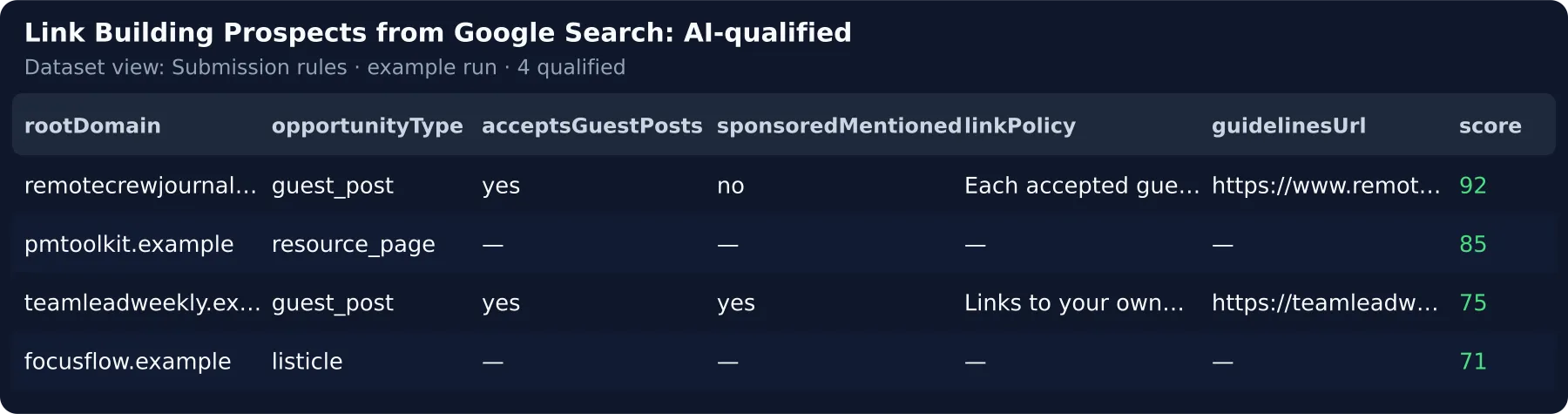
The guidelines page plus accepts guest posts, sponsored posts, the link policy and (AI) the topics accepted.
📚 Resource page link building and broken links
Link pages and "best X tools" roundups get their dead outbound links checked, and the opener becomes the broken-link pitch: "The link to estimatelab.example/ranges on it no longer works — my guide could replace it."
📬 Blogger outreach and domain authority
E-mails, contact page and social links from the site (robots.txt honoured), the best address picked — a named person
before info@ — and a 0–100 authority score from the Tranco rank or Open PageRank.
🏷️ Brand mentions, competitor mentions and agencies
Pages naming your brand are dropped or kept as unlinked mentions; competitor names find pages that cover them but not you. Agencies put every client in one run — own search, memory, digest and campaign each (agency preset).
🚀 How to use it
- Click
Try it— the free demo is pre-filled and works as is. - Paste your page into "Page you want links to" (keywords and pitch optional) — it replaces the sample and starts the live Google search on your Apify account, capped by "Max Google search spend". Leave "AI assessment" on: your first 5 prospects get live AI verdicts on any plan, all 25 free ones with Apify model access or a paid own key.
- Press Start and open the dataset — prospects land best-first, or in your Lemlist / Instantly campaign.
- Schedule it weekly with your address in "E-mail me the new prospects" — only new sites are delivered and charged.
📦 Already scraping Google? Qualify your Google search scraper data
Paste the dataset ID of your last Google Search Results Scraper run into Dataset — no second scrape, you pay only for the qualified prospects (chained-run recipe).
📚 Learn more: Step-by-step tutorial — how to find link building prospects with this Actor
🆚 Why this instead of running Google Search Results Scraper yourself?
Google Search Results Scraper (apify/google-search-scraper) | This Actor | |
|---|---|---|
| Price | $0.0045 per SERP page + $0.001 per run · 19,055 users / 30 days | from $0.006 per qualified prospect, first 25 free |
| What you pay for | every SERP page, directories and giants included | here only qualified prospects — filtered sites cost $0 here |
| Same 100 prospects, all in | ≈ $15.66 (67 SERP pages + website content + 100 add-on leads) | ≈ $0.90 rules only · $2.60 with AI, the 67 SERP pages included |
| Contact | $0.10 per lead | MX-checked best e-mail, contact and guidelines page — free |
| Your time per 100 prospects | ≈ 6–8 h opening results, finding contacts, writing first lines | ≈ 0 h — ranked, contact found, opener written |
| Repeat runs | the same domains again next week | cross-run memory — only new sites are charged |
vs other link prospecting Actors
Next to us in a search for "link building prospects" (their Store cards, 2026-09-26):
| This Actor | santhej/link-prospect-finder | scrapeai/backlink-opportunity-finder | |
|---|---|---|---|
| Price | $0.006 per qualified prospect, no start fee | $0.004 per prospect + $0.001 per run | $0.00249 per result + platform usage |
| You pay for | prospects that pass your filters | every unique domain | every result row |
| Contact, authority, opener | yes | — (domain lists) | — |
| Your time per 100 prospects | ≈ 0 h | ≈ 5 h finding contacts | ≈ 6 h vetting rows and contacts |
| Repeat runs | only new sites charged | — | — |
💵 Pricing — what a run really costs
Pay per result: one event per qualified prospect, nothing else. No start fee.
| Event | When it is charged | Price |
|---|---|---|
free-tier | your first 25 qualified prospects on this Actor, in any mode | $0.00 |
qualified-prospect-basic | AI off — type, rule score, authority, contact route, dead links, template opener | $0.006 |
qualified-prospect-ai | AI on — plus AI type, fit score with quotes, opener, pitch angle, submission rules | $0.018 |
This Actor never charges for the demo's sample rows, filtered or already-seen sites, or the contact, e-mail, authority and dead-link checks. The Google search is not ours to waive: a live search bills your Apify account per Google page — capped by "Max Google search spend".
How that compares — $0.006 is 1.5× one raw row at the $0.004 median of the Actors next to this one in Store search, but one qualified prospect replaces 7 raw Google results you would research by hand ($0.028 of raw rows).
Worked example (estimate) — 30 Google pages ≈ 300 results → ≈ 45 qualified: $0.136 Google on your account + 45 × $0.006 = $0.41, $0.009 per prospect; AI on: + 45 × $0.018 + ≈ $0.225 tokens = $1.17, $0.026 per prospect.
At volume — agency, 10 clients × that run with AI, weekly: ≈ $35 a month (estimate) — vs a link-prospecting suite at $24–200+ per seat a month.
AI tier, all in: ≈ $0.023 per prospect with tokens ($0.018 + ≈ $0.005 at anthropic/claude-haiku-4.5 rates,
measured in a local run — not yet measured on the platform), plus the Google pages of a live search.
🤖 What the AI tier adds
The same demo prospect, AI off:
AI on (run of INPUT.ai.json with a free own Gemini key and the default own-key model, 2026-10-16):
What it saves: ≈ 4 minutes of reading guidelines and writing a first line per prospect (our estimate on the 4 demo
prospects), for ≈ $0.017 more, tokens included. writeSequence: true adds a follow-up and a break-up e-mail in the same
call.
⚙️ Input
The form's first screen (it starts on the free demo):
| Field | Type | Default | What it does |
|---|---|---|---|
keywords | string[] | — | Topics; each becomes the footprint searches. Empty = read from targetUrl |
targetUrl | string | — | The page you want links to — enough on its own to start a live search |
senderPitch | string | — | One line on what you offer |
preset | select | custom | A ready niche search in one click |
minScore | 0–100 | 60 | Decides what you pay: below this = not delivered, not charged |
maxQualified | integer | 50 | Hard cap on output and spend — per client in agency mode |
maxDiscoveryChargeUsd | number | 0.5 | Caps the Google search cost on your account — the same over the API |
enableAi | boolean | true | On = $0.018 per prospect + tokens; off = $0.006 |
notifyEmail | string | — | The digest of every run with new prospects, by e-mail |
📤 Output
One item per qualified prospect (one per site), best first. Sort by score; ruleScore is the rule part and
fitScore the AI's — trend across runs on ruleScore; assessedBy says which scale score is on.
Upsert key: dedupeKey (domain:<root domain>, the cross-run memory's key) — one row per site;
prospectId / itemId = a hash of the page URL. Demo sites use the reserved .example domain with precomputed
authority and MX values.
Views: Overview, Outreach sheet, Outreach import (Lemlist / Instantly), Submission rules, Google & evidence, By client.
Next to OUTPUT sit a Slack / e-mail-ready DIGEST and a client-ready REPORT page (OUTPUT.reportUrl).
🔁 Run it weekly
- A successful live run saves its search as a Task and links it in the status: open it → Schedule, with your address
in
notifyEmail— every run with new prospects e-mails the digest and what changed since the last run. - Add your Lemlist or Instantly key + campaign ID: each new prospect lands in the campaign — nothing to export. No
outreach tool? Use the ready tracker sheet (
dedupeKeyfirst to upsert on). - Keep
dedupeAcrossRunson — next week only new sites are delivered and charged.
Weekly cost is the new prospects only: 8 keywords (≈ $0.18 Google) and ≈ 30 new prospects ≈ $0.87 a week with AI, $0.36 basic (estimate) — per client, all in one agency run.
🎯 Try it for your niche
Pick it in Start from a ready niche search and press Start — it fills the fields you left empty:
| Niche | What it looks for | Preset |
|---|---|---|
| SaaS content marketing | guest posts and listicles, contact route required | saas-guest-posts |
| Digital PR | listicles, reviews, brand and competitor mentions of the last year | digital-pr |
| SEO agency, all clients weekly | resource pages and guest posts per client, one schedule | agency-roster |
🔌 Integrations, automation and API
After every Google Search Results Scraper run: in apify/google-search-scraper's Integrations tab add "Run
succeeded → start this Actor" with sourceMode: dataset, datasetId = resource.defaultDatasetId and
enableAi: false — every search you already pay for becomes prospects, rules only until you switch AI on.
- Lemlist / Instantly — direct push with the API key + campaign ID; a rejected key never fails the run.
- Slack, Discord, Teams, Google Chat, Telegram, any webhook — paste the URL into
sendAlertsTo. The webhook gets each prospect as JSON (retried once; failed keys inOUTPUT.webhook.failedKeys, not re-sent);webhookSecretsigns every POST (X-Signature: sha256=<HMAC of the body>). - HubSpot / Pipedrive — a Make / Zapier "create or update" step: contact =
bestEmail+firstName+website, note =outreachOpener+pitchAngle, upsert ondedupeKey. - AI agents / MCP — every input is a plain typed field;
{}runs the free demo. Addhttps://mcp.apify.com/?actors=rich_minds/link-building-prospects-aito your MCP client.
Minimal agent input:
{"keywords": ["remote work"], "targetUrl": "https://www.yoursite.com/guide", "maxQualified": 20, "maxDiscoveryChargeUsd": 0.5, "dedupeAcrossRuns": false}
List-mode rows — what a pasted record needs
sourceMode: "list" runs on any plan: paste URLs or rows (an Ahrefs / Semrush / SERP export) into itemsList — start
from the ready template.
👥 Who is it for — SEO outreach and link building teams
| You are… | You run it to… | Start with |
|---|---|---|
| SEO / link-building agency | new sites for every client every week | the agency-roster preset + your Lemlist key |
| In-house SEO / content marketer | blogs that would link to one article | the article's targetUrl |
| Digital-PR team | roundups that cover your competitors but not you | the digital-pr preset |
| Blogger outreach freelancer | an Ahrefs / Semrush export → typed prospects with a checked e-mail | list mode with the URLs |
| AI agent (MCP) | "find 30 guest-post sites about X" as one tool call | the minimal agent input |
🧠 How the AI works
- One call per prospect, best rule score first (up to
aiCandidateMultiplier×maxQualified): type, fit score, opener, pitch angle and submission rules from your inputs, the title, snippet, page text and its dead links. - Grounded, checked in code — reasons only as verbatim quotes; an opener that cites neither the page nor a dead link
is replaced by the template. Default
anthropic/claude-haiku-4.5via Apify's model access. - No key where your Apify plan includes model access — otherwise your own Gemini / Groq key. If the model is unreachable the prospect keeps its rule score.
🔒 Data, compliance and limits
- Public data only: Google results, ≤ 2 pages per site (robots.txt honoured), one HEAD request per checked link, public DNS and the Tranco ranking. Keep outreach within anti-spam law (GDPR, CAN-SPAM, CCPA).
- Limits: JavaScript-only sites may show no e-mail; no mailbox probe; ≤ 15 outbound links checked per page.
❓ FAQ
How much will one run cost me? 5 keywords: ≈ $0.41 for 45 prospects, or ≈ $1.17 with AI — Google search on your account included. The first 25 prospects are free.
What will my first real search cost? The form's 4 keywords × 3 types = 24 Google searches ≈ $0.11 on your account (capped) — ≈ 34 qualified prospects: 25 free, ≈ 9 at $0.006.
Do I have to think up keywords? No — paste your page and leave the keywords empty; they are read from its title
and headings (OUTPUT.derivedBrief).
Can I use it for SEO outreach at an agency with several clients? Yes — one run, one schedule, a memory, digest and campaign per client.
Which Apify plan do I need? Any plan runs the demo and list mode; the live search needs a plan that runs Store
Actors — see At a glance. A refused search charges nothing.
🧩 More Actors from the same developer
For SEO teams and agencies — the same pay-per-qualified-result model:
- Google Reviews Insights — turn a local SEO client's Google reviews into a reputation report to resell next to the links
- Local Business Lead — local businesses on Google Maps whose websites need the SEO work your agency sells
- Website Change Monitor — every real change on the competitor pages you build links against, explained weekly
- Trending Keywords for Your Niche — rising searches in your niche, to write the next linkable article about
🆘 Support
Something missing or wrong? Open an issue on the Actor's page — requests from buyers are shipped first.
📝 Changelog
One line per published build, newest first — /actor-publish adds it with the commit subject.
- 0.3.4 (2026-10-16) — Type your keywords or paste your page next to the sample and press Start: the live search runs at once (spend-capped), and three ready niche searches — SaaS guest posts, digital PR, an agency with two example clients — are one click in the form; The AI tier on every plan: your first 5 real prospects get live AI verdicts even without Apify model access, the free demo shows labelled sample verdicts, and a free Gemini key now works as your own key without picking a model; New prospects can go to Slack, Discord, Teams, Google Chat or Telegram from one "Send alerts to" field; each digest says what changed since the last run, and a plan that cannot run the Google search ends with a clear next step instead of a failed run.
- 0.3.3 (2026-10-04) — Bring your own data: send rows in
itemsListor a dataset ID indatasetIdand the Actor picks the mode itself, starts no source Actor and charges only for the analysis.


