
Shopify Store Analyzer: Apps, Theme, Catalog & Pricing API
Pricing
from $1.50 / 1,000 store analyseds
Shopify Store Analyzer: Apps, Theme, Catalog & Pricing API
Analyse a list of Shopify stores from their own public pages: currency, shipping countries, theme, installed apps, tracking pixels, price range, new products and role e-mails. robots.txt obeyed, no personal data, pay only per store analysed.
Pricing
from $1.50 / 1,000 store analyseds
Rating
0.0
(0)
Developer

Rowcraft
Maintained by CommunityActor stats
0
Bookmarked
2
Total users
1
Monthly active users
2 days ago
Last modified
Categories
Security
Limited permissionsShare
Shopify Store Analyzer API
Analyse a list of Shopify stores from their own public pages. Give the actor domains or addresses; for each store it reads robots.txt first, then the public meta.json file, the home page, a sample of the public product feed and the contact page, and returns one row per store: currency, country, the countries it ships to, theme, installed apps, tracking pixels, price range, top brands and product types, how many products were added in the last 30 and 90 days, social profile addresses and the generic role e-mail addresses the store publishes on its own domain. JSON, CSV or Excel, one polite request at a time, no personal data.
Price and limits at a glance: $3.00 per 1,000 stores on the Free plan and $1.50 on the Business plan, charged only for stores that were recognised as Shopify stores and delivered; up to 20,000 stores per run; about nine seconds per store at the default speed with the 250-product sample, a few seconds without it; no personal data.
What you get
Price: $3.00 per 1,000 stores on the Free plan, $1.50 on the Business plan, paid per row delivered; the $5 monthly credit of a free Apify account covers about 1,600 stores. Details in Pricing below.
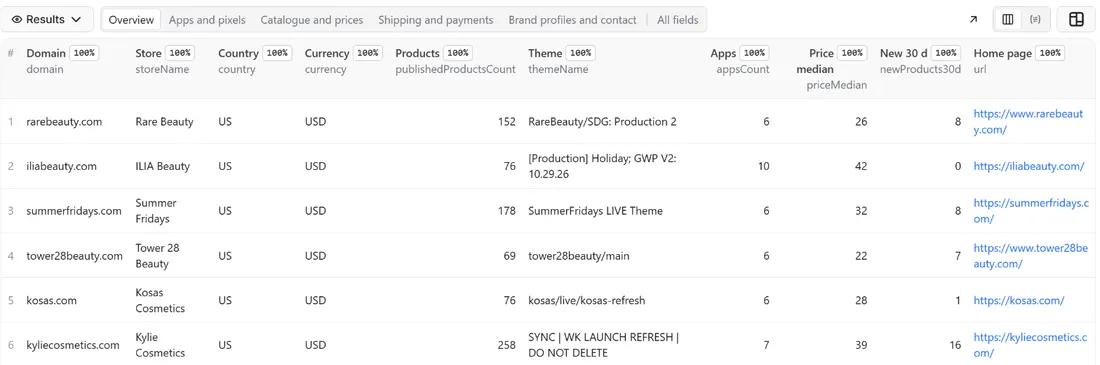
One row per Shopify store, 53 fields, with null where something does not apply or could not be read:
- The store:
storeName, the permanent store idshopId,myshopifyDomain(the store's.myshopify.comaddress, also used as the rowid),primaryDomain, the shortdescription,city,provinceandcountryof the business address the store publishes, and the final address of its home page inurl - Money and shipping:
currency,shipsToCountries(two-letter country codes, comma-separated) withshipsToCountriesCount,offersShopPayInstallmentsand the paymentcardBrandsthe store accepts - Size:
publishedProductsCountandpublishedCollectionsCountas the store itself reports them - Theme and language:
themeName,themeSchemaName,themeSchemaVersion,themeStoreId(set when the theme comes from the Shopify theme store) and the pagelanguage - Apps:
appswith the name, a category and the evidence for each one,appNamesas comma-separated text for filters and spreadsheets, andappsCount. 38 well-known apps are recognised by name and category; any other app that adds an embed to the storefront is listed under the name of its embed - Tracking pixels:
trackingPixels(Google Analytics 4, Google Ads, Google Tag Manager, Meta Pixel, TikTok Pixel, Pinterest Tag, Snapchat Pixel) andtrackingPixelIdswith the public identifier of each - Catalogue sample:
sampledProducts,catalogFullyRead,priceMin,priceMax,priceMedian,productsOnSale,vendorsCount,topVendors,productTypesCount,topProductTypes,newProducts30d,newProducts90d,newCountsExactandnewestProductAt - Social profiles:
instagramUrl,facebookUrl,tiktokUrl,youtubeUrl,pinterestUrl,twitterUrlandlinkedinUrl, one profile address per network, as linked from the store's own home page (on LinkedIn only company pages) - Contact:
contactEmails, the role addresses (info,hello,support,help,salesand a few more such names) that the store itself publishes on its own domain, never an address with a person's name - Honesty about the row:
warningssays what could not be read and why, andcheckedAtis the time of the check
The run also writes a COVERAGE record with one line per entry you gave (analysed, not a Shopify store, refused by robots.txt, blocked, not found, error, already delivered or not checked) and a RUN_SUMMARY with counts, the apps, themes and pixels seen most often in your list, and why the run stopped.
Why this actor
- The store's own public files. The shop facts come from
meta.json, the public file every Shopify storefront serves, not from a guess on the page. The rowidis the permanent.myshopify.comaddress, so the same store is the same row whatever domain you typed. - robots.txt first, on every store. The actor reads robots.txt before anything else and checks every file it requests against it: the home page,
meta.json, the product feed and the contact page. A store that closes a file to automated readers is never asked for it, and the row says which part is missing. - Apps by what the page really loads. An app counts as installed only when its script, stylesheet, frame or storefront embed is on the page, matched by the address it is loaded from, never by a word in the text. The
evidenceof every app shows what was seen, so a result can be checked in the browser. - New products that are counted, not estimated. The product feed lists the newest products first. When the sample reaches back more than 90 days, or holds the whole catalogue,
newCountsExactistrueandnewProducts30dandnewProducts90dare the real numbers. When it isfalse, the counts are a lower bound and the row says so. - Headless stores handled. Many large brands show a custom front end and keep the Shopify files on another address. The actor tries
meta.jsonand the product feed on the address you entered as well as on the address the visitor ends up on. - Contact data without people. Only role addresses on the store's own domain are returned. Addresses with a person's name, free-mail addresses, other companies' addresses and phone numbers are never read into a row.
- Pay only for stores analysed. Domains that are not Shopify stores, stores that block the actor, stores robots.txt closes, addresses that do not exist, duplicates in your list and stores you already received are not charged.
- Polite by design. One request per second by default, a page limit, and a stop after ten anti-bot pages in a row.
How to use it
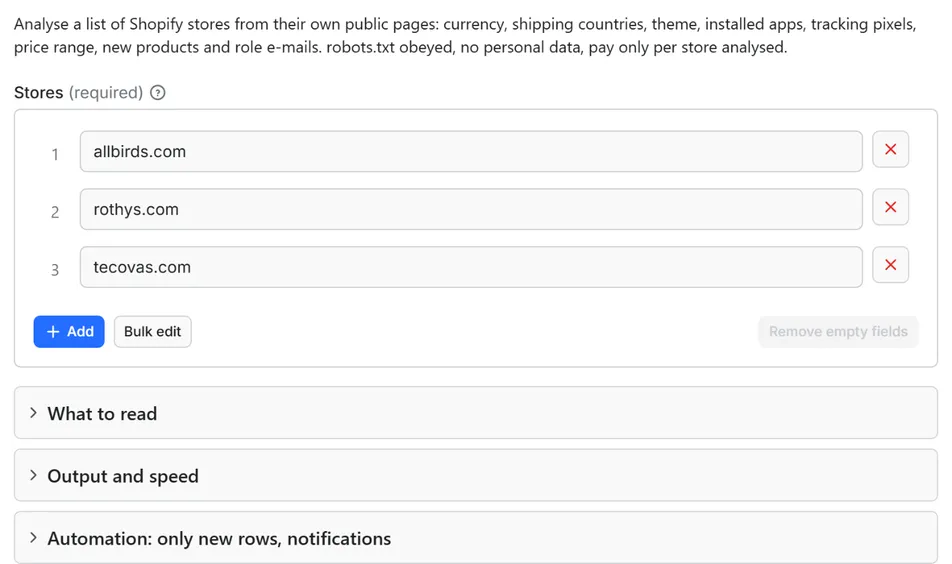
- Open the Actor and paste your stores into Stores, one per line: a domain such as
allbirds.comor an address such ashttps://www.allbirds.com. A column copied from a spreadsheet works, and so do entries separated by commas. - For a first try keep the three stores that are filled in. They are well-known brands with a public catalogue and the run takes about half a minute.
- Choose how much of the catalogue to read under What to read: the default of 250 products per store gives prices, brands and new-product counts. Set 0 to skip the catalogue entirely, or up to 1000 for a deeper sample. Switch Include contact e-mails off if you only want the technical profile.
- Click Start. The status line shows progress, and the run stops cleanly at your maximum or at the charge limit you set in the run options.
- Open the Dataset tab: the Overview, Apps and pixels, Catalogue and prices, Shipping and payments and Brand profiles and contact views show the main columns. Download JSON, CSV, Excel, XML or HTML, or send the rows to Google Sheets, Slack, Make, n8n or Zapier from the Integrations tab.
- Open the
COVERAGErecord in the key-value store to see which entries were not analysed and why. - To follow a list over time, schedule the Actor. Run it with Only new rows on to receive only stores you have not had before, or without it to get a fresh profile of every store each time.
Input
Quick start. This input is ready to run (it is also the example in the API tab):
One real row it returns (long texts shortened here):
| Field | What it does |
|---|---|
stores | Domains (example.com) or addresses (https://www.example.com/collections/all), one per line. Only the home page of an address is used, the path is ignored. Up to 20,000 per run. |
maxProductsToSample | Products read from each store's public catalogue, newest first, for the price range, brands, product types and new-product counts. Default 250, up to 1000, 0 = no catalogue request at all. |
includeContactEmails | Default on. Adds the role addresses the store publishes on its own domain, read from the home page and the contact page. Off = the contact page is not requested and contactEmails is null. |
maxItems | Stop after this many delivered rows. 0 = the whole list. |
onlyNew, stateName | Deliver a store only when it was not delivered to you by an earlier run with the same state name |
notifyUrl, notifyWhenEmpty | A webhook that receives one message when the run ends; see Automation below |
requestIntervalMs | Pause between requests, default 1000 ms, minimum 250 ms |
Example: three stores, the default sample.
Example: a quick technical profile of a competitor list, no catalogue and no contact data.
Example: a deeper catalogue sample, with a Slack message when the run ends.
Output
53 fields per row. Empty values are null, never missing, so CSV and Excel columns are stable.
| Field | Type | Example |
|---|---|---|
id | string | weareallbirds.myshopify.com |
domain | string | allbirds.com |
inputUrl | string | allbirds.com |
url | string | https://www.allbirds.com/ |
storeName | string | Allbirds |
shopId | integer | 11044168 |
myshopifyDomain | string | weareallbirds.myshopify.com |
primaryDomain | string | www.allbirds.com |
description | string | The most comfortable shoes, made with natural materials like merino… |
city | string | Beverly Hills |
province | string | California |
country | string | US |
currency | string | USD |
shipsToCountries | string | US, CA, GB |
shipsToCountriesCount | integer | 1 |
publishedProductsCount | integer | 337 |
publishedCollectionsCount | integer | 1346 |
offersShopPayInstallments | boolean | True |
cardBrands | string | visa, master, american_express |
language | string | en-US |
themeName | string | Dawn |
themeSchemaName | string | Dawn |
themeSchemaVersion | string | 15.2.0 |
themeStoreId | integer | 887 |
apps | array | [{"name": "Attentive", "category": "email-sms", "evidence": "cdn.at… |
appNames | string | Attentive, Elevar |
appsCount | integer | 3 |
trackingPixels | string | Google Tag Manager |
trackingPixelIds | array | [{"pixel": "Google Tag Manager", "ids": ["GTM-TH8KRSBJ"]}] |
instagramUrl | string | https://www.instagram.com/allbirds/ |
facebookUrl | string | https://www.facebook.com/weareallbirds |
tiktokUrl | string | https://www.tiktok.com/@weareallbirds |
youtubeUrl | string | https://www.youtube.com/@allbirds |
pinterestUrl | string | https://www.pinterest.com/weareallbirds/ |
twitterUrl | string | https://x.com/allbirds |
linkedinUrl | string | https://www.linkedin.com/company/allbirds/ |
contactEmails | string | hello@example.com |
sampledProducts | integer | 250 |
catalogFullyRead | boolean | False |
priceMin | number | 0.8 |
priceMax | number | 165 |
priceMedian | number | 110 |
productsOnSale | integer | 11 |
vendorsCount | integer | 2 |
topVendors | array | [{"name": "Allbirds", "products": 249}] |
productTypesCount | integer | 2 |
topProductTypes | array | [{"name": "Shoes", "products": 242}] |
newProducts30d | integer | 0 |
newProducts90d | integer | 245 |
newCountsExact | boolean | True |
newestProductAt | string | 2026-09-25T23:58:13.000Z |
warnings | string | What could not be read for this store and why, separated by semicolons (empty when everything was read) |
checkedAt | string | 2026-11-03T13:02:45.626Z |
How the main fields are worked out
- Is it a Shopify store? A store is recognised when
meta.jsonanswers with a Shopify shop description, or when the home page shows strong Shopify signs: theShopifyJavaScript object, the digital-wallet meta tag or a Shopify response header. Any other site goes toCOVERAGEwith the reason, for examplenot a Shopify store; looks like WooCommerce, and is not charged. - Theme.
themeNameis the name the store gave its theme (stores often name it after a release or a campaign),themeSchemaNameandthemeSchemaVersionidentify the theme itself, andthemeStoreIdis set for themes bought in the Shopify theme store. Headless stores have no theme object and returnnull. - Apps. The page is searched for scripts, stylesheets, frames and tracking images loaded from the address of a known app, and for storefront embeds, which Shopify serves from a folder named after the app. Known apps get a name and a category (email and SMS, product ratings, subscriptions, support and chat, loyalty, upsell, buy now pay later, analytics, search, page builders, translation, shipping and returns, attribution, pop-ups). Other embeds appear under the name of their folder with a
nullcategory. Apps that run only on the server, or that load after a click, leave no trace on the page and are not listed. - Tracking pixels. Recognised from the tag loaders and their public identifiers: a Google Analytics 4 measurement id, a Google Tag Manager container, a Meta Pixel id and so on.
- Prices.
priceMinandpriceMaxcover every variant price in the sample,priceMedianis the median of the lowest variant price of each product, all in the store'scurrency.productsOnSalecounts products with a variant whose compare-at price is above its price. - Brands and product types.
topVendorsandtopProductTypeshold the five most frequent values with their product counts;vendorsCountandproductTypesCountgive the number of different values in the sample. - New products. Counted from the date each product was published.
newCountsExacttells you whether to trust the count as exact (see above). - Role e-mail addresses. The home page and the contact page are searched for addresses whose name is one of a fixed list of role names and whose domain is the store's own domain, at most five per store.
Example rows
Two real rows from a run (long texts shortened here, complete in the dataset):
Results can be downloaded as JSON, CSV, Excel, XML or HTML from the Dataset tab, or read through the Apify API.
Pricing
Pay per result. You pay for each store delivered to your dataset, nothing else: no subscription, no minimum, no charge for rows your filters drop or for the requests behind them.
| Your Apify plan | Price per 1,000 rows | Price per row |
|---|---|---|
| Free plan | $3.00 | $0.003 |
| Starter plan | $2.50 | $0.0025 |
| Scale plan | $2.00 | $0.002 |
| Business plan and above | $1.50 | $0.0015 |
Example: 1,000 stores cost $3.00 on the Free plan and $1.50 on the Business plan. Platform usage of the run (compute, storage) is included in that price and is not billed to you separately (pay per event: the actor covers it).
A start event of $0.00005 is charged once per run (Apify default).
Cap your spend: set Maximum total charge in the run options. The actor stops cleanly when the cap is reached and you keep everything delivered until then. The run summary (RUN_SUMMARY in the key-value store) says why a run stopped.
A store is charged when it was recognised as a Shopify store and its row was delivered. If the home page was read but the catalogue or the contact page could not be, the row is still delivered, still charged, and warnings says what is missing, because the other 40 or so fields are filled in. You can check COVERAGE and the warnings of a small first run before you start a large one.
Automation: only new rows, notifications, schedules
On this Actor Only new rows means stores you have not received before. The memory holds the stores delivered to you, identified by their .myshopify.com address, not their contents. A store that changed its theme, apps or prices since your last run is not delivered again. To monitor changes, schedule the Actor without Only new rows and compare the runs. To grow a prospect list, leave it on and each run costs only the stores that are new to you.
Only new rows since the last run. Turn on onlyNew and the actor remembers every store it delivered to you (in a key-value store named rowcraft-shopify-store-analyzer-state in your Apify account). The next run with the same stateName skips what you already have and you pay only for new rows. The first run delivers everything that matches. Use a different stateName for each schedule or search so they keep separate memories.
Notification when the run ends. Put a webhook address in notifyUrl and the actor sends one JSON POST with the number of new rows, links to the dataset (JSON and CSV) and the run. It works out of the box with Slack and Discord incoming webhooks (the message is in text and content), with Make, n8n and Zapier catch hooks, and with your own endpoint. By default it is sent only when there is at least one new row; notifyWhenEmpty sends it every time.
Schedules. Create a schedule in Apify Console (hourly, daily, weekly or cron) with onlyNew on. A daily schedule gives you a feed of new stores for the price of the new rows only.
Integrations. Send the results to Make, n8n, Zapier, Google Sheets, Slack, Google Drive, Airtable or any webhooks from the Integrations tab of the Actor, with no code. Apify also offers native actions for Make, n8n and Zapier.
API, SDKs and AI agents. Every run is available through the Apify API and the official JavaScript and Python clients; the Actor can also be called by AI agents through the Apify MCP server. The example input in the API tab is a working call.
Use with AI agents (MCP). Add the Apify MCP server to Claude, Cursor, VS Code or any MCP client and the agent can run this Actor as a tool:
Call it from a shell or any language. One request runs the Actor with the input below and returns the rows as JSON:
Python (pip install apify-client):
JavaScript / Node.js (npm install apify-client):
Use cases
- Competitor and market research: put 50 stores of a niche into one run and compare currency, shipping countries, price median, catalogue size and the share of products on sale in a single table.
- App vendors and agencies: find stores that run a competing app, or that run none of a category (no email and SMS app, no loyalty app, no subscriptions), and see how their theme and tracking stack are set up before you reach out with a message that fits.
- Theme and design studios: group stores by
themeSchemaNameandthemeSchemaVersionto find stores that run an old release of a theme. - Ad and analytics audits: see which tracking pixels a store runs and their public ids, without opening a single page by hand.
- Catalogue and pricing benchmarks: price range, median and the share of discounted products for each brand in a category.
- Launch and assortment monitoring:
newProducts30d,newProducts90dandnewestProductAtshow which stores are adding products and which have stopped. - Business lists without people: store name, country, social profiles and role e-mail addresses make a company list; no personal profile is involved.
Ready-made examples, each with the input filled in (open one and press Start, or save it as your own task):
What this actor does not do
- Read sales, traffic, revenue, orders or conversion rates: none of it is public. Any figure for that kind of data is an estimate from a third party, not something a store publishes.
- List every product: the catalogue is a sample of up to 1000 products per store, newest first, kept as counts and statistics. For product-level data use the Shopify Products Scraper.
- Collect personal data: no names, personal e-mail addresses, phone numbers or personal social profiles, and no founders or employees.
- Find the stores for you: it analyses the stores you list. It does not search for Shopify stores by keyword.
- Crawl a store: only the home page,
meta.json, the product feed and the contact page are read, never collections, product pages, the cart or the checkout. - Look behind a login, a password page or an anti-bot challenge: it does not log in, does not use proxies or solve CAPTCHAs. Stores that answer with an anti-bot page are reported as blocked and not charged.
- List apps that leave no trace on the storefront, such as apps that work only in the back office.
Limits and fair use
- One request per second by default (minimum 250 ms). A store takes about five requests: robots.txt, the home page,
meta.json, the contact page and one page of 250 products, more for a bigger sample or when redirects are involved. In our test runs three well-known stores took about 30 seconds with the default sample, and a store without a sample about four. A request that gets no answer is given up after 25 seconds. - Up to 20,000 stores per run. The run stops 90 seconds before its timeout with the summary, the coverage and the Only new rows memory saved; for long lists raise the timeout or split the list.
- robots.txt is obeyed for every address the actor visits, including redirect targets. Most stores keep the default robots.txt of Shopify, which does not close the files this actor reads; a store that closes one of them is respected, and the row (or
COVERAGE) says which. - Anti-bot pages. Stores that answer with a bot challenge (Cloudflare, Akamai, DataDome and similar) or refuse the request with 403 or 429 are reported as
blockedand not charged. After 10 blocked stores in a row the run stops and says why in the run summary, because the rest of the list would most likely be blocked too. - The catalogue is a sample. Up to 1000 products per store are read, 250 per request, newest first. Counts of new products are exact only when
newCountsExactistrue. - File sizes. The first 5 MB of a home page are read; a longer page is cut. A page of the product feed larger than 12 MB is requested again in pages of 50 products.
- Private addresses are refused. Only public websites can be read.
Data source and licence
The data is what each store sends to every visitor: its robots.txt, the meta.json file of the storefront, its home page and contact page, and the public product feed (products.json) that Shopify storefronts serve. The actor reads each of these after checking robots.txt, and delivers facts and counts: names, codes, numbers, identifiers of public scripts and the addresses of the store's own social profiles. Product descriptions and page text are not stored or delivered, and the actor does not copy product images.
How robots.txt is read: the Robots Exclusion Protocol, RFC 9309 (https://www.rfc-editor.org/rfc/rfc9309). Shopify is the platform behind the stores (https://www.shopify.com).
Rowcraft is independent and not affiliated with or endorsed by Shopify Inc., by the stores whose pages it reads or by the app vendors named in the results. Product and company names belong to their owners and are used only to say which store or app a row is about.
Privacy: no personal data
Rowcraft actors are built not to collect personal data:
- Only the store's own public files are read, and a row holds business facts: the store name and business address, currency, shipping countries, theme, app names, tracking pixel identifiers, prices, brand names and counts.
- The only contact data is the role e-mail address (such as
infoorsupport) that a company publishes on its own domain for customers. Addresses with a person's name, free-mail addresses and phone numbers are not read into a row. Phone numbers and e-mail addresses are removed from the store description before it is delivered. - Social profiles are the brand pages linked from the store's home page, one per network. Share buttons and links to single posts are ignored, and on LinkedIn only company pages are kept.
- The actor sends no cookies, fills no forms and never logs in.
- No name of a person is requested or stored.
You are responsible for using the data in line with the law that applies to you.
Other Rowcraft actors
Related Rowcraft actors. All of them read official or public sources, deliver flat rows without private contact details and support only-new runs and notifications; the full list is on the Rowcraft profile:
- Shopify Products Scraper: Store Catalog Export to JSON, CSV — Shopify scraper for any store's public catalog: products, prices and compare-at prices, variants, SKU, stock and inventory, images, vendor, type, tags.
- Store Products Scraper – Shopify, WooCommerce, VTEX — Export the product catalogue of any Shopify, WooCommerce or VTEX store from its public catalogue endpoint: title, brand, prices, discounts, stock, categories, images and links, one row per product, the same columns on every platform.
- VTEX Products Scraper – Public Catalog Export — Export the catalogue of any VTEX store (Auchan, Chedraui and thousands of retailers in Europe and Latin America) from its public search endpoint: title, brand, EAN, prices, list prices, stock, categories, specifications and images, one row per product.
- WooCommerce Products Scraper – Store API Export — Export every product of a WooCommerce store through its public Store API: title, SKU, prices and sale prices, stock, categories, tags, attributes, ratings, images and links, one row per product.
- Ashby Jobs Scraper – Job Postings with Salary Ranges — Job postings from Ashby job boards (jobs.ashbyhq.com) by company: title, department, team, locations with country, employment and workplace type, published salary range, full text.
- Brazil CNPJ Companies Scraper: Receita Federal Register Data — Company records from the Brazilian CNPJ register for a list of CNPJ numbers or a search by state, city and CNAE activity: legal name, trade name, status, legal nature, capital, address, opening date and size.
FAQ
What does it return for each store? One row of 53 fields: shop facts from meta.json (name, currency, country, shipping countries, product and collection counts), theme, installed apps and tracking pixels, a price and brand summary of a catalogue sample, new-product counts, social profile addresses and role e-mail addresses. The Output section lists every field.
How does it know which apps a store uses? From the page itself. Each app that adds a script, a stylesheet, a frame or a storefront embed is matched by the address it is loaded from. 38 widely used apps are named and categorised; any other embed is listed under its folder name. The evidence field of each app shows what was found, so you can check it in your browser. An app that leaves no trace on the storefront cannot be seen, so apps is a list of what is visible, not a full inventory.
Can it analyse any Shopify store? Any store whose robots.txt allows the files above and that does not answer with an anti-bot page. Large brands on a custom front end (headless) usually work, with some fields empty, for example the theme. Password-protected stores and stores that block automated readers appear in COVERAGE.
How accurate are the new-product counts? Exact when newCountsExact is true: the product feed lists the newest products first, so a sample that reaches back more than 90 days, or covers the whole catalogue, contains every product published in the last 30 and 90 days. When it is false, the real number is at least the one shown; raise maxProductsToSample to get an exact count.
Why is contactEmails empty or null? null means you turned Include contact e-mails off. An empty value means the store publishes no role address on its own domain in the pages we read; many stores use a contact form instead. We never guess an address and never return a person's address.
Does it give sales or revenue? No. Stores do not publish them and the actor does not estimate them. See the section on what this actor does not do.
Is it legal? The actor reads a few public files and pages of each store, the same ones any visitor or search engine gets, obeys robots.txt, uses a modest request rate and delivers business facts, not personal data. Whether and how you may use the results depends on the law that applies to you.
Does it collect personal data? No personal data: no names of people, personal e-mail addresses or phone numbers are read into a row. The only contact data is a generic role address on the store's own domain, published by the company for its customers. See the Privacy section.
Why is the result empty? Every entry in the list was skipped. The COVERAGE record gives the reason for each: not a Shopify store (not_shopify), robots.txt closes the page (robots_disallowed), an anti-bot page or a refusal (blocked), no website at that address (not_found), a connection problem (error), a store you already received with Only new rows on (already_delivered), or entries not checked because the run stopped at your maximum or charge limit (not_checked). Nothing is charged for those, apart from the start event.
Why does a row have warnings? The store was recognised but part of it could not be read, for example robots.txt closes products.json, the store hides its catalogue, or the contact page was refused. The fields that could be read are filled and the rest are null. The row is still delivered and charged. A few small runs on your own list show how often it happens before you scale up.
Do I pay for stores that are not on Shopify or that block the actor? No. Only stores recognised as Shopify stores and delivered are charged. Duplicates in your list, the same store entered under two domains, and stores skipped by Only new rows are not charged either.
Can I get all products of a store? No, this Actor returns one row of statistics per store, built from a sample. For product-level data use the Shopify Products Scraper.
Which countries and languages are covered? Any country: the actor reads the same pages a visitor does. country is the country of the business address the store publishes, and language is the language of the page the actor was served. Large stores may redirect visitors to a local version of the site; url shows where the actor ended up.
Support and reviews
Problems, missing fields, questions: open an issue on the Issues tab of this Actor. We answer within one working day and fix confirmed bugs in the next release; the changelog lists every change.
If this Actor saved you time, a short review on its page helps other users find it and helps us keep improving it.


