

Store Products Scraper – Shopify, WooCommerce, VTEX
Pricing
from $0.60 / 1,000 products
Store Products Scraper – Shopify, WooCommerce, VTEX
Export the product catalogue of any Shopify, WooCommerce or VTEX store from its public catalogue endpoint: title, brand, prices, discounts, stock, categories, images and links, one row per product, the same columns on every platform. No login, no proxies, no personal data; pay per row delivered.
Pricing
from $0.60 / 1,000 products
Rating
0.0
(0)
Developer

Rowcraft
Maintained by CommunityActor stats
0
Bookmarked
2
Total users
1
Monthly active users
4 days ago
Last modified
Categories
Security
Limited permissionsShare
Store Products Scraper: Shopify, WooCommerce and VTEX Catalogs to JSON, CSV
Get the product catalogue of any Shopify, WooCommerce or VTEX store as clean, flat rows, with the same columns whatever the platform. This store products scraper detects the platform with one request and reads the public catalogue endpoint each platform serves to every visitor without a login (/products.json on Shopify, the Store API on WooCommerce, the catalogue search on VTEX), so it is fast, complete and does not break when a theme changes. Each product comes back as one row: title, brand, categories, tags, description, selling price and price before discount, discount, stock, variants and SKUs, options and attributes, images, dates, the store's currency and country, as JSON, CSV or Excel.
List the stores you want (a domain, a store URL, a collection or category URL, or a product URL), add filters for stock, sale, dates, brands, categories, tags, title words and price, and schedule it with Only new rows to get the new products of your market every morning for the price of the new rows. The robots.txt of each store is read first and obeyed; stores that block automated access are skipped and named, never bypassed.
What you get
Price: $0.90 per 1,000 products on the Free plan, $0.60 on the Business plan, paid per row delivered; the $5 monthly credit of a free Apify account covers about 5,500 products. Details in Pricing below.
One row per product, the same columns for every store and platform:
- Product: platform, ID, SKU and all SKUs, EAN where the platform gives it (VTEX), title, brand or vendor, product type, category path and category names, tags, link to the product page
- Prices: lowest and highest selling price, the price before the discount (compare-at, regular or list price), discount in percent, on-sale flag, the store's currency read from the store itself
- Stock: in stock, units in stock where the platform gives a number, number of variants and variants in stock
- Options and attributes: option names and values (size, colour), product attributes or specifications as name → values
- Images: the first image URL in its own column, the full image list when you want it
- Description: as plain text, HTML removed and contact details masked
- Dates: publication or release date (Shopify, VTEX), creation and last update (Shopify)
- Store: host, store name, country and currency; the seller on a marketplace store (VTEX); the collection or category the row was read from
- Coverage: one line per store in the run summary with its platform, product count, pages read, rows delivered and, when skipped, why
Why this actor
- Three platforms, one row format: Shopify, WooCommerce and VTEX stores come back with identical columns, so one sheet or one import handles a whole market. The platform is detected with one request; say it yourself (
vtex:auchan.ro) to skip the detection. - Public JSON, not HTML scraping: each platform's own catalogue endpoint is read as the storefront serves it (up to 250 products per request on Shopify, 100 on WooCommerce, 50 on VTEX), with no login, no cookies, no proxies, no CAPTCHAs.
- robots.txt first: each store's robots.txt is fetched and applied to the exact paths that will be read; disallowed stores are skipped and reported.
- Honest about blocks: a store that answers 403, an anti-bot page, HTML instead of JSON, a password page or a 429 is skipped at once with the reason in the run summary; nothing is retried through proxies.
- Large catalogues: a VTEX store with tens of thousands of products is read category by category through its public category tree; a Shopify store beyond the listing's limit tells you to split it by collections.
- Filters before you pay: stock, sale, dates, brands, categories, tags, title words and price range are applied before any row is charged; duplicates (a product in two categories) are delivered once.
- Count before you pay: Count only returns the number of products per store (the store's own count when no filter is set) and the cost; nothing is delivered.
How to use it
- Open the Actor and fill in Stores (the other fields are optional filters).
- Set Maximum products to a small number for a first try (the default is a safe start).
- Optional: tick Count only and start once. You get the number of matching rows and the estimated cost, for free (only the start event is charged). Untick it to get the data.
- Click Start. The status line shows progress; the run stops cleanly at your limit or at the charge limit you set in the run options.
- Open the Dataset tab and download JSON, CSV, Excel, XML or HTML, or send the rows to Google Sheets, Slack, Make, n8n or Zapier with the Integrations tab.
- To run it on a schedule, use Schedules in Apify Console and turn on Only new rows since the last run below: every run then costs only the new rows, and a webhook URL tells you when something new came in.
Input
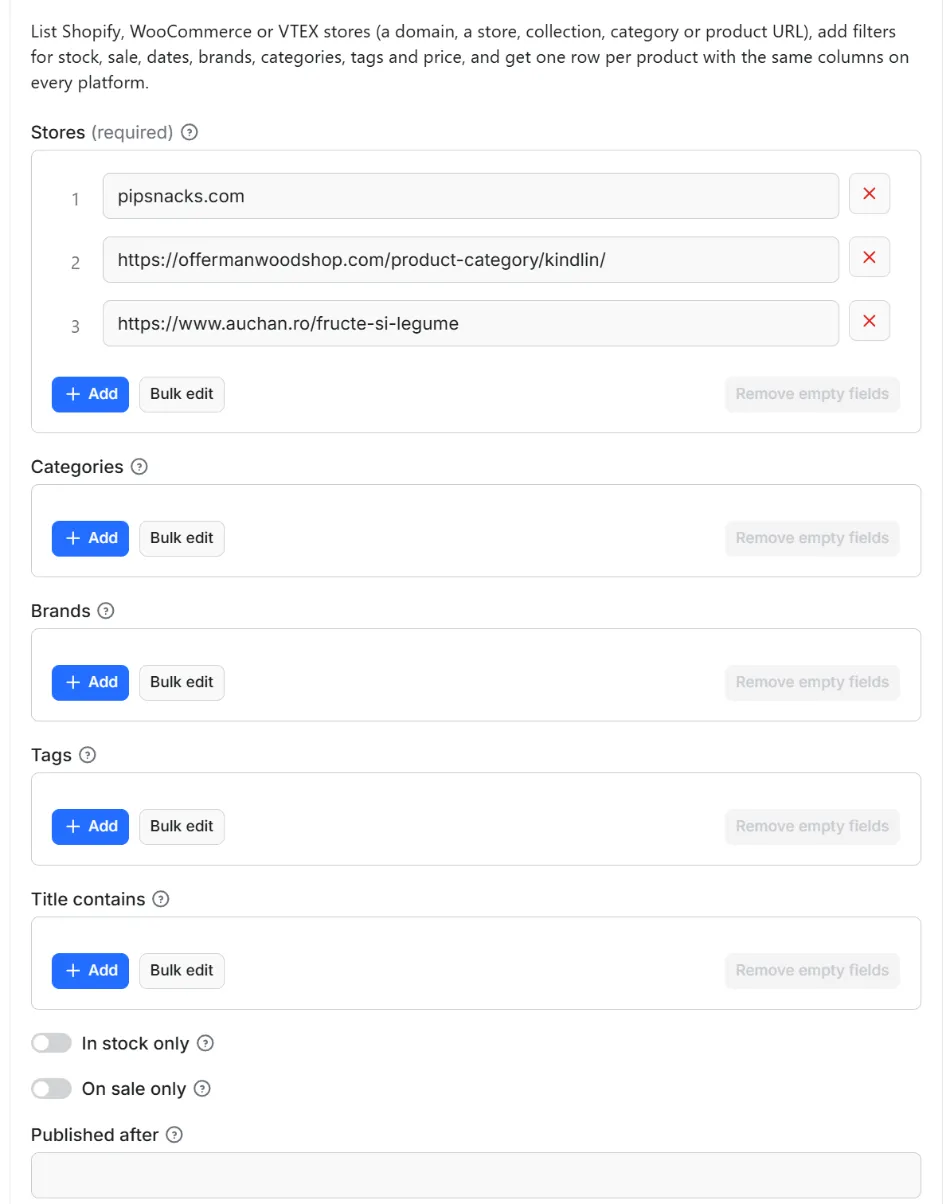
Quick start. This input is ready to run (it is also the example in the API tab):
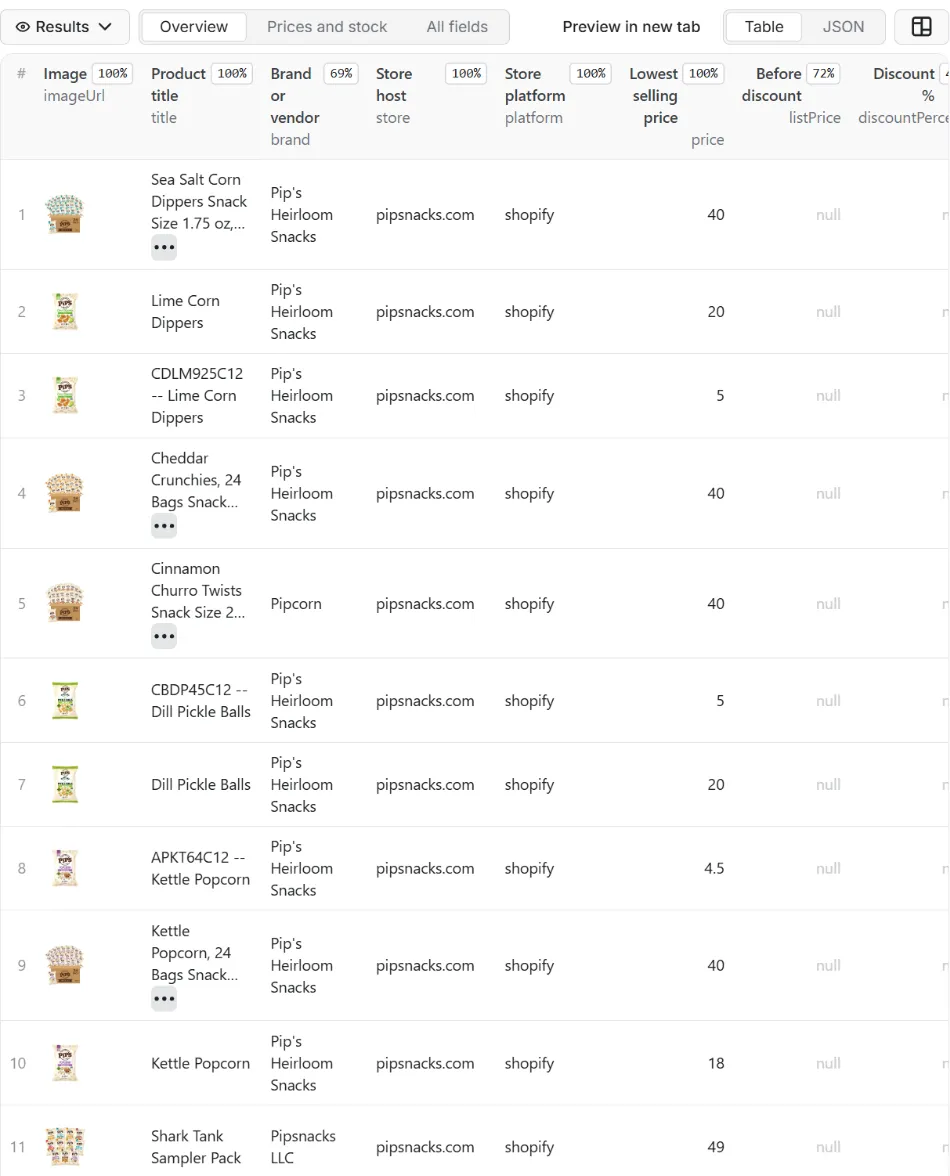
One real row it returns (long texts shortened here):
| Field | What it does |
|---|---|
stores | Stores to read, one per line: allbirds.com, https://offermanwoodshop.com/product-category/kindlin/, https://www.auchan.ro/fructe-si-legume, or a product URL. Prefix with shopify:, woocommerce: or vtex: to skip the detection |
categories, brands, tags, titleContains | Keep products whose category or type contains a word, of these brands (exact, case ignored), with one of these tags, or with one of these words in the title |
availableOnly, onSaleOnly | In stock only; reduced price only |
publishedAfter, updatedAfter | Published or changed on or after a date (2026-10-01, yesterday, 7 days, 3 months). WooCommerce stores give no dates; Shopify gives both, VTEX the release date |
minPrice, maxPrice | Selling price range in the store's currency |
includeDescription, includeImages | Description as text (on), the full image list (on) |
maxProductsPerStore, maxItems | Stop each store after this many products; stop the run after this many rows |
countOnly, onlyNew, stateName, notifyUrl, notifyWhenEmpty | Count only (deliver nothing); see Automation below |
requestIntervalMs | Pause between requests, one second by default, 500 ms at the lowest |
The stores are read one after the other. A store entry that points to a collection, a category or a product reads only that part; a product that appears in two categories is delivered once.
Example: everything in stock from three stores on three platforms, new rows only, as a daily feed.
Output
41 fields per row. Empty values are null, never missing, so CSV and Excel columns are stable.
| Field | Type | Example |
|---|---|---|
id | string | pipsnacks.com:6719287066696 |
platform | string | shopify |
url | string | https://www.pipsnacks.com/products/lime-corn-dippers |
store | string | pipsnacks.com |
storeName | string | Pipsnacks |
storeCountry | string | US |
currency | string | USD |
productId | string | 6719287066696 |
sku | string | LIME-DIP-6 |
skus | array | ["LIME-DIP-6"] |
gtin | string | 5949084015911 |
title | string | Lime Corn Dippers |
brand | string | Pipsnacks |
productType | string | Dippers |
categoryPath | string | Bacanie > Dulciuri > Croissante |
categories | array | ["Bacanie", "Dulciuri"] |
tags | array | ["gluten-free", "vegan"] |
description | string | Corn dippers with lime… |
price | number | 4.99 |
priceMax | number | 6.99 |
listPrice | number | 5.99 |
discountPercent | integer | 17 |
onSale | boolean | True |
available | boolean | True |
stockQuantity | integer | 99999 |
variantsCount | integer | 2 |
availableVariantsCount | integer | 2 |
options | array | [{"name": "Size", "values": ["S", "M"]}] |
attributes | object | {"Material": ["Cotton"]} |
rating | number | 4.8 |
ratingCount | integer | 12 |
imageUrl | string | https://cdn.shopify.com/s/files/1/0/products/lime.jpg |
imagesCount | integer | 3 |
images | array | [{"id": "1", "src": "https://cdn.shopify.com/s/files/1/0/products/l… |
publishedAt | string | 2024-03-05T14:00:00-05:00 |
createdAt | string | 2024-03-01T10:00:00-05:00 |
updatedAt | string | 2026-10-01T09:30:00-04:00 |
seller | string | Auchan Romania |
collection | string | best-sellers |
source | string | catalog |
scrapedAt | string | 2026-10-12T18:00:00.000Z |
Example rows
Two real rows from a run (long texts shortened here, complete in the dataset):
Results can be downloaded as JSON, CSV, Excel, XML or HTML from the Dataset tab, or read through the Apify API.
Pricing
Pay per result. You pay for each product delivered to your dataset, nothing else: no subscription, no minimum, no charge for rows your filters drop or for the requests behind them.
| Your Apify plan | Price per 1,000 rows | Price per row |
|---|---|---|
| Free plan | $0.90 | $0.0009 |
| Starter plan | $0.80 | $0.0008 |
| Scale plan | $0.70 | $0.0007 |
| Business plan and above | $0.60 | $0.0006 |
Example: 1,000 products cost $0.90 on the Free plan and $0.60 on the Business plan. Platform usage of the run (compute, storage) is included in that price and is not billed to you separately (pay per event: the actor covers it).
A start event of $0.00005 is charged once per run (Apify default).
Cap your spend: set Maximum total charge in the run options. The actor stops cleanly when the cap is reached and you keep everything delivered until then. The run summary (RUN_SUMMARY in the key-value store) says why a run stopped.
Check before you pay: turn on Count only to see how many rows match and what they would cost at your tier. That run delivers nothing and costs only the start event.
Automation: only new rows, notifications, schedules
Only new rows since the last run. Turn on onlyNew and the actor remembers every product it delivered to you (in a key-value store named rowcraft-store-products-scraper-state in your Apify account). The next run with the same stateName skips what you already have and you pay only for new rows. The first run delivers everything that matches. Use a different stateName for each schedule or search so they keep separate memories.
Notification when the run ends. Put a webhook address in notifyUrl and the actor sends one JSON POST with the number of new rows, links to the dataset (JSON and CSV) and the run. It works out of the box with Slack and Discord incoming webhooks (the message is in text and content), with Make, n8n and Zapier catch hooks, and with your own endpoint. By default it is sent only when there is at least one new row; notifyWhenEmpty sends it every time.
Schedules. Create a schedule in Apify Console (hourly, daily, weekly or cron) with onlyNew on. A daily schedule gives you a feed of new products for the price of the new rows only.
Integrations. Send the results to Make, n8n, Zapier, Google Sheets, Slack, Google Drive, Airtable or any webhooks from the Integrations tab of the Actor, with no code. Apify also offers native actions for Make, n8n and Zapier.
API, SDKs and AI agents. Every run is available through the Apify API and the official JavaScript and Python clients; the Actor can also be called by AI agents through the Apify MCP server. The example input in the API tab is a working call.
Count only. countOnly returns the number of matching products and the estimated cost without delivering anything, so you can size a job before paying for it.
Use with AI agents (MCP). Add the Apify MCP server to Claude, Cursor, VS Code or any MCP client and the agent can run this Actor as a tool:
Call it from a shell or any language. One request runs the Actor with the input below and returns the rows as JSON:
Python (pip install apify-client):
JavaScript / Node.js (npm install apify-client):
Use cases
- Price monitoring across platforms: the same price, list price, discount and stock columns from a Shopify brand, a WooCommerce shop and a VTEX retailer, run daily into one sheet.
- Competitor assortment: what a store sells, in which categories and price bands, how many variants, what is on sale and what is new (
publishedAfteron Shopify and VTEX). - Retail and grocery catalogues: VTEX retailers (Auchan, Chedraui and many others in Europe and Latin America) with EAN codes, list prices and stock, category by category.
- Catalogue feeds and migrations: a clean product export with images, options, attributes and descriptions for a marketplace listing, a comparison site or a move between platforms (your own store or one that allows it).
- Sourcing research: brands, categories and price ranges across many stores, counted before anything is paid.
Ready-made examples, each with the input filled in (open one and press Start, or save it as your own task):
- Compare prices across Shopify, WooCommerce and VTEX stores
- List every product on sale in a store, whatever the platform
What this actor does not do
- Read stores on other platforms (Magento, PrestaShop, BigCommerce, custom shops): a store with none of the three public catalogue endpoints is reported
not_supportedin the run summary and not charged. - Read stores that block automated access or hide their catalogue: a 403, an anti-bot page, HTML instead of JSON or a password page means the store is skipped and named; the actor never uses proxies or disguises itself.
- Read paths a store's robots.txt disallows.
- Deliver customer data, customers' comments, orders or inventory history: the public catalogue endpoints carry none of that. Ratings come only as a number where the platform publishes one (WooCommerce).
- Deliver one row per variant: the row has the variant count, SKUs, options and the lowest and highest price. For rows per Shopify variant use the Shopify Products Scraper.
- Use a store's search, log in, or go through admin or partner APIs.
Limits and fair use
- One request per second by default, 500 ms at the lowest, and one store at a time. Shopify returns 250 products per request, WooCommerce 100, VTEX 50, so a catalogue of 5,000 products takes 20, 50 or 100 requests. A 429 from a store ends that store at once (not retried) and the run continues with the next one.
- Shopify listings stop at 25,000 products per store or collection (the endpoint's own
page × limitlimit); split a very large store by collections. - VTEX search stops at 2,550 products per query (the endpoint's own
_fromlimit); larger stores and categories are read through their sub-categories automatically, with the store's public category tree (three levels). A category with more than 2,550 products and no sub-categories is cut at 2,550 and the run summary says so. - WooCommerce stores give no dates, no units in stock (only "low stock" counts) and no stock per variant; some stores disable the public Store API or sit behind a CDN that blocks automated access, and are reported as such.
- Prices are in the store's currency as shown to a visitor with no country or region selected; a store that sells in several currencies or regions shows its default one here.
- Pages of big catalogues are large (several megabytes per page with descriptions and images); switch off
includeImagesandincludeDescriptionwhen you only need prices and stock.
Data source
The data comes from the public catalogue endpoints of each store, which the three platforms serve to every visitor without authentication: on Shopify /products.json, /collections/<handle>/products.json, /products/<handle>.json and /meta.json (documented in Shopify's Ajax API reference); on WooCommerce the Store API (/wp-json/wc/store/v1/products, which WooCommerce documents as an unauthenticated API); on VTEX the catalogue search (/api/catalog_system/pub/products/search, /api/catalog_system/pub/category/tree and /api/segments). The actor fetches each store's robots.txt and follows it for the exact paths it reads. Each store publishes its own terms of service, and some forbid automated access; the actor cannot read those terms for you. By listing a store you confirm that you may read its catalogue under that store's terms and the law that applies to you. Stores that block automated access are skipped, never bypassed. Rowcraft is independent and not affiliated with or endorsed by Shopify Inc., Automattic Inc. (WooCommerce), VTEX or any store; names and trademarks belong to their owners.
Privacy: no personal data
Rowcraft actors are built not to collect personal data:
- The catalogue endpoints carry product data only: no customers, no orders, no staff. Customers' comments, which carry the writers' names on WooCommerce, are never read; only the average rating and the number of ratings are delivered where the platform publishes them. The fields delivered are listed above and nothing else is kept.
- Descriptions and titles are passed through the same filter as every Rowcraft actor: e-mail addresses, phone numbers,
mailto:andtel:links and contact-person names are removed before the row is saved. - The brand, vendor and seller are the business names shown on the store, not a person's contact.
You are responsible for using the data in line with the law that applies to you and with the terms of the stores you list.
Other Rowcraft actors
Related Rowcraft actors. All of them read official or public sources, deliver flat rows without private contact details and support only-new runs and notifications; the full list is on the Rowcraft profile:
- Shopify Products Scraper: Store Catalog Export to JSON, CSV — Shopify scraper for any store's public catalog: products, prices and compare-at prices, variants, SKU, stock and inventory, images, vendor, type, tags.
- VTEX Products Scraper – Public Catalog Export — Export the catalogue of any VTEX store (Auchan, Chedraui and thousands of retailers in Europe and Latin America) from its public search endpoint: title, brand, EAN, prices, list prices, stock, categories, specifications and images, one row per product.
- WooCommerce Products Scraper – Store API Export — Export every product of a WooCommerce store through its public Store API: title, SKU, prices and sale prices, stock, categories, tags, attributes, ratings, images and links, one row per product.
- Shopify Store Analyzer: Apps, Theme, Catalog & Pricing API — Analyse a list of Shopify stores from their own public pages: currency, shipping countries, theme, installed apps, tracking pixels, price range, new products and role e-mails.
- Brazil CNPJ Companies Scraper: Receita Federal Register Data — Company records from the Brazilian CNPJ register for a list of CNPJ numbers or a search by state, city and CNAE activity: legal name, trade name, status, legal nature, capital, address, opening date and size.
- Chrome Web Store Scraper: Users, Ratings & Versions — Reads public Chrome Web Store listing pages with no login, no proxy and no personal data: users, rating, category, version, update date, permissions and company developers.
FAQ
Which stores work? Any Shopify, WooCommerce or VTEX store whose public catalogue endpoint answers: most Shopify stores do, WooCommerce stores unless they disabled the Store API or sit behind a blocking CDN, VTEX stores unless they are behind a blocking CDN. In a test of eleven WooCommerce and VTEX stores, four answered with JSON, four had moved to Shopify (and are read as Shopify), two were blocked by a CDN and one had closed the endpoint. The run summary names every store with its platform and result.
How is the platform detected? With one small request per candidate on the store's own domain, in the order Shopify, WooCommerce, VTEX, until one answers with its catalogue; a store with none is reported not_supported and nothing is charged. Prefix an entry (vtex:auchan.ro) to skip the detection.
Why was a store skipped? The reason is in the run summary and in the log: robots.txt disallows the path, HTTP 403 or an anti-bot page (the store blocks automated access), no public catalogue endpoint (not_supported), HTML instead of JSON, a password page, a 429 rate limit, or a host that does not exist. None of these is retried through proxies or with a disguised browser: the store has said no.
Do I need an API key or a login? No. The catalogue endpoints are public; the actor sends a clear user agent and nothing else.
Can I read only one category, collection or product? Yes: paste the collection URL (Shopify), the category URL (WooCommerce /product-category/..., VTEX department or category path) or the product URL into stores. To filter by category words across whole stores use categories.
Why does a VTEX store take many requests? The VTEX search returns 50 products per request and stops at 2,550 per query; a store with 60,000 products is read through its category tree, category by category, which is what the public endpoint allows. Set maxProductsPerStore or paste the categories you need.
How do I get only new or changed products? For a feed of new products use Only new rows (onlyNew): the actor remembers what it delivered and skips it next time. To see what was recently added use publishedAfter (Shopify and VTEX give that date); to re-read Shopify products that changed set updatedAfter.
Which currency are the prices in? The store's own currency, read from the store itself (currency column): Shopify's metadata, WooCommerce's price block, VTEX's segment. Prices are numbers, not strings, so you can sort and compare.
Are images included? The first image URL is always in the row; includeImages adds the full list. Images stay on the store's CDN; the actor does not download files.
What does Count only do? It asks each store how many products it would deliver: the store's own count when the whole catalogue is read without filters, otherwise the listing is read and counted. The result, with the cost at your plan, goes into the run summary; nothing is delivered and only the start event is charged.
How do I get the results into Slack, Google Sheets, Make, n8n or Zapier? Use the Integrations tab of the Actor for the data, and the notifyUrl field for a message when a run ends (Slack and Discord webhooks work directly; catch hooks of Make, n8n and Zapier too).
Can I call it from code or from an AI agent? Yes: through the Apify API, the JavaScript and Python clients, and the Apify MCP server. The API tab shows a working example with the input of this Actor.
Is it legal to use this data? The actor reads the official API described in the Data source section and delivers product catalogue data without personal data. The licence of the source is described above. How you use the data is your responsibility under the law that applies to you.
Does it collect personal data? No. Contact persons, e-mails and phone numbers are removed and fields about people are never requested. See the Privacy section.
The run finished with 0 rows. Did I pay? No: with no rows delivered nothing is charged apart from the start event. Check the run summary (RUN_SUMMARY) for warnings, widen the filters, or run with Only new rows off if everything matching was already delivered to you.
Support and reviews
Problems, missing fields, questions: open an issue on the Issues tab of this Actor. We answer within one working day and fix confirmed bugs in the next release; the changelog lists every change.
If this Actor saved you time, a short review on its page helps other users find it and helps us keep improving it.


