

Brazil CNPJ Companies Scraper: Receita Federal Register Data
Pricing
from $0.70 / 1,000 companies
Brazil CNPJ Companies Scraper: Receita Federal Register Data
Company records from the Brazilian CNPJ register for a list of CNPJ numbers or a search by state, city and CNAE activity: legal name, trade name, status, legal nature, capital, address, opening date and size. Public data, no partner or personal fields, no API key.
Pricing
from $0.70 / 1,000 companies
Rating
0.0
(0)
Developer

Rowcraft
Maintained by CommunityActor stats
0
Bookmarked
2
Total users
1
Monthly active users
25 minutes ago
Last modified
Categories
Share
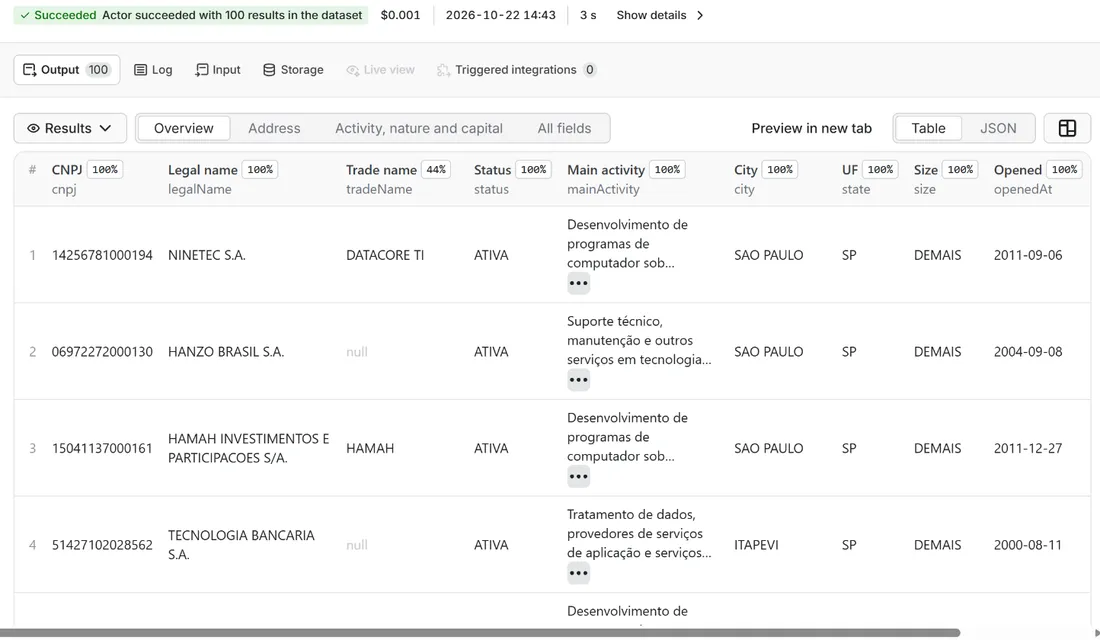
Get Brazilian companies from the CNPJ register of the Receita Federal, the national company register of Brazil. This Brazil CNPJ scraper has two ways in: give it a list of CNPJ numbers and it returns one row per company, or give it a state, an activity code (CNAE) and a city and it finds the companies for you. Each company comes back as one flat row: legal name, trade name, registration status, main and secondary activities, legal nature, share capital, size, opening date, the Simples Nacional option and the full registered address, as JSON, CSV or Excel.
It reads the register through free community services built on the Receita's open data, with a second service as a fallback, so there is no key, no login, no CAPTCHA and no proxy. It never delivers the partners of a company, e-mail addresses or telephone numbers, and it leaves out sole traders and MEI registrations, whose name is the name of a person. You pay only for the companies delivered.
What you get
One row per company (one CNPJ is one establishment: a head office or a branch):
- Identity: CNPJ (14 characters, without mask), legal name (razão social), trade name (nome fantasia), head office or branch
- Status: registration status (ATIVA, BAIXADA, INAPTA, SUSPENSA, NULA), the date and the reason of the status
- Activity: the main activity with its CNAE code and description, and every secondary activity as code and description
- Legal nature and size: legal nature code and name (2062 limited company, 2054 closed corporation, 2038 mixed-economy company...), company size (micro, small or large), share capital in reais
- Dates and tax: start of activity, Simples Nacional option with its dates, history flags of former MEI registrations
- Address: street type, street, number, complement, district, postal code (CEP), city, IBGE city code and state (UF)
- Traceability: which source answered (
minhareceitaoropencnpj), the update of the source data (the register is republished every month) and the time the record was read
Why this actor
- Two modes in one run: a list of up to 10,000 CNPJ numbers, a search by state, activity and city, or both together. Duplicates are removed across the two.
- Search where the demand is: most buyers of Brazilian company data want "all active software companies in São Paulo", not a list they already have. Search by one or several states, CNAE codes and cities, active companies only by default, head offices only if you wish, and a start-of-activity date for new companies.
- Count before you pay: Count only reads the search without delivering anything and tells you how many companies match and what they would cost.
- A report for every number: the
COVERAGErecord says for each CNPJ you gave whether it was found, not in the register, left out as a sole trader, mistyped (wrong check digits) or failed, so a result with fewer rows than numbers is never a mystery. - Check digits first: a mistyped CNPJ is reported without a single request, and a number that does not exist is never charged.
- A fallback source: if the main service is down, slow or refuses, the lookup goes to a second public service and the row says which one answered.
- No personal data by construction: rows are built from a fixed list of company fields; nothing else of the source answer is copied.
- Polite and cheap to run: robots.txt is read before the first request to each host, requests are spaced 150 ms or more, four lookups run in parallel, and the run keeps within 256 MB of memory.
How to use it
- Open the Actor and fill in CNPJ numbers (the other fields are optional filters).
- Set Maximum companies to a small number for a first try (the default is a safe start).
- Optional: tick Count only and start once. You get the number of matching rows and the estimated cost, for free (only the start event is charged). Untick it to get the data.
- Click Start. The status line shows progress; the run stops cleanly at your limit or at the charge limit you set in the run options.
- Open the Dataset tab and download JSON, CSV, Excel, XML or HTML, or send the rows to Google Sheets, Slack, Make, n8n or Zapier with the Integrations tab.
- To run it on a schedule, use Schedules in Apify Console and turn on Only new rows since the last run below: every run then costs only the new rows, and a webhook URL tells you when something new came in.
Input
| Field | What it does |
|---|---|
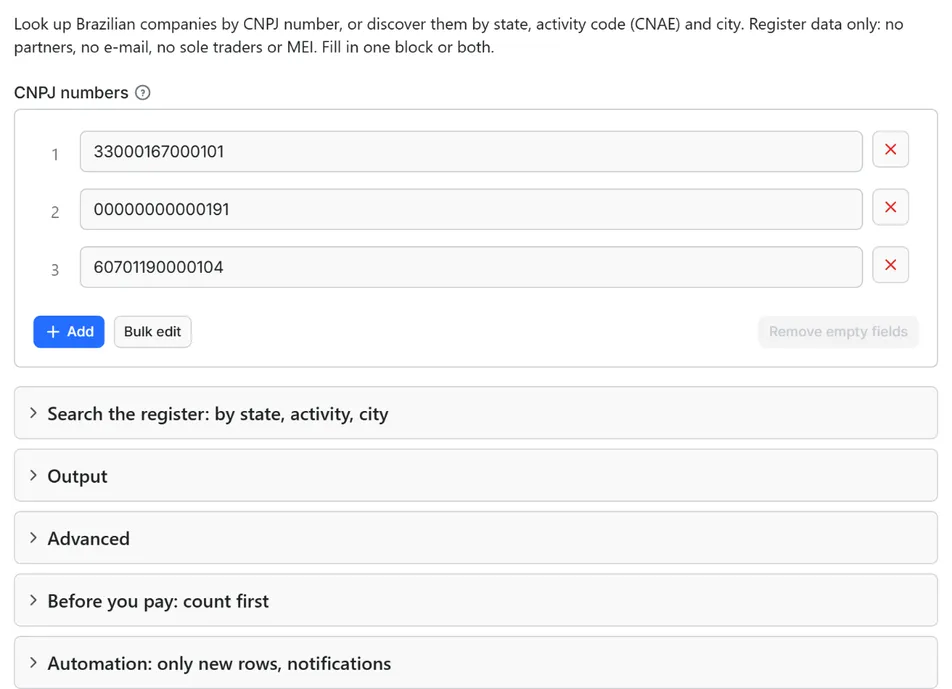
cnpjs | CNPJ numbers to look up, one per line, with or without the mask (33000167000101 or 33.000.167/0001-01). Up to 10,000 per run. Companies you look up are delivered with their status, active or not. |
states | Two-letter state codes (SP, RJ, MG...) for the search. Several states are searched together. |
activityCodes, activityScope | 7-digit CNAE codes (6201501 software development). By default the code must be the company's main activity; choose "main or secondary" to include companies that list it among their secondary activities (many more). |
cityCodes | 7-digit IBGE municipality codes (3550308 São Paulo, 3304557 Rio de Janeiro). |
onlyActive | On by default: skips closed, suspended and unfit companies (about four in ten records of a search). |
headOfficesOnly, openedAfter | Skip branches; keep only companies that started activity on or after a date (2025-01-01). |
legalNatureCodes | 4-digit legal nature codes (2062 limited company, 2054 and 2046 corporations). Makes searches of common activities much faster, because sole traders are then not read. Codes of sole traders and other forms named after a person are ignored and said so in the run summary. |
maxItems | Stop after this many companies (default 500, 0 = no limit). |
concurrency | Parallel lookups, 1 to 8 (default 4). The delay between requests still applies. |
countOnly, onlyNew, stateName, notifyUrl, notifyWhenEmpty | Count only (deliver nothing); only new rows, the webhook: see Automation below. |
requestIntervalMs | Delay between requests to the same host, 150 ms or more (default 150). |
A search needs at least one state, one activity code or one city: without one of them it would read the whole register of more than 70 million establishments, so the run stops with a clear message.
Example: look up three large companies.
Example: active software development companies in São Paulo opened since 2024, head offices only.
Example: restaurants in the city of Rio de Janeiro.
Output
35 fields per row. Empty values are null, never missing, so CSV and Excel columns are stable.
| Field | Type | Example |
|---|---|---|
id | string | 33000167000101 |
cnpj | string | 33000167000101 |
legalName | string | PETROLEO BRASILEIRO S A PETROBRAS |
tradeName | string | PETROBRAS - EDISE |
headOffice | boolean | True |
status | string | ATIVA |
statusDate | string | 2005-11-03 |
statusReason | string | SEM MOTIVO |
mainActivityCode | string | 0600001 |
mainActivity | string | Extração de petróleo e gás natural |
secondaryActivities | array | [{"code": "1921700", "description": "Fabricação de produtos do refi… |
legalNatureCode | string | 2038 |
legalNature | string | Sociedade de Economia Mista |
size | string | DEMAIS |
sizeCode | number | 5 |
shareCapital | number | 205431960000 |
openedAt | string | 1966-09-28 |
simplesOptant | boolean | Opted for the Simples Nacional tax regime (null = no record) |
simplesOptedAt | string | Date of the Simples Nacional option |
simplesExcludedAt | string | Date of exclusion from the Simples Nacional |
meiOptant | boolean | False |
meiOptedAt | string | Date a former MEI registration started |
meiExcludedAt | string | Date a former MEI registration ended |
streetType | string | AVENIDA |
street | string | REPUBLICA DO CHILE |
number | string | 65 |
complement | string | Address complement |
district | string | CENTRO |
zip | string | 20031170 |
city | string | RIO DE JANEIRO |
cityIbgeCode | string | 3304557 |
state | string | RJ |
source | string | minhareceita |
sourceUpdatedAt | string | 2026-10 |
fetchedAt | string | 2026-10-22T10:54:26.143Z |
Example rows
Two real rows from a run (long texts shortened here, complete in the dataset):
Results can be downloaded as JSON, CSV, Excel, XML or HTML from the Dataset tab, or read through the Apify API.
Besides the dataset, every run writes two records to the key-value store. RUN_SUMMARY has the counts: delivered, found, not found, left out as sole traders (with the reason), mistyped numbers, pages read, rate-limit waits, which source answered, and why the run stopped. COVERAGE has one entry per CNPJ you gave and one for the search.
Pricing
Pay per result. You pay for each company delivered to your dataset, nothing else: no subscription, no minimum, no charge for rows your filters drop or for the requests behind them.
| Your Apify plan | Price per 1,000 rows | Price per row |
|---|---|---|
| Free plan | $1.00 | $0.001 |
| Starter plan | $0.95 | $0.00095 |
| Scale plan | $0.85 | $0.00085 |
| Business plan and above | $0.70 | $0.0007 |
Example: 1,000 companies cost $1.00 on the Free plan and $0.70 on the Business plan. Platform usage of the run (compute, storage) is included in that price and is not billed to you separately (pay per event: the actor covers it).
A start event of $0.00005 is charged once per run (Apify default).
Cap your spend: set Maximum total charge in the run options. The actor stops cleanly when the cap is reached and you keep everything delivered until then. The run summary (RUN_SUMMARY in the key-value store) says why a run stopped.
Check before you pay: turn on Count only to see how many rows match and what they would cost at your tier. That run delivers nothing and costs only the start event.
Not charged: a CNPJ that is not in the register, a mistyped number, a sole trader or MEI left out, a duplicate, a company already delivered in an earlier run when Only new rows is on, a count-only run, and a failed lookup.
Automation: only new rows, notifications, schedules
Only new rows since the last run. Turn on onlyNew and the actor remembers every company it delivered to you (in a key-value store named rowcraft-brazil-cnpj-companies-scraper-state in your Apify account). The next run with the same stateName skips what you already have and you pay only for new rows. The first run delivers everything that matches. Use a different stateName for each schedule or search so they keep separate memories.
Notification when the run ends. Put a webhook address in notifyUrl and the actor sends one JSON POST with the number of new rows, links to the dataset (JSON and CSV) and the run. It works out of the box with Slack and Discord incoming webhooks (the message is in text and content), with Make, n8n and Zapier catch hooks, and with your own endpoint. By default it is sent only when there is at least one new row; notifyWhenEmpty sends it every time.
Schedules. Create a schedule in Apify Console (hourly, daily, weekly or cron) with onlyNew on. A daily schedule gives you a feed of new companies for the price of the new rows only.
Integrations. Send the results to Make, n8n, Zapier, Google Sheets, Slack, Google Drive, Airtable or any webhooks from the Integrations tab of the Actor, with no code. Apify also offers native actions for Make, n8n and Zapier.
API, SDKs and AI agents. Every run is available through the Apify API and the official JavaScript and Python clients; the Actor can also be called by AI agents through the Apify MCP server. The example input in the API tab is a working call.
Count only. countOnly returns the number of matching companies and the estimated cost without delivering anything, so you can size a job before paying for it.
For this actor, Only new rows is useful for a standing search: schedule "software companies in São Paulo opened after 2025-01-01" every week and you receive only the companies that appeared since the last run.
Use cases
- Lead lists by activity and place: every active restaurant, clinic, accountant or software house of a city, with its legal name, address, size and opening date, ready for a CRM or a Google Sheet.
- New company monitoring: a weekly search with
openedAfterand Only new rows gives the companies opened in your region and industry, for the price of the new rows. - Enriching a list of CNPJs: you have numbers from invoices, tenders or a customer list; get the current legal name, status, activity, size and address of each, and the numbers that are mistyped or closed are flagged.
- Supplier and counterparty checks: is this CNPJ active, since when, with what main activity and which capital? One lookup answers in a fraction of a second.
- Market sizing: how many active companies of an activity, in a state or a city, with a free count before you buy the rows.
- Prospecting by size and legal nature: limited companies with large size flags, head offices only, in the states you sell to.
Ready-made examples, each with the input filled in (open one and press Start, or save it as your own task):
What this actor does not do
- Search by company name. The free sources only filter by state, city, activity and legal nature, and the sites that search by name sit behind CAPTCHAs, which this actor does not solve. Give CNPJ numbers, or search by activity and place.
- Deliver partners and administrators (the QSA list), representatives or any person: they are never read into a row, never logged and never searched by.
- Deliver e-mail addresses or telephone numbers. Contact data is left out on purpose; an e-mail address typed into a trade name is removed as well.
- Deliver sole traders, MEI, EIRELI and the other forms named after a person. Their name is the name of a person (and for MEI sometimes carries the CPF). They are skipped and counted, never delivered, never charged.
- Give real-time data. The register is republished once a month by the Receita Federal and the services here follow it; the
sourceUpdatedAtfield tells which month you are reading. - Deliver financial statements, tax regime history, establishments of a company in one row, or debts. One row is one CNPJ with the registration data.
- Use proxies or solve CAPTCHAs. The sources are open and need neither.
Limits and fair use
- The search is rationed by the source. The paged search of the main service is marked "in testing" by its author and is limited per server, not per user: heavy searches (a big state with a very common activity) can be answered with HTTP 429 and "try again in 1 minute". The actor waits the time the service asks for, up to three times per page, then stops and says so:
searchIncomplete: truein the run summary. What was delivered before stays; run again later or narrow the search (a state plus an activity code is the lightest). - Common activities are slow unless you name the legal nature. Most records of a mass-market activity are sole traders and MEI registrations, which are read and left out. In a test on 22 October 2026, a state-wide search for clothing retail in São Paulo without legal nature codes delivered about 85 companies per minute (eight of ten records skipped, a one-minute wait after most pages); the same search with
legalNatureCodesset to2062delivered 3,000 companies in 22 seconds. The run log says so when more than six in ten records are skipped. - A page holds up to 1,024 records and the actor reads page by page. In a test on 22 October 2026, one page of software developers in São Paulo held 130 sole traders or MEI and 418 closed companies out of 1,024 records; the rest were delivered. Narrow searches therefore read many pages for few rows, which costs time, not money.
- Lookups: about 0.15 to 0.25 seconds each, four in parallel, at least 150 ms between requests to the same host. A list of 10,000 numbers takes roughly half an hour.
- Count only reads at most 100 pages (about 100,000 records) and says when the count stopped early.
- Up to 10,000 CNPJs per run. Split longer lists.
- The order of a search is the order of the source, not by size or date, and the same search can be repeated and resumed with Only new rows.
- Simples and MEI dates are history fields of the register and can look odd for large companies; they are shown as published.
- Data is as old as the last monthly update of the register. A company opened this week is not there yet.
- The main service has no service level. It is run by one volunteer; when it is down, lookups go to the second service (the search has no second service).
- The run stops 90 seconds before its timeout with the summary saved; for very large searches raise the timeout and use Only new rows.
Data source
The records come from the Cadastro Nacional da Pessoa Jurídica (CNPJ) of the Receita Federal do Brasil, published as open data in the national open-data portal under the Creative Commons Attribution (CC BY) licence: dados.gov.br, with the files on the Receita Federal data site. The actor does not read those files (7.8 GB a month); it reads two free public services that republish them: Minha Receita (lookup by CNPJ and the paged search; open-source, no key and no registration) and, as a fallback for lookups only, OpenCNPJ (free, commercial use allowed, no key). The documentation of the first one describes the search parameters used here: state, city, activity (main or any), legal nature, page size and cursor.
Attribution: contains data of the Receita Federal do Brasil (CNPJ open data, CC BY), served through Minha Receita or OpenCNPJ; the row says which one, and the month of the data.
This actor is independent and not affiliated with Receita Federal, minhareceita.org or OpenCNPJ, and none of them provides, endorses or guarantees it. The data is shown as published; names belong to their owners.
Privacy: no personal data
Rowcraft actors are built not to collect personal data. For the CNPJ register that needs care, because the register is full of people:
- Partners and administrators (QSA) are never read into a row. Rows are built field by field from a fixed list of company fields; the partner list, the representatives and their CPF numbers, the e-mail address and the tax regime history of the source answer are not on the list, so they cannot reach the dataset, the logs or the run summary.
- Sole traders and MEI are left out. For these registrations the company name is the name of a person (for MEI, sometimes with the CPF at the end). The legal natures 2135 (sole trader), 2305 and 2313 (EIRELI), 4014 (individual real-estate company), 4090 (candidate for political office) and 4120 (rural producer, individual), every MEI registration, and any answer that does not state a legal nature, are skipped before delivery, counted as
excludedIndividualin the run summary, and never charged. A name that ends in a CPF-like number is skipped as well. - No e-mail addresses and no telephone numbers. An e-mail address or a telephone typed by an owner into a trade name or an address complement is redacted.
- The search never filters by person. The source can search by the CPF of a partner; this actor does not offer it and never sends it.
What remains is the registered company name, which can contain a family name ("Silva Comércio Ltda"). That is the name of a legal entity as registered, but it can read like a person; judge your use of it under the law that applies to you.
Other Rowcraft actors
All Rowcraft actors read official or public sources, deliver flat rows without personal data and support only-new runs and notifications:
- Ashby Jobs Scraper – Job Postings with Salary Ranges — Job postings from Ashby job boards (jobs.ashbyhq.com) by company: title, department, team, locations with country, employment and workplace type, published salary range, full text.
- Broken Link Checker – Find 404s and Dead Links API — Pay per crawled page, not per link: crawl a site within robots.txt and check every link on each page for 404s, 5xx errors, DNS and TLS failures and redirects.
- Bulk Image Downloader API: Save Page Images with Sizes — Download the images of any web pages, or direct image links, into a key-value store with width, height, format, size and a download link per file.
- Career Site Jobs Scraper: Greenhouse, Lever, Ashby, Workday — Job listings from the career pages of the companies you choose on Greenhouse, Lever, Ashby, Workday, Workable, Personio, Recruitee, Teamtailor and Gem, in one run and one format: title, locations, department, salary when published, full text.
- Chrome Web Store Scraper: Users, Ratings & Versions — Reads public Chrome Web Store listing pages with no login, no proxy and no personal data: users, rating, category, version, update date, permissions and company developers.
- Company Register Lookup Europe: Name, ID, Domain or LEI — Look up a European company by name, domain or registry number and get one unified profile from the official registers of France, Norway, Poland, the UK and the LEI index.
- Domain Email and DNS Checker API: MX, SPF, DMARC, Providers — Find which email provider, sending services and DNS host each domain uses, from public DNS records only.
- SIRENE France Company Scraper: SIREN, NAF, Revenue, Status — French companies from the official Recherche d'entreprises API (INSEE SIRENE + INPI): SIREN and SIRET, legal form, NAF activity, head-office address, employee band, revenue and net income, labels, creation date and VAT number.
- France Fuel Prices Scraper – Official Open Data by Station — Current fuel prices at every French station, straight from the official open-data feed (Licence Ouverte 2.0): gazole, SP95, SP98, E10, E85 and GPLc, each with its update time.
- Gem Jobs Scraper – Job Board Listings from jobs.gem.com — Job listings from Gem job boards (jobs.gem.com) by company: title, department, offices with country, employment type, remote, hybrid or on-site, requisition ID, publication date and full ad text, from the public Gem Job Board API.
- Google Autocomplete Suggestions Scraper – Keyword Ideas — Get Google search suggestions for a list of keywords in bulk: a-z, question and preposition expansion, any language and country.
- Google Play Apps Scraper: App Details, Installs, Ratings — Public Google Play app details as flat rows: installs, rating, number of ratings, price, version, last update, minimum Android, ads and in-app purchases.
- Greenhouse Jobs Scraper – Job Listings by Company Board — Job listings from Greenhouse job boards by company: title, departments, offices, publication date, full ad text, published pay ranges.
- Hacker News Scraper API: Top, New, Best, Ask, Show Stories — Read Hacker News stories from the official Firebase API: top, new, best, Ask HN, Show HN and job lists with score, comments, domain and age.
- Himalayas Jobs Scraper: Remote Jobs API with Salaries — Remote jobs from Himalayas through its public jobs API: title, company, salary range, seniority, categories, the countries and time zones open to candidates, full description and job link.
- Image to Text OCR API: Extract Text from Images in Bulk — Read the text in images given by link or found on web pages, with a local OCR engine and no third-party API.
- KRS Poland Companies Scraper: Register Data, PKD, Status — Polish companies from the official KRS register API of the Ministry of Justice: name, KRS, NIP and REGON numbers, legal form, status, address, PKD activity codes, share capital, branches and registration dates.
- LEI Records Scraper: Legal Entity Identifier Lookup API — Legal Entity Identifier (LEI) records from the Global LEI Index, read through the public GLEIF API: legal name, legal form, register number, addresses, status, renewal date and parent companies.
- Lever Jobs Scraper – Job Postings from jobs.lever.co — Job postings from Lever career pages (jobs.lever.co) by company: title, team, department, location, commitment, workplace type, salary range when published, description, requirements and benefits.
- Lighthouse Website Auditor API: Core Web Vitals, Page Speed — Run Lighthouse on any public page and get Performance, Accessibility, Best Practices and SEO scores, lab Core Web Vitals and the biggest savings.
- Norway Company Register Scraper: Brønnøysund Business Data — Norwegian companies from the Central Coordinating Register for Legal Entities (Brønnøysund, NLOD open data): organisation number, legal form, industry, employees, share capital, addresses, website, VAT and bankruptcy status.
- PDF Text Extractor API: Text, Pages and Metadata from PDFs — Get the text of every PDF you link, page by page, with page count, language and word count.
- Personio Jobs Scraper: Job Listings, Salaries, Departments — Job ads from any company's Personio careers feed: title, department, office, employment type, schedule, seniority, salary when published, keywords and the full description in the language you choose.
- Platsbanken Scraper: Sweden Jobs, Employers, Org Numbers — Every job ad on Platsbanken (Arbetsförmedlingen) from the official JobTech API: headline, employer and organisation number, occupation codes, municipality, coordinates, salary type, deadline and full text.
- Recruitee Jobs Scraper – Job Listings by Company Career Site — Job listings from Recruitee career sites by company: title, department, locations with country, employment type, remote flag, published salary and full text, one request per company.
- Remote Jobs Aggregator API: RemoteOK, WeWorkRemotely, Jobicy — Remote jobs from RemoteOK, We Work Remotely and Jobicy in one clean list, read from their official feeds and APIs, merged without duplicates.
- Robots.txt and AI Crawler Access Checker API — Check which AI and search crawlers a website lets in: GPTBot, ClaudeBot, PerplexityBot, Google-Extended and more, read from robots.txt by the RFC 9309 rules.
- RSS Feed Finder and Reader – Blog and News Article API — Find the RSS, Atom and JSON feeds of any website and read their newest articles, from a domain name alone.
- SAM.gov Contract Opportunities Scraper: US Federal Bids — US federal contract opportunities from the official SAM.gov daily extract: solicitations, awards and notices with agency, NAICS, set-aside, deadlines, place of performance and full descriptions.
- SEO Audit Tool: Titles, Meta Tags, Headings and Links API — Audit the on-page SEO of any list of pages or websites: titles, meta descriptions, headings, canonicals, indexing, links, images and structured data, with a score and the issues found per page.
- Shopify Products Scraper: Store Catalog Export to JSON, CSV — Products from any Shopify store's public catalog: title, vendor, type, tags, description, variants with price, compare-at price, SKU and stock, images, options, store currency.
- Sitemap URL Extractor: Every Page with Last-Modified Dates — Get every page a site lists in its sitemaps, with last-modified dates, from robots.txt through sitemap indexes and .gz files.
- SSL Certificate and Security Headers Checker API — Check the TLS certificate and the HTTP security headers of every domain in one run, with an A+ to F grade and the exact issues to fix.
- Store Products Scraper – Shopify, WooCommerce, VTEX — Export the product catalogue of any Shopify, WooCommerce or VTEX store from its public catalogue endpoint: title, brand, prices, discounts, stock, categories, images and links, one row per product, the same columns on every platform.
- Structured Data Extractor: JSON-LD, Schema.org, Open Graph — Pull the schema.org JSON-LD, Microdata, RDFa and Open Graph of any page list into flat rows: types, product price, availability, ratings, organization, breadcrumbs, with validation issues.
- Teamtailor Jobs Scraper – Career Site Jobs by Company — Job listings from Teamtailor career sites by company: title, department, role, locations with city and country, remote or hybrid status, publication date and full ad text, from the official job feed.
- TED Tenders Scraper: EU Public Procurement Notices API — EU public procurement notices from TED (Tenders Electronic Daily), the official EU tenders portal, through its public Search API: title, buyer, country, CPV codes, values, deadlines, lots and document links.
- UK Companies House Scraper: Company Search & Profiles API — UK companies from the official Companies House API with your free key: search by name, status, type, SIC code, date or location, or look up company numbers.
- UK Tenders Scraper: Find a Tender + Contracts Finder API — UK public procurement notices from Find a Tender and Contracts Finder, the official UK government portals, through their open OCDS APIs: title, buyer, region, CPV codes, values, deadlines, notice type and links.
- Bulk URL Status and Redirect Chain Checker API — Check the status code, redirect chain, canonical and indexing signals of every URL in a list, with the final destination and a loop flag.
- Video Frame Extractor: Frames, Scenes, Thumbnails from MP4 — Extract JPG, PNG or WebP frames from direct video links (MP4, WebM, MOV, MKV, OGV): evenly spaced, every N seconds, at exact times or at scene changes.
- VTEX Products Scraper – Public Catalog Export — Export the catalogue of any VTEX store (Auchan, Chedraui and thousands of retailers in Europe and Latin America) from its public search endpoint: title, brand, EAN, prices, list prices, stock, categories, specifications and images, one row per product.
- Website Intelligence API: Tech, Social, SSL, DNS Profile — One row per domain with the whole website profile: technologies, social profile links, logo and brand assets, SSL expiry, DNS and mail providers, sitemap size, robots.txt and llms.txt.
- Website to Markdown Converter API: Text for LLMs and RAG — Turn a list of web page addresses into clean Markdown and plain text for LLMs and RAG: the main content only, with headings, links, images and tables.
- Website Screenshot API: Full-Page PNG, JPEG and PDF Captures — Capture full-page or viewport screenshots of any public web page as PNG, JPEG or WebP, with an optional A4 PDF.
- Website Social Links Finder: Company Profiles API — Get the official social media profiles of any company website: LinkedIn page, Facebook, Instagram, X, YouTube, TikTok and more, plus logo, favicon and share image.
- Website Tech Stack Detector – Technology Lookup API — Find the technologies behind a list of websites: CMS, e-commerce platform, analytics, tag managers, ad pixels, consent tools, chat, CDN and payments, from one polite home-page request per domain.
- WooCommerce Products Scraper – Store API Export — Export every product of a WooCommerce store through its public Store API: title, SKU, prices and sale prices, stock, categories, tags, attributes, ratings, images and links, one row per product.
- Workable Jobs Scraper: Job Listings from Career Pages — Job listings from any company's Workable career page: title, department, location, remote or on-site, employment type, description, requirements, benefits and salary when published.
- Workday Jobs Scraper – Jobs from myworkdayjobs.com Sites — Job listings from Workday career sites (myworkdayjobs.com) by company: title, locations, country, posting date, time type, requisition ID and the full description.
FAQ
Is it legal to use this data? The CNPJ register is public by law in Brazil (the Access to Information Law) and the Receita publishes it as open data under the CC BY licence, which allows copying and commercial use with attribution. The actor leaves out the records and fields that concern people. How you use the companies you receive (marketing, contact, profiling) is your responsibility under the law that applies to you, including consent and anti-spam rules; this is not legal advice.
Why are there no partners, e-mails or telephone numbers, and why no sole traders or MEI? Because they are personal data. The partner list and the contact data identify people, and for sole traders and MEI the company name is the owner's name. Rowcraft delivers company data only. If you need those fields, the rows contain the CNPJ, which you can use with sources you are entitled to.
Why is my result empty or smaller than the list I gave? Open COVERAGE and RUN_SUMMARY. Each CNPJ is found, notFound (not in the register), excludedIndividual (a sole trader or MEI), invalidInput (wrong length or check digits, no request made), error (both sources failed) or notChecked (the run stopped at your maximum or charge limit). With a search, the summary shows the records read, how many were closed (onlyActive), how many sole traders were left out, and whether the search was complete.
Why do I get HTTP 429, "incomplete search" or a long wait? The paged search of the main service is rationed per server and answers "busca muito custosa" with a wait of one minute when it is busy. The actor waits as asked, three times per page; if the service keeps refusing it stops with searchIncomplete: true and charges only the rows already delivered. Run again later, or narrow the search to a state and an activity code, and add legal nature codes such as 2062 so that sole traders are not read at all. Lookups by CNPJ have no such limit.
Can I search by company name? No. Free sources do not filter by name, and the sites that do are protected by CAPTCHAs. If you have a name, find its CNPJ first and look it up here; to find many companies, search by activity and place.
How do I find the activity code (CNAE) of a business? CNAE codes have seven digits and are listed by the national statistics institute (IBGE). 6201501 is custom software development, 5611201 restaurants, 4120400 building construction, 8630504 dental clinics, 6920601 accounting. Look at the mainActivityCode and secondaryActivities of a company you know and reuse its code.
What is the difference between "main activity" and "main or secondary"? Each company has one main CNAE and often many secondary ones. Searching the main activity finds companies whose business is that activity. Searching "main or secondary" also finds companies that merely list it, which can be many times more rows and less relevant ones.
Why are there rows with status BAIXADA or INAPTA? onlyActive is on by default for searches. If you turn it off, closed (BAIXADA), unfit (INAPTA) and suspended companies are delivered with their status and date. Companies you look up by CNPJ are always delivered with their status, because you asked for that number.
What does a CNPJ with letters mean? From July 2026 new CNPJs can contain letters. The actor accepts 14 letters and digits, but it checks the check digits only for numbers made of digits; a CNPJ with letters is validated by length only, and COVERAGE says so (validationMode: length-only).
How current is the data? It follows the monthly publication of the Receita Federal. The sourceUpdatedAt field shows the month (or the timestamp when the fallback answered).
Why does cityIbgeCode sometimes come empty? The fallback source gives the city name and its SIAFI code but not the IBGE code. Rows from the main source always have it.
How many companies can I get in one run? Without a limit, as many as the search matches, but a very broad search (a whole large state) is long and rationed by the source; split it by activity code or city and use Only new rows.
How much does it cost? $1.00 per 1,000 companies on the Free plan, less on paid plans (see Pricing). You pay only for rows delivered to your dataset; set a maximum total charge in the run options to cap a run.
How do I get the results into Slack, Google Sheets, Make, n8n or Zapier? Use the Integrations tab of the Actor for the data, and the notifyUrl field for a message when a run ends (Slack and Discord webhooks work directly; catch hooks of Make, n8n and Zapier too).
Can I call it from code or from an AI agent? Yes: through the Apify API, the JavaScript and Python clients, and the Apify MCP server. The API tab shows a working example with the input of this Actor.
Is it legal to use this data? The actor reads the official API described in the Data source section and delivers company and job data without personal data. The licence of the source is described above. How you use the data is your responsibility under the law that applies to you.
Does it collect personal data? No. Contact persons, e-mails and phone numbers are removed and fields about people are never requested. See the Privacy section.
The run finished with 0 rows. Did I pay? No: with no rows delivered nothing is charged apart from the start event. Check the run summary (RUN_SUMMARY) for warnings, widen the filters, or run with Only new rows off if everything matching was already delivered to you.
Support and reviews
Problems, missing fields, questions: open an issue on the Issues tab of this Actor. We answer within one working day and fix confirmed bugs in the next release; the changelog lists every change.
If this Actor saved you time, a short review on its page helps other users find it and helps us keep improving it.


