

Chrome Web Store Scraper: Users, Ratings & Versions
Pricing
from $0.70 / 1,000 extension delivereds
Chrome Web Store Scraper: Users, Ratings & Versions
Reads public Chrome Web Store listing pages with no login, no proxy and no personal data: users, rating, category, version, update date, permissions and company developers. You pay only for extensions delivered.
Pricing
from $0.70 / 1,000 extension delivereds
Rating
0.0
(0)
Developer
Rowcraft
Maintained by CommunityActor stats
0
Bookmarked
2
Total users
1
Monthly active users
4 days ago
Last modified
Categories
Security
Limited permissionsShare
Get the public details of any extension in the Chrome Web Store as one flat row: name, category, number of users, average rating, number of ratings, current version, package size, last update date, languages, short and full description, the Featured and Established Publisher badges, minimum Chrome version, manifest version, the permissions and the websites the extension asks for, and the developer when it is a company. This Chrome Web Store scraper reads the same public pages anyone can open in a browser (chromewebstore.google.com/detail/...), with no Google account, no cookies and no proxies, and exports JSON, CSV or Excel.
Give it extension IDs or links, or store categories, filter by minimum users, and schedule it with Only new rows to receive only the extensions that are new or have a new version or update date since the last run. The store's robots.txt is read at the start of every run and every page is checked against it. Search, the pages with what users write about an extension, the support page and the related-extensions page are never requested. A category page shows only its first 32 to 54 extensions; for anything beyond that, give the extension IDs (see Limits and fair use for the ceilings and the speed).
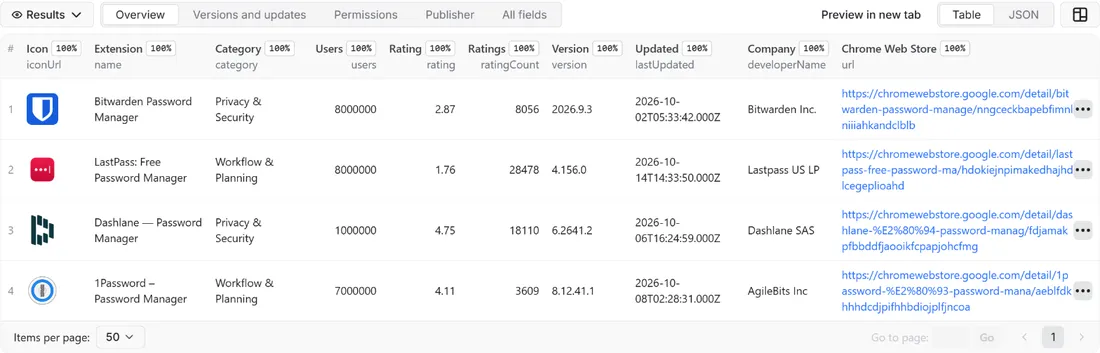
What you get
Price: $1.00 per 1,000 extensions on the Free plan, $0.70 on the Business plan, paid per row delivered; the $5 monthly credit of a free Apify account covers about 5,000 extensions. Details in Pricing below.
One row per extension, the same columns for every source:
- Extension: extension ID, link, name, short description, full description as plain text (contact details masked), icon
- Popularity: the number of users as the page shows it (the store rounds it), average rating with two decimals, number of ratings
- Category: the category name and its path in the store's addresses (
productivity/workflow) - Version and dates: current version, package size, date of the last update (ISO 8601), minimum Chrome version, number of languages and their names
- Badges: whether the store shows the Featured badge and the Established Publisher badge
- Permissions: manifest version (2 or 3), the API permissions and the website access (host permissions) the extension asks for, read from the extension's own manifest
- Developer (companies only): developer or trader name, website domain, privacy policy link, and whether the developer declared itself a trader; for an individual developer these stay empty
- Source: whether the row came from an extension ID or link or from a category, the category path, the position on the category page, and the language of the run
- Change since the last run: with Only new rows,
neworupdated - Coverage: one line per input in the run summary with its result (read, not found, invalid, disallowed by robots.txt, not read because the run stopped)
Why this actor
- No login, no proxy, no tricks: public pages, read once each, with a clear user agent. No Google account, no cookies kept beyond the run, no CAPTCHA solving, no click on a consent page.
- robots.txt first: the file is fetched at the start and every path, including its query, is checked before it is requested. Paths it disallows are skipped and listed in the run summary. On top of that the actor never requests a search page or any sub-page of an extension, even if robots.txt changed on the day.
- Stops politely: a rate limit (HTTP 429), an "unusual traffic" page, Google's consent page or a redirect away from the store ends the run at once. You keep what was delivered and the run summary says why; nothing is retried with another identity.
- Permissions from the manifest:
permissions,hostPermissionsandmanifestVersioncome from the manifest file the page itself carries, so you can compare what extensions ask for or follow the move from manifest 2 to 3. Only these keys are read from it. - New versions, not only new extensions: with Only new rows a scheduled run delivers extensions it has not delivered to you before and extensions with a new version or update date, and tells you which is which (
changeSinceLastRun). - Filter by users: Minimum users skips the small extensions, and skipped extensions are not charged.
- Count before you pay: Count only reads the category pages, counts the extensions they list and estimates the cost, without opening a single extension page.
- No personal data: developer names are delivered only for companies and organisations; descriptions are passed through the Rowcraft privacy filter.
How to use it
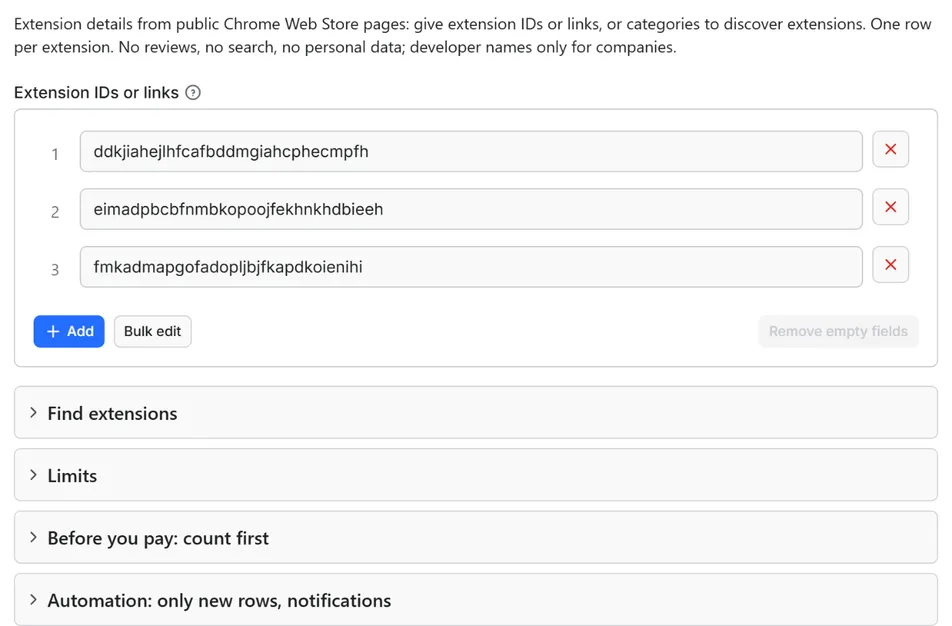
- Open the Actor and fill in Extension IDs or links (the form starts with three real IDs) or Categories. One of the two is enough.
- Set Maximum extensions to a small number for a first try (the form starts with 20).
- Optional: set Minimum users to skip small extensions, and Language if you want the texts in another language (
enby default). - Optional: tick Count only and start once. You get the number of extensions your categories list (plus the IDs you gave) and the estimated cost, for free (only the start event is charged). Untick it to get the data.
- Click Start. The status line shows progress; the run stops cleanly at your limit or at the charge limit you set in the run options. The prefilled example finishes in about ten seconds.
- Open the Dataset tab and download JSON, CSV, Excel, XML or HTML, or send the rows to Google Sheets, Slack, Make, n8n or Zapier with the Integrations tab.
- To follow extensions over time, create a schedule in Apify Console and turn on Only new rows since the last run: every run then costs only the new and updated extensions, and a webhook URL tells you when something changed.
Input
Quick start. This input is ready to run (it is also the example in the API tab):
One real row it returns (long texts shortened here):
| Field | What it does |
|---|---|
extensions | Extension IDs or links, one per line: eimadpbcbfnmbkopoojfekhnkhdbieeh or https://chromewebstore.google.com/detail/dark-reader/eimadpbcbfnmbkopoojfekhnkhdbieeh. The old chrome.google.com/webstore/detail/... links work too |
categories | Category paths or names (productivity/workflow, Developer Tools, Privacy & Security), the word all, or category links. The 18 categories of the store are known by name |
minUsers | Skip extensions with fewer users than this; skipped ones are not charged |
language | Language of the texts (en by default; de, fr, es, pt-BR, ja...) |
maxItems, maxItemsPerSource | Stop after this many extensions in total; read at most this many extensions from each category |
countOnly, onlyNew, stateName, notifyUrl, notifyWhenEmpty | Count only (deliver nothing); see Automation below |
requestIntervalMs | Pause between requests, one second by default, 500 ms at the lowest |
The sources are read one after the other. An extension that appears in two sources is delivered once. A link that is not the page of an extension (a search address, for example) is reported as invalid in the run summary and never requested.
maxItemsPerSource limits what is read from each category, not only what is delivered: extensions that are skipped (by Minimum users, themes, not found) count too, so a strict filter cannot make the actor read the whole page.
Example: two extensions you follow plus the first page of the Developer Tools category, only those with at least 1,000,000 users, as a daily feed of new and updated extensions.
Output
33 fields per row. Empty values are null, never missing, so CSV and Excel columns are stable.
| Field | Type | Example |
|---|---|---|
extensionId | string | efaidnbmnnnibpcajpcglclefindmkaj |
name | string | Adobe Acrobat: PDF edit, convert, sign tools |
url | string | https://chromewebstore.google.com/detail/adobe-acrobat-pdf-edit-co/… |
category | string | Workflow & Planning |
categoryId | string | productivity/workflow |
users | integer | 344000000 |
rating | number | 4.39 |
ratingCount | integer | 64022 |
version | string | 26.10.1.0 |
size | string | 5.97MiB |
lastUpdated | string | 2026-10-12T12:09:18.000Z |
languages | string | Deutsch, English, español, français |
languageCount | integer | 28 |
shortDescription | string | Do more in Google Chrome with Adobe Acrobat PDF tools. View, fill, … |
description | string | Adobe Acrobat is the industry-leading PDF solution, used by million… |
featured | boolean | True |
establishedPublisher | boolean | True |
minChromeVersion | string | 107.0 |
manifestVersion | integer | 3 |
permissions | string | contextMenus, tabs, downloads, storage, scripting |
hostPermissions | string | <all_urls> |
developerName | string | Adobe, Inc. |
developerWebsite | string | adobe.com |
developerIsOrganization | boolean | True |
isTrader | boolean | True |
privacyPolicyUrl | string | https://www.adobe.com/privacy/policy.html |
iconUrl | string | https://lh3.googleusercontent.com/T66wTLk-gpBBGsMm0SDJJ3VaI8YM0Utr8… |
sourceType | string | category |
sourceCategory | string | productivity/workflow |
sourceRank | integer | 1 |
language | string | en |
changeSinceLastRun | string | new |
scrapedAt | string | 2026-10-15T20:25:38.723Z |
Example rows
Two real rows from a run (long texts shortened here, complete in the dataset):
Results can be downloaded as JSON, CSV, Excel, XML or HTML from the Dataset tab, or read through the Apify API.
Pricing
Pay per result. You pay for each extension delivered to your dataset, nothing else: no subscription, no minimum.
| Your Apify plan | Price per 1,000 extensions | Price per extension |
|---|---|---|
| Free plan | $1.00 | $0.001 |
| Starter plan | $0.90 | $0.0009 |
| Scale plan | $0.80 | $0.0008 |
| Business plan and above | $0.70 | $0.0007 |
Example: 1,000 extensions cost $1.00 on the Free plan and $0.70 on the Business plan. A start event of $0.00005 is charged once per run (Apify default).
Not charged: extensions that do not exist or were removed, themes, extensions below your Minimum users, an extension listed twice, extensions already delivered to you unchanged (with Only new rows), the category pages themselves, and anything counted with Count only.
Cap your spend: set Maximum total charge in the run options. The actor stops cleanly when the cap is reached and you keep everything delivered until then. The run summary (RUN_SUMMARY in the key-value store) says why a run stopped.
Check before you pay: turn on Count only to see how many extensions your categories list and what they would cost at your tier. That run delivers nothing and costs only the start event.
Automation: only new rows, notifications, schedules
Only new and updated extensions since the last run. Turn on onlyNew and the actor remembers every extension it delivered to you, with its version and last update date (in a key-value store named rowcraft-chrome-web-store-scraper-state in your Apify account, one memory per language). The next run with the same stateName skips the extensions that did not change and delivers the rest: extensions never delivered before (changeSinceLastRun = new) and extensions with a new version or update date (updated). The first run delivers everything that matches. Use a different stateName for each schedule so they keep separate memories. Skipped extensions are not charged.
Notification when the run ends. Put a webhook address in notifyUrl and the actor sends one JSON POST with the number of new rows, links to the dataset (JSON and CSV) and the run. It works out of the box with Slack and Discord incoming webhooks (the message is in text and content), with Make, n8n and Zapier catch hooks, and with your own endpoint. By default it is sent only when at least one extension was delivered; notifyWhenEmpty sends it every time.
Schedules. Create a schedule in Apify Console (hourly, daily, weekly or cron) with onlyNew on. A daily schedule over a list of extension IDs gives you each new version of each extension, for the price of those rows only.
Integrations. Send the results to Make, n8n, Zapier, Google Sheets, Slack, Google Drive, Airtable or any webhook from the Integrations tab of the Actor, with no code.
API, SDKs and AI agents. Every run is available through the Apify API and the official JavaScript and Python clients; the Actor can also be called by AI agents through the Apify MCP server. The example input in the API tab is a working call.
Use with AI agents (MCP). Add the Apify MCP server to Claude, Cursor, VS Code or any MCP client and the agent can run this Actor as a tool:
Call it from a shell or any language. One request runs the Actor with the input below and returns the rows as JSON:
Python (pip install apify-client):
JavaScript / Node.js (npm install apify-client):
Use cases
- Market research by category: the extensions of a category side by side with users, rating, number of ratings, last update and badges, in any language of the store.
- Competitor tracking: the extensions of a competing company or of a product family on a daily schedule with Only new rows: you get each new version the day the store shows it, with its size and minimum Chrome version.
- Version and update monitoring: your own extensions and the ones you depend on, with version, last update date and manifest version collected over time into one sheet.
- Permission comparison: which extensions ask for access to all websites, which use manifest 3, and which permissions are common in a category, from the extension's own manifest.
- Finding popular and neglected extensions: read a category, or a list of IDs you collected, with Minimum users and sort by users, last update or rating to see what is large and what has not been updated in years.
- Lead lists of extension companies: company names, website domains and privacy policy links from a category (companies only; individual developers stay empty).
Ready-made examples, each with the input filled in (open one and press Start, or save it as your own task):
What this actor does not do
- Read what users write about an extension, or anything about those users: the pages that hold user opinions are disallowed by robots.txt and never requested. The average rating and the number of ratings are delivered.
- Search the Chrome Web Store by keyword: the search page is disallowed by robots.txt and never requested. Give extension IDs or categories instead.
- Deliver the names of developers who are private persons: for them the developer fields stay empty (see Privacy).
- Read the developer's e-mail address, postal address, phone number or registration number, which the store shows for traders: that block is never read into a row.
- Read the support page, the related-extensions page or the preview pages, all disallowed by robots.txt.
- Deliver themes: a theme is a listing in the same store but not an extension, so it is skipped and not charged (
themesSkippedin the run summary). - Download or inspect the extension package, its code or its screenshots.
- Cover other stores (Firefox add-ons, Edge add-ons, Opera add-ons).
- Log in, keep cookies between runs, use proxies, solve CAPTCHAs, click through a consent page or retry a blocked run with another identity.
Limits and fair use
- One request per second by default, 500 ms at the lowest. An extension given as a bare ID (or listed on a category page) costs two requests (the store redirects the bare ID to the page with the extension's name in the address), so about 30 extensions a minute; an extension given as a link with the name (the
urlof a row) costs one request: about 60 a minute. - A category page lists only the extensions the store shows on it. Measured on 15.10.2026: 32 extensions on the Workflow & Planning and Developer Tools pages, and 54 on the page of all extensions. The rest of a category loads through an interface this actor does not use. For more, give the extension IDs.
- The store's sitemap is not read: from cloud servers its files answered only after a minute or more, or not at all within four minutes (measured on the Apify platform on 16.10.2026), so it is not offered as a source.
- The number of users is the number the page shows, which the store rounds (7,000,000 for Dark Reader on 15.10.2026), and it is empty for an extension that shows none. The rating is empty when nobody has rated the extension yet.
permissions,hostPermissionsandmanifestVersioncome from the manifest the store page carries. When a page carries none, these fields are empty. Websites an extension may access are listed separately from API permissions.- The store's pages have no documented format. The actor reads the structured data the page carries for itself; if Google changes it, some fields come back empty, and three failed extension pages in a row stop the run, which the run summary reports.
- Names and descriptions come in the chosen language when the developer provides it. The category name is always the English name of the store's category;
categoryIdis the stable key. - Where the run starts from matters. On 15.10.2026, from a European address, the store answered the very first request with a redirect to Google's cookie consent page. The actor treats that as a block: it stops, delivers and charges nothing apart from the start event, and says so in the run summary and the status message. It never clicks the consent button and never sets a cookie to get past it. The Apify platform runs from other locations, but the store can answer differently by country: try the prefilled example first (three extensions, about ten seconds) before you launch a large job.
- Google may slow down or block automated access. The run then stops at once, keeps everything delivered and explains it in the run summary and the status message.
Data source (and licence)
The data comes from the public Chrome Web Store web pages: extension pages (https://chromewebstore.google.com/detail/<name>/<id>), and category pages (/category/extensions/...). Google's Terms of Service (https://policies.google.com/terms) forbid automated access that goes against machine-readable instructions such as robots.txt; the actor fetches https://chromewebstore.google.com/robots.txt at the start of every run and requests only paths it allows. Google does not publish this data under an open licence: names, descriptions, icons and screenshots belong to their developers, so check the terms that apply to your use before republishing them. The manifest keys the actor reads follow the format described at https://developer.chrome.com/docs/extensions/reference/manifest. By running the actor you confirm that your use is allowed under those terms and the law that applies to you. Rowcraft is independent and not affiliated with or endorsed by Google; Chrome Web Store and Google Chrome are trademarks of Google LLC.
Privacy: no personal data
Rowcraft actors are built not to collect personal data:
- Developers who are companies keep their name, the others do not. A developer counts as a company or organisation when the name the store shows for a trader (or, for a developer that is not a trader, the developer name) carries a legal form (Inc., LLC, Ltd, GmbH, AG, AB, Oy, S.A., S.p.A., B.V., sp. z o.o., OÜ, K.K. and other forms) or an organisation word (Corporation, Foundation, University). Sole-trader forms do not count. For everyone else
developerName,developerWebsiteandprivacyPolicyUrlare empty anddeveloperIsOrganizationisfalse, and the developer's name is masked in the description ([name removed]). - No contact data: the developer's e-mail address, postal address, phone number and registration number are never read into a row. E-mail addresses and phone numbers inside descriptions become
[email removed]and[phone removed]; e-mail parameters are cut from the privacy policy link. - No users: user opinions, user names and anything about the people who rate an extension are never read.
You are responsible for using the data in line with the law that applies to you and with Google's terms.
Other Rowcraft actors
Related Rowcraft actors. All of them read official or public sources, deliver flat rows without private contact details and support only-new runs and notifications; the full list is on the Rowcraft profile:
- Bulk Image Downloader API: Save Page Images with Sizes — Download the images of any web pages, or direct image links, into a key-value store with width, height, format, size and a download link per file.
- Dataset Dedup and Merge API: Remove Duplicate Rows — Merge several runs into one clean dataset and pay only for the unique rows delivered.
- GitHub Repository Search Scraper: Stars, Topics, Licenses — Search GitHub repositories through the official REST API: filter by language, stars, topic, license and date, or list new trending-like projects.
- SSL Certificate and Security Headers Checker API — Check the TLS certificate and the HTTP security headers of every domain in one run, with an A+ to F grade and the exact issues to fix.
- Website Screenshot API: Full-Page PNG, JPEG and PDF Captures — Capture full-page or viewport screenshots of any public web page as PNG, JPEG or WebP, with an optional A4 PDF.
- Broken Link Checker: Find 404s — Pay per crawled page, not per link: crawl a site within robots.txt and check every link on each page for 404s, 5xx errors, DNS and TLS failures and redirects.
FAQ
Is it legal? The actor reads public pages that anyone can open without an account, follows the store's robots.txt for every request, stops at the first sign of a block and delivers no personal data. Google does not license the store data openly, so how you use it (internal analysis or republishing) is your responsibility under Google's terms and the law that applies to you. See Data source.
Does it collect personal data? No personal data: developer names only for companies and organisations, no developer e-mail, address or phone, no users, and contact details masked in descriptions. See Privacy.
Why is the result empty? The run summary (RUN_SUMMARY in the key-value store) names every input with its result. The usual reasons: the extension ID does not exist or the extension was removed (not_found), the input is not an extension ID or a Chrome Web Store link (invalid), the extension is a theme, every extension was below Minimum users, everything was already delivered to you with Only new rows on, or the store stopped the run (the summary then says blocked, and for a consent page it names it). With no extension delivered, only the start event is charged.
Why is the developer name empty for some extensions? The developer is a private person, or the actor could not see a legal form in the name. Only companies and organisations keep their developer fields; see Privacy for the exact rule. developerIsOrganization tells you which case you have.
Can it read the opinions users write about an extension? No. They are personal data of the people who wrote them, and the pages that hold them are disallowed by robots.txt. The average rating and the number of ratings are delivered.
Can I search the Chrome Web Store by keyword? No. The store's robots.txt disallows the search page. Use categories, or paste the extension IDs you already know.
How do I find an extension's ID? It is the 32-letter string at the end of the address of its store page, and it is also in the extensionId column of every row. A full link works as well as the bare ID, and it is faster because it needs one request instead of two.
Why does a category give only a few dozen extensions? The store shows its first 32 extensions on a category page (54 on the page of all extensions) and loads the rest through an interface this actor does not use. To read others, give their extension IDs.
Can I read every extension in the store? No. A category page gives at most its first 32 to 54 extensions, so the actor works from the IDs you give it plus what the category pages show. To follow a larger set, collect the IDs you care about and give them in extensions.
What happens if the store blocks the run? On HTTP 429, an "unusual traffic" page, Google's consent page or a redirect away from the store, the run stops at once. You keep and pay only for the extensions delivered, and the run summary and status message say what happened. Try again later, with a longer requestIntervalMs.
What does Count only do? It reads your category pages, counts the extensions they list (and the extension IDs you gave) and writes the number and the estimated cost at your plan into the run summary. No extension page is opened, nothing is delivered and only the start event is charged.
How much does it cost? $1.00 per 1,000 extensions on the Free plan, less on paid plans (see Pricing). You pay only for extensions delivered to your dataset; set a maximum total charge in the run options to cap a run.
Can I pay only for new or updated extensions? Yes. Turn on Only new rows since the last run: later runs with the same state name deliver (and charge) only extensions that are new or have a new version or update date.
Support and reviews
Problems, missing fields, questions: open an issue on the Issues tab of this Actor. We answer within one working day and fix confirmed bugs in the next release; the changelog lists every change.
If this Actor saved you time, a short review on its page helps other users find it and helps us keep improving it.


