

Amazon Product Scraper - BSR, Buybox & Review Monitor
Pricing
from $36.00 / 1,000 product emitteds
Amazon Product Scraper - BSR, Buybox & Review Monitor
Scrapes Amazon products, reviews, and sellers. Returns a ranked incident queue: buybox changes, BSR trajectory, defect emergence from review themes, comp-set position. Monitor up to 1,000 ASINs. Drop-in junglee/Amazon-crawler replacement.
Pricing
from $36.00 / 1,000 product emitteds
Rating
0.0
(0)
Developer

Ryan Clinton
Maintained by CommunityActor stats
0
Bookmarked
20
Total users
2
Monthly active users
2 months ago
Last modified
Categories
Share
In one sentence
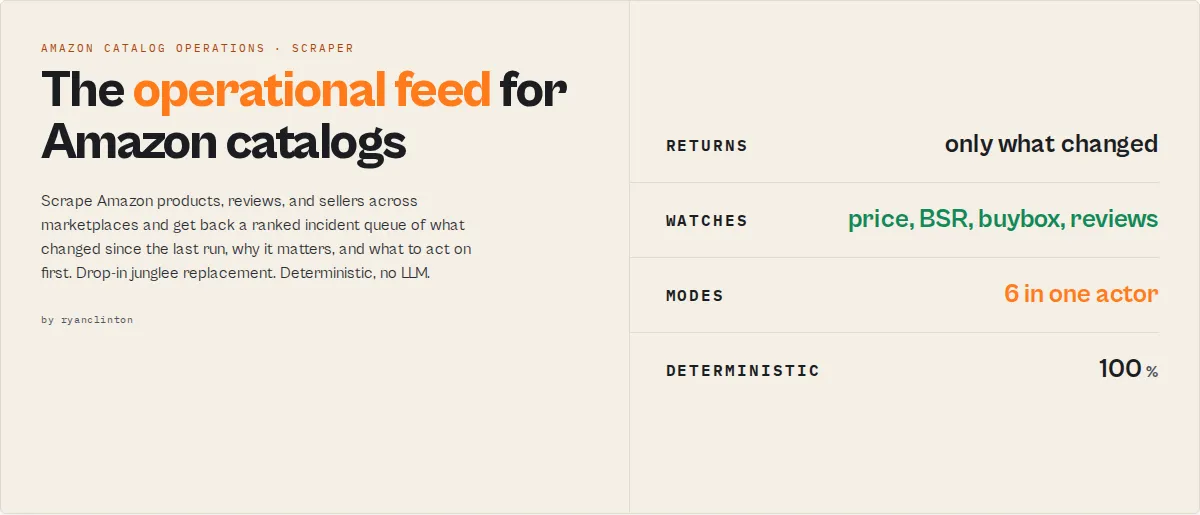
Amazon Product Scraper is an Amazon catalog operations intelligence actor. It tells you which Amazon listings need attention before your team opens a spreadsheet, by scraping products, reviews, and sellers and returning a ranked incident queue of what changed since the last run, what matters, and what to act on first.
Category: Amazon product scraper. Amazon price and BSR monitor. Amazon catalog operations intelligence. Primary use case: Track a catalog of ASINs on a schedule and get back only what changed since the last run. Can also be used for one-shot product extraction, review analysis, comp-set benchmarking, and seller tracking.
Also known as: amazon product monitor, amazon BSR tracker, amazon buybox monitor, amazon review analysis tool, amazon competitor tracker, junglee Amazon-crawler alternative
What this actor does
- What it is: An Amazon scraper with a decision layer on top. It groups raw price, rank, seller, and review signals into ranked incidents.
- What it checks: Price and Best Sellers Rank (BSR) trajectory, buybox/seller changes, defect emergence from review themes, comp-set position, and seller behavior.
- What it returns: A ranked incident queue (which listings need attention first), plus every product field
junglee/Amazon-crawlerships, plus signal events, attention routing, and run-over-run deltas. - What it does NOT do: It never judges review or seller authenticity, never declares a product defective or counterfeit, and never takes any in-Amazon action (no repricing, no purchasing, no review posting, no seller reporting). Public data only.
- Who it's for: Brand and 1P managers, 3P/FBA sellers, category analysts, Amazon agencies, product sourcers, and quality/CX teams.
Know exactly which listings need attention, why they changed, how severe the risk is, and whether the issue is isolated or spreading across your catalog. Amazon Product Scraper takes ASINs, a category search, a product plus competitors, or a seller storefront, and returns a ranked attention queue with price and BSR trajectory, buybox change detection, defect emergence from review themes, and comp-set position.
It uses the same input shape as junglee/Amazon-crawler, so migration is drop-in: paste your existing product or search URLs and they run. The signal layer is added on top of the exact fields you already read. The real competitor here is not another scraper. It is the spreadsheet your team eyeballs by hand. Amazon Product Scraper collapses "I scraped 300 ASINs" into "here are the 5 listings that need action now, and why."
To monitor an Amazon catalog, run Amazon Product Scraper in monitor mode with your ASINs in the track field. It returns only what changed since the last run: price and BSR moves, buybox flips, emerging defects, and comp-set movement, ranked by how urgently each listing needs a look. One key difference from a plain scraper: the decision surface emits before the full crawl finishes, so a scheduled Zapier or Make run gets a usable result on time.
In short: Amazon Product Scraper turns a catalog of ASINs into a ranked, on-time feed of which listings need attention and why, with the same field set as the incumbent plus the decision layer it never shipped.
What it is: A persistent Amazon catalog operations intelligence actor. Who it's for: Brands, 3P sellers, agencies, analysts, sourcers, and QA teams managing Amazon listings. When to use it: When you have more ASINs than you can eyeball daily and need to know which ones moved.
What it does — Scrapes Amazon products, reviews, and sellers, then ranks listings by what needs attention first. Best for — Daily/weekly catalog monitoring, comp-set benchmarking, defect watch, drop-in junglee replacement. Built for scheduled runs — The decision surface emits first and full runs clamp to a runtime budget, so scheduled Zapier, Make, and n8n catalog runs finish on time instead of timing out mid-crawl. Pricing — $0.15 per product, $0.001 per review, $0.20 per query. Compute included. Output — Ranked incident queue plus full product fields, signals, trajectory, and run-over-run deltas (JSON/CSV/Excel).
Key limitation: Maturity-gated values (trajectory, anomaly, seller tenure, recurrence) stay null with an honest reason until enough run history exists. The memory clock cannot be backfilled. What it is not: Not an authenticity checker, not a repricing tool, and not a replacement for your own pricing or legal judgment. Does not include: Counterfeit verdicts, recall/quality verdicts, seller-fraud accusations, or any action taken inside Amazon. Results may be incomplete when: Amazon serves a bot-protection page, a search exceeds Amazon's ~7-page limit, or a listing is unavailable.
Ready-to-run examples
Don't want to build an input from scratch? Each of these is a published, one-click example (see all) — open it, see real output, run it:
- Amazon Reviews Scraper with Sentiment Analysis — pull and synthesise an ASIN's reviews into aspect-level sentiment and defect emergence
- Amazon Search Results Scraper — scrape any Amazon search or category into structured product data, ranked by demand
- Amazon Product Data by ASIN — clean title, price, rating, reviews count and Best Sellers Rank for any ASIN
- Amazon UK Scraper — amazon.co.uk with correct GBP prices and availability via UK residential proxies
- Amazon Competitor Analysis — benchmark a product against named competitors (comp-set position, price gap, BSR)
- Amazon Price Tracker — track price and Best Sellers Rank across up to 1,000 ASINs
- Amazon Seller Storefront Scraper — scrape a seller's full catalogue from a storefront URL
What you get from one call
Input: { "mode": "monitor", "track": ["B09X7MPX8L"], "rankBy": "attention" }
Returns:
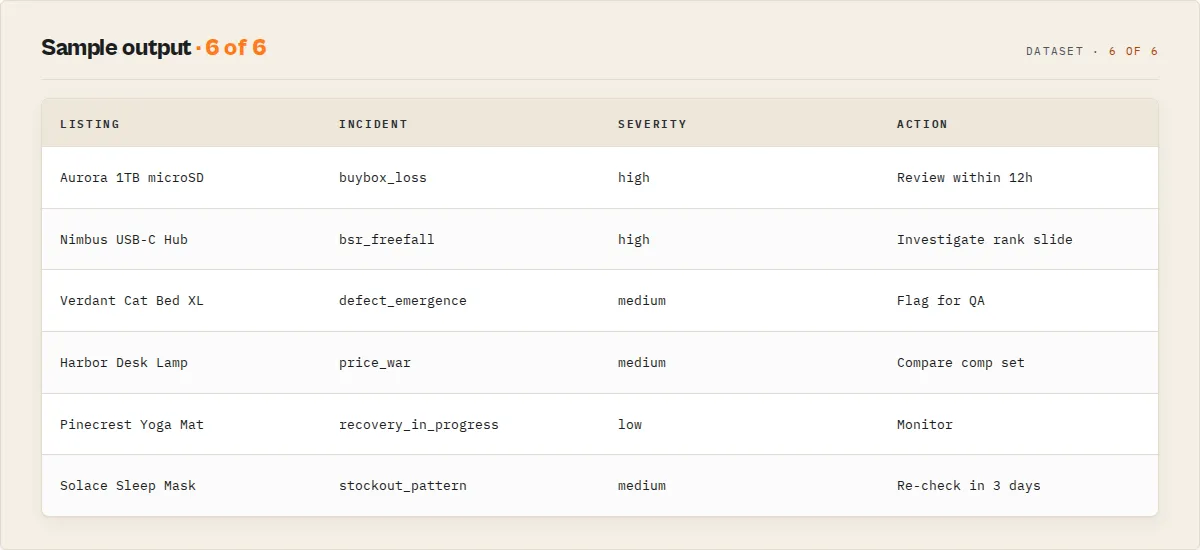
- A ranked incident queue: each listing's open incidents with severity, category, and a plain-English operational summary
whyNowandrecommendedActionper record (a prioritisation instruction, never a business action)- Price, BSR, and rating trajectory with run-over-run deltas (
changeFlagslikeBUYBOX_LOST,BSR_DOWN) - Review sentiment, aspect themes, and a
defectEmergenceflag when 1-star complaints cluster - Every field
junglee/Amazon-crawlerships (title,asin,price,listPrice,stars,starsBreakdown,reviewsCount,seller,bestsellerRanks,variantAsins,inStock,features)
Typical time to first result: seconds (the attention queue flushes before the full crawl finishes). Typical time to integrate: minutes if you already use junglee — paste the same input.
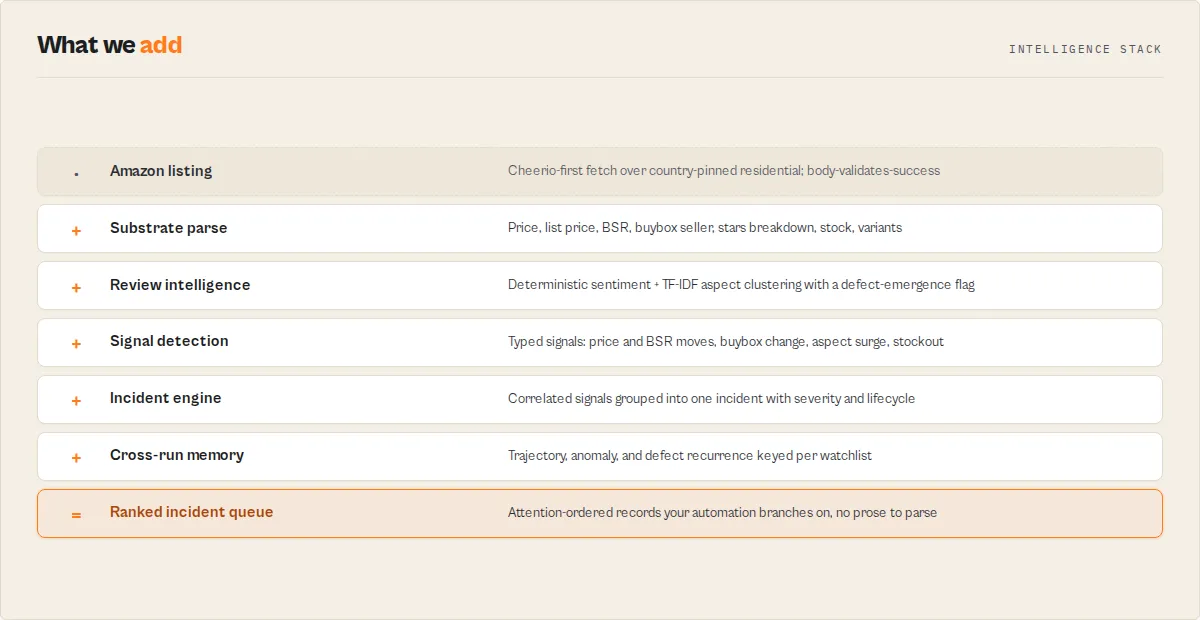
What makes this different
- Incidents, not rows — Amazon Product Scraper groups correlated signals into one ranked incident per listing, so you act on "buybox lost on B09X" instead of five separate alerts.
- Persistent memory moat — state compounds across runs. Run 1 finds today's signals; run 3 unlocks trajectory and anomaly; run ~6 unlocks behavioral fingerprint and incident recurrence. This memory cannot be backfilled by scraping today, so the clock starts the day you schedule the first run, not the day you need the history. Schedule it now and the picture is already deep when you need it.
- On-time completion — the decision surface emits first and the run clamps to a runtime budget, so a scheduled catalog run finishes before your Zapier or Make trigger times out.
If you are building this yourself, you would need to wire up cross-run state storage, deterministic price/BSR trajectory math, review aspect clustering, buybox-change detection, incident lifecycle tracking, and a runtime budget that emits partial results before a hard timeout.
It functions as an Amazon product intelligence API, producing decision-ready records useful for catalog monitoring, competitive benchmarking, and defect watch.
Quick answers
What is it? An Amazon product scraper that adds a decision layer: it returns a ranked incident queue of which listings need attention first, not just flat product rows.
How do I monitor my Amazon catalog? Run monitor mode with your ASINs in track, give it a watchlistName, and schedule a daily run. Each run returns only what changed since the last one.
What makes it different? It groups signals into incidents, remembers state across runs, and emits the decision surface before the crawl finishes so scheduled runs complete on time.
What data sources does it use? Public Amazon product, review, and seller pages, fetched through country-pinned residential proxies so prices and offers are accurate.
What does it return? A ranked incident queue plus the full junglee-compatible field set, signal events, attention routing, price/BSR/rating trajectory, review aspects with defect emergence, comp-set position, and seller behavior.
How much does it cost? $0.15 per product, $0.001 per review, and $0.20 per query (one search, comp-set, monitor, or seller execution). Platform compute is included.
Is it a drop-in junglee replacement? Yes. It accepts the same startUrls / product-URL input shape, and outputProfile: "compat" returns the exact junglee field set with no signal fields.
At a glance
Quick facts:
- Input: ASINs, product URLs, search terms, a product plus competitors, or seller storefront URLs (junglee input shape accepted).
- Output: Ranked incident queue plus full product fields, signals, trajectory, review aspects, comp-set, and deltas.
- Pricing: $0.15/product, $0.001/review, $0.20/query. Compute included.
- Batch size: Up to 1,000 tracked ASINs; up to 240 products per search/seller run. Review depth is limited to what Amazon exposes (typically the product-page reviews; see Limitations).
- Marketplaces: One or more Amazon domains, each pinned to its own residential proxy country.
- Proxy: Residential required (datacenter IPs are blocked and return wrong/blank prices).
- Determinism: Every score, enum, and aspect is deterministic and reproducible. No LLM in the decision path.
Input → Output:
- Input: a set of ASINs / a search / a product + competitors / a seller storefront.
- Process: scrape public pages, detect signals, group them into incidents, rank by attention, diff against prior runs.
- Output: a ranked incident queue with evidence, trajectory, and run-over-run deltas.
Best fit: daily/weekly catalog monitoring, comp-set benchmarking, defect watch from reviews, seller tracking, drop-in junglee migration. Not ideal for: authenticity/counterfeit verdicts, recall or product-quality judgments, anything that acts inside Amazon (repricing, ordering, review posting). Does not include: counterfeit flags, fraud accusations, recall verdicts, or in-Amazon actions.
Problems this solves:
- How to know which Amazon listings lost the buybox since the last run.
- How to catch a BSR slide or rating drop early across a large catalog.
- How to spot an emerging defect from clustered 1-star reviews.
- How to monitor competitor prices and rank without eyeballing a spreadsheet.
Data trust: Prices and offers are pinned to the marketplace's residential country (a non-US exit on amazon.com returns wrong prices). Amazon serves 200 on block pages, so the actor validates that product fields are present before counting a fetch as successful; bot-protection hits are reported, never returned as silent empty rows.
Common questions this actor answers:
- Which of my listings need attention right now? The default Incident Queue view ranks them by severity.
- What changed since yesterday? The summary's
dailyOperationalDigestreports new, resolved, and escalating incidents plus the highest-risk movement. - Is this defect on one listing or spreading? Catalog correlation reports the same aspect across ASINs that share a seller, brand, or fulfillment mode.
- Is this a good junglee/Amazon-crawler alternative? Yes, with a drop-in input shape and a
compatoutput profile for exact field parity.
What is Amazon catalog operations intelligence?
Amazon catalog operations intelligence is the layer between scraping Amazon and acting on it: it interprets raw product data into ranked, evidenced decisions about which listings need attention. Most Amazon actors stop at rows, ASINs, or reviews. Amazon Product Scraper adds the interpretation, ranks listings by what to look at first, and remembers state across runs so the picture compounds rather than resetting each time.
Canonical definitions
What is an Amazon incident queue? An incident queue is a ranked operational feed of Amazon listings that changed materially since the last run. Instead of returning flat rows, Amazon Product Scraper groups related changes (a buybox flip plus a BSR slide plus a price move on the same ASIN) into one incident with a severity score, a five-state lifecycle, and the evidence behind it. The queue is ordered so the listing that needs attention first is at the top.
What is monitor mode? Monitor mode is scheduled Amazon catalog monitoring: you give the actor a set of ASINs and a watchlist name, schedule a recurring run, and each run returns only what changed since the last one. It is the difference between scraping Amazon once and monitoring your whole catalog continuously.
What is operational memory? Operational memory is the state Amazon Product Scraper persists between runs: price, BSR, rating, and seller history, incident lifecycle, and defect recurrence keyed to a watchlist name. It compounds every run and cannot be backfilled by scraping today, which is why the trajectory and recurrence layers deepen the longer the actor runs.
What is defect emergence? Defect emergence is a descriptive flag raised when 1-star Amazon reviews cluster around the same product aspect (for example "data loss" on a memory card). It is a complaint-pattern signal, never a recall or quality verdict.
What is Amazon buybox monitoring? Amazon buybox monitoring is detecting when the featured seller on a listing changes. Amazon Product Scraper records the previous and current buybox seller run-over-run and raises a buybox_seller_change signal, so a buybox lost to a low-rated reseller surfaces on the next run instead of weeks later.
What is Amazon BSR / trajectory monitoring? Trajectory monitoring tracks Best Sellers Rank, price, and rating direction across runs (rising, falling, stable) within the same category node. It answers "is this listing getting better or worse over time?" rather than just reporting today's number.
What data does Amazon Product Scraper extract?
| Data Point | Source | Availability | Example |
|---|---|---|---|
| Product title | Product page | Always | "SanDisk 1TB Extreme microSDXC" |
| Current price / list price | Product page | When listed | 139.99 / 199.99 |
| Star rating (breakdown when exposed) | Product page | Rating when reviewed; breakdown only when Amazon renders the histogram (often null) | 4.6 |
| Reviews count | Product page | Always | 18,402 |
| Best Sellers Rank | Product page | When ranked | [{ "category": "Electronics", "rank": 3910 }] |
| Buybox / featured seller | Product page | Name + fulfillment when present; rating typically only in seller mode | { "name": "BargainBin LLC", "fulfillment": "FBM" } |
| In-stock status | Product page | Always | true / false |
| Variant ASINs | Product page | When present | ["B09X7MPX8L", "B09X8ABCDE"] |
| Review sentiment + aspects | Review pages | When sampled | reliability_failure (negative, 0.24 share) |
| Defect emergence | Review analysis | When detected | "data loss / card failure" cluster |
| Price / BSR / rating trajectory | Cross-run memory | Run 3+ | priceTrend: "declining", bsrSlope |
| Buybox change | Cross-run memory | Monitor mode | "Direct Suppliers US" → "BargainBin LLC" |
Why use Amazon Product Scraper?
The real competitor here is not another scraper. It is the spreadsheet your team eyeballs by hand. This is what replacing that spreadsheet looks like:
Before
- 400 ASINs in a sheet, spot-checked by hand.
- Buybox losses and BSR slides missed until conversion already dipped.
- Noisy, undifferentiated alerts that get muted.
- Scheduled scrapes that time out before the automation fires.
After
- One ranked feed: only the listings that changed since the last run.
- Correlated signals grouped into incidents, highest-risk movement first.
- Recurring issues remembered ("third buybox loss on this ASIN this quarter").
- Partial results emitted on time, so the scheduled run never times out.
Key difference: Amazon Product Scraper ships the monitoring, benchmarking, and defect-spotting jobs that junglee/Amazon-crawler's own use-case list names but does not build, while keeping the exact field set so migration loses nothing.
| Feature | Amazon Product Scraper | junglee/Amazon-crawler | web_wanderer/amazon-reviews-extractor |
|---|---|---|---|
| Flat product fields (price, BSR, seller) | Yes | Yes | Reviews only |
| Review aspect sentiment | Yes | No | Yes |
| Ranked incident queue | Yes | No | No |
| Price / BSR trajectory across runs | Yes | No | No |
| Buybox change detection | Yes | No | No |
| Defect emergence flag | Yes | No | No (has aspects, no flag) |
| Comp-set benchmarking | Yes | No | No |
| Monitor mode (only what changed) | Yes | No | No |
| Drop-in input parity | Yes (source) | n/a | Partial (compat matches aspects[]) |
| Pricing | $0.15/product (full decision record) | ~$0.005 → $0.0008/row by volume | varies by plan |
| On-time partial emit for scheduled runs | Yes | Not a core feature | Not a core feature |
Pricing and features based on publicly available information as of May 2026 and may change.
Unlike junglee/Amazon-crawler, which emits flat rows and stops, Amazon Product Scraper ranks the rows and tells you which ones to look at first. The aspect data the review sibling already produces is matched in compat, then exceeded with trajectory, defect-emergence, and monitor state.
Why ordinary Amazon scrapers fall short for monitoring
Most Amazon scrapers are built for one-off extraction, not for monitoring a catalog over time. They return flat rows, reset context every run, and leave the interpretation to you. For a daily catalog check that breaks down in five specific ways:
- Flat rows, no ranking. You get every field for every product and still have to eyeball which one moved.
- No memory. Each run starts from zero, so "the price dropped since last week" and "this is the third buybox loss this quarter" are invisible.
- No incident lifecycle. Five separate alerts on one listing instead of one grouped incident with severity and status.
- No delta. You re-scrape everything every run instead of getting back only what changed.
- No on-time emit. A full catalog scrape often finishes after your scheduled Zapier or Make trigger has already timed out.
Most Amazon scrapers reset context every run. Amazon Product Scraper compounds operational memory across runs. Signals become incidents; incidents become operational history. It is optimized for scheduled monitoring, not one-off extraction.
How it relates to Amazon research suites
Amazon research and analytics suites (such as Helium10, Jungle Scout, Keepa, SmartScout, and DataHawk) are built for product research, keyword tracking, and historical charts inside their own dashboards. Amazon Product Scraper is a different category: a deterministic monitoring and scraping layer that runs on the Apify platform, returns structured JSON/CSV records, and is built to drive automation (Zapier, Make, webhooks, your own pipeline) rather than a dashboard you log into. It is complementary to those suites, not a replacement for them: use a research suite to pick what to sell, and Amazon Product Scraper to monitor the catalog you already run and route what changed into your own tools. It does not provide keyword-rank trackers, sales-estimate models, or a hosted analytics UI.
Platform capabilities
- Scheduling — run daily, weekly, or on a custom interval; monitor mode returns only what changed.
- API access — trigger from Python, JavaScript, or any HTTP client.
- Country-pinned residential proxy — each marketplace runs through its own residential country so prices and offers are accurate.
- Monitoring + alerts — branch automation on
incident.status,watchStatus, or thedailyOperationalDigest. - Integrations — Zapier, Make, Google Sheets, webhooks, and the Apify API.
Where Amazon Product Scraper fits in a pipeline
Amazon Product Scraper is the interpretation step. Point it at ASINs, a category, a comp set, or a seller storefront, and it returns decision-ready records. Downstream, branch a Slack or Jira integration on incident.status IN ('open','escalating') and incident.severity.commercialImpact = 'high' — incidentId is stable across runs, so the same incident updates one ticket instead of opening a new one every run. Upstream, feed it the same URLs you currently send to junglee/Amazon-crawler.
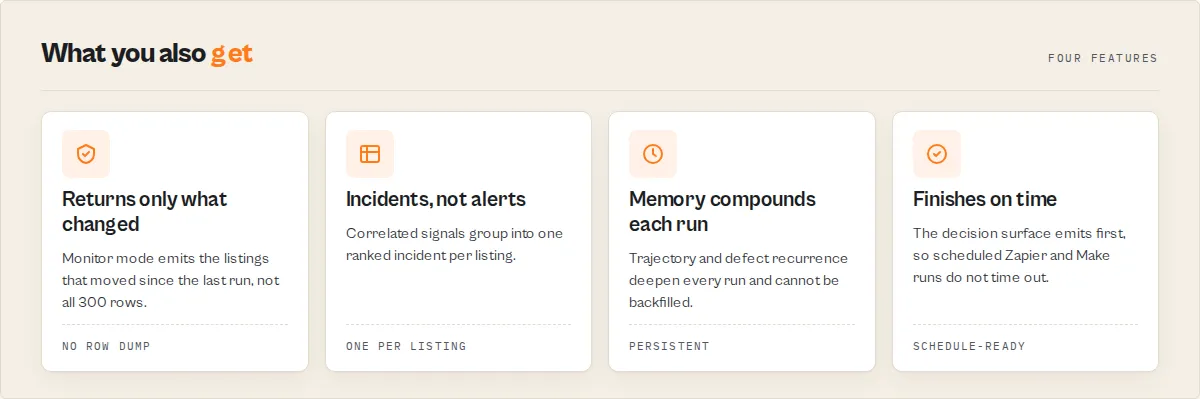
Features
Amazon Product Scraper detects commercial signals across a catalog and groups them into ranked incidents with evidence and lifecycle. The signal and review engines are deterministic and reproducible, with no LLM in the decision path. Features cluster into three groups: detection, decision, and memory.
Detection
- Price and discount signals —
price_drop,price_increase, anddiscount_deepenedagainst a rolling baseline, with the delta and window inevidence. - BSR signals —
bsr_improveandbsr_decline, compared within the same category node (BSR is per-node, so cross-node comparisons are avoided). - Rating and review signals —
rating_drop,rating_recovery, andreview_velocity_spikeover a recent-review window (descriptive surge, never an authenticity verdict). - Aspect signals —
negative_aspect_surgeandpositive_aspect_surgewhen an aspect's share of reviews moves materially. - Buybox and stock signals —
buybox_seller_change,stockout,back_in_stock, andcompetitor_overtakein comp-set and monitor modes. - Review intelligence — deterministic sentiment (vader) plus TF-IDF aspect clustering (
lexicon-tfidf-v1) against a fixed label dictionary, with adefectEmergenceflag when 1-star complaints cluster.
Decision
- Incident engine — groups two or more correlated signals into one incident with a stable
incidentId, a severity score (0-100), and a five-state lifecycle (open,escalating,stabilizing,resolved,resurfaced). - Attention routing —
attentionIndex(0-100),whyNowbullets, and arecommendedActionfenced to prioritisation verbs only (Review, Monitor, Compare, Investigate). - Comp-set position —
competitivePressureand per-competitorcompetitiveThreatshowing how aggressively rivals are moving on price, rank, or reviews. - Personas — six lenses (
brand_protection,catalog_operations,seller_competitive,quality_assurance,executive_summary,sourcer) that reshape weighting, routing, and suppression.
Memory (monitor mode)
- Run-over-run deltas —
priceTrajectory,bsrTrajectory,ratingTrajectory,buyboxChange, andchangeFlags, with first-run records flagged as "first sight" and no fabricated history. - Trajectory and anomaly — multi-run trends, time-shape, and z-score anomaly vs the listing's own baseline (maturity-gated, null with a reason until history exists).
- Incident memory graph —
timesSeen, historical severity range, and typical resolution time per incident type on each entity, so you see "third buybox loss on this ASIN this quarter." - Seller intelligence — per-seller
behaviorProfile, buybox tenure, and undercut behavior, deterministic from the buybox series.
Use cases for Amazon product scraping
Best for brand and 1P catalog protection
Use when you manage a catalog of owned ASINs and need to catch BSR slides, rating drops, and buybox loss early. Schedule a daily monitor run; the incident queue surfaces the listings that moved. Key outputs: incident.category, buyboxChange, bsrTrajectory, defectEmergence. Used by brand protection teams to watch for buybox loss to low-rated resellers before it dents conversion.
Best for 3P sellers and FBA price competitiveness
Use when you price against a comp set and watch rivals. Run compset mode with your product and competitors. Key outputs: competitivePressure, competitiveThreat, competitor_overtake signals, comp-set price distance.
Best for category and retail analysts
Use when you benchmark a category and track which products are rising. Run search mode; BSR-rising and price-pressured products surface first. Key outputs: reranked position, signalProfile, trajectory.
Best for Amazon agencies
Use when you manage catalogs for a roster of brands. Run a monitor watchlist per client and export the incident_report or executive_briefing bundle. Key outputs: catalogHealth, dailyOperationalDigest, riskConcentration.
Best for quality and CX teams
Use when you need to catch defect emergence and complaint patterns from reviews. Run reviews mode on an ASIN. Key outputs: reviewIntelligence.aspects, defectEmergence, negative_aspect_surge.
Best for product sourcers and researchers
Use when you validate demand and look for opportunities. Run search with persona: "sourcer". Key outputs: rising-rank products, review velocity, signalProfile: "rising-product".
Used by
Amazon agencies, ecommerce operators, marketplace and category analysts, FBA aggregators, brand protection teams, retail operations teams, catalog managers, and marketplace operations teams. The common thread: more Amazon listings than a person can eyeball by hand, and a need to know which ones moved since the last run.
Common tasks
- Monitor Amazon ASINs daily and get back only what changed.
- Detect Amazon buybox changes across a catalog.
- Track Amazon BSR movement and price trajectory over time.
- Monitor competitor pricing and rank automatically.
- Detect Amazon review-issue spikes and emerging defects early.
- Watch a competitor's seller storefront over time.
- Benchmark a product against a comp set.
- Detect recurring Amazon listing issues across runs.
- Export Amazon monitoring data to CSV, Sheets, or a webhook.
- Automate Amazon catalog monitoring with Zapier, Make, or n8n.
When to use Amazon Product Scraper
Best for:
- Monitoring 10-1,000 ASINs on a daily or weekly schedule.
- Benchmarking a product against a named comp set.
- Watching a competitor's seller storefront over time.
- Migrating off
junglee/Amazon-crawlerwithout changing downstream code.
Not ideal for:
- Verifying review or seller authenticity — the actor is descriptive only and never issues fraud verdicts.
- Judging product quality, safety, or recall status — out of scope by design.
- Taking action inside Amazon (repricing, ordering, review posting) — the actor routes attention; you act in your own tools.
How to monitor Amazon listings with Amazon Product Scraper
- Enter your targets — paste ASINs (e.g.
B09X7MPX8L) or/dp/URLs into thetrackfield in monitor mode. Leave fields empty to run the single-ASIN demo. - Configure options — set a
watchlistNameto start the memory clock, pickrankBy(defaultattention), and addmarketplacesif you track more than amazon.com. - Run the actor — click Start. The attention queue emits first, then the full crawl completes within the runtime budget.
- Download results — export JSON, CSV, or Excel from the Dataset tab. The default view is the ranked Incident Queue.
First run tips
- Start with one ASIN — run
{ "mode": "monitor", "track": ["B09X7MPX8L"] }first to see the output shape before scaling to a full catalog. - Set a watchlistName from day one — state persists keyed on this name. The memory clock cannot be backfilled, so the sooner you schedule a recurring run, the sooner trajectory and recurrence unlock. Renaming it starts a fresh clock.
- Expect honest nulls on early runs — trajectory, anomaly, seller tenure, and recurrence are maturity-gated. Run 1 finds today's signals; run 3 unlocks trajectory; run ~6 unlocks fingerprint and recurrence. Null fields carry a reason, never a fabricated value.
- Pin the right marketplace — prices and offers are country-dependent. Each domain in
marketplacesis pinned to its own residential country automatically. - Use
outputProfile: "compat"to verify parity — if you are migrating from junglee, run compat first to confirm your downstream code reads the same fields.
Typical performance
Behavior depends on input size, marketplace, and how many pages need the Playwright fallback. The figures below are descriptive design targets, not guarantees.
| Metric | Typical value |
|---|---|
| Tracked ASINs per run | up to 1,000 |
| Products per search/seller run | up to 240 (Amazon caps search at ~7 pages) |
| Reviews sampled per product | the product-page set (typically ~8-10); deeper only in reviews mode where Amazon allows |
| Time to first result | seconds (attention-queue-first emit) |
| Cost per product (typical) | $0.15 |
| Cost per query | $0.20 |
Choose your mode
One JSON example per mode, using the real input field names.
Monitor — track ASINs, get only what changed (recommended):
Search — rank a search or category by risk:
Products — analyse specific ASINs:
Reviews — synthesise reviews for an ASIN:
Compset — rank a product against competitors:
Seller — follow a seller storefront:
Input parameters
| Parameter | Type | Required | Default | Description |
|---|---|---|---|---|
mode | string (enum) | No | monitor | Entry point: monitor, search, products, reviews, compset, seller. |
track | string[] | Monitor mode | ["B09X7MPX8L"] | ASINs or /dp/ URLs to track over time. |
asins | string[] | Products/reviews mode | [] | ASINs or /dp/ URLs to analyse. |
searchTerms | string[] | Search mode | [] | Keywords/categories to search. |
product | string | Compset mode | "" | Your anchor ASIN/URL. |
competitors | string[] | Compset mode | [] | Competitor ASINs/URLs to rank against the anchor. |
sellerUrls | string[] | Seller mode | [] | Seller storefront URLs. |
rankBy | string (enum) | No | attention | attention, commercialRisk, trajectory, priceCompetitiveness, reviewVelocity. |
marketplaces | string[] | No | ["amazon.com"] | Amazon domains, each pinned to its own residential country. |
watchlistName | string | No | "" | Stable name keying cross-run memory (monitor mode). |
deltaWindowDays | integer | No | 7 | Comparison window for delta intelligence. |
maxProducts | integer | No | 50 | Max products in search/seller mode (max 240). |
includeReviewsSample | boolean | No | true | Include deterministic review sentiment + aspects. |
reviewsSamplePerProduct | integer | No | 100 | Reviews to sample per product (max 2000). |
asinRevenue | object | No | {} | Optional ASIN → monthly revenue map for risk weighting (your number, never fabricated). |
persona | string (enum) | No | catalog_operations | Buyer lens: brand_protection, catalog_operations, seller_competitive, quality_assurance, executive_summary, sourcer. |
outputProfile | string (enum) | No | signals | signals (full), compat (junglee parity), minimal. |
analysisDepth | string (enum) | No | standard | fast, standard, deep. |
explainability | string (enum) | No | standard | standard (trimmed diagnostics) or full. |
exportBundles | string[] | No | [] | Named CSV bundles written to the key-value store. |
maxRuntimeSeconds | integer | No | 3600 | Soft runtime budget; partial emit fires before a hard kill. |
startUrls / productUrls / searchQuery | array/string | No | [] / "" | Drop-in junglee compat aliases. |
proxyConfiguration | object | No | RESIDENTIAL | Residential is required for Amazon. |
Input tips
- Start with defaults — monitor mode plus a single tracked ASIN covers the most common first run.
- Set a watchlistName — without it, cross-run memory keys on a slug of your ASINs; a stable name is safer.
- Batch in one run — tracking 200 ASINs in one run is faster and cheaper to schedule than 200 single-ASIN runs.
- Use
compatto migrate —outputProfile: "compat"returns the exact junglee field set for parity testing.
Output example
Output fields
| Field | Type | Description |
|---|---|---|
recordType | string | product, review, seller, catalog_correlation, summary, or error. |
eventId | string | Stable cross-run key, e.g. amazon.com:B09X7MPX8L. |
title / price / listPrice / stars / reviewsCount | mixed | junglee-compatible substrate fields. |
seller | object | Buybox/featured seller: id, name, rating, reviewsCount, fulfillment. |
bestsellerRanks | array | Per category node: { category, rank }. |
incident | object | Grouped incident: incidentId, category, status, severity, operationalSummary. |
incident.severity.severityScore | number | 0-100 composite that ranks incidents. |
attentionIndex.value | number | 0-100 composite that ranks records within a view. |
whyNow | string[] | Plain-English reasons this record needs attention now. |
recommendedAction | string | A prioritisation instruction (review/monitor/compare), never an in-Amazon action. |
watchStatus | string | no-action, monitor, attention-required, urgent, critical. |
reviewIntelligence | object | Sentiment, aspects, and defectEmergence. |
priceTrajectoryDelta / bsrTrajectoryDelta / ratingTrajectoryDelta | object | Run-over-run change (monitor mode). |
buyboxChange | object | Previous vs current buybox seller. |
changeFlags | string[] | e.g. BUYBOX_LOST, BSR_DOWN, NEW_NEGATIVE_ASPECT. |
emitTiming | object | Runtime budget + partial-emit transparency. |
How much does it cost to scrape Amazon products?
Amazon Product Scraper uses pay-per-event pricing — you pay $0.15 per product, $0.001 per review, and $0.20 per query (one search, comp-set, monitor, or seller execution, regardless of result count). Each product record is a full decision record — incident, severity, trajectory, defect emergence, comp-set position, and cross-run memory — not a raw row. Platform compute (residential proxy + browser fallback) is included.
| Scenario | Products | Cost per product | Total cost |
|---|---|---|---|
| Quick test | 1 | $0.15 | $0.15 |
| Small batch | 10 | $0.15 | $1.50 |
| Medium catalog | 50 | $0.15 | $7.50 |
| Large catalog | 200 | $0.15 | $30.00 |
| Enterprise catalog | 1,000 | $0.15 | $150.00 |
Monitor mode emits only the listings that changed since the last run, so a scheduled monitor charges for a few dozen incident records, not the whole catalog — a 1,000-ASIN monitor surfacing 30 changed listings is one monitor_query ($0.20) plus 30 products ($4.50), about $4.70. Set a spending limit on the actor to cap monthly cost. Apify's free tier includes monthly credits you can use to test.
Scrape Amazon products using the API
Python
JavaScript
cURL
How Amazon Product Scraper works
Mental model: scrape public pages → detect signals → group into incidents → rank by attention → diff against prior runs.
Scrape
Amazon Product Scraper fetches lightweight HTML first and escalates to a full browser only when a page comes back incomplete or restricted. Amazon restricts automated access from shared and datacenter IPs, so the actor runs over residential proxies pinned to each marketplace's country and verifies the expected product fields are present before treating a fetch as successful, so a restricted page is never recorded as an empty result.
Detect signals
After substrate fetch, deterministic thresholds (all pinned to signalDetectionVersion) fire typed signal events: price moves vs a rolling baseline, BSR moves within the same category node, rating drift over a review window, aspect-share shifts, buybox-seller changes, and stock flips. Each event carries evidence and a heuristic signalStrength (not a calibrated probability).
Group into incidents
When two or more correlated signals fire on a listing within a window, they group into one incident with a stable incidentId, a bounded severity score, and a five-state lifecycle persisted in the watchlist key-value store. Resurfacing reuses the same incidentId within 90 days, so recurrence is visible.
Rank and diff
Records sort by attentionIndex; incidents sort by severityScore. In monitor mode, each record is diffed against the prior run to produce trajectory and delta blocks, with first-run records flagged as "first sight."
Tips for best results
- Schedule monitor mode — the moat is the memory. A daily run compounds trajectory, anomaly, and recurrence that a one-shot scrape can never reconstruct.
- Disable reviews for fast catalog sweeps — set
includeReviewsSampleto false when you only need price/BSR/buybox movement; re-enable for defect watch. - Use personas to cut noise —
quality_assuranceweights defects,seller_competitiveweights price and comp-set, so the queue matches your job. - Combine with HubSpot Lead Pusher — route high-severity incidents into a CRM or ticketing flow via webhook.
- Keep the watchlist name stable — renaming resets the memory clock and the trajectory math.
Combine with other Apify actors
| Actor | How to combine |
|---|---|
| Website Tech Stack Detector | Profile a competitor seller's own storefront tech alongside their Amazon listings. |
| Trustpilot Review Analyzer | Cross-check Amazon defect aspects against off-Amazon review sentiment. |
| Company Deep Research | Enrich a tracked seller or brand with company intelligence. |
| Website Change Monitor | Watch a brand's own site for price or product changes alongside Amazon. |
| HubSpot Lead Pusher | Push incident-flagged listings or sellers into HubSpot. |
| WHOIS Domain Lookup | Resolve registration data for a seller's linked domain. |
Limitations
- Public data only — Amazon Product Scraper reads public product, review, and seller pages. It does not access logged-in or private content.
- Maturity-gated values — trajectory, anomaly, seller tenure, fingerprint, and recurrence need accumulated run history. They are null with an honest reason until enough runs exist, and the memory clock cannot be backfilled.
- Search depth — Amazon caps search results at roughly 7 pages per term; coverage reports requested vs returned honestly.
- Review depth and field availability — Amazon reliably blocks its
/product-reviews/pagination endpoint, so review intelligence (sentiment, aspects, defect emergence) runs on the reviews present on the product page (typically ~8-10), with the confidence band scaled to that sample.reviewsmode attempts deeper pagination but may fall back to the product-page set.starsBreakdownpopulates only when Amazon renders the rating histogram in the page (often null); the buyboxseller.ratingis typically available only insellermode (the storefront), null otherwise. Missing values are reported as null, never fabricated. - Country-dependent prices — prices and offers vary by proxy country, which is why residential proxies pinned to the marketplace are required.
- Bot protection — some Amazon pages restrict automated access from shared IPs. The actor uses residential proxies and a browser fallback, but a blocked page is reported in
botProtection, never returned as a silent empty row. - Heuristic signals —
signalStrengthis a heuristic, not a calibrated probability. Signals are descriptive interpretations with evidence, not predictions. - No verdicts — the actor never declares a review fake, a seller fraudulent, or a product defective or recalled.
Integrations
- Zapier — trigger a workflow when a high-severity incident is detected.
- Make — branch on
incident.statusordailyOperationalDigestfor an operations digest. - Google Sheets — push the incident queue to a shared catalog sheet.
- Apify API — schedule and pull results from any HTTP client.
- Webhooks — POST run results to your own endpoint.
- LangChain / LlamaIndex — feed structured incident records into AI workflows.
How do I migrate from junglee/Amazon-crawler?
Paste your existing startUrls, product URLs, or search query into the matching compat field; /dp/ URLs map to products mode and /s? URLs map to search mode. Set outputProfile: "compat" to receive the exact junglee field set with no signal fields, so downstream code reading item.bestsellerRanks works unchanged. Switch to the default signals profile when you want the decision layer on top.
Why does my scheduled Amazon run keep timing out elsewhere?
Large catalog scrapes often finish too slowly for a scheduled Zapier or Make trigger. Amazon Product Scraper emits the ranked attention queue before the full crawl finishes and clamps the run to a runtime budget, so partial results arrive before a hard timeout. The emitTiming block reports firstResultsAt, truncated, and truncatedReason honestly.
Responsible use
- Amazon Product Scraper extracts publicly available product, review, and seller data from Amazon. It does not bypass authentication, CAPTCHAs, or access restricted content.
- Users are responsible for ensuring their use complies with applicable laws and platform terms, including data protection regulations in their jurisdiction.
- The actor is descriptive only. It never labels a review or seller fraudulent, never declares a product defective or counterfeit, and never takes any action inside Amazon.
- Do not use extracted data for spam, harassment, or unauthorized purposes.
- For guidance on web scraping legality, see Apify's guide.
FAQ
What is Amazon Product Scraper?
An Amazon scraper with a decision layer: it returns a ranked incident queue of which listings need attention first, plus the full product field set, signals, trajectory, and run-over-run deltas.
Can it be used as an Amazon price tracker?
Yes. Amazon Product Scraper tracks price changes run-over-run, calculates priceTrajectoryDelta, and fires price_drop, price_increase, and discount_deepened signals whenever price moves against a rolling baseline. Schedule a daily monitor run across your catalog to get a ranked list of listings where price changed since the prior run.
Can it be used as an Amazon review scraper?
Yes, within what Amazon exposes. It applies deterministic sentiment analysis (VADER) and TF-IDF aspect clustering to the reviews on the product page (typically ~8-10) and emits reviewIntelligence.aspects, defectEmergence, and negative_aspect_surge, with the confidence band scaled to the sample size. reviews mode attempts deeper pagination, but Amazon reliably blocks its review-listing endpoint, so the sample often falls back to the product-page reviews. Enable includeReviewsSample in any mode to get review intelligence alongside product data.
Can I use it as a drop-in replacement for junglee/Amazon-crawler? Yes. It accepts the same input shape, and outputProfile: "compat" returns the exact junglee field set so downstream code keeps working. It is a practical alternative to junglee/Amazon-crawler for teams that want decisions, not just rows.
How is it different from a normal Amazon scraper? A normal scraper returns rows and stops. Amazon Product Scraper ranks the rows into incidents, remembers state across runs, and tells you which listings to look at first.
Can I monitor my whole catalog on a schedule? Yes. Monitor mode tracks up to 1,000 ASINs and returns only what changed since the last run, which keeps scheduled runs fast and cheap.
How does the monitor-mode memory work? State persists keyed on watchlistName. Run 1 finds today's signals; run 3 unlocks trajectory and anomaly; run ~6 unlocks fingerprint and recurrence. The clock cannot be backfilled, so schedule early.
Why are some fields null on my first runs? Trajectory, anomaly, seller tenure, and recurrence are maturity-gated. They stay null with an explicit reason until enough run history exists, rather than fabricating a value.
Does this actor detect fake reviews or counterfeit sellers? No. review_velocity_spike and buybox_seller_change are descriptive signals. The actor never labels a review, seller, or product fake, fraudulent, or counterfeit.
Will it reprice my products or contact sellers for me? No. It routes attention only. recommendedAction uses prioritisation verbs (review, monitor, compare); you act in your own tools off Amazon.
What does defect emergence mean? It flags when 1-star complaints cluster around the same review aspect (e.g. "data loss"). It is a descriptive complaint-pattern flag, never a recall or quality verdict.
Which marketplaces does it support? One or more Amazon domains via marketplaces, each pinned to its own residential proxy country so prices and offers are accurate.
How much does it cost to scrape Amazon products? $0.15 per product, $0.001 per review, and $0.20 per query, with platform compute included.
Why does it need residential proxies? Datacenter IPs are restricted by Amazon and return wrong or blank prices. Residential proxies pinned to the marketplace country return accurate data.
Is it legal to scrape Amazon product data? The actor accesses only public pages and takes no action inside Amazon. Legality depends on jurisdiction and intended use; consult legal counsel for your specific case. See Apify's guide on web scraping legality.
Help us improve
If you encounter issues, you can help us debug faster by enabling run sharing in your Apify account:
- Go to Account Settings > Privacy
- Enable Share runs with public Actor creators
This lets us see your run details when something goes wrong, so we can fix issues faster. Your data is only visible to the actor developer, not publicly.
Support
Found a bug or have a feature request? Open an issue in the Issues tab on this actor's page. For custom solutions or enterprise integrations, reach out through the Apify platform.


