

CoinGecko Crypto — Data, Signals & Market Events
Pricing
from $2.00 / 1,000 coin fetcheds
CoinGecko Crypto — Data, Signals & Market Events
Generate crypto market intelligence from CoinGecko: live prices, relative strength, market regime, sector rotation, and automation-ready events across 15,000+ coins and 60+ currencies. Classifies what changed and what's leading, as stable enums. Export JSON, CSV, Excel.
Pricing
from $2.00 / 1,000 coin fetcheds
Rating
0.0
(0)
Developer

Ryan Clinton
Maintained by CommunityActor stats
0
Bookmarked
14
Total users
2
Monthly active users
2 months ago
Last modified
Categories
Share
CoinGecko Crypto Data
CoinGecko gives you prices. This actor tells your automation what changed.
Monitor the entire crypto market, detect regime changes, track sector rotation, identify emerging leaders, and generate automation-ready events from CoinGecko data. Instead of building formulas, thresholds, and alert logic yourself, you get stable classifications, signals, and events that tell your workflows exactly what changed and what deserves attention.
- What's moving -- relative strength, composite scores, leaders, performance vs Bitcoin
- What changed -- events, alerts, state transitions, regime changes
- What deserves attention -- opportunities, sector rotation, anomalies
- What's happened over time -- watchlists, lifetime stats, leadership history
No spreadsheets. No formulas. No custom alert logic. 15,000+ cryptocurrencies, 60+ currencies, one free API key. (Descriptive classification of observed data, not financial advice.)
Built for: Apify • Make • Zapier • Dify • n8n • Google Sheets • Airtable • Slack
Ready-to-run examples
Don't want to build an input from scratch? Each of these is a published, one-click example (see all) — open it, see real output, run it (add your own free CoinGecko Demo key to run it yourself):
- CoinGecko Market Data — top cryptocurrencies by market cap: rank, price, market cap, 24h change and volume
- Crypto Price Tracker — current price plus 24h, 7d and 30d change and all-time high per coin
- Crypto Historical Price Data — a coin's daily price, market cap and volume over your chosen window
Why not just call CoinGecko directly?
CoinGecko returns raw numbers you still have to interpret:
This actor returns something your automation can act on:
CoinGecko gives you data. This actor gives your workflow something to branch on -- so you no longer need CoinGecko API + Google Sheets + 20 formulas + Zapier filters + custom logic. The actor already did that work.

How does it compare?
| Capability | CoinGecko API | Typical CoinGecko actor | This actor |
|---|---|---|---|
| Prices + market rankings | Yes | Yes | Yes |
| Relative strength + composite scoring | No | No | Yes |
| Benchmark vs Bitcoin + market | No | No | Yes |
| Market regime + health detection | No | No | Yes |
| Sector rotation | No | No | Yes |
| Watchlist memory + lifetime stats | No | No | Yes |
| Event + alert generation | No | No | Yes |
| Opportunity + anomaly detection | No | No | Yes |
| Automation-ready stable enums | No | No | Yes |
Who is this for?
- Make / Zapier / n8n users building crypto workflows without spreadsheet formulas
- Dify and AI agents that need stable enums to branch on, not raw percentages to recalculate
- Analysts monitoring market-regime changes and sector rotation
- Portfolio dashboards that need change detection across scheduled runs
Not for users who only need a single current price. If you just want BTC's price right now, call CoinGecko directly. If you need to know what changed and why it matters, use this actor.
What this replaces
Without this actor, the typical crypto-monitoring stack is:
With this actor:
The ranking, relative strength, breadth, regime detection, and alert logic already ran inside the actor. You wire the output straight into Slack, a sheet, or an agent.
Questions this actor answers
- Can I find coins outperforming Bitcoin? Yes -- filter
benchmarkComparison.context = 'outperforming-btc'(oroutperforming-both). - Can I detect market regime changes? Yes -- branch on
WHERE event = 'market-regime-change'. - Can I monitor sector rotation? Yes --
sectorsmode emits arecordType: rotationrecord naming what capital is moving into and out of. - Can I identify emerging leaders? Yes -- filter
WHERE opportunityType = 'emerging-leader'. - Can I see which market state a coin is in? Yes --
marketSignals.marketState(strong-uptrend | downtrend | volatile | ...), withsignalQualityconfidence. - Can I detect watchlist changes automatically? Yes -- schedule with a
watchlistName; each coin then carries achangeblock plus events likeentered-top-25andleadership-transition. - Can I track a coin's history over time? Yes --
lifetimeStatsaccumulates rank, leadership, and composite history across runs. - Can I do all this without building formulas or alert thresholds? Yes -- every signal is a stable enum your workflow branches on directly.
What can you build?
Each of these is a scheduled run plus one filter -- no formulas, no threshold logic:
| Build this | How |
|---|---|
| Market health monitor | mode: market, watchlistName: top100 -> alert on WHERE event = 'market-regime-change' |
| Emerging leader scanner | alert on WHERE recordType = 'opportunity' AND opportunityType = 'emerging-leader' |
| Sector rotation dashboard | mode: sectors -> track WHERE recordType = 'rotation' |
| Relative-strength screener | filter WHERE relativeStrength.rating = 'elite' AND benchmarkComparison.context = 'outperforming-both' |
| Portfolio change detection | schedule hourly with a watchlistName -> receive entered-uptrend, leadership-transition, entered-top-25 events automatically |
Example: detect an emerging leader
Input:
The actor surfaces an opportunity record:
Your automation:
No spreadsheets. No formulas. No thresholds. No custom code.
Built for automation: stable enums
Every classification is a stable enum -- additive within a major version, never renamed -- so your workflows branch on fixed values instead of recalculating percentages:
marketState:strong-uptrend | uptrend | consolidating | downtrend | strong-downtrend | volatilemarketRegime:risk-on | risk-off | broad-rally | broad-selloff | large-cap-led | neutralbenchmarkComparison.context:outperforming-both | outperforming-market | outperforming-btc | underperforming-...opportunityType:emerging-leader | momentum-reversal | strong-recovery | low-vol-breakoutevent:market-regime-change | leadership-transition | entered-top-25 | signal-strengthened | ...
WHERE event = 'market-regime-change' beats IF breadthScore > 62 AND marketHealth > 71 AND ... in every automation tool.
What the output looks like
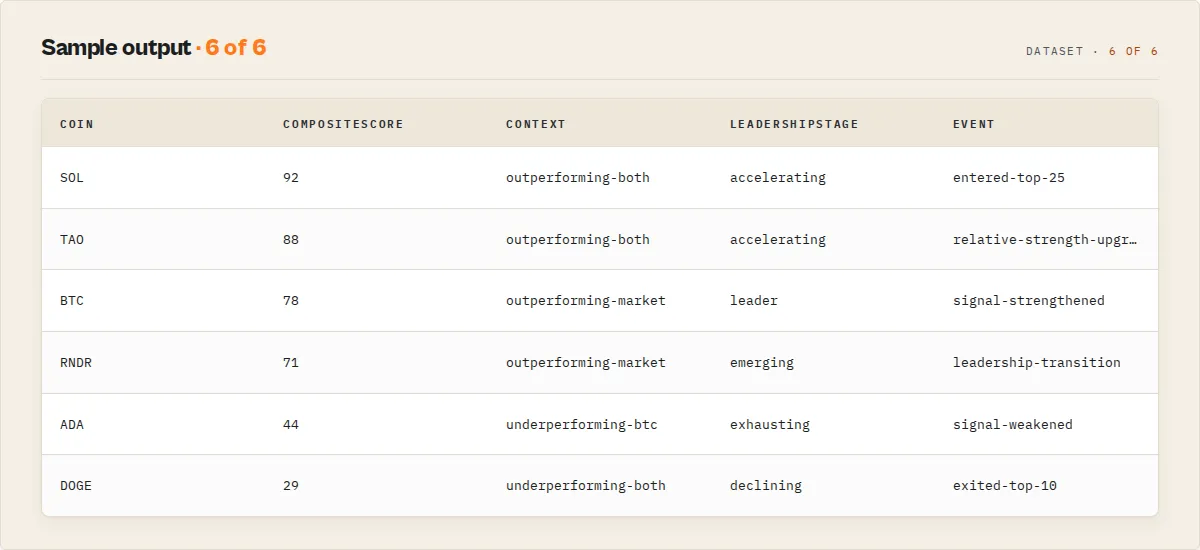
Market Leaders (market mode, sorted by composite score):
| Coin | Score | Context | Stage | vs BTC 24h |
|---|---|---|---|---|
| SOL | 92 | outperforming-both | leader | +4.8 |
| TAO | 89 | outperforming-both | accelerating | +6.1 |
| RNDR | 81 | outperforming-market | emerging | -0.4 |
Watchlist Monitor (scheduled watchlist run -- what changed since last run):
| Coin | Event | Rank change |
|---|---|---|
| SOL | entered-top-25 | +6 |
| TAO | leadership-transition | +2 |
| RNDR | signal-strengthened | +14 |
Market Health (one market-summary record):
| Metric | Value |
|---|---|
| Regime | risk-on |
| Health | 72 |
| Participation | broad |
| Breadth | 64 |
Key features
Under the hood it's four systems on top of CoinGecko data, plus the raw data modes. Every signal is a stable enum or number you can branch on, and it's all descriptive classification of observed data -- never financial advice.
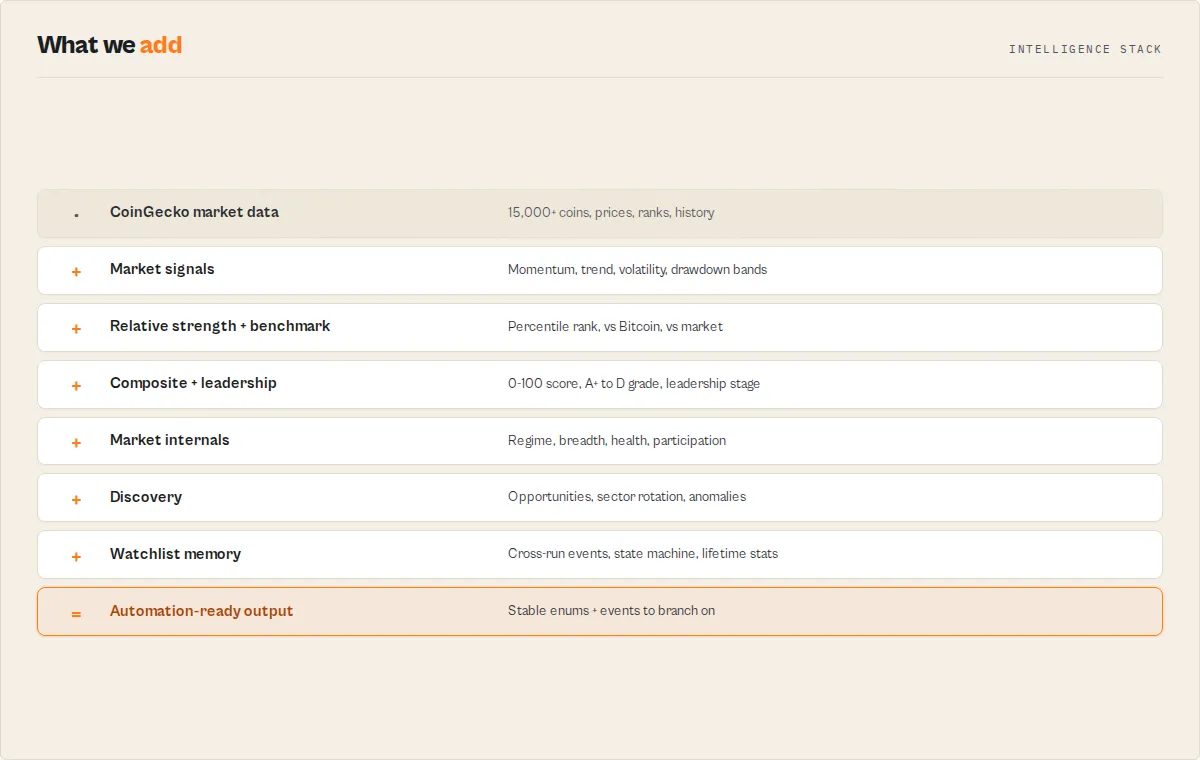
Data foundation
- Seven modes -- market rankings, price lookups, trending coins, global stats, search, historical charts, and sector overview, across 15,000+ coins and 60+ currencies.
- Full coverage -- supply + ATH/ATL metrics, BTC/ETH market dominance, 5-minute-to-daily historical time series, a
categoryfilter (e.g.artificial-intelligence), and a no-key dry-run mode.
1. Intelligence -- turn numbers into classifications
- Market signals -- per coin:
marketState(strong-uptrend | downtrend | volatile | ...), momentum band per timeframe, trend alignment, volatility level, liquidity tier, drawdown from ATH. - Relative strength --
relativeStrengthpercentile within the cohort + arating(elite | strong | average | weak | lagging). - Composite score -- one sortable
compositeScore(0-100) +compositeRating(A+..D) blending strength, momentum, trend, and ATH positioning. - Benchmark context --
benchmarkComparison(vs Bitcoin and vs the market) collapsed into one branchablecontextenum (outperforming-both | outperforming-market | outperforming-btc | underperforming-...). The question pros ask: "did it beat BTC?" - Leadership stage --
leadershipStage(emerging → accelerating → leader → exhausting → declining) adds direction to the rating. - Market internals -- the
market-summarycarriesmarketRegime,breadthScore,marketHealth, andleadershipConcentration+participationQuality(broad | healthy | narrow | fragile) -- is the rally real, or just the top 10?
2. Monitoring -- alert on the change, not the snapshot
- Cross-run state -- set a
watchlistName, schedule the actor, and each coin gets achangeblock (status, % move since last run, momentum shift) with no external state. - State machine --
stateTransition(consolidating-to-uptrend) so you alert on the transition. - Events + alerts -- a stable per-coin
eventsarray and separaterecordType: alertrecords, so automation fires onWHERE recordType = 'alert'instead ofIF a AND b AND c. - Market events -- run-level
recordType: eventrecords (market-regime-change,breadth-expansion,market-health-declined) forWHERE event = 'market-regime-change'.
3. Discovery -- surface what to look at
- Opportunities --
recordType: opportunityrecords (emerging-leader,momentum-reversal,strong-recovery,low-vol-breakout) with the driving metric + reason. - Screens -- the
market-summarybundles eight ready-made screens over the cohort (near-ATH, high-momentum, deep-value, volume-leaders, and the four above). - Sector rotation --
sectorsmode on a watchlist emits arecordType: rotationrecord (rotatingInto/rotatingOutOf+strengthDelta) and per-sectorsectorStatus(persistent-leader | new-leader | improving | deteriorating). - Anomalies -- an
anomaliesarray flags cross-signal divergences (momentum-strength-divergence,benchmark-split) -- what's unusual, not just what's strong. - History analytics -- per-coin
trendStrength,trendQuality(smooth | explosive | choppy | unstable),realizedVolatility, andmaxDrawdown.
4. Persistent intelligence -- gets smarter every run (the moat)
The first run gives you a snapshot. The hundredth run gives you history. Competitors can copy today's calculations in a weekend, but they cannot copy six months of accumulated watchlist intelligence -- because that requires state, run after run.
- Lifetime stats -- watchlist coins carry
lifetimeStats(first seen, runs/days tracked, best/worst rank ever, highest/average composite score, leadership consistency) that gets richer every run. - Rank movement --
change.rankChangeplusentered-top-100 / 50 / 25 / 10events. - Leadership history --
leaderRuns+leadership-transitionevents track how long a coin has led.
Every record carries a recordType discriminator and schemaVersion, and the dataset ships decision-first views (Market Signals, Market Leaders, Recovery, Watchlist Monitor).
How to use CoinGecko Crypto Data
- Get a free CoinGecko API key. Sign up at coingecko.com/en/api for a free Demo account. Copy your API key from the dashboard.
- Open the actor on Apify. Navigate to CoinGecko Crypto Data on the Apify platform and click "Try for free".
- Enter your API key. Paste the CoinGecko Demo API key into the "CoinGecko API Key" field.
- Select a data mode. Choose one of seven modes: Market Rankings, Price Lookup, Trending Coins, Global Market Stats, Search Coins, Historical Price Chart, or Sector Overview.
- Configure mode-specific options. For price lookups and historical data, enter coin IDs (e.g.,
bitcoin,ethereum). For search, enter a search term. For history, set the number of days. - Run the actor. Click "Start" or trigger a run via the Apify API. Most modes complete in under 30 seconds.
- Download or integrate results. Export the dataset as JSON, CSV, or Excel. Use the Apify API, webhooks, or integrations to automate data collection on a schedule.
Input parameters
| Parameter | Type | Required | Default | Description |
|---|---|---|---|---|
apiKey | String | No | -- | Free CoinGecko Demo API key from coingecko.com/en/api. Without a key, the actor runs in dry-run mode. |
mode | String | No | market | Data mode: market (top coins by market cap), price (specific coin prices), trending (24h trending), global (market-wide stats), search (find coins), history (historical charts), sectors (top categories by market cap, ranked by 24h move). |
coinIds | String[] | No | -- | CoinGecko coin IDs for price and history modes (e.g., bitcoin, ethereum, solana). |
searchQuery | String | No | -- | Search term for search mode (e.g., "bitcoin", "defi", "layer 2"). |
vsCurrency | String | No | usd | Price currency. Supports 60+ fiat currencies (usd, eur, gbp, jpy) and crypto pairs (btc, eth). |
days | String | No | 30 | Number of days for history mode. Accepted: 1, 7, 14, 30, 90, 180, 365, max. |
maxResults | Integer | No | 100 | Maximum coins to return in market/search modes, or sectors in sectors mode (top N by market cap; 1-250). |
category | String | No | -- | Optional CoinGecko category id to filter market mode to one sector (e.g. artificial-intelligence, layer-2, meme-token, gaming). Find ids at coingecko.com/en/categories. |
watchlistName | String | No | -- | Optional. Set a name to track changes across runs in market/price/trending mode. Each coin then gets a change block comparing it to the previous run on the same watchlist. Leave blank for a one-off snapshot. |
Input example
Tips for best results
- Use "search" mode first to find coin IDs. CoinGecko uses unique lowercase IDs (e.g.,
bitcoin,binancecoin,matic-network). If you are unsure of the exact ID, run a search first. - Start with 30-day history and expand. The default 30-day range returns daily data points and is fast to retrieve. Only request
365ormaxwhen you specifically need long-term data. - Choose currencies wisely. If you report in EUR or GBP, set
vsCurrencyaccordingly instead of converting USD values manually. - Combine market and trending modes. Run
marketfor fundamentals, thentrendingfor momentum. Cross-reference to find coins with both strong market position and rising interest.
Output
Schema highlights
Every record carries a recordType discriminator and a schemaVersion. The record types are:
coin · market-summary · history-summary · watchlist-summary · sector · sector-summary · opportunity · event · rotation · alert · global · error
Apify renders the full field-by-field descriptions in the dataset's Output tab (from dataset_schema.json), and the dataset ships decision-first views: Market Signals, Market Leaders, Recovery, Watchlist Monitor. The examples below show each record shape; skip to How to use if you just want to run it.
Output example
Market mode (default):
Market summary record (appended once per market / multi-coin price run):
Global mode:
History mode (one history-summary per coin, then the raw points):
Sector overview (sectors mode -- one sector record per category, then a sector-summary):
Alert record (recordType: alert, watchlist mode -- one per coin with a triggered event, for WHERE recordType = 'alert' routing):
Opportunity record (recordType: opportunity, market mode -- the "discover" surface):
Market event record (recordType: event, market + watchlist -- run-level state changes for WHERE event = '...' routing):
Sector rotation record (recordType: rotation, sectors mode + watchlist):
Cross-run change block (added to each coin when watchlistName is set):
Each watchlist coin also carries a lifetimeStats block (accumulates across runs) and a stateTransition block:
Watchlist summary record (recordType: watchlist-summary) -- one per watchlist run, a portfolio-style read of the tracked set:
Error record (recordType: error) -- the run still exits successfully so a CoinGecko outage or a bad input never counts against the actor's success rate. Branch on failureType to tell "no data" from "the request failed":
failureType is a stable enum: invalid-input | timeout | parse-error | api-error | no-data.
Run summary in the key-value store. Every run also writes a SUMMARY record to the default key-value store with { mode, vsCurrency, resultCount, watchlistName, schemaVersion, completedAt } -- a one-glance run stat for dashboards without parsing the dataset.
Monitoring behaviour (watchlist runs)
- First run on a new
watchlistNamemarks every coinchange.status: "new"with null deltas (logged explicitly). Diffs activate from the second run onward. - Second run and later compare against the previous run on the same watchlist and populate the full
changeblock. - State is stored in a named key-value store (
coingecko-watchlist-<name>), bounded to 5,000 coins (FIFO), so scheduled runs never grow it without limit.
Output fields
Market / Price / Trending / Search modes (CoinOutput):
| Field | Type | Description |
|---|---|---|
coinId | String | CoinGecko unique identifier (e.g., bitcoin) |
name | String | Full coin name (e.g., Bitcoin) |
symbol | String | Ticker symbol in uppercase (e.g., BTC) |
currentPrice | Number | Current price in the selected currency |
marketCap | Number | Total market capitalization |
marketCapRank | Number | Rank by market cap (1 = largest) |
volume24h | Number | 24-hour trading volume |
priceChange24h | Number | 24-hour price change percentage |
priceChange7d | Number | 7-day price change percentage (market mode only) |
priceChange30d | Number | 30-day price change percentage (market mode only) |
circulatingSupply | Number | Coins currently in circulation |
totalSupply | Number | Total coins that exist (including locked) |
maxSupply | Number | Maximum coins that will ever exist |
allTimeHigh | Number | All-time high price |
allTimeHighDate | String | ISO date of all-time high |
allTimeLow | Number | All-time low price |
allTimeLowDate | String | ISO date of all-time low |
imageUrl | String | URL to the coin logo image |
currency | String | Currency code used for prices |
extractedAt | String | ISO timestamp of data extraction |
recordType | String | Always coin for these records. Discriminator for filtering/views. |
schemaVersion | String | Output schema version of the interpretation layer (semver). |
marketSignals | Object | Descriptive market-signal block (see below). Present on market/price/trending records; absent on search (no price data). |
relativeStrength | Object | Cohort-relative percentile ranking (strength24h/7d/30dPercentile + rating: elite/strong/average/weak/lagging). Present on market / multi-coin price runs of >=5 coins. |
benchmarkComparison | Object | Performance vs Bitcoin and vs the cohort (vsBitcoin24h/7d/30d, vsMarket24h/7d/30d, relativeLeader, context enum). Present on market / multi-coin price runs. |
compositeScore | Number | 0-100 descriptive composite of relative strength + momentum + trend + ATH positioning. Not a buy signal. |
compositeRating | String | Letter grade of compositeScore: A+ | A | B | C | D. Descriptive strength grade. |
leadershipStage | String | Leadership-lifecycle stage: emerging | accelerating | leader | exhausting | declining | none. |
anomalies | Array | Cross-signal divergence flags (momentum-strength-divergence, benchmark-split). Empty when none. |
scoreDrivers | Array | Plain-enum explanation of the classification (elite-relative-strength, aligned-uptrend, outperforming-both, leadership-accelerating, ...). Explains the score without an LLM. |
lifetimeStats | Object | Accumulated per-coin watchlist memory (firstSeenAt, runsSeen, daysTracked, highestObservedPrice, pctFromObservedHigh, bestObservedRank, worstObservedRank, leaderRuns, leadershipConsistency, highestCompositeScore, averageCompositeScore). Present in watchlist mode. |
stateTransition | Object | Market-state machine (currentState, previousState, transition). Present in watchlist mode. |
change | Object | Cross-run change block. Present only when watchlistName is set. |
marketSignals sub-fields (descriptive, never advice): marketState (strong-uptrend | uptrend | consolidating | downtrend | strong-downtrend | volatile), momentum24h/7d/30d (surging >=20% | rising >=5% | flat | falling <=-5% | plunging <=-20%), trendAlignment (aligned-up | aligned-down | mixed | insufficient-data), volatilityLevel (low | moderate | high | extreme), volumeToMarketCap (Number) + liquidityTier (very-high..low), drawdownFromAth (0-1) + athProximity (at-or-near-ath | below-ath | well-below-ath | far-below-ath), recoveryFromAtl (Number), signalQuality (high | medium | low, timeframe-agreement confidence), signalSummary (paste-ready String). See the dataset's Output tab for the full per-field descriptions.
change sub-fields (watchlist mode only): status (new | up | down | stable), priceChangePctVsLast (Number), momentumShift (Boolean), shift (String, e.g. flat-to-rising, or null), events (Array of stable enums: entered-uptrend | entered-downtrend | momentum-surge | sharp-gain | sharp-drop | new-observed-high | relative-strength-upgrade | relative-strength-downgrade | entered-top-10/25/50/100 | exited-top-10 | leadership-transition | signal-strengthened | signal-weakened), rankChange (Number, prior rank minus current rank), upRuns / downRuns (Number, consecutive same-direction runs), previousPrice (Number), previousMomentum (String), lastSeenAt (String).
Market summary record (recordType: market-summary): coinsAnalyzed, advancers, decliners, unchanged (Number); breadthSignal (broad-advance | advance | mixed | decline | broad-decline); breadthScore (0-100); above30dTrend, below30dTrend, nearAthCount, deepDrawdownCount (Number); marketRegime (broad-rally | risk-on | large-cap-led | neutral | risk-off | broad-selloff); regimeReason (String); marketHealth (0-100); marketHealthState (very-weak | weak | neutral | healthy | strong); leadershipConcentration (0-100, % of up-move from top 10); participationQuality (broad | healthy | narrow | fragile); strongestCoin, largestRankMover (Object or null); avgChange24h, medianChange24h (Number); momentumDistribution (Object); topGainers, topLosers (Array); screens (Object: nearAth / highMomentum / deepValue / volumeLeaders / emergingLeaders / momentumReversals / strongRecoveries / lowVolBreakouts, each top-5 {coinId, symbol, metric}); summary (String).
History summary record (recordType: history-summary): coinId, periodDays; dataPoints, startPrice, endPrice, changePct, high, low, rangePct (Number); volatilityLevel (String); realizedVolatility (Number, std of per-interval log returns %); trendStrength (0-100, linear-fit R²); trendQuality (smooth | explosive | choppy | unstable); maxDrawdown (Number, worst peak-to-trough %); trendConsistency (0-100, share of intervals moving with the overall direction); direction (up | down | flat); summary (String).
Watchlist summary record (recordType: watchlist-summary): watchlistName, coinsTracked, newCoins, gainers, losers (Number); averageMove (Number); strongest, weakest, longestUpStreak (Object or null); summary (String). Emitted once per watchlist run.
Sector records (sectors mode): sector records carry sectorId, name, marketCap, volume24h, marketCapChange24h, sectorState (momentum band), sectorMomentumRank (1 = strongest), sectorStatus (persistent-leader | new-leader | improving | deteriorating | stable, watchlist mode), topCoins (Array). The sector-summary carries sectorsAnalyzed, advancingSectors, decliningSectors, avgChange24h, topSector, weakestSector, summary.
Alert records (recordType: alert, watchlist mode): coinId, name, symbol, alertType (the primary triggered event), events (Array), currentPrice, priceChangePctVsLast, marketState, message (paste-ready), watchlistName.
Opportunity records (recordType: opportunity, market mode): coinId, name, symbol, opportunityType (emerging-leader | momentum-reversal | strong-recovery | low-vol-breakout), metric, currentPrice, marketState, compositeScore, relativeStrengthRating, reason (plain-English).
Market event records (recordType: event, market + watchlist): event (market-regime-change | market-health-improved | market-health-declined | breadth-expansion | breadth-contraction), from, to, delta, message.
Sector rotation record (recordType: rotation, sectors mode + watchlist): rotatingInto, rotatingOutOf ({name, strengthDelta} or null), topMovers (Array), message.
Global mode (GlobalData):
| Field | Type | Description |
|---|---|---|
activeCryptocurrencies | Number | Total active cryptocurrencies tracked |
markets | Number | Number of exchanges tracked |
totalMarketCap | Number | Total crypto market capitalization |
totalVolume24h | Number | 24-hour total trading volume |
btcDominance | Number | Bitcoin market cap dominance percentage |
ethDominance | Number | Ethereum market cap dominance percentage |
marketCapChangePercentage24h | Number | 24-hour market cap change percentage |
marketCapTrend | String | Momentum band of the 24h market-cap move (surging ... plunging). |
summary | String | Factual one-line description of the global state. |
extractedAt | String | ISO timestamp of data extraction |
History mode (HistoryPoint):
| Field | Type | Description |
|---|---|---|
coinId | String | CoinGecko identifier for the coin |
date | String | ISO timestamp of the data point |
price | Number | Price at the given timestamp |
marketCap | Number | Market cap at the given timestamp |
volume | Number | Trading volume at the given timestamp |
currency | String | Currency code used for values |
Use cases
- Portfolio tracking and alerting -- Schedule hourly runs in
pricemode for your watchlist coins. Pipe results to Google Sheets or trigger Slack alerts when prices cross thresholds. - Market research and reporting -- Pull top 100 coins by market cap with 7-day and 30-day change data for weekly crypto market reports, newsletters, or client briefings.
- Trading strategy backtesting -- Download historical price and volume series in
historymode to backtest quantitative strategies or train machine learning models on crypto market data. - Trend detection -- Monitor
trendingmode daily to spot coins gaining traction before mainstream attention. Cross-reference withmarketmode to filter by fundamentals. - Market dashboard data feeds -- Use
globalmode to power overview dashboards showing total market cap, BTC/ETH dominance, and 24-hour volume without pulling individual coin data. - DeFi and Web3 application price feeds -- Integrate real-time price lookups into decentralized applications, portfolio trackers, or custom trading dashboards via the Apify API.
API & Integration
Python:
JavaScript:
cURL:
Integrations
- Zapier -- Build price alert workflows that run the actor on a schedule, check thresholds, and send notifications to Slack, email, or SMS.
- Make (Integromat) -- Create multi-step workflows that filter results by price change or volume and push data to Google Sheets, Airtable, or Notion.
- Google Sheets -- Export market data directly to a spreadsheet for collaborative portfolio tracking and charting using the Apify Google Sheets integration.
- Webhooks -- Configure Apify webhooks to POST the full dataset to any HTTP endpoint when a run completes for real-time database ingestion.
Use in Dify
Drop this actor into Dify workflows via the Apify plugin's Run Actor node. Each coin returns classified, not raw: a marketSignals block whose stable enums (marketState, momentum24h, trendAlignment, volatilityLevel) your downstream if/else node branches on directly. A plain CoinGecko wrapper pointed at the same endpoint returns raw percentages you have to threshold yourself; this returns the classification. (Classification of observed price action, not investment advice.)
- Actor ID:
ryanclinton/coingecko-crypto-data - Sample input (classify the top market and route the movers):
A Dify if/else node routes on the stable enums without parsing numbers:
marketSignals.marketState == "strong-downtrend"ormomentum24h == "plunging"→ alert / review branchmarketSignals.marketState == "strong-uptrend"→ momentum-watch branchmarketSignals.volatilityLevel == "extreme"→ flag-for-attention branchchange.status == "down"(watchlist mode) → "moved against us since last run" branchrecordType == "market-summary"→ readbreadthSignalfor the one-row market overview
The market-summary record's breadthSignal (broad-advance to broad-decline) and the global record's marketCapTrend are single-value enums a workflow can branch on for the whole-market view. With watchlistName set on a scheduled Dify run, the per-coin change.status enum is what a "what moved since last run" branch reads -- no diffing logic in the workflow.
How it works
- The actor reads input parameters and validates the selected mode.
- If no API key is provided, it enters dry-run mode and outputs setup instructions.
- Based on the mode, it calls the appropriate CoinGecko API v3 endpoint with the
x_cg_demo_api_keyparameter. - Raw API responses are normalized into typed output objects with consistent field names.
- For history mode, the actor iterates through each coin ID and fetches chart data sequentially.
- All results are pushed to the Apify dataset for download or API access.
Performance & cost
| Scenario | API calls | Compute units | Est. duration |
|---|---|---|---|
| Market rankings (top 100 coins) | 1 | ~0.01 CU | 3-5 seconds |
| Price lookup (5-10 coins) | 1 | ~0.01 CU | 2-4 seconds |
| Trending coins | 1 | ~0.01 CU | 2-4 seconds |
| Global market stats | 1 | ~0.01 CU | 2-3 seconds |
| Coin search | 1 | ~0.01 CU | 2-4 seconds |
| History (1 coin, 30 days) | 1 | ~0.02 CU | 3-5 seconds |
| History (5 coins, 365 days) | 5 | ~0.05 CU | 10-15 seconds |
The actor uses 256 MB of memory. On the Apify Free plan (~$5/month of compute), you can run roughly 500 market or price lookups per month. The CoinGecko Demo API key is free and allows 10,000 calls/month with approximately 30 calls/minute rate limiting. Each actor run uses 1-6 API calls depending on the mode and number of coins.
Limitations
- CoinGecko API key required. The actor requires a free Demo API key from CoinGecko. Without it, the actor only outputs setup instructions.
- Rate limits on free tier. The CoinGecko Demo key allows approximately 10,000 API calls per month and 30 calls per minute. High-frequency runs may hit these limits.
- 250 coins maximum per market run. The CoinGecko API returns a maximum of 250 coins per page in market mode. For the full 15,000+ coin list, use search mode.
- History mode is sequential. When requesting historical data for multiple coins, each coin requires a separate API call, which increases both run time and API usage.
- Price mode returns fewer fields. The simple price endpoint provides only current price, market cap, volume, and 24-hour change. For full metrics including supply and ATH/ATL, use market mode.
- Data granularity depends on range. History ranges of 1-2 days return 5-minute intervals. Ranges of 3-90 days return hourly data. Ranges over 90 days return daily data. This is controlled by CoinGecko, not the actor.
Responsible use
This actor accesses the CoinGecko API, which has published rate limits and terms of service. Please respect the following guidelines:
- Stay within your CoinGecko API key rate limits (30 calls/minute, 10,000 calls/month on the free tier).
- Do not use this actor to redistribute CoinGecko data in ways that violate their terms of service.
- Space out scheduled runs appropriately. Hourly runs for price monitoring are reasonable; running every minute is excessive and may trigger rate limiting.
- If your usage requires higher throughput, consider upgrading to a paid CoinGecko API plan.
FAQ
Do I need a CoinGecko API key? Yes. The actor requires a free CoinGecko Demo API key to fetch live data. Sign up at coingecko.com/en/api -- it takes about 30 seconds. Without a key, the actor runs in dry-run mode and outputs instructions.
How many coins can I retrieve per run? In market mode, up to 250 coins per run ranked by market cap. In price mode, you can look up any number of specific coins by ID. In search mode, up to 250 results. CoinGecko tracks over 15,000 cryptocurrencies total.
How fresh is the data? CoinGecko updates prices approximately every 1-2 minutes for actively traded coins. Historical data uses daily closing prices for ranges over 90 days, hourly prices for 3-90 day ranges, and 5-minute intervals for 1-2 day ranges.
What is the difference between market mode and price mode? Market mode returns the top coins ranked by market cap with comprehensive data including supply metrics, ATH/ATL, and 7d/30d price changes. Price mode is a lightweight lookup for specific coins by ID, returning only current price, market cap, volume, and 24-hour change. Use market mode for broad analysis and price mode for targeted monitoring.
Can I get historical data for multiple coins at once?
Yes. In history mode, provide multiple coin IDs in the coinIds field. The actor fetches chart data for each coin sequentially and combines all data points into a single dataset. Each coin uses one API call.
Does the actor support stablecoins and meme coins? Yes. CoinGecko tracks all types of cryptocurrencies including stablecoins (USDT, USDC, DAI), meme coins (DOGE, SHIB, PEPE), DeFi tokens, Layer 2 tokens, and NFT-related tokens. If a coin is listed on CoinGecko, this actor can retrieve its data.
What happens if I run the actor without an API key? The actor enters dry-run mode and outputs a single record with step-by-step instructions for obtaining a free CoinGecko Demo API key. No API calls are made and no cryptocurrency data is returned. This lets you test the actor setup before creating an account.
Related actors
| Actor | Description |
|---|---|
| Finnhub Stock Market Data | Stock prices, company profiles, and financial data from traditional markets for cross-asset analysis. |
| FRED Economic Data Search | Federal Reserve economic indicators like interest rates and inflation that influence crypto markets. |
| Currency Exchange Rate Tracker | Real-time fiat exchange rates to understand how currency strength affects crypto pricing. |
| Historical Exchange Rate Data | Historical fiat rates to normalize crypto prices across currencies for multi-region analysis. |
| Hacker News Search | Monitor crypto discussions and sentiment signals on Hacker News that often precede price movements. |
| Website Change Monitor | Track changes on crypto project websites or regulatory pages to catch important updates early. |


