

Lead Quality & Outreach Readiness Auditor — Decide & Benchmark
Pricing
from $5.00 / 1,000 lead auditeds
Lead Quality & Outreach Readiness Auditor — Decide & Benchmark
Audit lead lists before outreach. Every lead gets a quality score, trust score, and a use/verify/repair/enrich/reject decision, then rolls up to account health, pipeline risk, and a vendor benchmark of which source delivers usable leads. Works with Clay, Apollo, ZoomInfo, CSV.
Pricing
from $5.00 / 1,000 lead auditeds
Rating
0.0
(0)
Developer

Ryan Clinton
Maintained by CommunityActor stats
2
Bookmarked
3
Total users
0
Monthly active users
2 months ago
Last modified
Categories
Share
Lead Data Quality Auditor
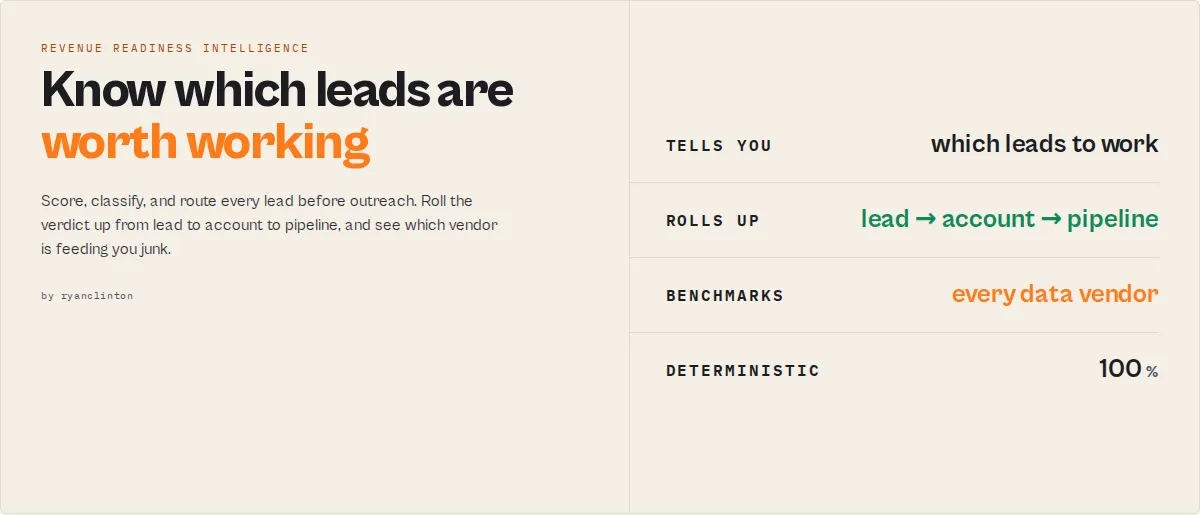
Stop paying SDRs to work leads that were never worth contacting. This is the final gate between enrichment and outreach. It tells you which leads to work, which accounts to prioritise, which vendors are feeding you junk, and which records are about to decay, before a single email is sent.
It answers one question at three levels:
Anyone can check MX records and run SMTP. Very few tools can tell you this lead is good, this account is weak, this pipeline is deteriorating, and Apollo is the reason. That lead → account → pipeline view is the category this actor owns.
The auditor accepts lead data from any source: Clay exports, Apollo lists, CSV uploads, or output from other Apify actors. It auto-detects field names, batches email verification and domain lookups through sub-actors, and returns your original records enriched with scores, a routing decision, the reasons behind the score, and the exact next actor to run. No configuration needed beyond pasting your data. It is, in effect, a Revenue Readiness Intelligence layer for your outbound pipeline.
Revenue teams don't have a lead problem. They have a revenue leakage problem.
Every month the same thing happens quietly: SDRs work dead leads, outreach credits burn, the sending domain takes reputation damage, an enrichment vendor quietly starts returning junk, and nobody notices until pipeline drops. The leak is never one bad email. It's the accumulation of records that were never worth touching.
This actor finds the exact records, accounts, vendors, and sources causing the leakage, before a human ever works them:
Why email verification isn't enough
Most tools answer one question: does this inbox exist? But campaigns don't fail because of one bad mailbox. They fail because decision-makers aren't present, domains are decaying, contact data is incomplete, vendors return low-quality records, and accounts have no reachable buying committee. Verifying the email tells you none of that.
This actor answers the question revenue teams actually have: should this lead, account, or pipeline be worked right now?
| Question | Email verifier | Enrichment tool | This actor |
|---|---|---|---|
| Is the email valid? | ✓ | partial | ✓ |
| Is this a real business contact? | ✗ | ✗ | ✓ |
| Should an SDR work this lead? | ✗ | ✗ | ✓ |
| Is this account worth targeting? | ✗ | ✗ | ✓ |
| Which vendor supplied the bad data? | ✗ | ✗ | ✓ |
| Is my pipeline deteriorating? | ✗ | ✗ | ✓ |
Stop paying humans to validate data
Your SDRs should spend their time talking to prospects, not discovering dead inboxes, expired companies, catch-all domains, and accounts with no reachable decision-maker. This actor finds those problems before a human ever touches the lead, so the list that reaches your reps is the list worth working.
Before vs after
Before: 500 Apollo leads → 500 emails sent → 31% bounce rate → a week of SDR time burned on dead records and a damaged sending domain.
After: 500 Apollo leads → 89 rejected before outreach, 411 sent → ~4% bounce rate → SDRs spend the week on leads that can actually convert.
Under the hood it scores every lead across four dimensions -- email deliverability, phone validity, domain freshness, and field completeness -- assigns an A-to-F grade, and then turns that into the readiness decision above. Stop sending cold emails to disposable inboxes, role-based catch-alls, suppression addresses (noreply@), and expired or spoofable domains.
Why this exists
Most lead tools stop at validation. Revenue teams don't care whether an email is syntactically valid; they care whether a lead is worth spending time, money, and human attention on. This actor was built to answer that question, and to roll the answer up from the individual lead to the account and the whole pipeline so a manager can see where the money is leaking.
Executive questions this actor answers
- Sales leaders: how many of these leads should we actually work? →
usableLeadRate,pipelineRisk - RevOps: which data vendor is degrading? →
sourceBreakdown,fingerprintTrend,revenueLeakage.highestRiskVendor - SDR managers: which accounts deserve attention first? →
accountHealth,decisionMakerCoverage,attentionPriority - Agencies: which client lists are hurting deliverability? →
estimatedBounceRate,revenueLeakage
What you get back
It sits between enrichment and outreach and answers the one question a RevOps team actually has: should we spend money, time, and human attention on this lead today? You only need two fields to route. The rest is there when you want to prioritise or defend the call.
- Act on these (primary):
decision(use/verify/repair/enrich/reject) or the friendliercohort(send-now/send-carefully/verify-first/repair-first/enrich-first/discard). For sales workflows,outreachRisk(low/medium/high+ reasons) says the same thing in risk language. - Prioritise with these (secondary):
attentionPriority(0-100 -- the "if I work 100 leads today, which?" sort key, blending reachability and buying power),outreachReadiness,qualityScore,trustScore;seniority(c-suite…individual+buyingPower) to work decision-makers first;volatilityto spot leads about to decay. - Quantify with these (economics):
opportunityCost(the SDR minutes a bad lead would burn),dataDebt(how much work before it's usable),reachability(email / phone / overall channel matrix). - Defend the call with these (supporting):
confidence,executionReadiness(blockers + steps),scoreExplanation(positive and negative signals behind the score). Everything else -- per-dimensionemailScore/companyScore,emailInfrastructure,dataGaps,actorGraph-- is detail you can ignore until you need it.
What data can you extract?
| Data Point | Source | Example |
|---|---|---|
| 📊 Quality score | All 4 checks combined | 78 (out of 100) |
| 🤝 Trust score | Email type + domain tenure/activity + email-auth + contact depth | 95 |
| 🚀 Outreach readiness | Deliverability + contactability + completeness + legitimacy + domain health | 93 |
| ⚠️ Outreach risk | Risk framing of readiness | { level: "low", reasons: [] } |
| 🧭 Decision | Routing verdict | use / verify / repair / enrich / reject |
| 👔 Seniority | Contact title | c-suite / vp / director / manager / individual |
| 🏷️ Quality grade | Score threshold | B |
| 📨 Email type | Verifier + local rules | corporate / personal / role-based / disposable |
| 🛡️ Email infrastructure | Domain SPF/DMARC/DKIM/BIMI | { spf: true, dmarc: true, dmarcPolicy: "quarantine" } |
| 🏢 Company exists | DNS + WHOIS (no HTTP fetch) | true |
| 📧 Email score | Syntax + MX + SMTP verification | 26/30 |
| 📞 Phone score | Format + country code validation | 17/20 |
| 🏢 Company score | WHOIS + DNS freshness checks | 22/25 |
| 📋 Completeness score | Key field coverage | 21/25 |
| 🚩 Quality flags | Per-check issue detection | ["disposable-email", "missing-country-code"] |
| 💡 Recommendations | Flag-based action items | "Replace disposable email with business address" |
| 📅 Audit timestamp | System clock | 2026-03-24T14:30:00.000Z |
| 📈 Batch summary | Aggregate stats | Average: 72/100, 3x A, 5x B, 2x F |
| 🔝 Top flags | Most frequent issues | ["no-email", "domain-expired"] |
| 📊 Grade distribution | Grade counts | { "A": 3, "B": 5, "C": 2, "D": 0, "F": 2 } |
Why use Lead Data Quality Auditor?
Enrichment tools like Clay, Apollo, and ZoomInfo charge per lookup regardless of data quality. You pay the same credit whether the result is a verified VP email or a disposable mailinator address attached to an expired domain. Most teams discover bad data only after bounce rates spike or campaigns underperform -- by then the outreach budget is already spent.
This actor audits lead data quality before you spend on outreach. Run it between enrichment and campaign execution. In 2 minutes and $0.50, you can score 100 leads, remove the F-grade records, and focus your sequencing budget on leads that will actually convert.
- Scheduling -- run daily or weekly audits on fresh enrichment batches to keep data quality high
- API access -- trigger audits from Python, JavaScript, or any HTTP client as part of your enrichment pipeline
- Proxy rotation -- email verification and domain checks use Apify's built-in proxy infrastructure
- Monitoring -- get Slack or email alerts when audit runs fail or average quality drops below threshold
- Integrations -- connect to Zapier, Make, Google Sheets, HubSpot, or webhooks to route clean leads downstream
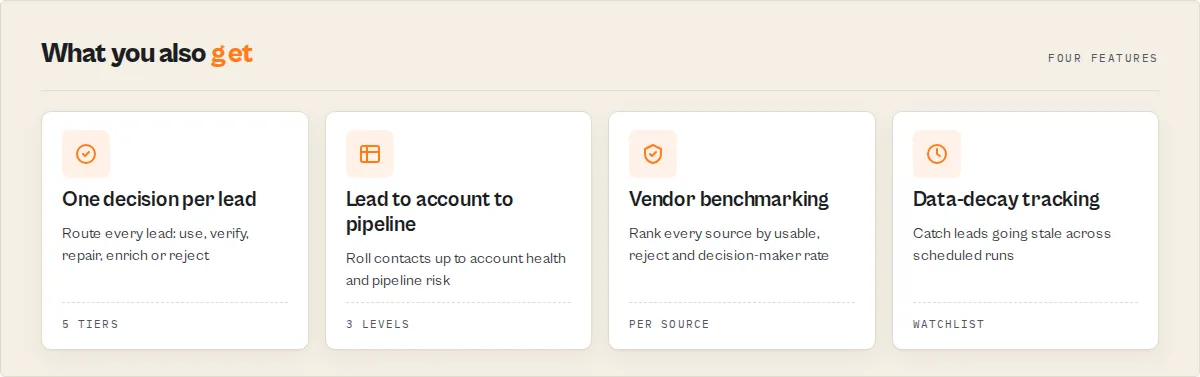
Features
- 4-dimension quality scoring -- every lead scored across email (0-30), phone (0-20), company domain (0-25), and completeness (0-25) for a composite 0-100 score
- Letter grade classification -- A (85+), B (70-84), C (55-69), D (40-54), F (<40) for fast filtering
- SMTP-level email verification -- goes beyond syntax checking to confirm MX records exist and mailboxes accept mail via the Bulk Email Verifier sub-actor
- Disposable email detection -- flags 23 known disposable email providers including Mailinator, Guerrilla Mail, YopMail, and TempMail
- Catch-all domain detection -- identifies domains that accept all addresses, where deliverability is uncertain
- Domain freshness via WHOIS -- checks registration and expiration dates, flags expired domains and very new domains (under 6 months)
- DNS resolution verification -- confirms company domains have active A records and are reachable
- Auto-detect field names -- recognizes 7+ email field names, 7+ phone field names, and 8+ domain field names from any data source format
- Batch summary record -- appends an aggregate summary with average score, grade distribution, top 5 flags, and batch-level recommendations
- Actionable recommendations -- each lead gets specific next steps: "Replace disposable email", "Add country code to phone", "Verify company still operates"
- Original data preserved -- all input fields pass through untouched alongside quality scores
- Spending limit control -- set a maximum budget per run; the actor stops when the limit is reached
Use cases for lead data quality auditing
Sales prospecting pipeline QA
SDRs and BDRs who export leads from Clay or Apollo before loading them into Outreach, Salesloft, or HubSpot sequences. Run the auditor on every batch, filter out D and F grade leads, and protect your sender reputation from bounces.
Marketing agency list cleaning
Agencies managing client prospect databases need to verify data quality before launching email campaigns. Audit imported CSV lists to identify records missing critical fields or containing disposable emails that will tank deliverability rates.
Post-enrichment quality gate
Data ops teams building enrichment pipelines use this as a quality gate between enrichment and CRM import. Automate via API: enrich leads with Clay or Apollo, audit quality, route A and B grades to the CRM, flag C and below for manual review.
Vendor data quality benchmarking
Compare data quality across enrichment vendors. Run the same lead list through Clay, Apollo, and ZoomInfo, then audit each output. The grade distribution tells you which vendor delivers higher-quality records for your target market.
CRM hygiene audit
Periodically audit existing CRM records to identify stale data: expired domains, undeliverable emails, incomplete records. Schedule weekly runs on CRM exports to maintain data freshness without manual review.
How to audit lead data quality
- Paste your lead data -- Copy your leads as a JSON array into the "Lead Records" field. Each lead should have fields like name, email, phone, company, title, and domain. The auditor auto-detects field names from any format.
- Configure checks -- Leave "Verify Emails" and "Check Domain Freshness" enabled for the most thorough audit. Disable either to save time on quick scans. Set "Max Leads" to limit batch size for testing.
- Run the actor -- Click "Start" and wait. A batch of 50 leads typically completes in 2-3 minutes. The status bar shows progress as each lead is scored.
- Download results -- Open the Dataset tab to see every lead with its quality score, grade, flags, and recommendations. Export as JSON, CSV, or Excel. Sort by
qualityScoreto prioritize outreach.
Input parameters
| Parameter | Type | Required | Default | Description |
|---|---|---|---|---|
leads | array | Yes | -- | Array of lead objects to audit. Any structure accepted -- auto-detects email, phone, domain, name, company, and title fields. Paste JSON from Clay, Apollo, or any enrichment tool. |
verifyEmails | boolean | No | true | Run SMTP-level email verification for each unique email. Confirms MX records exist and mailboxes accept mail. Slightly slower but much more accurate. |
checkDomains | boolean | No | true | Look up WHOIS registration data and DNS records for each unique company domain. Detects expired, very new, spoofable, or non-resolving domains. |
maxLeads | integer | No | 0 (unlimited) | Maximum number of leads to audit. Set to a small number (e.g., 5) to test before running the full batch. Maximum: 10,000. |
outputProfile | string | No | full | minimal (decision surface only -- score, grade, decision, confidence, readiness), standard (adds score blocks), or full (everything including per-dimension breakdowns and improvement suggestions). |
onlyFlagged | boolean | No | false | When true, only leads with at least one flag or a decision other than use are written and billed. Clean leads are scored but suppressed -- turns the auditor into a problem-finder you only pay for when it finds something. |
enableDedup | boolean | No | false | Group leads by canonical company domain and flag duplicates with an identity block. Duplicates are flagged, never dropped. |
accountIntelligence | boolean | No | true | Roll contacts up to company-level account records (health, decision-maker coverage, contact density) when two or more share a domain. Set false to emit only per-lead records. |
watchlistName | string | No | -- | Name a watchlist to track this lead source's quality across runs. Each run emits a temporalSignals block per lead (trend, score delta, re-engagement). Leave blank for a stateless one-off audit. |
Input examples
Standard audit of a lead list from Clay:
Quick syntax-only audit (no sub-actor calls):
Test run on first 5 leads from a large batch:
Input tips
- Start with a small test -- set
maxLeadsto 5 on your first run to verify the output format works with your downstream tools before auditing the full batch. - Keep both checks enabled -- email verification and domain checks add 1-2 minutes per batch but dramatically improve scoring accuracy. Syntax-only mode misses 40% of bad records.
- Use any field names -- the auditor auto-detects common naming conventions like
email,emailAddress,work_email,phone,phoneNumber,mobile,domain,website,companyDomain, and more. - Batch in one run -- processing 200 leads in one run is faster and cheaper than 200 single-lead runs because email verification and WHOIS lookups are batched by unique domain.
Output example
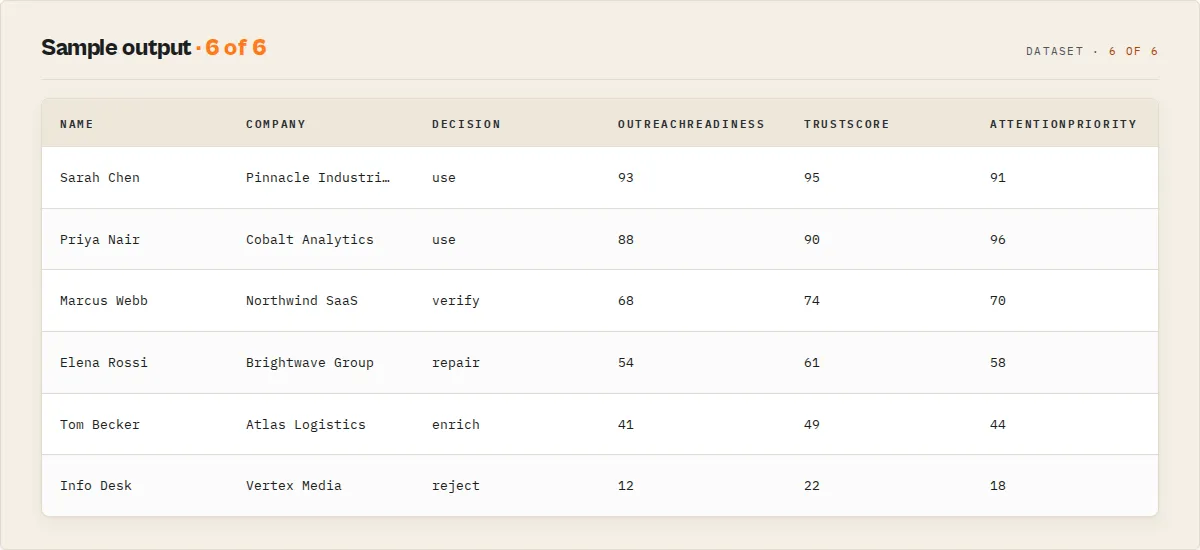
Batch summary record (appended after all leads):
The batchHealth object and estimatedDeliverability / estimatedBounceRate (computed across verified emails only) give an executive read of the batch without post-processing the per-lead records.
Account intelligence (lead → account → pipeline)
Outreach is account-based, so the auditor rolls per-contact results up to the company. When two or more contacts share a domain, it emits an account record (recordType: "account") -- no extra input, just title and decision aggregation:
decisionMakerCoverage answers the question a per-lead score can't: a company with a CEO, CTO and two VPs is a different opportunity from one with a recruiter and an office manager, even when every individual email is valid. busFactor flags accounts that look healthy but depend on a single reachable contact (7 contacts, 1 usable = fragile), and survivability scores whether you can keep reaching the account over time. contactDensity flags how many real people you can reach. The run summary then carries a pipelineRisk verdict over the whole batch. Set accountIntelligence: false to switch the account layer off.
Benchmark your data sources
Tag each lead with a source field (e.g. "apollo", "clay", "zoominfo") and the summary returns a sourceBreakdown -- a procurement-grade benchmark ranking each vendor by usable / repair / reject rate, so you can prove which one feeds you junk:
This is a vendor report card, not just an average -- usableRate, trustAverage, and decisionMakerRate together tell you which data budget actually buys reachable decision-makers.
In watchlist mode (watchlistName set), the summary also returns sourceTrend -- the change in each source's average score versus the previous run ({ "apollo": -4, "clay": +2 }), so a degrading vendor surfaces before it costs you a campaign. The run-level revenueLeakage block (highRiskRecords, estimatedBounceRisk, potentialWastedOutreach) plus usableLeadRate / repairRate / rejectRate give a manager the executive read in one glance.
Track data decay over time
Set a watchlistName to audit the same list on a schedule. Each lead then carries a temporalSignals block comparing this run to the last: healthTrend (improving / declining / stable), scoreDelta, previousGrade, decayReason (what broke -- e.g. "email now undeliverable"), daysSinceLastHealthy, a healthHistory array of recent scores, and predictedHealth30Days -- a simple linear trendline projecting where the lead's quality is heading (not an ML forecast). A lead that was grade A last month and is now undeliverable shows up as a declining record with the reason attached and a falling projection. Each lead also carries a volatility.confidenceHalfLifeDays estimate -- roughly how long before it likely needs revalidating -- so you can schedule re-audits on the cadence the data actually decays at, not a fixed guess.
Output fields
| Field | Type | Description |
|---|---|---|
recordType | string | Record discriminator: audit, summary, or error. |
entityId | string | Stable per-lead hash (sha256 of email/domain/name) for dedup and watchlist diffing. |
qualityScore | integer | Overall data quality score from 0 to 100. Sum of email, phone, company, and completeness sub-scores. |
trustScore | integer | 0-100 -- is this likely a real business contact? Distinct axis from quality. |
outreachReadiness | integer | 0-100 -- can I send to this right now? The send-gate composite. |
attentionPriority | integer | 0-100 -- should an SDR work this today? Sort key blending reachability + buying power. |
outreachRisk | object | { level: low/medium/high, reasons[] } -- readiness in risk language. |
volatility | object | { score, level, reasons[] } -- how likely the lead is to decay (forward-looking). |
cohort | string | Friendly routing cohort: send-now / send-carefully / verify-first / repair-first / enrich-first / discard. |
decisionPath | string[] | The chain of conditions behind the decision -- "why this verdict?" for audit/enterprise review. |
percentile | integer | This lead's outreach-readiness percentile within the batch (better than X%). |
reachability | object | { email, phone, overall } -- channel matrix, each high/medium/low/none. |
opportunityCost | object | { minutesLikelyWasted, risk } -- SDR time an unaudited bad lead would burn. |
dataDebt | object | { score, missingFields, repairItems, repairCost } -- work before the lead is usable. |
seniority | object | { level, targetQuality, buyingPower, title } -- contact seniority from the title field (no API). |
qualityGrade | string | Letter grade: A (85+), B (70-84), C (55-69), D (40-54), F (below 40). |
decision | string | Routing verdict: use / verify / repair / enrich / reject. |
confidence | object | { score 0-1, level, components[] } -- how much real signal backed the grade. |
trust | object | { score, level, components[] } -- the trustScore breakdown. |
scoreExplanation | object | { signals[], topPositiveSignals[], topNegativeSignals[] } -- why the score is what it is. |
companyExists | boolean/null | DNS/WHOIS-derived (no HTTP fetch): domain registered or resolving, and not parked. |
businessSignals | object | { websiteActive, mailConfigured, domainRegistered } -- DNS/WHOIS-derived. |
emailScore.emailType | string | corporate / personal / role-based / disposable / unknown. |
companyScore.emailInfrastructure | object/null | { spf, dmarc, dkim, bimi, dmarcPolicy } -- domain email-sending setup. |
companyScore.spoofable | boolean/null | Whether the domain can be email-spoofed right now. |
whyThisMatters | string | Plain-English one-line reason for the decision. |
summary | string | LLM-quotable one-line description of the lead's quality and decision. |
executionReadiness | object | { score, readyForOutreach, blockers[], stepsToReady[] } -- the automation gate. |
improvementSuggestions | array | Top-3 score-lift actions with projected delta and the sibling actor that delivers each. |
dataGaps | array | Missing fields with reason and the sibling actor that can fill them. |
actorGraph | object | { previous, current, next[] } -- suite navigation / what to run next. |
pipelineState | object | { enriched, emailVerified, domainChecked, deduped } -- what has already been done. |
identity | object | Present with enableDedup: { canonicalDomain, duplicateCount, isCanonical }. |
temporalSignals | object | Present in watchlist mode: { trend, previousScore, scoreDelta, reengage, runsSeen }. |
emailScore.score | integer | Email quality sub-score (0-30). Based on syntax, MX records, SMTP deliverability, disposable detection, catch-all detection. |
emailScore.syntaxValid | boolean | Whether email matches standard syntax pattern. |
emailScore.mxExists | boolean/null | Whether the email domain has MX records. Null if verification disabled. |
emailScore.deliverable | boolean/null | Whether the mailbox accepts mail (SMTP check). Null if verification disabled. |
emailScore.isDisposable | boolean | Whether the domain is on the 23-provider disposable email list. |
emailScore.isCatchAll | boolean/null | Whether the domain is a catch-all that accepts all addresses. |
phoneScore.score | integer | Phone quality sub-score (0-20). Based on format validity, country code presence, digit count. |
phoneScore.hasCountryCode | boolean | Whether phone starts with an international country code prefix (+1, +44, etc.). |
phoneScore.formatValid | boolean | Whether phone has between 7 and 15 digits. |
companyScore.score | integer | Company domain quality sub-score (0-25). Based on DNS resolution, WHOIS expiration, domain age. |
companyScore.dnsResolves | boolean/null | Whether domain has active DNS A records. Null if domain checks disabled. |
companyScore.whoisExpired | boolean/null | Whether WHOIS registration has expired. |
companyScore.domainAgeYears | number/null | Domain age in years based on WHOIS registration date. |
companyScore.spoofable | boolean/null | Whether the domain can be email-spoofed right now (from the DNS engine). |
companyScore.postureScore | number/null | DNS / email-auth posture score 0-100 (from the DNS engine). |
companyScore.expiryStatus | string/null | WHOIS expiry status: expired / critical / warning / healthy / unknown. |
emailScore.verifierStatus | string/null | The verifier's verdict: valid / invalid / risky / unknown / disposable. |
emailScore.reachability | string/null | Reachability tier from the verifier: high / medium / low / unreachable. |
completenessScore.score | integer | Field completeness sub-score (0-25). Proportional to percentage of 6 key fields populated. |
completenessScore.pct | integer | Percentage of key fields populated (0-100). |
completenessScore.populated | string[] | List of populated key fields. |
completenessScore.missing | string[] | List of missing key fields from: email, phone, name, company, title, domain. |
flags | string[] | All quality issue flags across all checks. See flag reference below. |
recommendations | string[] | Actionable steps to improve lead quality before outreach. |
auditedAt | string | ISO 8601 timestamp of when the audit was performed. |
Flag reference: no-email, invalid-email-syntax, disposable-email, role-based-email, suppressed-address, no-mx-record, email-not-deliverable, catch-all-domain, no-phone, invalid-phone-format, missing-country-code, no-domain, domain-not-resolving, domain-expired, domain-expiring-soon, very-new-domain, domain-parked, domain-spoofable.
How much does it cost to audit lead data quality?
Lead Data Quality Auditor uses pay-per-event pricing -- you pay $0.005 per lead audited. Platform compute costs are included.
| Scenario | Leads | Cost per lead | Total cost |
|---|---|---|---|
| Quick test | 5 | $0.005 | $0.025 |
| Small batch | 25 | $0.005 | $0.125 |
| Medium batch | 100 | $0.005 | $0.50 |
| Large batch | 500 | $0.005 | $2.50 |
| Enterprise | 2,000 | $0.005 | $10.00 |
You can set a maximum spending limit per run to control costs. The actor stops when your budget is reached, so you never overspend.
Compare this to discovering bad data after outreach: a 30% bounce rate on 500 emails damages your sender reputation and wastes $50-200 in sequencing tool credits. Auditing those 500 leads costs $2.50 upfront. Clay charges credits even for failed lookups -- this actor catches those failures for half a cent per record.
Audit lead data quality using the API
Python
JavaScript
cURL
How Lead Data Quality Auditor works
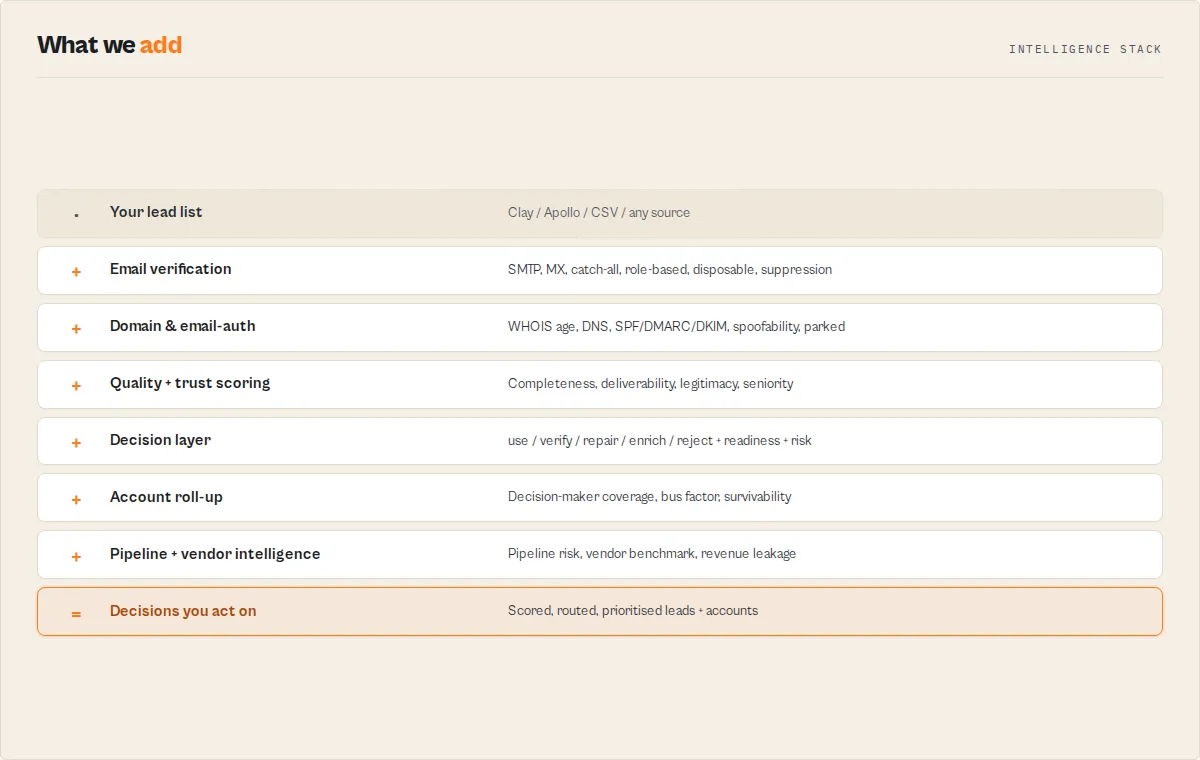
Field auto-detection
The auditor does not require a fixed schema. It scans each lead record for common field name patterns across 3 categories: email fields (email, emailAddress, email_address, workEmail, work_email, personalEmail), phone fields (phone, phoneNumber, phone_number, mobile, mobilePhone, cell, telephone), and domain fields (domain, website, url, companyDomain, company_domain, companyWebsite, company_website). If no explicit domain field exists, the auditor extracts the domain from the email address. This means Clay exports, Apollo exports, HubSpot exports, and custom CSV structures all work without configuration.
Batched sub-actor orchestration
Rather than running one sub-actor call per lead, the auditor extracts all unique emails and unique domains upfront, then makes 3 batched sub-actor calls in parallel: Bulk Email Verifier for SMTP verification, WHOIS Domain Lookup for registration data, and DNS Record Lookup for resolution checks. This reduces total runtime from O(n) sub-actor calls to exactly 3, regardless of batch size. Results are mapped back to individual leads via email-to-lead and domain-to-lead index maps.
Four-dimension scoring model
Each lead receives 4 independent sub-scores that sum to a maximum of 100:
Email score (0-30): 8 points for valid syntax (regex match), 7 points for non-disposable domain (checked against 23 known providers), 7 points for MX record existence, 6 points for SMTP deliverability confirmation, 2 points for non-catch-all domain. Without SMTP verification, email scores are capped at 15 to reflect the uncertainty.
Phone score (0-20): 10 points for valid format (7-15 digits), 7 points for international country code prefix (matches ^\+\d{1,3} pattern), 3 bonus points for full national number (10+ digits).
Company score (0-25): 5 points for having a domain, 10 points for DNS resolution, 7 points for non-expired WHOIS registration, 3 points for domain age over 1 year. Domains under 6 months old receive a very-new-domain flag. Without sub-actor data, company scores cap at 5.
Completeness score (0-25): Proportional to the percentage of 6 key fields populated: email, phone, name, company, title, domain. A lead with all 6 fields scores 25; a lead with 3 fields scores 12-13.
Decision layer
The audit does not stop at a 0-100 score. Each lead gets a decision -- the routing scalar your pipeline branches on:
| Decision | Meaning | What to do |
|---|---|---|
use | Clean, verified, actionable | Route straight to outreach |
verify | Deliverability unconfirmed | Verify the email before sending |
repair | Data present but malformed | Fix syntax/format in place |
enrich | Missing core data (email/domain/<50% complete) | Enrich before working the lead |
reject | Grade F, expired domain, undeliverable, disposable, or suppressed | Remove from outreach |
Three scores, one decision
The audit reports three orthogonal scores because they answer different questions:
| Score | Question | Built from |
|---|---|---|
qualityScore (0-100) | Is the data complete and valid? | email + phone + company + completeness sub-scores |
trustScore (0-100) | Is this likely a real business contact? | email type, domain tenure, domain activity, email-auth, contact depth |
outreachReadiness (0-100) | Can I send to this right now? | deliverability, contactability, completeness, legitimacy, domain email-health |
A complete record on a free Gmail address scores high on quality but lower on trust; a sparse record on an aged corporate domain with clean SPF/DMARC scores lower on completeness but high on trust. The decision enum is the routing tier those scores resolve to.
Alongside the scores, each record carries a confidence block (how much real signal backed the grade -- a syntax-only guess is low-confidence; verifier + DNS + WHOIS is high), a trust breakdown (the trustScore components), a scoreExplanation (topPositiveSignals / topNegativeSignals so you see why the score is what it is), an executionReadiness gate (readyForOutreach boolean + blockers + steps), improvementSuggestions (top-3 score-lift actions, each pointing at the sibling actor that delivers it), dataGaps, an actorGraph (what to run next), and a pipelineState (what has already been done). The verifier's verdict (verifierStatus, verifierDecision, reachability, emailType, isRoleBased), the domain's email-sending infrastructure (emailInfrastructure: SPF/DMARC/DKIM/BIMI + policy), spoofability and DNS posture (spoofable, postureScore, domainRiskLevel, domainParked, websiteActive), and WHOIS expiry status flow through into the score blocks rather than being collapsed into a single number. A top-level companyExists boolean and businessSignals block are derived from DNS + WHOIS without any HTTP fetch.
Batch summary generation
After scoring all leads, the auditor appends a summary record with aggregate statistics: average quality score, grade distribution (count of A/B/C/D/F), the 5 most frequent flags across the batch, and batch-level recommendations. The summary identifies systemic issues ("12 leads missing email", "5 leads with expired domains") that indicate problems with the upstream enrichment source rather than individual records.
Tips for best results
-
Audit immediately after enrichment. Run the auditor right after exporting from Clay, Apollo, or any enrichment tool. Data decays -- domains expire, employees change roles, emails become undeliverable. The sooner you audit, the more accurate the scores.
-
Filter by grade, not just score. Use the letter grade for routing decisions: A and B grades go straight to outreach sequences, C grades get manual review, D and F grades get dropped or re-enriched.
-
Check the batch summary first. Before diving into individual records, review the summary record. If the average score is below 60 or F-grade count exceeds 20%, the problem is likely your enrichment source, not individual leads.
-
Use the flags for targeted cleanup. Sort results by specific flags rather than just low scores. A lead with
missing-country-codeas its only flag is easy to fix; a lead withdisposable-emailplusdomain-expiredshould be dropped. -
Combine with Bulk Email Verifier for standalone email lists. If you only have email addresses (no phone, company, or domain data), use Bulk Email Verifier directly. The quality auditor is designed for multi-field lead records.
-
Schedule weekly CRM audits. Export your active pipeline from HubSpot or Salesforce as JSON, run a scheduled audit, and track average quality over time. A declining average signals stale data that needs re-enrichment.
-
Set spending limits on large batches. For lists over 1,000 leads, set a maximum spending limit on the run. If quality is uniformly poor, you will know from the first 200 records and can stop early.
Combine with other Apify actors
| Actor | How to combine |
|---|---|
| Bulk Email Verifier | Used as a sub-actor for SMTP verification. Also useful standalone for email-only lists. |
| WHOIS Domain Lookup | Used as a sub-actor for domain freshness checks. Run standalone for deep WHOIS analysis. |
| Website Contact Scraper | Scrape contacts from websites first, then audit the output quality before loading into your CRM. |
| Email Pattern Finder | Detect company email patterns to generate candidate emails, then audit those emails for deliverability. |
| Waterfall Contact Enrichment | Run 10-step enrichment cascade, then audit the enriched output to filter low-quality records. |
| B2B Lead Gen Suite | Full lead gen pipeline produces scored leads -- run the quality auditor as a second-pass validation. |
| HubSpot Lead Pusher | Audit leads first, then push only A and B grade records into HubSpot to keep your CRM clean. |
| Lead Enrichment Pipeline | Full enrichment pipeline -- run quality audit on the output before outreach |
| AI Outreach Personalizer | After auditing, personalize cold emails only for A and B grade leads |
| Intent Signal Tracker | Track buying signals to prioritize which leads to audit and enrich first |
Limitations
- No real-time phone verification -- phone scoring is based on format validation and country code detection, not carrier lookups or line-type checks. It catches malformed numbers but cannot confirm if a number is currently active.
- Disposable email list is not exhaustive -- the 23-provider disposable domain list covers the most common services but may miss newer or less popular disposable email providers.
- WHOIS data availability varies -- some TLDs and privacy-protected domains do not expose registration dates, resulting in null
domainAgeYearsand reduced company scores. - DNS checks reflect point-in-time status -- a domain that resolves today may go offline tomorrow. For ongoing monitoring, schedule periodic audits or use Website Change Monitor.
- Field detection requires standard naming -- the auto-detect logic checks 7-8 common field name variations per category. Highly custom field names (e.g.,
primaryContactElectronicMail) will not be matched. Rename fields to standard names before auditing. - Email verification adds latency -- SMTP verification via the Bulk Email Verifier sub-actor adds 1-3 minutes per batch depending on batch size. Disable
verifyEmailsfor faster syntax-only audits. - Maximum 10,000 leads per run -- the
maxLeadsparameter caps at 10,000. For larger datasets, split into multiple runs. - Completeness scoring checks 6 fixed fields -- the auditor tracks: email, phone, name, company, title, domain. Custom fields beyond these 6 are not included in the completeness percentage.
Use in Dify
Drop this actor into Dify workflows via the Apify plugin's Run Actor node. Each lead returns scored, classified, and routed as structured JSON -- use / verify / repair / enrich / reject plus the executionReadiness.readyForOutreach boolean your downstream node branches on. A raw email verifier pointed at the same list returns deliverability booleans; this returns the outreach decision.
- Actor ID:
ryanclinton/enrichment-quality-auditor - Sample input (audit a Clay/Apollo batch, emit only the leads that need attention):
Branch on the decision in an if/else node:
decision value | Route to |
|---|---|
use | Outreach sequence (Salesloft / Outreach / cadence node) |
verify | Bulk Email Verifier re-check, then re-audit |
repair | Data-cleanup branch (fix syntax / add country code) |
enrich | Lead Enrichment Pipeline → re-audit |
reject | Suppression list / drop |
A Dify if/else node matches on decision equality (or on executionReadiness.readyForOutreach == true for a clean go/no-go gate). The structured improvementSuggestions[] and actorGraph.next[] arrays are usable verbatim -- each entry already names the sibling actor to run next, so a downstream node can chain without any LLM rewriting. Opt-in modes: set onlyFlagged: true so the workflow only spends on (and only routes) leads that actually need action; set watchlistName to track a recurring source's quality drift across scheduled Dify runs.
Integrations
- Zapier -- trigger a quality audit whenever a new lead list is uploaded to Google Sheets or a CRM
- Make -- build a pipeline: Clay enrichment, quality audit, then route A/B grades to Outreach and C/D/F grades to a review queue
- Google Sheets -- export audit results directly to a spreadsheet for team review and manual cleanup
- Apify API -- embed quality auditing into your enrichment pipeline with Python or JavaScript
- Webhooks -- send audit results to your CRM or data warehouse when a run completes
- LangChain / LlamaIndex -- feed quality-scored lead data into AI agents for intelligent outreach prioritization
Troubleshooting
- All email scores capped at 15 -- this means
verifyEmailsis set tofalseor the Bulk Email Verifier sub-actor returned no results. Enable email verification and check that the sub-actor is accessible from your Apify account. - Company scores stuck at 5 -- this means
checkDomainsis set tofalseor the WHOIS/DNS sub-actors returned no data. Enable domain checks and verify the sub-actors are available. - Some leads missing domain data -- the auditor tries to extract domains from email addresses as a fallback. If a lead has no email and no domain/website/url field, the company score will be 0 with a
no-domainflag. - Run exceeded expected time -- large batches with both email verification and domain checks enabled require 3 parallel sub-actor calls. For 500+ leads, expect 3-5 minutes. Reduce batch size with
maxLeadsor disable one check type for faster results. - Spending limit reached before batch completed -- the actor stops and outputs a log warning. Results for already-audited leads are preserved in the dataset. Increase the spending limit or reduce batch size.
Responsible use
- This actor only processes data you provide as input. It does not scrape or collect personal data from websites.
- Respect applicable data protection laws (GDPR, CCPA, CAN-SPAM) when using lead data for outreach.
- Do not use audit results to circumvent email opt-out or unsubscribe mechanisms.
- The quality score is advisory -- it does not guarantee email deliverability or data accuracy.
- For guidance on responsible data use, see Apify's guide.
FAQ
How many leads can I audit in one run?
Up to 10,000 leads per run. The maxLeads parameter controls the cap. For larger datasets, split into multiple runs of 5,000-10,000. Each run produces a separate batch summary.
Does Lead Data Quality Auditor verify emails via SMTP?
Yes, when verifyEmails is enabled (the default), the actor calls the Bulk Email Verifier sub-actor which performs MX record lookups and SMTP-level deliverability checks. This catches undeliverable mailboxes that pass syntax validation.
What types of bad data does the auditor catch? Disposable email addresses (Mailinator, YopMail, etc.), invalid email syntax, domains with no MX records, undeliverable mailboxes, catch-all domains, expired company domains, domains that don't resolve via DNS, very new domains under 6 months old, phone numbers without country codes, malformed phone numbers, and records missing critical fields.
Can I use lead data from Clay, Apollo, or any enrichment tool?
Yes. The auditor auto-detects field names from any source. It recognizes common naming patterns like email, emailAddress, work_email, phone, phoneNumber, mobile, domain, website, and companyDomain. No reformatting required.
How is Lead Data Quality Auditor different from Clay's data quality features? Clay charges enrichment credits regardless of whether lookups return good data. This actor audits quality after enrichment for $0.005 per lead with no subscription. It works with data from any source, not just Clay, and provides a transparent 0-100 scoring breakdown rather than a pass/fail.
Is it legal to audit lead data quality? The auditor processes data you already possess. Email verification checks public DNS/MX records. WHOIS lookups access publicly available registration data. No websites are scraped. Ensure your upstream data collection complies with applicable laws.
How long does a typical audit run take? A batch of 50 leads with full verification takes 2-3 minutes. The bottleneck is the email verification sub-actor. With both checks disabled (syntax-only mode), the same batch completes in under 30 seconds.
Can I schedule this actor to run periodically? Yes. Use Apify's built-in scheduler to run daily, weekly, or at any custom interval. Schedule CRM export audits to track data quality trends over time and catch decay before it impacts campaigns.
What does a quality grade of C mean for my outreach? C-grade leads (score 55-69) have noticeable issues but may still be usable. Common C-grade patterns: valid email but missing phone and title, or complete contact info but on a catch-all domain. Review C-grade recommendations and decide per-record whether to include in outreach or re-enrich.
How accurate is the email deliverability check?
SMTP verification confirms whether a mailbox exists and accepts mail at the time of the check. Accuracy exceeds 95% for standard mail servers. Catch-all domains always show as "deliverable" even if the specific address does not exist -- the auditor flags these with catch-all-domain so you can handle them separately.
Can I use the quality auditor with the Apify API? Yes. The actor is fully API-compatible. Call it from Python, JavaScript, or any HTTP client. See the API examples above. Common pattern: trigger an audit run via webhook after an enrichment pipeline completes, then route results based on quality grade.
What happens if the spending limit is reached mid-batch? The actor stops processing new leads immediately and outputs a log warning. All leads already audited are preserved in the dataset with their scores. The batch summary reflects only the audited portion. Increase the limit or reduce batch size for the next run.
Help us improve
If you encounter issues, you can help us debug faster by enabling run sharing in your Apify account:
- Go to Account Settings > Privacy
- Enable Share runs with public Actor creators
This lets us see your run details when something goes wrong, so we can fix issues faster. Your data is only visible to the actor developer, not publicly.
Support
Found a bug or have a feature request? Open an issue in the Issues tab on this actor's page. For custom solutions or enterprise integrations, reach out through the Apify platform.


![✨Leads Finder - $1.5/1k leads with Emails [Apollo Alternative] avatar](https://images.apifyusercontent.com/hQh95d2BMIK4aiNBVTAopmRKraOLFaDFmflsEsCTEKM/rs:fill:76:76/cb:1/aHR0cHM6Ly9hcGlmeS1pbWFnZS11cGxvYWRzLXByb2QuczMudXMtZWFzdC0xLmFtYXpvbmF3cy5jb20vaUpPU0hXZDl4ZmFoRzBTWm0tYWN0b3ItSW9TSHF3VFI5WUdoemNjZXotYmdMcjdPbmo0Qy1jb21wYW55X3NjcmFwZXIucG5n.webp)


