

Multi-Review Scraper — Trustpilot & BBB in One Run
Pricing
$150.00 / 1,000 business analyzeds
Multi-Review Scraper — Trustpilot & BBB in One Run
Multi Review Scraper. Available on the Apify Store with pay-per-event pricing.
Pricing
$150.00 / 1,000 business analyzeds
Rating
0.0
(0)
Developer

Ryan Clinton
Maintained by CommunityActor stats
0
Bookmarked
12
Total users
0
Monthly active users
2 months ago
Last modified
Categories
Share
Vendor Due Diligence Engine — Trustpilot & BBB
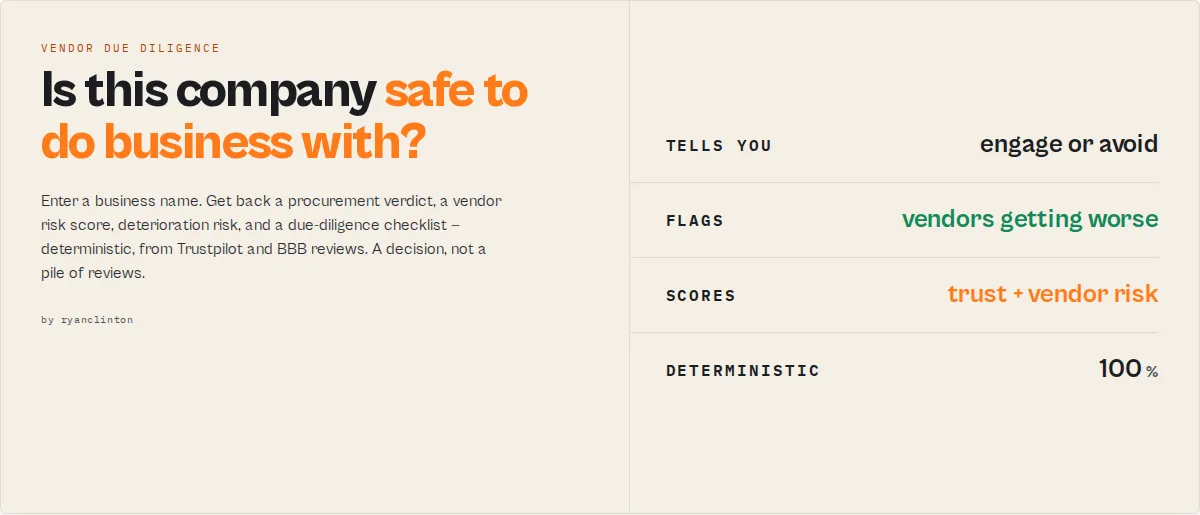
This is not a review scraper. It is a vendor due diligence engine that determines whether a company is safe to do business with.
Enter a business name and get back a decision — a vendor risk score, a trustworthiness score, a green/yellow/red procurement verdict, deterioration risk, investigation priorities, and a ready-to-run due-diligence checklist. Instead of reading hundreds of reviews, you get an answer.
Everything is deterministic — the same reviews always produce the same result. No LLM, no randomness, no per-call AI cost.
The decision, in 5 seconds
Typical workflow
Without this actor — screening one vendor:
Search Trustpilot → read 100 reviews → check BBB → read the complaints → compare ratings → guess whether the company is trustworthy.
~30–60 minutes per vendor, and the conclusion is a judgement call.
With this actor:
Enter the business name → receive a vendor risk score, a procurement verdict, an investigation checklist → make the decision.
~30 seconds, and the conclusion is reproducible.
Why not just read Trustpilot?
Trustpilot tells you:
4.1 stars · 1,800 reviews
This actor tells you:
Trustworthiness 42/100 · Vendor risk HIGH · Procurement tier RED · Deterioration risk 78/100 · Investigate billing disputes and refund complaints first.
One is data. The other is a decision.
What decision are you making?
| Your question | The output |
|---|---|
| Should we onboard this supplier? | procurementTier (green/yellow/red/blacklist) |
| Is this company trustworthy? | trustworthinessScore |
| Is the reputation deteriorating? | deteriorationRisk |
| What should we investigate? | investigationPriority + dueDiligenceChecklist |
| Which vendor in our list is riskiest? | vendorRiskScore + benchmark portfolio |
| Which competitor is strongest? | benchmark.ranking |
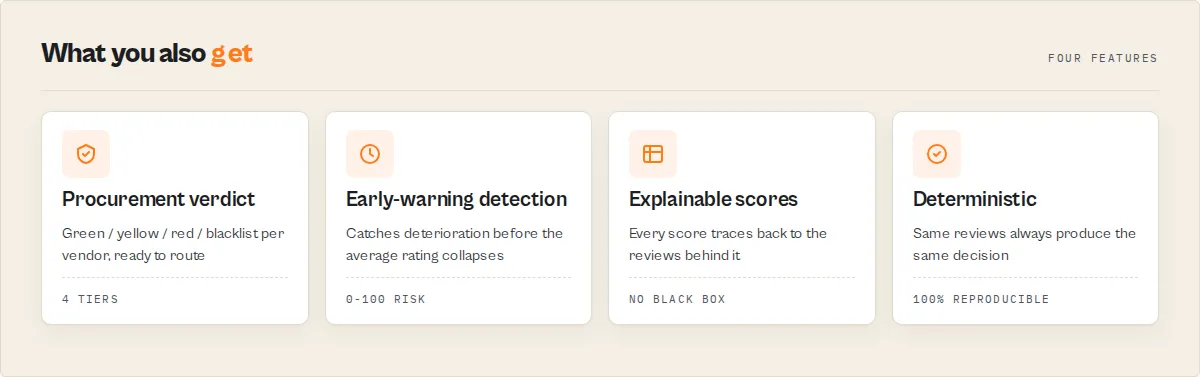
What makes this different?
Most review tools tell you what customers said. This tells you what to do.
| Traditional review tools | Vendor Due Diligence Engine |
|---|---|
| Reviews | A decision |
| Sentiment | Procurement verdict |
| Ratings | Vendor risk score |
| Theme counts | Investigation priorities + checklist |
| Historical data | Deterioration detection |
Detect vendors before they become problems
A company can hold a strong star rating while customer complaints accelerate underneath it. This actor catches the turn early — refund-complaint spikes, billing-dispute growth, emerging trust issues, reputation deterioration — before the average rating collapses. You are buying protection, not analytics.
Built for
- Procurement & vendor onboarding — a green/yellow/red verdict + a due-diligence checklist per supplier
- Investment due diligence — trust-weighted risk + deterioration detection
- Lead qualification — reputation-weighted screening as a trust signal
- Reputation monitoring — scheduled runs with trend + stability tracking
- Competitive analysis — benchmark a cohort and rank it by risk
Why should I trust the scores?
Every score is deterministic and traceable — no black box, no AI, no hidden weighting. The same reviews always produce the same result, and each composite score ships with the components that built it.
Ask "why is the deterioration risk 77?" and the record answers:
Same for trustworthiness (trustDrivers), the vendor risk score (vendorRiskBreakdown), and every risk flag (riskEvidence[] with example review snippets). You can audit any number back to the reviews that produced it.
What decision can you make in one call?
| Output | What it answers |
|---|---|
decisionPackage | Just tell me what to do. — one object: { decision, reason, nextAction, estimatedRisk }, ready for an automation to branch on. |
dueDiligenceChecklist[] | What checks should I run? — a deterministic, procurement-ready checklist generated from the elevated risk categories ("Request billing and refund documentation", "Obtain customer references"…). |
vendorRiskScore (0-100) + procurementTier | How risky is this vendor? — one composite risk number + the verdict procurement acts on: green / yellow / red / blacklist. Trust-weighted for screening. |
deteriorationRisk (0-100) | Are they getting WORSE? — the early-warning flagship: recent-negative growth + complaint acceleration + trust gap + freshness decline. A score-72 business that's collapsing scores high here. |
investigationPriority | What should I look at first? — high / medium / low across a batch of businesses. |
customerRecovery | Do they fix problems? — Trustpilot response rate, speed, and a recovery score weighted to replies on negative reviews. A business that answers complaints is a very different risk than one that ignores them. |
trustworthinessScore (0-100) + trustGap | Can I trust them? — a trust axis separate from reputation, plus the gap (liked-but-not-trusted). |
reputationScore (0-100) + reputationVerdict | Are customers happy? — excellent / strong / mixed / poor / critical |
vendorRiskProfile | Per-category risk levels: trust / service / billing / fulfilment / quality, each low → critical |
recommendation + decision | What should I do? safe-to-engage → avoid, plus a one-word routing scalar (engage / review / caution / avoid) |
riskEvidence[] | Why? — each risk flag with its count, share, and example review snippets. Explainable scoring. |
emergingRisks[] | What is becoming a problem? Complaint themes rising now but not historically prominent. |
freshnessAdjustedScore vs legacyScore | Are recent reviews worse than the all-time average? (5 years good + 3 months terrible is a major signal.) |
reputationPillars | Per-area sub-scores — customer service, delivery, billing, product quality, communication, value, trust — plus strongest/weakest and industry-priority pillars |
themeAcceleration[] + incident | Early warning: which complaint themes are spiking (last 30 days vs prior 30), and whether an incident is detected |
businessRisks[] | Exec-language risk categories (refund-billing-risk, service-risk, fulfilment-risk, trust-risk, quality-risk) |
authenticity | Review-manipulation pattern signals (bursts, suspicious 5-star clustering, duplicate text) — not a fake-review verdict |
executiveSummary | A ready-to-paste plain-English paragraph composing all of the above |
temporal (watchlist) | Reputation trend + a stability score (is the score volatile run-to-run?) across scheduled runs |
benchmark (competitors) | Rank, cohort average, and percentile vs the competitors you supply |
| Per-review records | Every review tagged with sentiment, themes[], severity, isRecent |
reviewMomentum, ratingDistribution + polarization, and themeCorrelations are also computed — they ship in outputProfile: "full" to keep the default output decision-focused.
Built on the Apify platform, it adds capabilities a script can't: scheduling (weekly runs with a watchlistName to track the trend), API access (Python / JavaScript / any HTTP client), proxy rotation, run-failure monitoring, and one-click integrations with Zapier, Make, n8n, Dify, Google Sheets, and webhooks.
Use cases
Vendor & supplier screening
Score a business's reputation before you sign. The decision and riskFlags[] tell you whether to proceed, run more due diligence, or walk away.
Reputation monitoring
Set a watchlistName and schedule weekly runs. The temporal block reports whether the reputation score is improving, declining, or stable since the last run.
Competitive analysis
Run competitors through the actor and compare reputation scores, complaint themes, and risk flags side by side.
Lead qualification
Feed the reputation score into a lead-scoring pipeline as a trust signal. Low scores or scam flags route leads differently.
Customer sentiment research
Export per-review sentiment and theme tags to feed dashboards or downstream analysis without running your own NLP.
Real-world examples
SaaS vendor evaluation
Input:
Output (summary record):
Why: refund complaints up 260%, billing disputes up 180%, and recent reviews materially worse than the historical average. Decision: request references or consider alternatives.
Supplier portfolio audit
Input:
Output (benchmark record):
Decision: audit supplier-c and supplier-b first.
How to use it
- Enter the business name — e.g. "Stripe", "Shopify", "Comcast".
- Add the business domain (optional) — improves Trustpilot matching (e.g. "stripe.com").
- Choose platforms — Trustpilot, BBB, or both (default both).
- Set review limit — max reviews per platform (default 20, max 100).
- (Optional) Set a watchlist name — to track reputation across scheduled runs.
- Run — get per-review records plus one scored reputation summary.
Input parameters
| Parameter | Type | Required | Default | Description |
|---|---|---|---|---|
businessName | string | Yes | — | Business to analyse (e.g. "Stripe"). |
businessDomain | string | No | — | Domain for accurate Trustpilot matching (e.g. "stripe.com"). |
competitors | string[] | No | — | Names or domains to benchmark against. Each is scored and a benchmark record ranks them. Ranking is vs the supplied cohort, not an industry baseline. Each competitor is charged as a business analysed. |
industry | string | No | generic | Sector lens (saas / ecommerce / hosting / telecom / logistics / finance) that sets which pillars matter most. Does not change the core score. |
analysisType | string | No | general | The job: vendor-screening / investment-due-diligence (trust-weighted procurement tier), lead-qualification / competitive-analysis (reputation-weighted), reputation-monitoring. Same scraping, different decision emphasis. |
platforms | string[] | No | ["trustpilot", "bbb"] | Which platforms to scrape. |
maxReviewsPerPlatform | integer | No | 20 | Max reviews per platform (1-100). |
minRating | integer | No | — | Only include reviews at or above this rating (1-5). |
outputProfile | string | No | standard | minimal (decisions only), standard (full reviews + decision), or full (everything incl. scoring components). |
watchlistName | string | No | — | Track reputation trend + stability across scheduled runs under this name. |
proxyConfiguration | object | No | — | Proxy settings. Recommended for production. |
Input examples
Score a business with defaults:
Decisions only, Trustpilot:
Weekly reputation monitoring:
Competitor benchmark (e-commerce lens):
Vendor screening (trust-weighted procurement tier):
Output
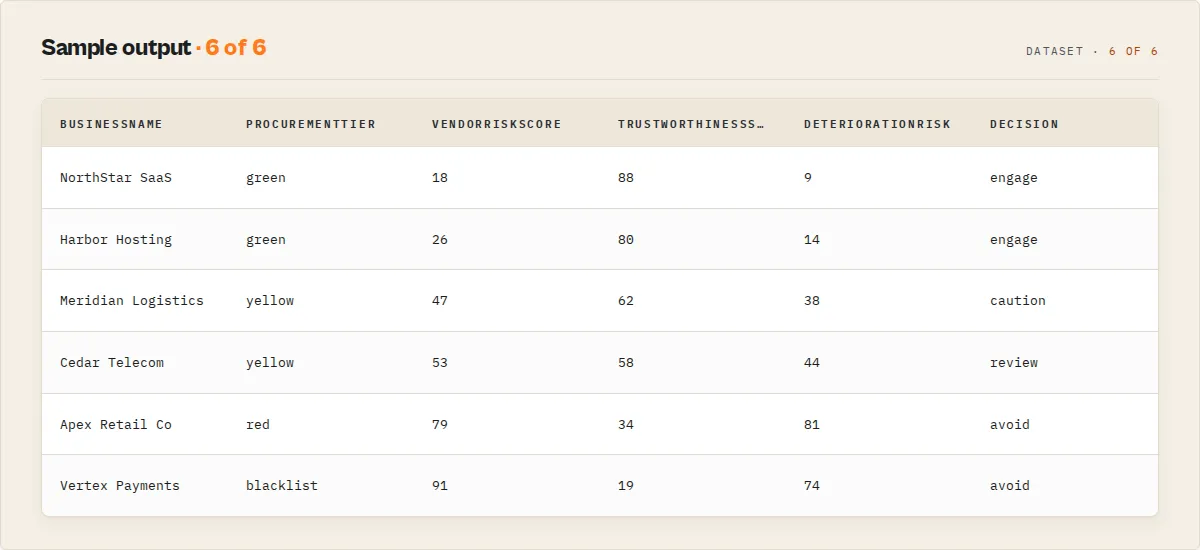
The dataset contains per-review records and one reputation-summary record. The full decision is also mirrored to the key-value store under SUMMARY.
Reputation summary record:
Per-review record:
Output fields
Summary (reputation decision) record
| Field | Description |
|---|---|
decision | Routing scalar: engage / review / caution / avoid / insufficient-data |
reputationScore | Composite 0-100 score (null if no reviews) |
reputationVerdict | excellent / strong / mixed / poor / critical |
recommendation | safe-to-engage / generally-positive / proceed-with-caution / due-diligence-required / avoid / insufficient-data |
decisionPackage | { decision, reason, nextAction, estimatedRisk } — the single object automation branches on |
dueDiligenceChecklist[] | Deterministic procurement checklist generated from the elevated risk categories |
vendorRiskScore | 0-100 composite vendor risk (higher = riskier); numeric backing of procurementTier |
procurementTier / procurementAction | green / yellow / red / blacklist / insufficient-data + plain-English next step |
investigationPriority | high / medium / low / insufficient-data |
deteriorationRisk / deteriorationLevel / deteriorationDrivers[] | 0-100 "are they getting worse?" composite + band + the {factor, impact} components that built it |
vendorRiskBreakdown | How vendorRiskScore was composed (weighted trust / reputation / deterioration + weights) |
trustGap | reputationScore − trustworthinessScore (liked-but-not-trusted signal) |
customerRecovery | Trustpilot response rate / negative-response rate / avgResponseDays / customerRecoveryScore |
vendorRiskProfile | Per-category levels: trustRisk / serviceRisk / billingRisk / fulfilmentRisk / qualityRisk |
complaintLifecycle[] | Per theme: emerging / growing / established / critical / declining |
trustworthinessScore / trustworthinessLevel / trustDrivers[] / trustFactors[] | Trust axis (0-100) with numeric {factor, impact} drivers and plain-English factors |
riskEvidence[] | Per risk flag: count, share, and example review snippets — explainable scoring |
emergingRisks[] | Complaint themes rising now but not historically prominent |
freshnessAdjustedScore / legacyScore / freshnessGap | Recency-weighted score vs all-time score; positive gap = recent reviews are worse |
riskLevel / riskFlags[] | Overall risk band and the specific flags that fired |
businessRisks[] | Exec-language risk categories (refund-billing-risk, service-risk, fulfilment-risk, trust-risk, quality-risk) |
reputationPillars | Per-pillar sub-scores + strongest/weakest + industry-priority + weak-priority pillars |
themeAcceleration[] / incident | Complaint themes spiking (last 30 vs prior 30 days) + detected incident |
reviewMomentum | Within-run review/negative flow + direction (rising-complaints / easing / steady) |
ratingDistribution | 1-5 star counts + polarizationScore |
authenticity | Manipulation-pattern signals + risk band (not a fake-review verdict) |
themeCorrelations[] | Complaint themes that co-occur (root-cause intel) |
executiveSummary | Ready-to-paste plain-English paragraph |
sentimentBreakdown | positive / neutral / negative counts + net sentiment |
complaintRate | Share of reviews that read as complaints (0-1) |
topComplaintThemes[] / topPraiseThemes[] | Most common themes with counts |
trustSignals | verifiedShare, recentShare, reviewVolume, platformsFound |
crossPlatform | Whether platforms agree, rating spread, note |
confidence | score, level, components, coldStart |
whyThisMatters / summary | Plain-English explanation and one-liner |
recommendedAction | actionId + label |
agentContract | Compact decision surface for agents/MCP |
warnings | Actionable warnings (e.g. a platform restricted automated access, or no reviews found) |
coverage | Requested vs found platforms, reviews scraped |
temporal | Reputation trend + stability score (only with a watchlist; trend is new and stability is null until the second/third run) |
Benchmark record (when competitors is set)
| Field | Description |
|---|---|
recordType | "benchmark" |
ranking[] | Each business with rank, reputationScore, decision, recommendation, percentileInCohort |
cohortAverage | Average reputation score across the supplied businesses (not an industry baseline) |
cohortLeader / cohortLaggard | Best and worst in the supplied cohort |
primaryRank / primaryPercentileInCohort | Where the primary business lands in the cohort |
portfolio | Risk-first rollup: highestRisk, fastestDeterioration, recommendedAudit[], safeToProceed[] |
note | States the ranking is relative to the supplied competitors, not an industry-wide baseline |
Review record
| Field | Description |
|---|---|
platform | trustpilot or bbb |
rating | Star rating (1-5) |
sentiment / sentimentScore | positive / neutral / negative, plus -1..1 score |
themes[] | Stable theme codes detected in the review |
isComplaint / isPraise | Complaint / praise flags |
severity | critical / high / medium for negative reviews |
isRecent / recencyDays | Whether within 90 days, and exact age |
reviewerName, title, body, date, verified | Raw review fields |
Pricing
Pay-per-event: $0.15 per business analysed, covering all platforms, all reviews, and the full reputation decision. You are charged once per business, only when an analysis is produced — never on an empty run.
Use in Dify
This actor returns a decision as structured JSON — decisionPackage, procurementTier, vendorRiskScore, and the enums your downstream node branches on. A raw review scraper pointed at the same business returns rows you still have to read; this returns the verdict and the next action.
Actor ID: ryanclinton/multi-review-scraper
Sample input (vendor screening):
Branching example — a Dify if/else node routing on the summary record's procurementTier:
procurementTier == "green"→ continue to onboardingprocurementTier == "yellow"→ assign thedueDiligenceChecklist[]to a reviewerprocurementTier == "red"→ escalate, withdecisionPackage.reasonas the alertprocurementTier == "blacklist"→ reject and notify
The dueDiligenceChecklist[], decisionPackage, and recommendedAction are usable verbatim — no LLM rewriting needed. Opt into watchlistName to let a scheduled Dify workflow act on the temporal.trend (improving / declining) signal, or pass competitors[] and branch on the benchmark record's portfolio.recommendedAudit[].
Combine with other Apify actors
| Actor | How to combine |
|---|---|
| Google Maps Email Extractor | Find businesses, then score their reputation here before outreach |
| Website Contact Scraper | Pull contacts after the reputation check passes |
| B2B Lead Qualifier | Use the reputation score as a trust signal in lead scoring |
| Website Tech Stack Detector | Add technology intelligence to the reputation profile |
| Bulk Email Verifier | Verify contacts before reaching out |
How it works (technical detail)
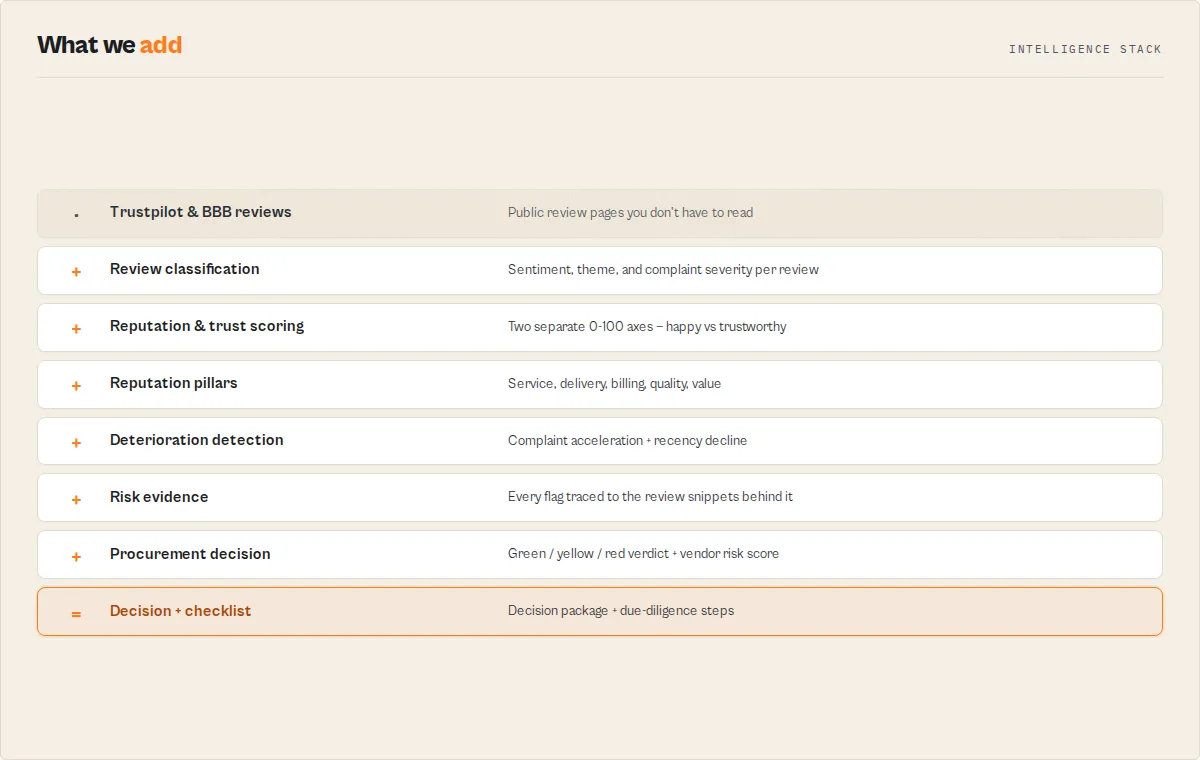
The actor loads each Trustpilot and BBB page in a real headless browser (Playwright + Chromium, residential proxy by default) for reliable extraction, then runs a deterministic intelligence layer over the reviews:
- Sentiment — per-review positive / neutral / negative + a -1..1 score, blending review text and star rating with negation handling.
- Themes — stable codes (
customer-service,delivery-shipping,product-quality,refund-returns,pricing-value,communication,billing-charges,reliability,ease-of-use,trust-scam,speed) from the review text. - Complaint severity — negative reviews tagged
critical/high/medium(scam, fraud, "never received", refund refused…). - Reputation score — composite of star ratings (60%) and sentiment (40%), penalised for scam and refund clusters.
- Trustworthiness score — a separate axis driven by scam/fraud language, billing disputes, and critical-severity complaints.
- Vendor risk score — analysis-type-weighted blend of (100 − trust), (100 − reputation), and deterioration;
procurementTieris its band. - Deterioration risk — recent-negative growth + complaint acceleration + trust gap + freshness decline.
Everything is deterministic and reproducible — no LLM, no randomness. The tradeoff: lexicon-based sentiment won't catch sarcasm the way a language model would, in exchange for zero per-call AI cost and identical output every run.
Responsible use
- Only accesses publicly visible review pages on Trustpilot and BBB.
- Respects each platform's terms of service and rate limits.
- Do not use scraped reviews to create fake testimonials, defame businesses, or manipulate ratings.
- Comply with applicable data protection laws when processing reviewer names and review content.
- For scraping legality, see Apify's guide.
FAQ
How is the reputation score calculated? It is a deterministic composite of star ratings (60%) and review sentiment (40%), penalised for scam complaints and refund clusters, then banded into a verdict. The same reviews always produce the same score — no LLM, no randomness.
What if a business isn't found on a platform?
The run still completes. The platform's summary shows found: false, and the decision is computed from whatever platforms returned data. With fewer than three reviews, the recommendation is insufficient-data.
Does it charge if no reviews are found? No. The actor only charges when an analysis is produced (at least one platform found or one review scraped).
How do I track reputation over time?
Set a watchlistName and schedule the actor. Each run stores the reputation score under that watchlist and the next run reports the temporal.trend (improving / declining / stable). On the first run for a new watchlist name there is no prior snapshot, so temporal.trend is new and the deltas are null — the trend becomes meaningful from the second run onward.
Why does it render pages in a browser?
It loads each Trustpilot and BBB page in a real headless browser through a residential proxy, which is what makes review extraction reliable. In the rare case a platform doesn't return data, that platform's summary shows status: "blocked" and the decision is computed from whatever did come back.
Is the score a lifetime average?
No. It scores the sample of reviews it scrapes (default review order, most-recent/relevant first, up to maxReviewsPerPlatform). For a polarized business this recent sample can run hotter or colder than the all-time star average — that's the point of freshnessAdjustedScore and deteriorationRisk. Increase maxReviewsPerPlatform for a broader sample.
Can I get just the decision without the reviews?
Set outputProfile to minimal for decision fields only.
How many reviews can I get from Trustpilot?
Up to 100 per run (configurable via maxReviewsPerPlatform).
What this does NOT do
- Not a live API feed — it reads publicly visible review pages on a per-run basis, not a real-time reputation stream.
- Two platforms — Trustpilot and BBB. Google Reviews, Yelp, G2, and Capterra are out of scope (use a dedicated actor for those).
- Not LLM sentiment — sentiment and themes are deterministic keyword/lexicon classification, not a language model. Fast, reproducible, and free of per-call AI cost, but it won't catch sarcasm or nuanced context the way an LLM would.
- Not a replacement for enterprise reputation suites (Reputation.com, Birdeye) — it gives you a deterministic, decision-ready reputation read at a fraction of the cost, not a full review-response/CRM platform.
- Customer recovery is Trustpilot-only — company responses are read from Trustpilot, which exposes them; BBB does not, so
customerRecoveryis based on the Trustpilot reviews in the run. - Deterioration / momentum / freshness need review dates — when reviews are undated or all from the same window, those fields return
nullrather than a guessed value. - One business per run (plus competitors for benchmarking) — for many independent businesses, run via the API or schedule per business.
Support
Found a bug or have a feature request? Open an issue in the Issues tab on this actor's page.


