

Pageframe – Website Screenshot & PDF Generator
Pricing
from $1.50 / 1,000 page captureds
Pageframe – Website Screenshot & PDF Generator
Turn any URL into a crisp PNG/JPEG screenshot or a print-ready PDF. Full-page capture, custom viewports, retina scaling, cookie-banner auto-dismiss. Pay only for pages that actually capture.
Pricing
from $1.50 / 1,000 page captureds
Rating
0.0
(0)
Developer

Siftwright
Maintained by CommunityActor stats
0
Bookmarked
2
Total users
1
Monthly active users
5 hours ago
Last modified
Categories
Share
Turn any URL into a crisp screenshot (PNG/JPEG) or a print-ready PDF in one call. Full-page capture, custom viewports, retina/HiDPI scaling, and best-effort automatic cookie-banner dismissal so your images aren't covered by consent popups.
Price: $0.0015 per successful capture. Failed pages (timeouts, 4xx/5xx, DNS errors) are never charged.
Why choose Pageframe
| Pageframe | |
|---|---|
| 💵 Price | $1.50 per 1,000 captures, no monthly rental |
| 🛡️ Pay only for success | Timeouts, DNS errors and 4xx/5xx pages cost $0 |
| 🍪 Clean shots | Cookie & consent banners dismissed automatically before capture |
| 📄 Screenshots and PDFs | PNG, JPEG or print-ready PDF (A4, A3, Letter, Legal) |
| 🔍 Retina quality | 2x / 3x device scale for crisp images on any screen |
| ⚙️ Real browser | Chromium renders React, Vue & Next.js pages correctly |
| 🤖 AI-agent ready | Callable from Claude, ChatGPT & Cursor through Apify's MCP server |
What you can use it for
- 🖼️ Visual monitoring – track how competitor or client pages look over time.
- 📄 PDF generation – invoices, reports, articles or landing pages as clean PDFs.
- 🔗 Link previews & thumbnails – generate real preview images for a directory or dashboard.
- 🧪 QA & regression testing – capture pages before/after a deploy.
- 📚 Archiving – keep a visual record of a page as it existed on a given date.
Features
- ✅ PNG, JPEG or PDF output, chosen per run
- ✅ Full-page or viewport-only capture
- ✅ Custom viewport size and device scale factor (2x/3x for retina)
- ✅ PDF page size control (A4, A3, Letter, Legal)
- ✅ Best-effort cookie-banner auto-dismiss (OneTrust, Cookiebot, common "Accept all" buttons)
- ✅ Optional wait-for-selector and extra delay for slow/animated pages
- ✅ Failed captures are never charged
- ✅ Runs on a real Chromium browser (Playwright) — renders JS-heavy pages correctly
How to use
- Click Try for free.
- Paste one or more URLs into URLs to capture.
- Pick a format (png / jpeg / pdf) and adjust viewport / scale if you want retina output.
- Click Start and open the Output tab — each row links directly to the image or PDF file.
Input example
| Field | Description |
|---|---|
urls | One or more page URLs to capture |
format | png, jpeg or pdf |
fullPage | Capture the whole scrollable page (image formats only) |
viewportWidth / viewportHeight | Browser viewport size in pixels |
deviceScaleFactor | 1 (default), 2 or 3 for retina/HiDPI |
pdfPageFormat | A4, A3, Letter or Legal (PDF only) |
blockCookieBanners | Best-effort auto-click common cookie "Accept" buttons first |
waitForSelector | CSS selector to wait for before capturing |
delaySec | Extra fixed wait (seconds) before capturing |
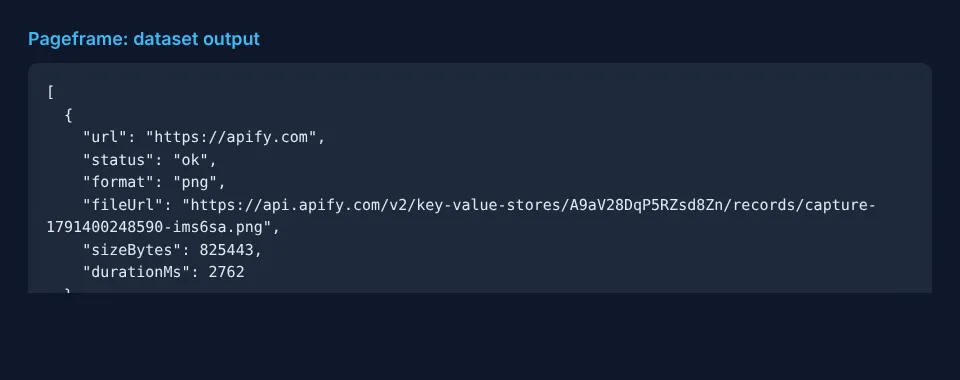
Output example
Failed pages are returned with "status": "error" and an error message, and are never charged.
Pricing
Pay-per-event: $0.0015 per successfully captured page (image or PDF). No monthly rental, no charge for failed pages. Apify's free plan gives you monthly credits so you can try it for free.
Quick start in Python
Use it via API
Works with Python and JavaScript API clients, Make, Zapier and n8n. AI agents (Claude, ChatGPT, Cursor) can call it directly through Apify's MCP server.
FAQ
Does it work on JavaScript-heavy sites? Yes — it renders with a real Chromium browser (Playwright), so React/Vue/Next.js pages capture correctly, not just static HTML.
Can I get a transparent background or a specific element only? Not in v1 — this version captures the full page or viewport. Element-only capture and transparent backgrounds are on the roadmap.
Why wasn't I charged for a page? Timeouts, DNS failures and HTTP 4xx/5xx responses are never charged — you only pay for a page that actually rendered and was captured.
Something broke or you need a feature? Open an issue on the Issues tab — we respond fast.


