

BuiltWith Scraper | Tech Stacks and Top Sites
Pricing
from $1.36 / 1,000 websites
BuiltWith Scraper | Tech Stacks and Top Sites
BuiltWith scraper for technology stacks and Top Sites rankings. Get every technology detected on any website with category, tags, rank and AI Index, or list the top sites of 40 countries with company name, tech spend, sales revenue and traffic. Build technographic lead lists, no API key needed.
Pricing
from $1.36 / 1,000 websites
Rating
0.0
(0)
Developer

SilentFlow
Maintained by CommunityActor stats
0
Bookmarked
3
Total users
3
Monthly active users
a month ago
Last modified
Categories
Share
BuiltWith Scraper
Turn BuiltWith into a table: the full technology stack of any list of websites, every technology a keyword matches with its adoption counts, or the ranked Top Sites of a country with company name, tech spend and traffic, one row per result. 100 top sites with their companies in a few seconds, 361 technologies for shopify.com in one page, 50 technology matches for one keyword.
How it works
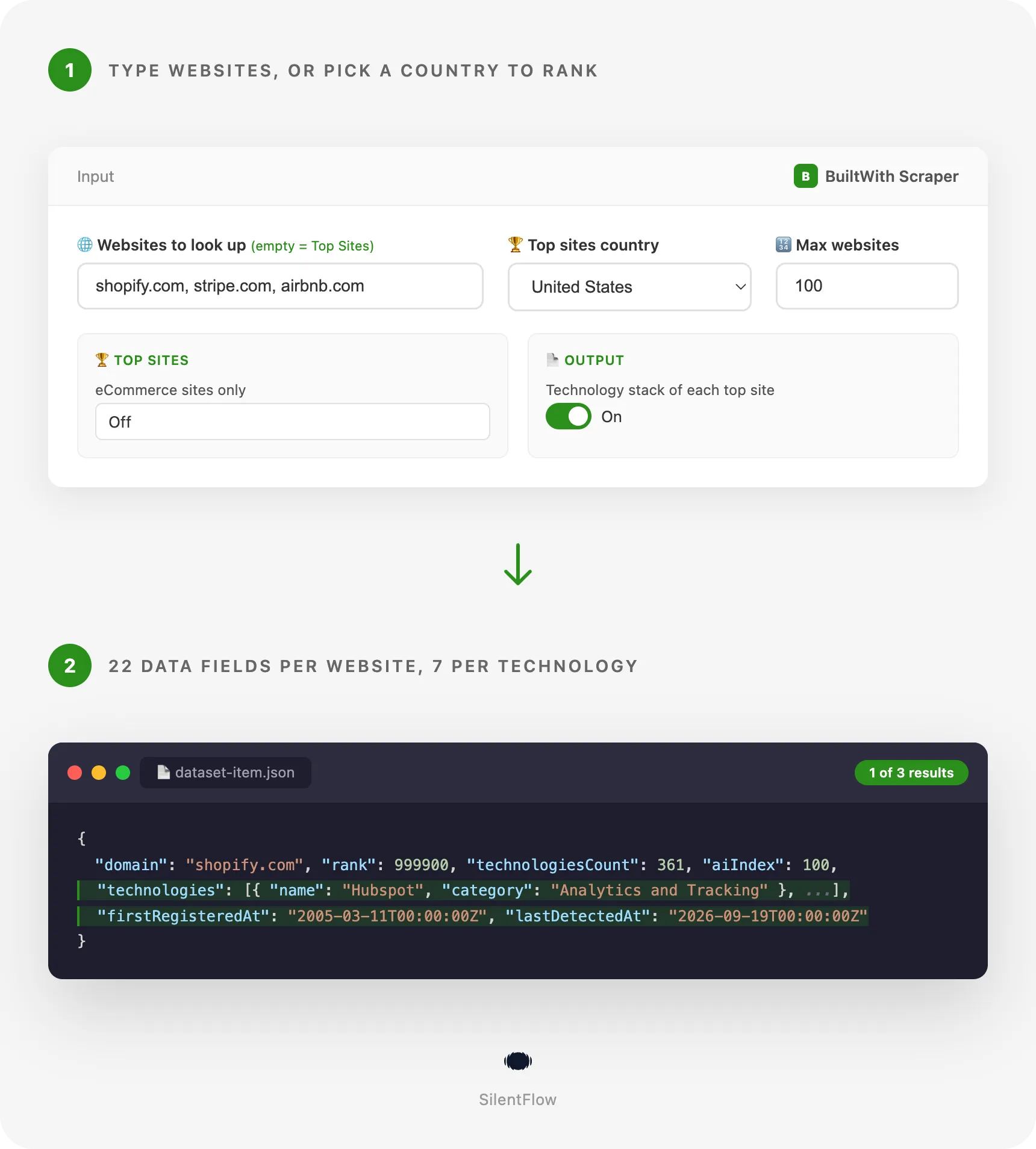
- You type websites, keywords, or pick a country. Paste domains one per line (
shopify.com,https://www.stripe.com/) to get their technology profiles, and type technologies in the keyword list (shopify,google analytics,next.js) to search BuiltWith's technology catalogue. Leave both lists empty and pick a country to walk BuiltWith's Top Sites ranking instead, all sites or online stores only. - Each entry is read once. A profile gives every technology BuiltWith detects on the site with its category, tags and description, plus the BuiltWith rank, the AI Index and the site age. A keyword gives the technologies BuiltWith matches it with, each with how many live websites use it and how many have dropped it. A ranking page gives 100 sites with rank, company, country, monthly tech spend, sales revenue, social reach and traffic tier.
- One row comes back per website, technology match or ranked site. 28 fields, the same shape in every mode, with 7 fields per technology. Ready for a CRM import, a spreadsheet, a warehouse or an AI pipeline.
✨ Why teams choose this over other BuiltWith scrapers
Looking up prospects one by one on builtwith.com? Copying the Top Sites pages into a sheet by hand? Cleaning "Upgrade to Advanced" placeholders and text ranges like "1K to 5K" out of another scraper's output?
- 🧩 Every technology, named and categorised. A profile row lists each technology BuiltWith shows on the public page (361 for shopify.com, in 26 categories) with its category, tags, description, link and icon. No placeholder rows, no nested trees: one flat list you can filter with a single expression.
- 🏆 The Top Sites ranking as data. Pick one of 40 countries or the Global list, choose all sites or online stores only, and get the ranking 100 rows per page, up to 2,000 rows per list, with the company name on each row. The most used BuiltWith actors on the Store cannot read this list at all.
- 💵 Numbers you can sort. Tech spend, sales revenue, social reach and employees are integers in USD or units, never "1K to 5K". Dates are RFC 3339. Unknown values are
null, never empty strings. - 🏢 Company on every ranked site. Company name and a registration id such as an SEC CIK where BuiltWith has one, without an extra tab or a second actor.
- 🤖 AI readiness and site age on every profile. The AI Index (0 to 100), the registration date and the date of the last technology detection sit on the row, next to the BuiltWith rank.
- 🔀 Three jobs, one form. Profile the websites you name, search a keyword and get every technology that matches it with its adoption counts, or rank a market. Turn on one switch and every ranked site also carries its full technology stack.
- 🔓 No account, no API key. Click Start on the prefilled form and the first 100 rows arrive in seconds.
🎯 What you can do with BuiltWith data
| Team | What they build |
|---|---|
| Sales and SDR | A prospect list enriched with the tools each website runs, to pitch the accounts on a competitor's stack or on a stack their product integrates with |
| Growth and marketing | The 2,000 biggest online stores of a country with revenue and spend estimates, as the seed of an outbound campaign |
| RevOps and data | A technographic column set in the CRM, refreshed monthly by a scheduled run over the account domains |
| Competitive intelligence | A monthly snapshot of competitors' stacks: which analytics, CRM, payment or CDN vendor they add or drop |
| Market research | Adoption of a technology among the top sites of ten countries, computed from the technologies column, or straight from a keyword's live counts across every match |
| Investors and analysts | The infrastructure and AI readiness of a target and its peers before a call |
| Agencies | A list of high-spend websites in a market that still run an outdated platform, for migration offers |
| Security and compliance | The third-party scripts, hosts and vendors present on a portfolio of company websites |
📥 Input parameters
Type websites, keywords, or pick a country. The form works as prefilled: the Top Sites of the United States, 100 rows.
| Parameter | Type | Default | What it does |
|---|---|---|---|
domains | array | none | Websites to profile, one per line. A domain (shopify.com) or a full address (https://www.stripe.com/) both work. When this list has at least one entry, the Top Sites options are ignored. |
keywords | array | none | Technologies to search for, one per line: shopify, google analytics, next.js. Each keyword returns up to 50 matching technologies, one row each, with its category, tags, description and adoption counts. Works on its own or together with the website list (websites are profiled first). When this list has at least one entry, the Top Sites options are ignored. |
topSitesCountry | select | United-States | Used when both lists are empty: the Top Sites ranking to walk. Global or one of 40 countries. |
maxItems | integer | 100 | Rows to save. With websites, the first N of the list. With keywords, up to 50 technology matches per keyword until N rows. With Top Sites, the ranking in order until N rows: 100 is one page, 2000 is a whole list. |
🏆 Top sites
| Parameter | Type | Default | What it does |
|---|---|---|---|
ecommerceOnly | boolean | false | Only the online stores of the ranking, each with its estimated monthly sales revenue. |
📄 Output
| Parameter | Type | Default | What it does |
|---|---|---|---|
includeTechnologies | boolean | false | Read the technology profile of every ranked site: full technology list, categories, AI Index and site age on each row. Profiles are read about ten seconds apart, so 100 sites take around 20 minutes. Websites you name always include their technologies. |
⚙️ Advanced
| Parameter | Type | Default | What it does |
|---|---|---|---|
debugMode | boolean | false | Detailed run log. Leave off. |
📊 Output data
One row per website, technology match or ranked site. All three modes share the same 28 fields; a field the source does not give is null.
A ranked site (Top Sites mode):
A technology profile (website list mode, technologies shortened):
With includeTechnologies on, a ranked site carries both halves: the ranking columns and the technologies list.
A keyword match (keyword shopify, first of 50):
🗂️ Data fields
28 fields per row. technologies holds 7 fields per entry.
| Group | Field | Type | Description |
|---|---|---|---|
| Identity | id | string | The domain, or the technology's BuiltWith identifier on keyword rows, stable across runs |
| Identity | url | string | The BuiltWith profile page of the site, or the technology's trends page, permanent |
| Identity | domain | string | Root domain as BuiltWith keys it, empty on keyword rows |
| Identity | companyName | string or null | Company behind the site (Top Sites rows) |
| Identity | companyId | string or null | Registration id BuiltWith links, such as SEC CIK 1837686 |
| Content | technologies | array or null | One entry per detected technology, see below |
| Content | technologiesCount | integer or null | Number of technologies on the profile |
| Content | techCategories | array or null | Distinct categories, in page order |
| Measures | rank | integer or null | Position in BuiltWith Top Sites |
| Measures | techSpend | integer or null | Estimated monthly technology spend, USD, lower bound |
| Measures | salesRevenue | integer or null | Estimated monthly sales revenue, USD, online stores only |
| Measures | socialFollowers | integer or null | Combined social media followers, lower bound |
| Measures | employees | integer or null | Approximate employee count when BuiltWith shows one |
| Measures | traffic | string or null | Traffic tier: Very High, High, Medium, Low |
| Measures | aiIndex | integer or null | BuiltWith AI Index, 0 to 100 |
| Measures | totalLiveSites | integer or null | Websites currently using a keyword-matched technology |
| Measures | countryLiveSites | integer or null | Websites in countryLiveCountry currently using it |
| Measures | liveAndExpiredSites | integer or null | All-time websites that ever used it |
| Measures | expiredSites | integer or null | Websites that have dropped it |
| Place and time | country | string or null | Country of the site |
| Place and time | countryLiveCountry | string or null | Country of countryLiveSites, the list BuiltWith served the match from |
| Place and time | firstRegisteredAt | string or null | Domain registration date, RFC 3339 |
| Place and time | lastDetectedAt | string or null | Date of the last technology detection, RFC 3339 |
| Media | faviconUrl | string or null | Site icon served by BuiltWith |
| Meta | dataType | string | profile, topSite or technology |
| Meta | keyword | string or null | The keyword a technology row matched |
| Meta | isLiveLookup | boolean | True when BuiltWith had no cached profile and scanned the site on the spot: a shorter technology list, no rank, AI Index or dates |
| Meta | scrapedAt | string | When the row was read, RFC 3339 UTC |
Each entry of technologies:
| Field | Type | Description |
|---|---|---|
name | string | Technology name as BuiltWith spells it |
category | string | BuiltWith category card: Analytics and Tracking, Widgets, eCommerce, Frameworks, Payment, Web Hosting Providers, ... |
tags | array or null | Sub-category badges, hidden "show more" ones included |
description | string or null | BuiltWith's one-line description |
link | string or null | Trends page of the technology |
iconUrl | string or null | Technology icon |
isSubTechnology | boolean | True when BuiltWith indents it under the previous entry |
url and link are permanent addresses. iconUrl and faviconUrl are served by BuiltWith's image CDN and have stayed valid for months in our tests.
🚀 Examples
Rank the top 100 sites of the United States
The prefilled form. One ranking page, company names included.
Get the technology stack of your prospects
One row per domain with every technology, the rank, the AI Index and the site age.
List the 500 biggest online stores of France with their revenue
Five ranking pages, salesRevenue filled on every row.
Build a technographic dataset of Germany's top 200 sites
Every ranked site with its full technology list. About 200 profile pages, read ten seconds apart: allow 40 minutes.
Export a whole country list
The complete ranking of a list, 2,000 rows.
Find which of your accounts run HubSpot
Profile the account domains, then filter the technologies column on name in your sheet or notebook.
Measure a technology's adoption in one search
Every technology BuiltWith matches a keyword with, each carrying how many live websites use it, how many use it in the country, and how many have dropped it. One row per match, 50 matches for shopify.
🤖 Copy to your AI assistant
Paste this block into Claude, ChatGPT or Cursor to give it full context about this scraper:
💻 Integrations
Enrich a CRM account list with technographics (Python)
Build a lead list of high-spend online stores (JavaScript)
Measure a technology's share of a market (Python, CSV out)
Refresh a technographic sheet every month (Apify CLI)
Schedule the same input from the Apify Console and connect the Google Sheets integration to the run's dataset.
📈 Performance
Measured on 20 September 2026 on the live site.
| Run | Rows | Time |
|---|---|---|
| Top Sites, United States, 100 rows (the default input) | 100 | about 10 seconds |
| Top Sites, France, online stores only, 200 rows | 200 | about 20 seconds |
| 5 website profiles | 5 | about 2 minutes |
| Top Sites with technologies, 25 rows | 25 | about 5 minutes |
| Metric | Value |
|---|---|
| Fields per row | 28, plus 7 per technology |
| Sites per ranking page | 100 |
| Technologies on a large profile | several hundred (361 for shopify.com) |
| Depth of a Top Sites list | 20 pages, 2,000 rows |
| Limit per run | no fixed limit: maxItems is yours to set |
💾 Data export
Every run stores its rows in a dataset you can download as JSON, CSV, Excel, XML or HTML from the Storage tab, or pull from the API:
The dataset has three ready-made table views: Websites (website, company, country, rank, tech spend, social reach, traffic, technologies, profile link), Technology profiles (website, technologies count, categories, AI Index, rank, registered, last detection, profile link) and Keyword matches (keyword, live websites, live in country, all-time websites, dropped, category, technology link). Schedules, webhooks and the Apify integrations (Google Sheets, Slack, Zapier, Make, n8n) work on top of the same dataset. In CSV and Excel the technologies list is flattened into columns; keep JSON when you need the nested list as is.
💡 Tips for best results
- Use root domains. BuiltWith keys profiles on the registrable domain:
shopify.com, nothelp.shopify.com. Full addresses are reduced to the domain for you. - Start from the ranking, then profile. Walk a country list first, pick the rows you care about, and run a second job with those domains. It is faster than turning
includeTechnologieson for a whole list. - Filter on
techCategoriesbeforetechnologies. The category list is short and tells you in one look whether a site has an eCommerce platform, a CRM or a payment provider. - Read
technologiesCountto judge a profile. A site with fewer than ten technologies is often a parked or redirecting domain. - Keep
maxItemsa multiple of 100 for Top Sites. Each page is 100 rows; asking for 250 reads three pages and keeps 250. - Schedule monthly, not daily. BuiltWith's rankings and profiles move slowly; a monthly run catches vendor changes without re-reading the same rows.
- Give profile runs time. Profiles are read about ten seconds apart on purpose, and a profile BuiltWith is still preparing is asked again half a minute later. A list of 100 domains is a 20-minute run, not a 20-second one.
- Search a keyword to size a technology. One keyword like
shopifyorcrmreturns every technology BuiltWith matches it with and its live counts, in one page.totalLiveSitesagainstexpiredSitestells you at a glance whether a technology is gaining or losing ground.
❓ FAQ
What exactly does the scraper read? BuiltWith's public Technology Profile page of a domain (every technology listed, rank, AI Index, site age), the public search results page of a keyword (every technology match with its adoption counts) and the public Top Sites ranking pages (rank, company, country, spend, revenue, social reach, employees, traffic).
Do I need a BuiltWith account or API key? No. Every page it reads is public. Nothing to sign up for and nothing to paste.
Is the technology list complete? It contains every technology BuiltWith names on the public profile, with the count on the row. First and last detection dates per technology, and technologies removed over time, sit behind BuiltWith's paid plans and are not part of the output.
What does rank mean?
The position in BuiltWith Top Sites, a ranking BuiltWith computes from site age and technology spend, not from traffic. A profile row shows the site's position in the whole ranking; a Top Sites row shows its position in the list you asked for.
What is techSpend?
BuiltWith's estimate of the monthly cost of the paid technologies found on the site, in USD, as a lower bound. The Top Sites pages show 10,000 for every site in their first pages; the exact figure appears on the paid tabs of the site.
Which countries are available? Global and 40 countries: United States, United Kingdom, Canada, Australia, New Zealand, Germany, France, Netherlands, Italy, Spain, Mexico, India, Japan, Switzerland, China, Russia, Sweden, Norway, Brazil, Indonesia, Turkey, Saudi Arabia, Argentina, Poland, Belgium, Thailand, Austria, Israel, Hong Kong, Denmark, Singapore, Malaysia, South Korea, Philippines, Pakistan, Chile, Finland, Vietnam, Czech Republic and Romania.
How many rows can a Top Sites list give? 20 pages of 100, so 2,000 rows per list. All sites and online stores are two different lists, so a country gives up to 4,000 distinct rows.
Can I profile thousands of domains?
Yes. Domains are read in order until maxItems, duplicates are skipped, and a domain BuiltWith does not know yields no row and a note in the run log. Very large lists take longer; split them across scheduled runs if you want fresh rows every day.
Why is companyName null on some ranked sites?
BuiltWith has no company on file for that domain. The field is null rather than an empty string so your filters stay honest.
Why are technologies null on my Top Sites rows?
The ranking pages do not list technologies. Turn includeTechnologies on to read each site's profile, or run the domains you care about through the website list.
Can I search by technology instead of by website?
Yes. Type technologies in the keywords field, one per line: shopify, google analytics, hubspot, or names with a dot like next.js. Each keyword returns the technologies BuiltWith matches it with, up to 50, one row each, with its category, tags, description, how many live websites use it today, how many used it at some point, how many have dropped it and how many use it in the country your run is served from. A keyword takes a few seconds. You can fill both domains and keywords in the same run: the websites are profiled first, then the keywords are searched. The website list keeps reading websites only, so a saved task that profiles domains runs exactly as before.
What is a live lookup?
When BuiltWith has no cached profile for a domain it scans the site on the spot and answers with what it finds: a shorter technology list and no rank, AI Index or dates. The row is flagged isLiveLookup: true so you can tell it from a full profile. Run the domain again a few days later to get the full profile once BuiltWith has built it.
Why did a profile run take longer than expected? Profiles are read about ten seconds apart, and a profile BuiltWith is still preparing is asked again half a minute later, up to three times. The run log says which domains are waiting. Domains BuiltWith kept behind its human test after three rounds get no row and a note in the log; run them again later.
How fresh is the data?
Live: every run reads the pages at run time, no cache. lastDetectedAt tells you when BuiltWith last saw a technology on the site.
What happens when a run ends without rows? The run finishes with a status message that says why: unknown domains, an empty list, or a source that did not answer. No error rows are written to the dataset.
⚖️ Legal
This Actor extracts publicly available data from builtwith.com. It does not bypass any login, paywall or CAPTCHA. Users are responsible for complying with BuiltWith's terms of use and applicable data protection laws (GDPR, CCPA, and PIPL where relevant). The output describes companies and websites, not individuals; where a company name or registration id appears, handle it as business data. The data returned is informational; verify accuracy for regulated use cases.
🔗 Related scrapers
- Website Tech Stack Scraper: detect the technologies of any website live, from the page itself.
- Domain Enricher: company data behind a list of domains.
- Storeleads Scraper: online stores by platform with sales estimates.
- Company Data Scraper: firmographics for a list of companies.
📬 Support
Need something this scraper doesn't do yet? We ship features fast.
- Feature requests go straight to our backlog
- Enterprise needs? We do custom integrations and high-volume plans
- Pricing questions? Check the Monetization tab on the actor page
Response time: usually under 24 hours.
Check out our other scrapers: silentflow on Apify


