

Company Data Scraper | Emails, Phones and Tech Stack
Pricing
from $2.04 / 1,000 companies
Company Data Scraper | Emails, Phones and Tech Stack
Company Data Scraper turns any domain list into structured company records: legal name, postal address, emails, phones, LinkedIn and 14 other social links, registration numbers, tech stack, and domain infrastructure. Built for sales prospecting, lead enrichment, KYC checks, and B2B research.
Pricing
from $2.04 / 1,000 companies
Rating
0.0
(0)
Developer

SilentFlow
Maintained by CommunityActor stats
0
Bookmarked
2
Total users
1
Monthly active users
16 days ago
Last modified
Categories
Share
Company Data Scraper
Turn a list of domains into complete company records: identity, contacts, postal address, legal registration, technology stack and domain infrastructure, one row per company. 30 domains resolved in 7 minutes 29 seconds across France, Germany, the UK, the US, Spain and Italy.
How it works
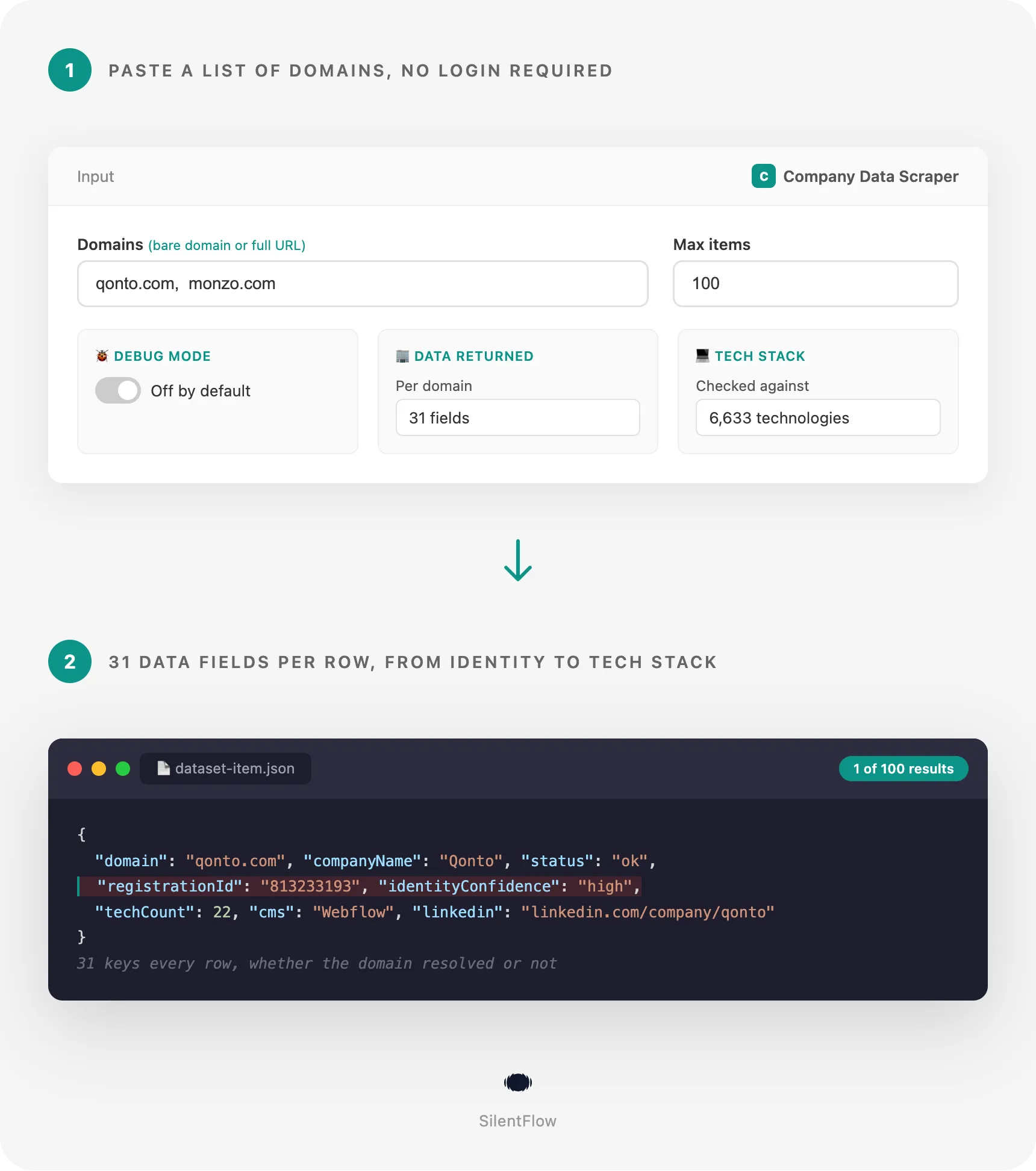
- You submit a list of domains or website URLs. A bare domain and a full URL both work, the domain is extracted automatically, and duplicates in the list are combined into a single row.
- Each domain is read for the pages that actually carry company data. The homepage, plus the handful of pages a real visitor would open: about, contact, legal notice, pricing. The structured data a company already publishes about itself is parsed straight from those pages, rather than the scraper guessing what to look for.
- One consolidated row comes back per domain. Company identity, contacts, postal address, legal registration, 15 social profiles, a detected technology stack and domain infrastructure, all in the same record, with a status field explaining what happened on the domains that could not be fully resolved.
✨ Why teams choose this over other company data scrapers
Tired of a contact scraper that hands you an email address and calls it a day? Sick of stitching four separate tools together just to confirm a company is even real? Done paying twice for the same domain because the output arrives one row per page and you dedupe it yourself?
- 🏢 Get the company, not just its inbox. Name, legal name, description, logo, founding year, industry code and headcount band all come back in the same row as the contacts, not behind a separate lookup.
- 📮 A postal address, not a city guess. Street, postal code, region, country and country code, pulled from the pages that actually carry them.
- 🧾 A legal registration number you can trust. Checksum-validated offline and checked against public registries where they exist, with the exact page it was found on attached. If a number does not validate, the row says so instead of asserting it.
- 💻 A technology stack in the same row as the contacts. Checked against 6,633 known technologies and returned with a confidence score for each match.
- 🌐 Domain infrastructure done properly. Normalized registration dates on every TLD, a derived email and DNS provider instead of raw records to parse yourself, an email security read, and the sibling domains a certificate reveals.
- 🔗 One row per company, joinable on what you sent. The exact string you submitted comes back untouched as
inputUrl, so the output snaps straight onto your source list without a join key you have to invent. - ✅ Every input gets a row. A domain that is dead, parked, or refuses to answer still produces a row, with a status explaining which, so your list stays complete and an empty cell is never ambiguous.
- 🔍 Every fact carries where it came from. Every contact and every identifier includes the URL it was found on, so anything can be checked by hand in one click.
- 🔓 No account, no API key, nothing to install. Point it at a domain list and run it.
🎯 What you can do with company data
| Team | What they build |
|---|---|
| Sales ops | Turn an exported prospect list into CRM-ready rows with legal name, postal address and headcount band, no manual dedup across pages |
| RevOps / data teams | Segment a market by technology, email provider, company age or headcount band before a campaign goes out |
| Compliance / procurement | Confirm a supplier or partner is a registered, active legal entity, with the registry source attached for the file |
| Automation builders | Wire a fixed 31-key schema into n8n, Make or Zapier once, and stop re-mapping the workflow every time a run comes back different |
| Growth teams | Enrich inbound signups by the domain they signed up with, and route the lead by headcount or industry code |
| Market researchers | Build a territory list from a conference exhibitor roster, ranked by employee range and industry |
| Agencies | Turn a client's competitor list into a side-by-side sheet: technology stack, social presence, and domain age, in one table |
📥 Input parameters
| Parameter | Type | Default | Description |
|---|---|---|---|
domains | array of strings, required | - | Domains or website URLs to look up, for example stripe.com or https://www.qonto.com/pricing. The domain is extracted automatically. |
maxItems | integer | 100 | Maximum number of company rows this run returns (1 to 10,000). |
debugMode | boolean | false | Turns on detailed logs, useful when investigating a specific run. |
📊 Output data
A resolved domain
This example trims the technologies list for readability, and leaves out the certificate issuer and validity fields that also live inside domainInfo. See Data fields below for the full, exact count.
A domain that could not be reached
Every key is still present. Nothing is missing from the shape, only from the values, and status says exactly why.
🗂️ Data fields
Every row carries the same 31 top-level keys, whether the domain resolved or not. Fourteen of them are flat columns built for the table view and CSV export: companyName, email, phone, city, country, registrationId, linkedin, employeeRange, industry, techCount, cms, emailProvider, domainAge, identityConfidence. The remaining top-level keys are row metadata (inputUrl, domain, finalUrl, httpStatus, status, isLive, redirectChain, language, scrapedAt) and eight nested blocks:
| Block | Fields | What is inside |
|---|---|---|
company | 9 | name, legal name, description, tagline, logo, founding year, industry code, headcount band, source URL |
contacts | 3 | emails[] (4 fields each: address, role flag, mail-server validity, source URL), phones[] (4 fields each: raw text, E.164 format, country, source URL), contact page URL |
address | 9 | raw text, street, postal code, city, region, country, country code, confidence, source URL |
registration | 8 | ids[] (6 fields each: type, value, whether the type can be checked at all, checksum validity, registry confirmation, source URL), legal name, status, incorporation date, industry classification code, officers[] (2 fields each: name, role), identity confidence, an attribution-uncertain flag |
social | 15 | one profile URL field per platform: LinkedIn, X/Twitter, Facebook, Instagram, YouTube, TikTok, GitHub, Pinterest, Threads, Telegram, WhatsApp, Discord, Reddit, Snapchat, Medium |
tech | 8 | technology count, technologies[] (4 fields each: name, categories, version, confidence score), a category summary, detected CMS, ecommerce platform, CDN, framework, analytics tools |
domainInfo | 16 | registrar, created date, expiry date, age in days, nameservers, IP addresses, MX records, derived email provider, derived DNS provider, SPF record, DMARC policy, DKIM presence, certificate issuer, certificate issued date, certificate expiry date, and the sibling domains found in the certificate |
meta | 3 | pages read, an internal note on how the domain answered, and any warnings raised during the run |
status is one of ok, partial, blocked, unreachable, or parked. blocked means the server answered and declined to serve the page; unreachable means the domain could not be read at all, whether nothing answered or the answer was a server error. identityConfidence is one of high, medium, low, or none, and it is the field to filter on: a high-confidence company can still have an empty registrationId if the site never published one. The technology engine behind tech carries 6,633 technologies.
inputUrl is preserved exactly as submitted, so it is the join key back to your source list even when domain has been normalized. registrationId in the flat column carries an identifier when it passed a checksum, or when its type has no checksum to pass and exactly one candidate was found on the site. Everything else stays in registration.ids with the page it came from: a number that failed its checksum, one of several same-type candidates where the row cannot say which is the company's, and any number a registry attributes to a different company, which also sets registration.attributionUncertain. So a flat cell you can trust never shares space with one you cannot. Timestamps (scrapedAt, domainInfo.createdAt, domainInfo.expiresAt) are RFC 3339.
🚀 Examples
Look up a single company
Enrich a list of fintech competitors
Cap a large exported list to a first batch
Mix bare domains and full URLs from a bookmarks export
Investigate a run with unexpected statuses
🤖 Copy to your AI assistant
Paste this block into Claude, ChatGPT, or Cursor to give it full context about this scraper:
💻 Integrations
Build a segmented lead list (Python)
Flag suppliers with no validated registration number (JavaScript)
Export a spreadsheet-ready CSV (Python)
📈 Performance
Measured on the actor's own end-to-end run, 30 domains across France, Germany, the UK, the US, Spain and Italy:
| Metric | Value |
|---|---|
| Domains resolved | 93% |
| Company name returned | 100% of resolved domains |
| Technology stack detected | 100% of resolved domains |
| Run time | 30 domains in 7 minutes 29 seconds |
| Pages read per domain | About 5 |
💾 Data export
Results are available in:
- JSON (full nested structure, best for pipelines and AI ingestion)
- CSV (the 14 flat columns plus row metadata, nested arrays flattened)
- Excel (.xlsx, native formatting)
- JSONL (for streaming consumers)
Download from the Apify console, or pull programmatically from the dataset API:
💡 Tips for best results
- Submit bare domains when you have them.
qonto.comresolves the same ashttps://www.qonto.com/pricing, a bare domain just skips a parsing step. - Start with a small
maxItemsto confirm the fields you actually need are populated before scaling a run up to your full list. - Filter on
identityConfidence, not on whetherregistrationIdis filled in. A high-confidence company can still have no registration number if the site never published one; an emptyregistrationIdis not by itself a failure. - Group your list by expected country before a large run. Legal registration and postal address coverage is strongest in the EU and the UK, where a legal notice page is standard practice, and thinner in the US. Segmenting sets the right expectation before you look at the results.
- Re-run domains that come back
blockedorunreachableon their own. A site that failed once can answer on a second pass if it was mid-deploy or briefly down when this run read it. - Turn on
debugModeonly when investigating one run. Leave it off day to day, it exists for troubleshooting a specific batch.
❓ FAQ
What does the scraper return for each domain? One consolidated company record: identity (name, legal name, description, logo, founding year, industry, headcount band), contacts with the page each one was found on, a postal address, legal registration data, 15 social profile links, a detected technology stack, and domain infrastructure. Every row carries the same 31 keys, whether the domain resolved or not.
What can I put in domains?
Bare domains (qonto.com) or full website URLs (https://www.qonto.com/pricing). The domain is extracted automatically, so mixing both formats in the same list works. Duplicate domains are combined into a single row.
How fresh is the data? Live. Each run reads the target pages at the moment it runs. There is no cached or pre-scraped data behind the results.
Do I need an account, an API key, or to log into the target sites? No. Point it at a domain list and run it. Only publicly available pages are read.
What happens when a domain does not resolve, is dead, or is parked?
You still get a row. The status field says what happened (ok, partial, blocked, unreachable, or parked), so an empty cell never means "we don't know", it means exactly the thing the status says. Your list stays complete even when some domains fail.
How do I know a registration number is really that company's?
Every identifier whose register publishes a check digit is checked against it, and the flat registrationId column carries that number once it passes. Some registers publish no check digit at all, so nothing can be verified locally; there the flat column carries the number only when the site named exactly one of that kind, and each identifier says which case it falls under. If a number fails its check, if a registry attributes it to a different company, or if the site named several and the row cannot choose, the row says so through identityConfidence and registration.attributionUncertain instead of asserting an answer. The raw finding stays available in registration.ids, with the page it came from.
Does coverage vary by country? Yes. Legal registration data is richest in the EU and the UK, where publishing a registration number on a legal notice page is standard practice. Coverage is thinner in the US, where no equivalent requirement exists. Company identity, contacts, technology and domain infrastructure are read the same way everywhere.
Can I submit a large list in one run?
Yes. maxItems controls how many rows the run returns, raise it as your list grows.
How many technologies can it detect? The technology engine checks each site against 6,633 known technologies and returns every match with a confidence score, alongside a summary by category.
What is identityConfidence and how should I use it?
It is the scraper's own read on how sure it is that the legal entity it found is this company: high, medium, low, or none. Filter on it instead of on whether registrationId is filled in.
Is this legal? Where does the data come from? The data comes from pages the companies themselves publish: homepages, about pages, contact pages, and legal notice pages. See the Legal section below.
⚖️ Legal
This Actor extracts publicly available data from company websites and the legal notice pages they publish. It does not bypass any login, paywall, or CAPTCHA. Users are responsible for complying with the terms of service of the sites in their input list and with applicable data protection laws, including GDPR, CCPA, and PIPL where relevant. The output can contain personal data, such as named officers, work email addresses, and phone numbers: handle it accordingly. Registration numbers and registry attributions are informational; verify with the relevant national registry before relying on them for a compliance or KYC decision.
🔗 Related scrapers
Need just one slice of this data instead of the full company record:
- Technology only: Website Tech Stack Scraper runs the same 6,633-technology engine on its own, without the company, contact, or registration data.
- Domain infrastructure only: Domain Enricher returns registration dates, DNS and email provider, and certificate data for a domain list, without the company record.
- More scrapers from the same publisher: silentflow on Apify
📬 Support
Need something this scraper doesn't do yet? We ship features fast.
- Feature requests go straight to our backlog.
- Enterprise needs? We do custom integrations and high-volume plans.
Response time: usually under 24 hours.
Check out our other scrapers: silentflow on Apify


