

Website Tech Stack Scraper
Pricing
from $1.15 / 1,000 results
Website Tech Stack Scraper
Detect the technology stack of any website from a list of domains: CMS, ecommerce, analytics, advertising, frameworks, CDN, WAF and payments, 6,633 technologies with versions. Adds the email provider, DNS provider and certificate issuer from live DNS. Technographic data for lead enrichment.
Pricing
from $1.15 / 1,000 results
Rating
0.0
(0)
Developer

SilentFlow
Maintained by CommunityActor stats
1
Bookmarked
2
Total users
1
Monthly active users
2 months ago
Last modified
Categories
Share
Turn a list of domains into a full technographic profile of every company behind them. 30 sites analyzed in 12 seconds, with a median of 20 technologies found per site.
How it works
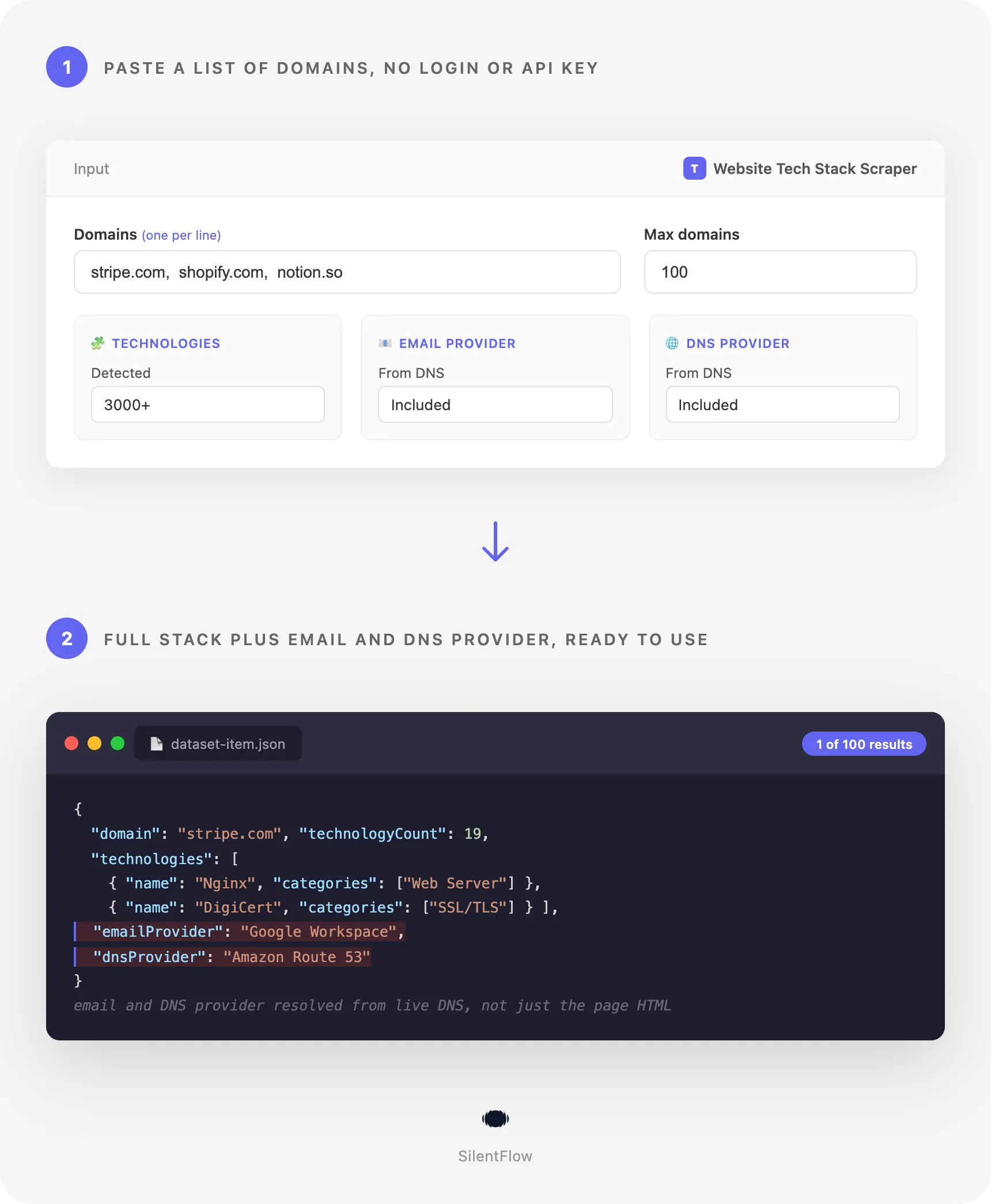
Give the scraper a list of domains. It visits each website, reads what the page and the server reveal, resolves the domain's nameservers and other DNS records, and returns one tidy row per site listing every technology it recognized, grouped into categories. The fingerprinting runs on the live response, so the answer describes the site as it is served today.
✨ Why teams choose this over other website technology scrapers
Do you keep paying for a technology lookup that returns a cached snapshot from last year? Have you ever exported a lead list only to find the platform column empty for half the rows? Do you need to know not just the CMS, but who hosts the company's email and who issues its certificates?
- 🎯 Live detection, never a stale directory. Every result comes from reading the website at the moment of the run. Directory products such as BuiltWith serve you a record that was crawled at some point in the past. This one tells you what the site is running right now, which matters when you are timing outreach around a replatform.
- 📚 6,633 technologies across 115 categories. The detection library spans CMS, ecommerce, analytics, advertising and tracking pixels, JavaScript frameworks and libraries, UI frameworks, web servers, programming languages, hosting, CDN, WAF and bot management, payment processors, buy now pay later, CRM, marketing automation, live chat, A/B testing, cookie compliance, fonts, video players, search engines, reviews, and accessibility. 738 of them report a version number when the site exposes one.
- 🌐 Email, DNS and certificate signals a page scrape cannot see. It resolves MX records to name the email provider, NS records to name the nameserver and DNS provider, TXT and SPF records to reveal the SaaS tools a company has verified its domain with, and reads the SSL certificate to name its issuer, the certificate authority. In a 30 domain benchmark, 26 sites returned both an email provider and a DNS provider.
- ⚡ Built for bulk technographic enrichment. 30 domains finished in 12 seconds in our benchmark, roughly 150 domains a minute, so a 1,000 domain list clears in under ten minutes.
- 🧩 Categories you can filter on immediately. Every technology carries one or more category labels and each row ships a
categoriesSummarycount, so segmenting a list by "uses Shopify" or "runs a WAF" is one filter, not a text search. - 🔓 No account, no API key, no third party credits. You do not need a BuiltWith subscription, a Wappalyzer account, or any key from another service. Everything happens inside the run.
- 📊 A confidence score on every hit. Each detection reports how strong its evidence was, from a server header match down to a weaker page signal, so you can keep only the detections you trust.
- 🛠️ Flat, predictable output. One record per domain with 11 top level fields, ready for a spreadsheet, a CRM import, or a warehouse table.
🎯 What you can do with website technology data
| Team | What they build |
|---|---|
| Sales | Account lists filtered to the exact ecommerce platform, payment processor, or CRM a prospect already runs, so the first line of the email names their actual stack |
| Marketing | Market share reports counting how many of 5,000 tracked domains run each analytics tool, ad pixel, or consent platform, refreshed on a schedule |
| Competitive intelligence | A live map of which technologies competitors adopt and drop, built by re-running the same domain list every month and diffing the technology names |
| Agencies | A technology audit of a prospect before the pitch, including the CMS, the page builder, the hosting provider, and whether the site sits behind a WAF |
| RevOps | A technographic column added to every account record in the CRM, so routing and scoring rules can key off the platform a company runs |
| Investors | Adoption signal across a portfolio or a target market, measured as the count of domains in a segment running a given vendor |
| Security research | An inventory of the web servers, certificate issuers, and bot management products in use across a set of domains, built by website fingerprinting rather than by asking each vendor |
| Recruiters | Company shortlists built from the frameworks and programming languages a site actually runs, instead of from job ad keywords |
📥 Input parameters
| Field | Type | Description |
|---|---|---|
startDomains | array | Required. One or more domains or website URLs to analyze, for example shopify.com. Full URLs are accepted and the host is extracted for you. |
maxItems | integer | The maximum number of domains to analyze in this run. Default 100. |
debugMode | boolean | Adds verbose logging to the run log. Off by default. |
Example input:
📊 Output data
One record per domain. A retailer running a full commerce stack:
A SaaS company, where the interesting signal is the search, consent and marketing layer:
🗂️ Data fields
11 top level fields per domain, plus 5 fields on every technology in the list.
Identity and response
| Field | Type | Description |
|---|---|---|
domain | string | The domain you requested, normalized |
url | string | The final URL analyzed after redirects |
statusCode | integer | HTTP status returned by the website |
title | string | The page title of the site |
scrapedAt | string | Timestamp of the analysis, ISO 8601 |
Detected stack
| Field | Type | Description |
|---|---|---|
technologyCount | integer | Number of technologies detected on this domain |
technologies | array | The detected technologies |
technologies[].name | string | Technology name, for example WordPress, Stripe, React |
technologies[].categories | array | One or more category labels, for example ["WAF", "Security"] |
technologies[].website | string | Official website of the technology vendor |
technologies[].version | string | Version number when the site exposes one |
technologies[].confidence | integer | Evidence strength from 0 to 100 |
categoriesSummary | object | Count of detected technologies per category |
Infrastructure rollups
| Field | Type | Description |
|---|---|---|
emailProvider | string | Email host resolved from MX records, for example Google Workspace or Microsoft 365 |
dnsProvider | string | DNS provider resolved from nameserver records, for example Cloudflare or Route 53 |
certificateIssuer | string | Certificate authority that signed the site's SSL certificate, for example Let's Encrypt or Sectigo |
🚀 Examples
Check a single site
Audit a list of prospects before a pitch
Find which of your accounts run on Shopify
Run your account domains through, then keep the rows whose categoriesSummary contains Ecommerce, and read the technology named Shopify.
Map the email and DNS providers across a market segment
Run a large technographic enrichment pass
🤖 Copy to your AI assistant
Paste this block into Claude, ChatGPT, or Cursor to give it full context about this scraper:
💻 Integrations
Build a lead list segmented by ecommerce platform
Monitor a competitor set for stack changes
Export a technographic column straight to CSV
📈 Performance
Measured on a 30 domain benchmark of large public websites.
| Metric | Value |
|---|---|
| Domains analyzed | 30 of 30, no failures |
| Total run time | 12 seconds |
| Throughput | About 150 domains a minute |
| 1,000 domain list | Under ten minutes |
| Technologies found per site | Median 20, mean 19.2, range 6 to 31 |
| Sites returning an email provider | 26 of 30 |
| Sites returning a DNS provider | 26 of 30 |
Domains are analyzed in parallel, so throughput holds as the list grows.
💾 Data export
Results land in a standard Apify dataset. Download them as JSON, CSV, Excel, XML, HTML table, or JSON Lines from the run's Storage tab, or pull them programmatically:
The same dataset feeds Apify integrations, so results can be pushed to Google Sheets, Airtable, Slack, a webhook, or a warehouse without an export step.
💡 Tips for best results
- Pass clean apex domains such as
example.com. Full URLs work too, and a leadingwww.is stripped for you. - De-duplicate your input list before the run. Two spellings of the same host are two results and two charges.
- Filter on
confidencewhen precision matters more than recall. Detections at 100 come from response headers, cookies, or DNS records, which are the hardest signals to fake. - Read
categoriesSummaryrather than scanning the technology list when you only need a yes or no on a category such asEcommerceorWAF. - A site that answers with a non-200 status can still return an infrastructure profile from its DNS records, so check
emailProvideranddnsProviderbefore discarding a row.
❓ FAQ
Which technologies can it detect? 6,633 technologies across 115 categories, covering CMS, ecommerce platforms, payment processors, buy now pay later, analytics, advertising and tracking pixels, tag managers, JavaScript frameworks and libraries, UI frameworks, web servers, programming languages, hosting, CDN, WAF and bot management, CRM, marketing automation, live chat, A/B testing, cookie compliance, fonts, video players, search engines, reviews, and accessibility.
Is this a BuiltWith or Wappalyzer alternative? Yes, and you need no account with either. The difference is where the answer comes from: a directory hands you a record crawled at some earlier date, while this reads the live site during the run.
Do I need an API key or a subscription anywhere else? No. There is nothing to sign up for beyond Apify itself.
Can it identify the ecommerce platform a store runs?
Yes. Ecommerce platform identification is one of the strongest signal groups, covering Shopify, WooCommerce, Magento, BigCommerce, PrestaShop, Salesforce Commerce Cloud, and many more, and the result is labeled with the Ecommerce category.
Does it detect the CMS? Yes. Used as a CMS detector it recognizes WordPress, Drupal, Joomla, Webflow, Wix, Squarespace, Contentful, and hundreds of others, with a version number when the site publishes one.
Do you detect email and DNS providers? Yes. MX records name the email host, nameserver records name the DNS provider, and TXT and SPF records reveal SaaS tools that a company has verified its domain with. The SSL certificate also names the issuing certificate authority.
What does confidence mean? A score from 0 to 100 describing how strong the evidence was. Matches from response headers, cookies, and DNS records score highest, page content scores lower.
How fresh is the data? It reflects the website at the moment of the run. Re-running the same list on a schedule and diffing the technology names is how teams track adoption over time.
Can I use it on a single domain?
Yes. Pass one domain with maxItems set to 1 and it behaves as a website technology checker for that site.
What happens if a site is unreachable? The row is still useful when DNS resolves: you get the infrastructure rollups even when the page itself did not return content. When nothing at all resolves, the domain is reported as failed in the run log and is not charged as a result.
⚖️ Legal
This scraper reads publicly available information that websites publish to every visitor: the public homepage, the HTTP response headers that accompany it, the TLS certificate presented by the server, and public DNS records. It collects no personal data, so GDPR, CCPA, and PIPL obligations around personal information are not triggered by the output. You remain responsible for how you use the results, including applicable terms of the sites you analyze and any marketing or outreach rules in your jurisdiction.
🔗 Related scrapers
- Domain Enricher for company details resolved from a domain
- Storeleads Scraper for ecommerce store lead lists
- Trustpilot Enricher for review reputation on a domain
- French Company Prospector for French company discovery and filtering
- UK Companies House Enricher for UK registry data
📬 Support
Want a technology added to the detection library, or unsure how to read a result? Open the Issues tab on this Actor's page and describe the domain and what you expected to see.
Detection is powered in part by the open-source Wappalyzer fingerprint database (via projectdiscovery/wappalyzergo, MIT licensed).


