

Facebook Search Scraper
Pricing
from $1.90 / 1,000 results
Facebook Search Scraper
Search Facebook by keyword and export posts, pages, places, events and people as clean structured data. Get text, author, reactions breakdown, comment and share counts, images, videos, links and timestamps. No login. Six search types in one actor. For lead generation, social listening, research.
Pricing
from $1.90 / 1,000 results
Rating
0.0
(0)
Developer

SilentFlow
Maintained by CommunityActor stats
1
Bookmarked
25K
Total users
47
Monthly active users
16 days ago
Last modified
Categories
Share
by SilentFlow
Search Facebook the way a person would, and get the results back as clean, structured data. Type a keyword, pick what you want (posts, pages, places, events, people, videos or a mixed feed), and export every result with author, engagement counts, timestamps and links. No login, no manual copy and paste.
How it works
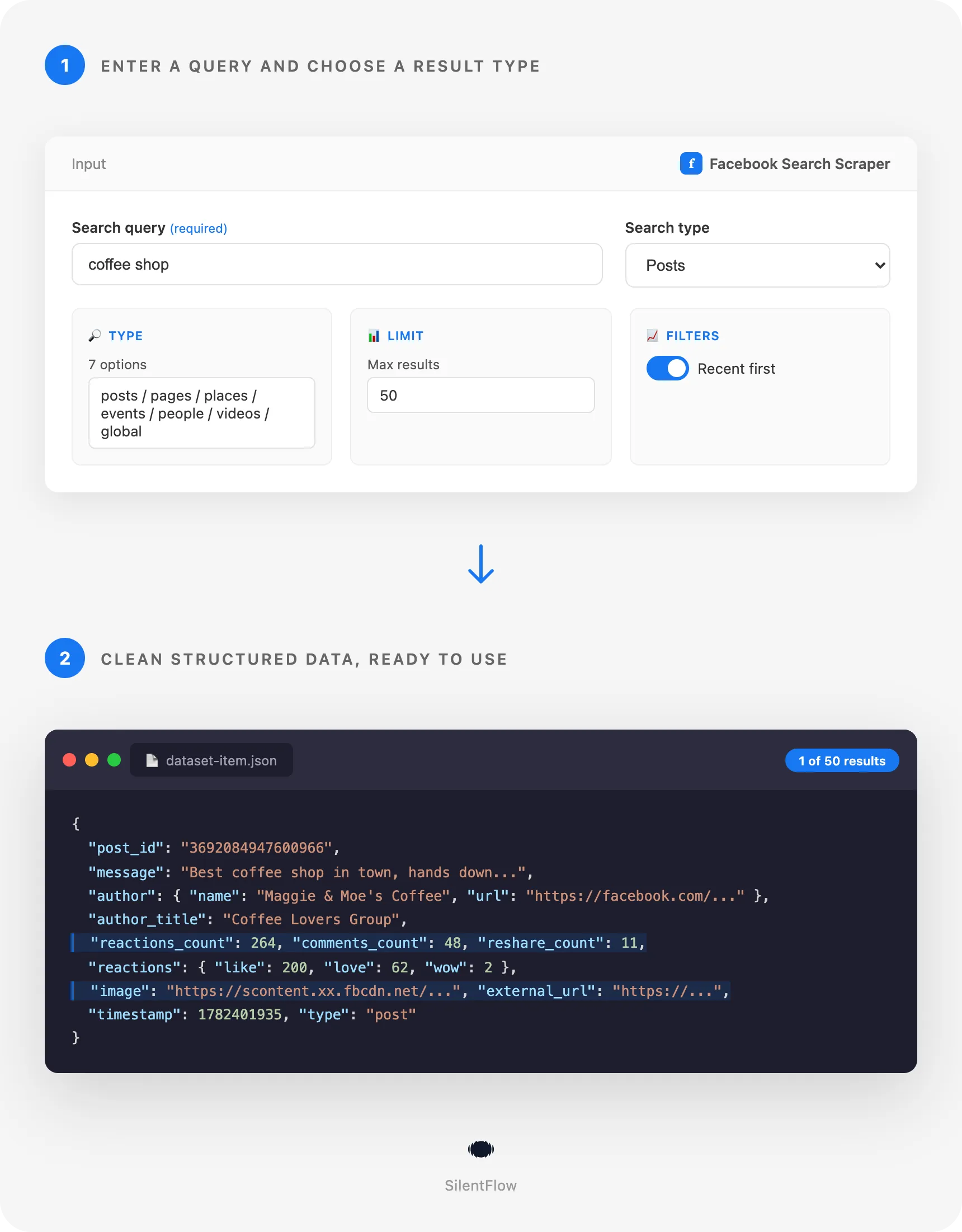
- Enter a search query and choose a result type: posts, pages, places, events, people, videos or global.
- Run the actor. It collects results page by page and returns them as a ready-to-use dataset you can export to JSON, CSV or Excel.
✨ Why teams choose this over other Facebook search scrapers
- 🔓 No login and no account required. Point it at a keyword and go. You never share a Facebook account or risk one, because results come from public search only.
- 🎯 Seven search types in one actor. Posts, pages, places, events, people, videos and a mixed global feed, all from the same simple input. No other Facebook search scraper covers this many.
- 📊 Real engagement, not just text. Every post comes with a full reactions breakdown (like, love, haha, wow, sad, angry, care) plus comment and share counts, so you can rank by what actually performs.
- 🔁 Built to keep working. The actor adapts automatically when Facebook changes things behind the scenes, so your runs keep returning data instead of breaking.
- ⚡ Fast and cheap. Results come back in seconds and you pay per result, never for idle compute time.
- 🧹 Clean, flat fields. Author, message, counts, timestamp and URL are ready for a spreadsheet or a database with zero cleanup.
🎯 What you can do with Facebook search data
| Team | What they build |
|---|---|
| Lead generation | Prospect lists of pages and places around a topic or location, with links and names ready for outreach |
| Social listening | Track what people post about a brand, product or event and sort by reactions to find what resonates |
| Market research | Map the businesses and communities active around a keyword or in a specific city |
| PR and comms | Catch mentions early and measure how far a post spread using share and comment counts |
| Content teams | Find the highest-engagement posts on a topic to model new content on what already works |
| Recruiting and local ops | Discover local groups, pages and places relevant to a market before you expand into it |
📥 Input parameters
| Parameter | Type | Required | Description |
|---|---|---|---|
query | string | Yes | What to search for, for example a keyword, brand or topic |
search_type | string | No | posts (default), pages, places, events, people, videos or global (mixed) |
max_posts | integer | No | Maximum number of results to return. Defaults to 10 |
recent_posts | boolean | No | Sort posts by most recent instead of relevance |
location | string | No | Focus the search on a place. For best results include city and country |
start_date | string | No | Only posts on or after this date. Format: YYYY-MM-DD |
end_date | string | No | Only posts on or before this date. Format: YYYY-MM-DD |
One field is enough: everything except query has a sensible default, so the shortest working input is { "query": "cold brew" }.
📊 Output data
Post result
Page or place result
🗂️ Data fields
| Group | Fields |
|---|---|
| Post | post_id, url, message, timestamp, type |
| Author | author.id, author.name, author.url, author.profile_picture_url |
| Engagement | reactions_count, comments_count, reshare_count, reactions (like, love, haha, wow, sad, angry, care) |
| Media and links | image, video, video_thumbnail, video_view_count, album_preview, external_url |
| Context and reshares | author_title (group or page the post appears in), message_rich (mentions, hashtags and links inside the text), attached_post (the original post when it is a share) |
| Follow-up IDs | comments_id, shares_id, associated_group_id |
| Page / place | id, name, url, category, description, verified, profile_picture_url, type |
🚀 Examples
Search with a single field
Find recent posts about a product
Build a list of pages around a topic
Find places in a city
Posts in a date range
Discover events by keyword
💻 Integrations
Connect the results to the tools you already use with Apify integrations: Make, Zapier, n8n, Google Sheets, Slack, or your own app through the Apify API. Schedule runs to keep a topic or location continuously monitored, and push new results straight into your CRM or data warehouse.
📈 Performance
Results come back in seconds. Each run pages through the results until it reaches your max_posts limit, so cost and runtime scale with exactly how much data you ask for and nothing more.
💡 Tips for best results
- Use specific queries. "cold brew coffee austin" returns tighter results than "coffee".
- Turn on
recent_postswhen you care about what is happening now rather than all-time relevance. - For
placesandpagessearches, add alocation(city and country) to focus a broad term like "restaurant" or "dentist" on one area instead of the whole of Facebook. - Use
globalwhen you want a quick mixed snapshot, and a specific type when you want volume of one kind. - Set
max_poststo what you actually need. Smaller runs finish faster and cost less.
❓ FAQ
Do I need a Facebook account or login? No. The actor only uses public search, so you never provide credentials.
Which search types are supported? Posts, pages, places, events, people, videos, and a mixed global feed.
Can I filter posts by date?
Yes. Use start_date and end_date in YYYY-MM-DD format, and turn on recent_posts to sort by newest.
What engagement data do I get? For posts you get total reactions, a per-type reactions breakdown, comment count and share count.
In what formats can I export? JSON, CSV, and Excel, plus the Apify API for programmatic access.
📬 Support
Maintained by SilentFlow. Have a request or want another Facebook data type added? Let us know and we will consider it for a future update.


