

Instagram Story Scraper | Stories & Highlights
Pricing
from $3.82 / 1,000 stories
Instagram Story Scraper | Stories & Highlights
Extract Instagram stories and highlights from any public account: image and video links, exact posting time, expiry, swipe-up links and mentions, plus followers, following, posts, bio and website on every row. Track competitors, creators and news accounts daily with no login or account needed.
Pricing
from $3.82 / 1,000 stories
Rating
0.0
(0)
Developer

SilentFlow
Maintained by CommunityActor stats
0
Bookmarked
21
Total users
14
Monthly active users
17 days ago
Last modified
Categories
Share
Instagram Story Scraper
Every active story and every highlight of a public Instagram account, as a table: image and video links, exact posting time, expiry, swipe-up link, mentions, and the account's followers on each row. Three news accounts, 43 stories, in 24 seconds. No login.
How it works
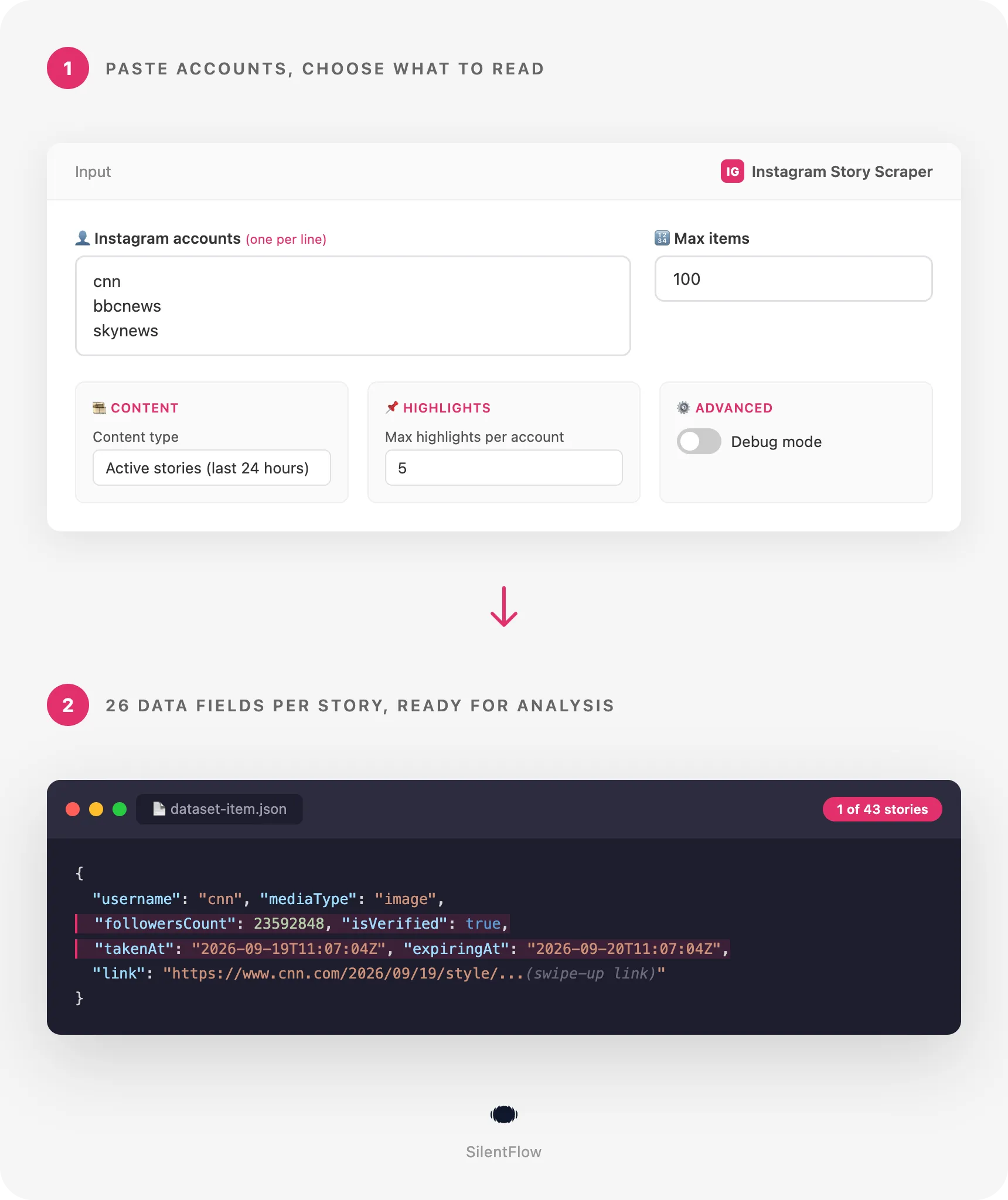
- You paste one or more accounts, or story links. A username, an
@handleor a profile link all name an account; a story link names one precise story. - Each account is read once. Its active stories come back in one call. If you ask for highlights, each album pinned on the profile is opened, newest first, up to the cap you set.
- One row comes back per story or highlight item. 26 fields: the media with its links and exact time, and the account it belongs to with followers, name, bio and website. Ready for a spreadsheet, a database or an AI pipeline.
✨ Why teams choose this over other Instagram story scrapers
Taking screenshots of competitors' stories every morning before they vanish? Asked by a client to prove that a sponsored story went live at the right time with the right link? Getting back 150 raw keys per story and a unix timestamp when all you wanted was a date and a follower count?
- 📊 20 fields filled on every row, not 11. The other flat story scraper on the Store fills 11 keys per row; the most used ones return the raw Instagram object with 150 nested keys and unix timestamps. Here every story row carries 20 filled columns, measured on the default run of 22 September 2026 (43 rows, 21 columns filled on the majority of rows, the swipe-up
linkon 25 of them). No other story scraper putsfollowersCount,followingCount,postsCount,biographyandexternalUrlon the row. - 👤 The account on every row. Followers, following, posts, name, bio, website, verified badge and avatar come with each story. One dataset answers both "what did they post" and "how big are they", with no second scraper to join.
- ⏰ Exact time and expiry, in a format that sorts.
takenAtandexpiringAtare RFC 3339 (2026-09-21T22:07:02Z), not1758492422. Sort a day of stories, prove a posting window, schedule the next run before anything expires. - 🔗 Accounts or precise story links. Name an account by username,
@handleor profile link, or paste the link of one story (instagram.com/stories/cnn/3992904485714001336/) and get exactly that story with its account's figures, to prove a sponsored story went live. The most used scraper of the niche accepts plain usernames only, and no field here is required: accounts, links or both. - 🎞️ Stories and highlights, chosen per run. Read what is live now, the permanent albums pinned on the profile, or both, with a cap on albums. The two most used story scrapers read stories only; highlights here return rows even at 3 a.m. when nothing is live.
- 🖼️ Direct media links and a permalink.
imageUrlfor photos and posters,videoUrlfor the mp4 of video stories,thumbnailUrlfor a preview, and a stableurlper row. Download what you want to keep. - 🧹 No error rows. One row is one real story or highlight item. An unknown or private account produces no row and a clear message on the run, where other scrapers write an error item into your export. Unknown values are
null, never an empty string, and no item appears twice. - 🔑 No login, no account to connect. Public accounts only. Paste a username and press Start.
🎯 What you can do with Instagram story data
| Team | What they build |
|---|---|
| Influencer marketing | Proof of delivery for a paid story: the row shows when it went live, the link it carried and the media, taken by a schedule before it expired |
| Competitive research | A daily archive of every story a list of rival brands posted, with links, mentions and media, searchable months later |
| Social media agencies | A morning digest of what each client's competitors pushed overnight, ready for Slack or a spreadsheet |
| Affiliate and e-commerce | A tracker of the swipe-up links and promo codes creators post in stories, with the UTM tags as they appear |
| Newsrooms and PR | A timeline of the stories a public figure or a news account published around an event, with exact times |
| Research and archives | A dataset of a brand's highlight albums, item by item, with posting dates that span years |
| Creator platforms | A vetting card per creator: followers, posting cadence in stories, share of video versus image, links pushed |
📥 Input parameters
Essentials
| Field | Type | Description |
|---|---|---|
usernames | array | Public accounts to read, one per line. Accepts a username (cnn), a handle (@cnn) or a profile link (https://www.instagram.com/cnn/). |
startUrls | array | Links of precise stories (https://www.instagram.com/stories/cnn/3992904485714001336/): each gives exactly that story while it is live (24 hours). A profile link here reads the whole account. Highlight links do not name their account: add the account and choose highlights instead. Fill usernames, startUrls or both. |
maxItems | integer, default 100 | Maximum rows for the whole run, stories and highlight items together. |
🎞️ Content
| Field | Type | Description |
|---|---|---|
contentType | string, default stories | stories reads what the account posted in the last 24 hours, one call per account. highlights reads the permanent albums pinned on the profile, one call per album. both reads the two. |
maxHighlights | integer, default 5 | How many highlight albums to open per account, newest first. Each album returns all its items. Ignored when contentType is stories. |
⚙️ Advanced
| Field | Type | Description |
|---|---|---|
debugMode | boolean, default false | Adds detailed lines to the run log. Leave it off for normal runs. |
📊 Output data
Each row is one story or one highlight item. An active story of a news account looks like this (long media links shortened here):
A video item of a highlight album keeps the same 26 columns. It carries the mp4 in videoUrl, its poster in imageUrl, the album in highlightId and highlightTitle, and no expiringAt since highlights do not expire (account block shortened here):
🗂️ Data fields
26 fields per row: 4 identity, 4 content, 10 account, 3 time, 3 media, 2 meta. mentions is the only list, the usernames tagged in the story.
| Group | Fields |
|---|---|
| Identity | id (Instagram media id), url (permalink), type (story or highlight), mediaType (image or video) |
| Content | highlightId, highlightTitle, link (the swipe-up link), mentions |
| Account | username, userId, fullName, biography, externalUrl, isVerified, followersCount, followingCount, postsCount, profilePicUrl |
| Time | takenAt (RFC 3339, UTC), expiringAt (stories only, 24 hours after takenAt), highlightCreatedAt (highlight items only) |
| Media | imageUrl (the photo, or the poster of a video), videoUrl (mp4, videos only), thumbnailUrl |
| Meta | input (the account as you typed it), scrapedAt (RFC 3339, UTC) |
Good to know when you store the data:
idis Instagram's own media id and never changes.urlis built from it: the story permalink for a story, the share link of the album item for a highlight.takenAtis the moment the story was posted.expiringAtis when Instagram removes it from the profile. A highlight item keeps its originaltakenAt, which can be years old, andhighlightCreatedAttells when the album was created.imageUrl,videoUrl,thumbnailUrlandprofilePicUrlpoint to Instagram's own media servers. They stay valid for a few days, then Instagram rotates them: download the files you want to keep,urlstays.linkis set only when the story carries a swipe-up link,mentionsis an empty list when nobody is tagged.followersCount,followingCountandpostsCountare the numbers shown on the profile at run time.- The account block is identical on every row of an account, so the first row of each
usernameis the account's profile.
🚀 Examples
Get the active stories of three news accounts
Watch a list of competitors every morning
Put this on a daily schedule. Each run returns what is live at that moment, with time, link and media.
Export the highlight albums of a brand
Read stories and the latest album together
Check that a sponsored story is live on a creator's account
Sample a large watchlist quickly
🤖 Copy to your AI assistant
Paste this block into Claude, ChatGPT or Cursor to give it full context about this scraper:
💻 Integrations
Keep a daily archive of competitors' stories (Python)
Alert Slack when a creator posts a story with a link (JavaScript)
Download the media of a highlight album (Python)
📈 Performance
Measured on 22 September 2026 on real accounts.
| Run | Rows | Time |
|---|---|---|
| 3 news accounts, active stories (the default input) | 43 | 24 seconds |
| 1 account by profile link, its 2 latest highlight albums | 28 | 23 seconds |
| 3 accounts, stories and 1 album each, one unknown account, capped at 25 | 25 | 25 seconds |
| 2 sports accounts by profile link, active stories | 13 | 42 seconds |
| 2 news accounts, capped at 5 | 5 | 12 seconds |
| Metric | Value |
|---|---|
| Fields per row | 26 |
| Calls per account | 1 for stories, plus 1 per highlight album |
| Time per call | about 10 seconds, the pace the source allows |
| Columns filled on the default run | all, except link and mentions when the story carries none, and the highlight columns on stories |
| Limit per run | no fixed limit: maxItems is yours to set |
💾 Data export
Every run stores its rows in a dataset you can download as JSON, CSV, Excel, XML or HTML from the Storage tab, or pull from the API:
The dataset has two ready-made table views: Stories (account, type, media, highlight, posted, swipe-up link, story URL, image) and Accounts (account, name, followers, following, posts, verified, website, avatar). Schedules, webhooks and the Apify integrations (Google Sheets, Slack, Zapier, Make, n8n) work on top of the same dataset.
💡 Tips for best results
- Schedule twice a day for a complete archive. Stories last 24 hours. A run every 12 hours sees every story at least once;
expiringAttells you how much margin you had. - Start with accounts that post daily. News and sports accounts have stories around the clock. A brand that posts twice a week returns no story row on most runs, which is normal: switch to
bothto always get rows. - Use
highlightsfor permanent content. Campaign albums, product albums and press albums stay on the profile for years.maxHighlightsdecides how many albums open, newest first. - Download the media you want to keep. Instagram rotates its media links after a few days.
urlstays valid, the files do not. - Size
maxItemsfor the whole run. Ten accounts with about 8 stories each needmaxItems: 100. With highlights, count up to 100 items per album. - Group rows by
usernamefor account reports. The account block is identical on every row of an account.
❓ FAQ
What does this scraper extract? The active stories and the highlight albums of public Instagram accounts, one row per item, with 26 fields: the media (type, image, video, thumbnail, permalink), its exact posting time and expiry, the swipe-up link and mentions, the album it belongs to, and the account (name, bio, website, verified badge, followers, following, posts, avatar).
What can I type in the accounts field?
A username (cnn), a handle (@cnn), a profile link in any form (https://www.instagram.com/cnn/, instagram.com/cnn), or a story link (instagram.com/stories/cnn/…). A link to a post or a reel is skipped and named in the run log.
Do I need an Instagram account? No. The scraper reads public accounts. There is no login, no key and no session to refresh.
Why does an account return no story?
Stories last 24 hours. If the account posted nothing in that window, there is nothing to read, and the run log says so. Run again later, put the run on a schedule, or set contentType to both to get the highlight albums as well.
What about private accounts? Their stories are not public, so the scraper skips them, names them in the run log, and writes no row. Your dataset never contains error rows.
How fresh is the data?
Live. Every run reads the accounts at run time. scrapedAt tells you when each row was read, takenAt when the story was posted.
Are the media links permanent?
url is permanent. imageUrl, videoUrl, thumbnailUrl and profilePicUrl are links to Instagram's media servers and stay valid for a few days. Download the files you want to keep.
Can I scrape many accounts in one run? Yes. List as many accounts as you need. An account named twice is read once, and no item is delivered twice in a run. Each account takes about ten seconds, plus about ten seconds per highlight album.
How do highlights work?
Highlights are the albums pinned under the bio of a profile. With contentType set to highlights or both, the scraper opens up to maxHighlights albums, newest first, and returns every item of each album with the album's id, title and creation date.
Does it get story views, replies or the viewers list? No. Those numbers are only visible to the account owner. The scraper returns what a visitor of the profile can see.
Is there a limit on the number of rows?
No fixed limit. maxItems caps the whole run and you choose it.
Can I get the text written on a story? Not as a field: Instagram does not publish the text of stickers and captions. You get the image or video, which you can pass to an OCR or vision model.
⚖️ Legal
This Actor extracts publicly available data from Instagram. It does not bypass any login, paywall or CAPTCHA, and it only reads public accounts. Users are responsible for complying with Instagram's terms of service and with applicable data protection laws (GDPR, CCPA, and PIPL where relevant). The output contains account information that account owners publish themselves (username, name, bio, website, follower counts, avatar); when you process it as personal data, handle it accordingly. The data returned is informational; verify accuracy for regulated use cases.
🔗 Related scrapers
- Instagram Engagement Scraper: likes and comments behind Instagram posts.
- TikTok Scraper: videos and profiles from TikTok.
- Youtube Channel Scraper: every video of a channel with exact dates, views and likes.
- Facebook Search Scraper: posts, pages and videos from Facebook search.
📬 Support
Need something this scraper does not do yet? We ship features fast.
- Feature requests go straight to our backlog
- Enterprise needs? We do custom integrations and high-volume plans
- Pricing details live on the Monetization tab of the actor page
Response time: usually under 24 hours.
Check out our other scrapers: silentflow on Apify


