

TikTok Scraper
Pricing
from $0.80 / 1,000 results
TikTok Scraper
Scrape TikTok profiles, videos, hashtags, sounds, locations, search and comments. Get views, likes, shares, bookmarks, creator stats, video download URLs, music and captions as clean JSON. Pull followers, following and reposts too. No login. Ideal for influencer research and trend tracking.
Pricing
from $0.80 / 1,000 results
Rating
0.0
(0)
Developer

SilentFlow
Maintained by CommunityActor stats
1
Bookmarked
16
Total users
5
Monthly active users
5 days ago
Last modified
Categories
Share
From SilentFlow. Creators of Pinterest Scraper and Leboncoin Scraper, with 420,000+ combined lifetime runs.
Turn any public TikTok into structured data. Creators, videos, hashtags, sounds, locations, and search, scraped from one actor and delivered as clean records ready for analysis. In seconds, not hours.
How it works
✨ Why teams choose this over other TikTok scrapers
Juggling one scraper for profiles, another for hashtags, and a third for search? Tired of untangling nested data before you can use it? Need an account and cookies just to pull a few videos?
- 🧩 Every TikTok surface in one actor. Creators, videos, photos, hashtags, sounds, locations, search, comments, following lists, followers, reposts, and related videos. Stop wiring up five tools to cover one platform.
- 📊 Analytics-ready output. One flat record per post with views, likes, comments, shares, and bookmarks. Drop it straight into a sheet, dashboard, or model. No nested blobs to clean up.
- 🎬 The fields you actually use. Creator profile, video download URL, music, hashtags, captions, ad flags, pinned status, language, and mentions on every post. Plus comments with replies when you want them.
- 🔎 Filter and sort by what matters. Narrow profile posts by date range, minimum or maximum likes, and choose between latest, oldest, or most popular order.
- 🤝 See who follows and who a creator follows. Pull following or follower lists alongside post data in a single run.
- 🔄 Capture reposts and related videos. Scrape a profile's reposts or surface videos related to a specific post without extra setup.
- 🔀 Mix inputs in one run. Paste profile, hashtag, sound, and search URLs together, add keywords, usernames, and video IDs, and cap the output with a single field.
- 🔓 No login, no account, no setup. Public data only. Paste a URL, a keyword, a username, or a video ID and get results.

🎯 What you can do with TikTok data
| Team | What they build |
|---|---|
| Influencer marketing | Shortlist creators in a niche by real views and engagement before spending a dollar on outreach |
| Growth & social | Track a hashtag or sound daily to catch a trend while it is still climbing |
| Competitive research | Pull a competitor's full video history with metrics into one sheet to see what works |
| Content strategy | Find the top-performing formats and sounds for a topic and brief creators with proof |
| Brand & comms | Read comments and replies on a viral post to gauge sentiment and spot issues early |
| Data & ML | Generate a labeled TikTok dataset across creators, hashtags, and search for analysis or training |
📥 Input parameters
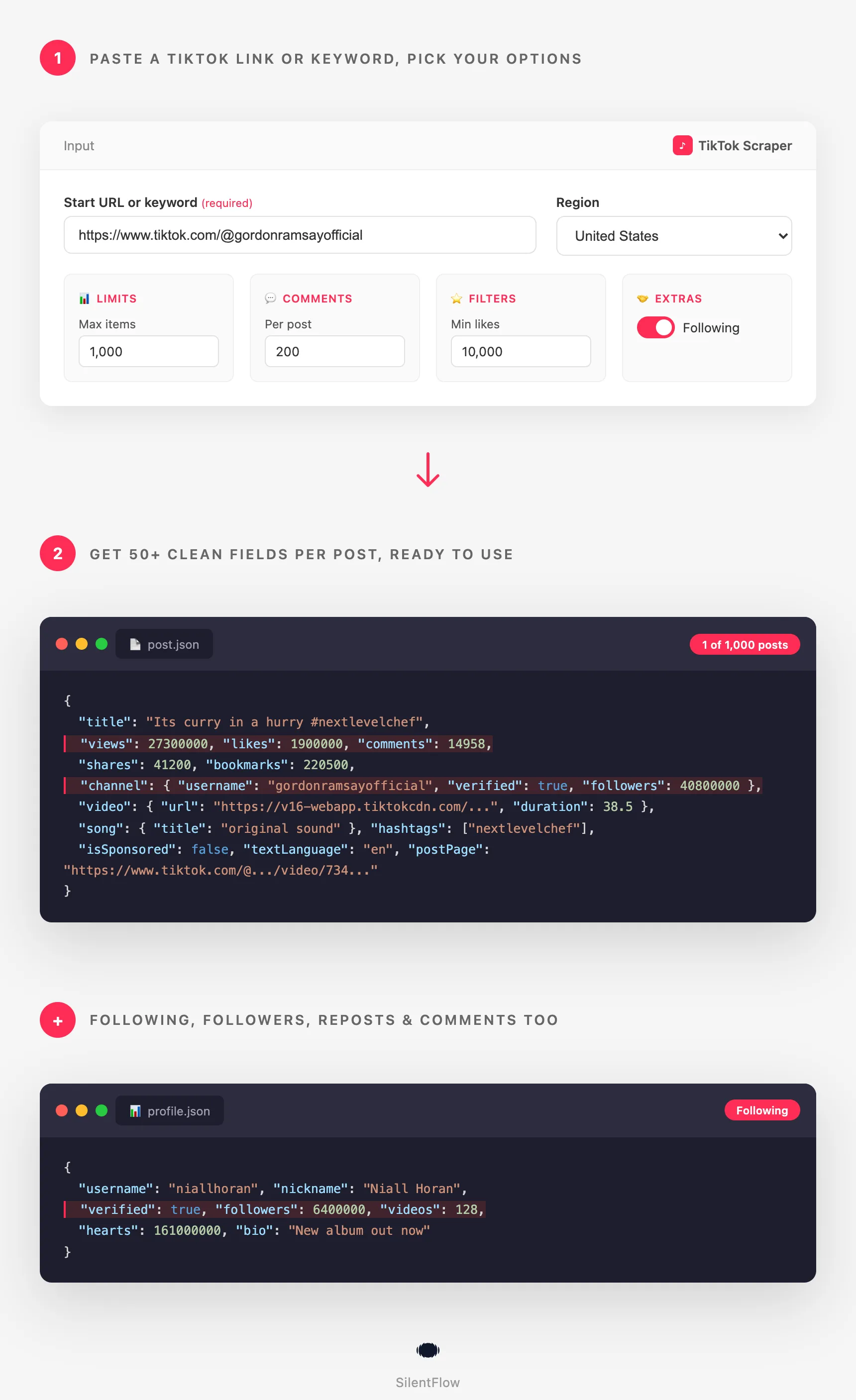
Fill one or more of the first four fields: every entry of every field is read in the same run.
| Field | Type | Description |
|---|---|---|
startUrls | array | TikTok URLs to scrape: creator, video, photo, hashtag (/tag/), sound (/music/), location (/place/), or search. |
keywords | array | Search terms to scrape from TikTok search. |
usernames | array | TikTok usernames, with or without the @ (gordonramsayofficial, @nasa). Each one gives the videos of that profile, like its profile URL. |
videoIds | array | TikTok video or photo post IDs (7050551461734042926), the number at the end of a video link and the id of every post record. Each one gives that post, plus its comments when maxComments is set. |
maxItems | integer | Maximum number of posts to return across the whole run. |
🌍 Region and search
| Field | Type | Description |
|---|---|---|
location | string | Region for results, as an ISO country code (for example US, GB, DE). |
dateRange | select | Time filter for search: default, all time, yesterday, this week, this month, last 3 months, last 6 months. |
sortType | select | Search sort order: relevance, most liked, or date posted. |
includeSearchKeywords | boolean | Add the source keyword to each post found through search. |
👤 Profiles
| Field | Type | Description |
|---|---|---|
profileSorting | select | Order for a creator's videos: latest, popular, or oldest. |
excludePinnedPosts | boolean | Skip posts a creator has pinned to the top of their profile. |
scrapeReposts | boolean | Also scrape videos a profile has reposted. |
maxFollowers | integer | If greater than 0, also scrape up to this many of each profile's followers. TikTok limits follower visibility for some accounts. |
maxFollowing | integer | If greater than 0, also scrape up to this many accounts each profile follows. |
🎬 Videos
| Field | Type | Description |
|---|---|---|
maxComments | integer | If greater than 0, also scrape up to this many comments for each video ID or video and photo URL. |
scrapeRelatedVideos | boolean | For video IDs and video URLs, also scrape related videos. |
🔽 Filters
| Field | Type | Description |
|---|---|---|
onlyPostsNewerThan | string | Keep only posts on or after this date (YYYY-MM-DD). Applies to every surface. |
onlyPostsOlderThan | string | Keep only posts on or before this date (YYYY-MM-DD). Applies to every surface. |
minLikes | integer | Keep only posts with at least this many likes. Applies to every surface. |
maxLikes | integer | Keep only posts with at most this many likes (0 = no limit). Applies to every surface. |
⚙️ Advanced
| Field | Type | Description |
|---|---|---|
customMapFunction | string | A JavaScript function to reshape each output record (add, rename, or drop fields). |
📊 Output data
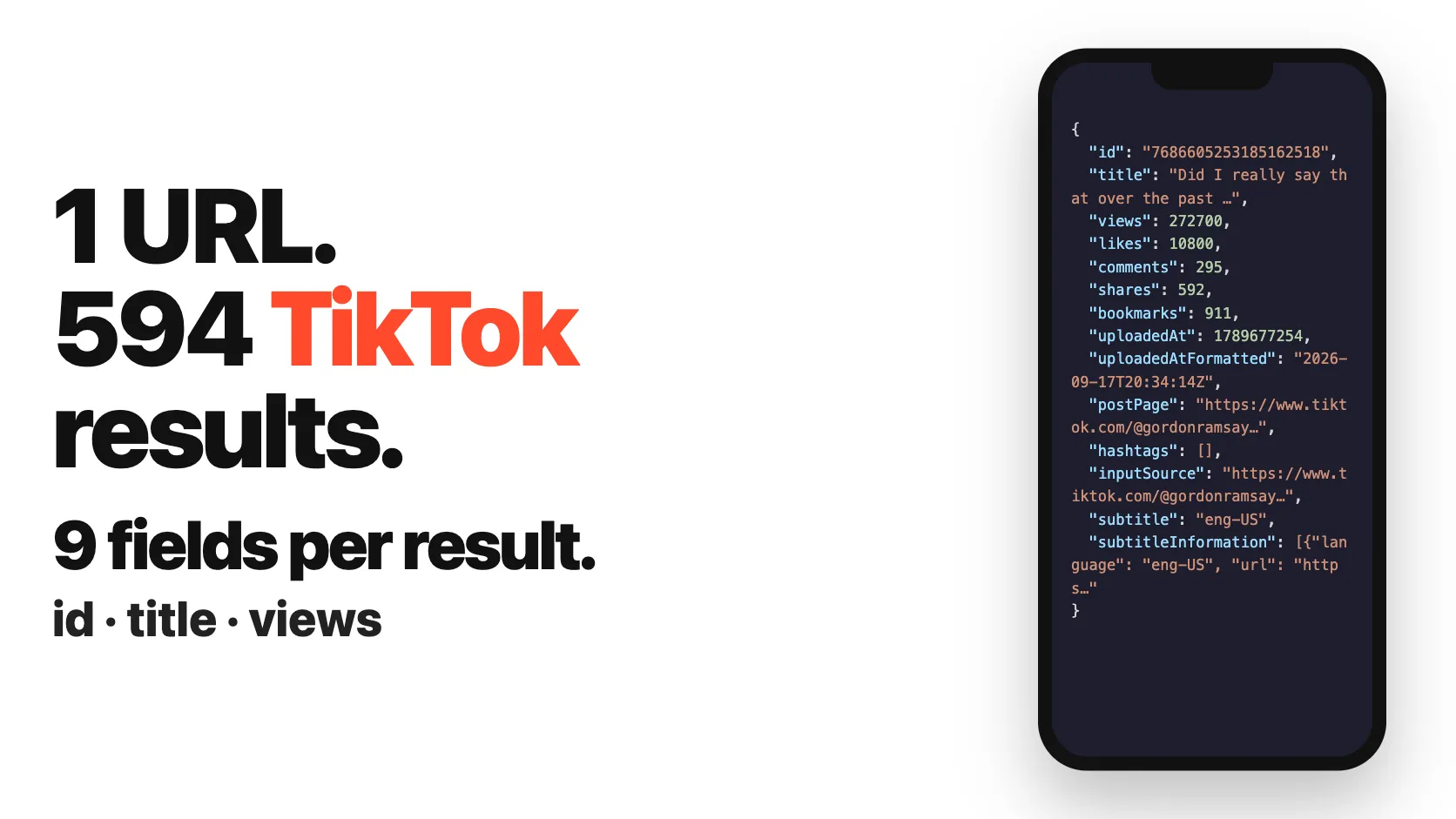
Each post is one flat record:
When maxComments is set, comments are returned as their own records:
🗂️ Data fields
| Group | Fields |
|---|---|
| Post | id, title, views, likes, comments, shares, bookmarks, uploadedAt, uploadedAtFormatted, postPage, hashtags, inputSource, isAd, isSponsored, isPinned, isSlideshow, mentions, textLanguage, stickers |
| Creator | channel.id, username, name, bio, avatar, verified, url, followers, following, videos, likes |
| Video | video.url, cover, thumbnail, width, height, ratio, duration |
| Photo | images (url, width, height) for photo posts |
| Music | song.id, title, artist, album, duration, cover |
| Captions | subtitle, subtitleInformation |
| Location | poi (name, address, city) |
| Comment | id, text, likes, createTime, replyCount, author, replies |
| Profile (followers/following) | id, username, nickname, bio, avatar, verified, followers, following, hearts, videos, secUid, url, inputSource |
🚀 Examples
Pull a creator's full video history
Add https://www.tiktok.com/@gordonramsayofficial to startUrls, or gordonramsayofficial to usernames, and set maxItems.
Watch a list of creators by username
Paste the usernames from your creator sheet into usernames, one per line, with or without the @. No need to build the profile links first.
Refresh the numbers of videos you already track
Paste their IDs into videoIds to get today's views, likes, comments, shares, and bookmarks for each one. The IDs are the id of the records of an earlier run.
Track a trending hashtag
Add https://www.tiktok.com/tag/recipe to scrape the latest posts using that hashtag.
Find videos using a sound
Add a https://www.tiktok.com/music/... URL to pull every post built on that track.
Search a topic across TikTok
Set keywords to ["air fryer recipes"] with sortType of most liked to surface the best-performing videos.
Read the conversation on a viral video
Add the video URL and set maxComments to 200 to collect comments and replies.
See who a creator follows
Add a creator URL to startUrls and set maxFollowing to the number of accounts you want. Each account the creator follows is returned as its own profile record.
Pull a creator's reposts
Add a creator URL and set scrapeReposts to true. Reposted videos are added to the output alongside the creator's own posts.
💻 Integrations
Run it from your own code with the Apify client.
Python
JavaScript
Results are also available as JSON, CSV, or Excel from the dataset.
📈 Performance
| What | Detail |
|---|---|
| Coverage | Creators, videos, photos, hashtags, sounds, locations, search, and comments |
| Output | One flat record per post, 50+ fields, deduplicated |
| Scale | Mix many inputs and keywords in one run; cap with maxItems |
| Pricing | Pay per post returned, set on the actor page |
💡 Tips for best results
- Mix surfaces in one run. Combine a creator, a hashtag, and a few keywords in the same input to cover a topic from every angle at once.
- Use
maxItemsto control cost. Each TikTok entry point returns a few hundred posts per query, so set the cap to what you need and add more URLs for more reach. - Set a region. Use
locationto match the country you care about, since trending content differs by market. - Reshape on the fly. Use
customMapFunctionto keep only the fields you need, for example justid,views, andchannel.username. - Search smart. Pair
keywordswithsortTypeof most liked to pull the strongest videos for a topic instead of the newest.
❓ FAQ
Do I need a TikTok account or login? No. No login, no API key, no cookies. The scraper reads publicly available data.
Can it scrape private accounts? No. Public profiles, videos, and comments only.
Can I get profiles, hashtags, and search in one run? Yes. Mix creator, video, hashtag, sound, location, and search URLs, plus keywords, usernames, and video IDs, in a single input.
Can I use usernames or video IDs instead of URLs?
Yes, each has its own field. usernames takes TikTok usernames, with or without the @ (gordonramsayofficial, @nasa), and returns the videos of each profile exactly like its profile URL would, with the same profile options (order, pinned posts, reposts, followers, following). videoIds takes post IDs such as 7050551461734042926, the number at the end of a video link and the id of every post record, and returns one record per post, with its comments when maxComments is set and its related videos when scrapeRelatedVideos is on. A profile link pasted into usernames or a video link pasted into videoIds works too. An entry that is not a username or an ID is skipped and noted in the run log, and the rest of the run goes on.
Can I download the videos?
Each post includes a video.url you can use to fetch the file.
How many posts can I get from one hashtag or profile? TikTok serves a few hundred posts per query. For more reach, add more URLs or keywords rather than expecting one query to return everything.
What formats can I export? JSON, CSV, and Excel, or pull results straight from the API.
More SilentFlow scrapers
🛒 E-commerce
 Pinterest - Pinterest Scraper | Pins, Boards and Profiles
 Leboncoin - Leboncoin Scraper | Classified Ads, Prices and Sellers
 Leboncoin - Leboncoin Ad Details Scraper
 Back Market - Back Market Scraper | Refurbished Prices
 ImportYeti - US Customs Records, Suppliers & Trade Data - ImportYeti Scraper - US Customs Records, Suppliers & Trade Data
 TikTok Shop - TikTok Shop Scraper | Products, Sellers and Creator Videos
 1688 Wholesale - 1688 Wholesale Scraper
 Naver - Naver Scraper | Shopping Products, Prices and Reviews
 Udemy Course - Udemy Course Scraper
 JD - JD Products Scraper | Prices, Brands and Barcodes
 Store Leads Ecommerce - Store Leads Ecommerce Scraper
 Amazon Seller - Amazon Seller Scraper | Emails, Phones and Ratings
 Naver - Naver Reviews Scraper | Shopping Product Reviews
 Bring a Trailer - Bring a Trailer Scraper
 Lowes - Lowes Products Scraper | Prices, Stock and Specs
 Store Leads - Store Leads Scraper | Shopify Data
 Avito - Avito Scraper | Listings, Prices and Sellers
 Leboncoin - Leboncoin Scraper
 Mobile.de - Mobile.de Scraper
 Naver - Naver Products Scraper | Shopping Prices, Sellers and Ratings
 Taobao - Taobao Scraper | Products, Prices and Sellers
 Udemy - Udemy Scraper
 Agoda - Agoda Scraper | Hotel Prices and Guest Ratings
 Alibaba - Alibaba Products Scraper | Wholesale Prices and MOQ
 AliExpress - AliExpress Reviews Scraper | Feedback, Ratings and Photos
 AliExpress - AliExpress Scraper | Products, Prices and Sales
 Allegro - Allegro Scraper | Products, Prices and Sellers
 Avito - Avito Profiles Scraper | Sellers, Ratings and Reviews
 Back Market - Back Market Scraper | Refurbished Electronics Prices
 BAUHAUS - BAUHAUS Scraper | Product Prices, EAN and Specs
 CARFAX - CARFAX Scraper | Used Cars, Prices and History
 Coupang - Coupang Detail Scraper | Product Prices and Options
 Ctrip - Ctrip Scraper | Attractions, Tickets and Reviews
 eBay Marketplace - eBay Marketplace Scraper
 Europages - Europages Scraper | Suppliers and B2B Companies
 Eventim - Eventim Scraper | Events, Ticket Prices and Venues
 GasBuddy - GasBuddy Scraper | Gas Prices by Station
 Google Hotels - Google Hotels Scraper | Prices, Offers and Ratings
 Homedepot - Homedepot Reviews Scraper | Customer Reviews and Ratings
 Leboncoin - Leboncoin Details Scraper | Full Ad Data and Sellers
 Mercari - Mercari Scraper | Listings, Sold Prices and Sellers
 Vinted Marketplace - Vinted Marketplace Scraper
 Walmart - Walmart Product Scraper
 Alibaba - Alibaba Scraper | Products, Prices and Suppliers
 Amazon - Amazon Product Scraper
 Amazon Marketplace - Amazon Marketplace Scraper
 AutoScout24 - AutoScout24 Scraper
 eBay Listings - eBay Listings Scraper
 Europages Deep Dive Extractor - Europages Deep Dive Extractor | VAT, Decision Makers, ISO Certs
 Pinterest - Pinterest Scraper
 Trip - Trip Scraper | Hotels, Prices and Reviews
 Vinted - Vinted Scraper
 Walmart - Walmart Scraper | Prices, Reviews, Sellers, Availability
💼 Jobs
 ZipRecruiter - ZipRecruiter Jobs Scraper | Salary, Company & Location Filters
 Indeed - Indeed Company Reviews Scraper
 Multi Board - Multi Board Job Scraper
 Glassdoor Job Listings - Glassdoor Job Listings Scraper
 🔥 Glassdoor - 🔥 Glassdoor Scraper
 LinkedIn Job Search - LinkedIn Job Search Scraper | Salaries & Seniority
 ATS - ATS Jobs Scraper | Greenhouse, Lever and Ashby
 Dice Tech - Dice Tech Jobs Scraper
 iimjobs - iimjobs Scraper | Jobs, Companies and Recruiters
 Jora - Jora Jobs Scraper
 Malt Freelancer - Malt Freelancer Scraper
 Malt - Malt Scraper | Freelance Profiles
 Welcome to the Jungle - Welcome to the Jungle Job Scraper
 All - All Jobs Scraper
 Arbeitsagentur - Arbeitsagentur Jobs Scraper
 Cutshort - Cutshort Jobs Scraper | Salaries, Skills and Companies
 Dice - Dice Jobs Scraper | US Tech Jobs, Salaries, Skills
 Glassdoor - Glassdoor Jobs Scraper
 Indeed - Indeed Jobs Scraper | Job Listings in 73 Countries
 Jora - Jora Scraper | Jobs in Australia, New Zealand, Singapore
 StepStone - StepStone Scraper
 YCombinator - YCombinator Jobs Scraper | Startup Jobs, Salaries and Founders
 Arbeitsagentur - Arbeitsagentur Scraper | German and Austrian Job Board
 Indeed - Indeed Companies Scraper | Reviews, Salaries, Interviews
 Indeed - Indeed Jobs Scraper | NLP Skills
 LinkedIn - LinkedIn Jobs Scraper
 Naukri & NaukriGulf - Naukri & NaukriGulf Jobs Scraper
 Seek - Seek Job Scraper
 Welcome to the Jungle - Welcome to the Jungle Scraper | Jobs and Company Data
 Ziprecruiter - Ziprecruiter Scraper
🏠 Real estate
 SeLoger - SeLoger Scraper | Real Estate Listings
 Anjuke - Anjuke Scraper | Rental Listings, Prices and Agents
 Realtor Rental Listings - Realtor Rental Listings Scraper
 Airbnb Pro Host Contact & - Airbnb Pro Host Contact & Email Scraper
 Bien'ici - Bien'ici Scraper | Property Listings
 Rightmove - Rightmove Scraper
 Trulia Rental Listings - Trulia Rental Listings Scraper
 Airbnb Professional Host - Airbnb Professional Host Scraper | Emails, Phones, SIRET
 Airbnb Search - Airbnb Search Scraper
 Bienici - Bienici Scraper
 Idealista - Idealista Scraper
 Realestate.com.au - Realestate.com.au Scraper
 SeLoger - SeLoger Scraper | French Property Listings and Agencies
 Zillow - Zillow Scraper
 Airbnb Search - Airbnb Search Scraper | Prices, Fees, Amenities, Hosts
 Idealista - Idealista Scraper
 Realtor Rental - Realtor Rental Scraper
 Trulia Rental - Trulia Rental Scraper | US Rentals, Prices, Pet Policy
📣 Social media
 LinkedIn Post Search - LinkedIn Post Search Scraper | Keywords, Hashtags & Profiles
 Facebook Search - Facebook Search Scraper
 Instagram - Instagram Story Scraper | Stories & Highlights
 LinkedIn Leads - LinkedIn Leads Scraper | Sales Navigator Export
 YouTube - YouTube Channel Scraper | Videos, Shorts and Views
 Facebook Search - Facebook Search Profiles Scraper | People by Name or Keyword
 Instagram Engagement - Instagram Engagement Scraper
 Meta Ad Library - Meta Ad Library Scraper
 OnlyFans - OnlyFans Profile Scraper
 TikTok Trend - TikTok Trend Scraper | Trending Hashtags and Videos
 OnlyFans - OnlyFans Creator Scraper
 Skool Community - Skool Community Scraper
 Bilibili - Bilibili Scraper
 Facebook Thread - Facebook Thread Profiles Scraper | Followers, Bios & Engagement
 Kuaishou - Kuaishou Scraper | Videos, Comments and Creator Stats
 LinkedIn Event - LinkedIn Event Scraper
 Reddit - Reddit Scraper | Posts, Comments and Subreddits
 Reddit - Reddit Scraper | Comments, Posts and Users
 Snapchat - Snapchat Contacts Scraper | Phones, Emails and Websites
 Weibo - Weibo Scraper | Posts, Profiles and Engagement
 Xigua - Xigua Scraper | Videos, Creators and Downloads
 Discord - Discord Scraper | Servers, Member Counts and Invites
 Facebook - Facebook Company Scraper | Emails, Phones, Ratings
 Facebook Business Page - Facebook Business Page Scraper
 Kwai - Kwai Scraper | Videos, Creators and Hashtags
 LinkedIn Ads Library - No Cookies - LinkedIn Ads Library Scraper - No Cookies
 LinkedIn Hashtag & - LinkedIn Hashtag & Post Scraper | No Cookies
 Skool Group - Skool Group Scraper
 Snapchat - Snapchat Ads Scraper | Ad Library, Impressions & Targeting
 YouTube - YouTube Transcript Scraper
🏢 Business data
 Tencent - Tencent Scraper | Maps Places, Phones and Ratings
 LinkedIn People Search - LinkedIn People Search Scraper | Profiles & Companies
 LinkedIn Company Search - LinkedIn Company Search Scraper | Profiles & Firmographics
 Company Data - Company Data Scraper | Emails, Phones and Tech Stack
 FanDuel - FanDuel Scraper | Odds, Spreads and Player Props
 ForexFactory - ForexFactory Scraper | Economic Calendar and Forecasts
 Justdial - Justdial Companies Scraper | Business Leads, Phones and Emails
 Kakao - Kakao Scraper | Map Places, Reviews and Phones
 OpenTable - OpenTable Reviews Scraper | Restaurant Reviews and Ratings
 SoftwareAdvice - SoftwareAdvice Scraper | Reviews, Ratings and Pros & Cons
 Teachable Course - Teachable Course Scraper
 Zomato - Zomato Reviews Scraper | Restaurant Ratings and Replies
 2GIS - 2GIS Reviews Scraper | Ratings, Photos and Owner Replies
 LinkedIn Sales Navigator - LinkedIn Sales Navigator Scraper
 Teachable - Courses, Prices & Instructors - Teachable Scraper - Courses, Prices & Instructors
 Trustpilot - Trustpilot Scraper | Reviews, Ratings and Company Contacts
 Website Tech Stack - Website Tech Stack Scraper
✈️ Travel
 Google Maps - Google Maps Scraper
 Booking.com Hotel - Booking.com Hotel Scraper
 Flight Price - Flight Price Scraper
 Trip - Trip Reviews Scraper | Hotel Reviews and Ratings
 Booking - Booking Scraper | Hotel Prices, Photos, Availability
🎯 Lead generation
 Northdata - Northdata Company Scraper
 ZocDoc - ZocDoc Scraper | Doctors, Reviews and Availability
 UK Companies House - UK Companies House Enricher
 Dealroom - Dealroom Scraper | Companies and Investors
 CNPJ Brazilian - CNPJ Brazilian Company Enricher
 Google Ads Transparency - Google Ads Transparency Scraper
 SIRET - SIRET Company Enricher
 BuiltWith - BuiltWith Scraper | Tech Stacks and Top Sites
 Domain - Domain Enricher
 French Company Prospector - French Company Prospector
 SEC - SEC Scraper | EDGAR Filings and Company Data
 USPTO - USPTO Scraper | Trademark Search and Status
 ZocDoc - ZocDoc Scraper
 Clutch - Clutch Scraper | Agencies, Reviews, Ratings, Services
 Clutch Agency - Clutch Agency Scraper
 Dealroom Startup Data - Dealroom Startup Data Scraper
 G2 - G2 Reviews Scraper
 PagesJaunes - PagesJaunes Scraper | French Business Emails and SIRET
 PagesJaunes - PagesJaunes Business Scraper
 SIRET French - SIRET French Company Enricher
 ThomasNet Suppliers - ThomasNet Suppliers Scraper
🔎 SEO
 Similarweb - Similarweb Scraper | Website Traffic, Rankings and Competitors
 Google News - Google News Scraper
 Apple - Apple Scraper | App Store Apps, Ratings and Charts
📈 Marketing
 Pexels -
 🧰 More tools
 PrizePicks - PrizePicks Scraper | Player Props, Lines and Projections
 Apple - Apple Reviews Scraper | App Store Reviews and Ratings
📬 Support
Need something this scraper does not do yet? We ship features fast.
- Feature requests go straight to our backlog
- Custom needs? We do tailored integrations
Response time: usually under 24 hours.


