

Meta Ad Library Scraper
Pricing
from $0.40 / 1,000 ads
Meta Ad Library Scraper
Scrape Facebook and Instagram ads from the Meta Ad Library by keyword or page URL, no login needed. Extract ad creatives, images, videos, carousel cards, copy, CTA, landing pages, advertiser details, dates and platforms. Track competitor ads, build swipe files and analyze ad strategy at scale.
Pricing
from $0.40 / 1,000 ads
Rating
0.0
(0)
Developer

SilentFlow
Maintained by CommunityActor stats
1
Bookmarked
8
Total users
3
Monthly active users
15 hours ago
Last modified
Categories
Share
Turn the Meta Ad Library into clean, structured ad data you can actually work with. Every active and inactive ad from any advertiser or keyword, with the full creative, in seconds.
Scrape Facebook and Instagram ads straight from Meta's public Ad Library. Search by keyword, pull every ad a page is running, or paste an Ad Library URL. Get the headline, body, call to action, landing page, images, videos, carousel cards, advertiser identity, run dates, and platform spread for each ad. No login, no API key, no cookies.
How it works
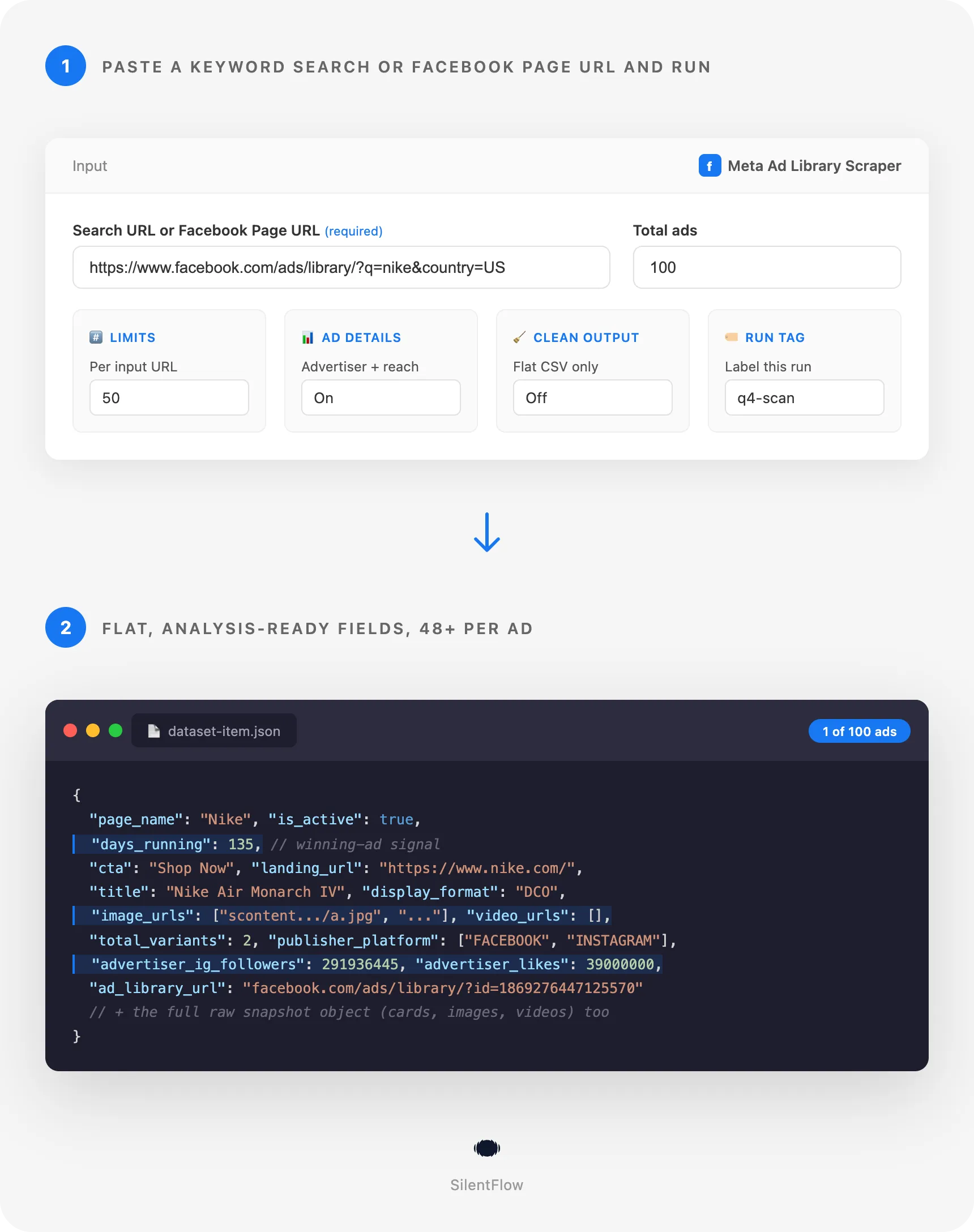
- Drop in a keyword search URL, a Facebook Page URL, or an Ad Library URL.
- Set how many ads you want.
- Get back a clean row per ad, with the full creative and advertiser data, ready for export.
✨ Why teams choose this over other Meta Ad Library scrapers
Spending hours scrolling the Ad Library and screenshotting competitor ads? Running scrapers that choke after a few hundred results? Tired of getting back a headline and nothing else?
- 💰 Pay per result, not per minute. No compute costs, proxies included. You pay for ads delivered, period. A run that returns nothing costs nothing.
- 🔁 Drop-in compatible, plus extras. Same inputs and the same output structure as the most popular Ad Library scraper, so you can switch your pipeline over with zero rewrites, and get cleaner fields on top.
- 🧹 Flat, analysis-ready output. Other scrapers hand you the raw nested object and leave you to dig through
snapshot.cards[].video_hd_url. We pull the essentials up to the top level:cta,landing_url,title,body, plusimage_urlsandvideo_urlsas flat lists. Open the CSV and the columns you need are right there. - 🖼️ Every creative URL in one list. All images and all videos across single ads and carousels are flattened into
image_urlsandvideo_urls. Build a swipe file with one column, not a JSON crawl. - ⏳ Spot winning ads instantly. Each ad carries
days_running, how long it has actually been live. Long-running ads are the ones that work, sorted in seconds. - 🧱 The full creative, not just the caption. Every image, every video, and every carousel card comes through with its own link, call to action, and copy. Nothing is dropped.
- 🆔 No login, no account, no API key. This reads the public Ad Library directly. Nothing to authenticate, nothing to get rate limited on your own account.
- 🌍 Any country, Facebook and Instagram. Pull ads targeted to any market and see exactly which platforms each ad runs on, from one input.
- 🏷️ Advertiser intelligence built in. Every ad carries the advertiser's page likes. Turn on ad details and each ad also gets
advertiser_name,advertiser_ig_followers,advertiser_likes,advertiser_category, and EU reach as flat columns. Size up who is spending in one glance. - 📊 Reliable at volume. No login means no account to get rate limited, and the scraper recovers from hiccups on its own. In testing it held a perfect success rate across dozens of parallel runs in 10+ countries.
- 📦 60+ fields per ad. The fields other scrapers skip, like the carousel breakdown, the collation of duplicate ads, total active time, and the advertiser profile, are often the ones that tell you what is actually working.
🎯 What you can do with Meta Ad Library data
| Team | What they build |
|---|---|
| Performance marketing | A live feed of every competitor ad by keyword and country, refreshed before each campaign sprint |
| Creative strategy | A searchable swipe file of winning images, videos, and carousels pulled from the top spenders in a niche |
| Brand and comms | A monitor that flags when a competitor launches a new campaign or kills an old one |
| Agencies | Client pitch decks backed by the actual ads competitors are running, not guesses |
| Ecommerce and DTC | A catalog of product ads and landing pages across an entire category to spot pricing and offer angles |
| Market research | A cross-country comparison of how the same brand advertises in different regions and languages |
| Affiliate and dropshipping | A scan of which products and creatives are scaling, by how many active ad variants a page is running |
📥 Input parameters
Sources
| Field | Type | Description |
|---|---|---|
urls | array | One or more Ad Library search URLs or advertiser page URLs. This is the only required field. |
A search URL looks like https://www.facebook.com/ads/library/?active_status=all&ad_type=all&country=US&q=nike&search_type=keyword_unordered&media_type=all. An advertiser page URL can be a simple https://www.facebook.com/nike or the Ad Library URL that contains view_all_page_id. Page URLs return every ad that advertiser is running. You can mix both in one run.
Limits
| Field | Type | Default | Description |
|---|---|---|---|
count | integer | 100 | Total ads to collect across all URLs. Leave empty for no cap. |
limitPerSource | integer | (none) | Maximum ads to collect per input URL. |
Page URL filters
These apply when an input is an advertiser page URL.
| Field | Type | Default | Description |
|---|---|---|---|
scrapePageAds.activeStatus | select | All | All, active only, or inactive only. |
scrapePageAds.countryCode | string | ALL | Two letter country code, or ALL. |
Options
| Field | Type | Default | Description |
|---|---|---|---|
scrapeAdDetails | boolean | false | Also fetch the advertiser profile (followers, likes, page spend) and EU reach breakdown for each ad. |
cleanOutput | boolean | false | Return only the flat, analysis-ready fields instead of the full raw object. Best for tidy CSV. |
runTag | string | (none) | A label written into every output row, handy for tracking which run produced which data. |
debugMode | boolean | false | Verbose logs for troubleshooting. |
📊 Output data
Each ad is one row. Example of a keyword search result:
Example of a video ad with a carousel:
With scrapeAdDetails enabled, each ad also carries an advertiser block (and aaa_info EU reach for EU and political ads):
🗂️ Data fields
| Category | Fields |
|---|---|
| Quick fields (flat) | cta, cta_type, landing_url, title, body, caption, display_format, image_urls, video_urls, days_running, total_variants, page_likes, advertiser_logo |
Advertiser (flat, with scrapeAdDetails) | advertiser_name, advertiser_category, advertiser_ig_followers, advertiser_likes, advertiser_ig_username, advertiser_page_url, advertiser_about, eu_total_reach |
| Identity | ad_archive_id, ad_library_url, page_id, page_name, runTag |
| Status and timing | is_active, start_date, end_date, start_date_formatted, end_date_formatted, total_active_time |
| Reach and grouping | publisher_platform, collation_count, collation_id, currency, categories |
| Creative copy | snapshot.body.text, snapshot.title, snapshot.caption, snapshot.cta_text, snapshot.cta_type |
| Landing page | snapshot.link_url, snapshot.link_description |
| Media | snapshot.images, snapshot.videos, snapshot.cards, snapshot.display_format |
| Advertiser | snapshot.page_profile_picture_url, snapshot.page_profile_uri, snapshot.page_like_count, snapshot.page_categories |
| Transparency | regional_regulation_data, targeted_or_reached_countries, contains_sensitive_content, contains_digital_created_media |
Ad details (when scrapeAdDetails on) | advertiser.ad_library_page_info.page_info (followers, likes, category), advertiser.ad_library_page_info.page_spend, aaa_info (EU age, gender, country reach) |
🚀 Examples
Get the latest Nike ads in the US
Pull every ad a specific advertiser is running
Scan a whole niche for video ads only
Compare one brand across two countries
Get only the active ads from one advertiser
Add advertiser profiles and EU reach
🤖 Copy to your AI assistant
Paste this block into Claude, ChatGPT, or Cursor to give it full context about this scraper:
💻 Integrations
Build a competitor ad monitor in Python
Build a creative swipe file in JavaScript
Export to CSV from the command line
📈 Performance
| Metric | Value |
|---|---|
| Login required | None |
| Platforms covered | Facebook, Instagram, Messenger, Audience Network |
| Ads per page request | Streamed continuously with automatic pagination |
| Typical run | A few hundred ads in well under a minute |
| Output format | One clean row per ad |
💾 Data export
Results land in an Apify dataset with a clean table view (advertiser, active, days live, CTA, landing page, images, videos) so you can scan ads without leaving the console. Export from the dataset tab as JSON, CSV, Excel, HTML, RSS, or XML. To pull data programmatically, use the dataset API:
💡 Tips for best results
- Build your search URL on the Ad Library website first, then paste it in. Whatever filters you set there, country, keyword, media type, active status, carry straight into the scraper.
- Use
countfor a quick sample andlimitPerSourcewhen you want an even number of ads from each of several URLs. - To track a single advertiser over time, run the same Page URL on a schedule and compare
is_activeandstart_datebetween runs. - Sort the dataset by
days_runningto surface the longest running ads first. Those are usually the winners worth copying. image_urlsandvideo_urlsgive you every creative as a flat list, so a swipe file is one column away in CSV.total_variantstells you how many near duplicate variants an ad has. A high number is a strong signal a creative is scaling.- Set a
runTagper project so you can tell campaigns apart when you merge several runs into one dataset.
❓ FAQ
What exactly does this scrape? Public ads from the Meta Ad Library: the creative (images, videos, carousel cards), the copy, the call to action, the landing page link, the advertiser page, run dates, active status, and the platforms each ad runs on.
Can I search by keyword and by advertiser? Yes. Paste a keyword search URL to scan everything matching a term, or an advertiser page URL like facebook.com/nike to pull every ad that advertiser is running. You can mix both in one run.
Do I need a Facebook account or API key? No. The Ad Library is public. There is no login, no API key, and no cookies to manage.
Which countries and platforms are covered? Any country supported by the Ad Library, and ads across Facebook, Instagram, Messenger, and Audience Network. The platform list comes through on every ad.
How fresh is the data? It is pulled live from the Ad Library at the moment you run the scraper, so it reflects what is showing right now, including ads that went live today.
How many ads can I pull?
As many as the Ad Library returns for your URL. Use count and limitPerSource to cap the total when you only need a sample.
Can I scrape several searches at once?
Yes. Put as many search URLs and Page URLs as you want in the urls list and they are processed in one run.
Do I have to dig through nested JSON?
No. The fields most people need, the CTA, landing page, headline, body, and every image and video URL, are pulled up to the top level as cta, landing_url, title, body, image_urls, and video_urls. Open the CSV and the columns are right there. The full raw object is still included if you want it.
What does Scrape ad details add?
With it on, each ad also gets an advertiser block (page followers, likes, page spend) and, for EU and political ads, an aaa_info block with the EU age, gender, and country reach breakdown. It is off by default because it makes one extra request per ad.
Why are spend and impression numbers sometimes empty? Meta only publishes spend, impression, and audience reach figures for ads about social issues, elections, or politics, and for EU transparency. Commercial ads do not carry those numbers, so those fields are empty for them. Everything else, the creative and advertiser data, is always there.
⚖️ Legal
This Actor extracts publicly available data from the Meta Ad Library. It does not bypass any login, paywall, or CAPTCHA. Users are responsible for complying with Meta's terms of service and applicable laws in their jurisdiction. The data returned is informational; verify accuracy for regulated use cases.
📬 Support
Need something this scraper doesn't do yet? We ship features fast.
- Feature requests go straight to our backlog
- Enterprise needs? We do custom integrations and high-volume plans
- Pricing questions? Check the Monetization tab on the actor page
Response time: usually under 24 hours.
Check out our other scrapers: silentflow on Apify


