
YouTube Email Finder - Influencer & Creator Emails, Socials
Pricing
from $4.25 / 1,000 creators
YouTube Email Finder - Influencer & Creator Emails, Socials
Influencer email finder for YouTube creators: search by keyword or channel and get public business emails from About pages, video descriptions, websites and link-in-bio pages, plus Instagram/TikTok/X handles, subscribers, country, lead score and Slack/Discord alerts for new creators.
Pricing
from $4.25 / 1,000 creators
Rating
0.0
(0)
Developer

Sonic Scraper
Maintained by CommunityActor stats
0
Bookmarked
2
Total users
1
Monthly active users
9 hours ago
Last modified
Categories
Features
Share
Find YouTube creators by keyword and get the business emails they publish: in the channel description, in their video descriptions, on their own website and on their link-in-bio page. Each creator comes with subscribers, country, last upload, Instagram / TikTok / X links and a 0-100 lead score. No login, no YouTube API key. $5 per 1,000 creators, and by default you only pay for creators with an email.
An influencer email finder for YouTube creators: one run gives you a contact list with emails, Instagram / TikTok / X handles and audience size, and a Slack or Discord alert can tell you when new creators appear. Built for influencer marketing, brand partnerships, sponsorship sales, podcast booking and agency outreach.
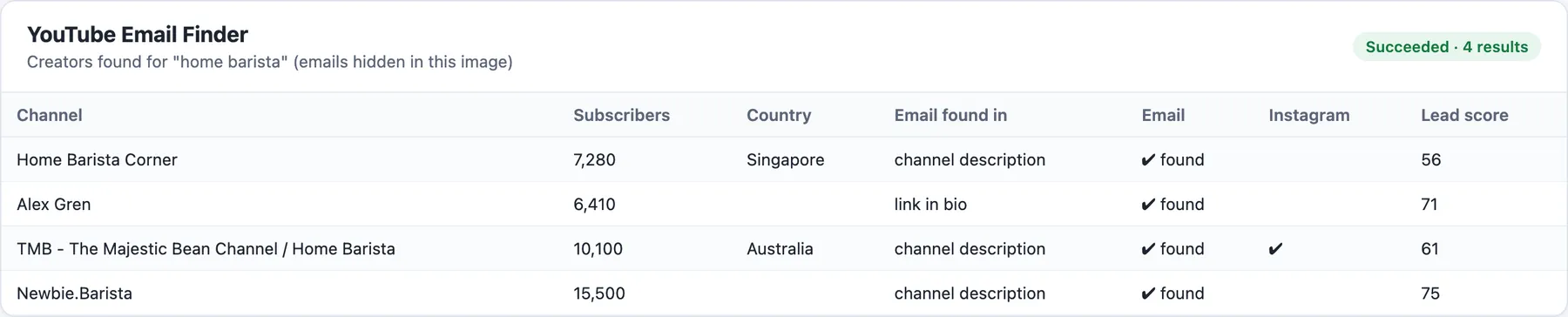
Real output from a run of YouTube Email Finder for "home barista". Email addresses are hidden in this image; they are in the dataset.
What you get
One row per creator:
- Email – the best public contact address, where it was found (
channel_description,video_description,websiteorlink_in_bio) and the exact page or video it came from, plus every other address found. - Email domain check – whether the email's domain has MX records, so you can drop addresses that cannot receive mail before you send.
- Audience – subscribers, total views, video count and an audience tier (nano, micro, mid-tier, macro, mega).
- Activity – date of the last upload, days since then and average views of recent uploads, so you can skip abandoned channels.
- Profile – country, join date, verified badge, avatar, description and the links on the channel's About page.
- Socials – Instagram, TikTok and X profiles with their @handles in separate columns, plus Facebook, LinkedIn, Twitch, Threads, Pinterest, Discord, Patreon and others when linked. Ready for cross-platform outreach.
- Lead score – 0-100, so the best leads sort to the top (formula below).
How it finds emails
Creators publish business contacts in different places, so the Actor checks all of the public ones:
- Channel About page – the description and the links YouTube shows under "Links".
- Recent video descriptions – the latest 15 uploads. Many creators repeat "Business inquiries: …" under every video. To leave out sponsors' and advertisers' addresses, a video email is kept only when it follows a contact line ("business", "inquiries", "collabs", "email me", …) or appears under more than one video.
- Link-in-bio pages – Linktree, Beacons, Stan, bio.link, Carrd and similar pages linked from the channel.
- The creator's own website – the home page and up to 3 contact-like pages (contact, business, work with me, press, about, imprint). Support addresses of website builders and shop platforms are filtered out.
Obfuscated addresses such as name [at] domain [dot] com are decoded. Image file names, placeholders (you@example.com) and no-reply addresses are dropped.
What it does not do: YouTube also lets creators add an email that only signed-in viewers can reveal, behind a CAPTCHA. This Actor does not sign in, use accounts or solve CAPTCHAs, so it does not collect that address. When a channel has one, hasHiddenBusinessEmail is true, so you know to open the About page yourself.
Quick start
Find active fitness creators with 10K-100K subscribers and an email:
Get contact details for channels you already have:
UK personal-finance creators, only new ones each week (schedule this in Apify):
Alerts in Slack or Discord
Paste a Slack incoming-webhook URL or a Discord channel webhook URL into Slack, Discord or webhook URL. When the run finishes you get a message like this, best leads first, with a link to download the full list as CSV:
Any other https URL receives the same data as JSON (summary plus the top creators), for Make, Zapier, n8n or your own backend. Turn on Only new creators and schedule the task weekly to get a fresh lead list in your channel every week. No alert is sent for runs that find nothing new, unless you ask for one.
Input
| Field | What it does |
|---|---|
searchKeywords | Keywords to search with YouTube's Channels filter. |
channelUrls | Channel URLs, @handles or UC… channel IDs. Can be combined with keywords. |
maxChannelsPerKeyword | Channels checked per keyword (default 40, up to 500). Only saved creators are billed, so check more channels than the number of leads you need. |
maxResults | Stop after this many saved creators (default 50, 0 = no limit). |
onlyWithEmail | Save only creators with an email (default on). |
minSubscribers, maxSubscribers | Subscriber range. |
countries | Countries from the About page, as names or two-letter codes. |
maxDaysSinceLastUpload | Keep only channels that uploaded in this many days. |
crawlWebsites, maxPagesPerWebsite | Check linked websites and link-in-bio pages (default on, 4 pages). |
checkEmailDomains | MX lookup for each saved email (default on). |
includeRecentVideos | Add the 5 latest uploads to each row. |
onlyNewChannels, stateKey | Monitoring: skip creators saved by earlier runs of the same stateKey. |
webhookUrl, webhookTopCreators, notifyWhenEmpty | Slack, Discord or JSON webhook digest at the end of the run (top 10 by default). |
searchLanguage, searchCountry | YouTube language and region used to rank search results. |
Output example
Values below are illustrative, not a real creator:
The dataset has two ready-made views: Leads (email, audience, score and socials) and Overview (channel stats and activity). Export as CSV, Excel or JSON, or send rows to Google Sheets, HubSpot, Slack or a webhook with Apify integrations, Make, Zapier or n8n.
Lead score
Out of 100, so you can sort and set a cut-off:
- Email (45): a public email; +10 when it is on the creator's own domain; -15 when the domain cannot receive mail.
- Activity (up to 20): last upload within 14 days 20, 30 days 15, 90 days 8, a year 3.
- Audience (up to 15): 1M+ 15, 100K+ 13, 10K+ 10, 1K+ 6, under 1K 2.
- Website (5) and other social profiles (1 each, up to 5).
Use with AI agents / MCP
Connect the Apify MCP server at https://mcp.apify.com?tools=sonic_scraper/youtube-email-finder in Claude Desktop, Cursor, VS Code or any MCP client. Example prompt: "Find 20 active cooking YouTubers with 10K-100K subscribers and a public business email." Each row is flat JSON with plain-English fields, so an agent can filter and summarise it directly.
Pricing
$5 per 1,000 creators saved ($0.005 per creator) on the free plan, with lower rates on paid Apify plans; see the Pricing tab for current rates. There is also a tiny start fee per run.
- Channels skipped by your filters, and with
onlyWithEmailon, channels without an email, are not billed. - Errors are never billed.
- In monitoring mode, creators already saved are skipped and not billed again.
- The Actor stops before it would exceed your run's maximum charge.
Example: 200 contactable creators cost $1.00.
How it works and where the data comes from
The Actor reads public YouTube pages the way a logged-out visitor sees them: channel search results, the About page and the channel's public RSS feed of recent uploads. It then fetches the public pages the creator links to. It uses no YouTube account, no API key and no browser, and it does not try to get past logins, CAPTCHAs or bot checks: a site that blocks a plain request is skipped. Emails are only ones the creators published themselves for people to contact them.
Limits
- Public emails only. Many creators publish none, or only the hidden one (
hasHiddenBusinessEmail). In our tests about 35-45% of channels found by a niche keyword had a public email; it varies by niche and country. - Instagram and TikTok are links and handles, not scraped profiles. You get the profiles creators link from YouTube and their websites. The Actor does not log in to or scrape Instagram or TikTok, so their follower counts are not included.
- The MX check is not mailbox verification. It confirms the domain accepts mail, not that the address exists. Use an email verifier before large sends.
- Search results follow YouTube. The Channels filter returns what YouTube ranks for the keyword and region, usually several hundred channels at most per keyword. Use several specific keywords for bigger lists.
- Websites that need JavaScript or block bots are skipped, so an email shown only by a script or a contact form is missed.
Use the data responsibly
These are addresses creators published for business contact. Your outreach still has to follow the laws that apply to you, such as GDPR in the EU and UK, CAN-SPAM in the US and CASL in Canada: say who you are, keep messages relevant to the creator's work, honour opt-outs, and do not add creators to unrelated mailing lists. Do not use the data to harass anyone or to resell personal data.
FAQ
How do I find a YouTuber's email address?
Run this Actor with the channel URL or @handle. It checks the channel description, the latest video descriptions, the creator's website and link-in-bio page, and returns the published email with the page it came from. If the creator only added YouTube's hidden business email, hasHiddenBusinessEmail is true and you can reveal it on the About page while signed in.
Is this an influencer email finder for Instagram and TikTok too?
It finds creators through YouTube and collects the Instagram, TikTok and X handles they link, with their published email. Many creators use the same contact address on every platform, so one row covers their cross-platform outreach. It does not scrape Instagram or TikTok directly.
Can I get new influencer leads in Slack every week?
Yes. Add your niche keywords, turn on "Only new creators", paste a Slack or Discord webhook URL, and schedule the task weekly. Each run posts only the new creators to your channel.
How can I find YouTube influencers in my niche with emails?
Enter a few niche keywords, set a subscriber range and "Uploaded within (days)", and keep "Only creators with an email" on. You get a list of active creators in that niche with contact emails, sorted by lead score.
Does it get the "View email address" business email?
No. That address is shown only to signed-in viewers after a CAPTCHA, and this Actor does not use accounts or solve CAPTCHAs. It reports when a channel has one.
Do I pay for channels without an email?
Not with the default settings. With "Only creators with an email" on, only creators with an email are saved and billed.
Can I get only new creators every week?
Yes. Turn on "Only new creators", give the monitor a name, and schedule the task. Each run saves only creators that earlier runs of that monitor have not saved.
Do I need a YouTube API key or account?
No. It reads public pages and the public RSS feed.
Related actors
- YouTube Transcript Scraper: transcripts of a creator's videos, to check what they talk about before you pitch.
- YouTube Channel Monitor: alerts when the creators you work with publish a new video.
- YouTube Comments Scraper: comments on a creator's videos, to judge audience engagement.
- Website Screenshot API: screenshots of creators' websites and media kits for your outreach decks.
Support
Something wrong with a channel? Open an issue on the Issues tab with the channel URL and your run ID (never share tokens). Run statistics are in the SUMMARY record and failed channels in ERRORS. This is an independent tool, not affiliated with YouTube or Google.


