

Cars24 Used Cars Search Scraper
Pricing
from $2.00 / 1,000 results
Cars24 Used Cars Search Scraper
Scrape comprehensive used car listings from Cars24.com, India's leading online platform for certified pre-owned vehicles. Extract pricing, specifications, condition reports, and dealer information. Perfect for automotive market research, price comparison tools, inventory analysis.
Pricing
from $2.00 / 1,000 results
Rating
0.0
(0)
Developer

Stealth mode
Maintained by CommunityActor stats
0
Bookmarked
51
Total users
1
Monthly active users
a day ago
Last modified
Categories
Share
Cars24.com Used Car Scraper: Extract Complete Vehicle Listings Data
Excerpt: Scrape comprehensive used car listings from Cars24.com, India's leading online platform for certified pre-owned vehicles. Extract pricing, specifications, condition reports, and dealer information. Perfect for automotive market research, price comparison tools, inventory analysis, and competitive intelligence in the used car industry.
Understanding Cars24.com and Its Market Position
Cars24.com revolutionized India's used car market by providing transparent pricing, standardized quality checks, and streamlined buying experiences. The platform lists thousands of certified pre-owned vehicles with detailed specifications, inspection reports, and competitive pricing—making it a goldmine for automotive data intelligence.
Unlike traditional classifieds, Cars24 provides structured, verified data including mechanical condition, service history, and transparent pricing. For automotive dealers, market researchers, price comparison platforms, and automotive analytics companies, this data enables market trend analysis, competitive pricing strategies, and inventory optimization.
Manual data collection across multiple cities, car segments, and specifications requires extensive time browsing pages and copying fragmented information. This scraper automates the entire process, transforming search results into structured datasets ready for analysis.
What This Scraper Extracts and Target Users
The Cars24.com Used Car Scraper processes search result pages—the listings you see after applying filters for body type, price range, fuel type, or location. It extracts comprehensive vehicle data from multiple listings simultaneously.
Key Users:
Used Car Dealers monitor inventory availability, competitive pricing, and market supply across segments. Automotive Market Researchers analyze pricing trends, popular models, and regional demand patterns. Price Comparison Platforms integrate Cars24 data to provide comprehensive market coverage. Automotive Analytics Companies build predictive pricing models and demand forecasting tools. Financial Institutions assess used car market values for loan underwriting and insurance purposes.
Input Configuration: Targeting Vehicle Listings
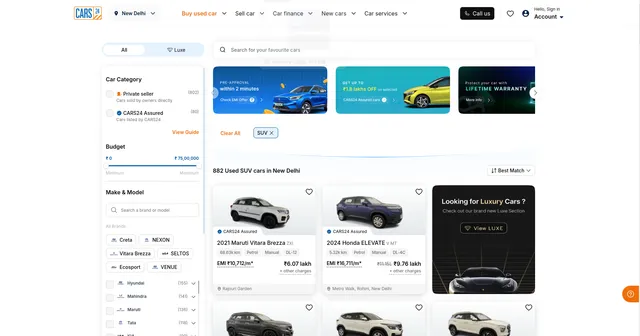
The scraper processes Cars24 search result URLs with applied filters. These URLs contain query parameters specifying body types, cities, price ranges, and other criteria.
Example Input:
Example Screenshot:
Parameter Explanation:
proxy: Set to false for direct access. Enable (useApifyProxy: true) if experiencing rate limiting or regional restrictions.
max_items_per_url: Limits extraction to 20 vehicles per URL. Increase for comprehensive data collection; Cars24 typically displays 20-30 listings per page.
ignore_url_failures: When true, continues processing remaining URLs if one fails—essential for batch scraping multiple search pages.
urls: Search result page URLs from Cars24. Example URL includes filters: bodyType=suv (SUVs only), storeCityId=2 (specific city). Build URLs by performing searches on Cars24 and copying the resulting URLs.
URL Construction Tips: Apply desired filters on Cars24 (body type, transmission, fuel, price range, city), then copy the URL. For pagination, add &page=2, &page=3 to collect additional listings. Test URLs in browser before scraping.
Complete Output Structure and Field Definitions
The scraper returns JSON data with each used car as an object containing detailed fields. Understanding field purposes enables effective analysis and application.
Listing Identification
ID: Unique identifier (appointment ID) of the car listing on CARS24. Purpose: Database indexing, tracking specific cars over time, avoiding duplicates, linking to detail pages.
Listing URL: Direct link to the full car detail page on CARS24. Purpose: Accessing complete details, sharing opportunities with clients, verification of scraped data.
Vehicle Details
Car Name: Full display name of the car (make and model). Purpose: Quick identification and display in reports.
Make: Car manufacturer (e.g., Maruti). Purpose: Brand-level market analysis and filtering.
Model: Car model name. Purpose: Model-level price and demand comparison.
Variant: Trim or variant of the model (e.g., ZXI). Purpose: Precise valuation, since price varies strongly between variants.
Year: Manufacturing year of the car. Purpose: Depreciation analysis, age-based filtering.
Body Type: Body style of the car (e.g., SUV). Purpose: Segmenting the market by vehicle type.
Fuel Type: Fuel used by the car (e.g., Petrol). Purpose: Running cost estimation, fuel-based filtering.
Transmission: Transmission type (Manual or Automatic). Purpose: Matching buyer preferences, price comparison between transmission types.
Ownership: Owner sequence number (1 = first owner, 2 = second owner). Purpose: Assessing vehicle history and resale value.
Odometer Km: Distance driven in kilometers as a number. Purpose: Usage analysis, price-versus-mileage modeling.
Odometer Display: Distance driven as displayed on the listing (e.g., 68.63k km). Purpose: Display and verification against the website.
Color: Exterior color of the car (may be null). Purpose: Filtering by color preference when available.
Seats: Number of seats (may be null). Purpose: Matching buyers by family size when available.
Features: List of car features (may be null). Purpose: Comparing equipment levels when available.
Registration Number Masked: Partially hidden registration plate number. Purpose: Identifying the registration state and series without exposing the full plate.
Registration Date: Date the car was first registered (may be null). Purpose: Precise vehicle age calculation when available.
RTO Code: Regional Transport Office code of the registration (e.g., DL12). Purpose: Identifying the registration region and its regulations.
Fitness Age: Vehicle age limit value related to fitness validity. Purpose: Assessing remaining legal usage life under local regulations.
Car Segment: Platform segment classification of the car (e.g., STANDARD). Purpose: Segmenting inventory by platform tier.
Car Category: Platform category of the car (e.g., PRIME). Purpose: Comparing quality tiers across inventory.
Pricing
Listing Price: Current asking price as a number. Purpose: Price comparison, market valuation, budget filtering.
Original Price: Price before discount (0 when no discount is applied). Purpose: Measuring price drops and discount depth.
On Road Price: Price including registration and taxes (may be null). Purpose: Total cost estimation when available.
Discount: Discount amount applied to the car. Purpose: Identifying discounted inventory and promotion strategy.
Currency: Currency of the listed price (INR). Purpose: Correct financial interpretation when merging datasets from multiple markets.
Price Tag: Platform deal label (e.g., STEAL_DEAL). Purpose: Spotting cars the platform rates as good value.
Other Charges Note: Notice that additional charges apply on top of the listed price. Purpose: Warning that the final cost exceeds the listed price.
EMI (Financing)
EMI Starting Value: Lowest monthly installment offered. Purpose: Affordability analysis and buyer targeting.
EMI Ending Value: Highest monthly installment offered. Purpose: Understanding the EMI range across plans.
EMI Interest Rate Min: Lowest annual interest rate (%) offered. Purpose: Comparing financing cost across listings.
EMI Interest Rate Max: Highest annual interest rate (%) offered. Purpose: Understanding the financing cost range.
EMI Tenure Months: Loan duration in months. Purpose: Calculating total financing cost.
EMI Down Payment: Upfront cash payment required for the EMI plan. Purpose: Assessing entry barrier for buyers.
EMI Display Text: EMI text as displayed on the listing. Purpose: Display and verification against the website.
Availability and Engagement
Status: Availability status of the car (e.g., AVAILABLE). Purpose: Filtering out sold or reserved cars.
Listing Status: Publication status of the listing (e.g., LISTED). Purpose: Confirming the listing is live.
Test Drive Label: Earliest test drive availability shown on the listing (e.g., Today). Purpose: Measuring buyer convenience and service responsiveness.
First Listing Time: Time the car was first listed (may be null). Purpose: Measuring time on market when available.
Wishlist Count: Number of users who saved the car (may be null). Purpose: Measuring buyer interest and demand.
OEM Service History Available: Whether manufacturer service records are available (may be null). Purpose: Assessing maintenance transparency and trust.
USP Badges: List of selling-point badges attached to the listing. Purpose: Identifying promoted benefits and highlights.
AI Highlights Available: Whether AI-generated highlights exist for the car. Purpose: Identifying listings with richer summaries.
Location and Seller
Locality: Locality where the car is located. Purpose: Local inventory analysis and proximity filtering.
City ID: Platform identifier of the city used in search filters. Purpose: Joining datasets by city, building city-based search queries.
Seller Badge: Seller or program badge (e.g., CARS24 Assured). Purpose: Distinguishing certified inventory from standard listings.
Media
Gallery Count: Number of photos in the gallery (may be null). Purpose: Evaluating listing completeness when available.
Image URL: Link to the main listing photo. Purpose: Visual inspection, thumbnails in reports and dashboards.
Image Background Removed URL: Link to the main photo with background removed. Purpose: Clean catalog display and computer vision analysis.
Image Label: Angle or view shown in the main photo (e.g., Right Front Diagonal). Purpose: Understanding which view is shown.
Image Category: Category of the main photo (e.g., Exterior). Purpose: Classifying image content.
Raw Data
Raw Data: Complete original JSON object of the car as scraped, without modification. Purpose: Auditing, debugging, accessing fields not included in the cleaned output, and reprocessing without re-scraping.
Sample Output:
Step-by-Step Usage Guide
1. Define Search Criteria: Decide what vehicles to target—body types, cities, price ranges, fuel types. Test searches on Cars24 to verify results match requirements.
2. Build URL List: Copy search result URLs from Cars24. For comprehensive data, include multiple URLs with different filters. Add pagination (&page=2, &page=3) for large datasets.
3. Configure Input: Create JSON with URL list. Set max_items_per_url based on needs (20 for standard, 50+ for comprehensive). Enable ignore_url_failures for robustness.
4. Execute Scraper: Launch via Apify console. Monitor real-time progress. Processing 5-10 search pages typically completes in 2-4 minutes.
5. Validate Data: Check dataset preview for completeness. Verify pricing, specifications, and images are correctly extracted.
6. Export Results: Download in preferred format—JSON for databases, CSV for spreadsheets, Excel for business reporting.
7. Error Handling: Review activity log for failed URLs. Ensure URLs are search result pages, not individual car detail pages. Verify filters in URLs are valid.
Strategic Applications in Automotive Intelligence
Dynamic Pricing Models: Analyze listing prices against year, odometer, ownership, and features to build predictive pricing algorithms. Identify undervalued vehicles and pricing anomalies.
Inventory Optimization: Track which models, body types, and price ranges move fastest (using first_listing_time and status). Optimize dealer inventory based on demand patterns.
Competitive Benchmarking: Monitor competitor pricing, discount strategies, and inventory composition. Identify market positioning opportunities.
Market Trend Analysis: Track model popularity (wishlist counts), fuel type preferences, transmission shifts (manual to automatic), and emerging segments over time.
Geographic Analysis: Compare pricing, availability, and preferences across cities. Identify regional supply-demand imbalances for arbitrage opportunities.
Depreciation Studies: Calculate depreciation rates using listing_price vs original_price across different makes, models, and years. Forecast future values.
Quality Assessment: Correlate Cars24 scores, OEM service history, and USP badges with pricing and time-to-sell for quality premium quantification.
Feature Demand Tracking: Analyze which features (sunroof, automatic transmission, safety features) command highest premiums in different segments.
Best Practices for Maximum Value
Regular Scraping: Used car market changes daily. Scrape weekly for trend analysis, daily for real-time inventory monitoring.
Segment Strategically: Create separate URLs for SUVs, sedans, luxury cars, budget vehicles. Cleaner datasets enable better analysis.
Enrich Data: Combine with fuel price data, insurance costs, maintenance records, and customer reviews for comprehensive automotive intelligence.
Track Temporal Patterns: Monitor how first_listing_time correlates with status changes to calculate average time-to-sell by segment, price, and location.
Quality Filters: Use score, OEM service history, and USP badges to segment premium vs. standard inventory for targeted analysis.
Competitive Monitoring: Track specific models or price ranges weekly to identify when competitors adjust pricing or expand inventory.
Conclusion
The Cars24.com Used Car Scraper transforms India's leading certified pre-owned vehicle platform into actionable automotive intelligence. From pricing optimization to market trend forecasting, this tool delivers the data-driven insights needed to compete in the dynamic used car market. Start extracting comprehensive vehicle data today.


![🚀 Indeed jobs scraper [PPR] avatar](https://images.apifyusercontent.com/PEDOk9MmTf1yHtczA1A4wQEoGyAKCe5Aft1HzkhwROk/rs:fill:76:76/cb:1/aHR0cHM6Ly9hcGlmeS1pbWFnZS11cGxvYWRzLXByb2QuczMudXMtZWFzdC0xLmFtYXpvbmF3cy5jb20vTVhMcG5nbVZwRThXVEVTUXIvQjFrZ3BRS1p5dzJvVEpJUmctTG9nby1IZXJvLVN0YXRpYy1lemdpZi5jb20td2VicC10by1qcGctY29udmVydGVyLmpwZw.webp)


