

HTTP Request API: Send HTTP Requests in Bulk via Proxy
Pricing
from $2.50 / 1,000 request (datacenter or no proxy)s
HTTP Request API: Send HTTP Requests in Bulk via Proxy
Send an HTTP request to any URL or API through a proxy and get the response back: any method, custom headers and body, datacenter or residential IP, country per request. Returns status code, headers, body or parsed JSON and a JSON path or CSS extract. From $5 per 1,000; failed requests are free.
Pricing
from $2.50 / 1,000 request (datacenter or no proxy)s
Rating
0.0
(0)
Developer

Tenfold Fleet
Maintained by CommunityActor stats
0
Bookmarked
1
Total users
1
Monthly active users
a day ago
Last modified
Categories
Features
Share
What does HTTP Request API do?
HTTP Request API lets you send HTTP requests to any public URL or REST API from an Apify proxy IP and get the raw response back. Give it a list of requests, each with its own method, headers and body, and it returns one row per request with the status code, response headers, body or parsed JSON, timing and the proxy that was used.
It is an HTTP client as an API: one call from n8n, Make, Zapier, Clay, a script or an AI agent, and the request leaves from a datacenter or residential proxy IP, with the exit country set per run or per request. Nothing is rendered and no browser is started, so it is fast and cheap.
- Any method: GET, POST, PUT, PATCH, DELETE, HEAD, OPTIONS.
- Bulk: up to 5,000 requests per run, up to 50 in parallel.
- Country per request: set one country for the run and override it on single requests. Residential covers most countries; the datacenter pool covers few (see Tips).
- Built-in extraction: a JSON path or a CSS selector pulls the one value you need out of each response.
- Hard size cap: the download stops at the limit and the row says
"truncated": true, so one huge file cannot blow up your bill. - Failed requests are free: you pay only when an HTTP response comes back.
Why use HTTP Request API?
- Call an API that blocks your server's IP or that answers differently per country (prices, availability, geo-restricted content).
- Give an AI agent a safe "fetch" tool: it runs on the Apify MCP server and returns compact JSON an agent can read.
- Add a proxied HTTP step to a no-code workflow when the built-in HTTP module is rate-limited or blocked.
- Check many endpoints at once: status codes, redirects, response times and headers for a list of URLs.
- Fetch a value, not a page:
"extract": "$.data.price"or"extract": "title"returns only that part inextracted.
What data can HTTP Request API return?
| Field | Description |
|---|---|
index | Position of the request in your input list |
url, finalUrl | The URL you asked for and the URL after redirects |
method | HTTP method that was sent |
statusCode, ok | Response status and whether it is 2xx |
headers, contentType | Response headers (lower-case names) |
json | Parsed body when the response is JSON |
body, bodyEncoding | Body as text, or base64 for binary files |
extracted, extractError | Result of your JSON path or CSS selector |
truncated, bytes | Whether the size cap cut the body, and how many bytes were kept |
durationMs, attempts, redirects | Timing, tries and redirect hops |
proxyType, country | Proxy and exit country used |
error | Why a request failed (such rows are free) |
How to send HTTP requests in bulk
- Open the Actor and paste your requests into Requests: plain URLs, or objects with
url,method,headersandbodyorjson. - Pick the Proxy: datacenter for most APIs, residential for sites that refuse datacenter IPs, or none.
- Optional: set a Proxy country, an Extract expression and a response size limit.
- Click Start. Each request becomes one row in the dataset.
- Read the rows over the API, or download them as JSON, CSV or Excel.
How much does it cost to send HTTP requests?
Pay per event, no subscription:
- $5 per 1,000 requests ($0.005 each) over the datacenter proxy or with no proxy.
- $12 per 1,000 requests ($0.012 each) over the residential proxy.
- A run start costs $0.00005.
A request is charged when an HTTP response arrives, whatever its status code (a 404 or 500 from the target is still a delivered response). Not charged: network errors, timeouts, DNS failures, proxy errors, blocked destinations, invalid input rows and every retry. Proxy and compute are included in the price.
Free Apify plan: up to 20 requests per run, datacenter proxy or no proxy. Residential needs a paid plan.
Input
method defaults to GET, or POST when the request has a body. json is serialized and sent with Content-Type: application/json; body is sent as it is. Per request you can override country, responseType, extract, timeoutSecs and followRedirects. A run-level "country" applies to every request that does not set its own.
Extract syntax. JSON responses: $.data.items[0].name, $.results[*].id (a * returns a list), $['odd key'], negative indexes such as [-1]. HTML responses: any CSS selector returns the text of every match (title, h1, .price, table td:nth-child(2)); add @attribute for an attribute (a.product@href, meta[property="og:image"]@content).
Output
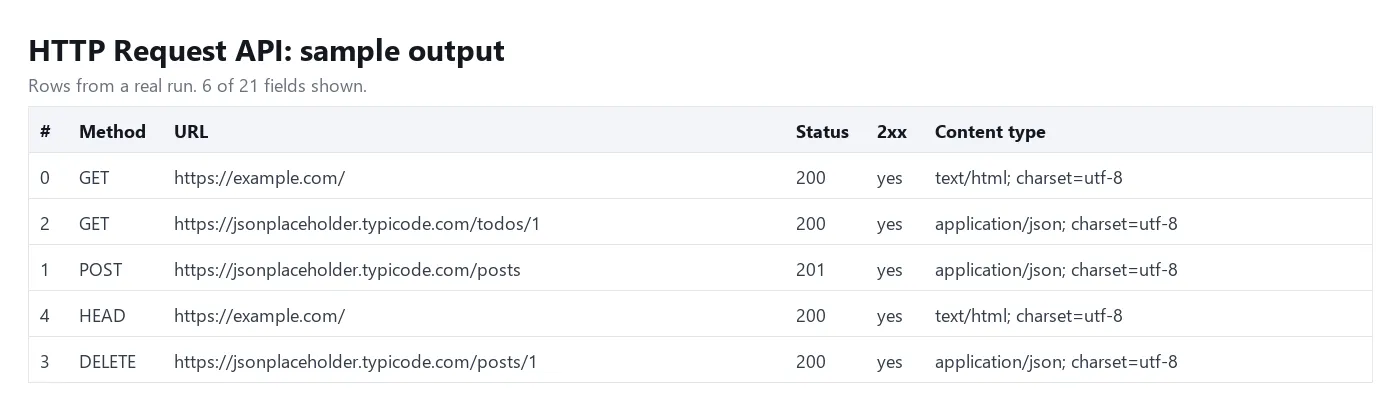
You can download the dataset as JSON, CSV, Excel, XML or HTML, or read it through the Apify API.
Tips
- Start with datacenter. It is the cheaper option and enough for most APIs. Switch to residential only when the target answers 403 or shows a challenge page to datacenter IPs.
- Response size limits: 5 MB on datacenter or no proxy, 500 KB on residential. Lower
maxResponseByteswhen you only need the start of a page. - Your own headers win. If you send a
User-Agent, the request goes out with exactly your headers. Without one, a realistic browser header set is added. - Retries apply only when no response arrived. A 429 or 503 from the target is returned to you so your workflow can decide what to do. POST and PATCH are sent again only when the first try never reached the target (for example the proxy could not connect), so a timeout cannot create the same record twice.
- Dead hosts fail fast. When a host gives no response to 5 requests in a row, the next requests to it get one 10-second try each until it answers again. These rows are free.
- The timeout covers one whole attempt, redirects and download included.
- Datacenter countries are limited. The datacenter pool depends on your Apify plan: in our test run US worked, while DE and GB had no datacenter IP. A country the pool does not have comes back as a free
errorrow. Use residential when the country matters. - Use it from an agent: add this Actor to the Apify MCP server and the agent can make proxied calls with a single tool.
FAQ
Can I send POST requests with a JSON body?
Yes. Put the object in json, or a raw string in body with your own Content-Type header. Form posts work the same way with body: "a=1&b=2" and Content-Type: application/x-www-form-urlencoded.
Does it run JavaScript or render pages?
No. It sends one HTTP request and returns the response as the server sent it. That is why it is fast. For rendered pages use a browser-based Actor from Apify Store.
Which destinations are refused?
Only public internet hosts are allowed. Private and internal addresses (10.x, 172.16-31.x, 192.168.x, 127.x, 169.254.x, IPv6 local ranges), cloud metadata endpoints, the Apify proxy and the Apify API are refused, also when a public URL redirects to them. These rows carry an error and cost nothing.
What happens with large files?
The download is cut at the size limit, the part that was received is returned (as base64 for binary files) and truncated is true. You are charged for one request as usual. Responses over 500 KB are stored a few at a time, so very large batches of big files run slower than small API calls.
Are my headers and API keys stored?
Request headers and bodies are used to send the request and are not written to the dataset. The response, including response headers, is stored in your own dataset under your Apify account, so treat the dataset like any other place that may hold API data.
Can I keep the same IP across requests?
Each request, and each retry, uses a fresh proxy IP. Sticky sessions are not supported yet; open an issue on the Actor page if you need them.
Disclaimer
Use this Actor only for requests you are allowed to make. You are responsible for following the terms of the sites and APIs you call and the laws that apply to you, including rules on personal data. Do not use it to attack, overload or probe systems you do not own.
More tools from Tenfold Fleet
All 122 tools: apify.com/tenfoldfleet. If this Actor saves you time, save it (the bookmark on its Store page) and leave a review: both help other people find it. Found a bug or need another field? Tell us on the Issues tab of this page.


