

Journalist Requests Monitor - HARO Alternative for PR Links
Pricing
from $5.00 / 1,000 new journalist requests
Journalist Requests Monitor - HARO Alternative for PR Links
Monitor journalist requests: find reporters who need an expert, a quote or a case study on your keywords. Sources: public SourceBottle call-outs and Bluesky posts tagged #journorequest. Returns title, text, outlet, deadline, topic, reply link. $10 per 1,000 new requests; repeats and empty runs free.
Pricing
from $5.00 / 1,000 new journalist requests
Rating
0.0
(0)
Developer

Tenfold Fleet
Maintained by CommunityActor stats
0
Bookmarked
2
Total users
1
Monthly active users
a day ago
Last modified
Categories
Features
Share
What does Journalist Requests Monitor do?
Journalist Requests Monitor collects open journalist requests: public call-outs where a reporter, editor or blogger asks for an expert, a quote, a product or a case study. It reads two public sources, SourceBottle call-outs and Bluesky posts tagged #journorequest and #journorequests, removes duplicates, keeps the requests that match your keywords and topics, and remembers what it already gave you. Run it on a schedule and it works as a HARO alternative alert or a journalist request API: each run returns only the requests that are new, and only those are charged.
Not affiliated with HARO (Help a Reporter Out), SourceBottle or Bluesky. Those names are used only to describe where the public requests come from and what kind of service this replaces.
Why use it?
- Earn PR links and press mentions. Answer a relevant request the day it appears and your client or brand can be quoted with a link.
- Stop reading every request by hand. Set keywords such as
mortgage,cybersecurityorsmall businessand receive only the matches. - Pay for news, not for repeats. A daily or hourly schedule costs nothing on the runs where nothing new appeared. A request you already received is not charged again, and a repost with the same reply link, or the same outlet, headline and deadline, counts as the same request.
- Feed an agency workflow. Send new requests to Slack, email, Google Sheets or an AI agent through Apify integrations and the Apify API.
What data can it extract?
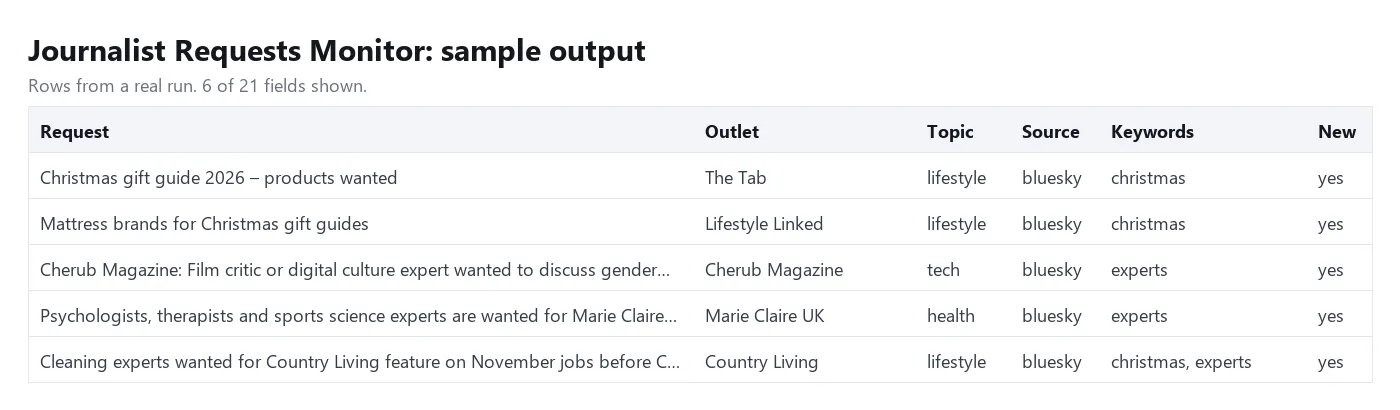
| Field | Meaning |
|---|---|
title | Short headline of the request |
text | Full text as published |
outlet, outletVerified | Publication or outlet named in the request, when one is given; on SourceBottle, whether the site marks it as verified media |
deadline, deadlineAt | Deadline as written, and as an ISO date when it can be read |
topic | One of business, finance, health, tech, lifestyle, travel, home, food, family, entertainment, sport, law, education, environment, general |
matchedKeywords | Which of your keywords were found |
journalistName, authorHandle | The person who posted, when a person (not a relay account) posted on Bluesky |
replyUrl, contactUrl | Where to answer: the link given in the request, or an email address the journalist wrote into the request |
postUrl, postedAt | The public page or post, and when it was posted |
country, category | SourceBottle's country and industry labels |
source, requestId, isNew, scrapedAt | Where it came from, a stable id, whether it is new for you, and when it was read |
Contact details are only what the journalist chose to publish in the request. SourceBottle answers go through its own sign-in form, so those requests carry the call-out link and no personal contact.
How to monitor journalist requests
- Open the Actor and add your keywords (or leave them empty for every open request).
- Optionally pick topics and sources.
- Click Start. The first run returns the current backlog, usually 30 to 60 requests.
- Open Schedules in Apify Console and run the same input every hour or every morning. From then on each run returns only new requests.
- Add an integration (Slack, email, webhook, Google Sheets) or read the dataset through the API.
How much does it cost to monitor journalist requests?
$0.01 per new matching request, which is $10 per 1,000. There is no monthly fee, and runs cost only a $0.00005 start event.
Free: runs with nothing new, requests you already received, expired requests that are filtered out, and a source that could not be read (it returns a free error row). AI topic tagging has no extra charge.
With a few keywords, expect roughly 10 to 40 new matching requests a month, about $0.10 to $0.40; with no filter at all it is closer to 150 a month, about $1.50. On the Apify free plan the $5 monthly credit pays for about 500 new requests; there is no other free-plan limit. Set Maximum cost per run in the run options to cap your spend: the Actor stops cleanly and delivers the rest on the next run.
Input
keywords: words or phrases, matched as whole words without regard to case; a request needs one of them. Empty means all requests.topics: optional topic filter.onlyNew: on by default. The Actor keeps a small history for each combination of keywords, topics and sources, so two different filters each have their own "new".maxItems: caps one run, mainly the first one.tagTopics: let a small AI model choose the topic instead of word rules.includeExpired,maxAgeDays,sourceBottleLookback,proxyConfiguration: fine tuning; the defaults suit most users.
Output
You can download the dataset as JSON, CSV, Excel or HTML, or read it through the Apify API. A run with nothing new returns one free row with "status": "no-new-requests", so filter on isNew in your automations.
Tips
- Use several narrow keywords instead of one broad one:
physiotherapist,back pain,ergonomicsfinds more thanhealth. - Singular keywords also match the simple plural (
expertfindsexperts). - Bluesky deadlines are written without a year or time zone;
deadlineAtreads them as UTC, so treat it as accurate to within an hour or two. SourceBottle deadlines are Australian eastern time and are converted exactly. - Changing keywords, topics, sources or AI tagging starts a new history, so the first run with a new filter returns (and charges) its backlog once. Decide on your filter before you schedule it.
- Two relay accounts sometimes announce the same request in different words. When neither the reply link nor the outlet, headline and deadline match, the Actor cannot tell that they are the same, and both are returned.
- Set
onlyNewto false to see everything that is open right now. Requests you already received come back withisNew: falseand are free.
FAQ
Is this a HARO alternative?
It does the same job, finding journalists who need sources, from different public places. HARO sends requests by email to subscribers; this Actor reads public call-outs on SourceBottle and public Bluesky posts and returns them as structured data you can filter and automate.
How is it different from a one-time list of journalist requests?
A list gives you everything again on every run. This Actor is a monitor: it keeps a history, returns only what is new for your filter, and bills only those rows. It also adds a keyword filter, a deadline you can sort by and the outlet name.
How many requests are there?
The sources are small. Expect a handful of new requests a day across both before filtering (about five a day in November 2026), mostly from the UK and Australia. Posts that only advertise a list of several requests are left out.
Can I reply through the Actor?
No. It gives you the link or address the journalist published. You answer there yourself.
Does it need a login or cookies?
No. It reads public pages only and never signs in.
Disclaimer
The Actor collects publicly available requests that journalists and relay accounts published in order to be found. Names and contact details appear only when the author put them in the request. If you store or process personal data from the results, make sure you have a lawful basis under GDPR or the rules that apply to you. Use the data to answer requests that are relevant to you, not for bulk unsolicited messages.
More tools from Tenfold Fleet
| Actor | Output |
|---|---|
| Alibaba RFQ Scraper - New Buying Requests Monitor | new buying request |
| HTTP Request API: Send HTTP Requests in Bulk via Proxy | request (datacenter or no proxy) |
| BBB Scraper: Business Leads, Ratings & New Reviews | business |
| Businesses Without Websites - Local Leads with Phone & Rating | lead |
| Company Contact Lookup - One Lead Record per Website | website with contacts |
| Contact Form Finder: Form Fields, Embed Type & Captcha Flag | website with contact page or form |
| Facebook Page Email & Phone Finder - Leads from Page Links | page with contact details |
| Funding Rounds Scraper - Recently Funded Companies & Investors | funding round |
| Google Maps Extractor - Business Leads, Phones & Websites | place |
| LinkedIn Company Scraper: Firmographics & Recent Posts | company |
| Website Built With Checker - Find Any Site's CMS & Tech Stack | website |
| Yandex Maps Scraper: Business Leads, Phones & Ratings | place |
All 122 tools: apify.com/tenfoldfleet. If this Actor saves you time, save it (the bookmark on its Store page) and leave a review: both help other people find it. Found a bug or need another field? Tell us on the Issues tab of this page.


