

Alibaba RFQ Scraper - New Buying Requests Monitor
Pricing
from $5.00 / 1,000 new buying requests
Alibaba RFQ Scraper - New Buying Requests Monitor
Get new Alibaba RFQ buying requests for your product keywords as sales leads: subject, quantity, buyer country, time posted, quotes left, quote link. Filter by country and minimum quantity. Schedule it and pay only for requests not seen before: $10 per 1,000 new RFQs; repeats and errors are free.
Pricing
from $5.00 / 1,000 new buying requests
Rating
0.0
(0)
Developer

Tenfold Fleet
Maintained by CommunityActor stats
0
Bookmarked
2
Total users
1
Monthly active users
a day ago
Last modified
Categories
Features
Share
What does Alibaba RFQ Scraper do?
Alibaba RFQ Scraper collects the public buying requests (RFQs, requests for quotation) that buyers post on Alibaba.com, for the product keywords you sell. Each row is one buyer asking for quotes: what they want, how many, which country they are in, when they posted and how many more quotes the request accepts, with the link to send a quote.
It is built as a new buying requests monitor. Put it on a schedule and it remembers which requests it already gave you for each keyword, so every later run returns, and charges, only the requests posted since. You can also call it as an Alibaba RFQ API from your own code, a CRM workflow or an AI agent.
Not affiliated with Alibaba.com or Alibaba Group. The Actor reads only what a logged-out visitor sees on the public RFQ list; it does not sign in and does not return buyer names or contact details.
Why use it
- Suppliers and factories: see new requests for your products minutes after they are posted, while the buyer still accepts quotes.
- Trading companies and sourcing agents: watch many product lines at once and pass each request to the right person.
- Export sales teams: keep only buyers from the countries you ship to and orders above your minimum quantity.
- Market research: track which products buyers ask for, in what quantities and from where.
What sets it apart: you pay once per request, never again for the same one, and the country and minimum-quantity filters are applied before anything is charged.
What data can it extract?
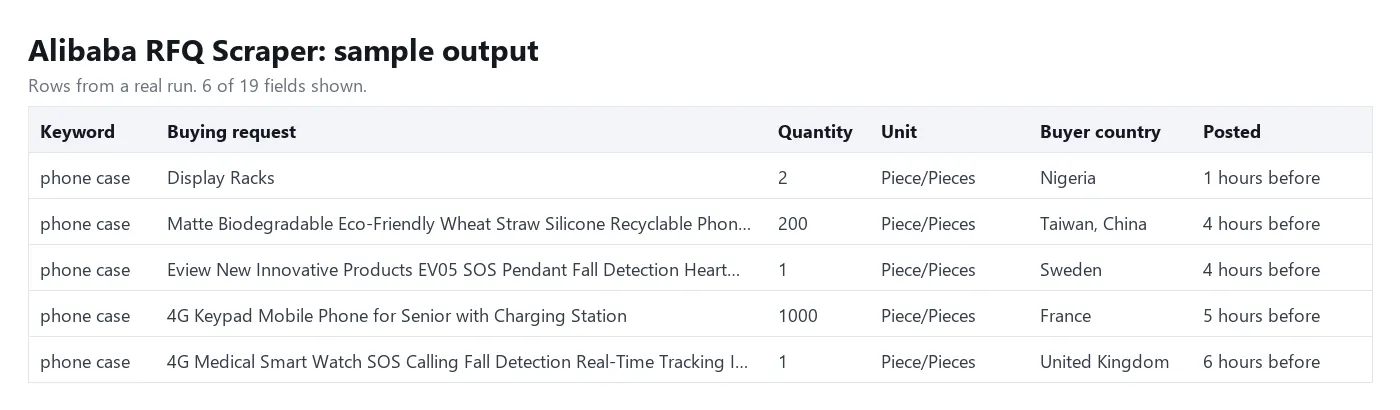
| Field | Description |
|---|---|
keyword | The keyword that found the request |
rfqId | Alibaba's ID of the request |
subject | Title of the buying request |
descriptionExcerpt | The start of the buyer's description, as shown in the list |
quantity, unit | Quantity asked for and its unit |
buyerCountry, buyerCountryCode | Buyer's country name and two-letter code |
postedAgeText, postedAt | Age as shown ("6 minutes before") and the time derived from it |
quotesLeft | How many more quotes the request accepts |
starLevel | The site's star rating of the request, when shown |
buyerTags | Buyer badges such as emailConfirm or experienced_buyer |
hasAttachment | Whether the buyer attached a file or picture |
imageUrl | Product picture, when the buyer added one |
rfqUrl, quoteUrl | Links to the request and to the quote form |
isNew | true the first time this request is returned for the keyword and monitor name |
scrapedAt | When the row was collected |
How to scrape Alibaba RFQs and monitor new buying requests
- Open the Actor and add your product keywords, one per line.
- Optional: set buyer countries (two-letter codes such as
US,GB,DE, or country names), a minimum quantity and posted within. - Give the run a monitor name if you run more than one schedule, so each keeps its own memory.
- Click Start. The first run returns the newest requests for each keyword.
- Add a schedule (for example every hour or every morning). Each later run returns only what is new.
- Download the results as JSON, CSV or Excel, or send them on with a webhook or an integration.
How much does it cost to scrape Alibaba RFQs?
Pay per event, no subscription:
- $0.01 per new buying request ($10 per 1,000), charged once per keyword and monitor name.
- $0.00005 per run start.
Free: requests an earlier run already returned, requests removed by your filters, keywords with nothing new or no requests at all, and keywords that failed to load.
The first run charges every request it returns: 3 keywords with the default 40 requests each cost up to $1.20. Repeat runs usually cost a few cents, because only requests posted since the last run are charged; a run that finds nothing new costs the run start only.
This price per row is higher than the cheap row-priced Alibaba RFQ scrapers on Apify Store, which charge for every row on every run. If you want one large export, one of those will cost less. If you check the same keywords every hour or every day, paying only for unseen requests usually works out lower, and the result contains nothing you have to de-duplicate.
On Apify's free plan the $5 monthly credit pays for about 500 new buying requests. Set a maximum charge per run to cap the spend; the Actor stops when it is reached and the next run carries on from there.
Input
keywords(required): product keywords, each searched on its own.maxRfqsPerKeyword: the most rows per keyword in one run (default 40; the site lists 20 per page and at most 100 pages per search).onlyNew:true(default) returns only unseen requests.falsealso returns requests seen before, markedisNew: falseand free.postedWithin:any,1h,3h,12h,24h,3dor7d.buyerCountries: two-letter codes or English country names; empty means all countries. An entry that is not a country stops the run before anything is read or charged, so a typing mistake never turns the filter off.minQuantity: skip requests for fewer units.monitorName: names the memory. The same name and keyword share one memory of the last 5,000 request IDs, kept in a key-value store calledalibaba-rfq-monitor-seenin your account.proxyConfiguration: Apify datacenter proxy by default.
Output
A keyword with nothing to return gets one free row with status set to no-new-rfqs or no-rfqs; a keyword that could not be loaded or was not reached before the run timeout gets one free row with error. You can download the dataset as JSON, CSV, Excel or HTML, or read it through the Apify API.
Tips
- Alibaba's own RFQ search decides what matches a keyword, and it matches loosely: a broad keyword such as
led lightalso brings requests for neighbouring products. Use the most specific keyword you can, and try it once with a lowmaxRfqsPerKeywordbefore you schedule it. - Requests are read newest first. On a busy keyword, schedule more often or raise
maxRfqsPerKeyword, so a run reaches the point where the last one stopped. postedAtis derived from the age the site shows, so it is exact to the minute for the last hour, to the hour for the last day and to the day after that.- Use one monitor name per schedule or per client. Two schedules with the same name and keyword share a memory, and each request goes to whichever runs first.
- To start over, use a new monitor name or delete the record in the
alibaba-rfq-monitor-seenkey-value store. - The description is the excerpt from the list page. The full text and the buyer's contact route are on Alibaba, behind a supplier sign-in; open
rfqUrlorquoteUrlwith your own account. - For AI agents: connect the Actor through the Apify MCP server and ask for "new Alibaba RFQs for
FAQ
Do I need an Alibaba account?
No. The Actor reads the public RFQ list without signing in. To send a quote you use your own Alibaba supplier account.
Does it return the buyer's name, email or phone?
No. The Actor leaves out buyer names and collects no contact details. You get the buyer's country and badges, and the link to quote through Alibaba.
What happens when nothing is new?
The keyword gets one free status row and the run costs the run start only ($0.00005).
Is a request ever charged twice?
Not for the same keyword and monitor name, as long as it is among the last 5,000 requests returned for that keyword. The same request found by two different keywords counts once for each.
Why did the first run cost more than later runs?
The first run has no memory yet, so everything it returns is new. Lower maxRfqsPerKeyword or set postedWithin to keep the first run small.
Is scraping Alibaba RFQs legal?
The Actor collects only publicly visible business listings. You are responsible for how you use the data.
Disclaimer
Not affiliated with, endorsed by or sponsored by Alibaba.com or Alibaba Group. This Actor collects publicly available buying requests and does not collect private personal data. Check that your use of the data follows Alibaba's terms of use and the laws that apply to you, including GDPR where relevant.
More tools from Tenfold Fleet
| Actor | Output |
|---|---|
| Alibaba Image Search - Reverse Lookup of Suppliers by Photo | matched product |
| Alibaba Scraper - Wholesale Suppliers, MOQ & Price Breaks | product |
| Alibaba Verified Suppliers Scraper - Company Profiles | supplier profile |
| Journalist Requests Monitor - HARO Alternative for PR Links | new journalist request |
| 1688 Alibaba AliExpress Image Search: Compare Prices by Photo | matched product |
| HTTP Request API: Send HTTP Requests in Bulk via Proxy | request (datacenter or no proxy) |
| BBB Scraper: Business Leads, Ratings & New Reviews | business |
| Businesses Without Websites - Local Leads with Phone & Rating | lead |
| Company Contact Lookup - One Lead Record per Website | website with contacts |
| Contact Form Finder: Form Fields, Embed Type & Captcha Flag | website with contact page or form |
| Facebook Page Email & Phone Finder - Leads from Page Links | page with contact details |
| Funding Rounds Scraper - Recently Funded Companies & Investors | funding round |
All 122 tools: apify.com/tenfoldfleet. If this Actor saves you time, save it (the bookmark on its Store page) and leave a review: both help other people find it. Found a bug or need another field? Tell us on the Issues tab of this page.


