
JD Products Scraper - JD.com Keyword Search with Prices
Pricing
from $1.00 / 1,000 products
JD Products Scraper - JD.com Keyword Search with Prices
Get JD.com (Jingdong) products for any keyword with live prices in CNY from JD's hot-sale search listing: title, price, shop, SKU id, review count, category ids, image and product link. Optional brand, variants, photos and stock. $2 per 1,000 products; empty or failed keywords are free.
Pricing
from $1.00 / 1,000 products
Rating
0.0
(0)
Developer

Tenfold Fleet
Maintained by CommunityActor stats
0
Bookmarked
1
Total users
0
Monthly active users
a day ago
Last modified
Categories
Features
Share
What does JD Products Scraper do?
JD Products Scraper searches JD.com (Jingdong, 京东) for a keyword and returns the matching products with their live prices in CNY. Give it one or many keywords, in Chinese or English, and it works like a small JD.com product search API: one row per product with the title, price, shop, SKU id, review count bucket, category ids, image and product page URL.
Not affiliated with JD.com or Jingdong. This is an independent tool that reads public pages only.
Where the data comes from, in plain words: the products come from JD's public hot-sale listing for the keyword. That listing is a promoted feed. Its pages overlap, so the Actor removes repeats and you pay only once per product per keyword. JD also pads every page with the same general recommendations (kitchen aprons, tents and the like) whatever you search for; the Actor leaves those out, so every row is a product JD matched to your keyword. It is not JD's organic search ranking, so use it to find products and prices for a keyword, not to measure where a product ranks in JD search. It does not return review text or barcodes.
No login, no cookies, no browser. Plain HTTP requests through Apify datacenter proxy, which is included in the price.
Why use JD Products Scraper?
- Price research in China: see what a product type sells for on JD today, across shops and brands.
- Sourcing and competitor checks: list the shops selling a keyword, with shop ids and JD self-operated flags.
- Catalog building: collect SKU ids, titles, images and product page URLs to feed your own tools.
- Price monitoring: run the same keywords on a schedule and compare
priceCnyperskuIdover time. - AI agents: a simple keyword in, structured priced products out. Works through the Apify API and the Apify MCP server.
What data can JD Products Scraper extract?
| Field | Meaning |
|---|---|
keyword | The keyword this product was found for |
skuId | JD SKU id |
title | Product title as shown on JD |
priceCny | Live listing price in Chinese yuan, as a number |
shopName, shopId, vendorId | The selling shop |
reviewCountBucket | JD's rounded review count, for example 5万+ or 2000+ |
goodRatePercent | Share of positive reviews, when JD shows it |
categoryIds | JD category ids, top level first |
imageUrl | Main product image |
itemUrl | Product page, https://item.jd.com/<sku>.html |
onShelfTime | When the product was listed (ISO date) |
isPromoted | True when JD marks the row as a promoted placement |
isSelfOperated | True for JD self-operated (自营) products |
promoTag | Promotion label such as a gift tag, when present |
position, page | Order in the listing after removing repeats, and the page it first appeared on |
scrapedAt | When the row was collected |
With Add brand, variants, images and stock turned on, each row also gets brand, variants (SKU id, options and image per variant), images (gallery), stockText and deliveryText. These come from the product's public page, as shown for JD's default delivery area. JD limits how often product pages can be opened, so on large runs some rows may come back without these extra fields (their detailsError says so); the listing data and price are always there.
How to scrape JD.com products by keyword
- Open the Actor and type one or more keywords, for example
蓝牙耳机orlaptop. - Set Max products per keyword (default 60) and, if you want, a price range in CNY. For more than about 130 products per keyword, raise Max pages per keyword too.
- Turn on Add brand, variants, images and stock only if you need those fields.
- Click Start. When the run finishes, download the dataset as JSON, CSV or Excel, or read it through the Apify API.
How much does it cost to scrape JD.com?
$2 per 1,000 products ($0.002 per product), plus a $0.00005 start fee per run. There is no extra charge for the brand, variants, images and stock fields.
You are never charged for:
- repeats of a product already returned for the same keyword,
- products removed by your price filter,
- JD's general recommendations that do not match your keyword (they are left out),
- keywords with no products, and pages that fail or are blocked (a failed keyword gives one free row with an
errortext).
The Actor stops by itself when it reaches the maximum charge you set for the run. On the Apify free plan, the monthly $5 credit covers about 2,500 products.
Input
keywords(required): search words, Chinese or English.maxProductsPerKeyword: 1 to 500, default 60.maxPages: listing pages per keyword, 1 to 30, default 5. A page holds 48 products for the keyword and adds about 25 new ones (30 to 40 on page 1), so 5 pages give about 130 products and 500 products need about 20 pages. A keyword stops early when a page brings fewer than 5 new products.includeDetails: add brand, variants, images, stock and delivery text.minPrice,maxPrice: optional price range in CNY. Pages are still read to find matching products, but only matching products are charged.proxyConfiguration: the Actor runs on Apify datacenter proxy. Other Apify proxy groups are ignored; your own proxy URLs are used if you add them.
Output
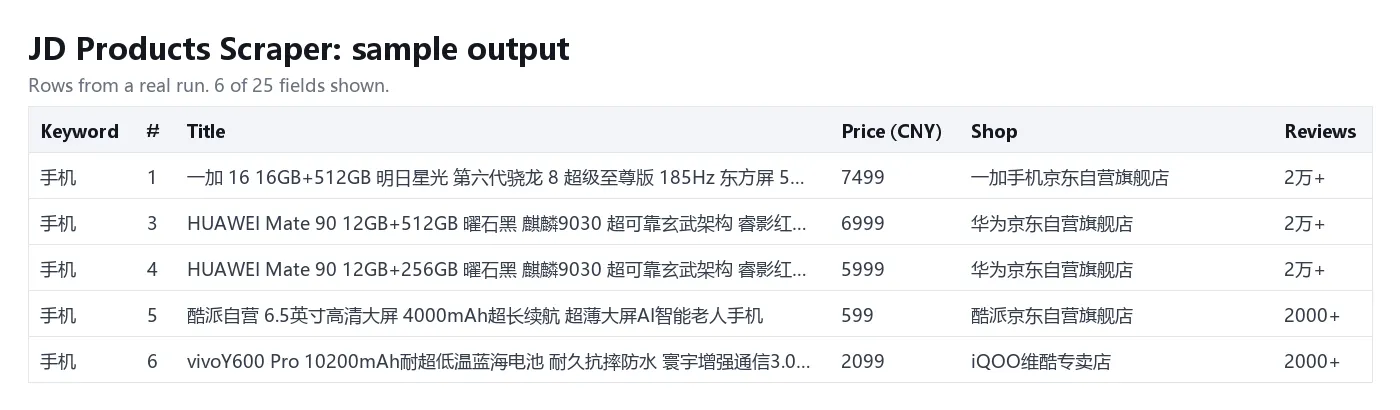
One row per unique product per keyword. You can download the dataset as JSON, CSV, Excel or HTML. A keyword with no products, or one JD could not be read for, gives a single free row with keyword, error and scrapedAt instead.
Tips
- Chinese keywords match more products than English ones.
蓝牙耳机finds more thanbluetooth earphones. - The default 5 pages give about 130 unique products for a common keyword, and each extra page adds about 25. For the full 500, set Max pages per keyword to 20. For wider coverage, add narrower keywords (brand plus product type).
- Prices are JD's listing prices for a logged-out visitor at the moment of the run. Member prices and coupons are not included.
- For price tracking, schedule the Actor and join runs on
skuId.
FAQ
Is this JD's organic search ranking?
No. The products come from JD's hot-sale listing for the keyword, which is a promoted feed. position is the order in that feed, not the rank in JD's main search.
Does it return reviews or barcodes?
No. You get the rounded review count and the positive review share, but no review text and no barcode (EAN, UPC).
Why did an odd keyword still return products?
JD's matching is loose. When it has few exact matches it widens the search to related products: a rare camera model can return other cameras and lenses, and a long English phrase can return products that share only one word with it. Those rows are charged like any other, so test a rare or English keyword with a small Max products per keyword first and check the titles. A keyword JD reports no matches for returns one free row that says so.
Do I need a JD account or cookies?
No. The Actor reads public pages only and never logs in.
Can I use it as a JD.com API?
Yes. Start runs and read results through the Apify API, or call the Actor from an AI agent through the Apify MCP server.
Is scraping JD.com legal?
The Actor collects public product listings only: no personal data and nothing behind a login. You are responsible for how you use the data and for following the laws that apply to you. If unsure, ask a lawyer.
More tools from Tenfold Fleet
All 122 tools: apify.com/tenfoldfleet. If this Actor saves you time, save it (the bookmark on its Store page) and leave a review: both help other people find it. Found a bug or need another field? Tell us on the Issues tab of this page.


