
Mobile Friendly Test - Bulk URL Audit with Pass/Fail Verdict
Pricing
from $2.00 / 1,000 url testeds
Mobile Friendly Test - Bulk URL Audit with Pass/Fail Verdict
Check if a website or web page is mobile friendly: test URLs in bulk for a PASS/FAIL verdict, a 0-100 score and issues (viewport, responsive CSS, fixed widths, small text, zoom, Flash), plus indexability via robots.txt and noindex. $4 per 1,000 URLs; blocked and failed URLs are free.
Pricing
from $2.00 / 1,000 url testeds
Rating
0.0
(0)
Developer

Tenfold Fleet
Maintained by CommunityActor stats
0
Bookmarked
1
Total users
0
Monthly active users
a day ago
Last modified
Categories
Features
Share
What does Mobile Friendly Test do?
Mobile Friendly Test checks whether web pages work on a phone, in bulk. Paste a list of URLs (or a whole sitemap's worth) and get one row per URL with a PASS/FAIL verdict, a 0-100 mobile score and the exact issues found: missing or fixed-width viewport, no responsive CSS, content wider than the screen, tiny text, blocked pinch-zoom and Flash or Java plugins. Each row also says whether the URL is indexable (HTTP status, noindex tags and robots.txt rules for Googlebot).
It works as a mobile-friendly checker API: call it from the Apify API, a schedule, Make, Zapier, n8n or an AI agent through the Apify MCP server, and read the results as JSON, CSV or Excel.
Important: the verdict is our own heuristic, computed from each page's HTML, CSS and HTTP headers. It is not Google's or Bing's result and does not reproduce either search engine's internal test. Google retired its public Mobile-Friendly Test tool in December 2023; this Actor gives you a transparent, rule-based replacement you can run on thousands of URLs. Not affiliated with Google or Microsoft.
Why use it?
- SEO audits at scale: find every page on a site that still has no viewport tag or a desktop-only layout, before it costs you mobile rankings.
- Agency client reports: test a prospect's key pages in one run and show a clear PASS/FAIL table.
- Migration and redesign QA: rerun the same URL list after a launch and compare verdicts.
- Lead generation: find businesses whose websites fail on mobile and offer them a redesign.
- Monitoring: schedule a weekly run and get alerted when a page drops from PASS to FAIL or becomes non-indexable.
Need a full on-page SEO crawl (titles, meta descriptions, canonicals, broken links, structured data)? Use our SEO Audit Tool. To collect every URL of a site first, run Sitemap URL Extractor and feed its output here.
What data can it extract?
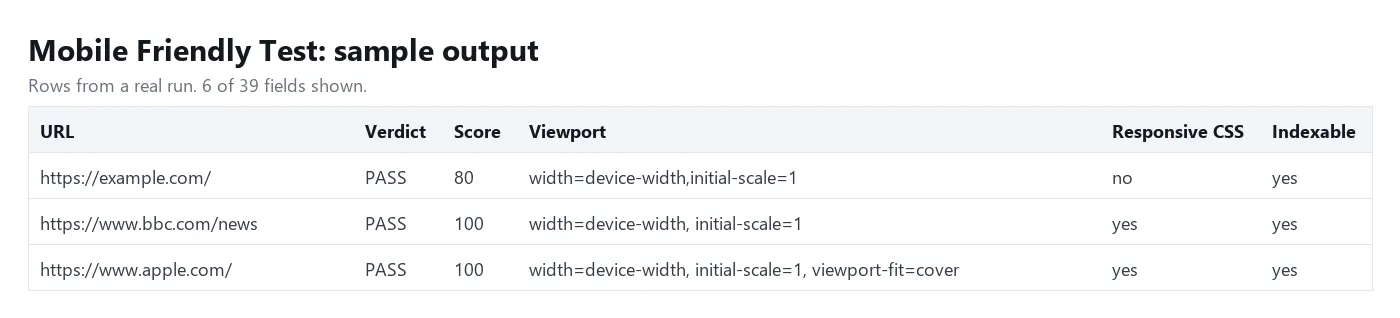
| Field | What it tells you |
|---|---|
verdict / mobileFriendly | PASS or FAIL (true/false) |
score | 0-100 mobile score (100 = no issues found) |
issues | List of issues with id, severity (critical, major, minor, info) and a plain-English message |
viewport, viewportWidth, initialScale, zoomDisabled | The meta viewport tag, parsed |
hasResponsiveCss, mediaQueryCount | Width-based media queries found in the page and its linked CSS |
fixedWidthElements | Elements or CSS rules 980px or wider that make the page scroll sideways |
smallFontCount, pluginCount | Text below 12px, Flash/Java/Silverlight elements |
indexable, indexabilityIssues | Whether Google may index the URL, and why not |
robotsTxtAllowed, robotsTxtRule, metaRobots, xRobotsTag | The crawl and index rules behind that answer |
canonicalUrl, canonicalIsSelf, ampUrl, mobileAlternateUrl | Canonical, AMP and separate mobile (m.) page links |
statusCode, finalUrl, redirected, responseTimeMs, htmlBytes | How the URL responded |
How to run a bulk mobile friendly test
- Open the Actor and paste your URLs into URLs to test, one per line. Bare domains such as
example.comtest the home page. - Keep Check robots.txt and indexability on if you also want the
indexableanswer. - Click Start. Most URLs take 1-3 seconds; 1,000 URLs usually finish in a few minutes.
- Open the Mobile-friendly verdicts table, filter by
verdict = FAIL, and download the results as JSON, CSV or Excel.
How is the verdict calculated?
Every page starts at 100 points. Each issue subtracts points by severity:
- Critical (-40): no viewport tag, a fixed viewport width (for example
width=1024), a viewport with neitherwidth=device-widthnorinitial-scale, Flash/Java/Silverlight plugins, or an HTTP error (404, 410, 5xx). - Major (-20): no width-based media queries or responsive framework, or content 980px or wider outside media queries.
- Minor (-5): viewport without
width=device-width, pinch-zoom disabled, 3 or more places with text under 12px, HTML over 1.5 MB. - Info (0): notes such as "content is built by JavaScript" or "linked CSS could not be fetched".
A URL passes when it has no critical issue and scores 70 or more.
How much does it cost?
$4 per 1,000 URLs tested ($0.004 per URL), plus a tiny start fee of $0.00005 per run. A 404 or 5xx URL is still a result (FAIL, not indexable) and is charged.
Free: URLs blocked by bot protection (HTTP 401/403/429, a challenge page or an empty reply), other refusals such as HTTP 400, 406 or 451, unreachable URLs, non-HTML files (images, PDFs), responses over 4 MB and invalid URLs. Each gives a row with an error and errorType and costs nothing. On the Apify free plan, the $5 monthly credit covers about 1,000 URLs. Set a maximum cost per run and the Actor stops as soon as it is reached.
Input
Output
A blocked URL looks like this and is free:
You can download the dataset as JSON, CSV, Excel, XML or HTML, or read it through the Apify API.
Tips
- Test the pages that matter, not only home pages: product, category, blog and landing pages often use different templates.
- Blocked rows: rerun only the
errorType = blockedURLs with Proxy set to Apify Proxy, residential group. - JavaScript-heavy sites: when a row has the
js-renderedinfo note, the HTML is mostly empty until scripts run. Viewport and CSS checks still apply, but layout issues that only appear after rendering may be missed. - Faster runs: turn off Read linked CSS files. Pages without inline media queries may then show
responsive-css-unknowninstead of a firm answer.
FAQ
Is this the same as Google's Mobile-Friendly Test?
No. Google shut its public Mobile-Friendly Test down in December 2023, and this Actor does not call Google or Bing. It applies its own published rules (above) to each page's HTML and CSS, so you always see why a page passed or failed.
Does it render pages in a browser?
No. It downloads the HTML and up to 12 linked stylesheets over plain HTTP with a mobile Chrome user agent. That keeps it fast and cheap. It does not measure tap-target spacing or take screenshots.
Why is a 404 page charged?
A 404, 410 or 5xx answer is real, useful information about the URL (broken page, not indexable), so it is reported as a FAIL row. Only bot walls and network failures are free, because they tell you nothing about the page.
Can I check whether Google is allowed to crawl my URLs?
Yes. With Check robots.txt and indexability on, the Actor reads each site's robots.txt once (following redirects; a missing robots.txt means everything is allowed), applies Google's matching rules for the Googlebot user agent, and combines the result with noindex meta tags, the X-Robots-Tag header and the HTTP status.
Can an AI agent use it?
Yes. Through the Apify MCP server or API, an agent can pass a list of URLs and read back the verdict, score and issues as structured JSON.
Disclaimer
This Actor reads only public web pages, the same way a phone browser does. The mobile-friendly verdict is an automated heuristic provided as-is and may differ from what any search engine reports. It is not affiliated with, endorsed by or connected to Google, Microsoft or any website it tests.
More tools from Tenfold Fleet
| Actor | Output |
|---|---|
| Amazon Search Volume - Keyword Demand for Sellers & PPC | keyword with amazon volume |
| ASO Keyword Rank Tracker: iOS & Android App Positions | keyword check |
| Backlinks Checker - Referring Domains, Anchors & Domain Rank | backlink |
| Bing Search Volume: Microsoft Ads Keyword Data in Bulk | bing keyword batch |
| ChatGPT Search Scraper: Brand Mentions & Citations per Prompt | prompt answered |
| Google AI Overviews Checker - Citations & Domain Tracker | keyword checked |
| Google Images API - Image Search Results in 90+ Countries | image result |
| Google Keyword Planner Alternative - Ideas, Bids & Volume | keyword idea |
| Google Maps Rank Tracker - Geo-Grid Rank Changes & Competitors | grid point checked |
| Google Trends Scraper - Search Interest by Region and Over Time | keyword |
| Keyword Ideas & Related Keywords - Difficulty, Volume & CPC | keyword idea |
| Keyword Search Volume Checker - Bulk CPC & Keyword Difficulty | keyword with data |
All 122 tools: apify.com/tenfoldfleet. If this Actor saves you time, save it (the bookmark on its Store page) and leave a review: both help other people find it. Found a bug or need another field? Tell us on the Issues tab of this page.


