

Amazon Search Volume - Keyword Demand for Sellers & PPC
Pricing
from $0.70 / 1,000 keyword with amazon volumes
Amazon Search Volume - Keyword Demand for Sellers & PPC
Get the Amazon search volume of a list of keywords: estimated monthly Amazon searches per keyword in 16 marketplaces (US, UK, DE, FR, IT, ES, CA, MX, IN, AU and more), 1,000 keywords per batch. $1 per 1,000 keywords plus $0.025 per batch; no-data keywords are free.
Pricing
from $0.70 / 1,000 keyword with amazon volumes
Rating
0.0
(0)
Developer

Tenfold Fleet
Maintained by CommunityActor stats
0
Bookmarked
2
Total users
1
Monthly active users
a day ago
Last modified
Categories
Features
Share
What does Amazon Search Volume do?
Amazon Search Volume tells you roughly how many times a month shoppers type each of your keywords into the search box on Amazon. Paste a list of search terms, pick a marketplace, and get one row per keyword with its estimated monthly Amazon searches. It works for up to 1,000 keywords per batch and thousands per run, from the Apify Console or as an Amazon keyword volume API.
Not affiliated with Amazon. The volumes are DataForSEO estimates of Amazon search demand, not figures published by Amazon.
You pay $1 per 1,000 keywords with data plus $0.025 per batch of up to 1,000 keywords. Keywords with no data, skipped keywords and failed lookups are free. Free Apify plan runs check the first 5 keywords per run (15 per day), because every lookup costs the developer a data fee.
For Google volume, CPC and keyword difficulty, use Keyword Search Volume. For Bing and Microsoft Ads volume, use Bing Search Volume.
Why check Amazon search volume?
- 🛒 Product research: compare demand for product ideas before you source stock. "dog toys" at 276,000 searches a month and "led strip lights" at 31,000 are very different markets.
- 📝 Listing SEO: decide which phrases go in the title, bullets and backend search terms by how often shoppers actually type them.
- 💰 Amazon PPC: size Sponsored Products campaigns and pick exact-match terms with real demand instead of guessing.
- 🌍 New marketplaces: check the same keyword list in the UK, Germany, France, Italy, Spain, Canada, Mexico, India and more before you expand.
- 📊 Tracking: schedule a run every month and watch demand for your category rise or fall.
- 🤖 Automation and AI agents: call it from the API, Make, Zapier, n8n or the Apify MCP server.
What data does it return?
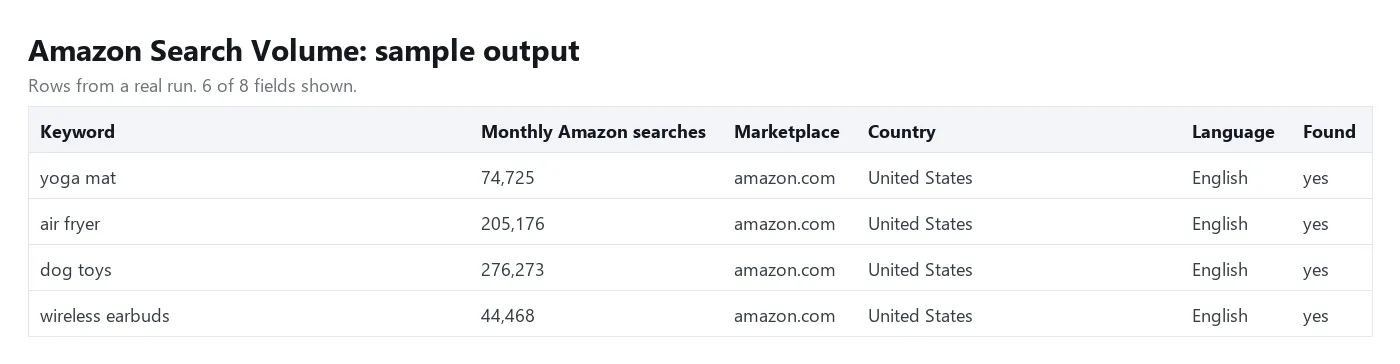
| Field | Example | Description |
|---|---|---|
keyword | yoga mat | Your keyword, as you typed it |
searchVolume | 74725 | Estimated monthly searches on Amazon in that marketplace |
found | true | false when there is no estimate for the keyword (free row) |
marketplace | amazon.com | Amazon site shoppers in that country use |
location / locationCode | United States / 2840 | Country of the marketplace |
language | English | Language of the data |
error | null | Why a row was not processed (those rows are free) |
How to get Amazon keyword search volume in bulk
- Click Try for free.
- Paste your search terms into Keywords, one per line.
- Choose the Amazon marketplace (default United States). Codes such as
UKorDEand domains such asamazon.co.ukalso work. - Click Start. Each batch of up to 1,000 keywords is one request and usually comes back in a few seconds.
- Download the results as JSON, CSV, Excel or HTML, or read them through the API.
How much does it cost to check Amazon search volume?
| Run | Price |
|---|---|
| 10 keywords | about $0.035 |
| 100 keywords | about $0.125 |
| 1,000 keywords | about $1.03 |
| 10,000 keywords | about $10.25 |
You are charged $0.001 for each keyword that comes back with a volume, plus $0.025 for each batch of up to 1,000 keywords that the data source answers. Keywords with no estimate are free, and a batch that fails is free. Set a maximum cost per run and the Actor stops sending keywords before it would go over; the rest are listed as not processed and not charged.
Free Apify plan: the first 5 keywords per run and up to 15 per day are looked up; the rest come back as free rows with a note. Any paid Apify plan gets every keyword.
Input
Supported marketplaces: United States, United Kingdom, Canada, Australia, India, Singapore, Germany, Austria, France, Italy, Spain, Mexico, Netherlands, Egypt, Saudi Arabia and United Arab Emirates. Each one uses its main language (for example German for Germany and Austria, Arabic for Egypt, Saudi Arabia and the UAE).
Output
Every keyword that is looked up gets a row, in your order. Download the dataset as JSON, CSV, Excel, XML or HTML.
Tips
- Write keywords the way shoppers type them: "yoga mat thick", not "Yoga Mats (Thick, Non-Slip)". Volumes are matched in lowercase.
- Duplicates are removed ignoring case and trailing punctuation, so you never pay twice for one keyword.
- Long-tail phrases often have no estimate. Those rows are free, so it is safe to include them. If a full batch of 500 or more keywords has data for fewer than 5% of them (for example a list of ASINs or product titles), the run stops and the rest are not sent or charged.
- Keywords that are not looked up (free-plan limit, max charge reached, data source down) each get a free row, up to 1,000 per run.
- For a full keyword plan, run the same list here and in Keyword Search Volume to compare Amazon demand with Google demand.
FAQ
Where do the numbers come from?
They are DataForSEO estimates of monthly Amazon search demand. Amazon does not publish exact search counts, so use them to compare keywords and markets rather than as exact totals.
Is this Amazon's own data?
No. This Actor is not affiliated with, endorsed by or connected to Amazon. It does not log in to Amazon or use any seller account.
Why did a keyword come back with found: false?
There is no estimate for that phrase in that marketplace, usually because very few shoppers search for it. Those rows are not charged.
Can I check several marketplaces in one run?
One run covers one marketplace. Start one run per marketplace, or use the API to start several at once.
Does it give CPC or keyword difficulty?
No, this Actor returns Amazon search volume only. For Google CPC, competition and keyword difficulty, use Keyword Search Volume.
Disclaimer
Amazon is a trademark of Amazon.com, Inc. or its affiliates. This Actor is an independent tool and is not affiliated with Amazon. Search volumes are third-party estimates and can differ from actual Amazon traffic.
More tools from Tenfold Fleet
| Actor | Output |
|---|---|
| Amazon Bestsellers Tracker: New Releases & Rank Changes | ranked product |
| Amazon Product Scraper - Details, Prices & Search by ASIN | product |
| Amazon Reviews Summary - AI Insights & Star Breakdown | product review insights |
| Bing Search Volume: Microsoft Ads Keyword Data in Bulk | bing keyword batch |
| Keyword Search Volume Checker - Bulk CPC & Keyword Difficulty | keyword with data |
| ASO Keyword Rank Tracker: iOS & Android App Positions | keyword check |
| Backlinks Checker - Referring Domains, Anchors & Domain Rank | backlink |
| ChatGPT Search Scraper: Brand Mentions & Citations per Prompt | prompt answered |
| Google AI Overviews Checker - Citations & Domain Tracker | keyword checked |
| Google Images API - Image Search Results in 90+ Countries | image result |
| Google Keyword Planner Alternative - Ideas, Bids & Volume | keyword idea |
| Google Maps Rank Tracker - Geo-Grid Rank Changes & Competitors | grid point checked |
All 122 tools: apify.com/tenfoldfleet. If this Actor saves you time, save it (the bookmark on its Store page) and leave a review: both help other people find it. Found a bug or need another field? Tell us on the Issues tab of this page.


