

Twitter Trends Scraper: X Trending Topics by Country & City
Pricing
from $5.00 / 1,000 locations
Twitter Trends Scraper: X Trending Topics by Country & City
Get the trending topics and hashtags on X (Twitter) right now for any country or city, or worldwide. Returns up to 50 trends per location with rank, rank change and hours trending, plus 24 hours of hourly history, for 460+ locations. $10 per 1,000 locations; locations without data are free.
Pricing
from $5.00 / 1,000 locations
Rating
0.0
(0)
Developer

Tenfold Fleet
Maintained by CommunityActor stats
0
Bookmarked
2
Total users
1
Monthly active users
2 days ago
Last modified
Categories
Features
Share
What does Twitter Trends Scraper do?
Twitter Trends Scraper returns the trending topics and hashtags on X (Twitter) for any of 62 countries, 400+ cities or worldwide. For each location you get the current top trends in rank order (up to 50) and the hourly trend lists of the last 24 hours, so you can see what is trending now, what is new this hour and how long each topic has stayed in the list.
Not affiliated with X Corp. or Twitter. The data comes from a public trend aggregator that records X's trending lists about once an hour. It is not read from X itself, and no X account, login, cookie or API key is used.
Use it as a Twitter trends API: start it from the Apify API, a schedule, Make, Zapier, n8n or an AI agent through the Apify MCP server, and get clean JSON. It runs over plain HTTP with no browser: a few locations take a few seconds, and all 460+ take about 12 minutes (about 40 locations a minute).
Why use Twitter Trends Scraper?
- Social media and content teams: check each morning what your country or city is talking about, and post while a topic is still rising (
isNew,previousRank). - Newsrooms and PR: spot breaking topics by location and see how long they have been trending (
hoursTrending,firstSeenAt). - Marketing by market: compare trends across countries in one run with
all-countries. - Trend monitoring: schedule an hourly or daily run and build your own long-term archive of X trends by location. One run already holds the last 24 hours.
- AI agents: one compact row per location, with a ready
topTrendssummary and a search link for every trend.
What data can Twitter Trends Scraper extract?
| Field | Description |
|---|---|
location, locationName, country, city | The place, for example united-kingdom/london, "London, United Kingdom" |
snapshotAt | When the newest trend list was recorded (UTC) |
trends | The newest list, up to 50 trends in rank order |
trends[].rank, name, isHashtag, url | Position, trend text, whether it is a hashtag, and the X search link for it |
trends[].previousRank, isNew | Position one list earlier; isNew is true when the trend just entered the list |
trends[].bestRank, hoursTrending, firstSeenAt | Highest position, number of hourly lists it appeared in and first appearance, all inside the 24-hour window |
trends[].tweetCount | Post volume when the source publishes one. It is usually null, because X rarely shares volumes now |
topTrends | The top 10 trend names as one line of text |
history | The hourly lists of the last 24 hours: timestamp and trend names in rank order |
trendCount, snapshotCount, isComplete | Size of the newest list, number of hourly lists, and whether a full day was available |
source, url | Which aggregator page the row came from |
error, suggestions | null on a normal row. On a free row: why there are no trends, and what to enter instead |
How to scrape Twitter trends by location
- Click Try for free.
- In Locations, enter the places you want:
worldwide, a country (United States,US,Japan), a city with its country (London, United Kingdom) or a slug (united-states/new-york). - Click Start. Each location is one row.
- Open the Output tab and download the trends as JSON, CSV, Excel or HTML, or read them through the API.
- To monitor trends, add a Schedule that runs the same input every hour or every day.
How much does it cost to scrape Twitter trends?
You pay $0.01 per location returned with trends, which is $10 per 1,000 locations, plus $0.00005 per run. The price is the same with or without the 24-hour history. Unknown locations, locations that fail to load and locations the source has no current trends for are free.
| Use | Locations | Cost |
|---|---|---|
| One country, once a day for a month | 30 | $0.30 |
| One city, every hour for a month | 720 | $7.20 |
| Worldwide plus all 62 countries, once | 63 | $0.63 |
The Apify free plan includes $5 of credit each month, which covers about 500 locations. Set a maximum cost per run in the run options and the Actor stops cleanly when it is reached.
Input
locations(required): any mix ofworldwide, country names or 2-letter codes,City, Country, andcountry/cityslugs.all-countriesexpands to worldwide plus the 62 countries (63 rows).all-locationsexpands to every country and city (460+ rows).includeHistory(defaulttrue): add the hourly lists of the last 24 hours.maxTrends(default50): keep only the top N trends of each list.
Output
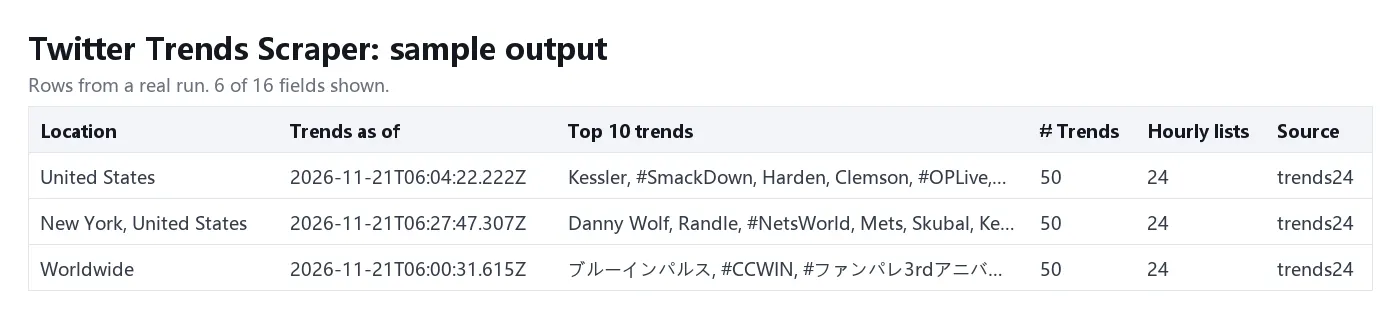
One row per location. The example is shortened to two trends and two hourly lists, and leaves out each trend's url (its X search link).
A location that cannot be matched returns a free row with error and suggestions, for example "Barcelona" returns ["spain/barcelona", "venezuela/barcelona"]. Free rows have the same columns as normal rows, with an empty trends list.
Tips
- Trend lists are recorded about once an hour, so running more often than hourly returns the same list.
- For a dashboard or an alert, read
trendswhereisNewis true: these topics entered the list in the last hour. - For small results, set
includeHistorytofalseandmaxTrendsto 10. - A few city names exist in two countries (Barcelona, Valencia, Birmingham). Add the country:
Birmingham, United Kingdom. - A list can be shorter than 50, mostly for smaller cities and at night local time.
isCompleteis true when the newest list has 40 or more trends and 20 or more hourly lists are present. - A few listed places have no trends at the source at a given time (on 10 November 2026: 19 of 467, among them Kyiv, Athens and Tel Aviv). They return a free row with
error, andsuggestionsholds the country to try instead. previousRank,isNew,bestRankandhoursTrendingare always worked out on the full lists, also whenmaxTrendsis small.
FAQ
Which countries and cities are covered?
Worldwide, 62 countries and 400+ cities: every place the aggregator tracks. Countries: Algeria, Argentina, Australia, Austria, Bahrain, Belarus, Belgium, Brazil, Canada, Chile, Colombia, Denmark, Dominican Republic, Ecuador, Egypt, France, Germany, Ghana, Greece, Guatemala, India, Indonesia, Ireland, Israel, Italy, Japan, Jordan, Kenya, Korea, Kuwait, Latvia, Lebanon, Malaysia, Mexico, Netherlands, New Zealand, Nigeria, Norway, Oman, Pakistan, Panama, Peru, Philippines, Poland, Portugal, Puerto Rico, Qatar, Russia, Saudi Arabia, Singapore, South Africa, Spain, Sweden, Switzerland, Thailand, Turkey, Ukraine, United Arab Emirates, United Kingdom, United States, Venezuela and Vietnam.
How far back does the trend history go?
24 hours. Each run returns about 24 hourly lists per location. For a longer history, schedule the Actor daily and keep the datasets.
Does it return tweet volume?
Only when the source shows one. X now shares post volumes for few trends, so tweetCount is null in most rows. Use rank, bestRank and hoursTrending to judge how big a trend is.
Is the data read from X?
No. It comes from a public aggregator that records X's trending lists, so trends are usually up to an hour old. snapshotAt gives the exact time of the newest list. A list older than 12 hours is not returned as current: that location gets a free row, or the second source for a country. If the main aggregator is down, the Actor reads a second one for countries and worldwide: those rows have the current list only (snapshotCount 1, isComplete false).
Do I need an X account or the X API?
No. There is no login, cookie or API key.
Can I use it as a Twitter trends API from my code or an AI agent?
Yes. Call the Actor through the Apify API or add it as a tool in the Apify MCP server. The input is a list of place names, and each result is one JSON row.
Is it legal to scrape Twitter trends?
Trending topics are public, aggregate information about what many people post about. The results contain topic names and ranks, not personal data. You are responsible for how you use the data and for following the laws that apply to you.
Disclaimer
This Actor is an independent tool. It is not affiliated with, endorsed by or sponsored by X Corp. or Twitter. X and Twitter are trademarks of their owner. Trend data is provided as recorded by a public third-party aggregator, without any guarantee of completeness.
More tools from Tenfold Fleet
All 124 tools: apify.com/tenfoldfleet. If this Actor saves you time, save it (the bookmark on its Store page) and leave a review: both help other people find it. Found a bug or need another field? Tell us on the Issues tab of this page.


