

Email Scraper
Pricing
from $2.20 / 1,000 page checkeds
Email Scraper
Email scraper & extractor tool to pull emails from any website or domain in bulk. Hunter.io alternative.
Pricing
from $2.20 / 1,000 page checkeds
Rating
0.0
(0)
Developer

Thodor
Maintained by CommunityActor stats
1
Bookmarked
44
Total users
6
Monthly active users
2 months ago
Last modified
Categories
Share
A no-code email extractor tool that pulls business email addresses from any website. Paste a list of domains, get back one clean row per unique email, deduplicated, validated, and traced to the exact pages it came from, as CSV, Excel, or JSON. A pay-per-page Hunter.io alternative with no subscription and no seat fees.
For every domain it visits the pages most likely to hold contact info (contact, about, team, legal, in that order), decodes the tricks sites use to hide addresses (Cloudflare email protection, HTML entities, "name [at] domain [dot] com"), filters out junk like noreply@ and placeholder names, and checks that each address's domain can actually receive mail.
📋 How to extract emails from a list of websites
- Paste your domains or pages into Start URLs. Bare domains (
apify.com) and specific pages (apify.com/contact) both work; pages you supply are visited first. - Click Start.
- Open the Output tab and click Export for CSV, Excel, JSON, or HTML.
🎁 So what do you get?
| 📧 Email: one row per unique address | ✅ Domain validation: can it receive mail? | 🔢 Occurrences: seen on how many pages |
| 🔗 Source URLs: every page it appeared on | 🛡️ Hidden emails decoded: Cloudflare, [at]/[dot], entities | 🚫 Junk filtered: noreply@, placeholders, filenames |
⚖️ Compared to Hunter.io, Snov.io, and Outscraper
| This actor | Hunter.io | Snov.io | Outscraper | |
|---|---|---|---|---|
| 🆓 Free tier | ✅ ~1,650 pages per month, Apify's $5 free credit | ⚠️ 25 searches/mo | ⚠️ 50 credits | ⚠️ Limited |
| 💰 Billing | ✅ Pay per page checked | ❌ Credit subscription | ❌ Subscription | ⚠️ Per result |
| 🔗 Which page each email came from | ✅ Every URL | ❌ | ❌ | ⚠️ Domain-level |
| 🔢 Occurrence counting | ✅ | ❌ | ❌ | ❌ |
| 📥 Bring your own URL list | ✅ Unlimited, parallel | ⚠️ Limited | ⚠️ Limited | ✅ |
| 🎯 Focus | ✅ Emails only, clean rows | ⚠️ Bundled finder suite | ⚠️ Bundled cold-mail sender | ⚠️ Emails + phones + socials |
Mailbox-level probing is deliberately out of scope: most providers block it as abuse, and the domain-level check gives the same practical signal. See the FAQ.
🎯 Three things people run this for
| How | |
|---|---|
| 🧱 Turn any scrape into contacts | The website column from the Google Maps Scraper or the landing pages from the Meta Ad Library Scraper paste straight into Start URLs |
| 📇 Enrich a CRM or prospect list | Run your domain column, keep rows where valid_email_domain is true, and rank by occurrences: an address on five pages is a real, publicised contact |
| 🤖 Automated enrichment | A Clay column, an n8n node, or a nightly Schedule against a growing list. AI agents can run it through the Apify MCP server |
📥 Input
start_urls: domains or pages, hundreds at a time. URLs on the same domain are grouped and visited first, then the actor explores the rest of the site, subdomains includedmax_pages_domain: default20, the cap on pages fetched per domain. It is also the cost cap
🎯 Known contact pages only, cheapest
🕳️ Deep scan of a large site
Team rosters, regional offices, multi-language sections: contact info buried several clicks deep.
📤 Output
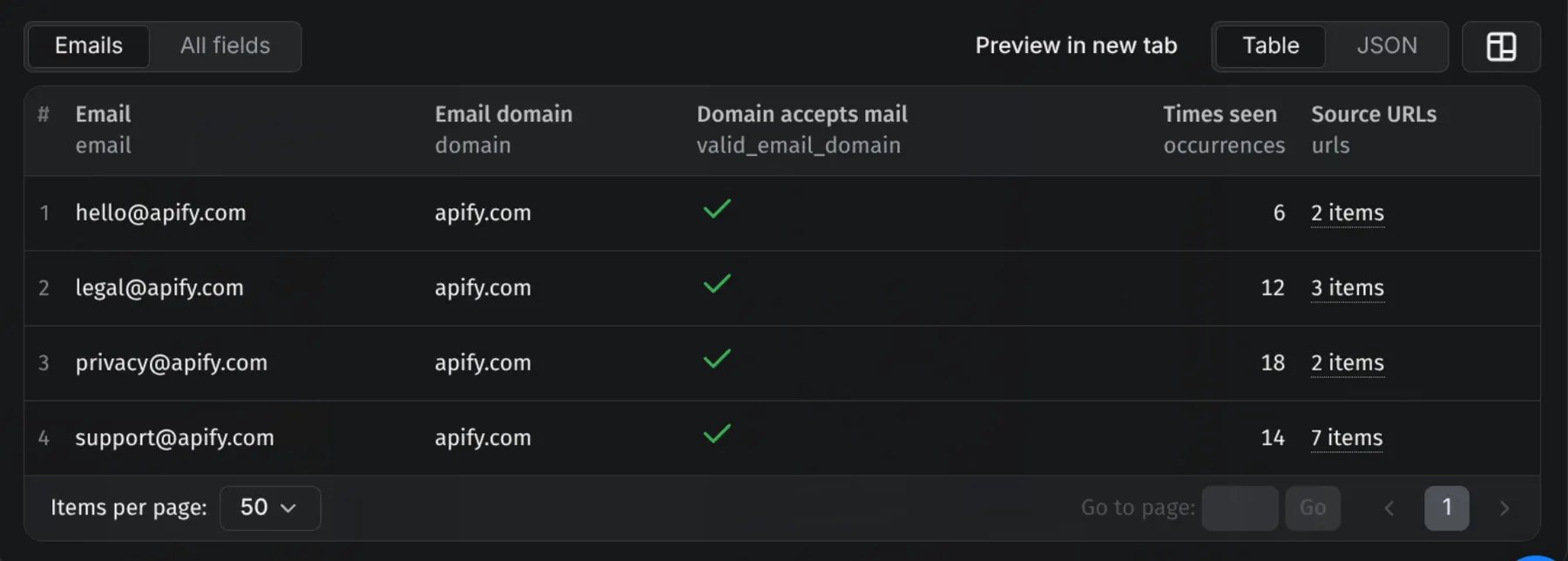
One row per unique email. Results stream into the dataset while the run is going.
⚠️
valid_email_domain: truemeans the domain can receive mail, not that the mailbox exists. The check confirms the address is syntactically correct and its domain runs a mail server. Whetherjane@specifically exists can only be proven by probing the mailbox, which providers block as abuse. For mailbox-level certainty, run the output through a verification service like NeverBounce or ZeroBounce.
Fields
| Field | Meaning |
|---|---|
email | The address, lowercased. Junk is already filtered out: noreply@, webmaster@, placeholders like john.doe@, and false matches from image filenames never reach the dataset |
domain | The part after the @ |
valid_email_domain | true when the domain is set up to receive mail |
occurrences | How many times the address appeared across the crawled pages. Higher = more likely a real, publicised contact |
urls | Every page where the email was found |
⚙️ Use it as an email extraction API
Every run is an HTTP endpoint: POST the same JSON as the form and the rows come back in the response body.
Python
Node.js
curl
Clay
Add an HTTP API column: method POST, the URL above, body { "start_urls": [{ "url": "{{Domain}}" }] }. Map email, valid_email_domain, occurrences, and urls into columns, and use Clay's "Multiple Rows from Array" expander when a domain returns several addresses. n8n and Make use the official Apify modules with the same input; AI agents call it through the Apify MCP server.
💡 Tip: no need to write the JSON by hand. Fill in the form on the Input tab, switch the editor from Form to JSON, and copy the result into your code.
💰 How much does it cost to scrape emails?
Billing is per page successfully loaded (HTTP 200 with HTML), at the rate on the price card on this page. Failed fetches, 404s, blocked pages, and non-HTML responses are free. At the default cap of 20 pages per domain, 100 domains cost at most 2,000 page events, and usually fewer, since many sites have fewer than 20 relevant pages. max_pages_domain is the cost lever: 5 checks only the obvious contact pages, 100 does a deep enterprise crawl.
❓ FAQ
Can I use this email scraper for free? Yes. Registering on Apify comes with $5 of free platform credit every month, no credit card needed, which covers around 1,650 pages: roughly 80 domains at the default settings, more when sites are small.
Why use this instead of an email scraper Chrome extension? An extension grabs the page you are looking at, one tab at a time. This takes hundreds of domains in one run, works unattended on schedules, and returns deduplicated, validated rows instead of text copied from a popup.
Why are some obvious emails missed? Some sites only reveal an address after a click ("Show email") or a delay. The actor reads pages directly, so anything that needs user interaction stays invisible. Open a ticket with the URL if you hit one that matters.
Does it find emails on social profiles? Often, yes. Bio emails on creator pages are usually rendered in the page's server-side JSON or meta tags, which it reads the same way as a contact page.
Is scraping public emails legal? Scraping publicly published contact information is generally permitted, but you are responsible for each site's terms and for anti-spam and privacy law (GDPR, CAN-SPAM). Do not use the output for spam; Apify's terms forbid it.
🛟 Support
An email it should have found but didn't, or an obfuscation scheme it doesn't know yet? Message me in the Issues tab with the URL and I'll look into it quickly. I'm a solo dev, so don't hesitate.
Want to know what those domains run before you reach out? The Tech Stack Detector classifies the same list by CMS and framework.
- Thodor


