
Reverse Image Search API
Pricing
from $0.80 / 1,000 image searches
Reverse Image Search API
Reverse image search where any image appears online with source URL resolution. Covers Instagram, TikTok, eBay, Amazon and the entire web.
Pricing
from $0.80 / 1,000 image searches
Rating
0.0
(0)
Developer

Thodor
Maintained by CommunityActor stats
1
Bookmarked
317
Total users
55
Monthly active users
18 days ago
Last modified
Categories
Share
What does Reverse Image Search API - Google Lens do?
This actor is a reverse image search API that takes any image URL, runs it through Google Lens, and returns every exact-match page Lens found, including the page URL, title, publisher, and thumbnail. Google Lens no longer returns the direct URL of each matched image — only the page where it was found. To bridge that gap, this actor can optionally visit each result page and find the original-source image URL, so you get a direct download link instead of just the page address.
It is a clean, JSON-first Google Lens API for developers, OSINT teams, brand-protection workers, photographers, and e-commerce operators. Try it from the Apify Console, call it from the Apify API, schedule it as a cron job, or wire it into n8n, Zapier, Make, or your own pipeline. Apify handles scheduling, scaling, storage, and monitoring; blocked or failed searches are retried automatically and never billed.
Unlike most reverse image search tools, this one returns Google Lens exact matches only, not the visually-similar suggestions that pad out most result lists.
Why use this Google Lens reverse image search API?
- Reverse image search at scale. Bulk / batch reverse image search across hundreds or thousands of source images per run. Output streams to the dataset as it lands. Export to JSON, CSV, Excel, or HTML.
- Finds the original image source. A Google Lens exact-match result set contains only Google-hosted thumbnails — in a typical run, several hundred
encrypted-tbnthumbnails and zero links to the actual image files. Other reverse image search tools hand you that page URL and stop. This actor goes to each page and finds the real image file, so you get a downloadable original instead of a thumbnail. - Exact-match focus. Exact-match Lens queries cut out the noise of visually-similar matches, so what you get back is genuinely the same image. Exactly what you need for image-source lookup, copyright takedowns, and image-theft detection.
- Pay only for what you get. Pay-per-event pricing: one tiny charge per Lens search, one per match returned. No subscription, no monthly minimum, no idle compute units — run a single image to try it and pay for that one image. Unresolved matches aren't charged.
- No CAPTCHA dance for you. No browser, no proxies, no Google session to babysit. A blocked or empty answer is retried automatically, and a search that never completes is not billed.
How to find the original source image URL
Google Lens tells you where an image appears. It does not tell you which file it found. Every match comes back with a Google-hosted thumbnail and a page address — nothing that points at the image itself.
That is the gap this actor closes. With resolve enabled, each result page is opened, every candidate image on it is examined, and the one that is genuinely your image is returned as resolved_image_url. You get a direct, downloadable link to the full-size original on the publisher's own server.
This is what makes the output usable as evidence rather than as a lead. A page URL tells you someone used your photo; the original file is what you attach to a DMCA notice, hash into a database, compare against your master, or archive before it disappears.
How each image source match is verified
Finding an image on a page is easy. Proving it is your image is the hard part, and it is what separates a real image source finder from a scraper that grabs the largest file it can see.
Every candidate is compared against the Google Lens thumbnail using perceptual hashing — a fingerprint of the visual content that survives resizing, recompression, and format changes. Only images that actually match are returned, and each one carries its confidence level in resolve_status:
| Status | Meaning |
|---|---|
match_definitely | High-confidence match — the file is your image |
match_maybe | Likely match, slightly outside the strict threshold |
match_no | Page loaded, but the original image was not found on it |
no_candidate | Page loaded but had no usable images |
fetch_failed | Paywall, captcha, or network block on the destination page |
thumbnail_failed | The Lens thumbnail could not be loaded, so the page was not tried — the page URL is still kept |
Because the check is visual rather than filename- or size-based, it works on sites that rename, crop, watermark, or re-encode the images they republish. You never have to manually confirm that a returned file is the right one.
How to use this reverse image search Actor
- Open the actor in the Apify Console.
- Paste one or more image URLs into the Image URLs field. Direct links to
.jpg,.png,.webp,.heic, or.aviffiles all work, and bigger originals give cleaner exact matches. - Leave Resolve original-source image URL turned on (recommended) for the full pipeline, or turn it off for a faster, cheaper run when you only need the page URLs and titles.
- Click Start.
- Watch results stream into the Dataset tab. Download as JSON, CSV, Excel, or HTML when the run finishes, or fetch them via the API while the run is still going.
To automate this, hit the Apify API directly or use one of the official client libraries (Python, JavaScript). Every run accepts the same JSON body as the Input tab.
Reverse image search API example — Python
Reverse image search API example — JavaScript
Both return the same rows as the Dataset tab, so you can prototype in the Console and move to code without changing anything.
Input
| Field | Type | Required | Description |
|---|---|---|---|
imageUrls | array of URLs | yes | Image URLs to reverse-search. Accepts bare strings or {"url": "..."} entries. |
resolve | boolean | no (default true) | When true, each match is enriched with the original-source image URL — when we can still find it on the destination page. Sometimes the image has been moved or deleted, and you only pay for the matches we successfully resolve. |
country | string (ISO 3166-1 alpha-2) | no (default US) | Country whose Google Lens index is searched (the gl= parameter). Biases which regional pages surface as matches. |
Example input JSON:
Output
You can download the dataset in various formats such as JSON, HTML, CSV, or Excel, or read it as a spreadsheet directly from the Apify Console.
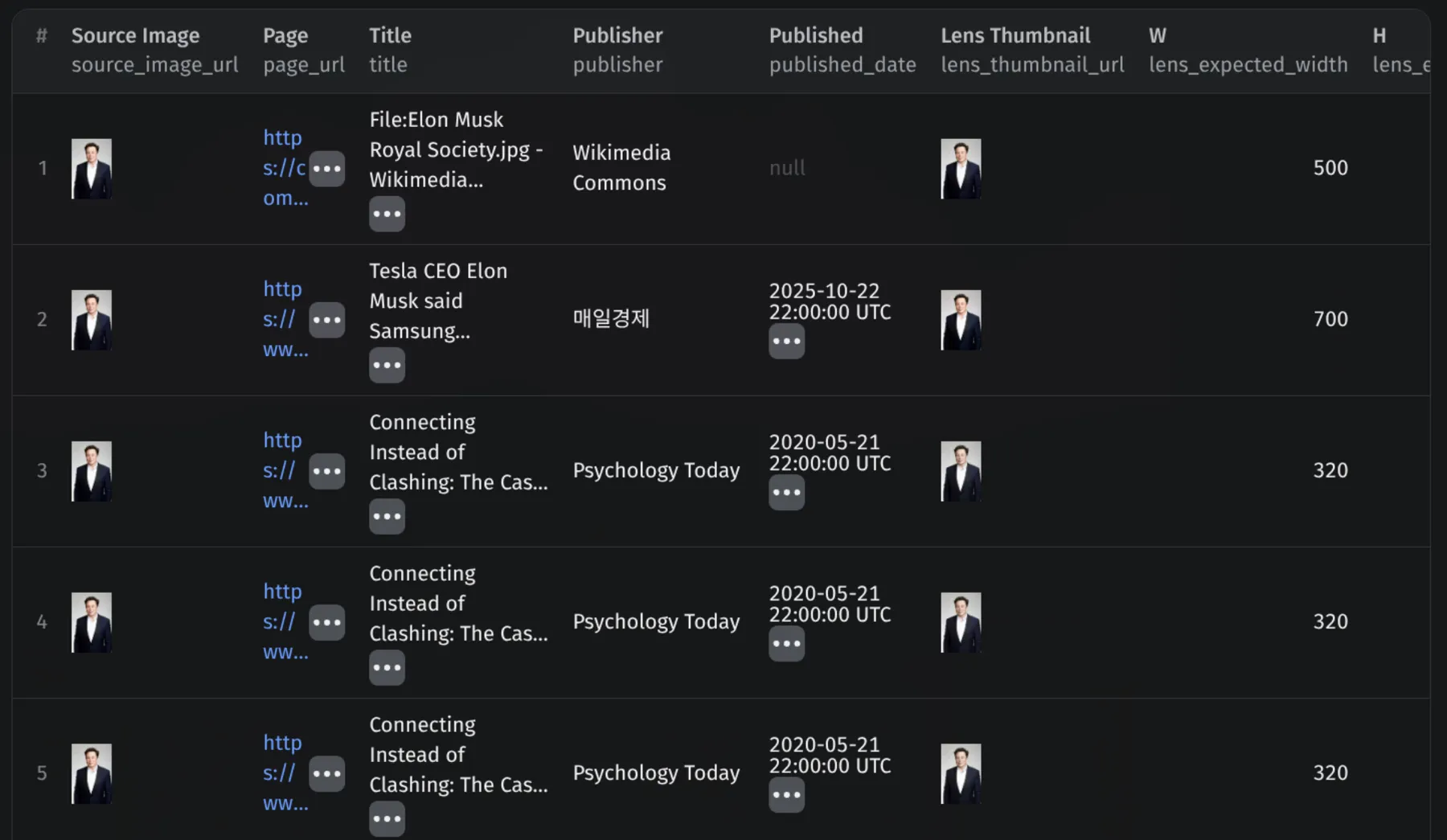
One dataset record per Lens match. A single input image typically produces several to several dozen output rows:
Data fields
| Field | Description |
|---|---|
source_image_url | The image you searched |
page_url | Web page where Google Lens found this match |
title | Page title as Lens displays it |
publisher | Publisher / site name |
lens_thumbnail_url | The thumbnail Lens shows for this match (usable as-is) |
lens_expected_width / lens_expected_height | Dimensions Lens reports for the match |
scraped_date | Date this actor row was produced |
resolved_image_url | The original-source image file on the destination page (present when resolve=true) |
resolve_status | match_definitely, match_maybe, match_no, no_candidate, fetch_failed, or thumbnail_failed |
page_status | HTTP status of the destination page fetch |
thumbnail_mismatch | true when the resolved image didn't match the Google Lens thumbnail for this row, but matched a different Google Lens thumbnail from the same search |
Use cases for reverse image search
OSINT reverse image search and investigation. Trace where a photograph first appeared online and who has republished it. Investigators get the full-resolution original image source, not just the Lens thumbnail. That is critical when verifying authenticity or building a timeline.
Dating profile verification. Run a list of profile photos through the actor to catch stolen or recycled images. Reverse image search for dating profiles works across Tinder, Hinge, and every other major dating app, anywhere Google has indexed the photos. Useful for both individual safety checks and Trust & Safety teams running bulk reverse image search for dating sites.
Scammer and catfish detection. A scammer's profile picture often originates from a stock photo, a public Instagram account, or another victim's social media. Reverse image search scammer photos to surface those origins and prior fraud reports.
Copyright protection, artwork, and image-theft detection. Photographers, illustrators, and stock-photo licensees use bulk reverse image search artwork to find unauthorized reuse. Used as an image copyright checker, it finds every page carrying your work and returns the file each one is serving — downloadable evidence URLs straight from the dataset, ready for your DMCA workflow. Finding the original image source on every infringing page is exactly what this actor is designed for.
E-commerce product matching. Reverse image search clothing, an outfit, furniture, jewelry, or any product photo to find duplicate listings, knock-offs, and competitor pricing across marketplaces.
Social media monitoring and brand protection. Track image usage online across every major platform, and find where a brand asset, leaked screenshot, or viral photo has spread.
Specialized lookups. Reverse image search plants, mugshots, art, anime stills, or anything else where you want the authoritative page of context, not just visually-similar images.
Supported platforms and sources
Google Lens indexes the public web, so any page reachable by Googlebot can surface as a match. In practice you'll routinely see results from:
- Social media: Facebook, Pinterest, Twitter / X, Instagram, TikTok, YouTube, LinkedIn, Tumblr, Reddit, VK
- Marketplaces: eBay, AliExpress, Taobao, Depop, Shutterstock, Etsy
- Image and art hosts: DeviantArt, Pixiv, Flickr, Imgur, ArtStation
- News and publisher sites: every major outlet plus long-tail blogs
- Dating sites and forums where Google has indexed the photo
The actor does not separately query each platform's own search endpoint. It leverages Google Lens' single, consistent index of all of them. That means a single reverse image search call effectively gives you a Facebook reverse image search, Pinterest reverse image search, Twitter reverse image search, TikTok reverse image search, Depop reverse image search, eBay reverse image search, and so on, wherever Google has crawled.
Note: private content (private Instagram, closed Facebook groups, WhatsApp messages, Discord servers) is not indexable by Google and therefore not reachable by Lens or this actor.
Tips and advanced options
- Disable
resolvefor speed and cost savings. With resolve off, each input image finishes in a few seconds. With resolve on it can take 30-90 seconds per image because the actor visits every result page to find the original image. Turn it off when you only need page URLs and titles. - Use big, clean source images. Lens is most precise with originals ≥1000px on the long edge. Tiny thumbnails or heavily-cropped versions produce more visually-similar noise and fewer true exact matches.
- Interpret
resolve_statuscorrectly. See How each image source match is verified for what each value means. thumbnail_mismatch=truemeans the resolved image didn't match the Google Lens thumbnail for this row, but did match a different Google Lens thumbnail from the same search. Usually happens when Lens displays a cropped or scaled thumbnail and the page hosts a clean original — the match is still real.- Schedule it. Use Apify Schedules to monitor image leaks or stolen art daily / weekly. Pair with Apify Webhooks to notify Slack, Discord, or email whenever new matches show up.
- Combine with other actors. Pipe the output into a downstream actor that screenshots
page_url, runs OCR, or scorespublisheragainst a reputation list.
FAQ
Does this resolve images from the following domains? Yes, across the public web. From real runs we routinely get resolved image URLs from:
- Social: Facebook, Instagram, Threads, TikTok, X / Twitter, Pinterest, LinkedIn, YouTube
- Encyclopedic: Wikipedia (all language editions), Wikimedia Commons, Britannica
- News & media: BBC, Forbes, Reuters, CNN, CNBC, India Today, Hindustan Times, The Daily Beast, and most other major outlets
- E-commerce: Amazon, eBay, AliExpress, Shutterstock
- Long tail: Medium, Substack, WordPress blogs, fandom wikis, personal sites
What doesn't resolve cleanly:
- Private or login-walled content — private Instagram accounts, closed Facebook groups, Discord, WhatsApp, paywalled articles. If Google can't index it, we can't find it
- Sites behind aggressive bot protection — parts of Reddit, namu.wiki, and certain regional outlets sometimes return
fetch_failed
Does Google Lens give you the original image URL? No. Google Lens returns the page where an image was found and a Google-hosted thumbnail (encrypted-tbn0.gstatic.com), never a link to the image file on the publisher's server. A single exact-match result set typically contains several hundred of those thumbnails and no source image URLs at all. To get the actual file you have to open each result page and identify the right image on it, which is what this actor's resolve option does automatically.
How do I find the original source of an image, not just the page? Run the image through this actor with resolve enabled. Each match returns resolved_image_url — a direct link to the full-size file on the site that published it — alongside the page URL, title, and publisher. Every returned file is perceptually matched against the Lens thumbnail first, so you are not guessing which image on the page was the one Lens saw.
Why don't I get results for some images? Either Lens has no exact match in its index, or the search could not be completed upstream. The actor logs both cases distinctly, and only the first one is billed. Try a different version of the source image (typically a larger or less cropped one).
Why does the resolved image sometimes differ in size from the Lens thumbnail? Publishers often serve compressed, resized, or watermarked thumbnails on listing pages. The resolver looks for the largest, highest-priority visually-matching image on the page. That's typically the original asset, not the same crop Lens showed.
Is there a free way to try this reverse image search API? Yes — Apify's free plan includes $5 of platform credit every month, and a trial run costs a tiny fraction of that. There's no subscription and no monthly minimum, so you can run a single image, see the output, and stop. You're never billed for idle compute, and matches that fail to resolve aren't charged at all. See the Pricing tab for current rates.
Is reverse image search legal? Searching an image against a public index is the same activity as using Google Lens or TinEye in a browser, and this actor only reaches pages Google has already crawled and indexed — nothing private, logged-in, or paywalled. What matters legally is what you do with the results. Common uses like copyright enforcement, DMCA evidence gathering, brand protection, and catfish or fraud checks are exactly what reverse image search exists for. If you process images of identifiable people, handle the output under whatever privacy rules apply to you (GDPR, CCPA), and follow each destination site's terms before republishing anything you find. This actor returns links and metadata — it does not host, alter, or redistribute anyone's images.
Can I use this for a video or a GIF? Lens treats animated GIFs as their first frame. Reverse image search on a video isn't directly supported. Extract a representative frame yourself and feed it as a still image.
Can this extract the text inside an image? Not this actor — it finds where an image appears, not what it says. For OCR, use Google Lens OCR API - Image to Text & Coordinates, which returns the text plus word, line and paragraph bounding boxes. The two are deliberately separate: OCR finishes in under a second, while reverse image search visits each result page and costs accordingly.
How does this compare with other Apify Google Lens actors? This actor specializes in exact-match reverse image search with original-image URL resolution. Other Google Lens actors on Apify focus on visually-similar matches, OCR, translation, or AI-mode Lens features. If you need OCR or translation, look at those. If you need the page URL and the actual downloadable original image for each exact match, at scale, with structured JSON output, this is the right tool.


