
Background Remover — Transparent PNG & White Background AI
Pricing
from $3.20 / 1,000 image processeds
Background Remover — Transparent PNG & White Background AI
Remove the background from images in bulk with AI (BiRefNet): transparent PNG/WebP cutouts or JPG on white, any color or blur. Crop, square or Amazon-ready 2000×2000 main images. Links, uploads, Drive or scraper datasets.
Pricing
from $3.20 / 1,000 image processeds
Rating
0.0
(0)
Developer

tidydata
Maintained by CommunityActor stats
0
Bookmarked
2
Total users
1
Monthly active users
5 days ago
Last modified
Categories
Features
Share
✂️ Background Remover — transparent PNG, white background & Amazon-ready product photos
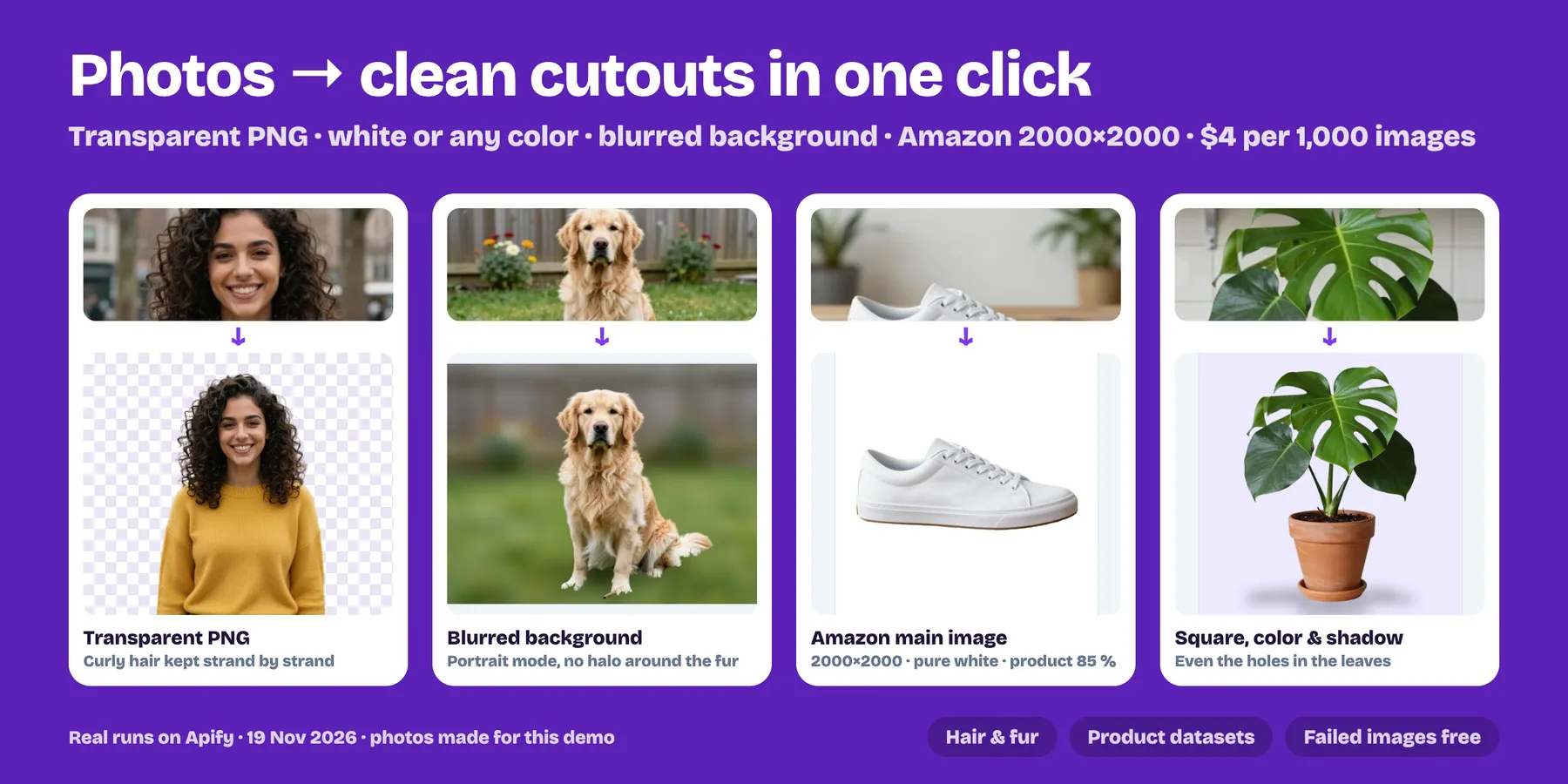
Remove the background from thousands of images, no Photoshop and no remove.bg subscription. Give it image links, upload images or chain it with any product scraper, and get back for every image a clean cutout: transparent PNG or WebP, or a JPG on white, any color or a blurred background. Keep the photo's size, crop to the subject, center it on a square, or make an Amazon main image (2000×2000, pure white, product filling 85 %) in one click.
$4 per 1,000 images ($0.004 per image) + Apify platform usage (about $0.012 per image, see Pricing) — no subscription, no API key, no account at any AI service. Failed and skipped images are free.
- ✅ State-of-the-art AI: BiRefNet, one of the best open background-removal models (better than U²-Net/rembg on hair, fur and fine details), run at full 1024 px resolution
- ✅ Clean edges: the old background's color is removed from hair, fur and soft edges, so a cutout from a green wall has no green halo on your white page
- ✅ Ready-to-use layouts: same size · crop to the subject (with margin) · subject centered on a square · Amazon main image (pure white RGB 255, square, product ≈ 85 % of the frame, JPG)
- ✅ Any background: transparent, white, any hex color, or the original photo blurred (portrait mode) — plus an optional soft contact shadow for products
- ✅ Product catalogs: chain it with any e-commerce scraper (Amazon, Shopify, eBay, Etsy, WooCommerce…). The ASIN / SKU / ID is copied to each row and used in the file name
- ✅ All common formats: JPG, PNG, WebP, AVIF, HEIC from iPhones, GIF (first frame), BMP, TIFF, CMYK JPEGs, rotated photos (EXIF), 16-bit PNGs, photos up to 5000 px. Google Drive, Dropbox and OneDrive links
- ✅ Optional mask (black-and-white PNG) for designers, video tools and further editing
- ✅ Works with n8n, Make, Zapier and AI agents (MCP): one call, one row per image with a direct link to the finished file
What can I use it for?
- E-commerce product photos: white or transparent backgrounds for Amazon, Shopify, eBay, Etsy, WooCommerce and Google Shopping, in bulk.
- Amazon main images: square 2000×2000 JPG on pure white with the product filling ~85 % of the frame, as Amazon's image rules ask.
- Marketplace and catalog cleanup: make supplier and dropshipping photos consistent (same background, same margins, same size).
- Marketing and social media: cutouts of people, pets and products for banners, thumbnails, stickers and ads.
- Profile photos and ID-style pictures: people on a plain white or colored background.
- AI and design pipelines: masks and cutouts as input for compositing, generative fill or training data.
How to use it
- Add your images in one (or more) of these ways:
- Image links: one link per line.
- Upload images from your computer.
- Dataset of another Actor: pick the dataset of your scraper run, the field with the image link(s) (e.g.
image,thumbnailUrlorimages.0.url) and the ID field (e.g.asinorsku). - Key-value store: the images saved in one of your stores.
- Choose the layout (same size, crop, square or Amazon), the background (transparent, white, color or blurred) and the format (PNG, WebP or JPG).
- Click Start. Each image becomes one row with an
outputUrlthat opens the finished file. All files are also in the run's key-value store; export the rows as JSON, CSV or Excel, or read them from the API.
Tip: for Amazon, just pick Layout → Amazon main image: background, size, margin and format are set for you.
Output example
outputUrl is a signed link: it opens without an API token (keep it private if your images are). With Also save the mask, rows also have maskUrl. Rows from a dataset have id and sourceRow (dataset rows without an image link get a free failed row, so every product can be joined back). Failed images have status: "failed" and the reason in error; nothing is charged for them.
Pricing
| What | Price |
|---|---|
| One finished image (any layout, background and format, mask included) | $0.004 |
| 1,000 images | $4 |
| Apify platform usage (paid to Apify at its normal rates; measured) | about $0.012 per image (8 GB × ~25 s) |
| Failed or skipped images | free (only a few seconds of usage) |
About $16 per 1,000 images in total, a fraction of what paid background-removal APIs charge, and the event price is less than half of the most-used background-removal Actor's ($0.01 per image, also plus usage). Apify store discounts apply automatically (−10 % Bronze, −15 % Silver, −20 % Gold and above). Your spending limit is respected: the Actor checks it before each image and skips the rest for free once it is reached. Platform usage counts toward that limit too, so Apify may then stop the run with the status Aborted: the finished images are kept.
Limits and good to know
- The Actor needs 8 GB of memory (set by default): the AI model is large. 16 GB is about 1.5× faster but uses about 30 % more platform usage per image; to go faster for the same price, start several runs in parallel.
- Speed: about 25 seconds per image on Apify (about 140 per hour; the next image is downloaded and the previous one saved while the AI works). The default timeout (4 hours) fits about 550 images: for bigger batches raise the Timeout in the run options; images that don't fit are skipped for free and the summary says so.
- Photos larger than 5000 px are processed at 5000 px on the long side. Images smaller than 32×32 px, SVG files and files over the size limit (30 MB by default) are skipped for free.
- Images with no clear subject (a plain wall, a landscape, a texture) fail for free with a clear reason.
- Images on social and streaming platforms (Instagram, Facebook, TikTok, YouTube, X, Pinterest…) are not downloaded: their terms forbid it.
- Glass, smoke and very thin see-through objects are the hardest cases for any AI: check them before printing.
- Only use images you have the right to edit.
FAQ
Do I need a remove.bg, Photoroom or OpenAI account? No. The AI runs inside the Actor.
Which AI model is used? BiRefNet (general, lite version), an open model (MIT licence) that is among the best at fine details like hair and fur. It runs on the Actor's own CPU: your images are not sent to any other AI service.
Is the Amazon layout compliant? It produces a square 2000×2000 JPG with a pure white (RGB 255, 255, 255) background and the product filling about 85 % of the frame, which is what Amazon asks for main images. Amazon also requires the photo itself to be a real photo of the product only (no extra text, logos or props): that part is up to your photo.
Can I get the same size as the original? Yes: Layout → Same size as the photo (default). Crop and square layouts use the subject's bounding box plus your margin.
Transparent JPG? JPG has no transparency: with JPG the cutout is put on white. Use PNG or WebP for transparency (WebP files are 3-6× smaller).
What if a site blocks downloads? Polite retries are built in (it respects "too many requests"). Lower "Parallel downloads" for slow sites.
Related Actors
- Bulk Image Downloader & Converter — download, resize and convert images in bulk, with a ZIP
- Image Captioner & Alt Text Generator — SEO alt text, titles and tags for your cutouts
- Image Upscaler 2x & 4x — enlarge small product photos before removing the background
- Merge Datasets & Remove Duplicates — join the cutout links back to your product data


