

Image Captioner & Alt Text Generator — AI Image Descriptions
Pricing
from $2.40 / 1,000 image describeds
Image Captioner & Alt Text Generator — AI Image Descriptions
Write SEO and WCAG alt text, titles, descriptions, tags and file names for images in bulk with AI: image links, uploads, product datasets from scrapers or whole web pages (only images missing alt). 36 languages, no API key, $3 per 1,000 images.
Pricing
from $2.40 / 1,000 image describeds
Rating
0.0
(0)
Developer

tidydata
Maintained by CommunityActor stats
0
Bookmarked
1
Total users
1
Monthly active users
5 days ago
Last modified
Categories
Features
Share
🖼️ Image Captioner & Alt Text Generator — AI image descriptions in bulk
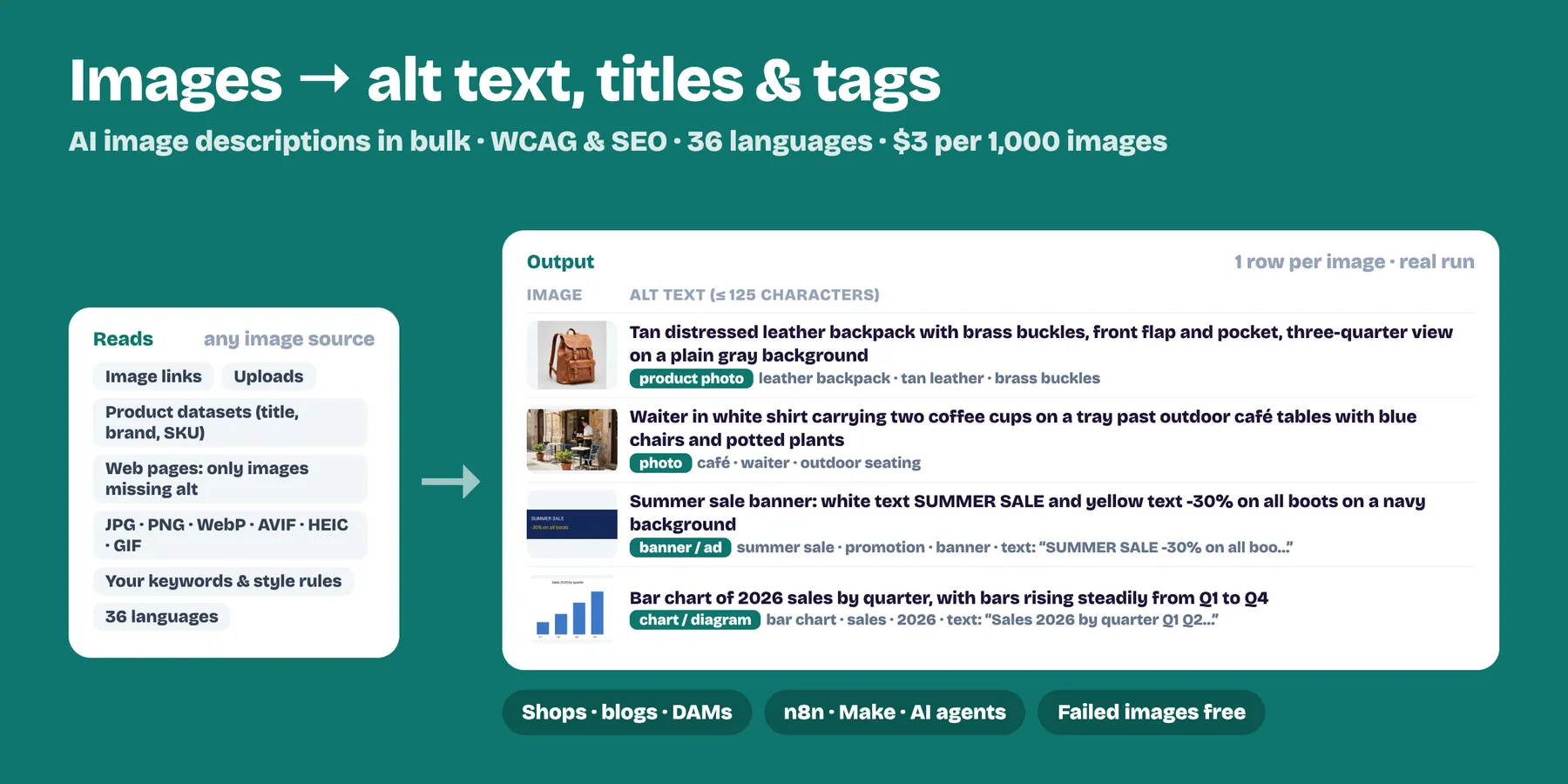
Write alt text for thousands of images in minutes. Give it image links, upload images, chain it with a product scraper or point it at your web pages, and get back for every image: SEO and accessibility (WCAG) alt text, a title, a description, tags, the text inside the image, the image type, main colors and an SEO file name. In 36 languages.
$3 per 1,000 images ($0.003 per image) — no start fee, no subscription, no API key and no account at any AI service. Failed and skipped images are free.
- ✅ Alt text that follows the rules: within your length (125 characters by default), no "image of…", product name first, text in banners read out, charts summarized with their trend
- ✅ Product catalogs: chain it with any e-commerce scraper (Shopify, Amazon, WooCommerce…) and use the product title, brand or color as context, so the alt text names the real product. The SKU / ID is copied to each row to update your shop
- ✅ Website fix-up: give it your pages and it finds the images missing alt text (no alt, empty or generic like "image" or "IMG_2034"), skips icons and tracking pixels and describes the rest, with the page URL for each one
- ✅ Text in the image (OCR) copied exactly as written: banners, signs, packaging, screenshots, infographics
- ✅ Any language: English, Spanish, French, German, Italian, Portuguese, Dutch, Polish, Japanese, Chinese, Arabic, Hindi… 36 in total
- ✅ Your own rules: context ("product photos for a leather bag shop"), SEO keywords (used only where they truly fit, no stuffing), extra style instructions and one question answered for every image ("Is the product on a white background?")
- ✅ All common formats: JPG, PNG, WebP, GIF (first frame), AVIF, HEIC from iPhones, BMP, TIFF, CMYK JPEGs, rotated photos (EXIF). Google Drive, Dropbox and OneDrive links
- ✅ Works with n8n, Make, Zapier and AI agents (MCP): one call, one row per image, JSON / CSV / Excel
What can I use it for?
- E-commerce SEO: fill the empty alt text of every product image in your shop, in your shop's language, with the product name in it.
- Accessibility (WCAG 2.2 / European Accessibility Act): find and fix images without alt text across your site.
- Catalog enrichment: tags, colors, image type and a description for every product photo, ready for search filters and feeds.
- Image SEO file names: rename
IMG_2034.jpgtotan-leather-backpack-brass-buckles.jpgbefore uploading. - Content teams and DAMs: caption photo libraries, blog images and social posts in bulk.
- AI pipelines: turn images into searchable text for RAG, vector search and classification.
How to use it
- Add your images in one (or more) of these ways:
- Image links: one link per line.
- Upload images from your computer.
- Web pages to scan: the images on those pages, by default only those missing alt text.
- Dataset of another Actor: pick the dataset of your scraper run, the field with the image link(s) (e.g.
imagesorimages.0.url), the fields to use as context (e.g.title,brand) and the ID field (e.g.sku). - Key-value store: the images saved in one of your stores.
- Choose the language and, optionally, tell it what the images are, your keywords and your style rules.
- Click Start. Each image becomes one row; export as JSON, CSV or Excel, or read it from the API.
Tip: one line of context ("Product photos for an online shop selling handmade leather bags") makes the alt text noticeably better.
Output example
Images found on web pages also have pageUrl, existingAlt and altStatus (missing, empty, generic or present). Rows from a dataset have id, sourceRow and the context that was used. Failed images have status: "failed" and the reason in error.
Pricing
| What | Price |
|---|---|
| One image described (all fields included) | $0.003 |
| 1,000 images | $3 |
| Failed, skipped or already-good page images | free |
Apify store discounts apply automatically (−10 % Bronze, −15 % Silver, −20 % Gold and above). Your spending limit is respected: the Actor checks it before each image and stops cleanly when it is reached, so you never pay more than you set.
Limits and good to know
- SVG (vector) images are not supported: use a PNG or JPG version. Animated GIFs/WebPs are described from their first frame.
- Images smaller than 16×16 px and files over the size limit (30 MB by default) are skipped for free.
- Images on social and streaming platforms (Instagram, Facebook, TikTok, YouTube, X, Pinterest…) are not downloaded: their terms forbid it.
- People are described by what they do and wear, never identified by name or by sensitive traits (age, ethnicity, health…). Visible brand names, logos and famous landmarks can be named.
- Only use images you have the right to use. The texts are written by an AI vision model: review them for critical uses (legal, medical, safety).
- Speed: about 8 images at a time (adjustable); 1,000 images take roughly 10-15 minutes.
FAQ
Do I need an OpenAI, Google or Claude API key? No. The AI cost is included in the price per image.
Which AI model is used? A fast, current vision-language model from Anthropic (Claude). It reads the image itself, not just its file name.
Can I get alt text in my shop's language? Yes: pick one of 36 languages. Text inside the image is copied as written.
How do I update my Shopify / WooCommerce images afterwards? Use the id (copied from your dataset) and altText columns with your platform's bulk editor, CSV import or API, or an n8n / Make flow.
Does it change my website? No. It only reads public pages and images and returns the texts; nothing is written to your site.
What if a site blocks downloads? Polite retries are built in (it respects "too many requests"). Lower "Images at a time" for slow sites.
Related Actors
- Bulk Image Downloader & Converter — download, resize and convert images in bulk, with a ZIP
- Background Remover — transparent PNG, white or Amazon-ready backgrounds for the same images
- PDF Text Extractor — PDF & Image to Text OCR — full text of PDFs and scanned documents
- Merge, Dedupe & Transform Datasets — join the alt texts back to your product data


